I Built an AI Production OS That Replaced 4 SaaS Tools
How I replaced ShipBob, Redo, Google Drive, and tribal knowledge with a single AI-powered system for a 10-person fashion company. 6 AI agents, 47 API routes, built with Claude Code.
By Mike Hodgen
My warehouse was running on four disconnected systems. ShipBob for warehouse management. Redo for customer support. Google Drive for design files. And the most dangerous one of all — tribal knowledge in people's heads for production scheduling.
None of them talked to each other. When a customer emailed asking where their order was, someone had to check Shopify for the order, ShipBob for the pick status, and then walk to the production floor to see if the garment was still being sewn. The answer took twenty minutes and three different logins.
I built a system called Cortex that replaced all four. It's an AI-powered production OS for my DTC fashion brand — a company I run in San Diego with a 10-person team. Six AI agents now manage production planning, bottleneck detection, staffing recommendations, design pipeline oversight, customer support, and dynamic lead time estimation. The entire thing runs on a single Next.js application with 47 API routes, real-time updates, and four automated cron jobs that run the operation while I'm asleep.
Here's what actually happened.
The Problem Was Integration, Not Features
Each of those four tools was fine in isolation. ShipBob could manage bins and pick orders. Redo could handle returns. Google Drive could store design files. The problem was that production decisions require information from all of them simultaneously.
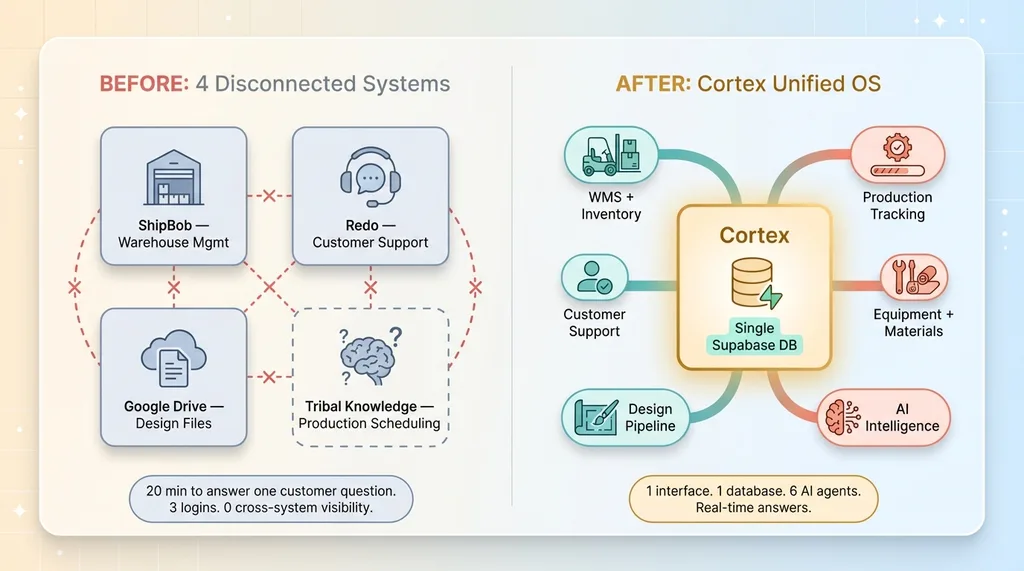 Four Disconnected Tools vs. Cortex Unified OS
When a made-to-order comes in, someone needs to know: Do we have the fabric in stock? Which sewing station is available? Is the pattern already cut, or does it need to go through print first? How many other orders are ahead of it? What's the realistic ship date?
That question touches inventory, work orders, station events, fabric counts, sewing routes, and pending orders. In the old setup, the answer lived in someone's head — usually mine or our production lead's. That's not a system. That's a single point of failure.
Cortex consolidates all of that into one database. One interface. And six AI agents that can reason across the full picture.
Five Phases, One Application
I built Cortex in five phases, each replacing a specific tool or capability.
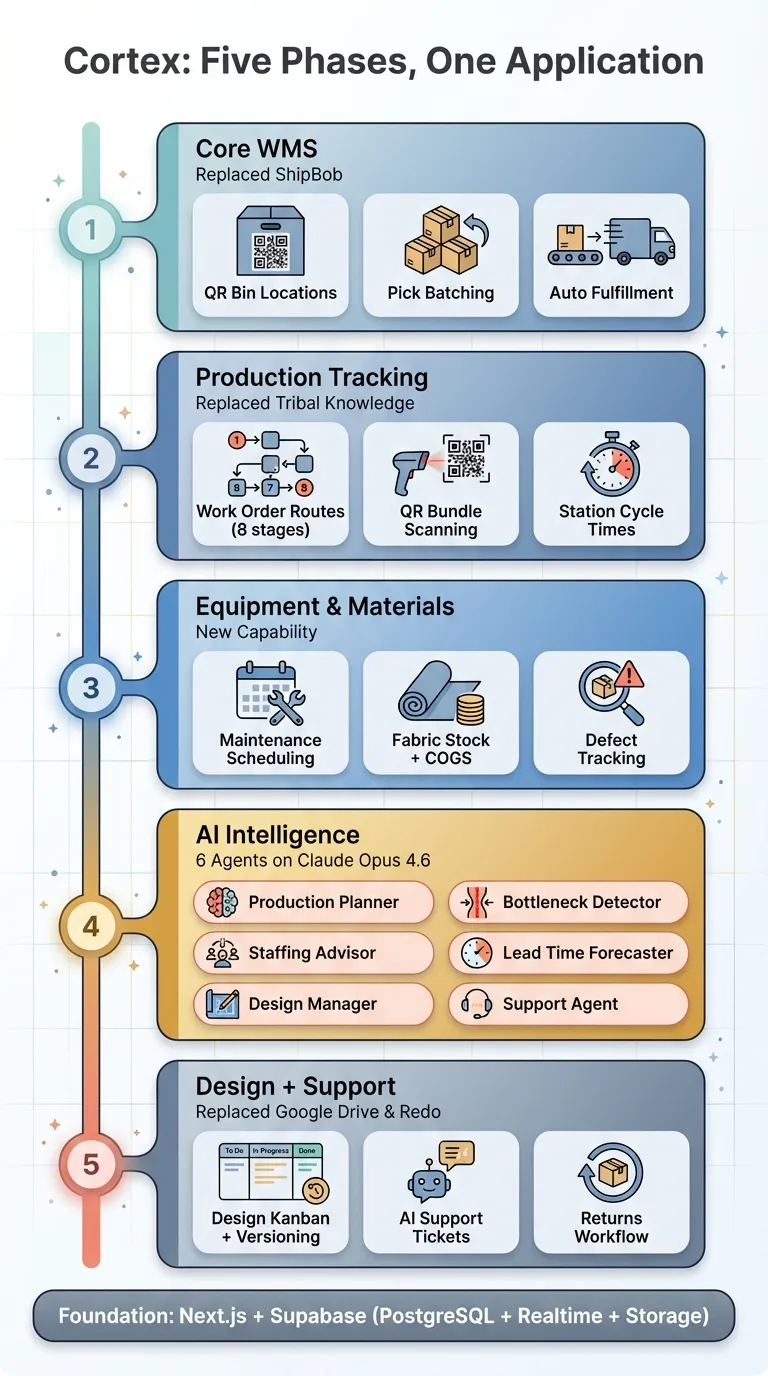 Five-Phase Build Sequence
Phase 1 — Core WMS (Replaced ShipBob). Bin locations with QR codes, stow scanning that syncs inventory to Shopify in real-time, pick batching that groups orders for efficient warehouse walks, and a pack-and-ship station that creates Shopify fulfillments automatically. The scanner is a USB barcode gun that types into a browser input field — zero driver setup required.
Phase 2 — Production Tracking (Replaced Tribal Knowledge). Work orders flow through a defined route: draft, queued, printing, cutting, pressing, sewing, processing, complete. Every garment bundle gets a QR code. Workers scan in at a station, complete their step, scan out. The system knows where every bundle is, how long each step took, and what's backed up.
Phase 3 — Equipment and Materials. Maintenance scheduling for sewing machines and sublimation printers. Consumable tracking for thread, needles, transfer paper. Fabric stock with QR-scanned yard counts. COGS calculation. Defect tracking with disposition — rework, resale on Treet, or scrap.
Phase 4 — AI Intelligence. Six agents powered by Claude Opus 4.6:
- Production Planner — analyzes demand vs capacity, auto-creates work orders, flags when MTO orders are backing up
- Bottleneck Detector — runs every 30 minutes, identifies stations with growing queues or slow cycle times
- Staffing Advisor — forecasts sewing demand for the next two weeks, recommends flex sewer hours
- Lead Time Forecaster — calculates dynamic ship dates for the Shopify product page, replacing our static "ships in 10-15 days" copy
- Design Manager — monitors the design pipeline, auto-assigns projects to designers based on skills, flags stale work
- Customer Support Agent — handles ticket responses with full context on orders, production status, and return policy
Phase 5 — Design Pipeline and Customer Support (Replaced Google Drive and Redo). Kanban board for design projects, file management with Supabase Storage, tech pack versioning, a support ticket system with AI-powered responses, and a returns workflow.
Every one of those features is wired to the same Supabase database. The production planner can see that three work orders are due next week, cross-reference with the bottleneck detector showing sewing is at 90% capacity, and recommend that we bring in a flex sewer for Thursday and Friday. That kind of cross-system reasoning was impossible when the data lived in four separate platforms.
PIN-Based Auth for Workers in Gloves
One detail that matters more than it sounds: production floor workers wear gloves. They can't type passwords. Some of them share iPads at stations.
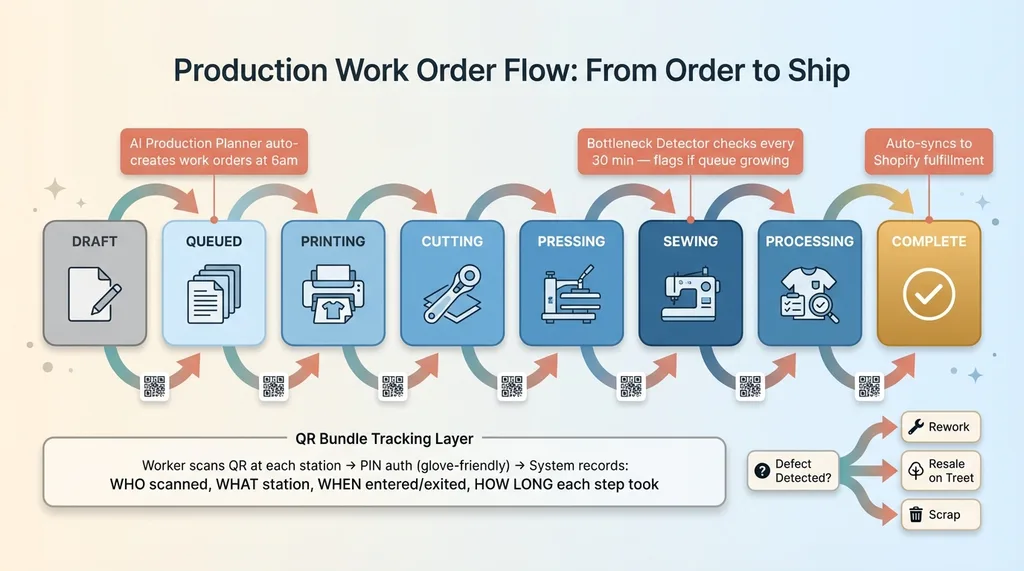 Production Work Order Flow Through Stations
Cortex uses PIN-based authentication. Each operator has a 4-6 digit PIN. Tap it in, get a 12-hour JWT session. The system knows who scanned what, when, at which station. Role-based access means sewers see their station interface. Supervisors see the dashboard. I see everything.
This is the kind of decision that changes when you build the system yourself instead of buying it. ShipBob doesn't know my workers wear gloves. A custom system does.
What the AI Agents Actually Do
The production planner runs every morning at 6am via a Vercel cron job. It gathers every active work order, every pending Shopify order, current inventory levels, fabric stock, and historical throughput data. It feeds all of that to Claude Opus 4.6 with a structured prompt. Claude returns JSON — specific recommendations with product IDs, quantities, priorities, and risk alerts. The route handler independently validates each recommendation before executing it. If Claude recommends creating a work order, the handler verifies the product exists and the quantity is reasonable before inserting it.
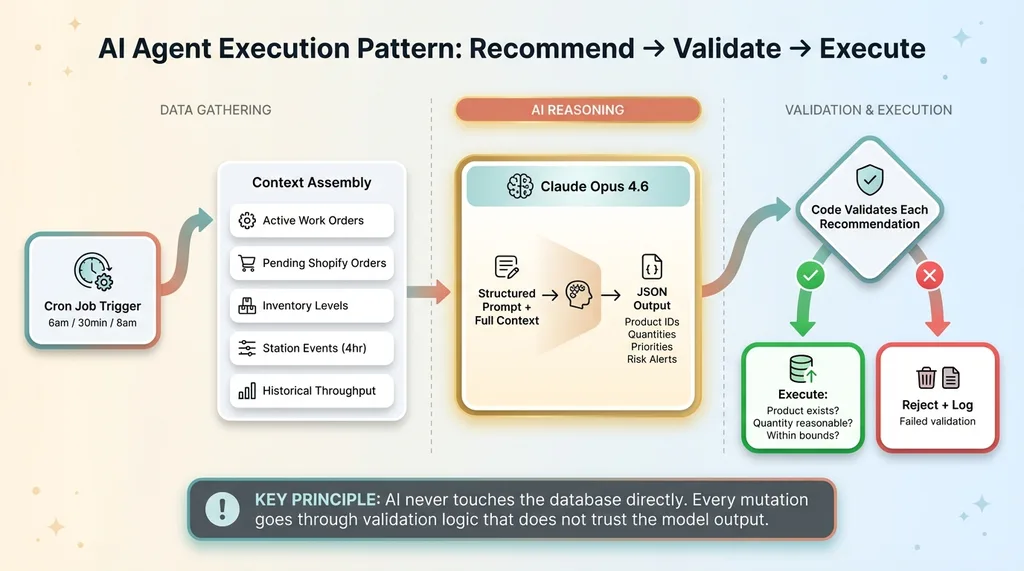 AI Agent Execution Pattern: Recommend, Validate, Execute
This is the pattern across all six agents: AI recommends, code validates, then executes. The AI never touches the database directly. Every mutation goes through validation logic that doesn't trust the model's output.
The bottleneck detector runs every 30 minutes. It pulls the last four hours of station events, calculates average cycle times against 7-day historical baselines, and identifies stations that are running slower than normal or accumulating queues. When it finds a critical bottleneck, it creates a system notification that shows up on the dashboard in real-time via Supabase Realtime.
The customer support agent is the most context-rich. When a customer sends "where is my order?", the agent gets: the customer's Shopify orders, their pick orders and line items, any active work orders for their products, what station each bundle is currently at, existing returns, and the full conversation history. It knows our return policy — 30 days, unworn, tags on, no final sale or MTO returns. It can recommend actions like initiating a return, checking production status, or escalating to me. If the refund is over $100 or the order is mid-production, it escalates automatically.
At 7am every morning, a daily briefing cron aggregates metrics from all agents into a single email to me: active work orders, completed today, open orders, throughput, defect count, open support tickets, pending returns. Plus the latest AI planner and bottleneck insights. I read it with my coffee before the team arrives.
The Security Audit That Humbled Me
After shipping all five phases, I ran a security audit across the entire codebase. I'm not going to pretend everything was perfect.
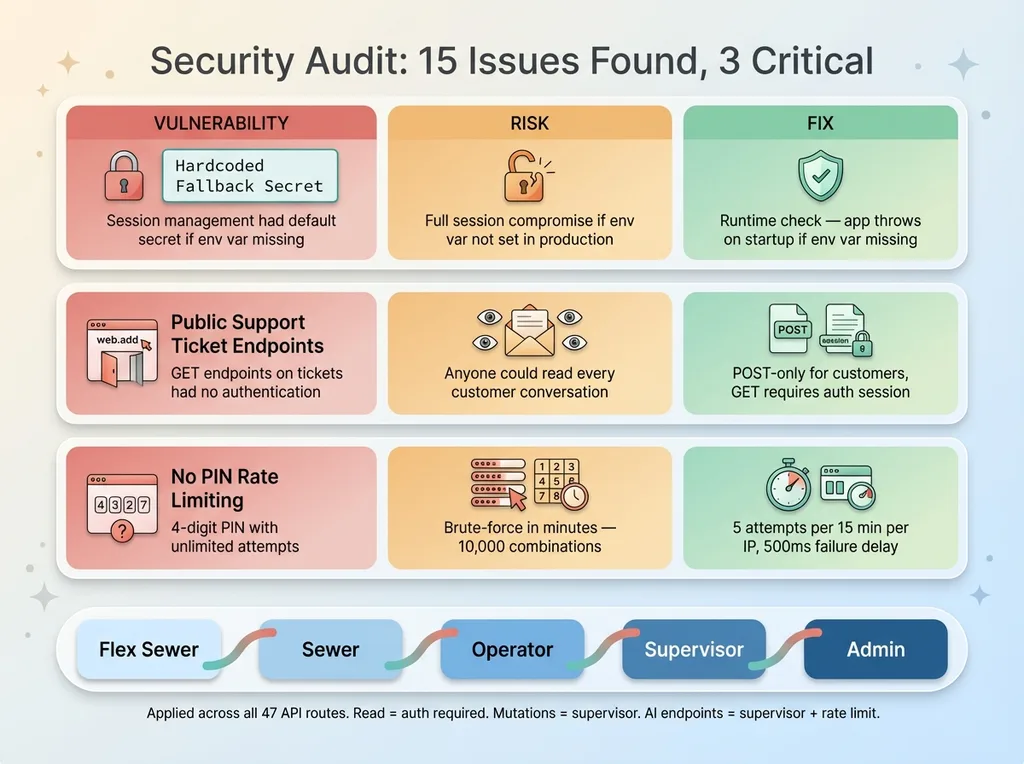 Security Audit Findings and Fixes
The audit found 15 issues. Three were critical. My session management had a hardcoded fallback secret that would have shipped to production if someone forgot to set an environment variable. The support ticket endpoints were fully public — meaning anyone could read every customer's conversation history, not just submit new tickets. The PIN authentication had no rate limiting — someone could brute-force a 4-digit PIN in minutes.
I fixed all of it. The hardcoded secret became a runtime check that throws if the environment variable is missing. The public endpoints got scoped to POST-only for customers, with GET methods requiring authentication. PIN auth got a sliding-window rate limiter — 5 attempts per 15 minutes per IP, with a 500ms delay on failure to slow automated attacks.
Then I added RBAC across all 47 API routes. A five-tier role hierarchy: flex sewer, sewer, operator, supervisor, admin. Read endpoints require authentication. Mutation endpoints require supervisor role. AI endpoints require supervisor plus per-user rate limiting — 10 requests per hour for analysis agents, 5 per hour for image generation.
The security hardening took about four hours. AI found the issues and AI wrote the fixes. But I reviewed every change before it shipped. This is the pattern that works: AI does the scanning and the implementation, humans do the judgment calls about what's actually dangerous and what the fix should be.
I wrote about this more broadly in my post on the security debt of vibe coding. If you're building fast with AI, you're accumulating security debt whether you know it or not. The question is whether you audit it before or after someone exploits it.
What Didn't Work
The honest list.
I underestimated the operatorId vulnerability. Four scan routes accepted operatorId from the request body instead of deriving it from the session. That means any authenticated user could log events as any other user. In a warehouse with piece-rate pay or quality-based performance reviews, that's a real problem. The fix was simple — pull it from the session JWT instead — but the fact that it shipped at all bothers me.
The initial image generation model was wrong. I configured the image generation endpoint to use Gemini 3 Pro instead of Nano Banana Pro. It worked, but it wasn't the model I wanted. This is the kind of silent misconfiguration that slips through when you're moving fast across multiple AI providers.
I didn't build rate limiting from the start. Every AI endpoint was wide open. A supervisor could hammer the production planner a hundred times in an hour, burning through API credits. Rate limiting should have been in the initial implementation, not bolted on during a security review.
None of these were catastrophic. All of them were avoidable. The pattern is consistent: the things you skip when building fast are exactly the things that bite you later.
The Numbers
Here's what Cortex looks like after all five phases:
- 47 API routes across warehouse, production, equipment, design, support, and AI
- 6 AI agents running on Claude Opus 4.6 with structured JSON output
- 4 automated cron jobs — bottleneck detection every 30 min, production planner at 6am, design manager at 8am, daily briefing at 7am
- 5-tier RBAC with defense-in-depth authentication (middleware + route-level)
- Real-time updates via Supabase Realtime for dashboard floor view
- PWA support for iPad stations on the production floor
- Per-user rate limiting on all AI endpoints and authentication
- Security headers — CSP, HSTS, X-Frame-Options, constant-time HMAC verification
The stack: Next.js 16 App Router, Supabase (PostgreSQL + Realtime + Storage), Tailwind CSS, Claude Opus 4.6 via Anthropic API, Nano Banana Pro via Gemini API for design image generation, Resend for email, Twilio for SMS, Zebra ZPL for label printing. Deployed on Vercel.
What This Actually Means
I run a 10-person fashion company. We sew garments in a warehouse in San Diego. We are not a technology company.
Cortex is the kind of system that enterprise manufacturers spend seven figures on and twelve months implementing. They buy it from SAP or Oracle and hire a systems integrator. The implementation comes with a project manager, a change management consultant, and a multi-phase rollout plan with steering committees.
I built it with AI in a compressed timeframe. Not because I'm a better engineer than the people who build ERP systems. Because AI collapsed the implementation cost to the point where a single person can build a production-quality system that's tailored exactly to their operation.
That's the takeaway here. Not "look what I built." Look what's now possible for any operator who understands their own business and is willing to sit down and build.
The tools are here. The window is open. What you build with it is up to you.
If you're running a production operation on disconnected tools and wondering whether AI can consolidate it, let's talk. No pitch deck, no sales team. Just a conversation about what's possible.
Get AI insights for business leaders
Practical AI strategy from someone who built the systems — not just studied them. No spam, no fluff.
Hodgen.AI
Ready to automate your growth?
Book a free 30-minute strategy call with Hodgen.AI.
Book a Strategy Call