How Deals Die: Walking Into a Follow-Up Cold
Here is how a good deal quietly dies.
A salesperson takes a great first call. The prospect is engaged, the chemistry is real, and by the end your rep has promised three things: a security review doc, a custom pricing breakdown, and an intro to someone on your team. Everyone hangs up feeling good.
Two weeks later the follow-up call comes around. Your rep has taken nine other calls since then. They walk in remembering maybe one of the three promises. The prospect remembers all three. They asked for that security doc and it never showed.
That gap is where trust leaks out. I watched this exact thing happen at a payments startup client. A rep had promised a compliance summary on a discovery call, forgot it entirely, and opened the next meeting with a cheerful "so where did we leave off?" The prospect's tone changed in about four seconds. The deal didn't die that day, but it stalled, and stalled deals mostly die.
The problem is not that the rep is lazy. The problem is that the context lives in someone's head or buried in a transcript nobody opens. Every call restarts from zero. Follow-ups miss commitments. The prospect feels like a stranger to you, which is a terrible feeling when they just spent an hour telling you their problems.
The usual fix is "take better notes." That is not a fix. That is asking a busy human to do more manual work on top of the work that is already failing.
The real fix is an AI pre-meeting briefing: make the system remember for you, and hand you the memory at the exact moment you need it. That is what I built into my own CRM, and it is one of the highest-leverage things a sales team can wire up.
What an AI Pre-Meeting Briefing Actually Is
An AI pre-meeting briefing is a short, auto-generated document delivered before a scheduled call that summarizes your prior conversations with that person: what was discussed, what was decided, what action items are still open, and what each side promised the other.
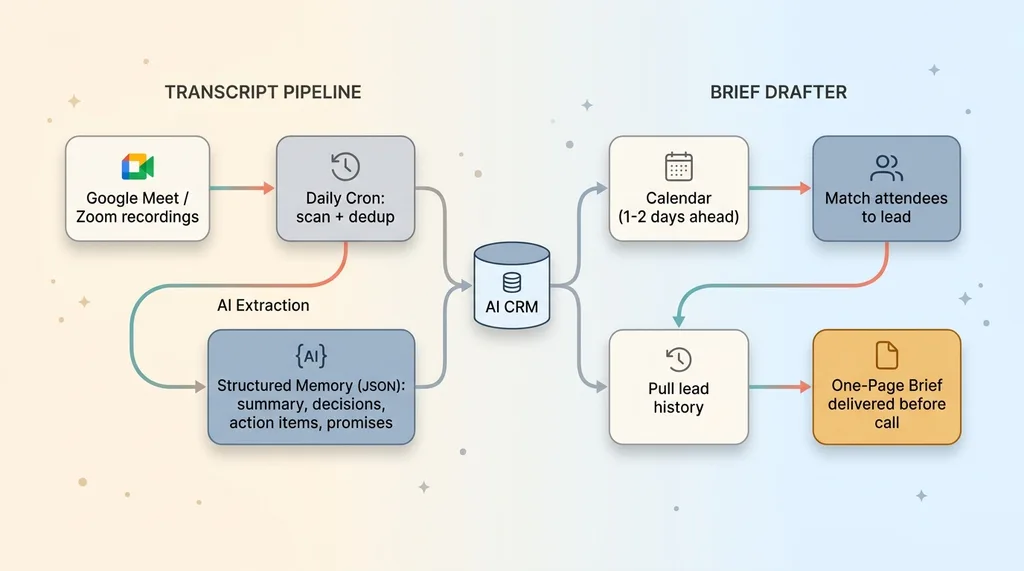 Two-half system architecture: transcript pipeline + brief drafter
It is the opposite of manual prep. Manual prep is 15 to 30 minutes of digging through old notes, scrolling email threads, and trying to reconstruct what you said on a call you barely remember. The brief just shows up. You read it in 90 seconds and walk in informed.
The system has two halves, and both have to work for the whole thing to be useful.
The first half is a transcript pipeline. It captures what happened on every call, runs the raw transcript through AI, and turns it into structured memory: a summary, the decisions, the action items, the promises. Structured, not a wall of text.
The second half is a brief drafter. It looks ahead at your calendar, figures out who you are about to meet, pulls that person's history out of the structured memory, and assembles the one-page brief before the call.
This is not a bolt-on SaaS subscription. It is wired directly into the AI CRM I built in one session. The CRM is where the leads live, so it is where the memory has to live too. A standalone tool that does not know your pipeline is just another tab nobody opens.
That tight coupling is the whole point. The brief is only valuable because it knows which lead you are talking to and can pull their entire relationship history in one query.
Step One: Turning Raw Meeting Transcripts Into Structured Memory
You cannot brief someone on a conversation you never captured. So the first job is turning raw transcripts into something queryable.
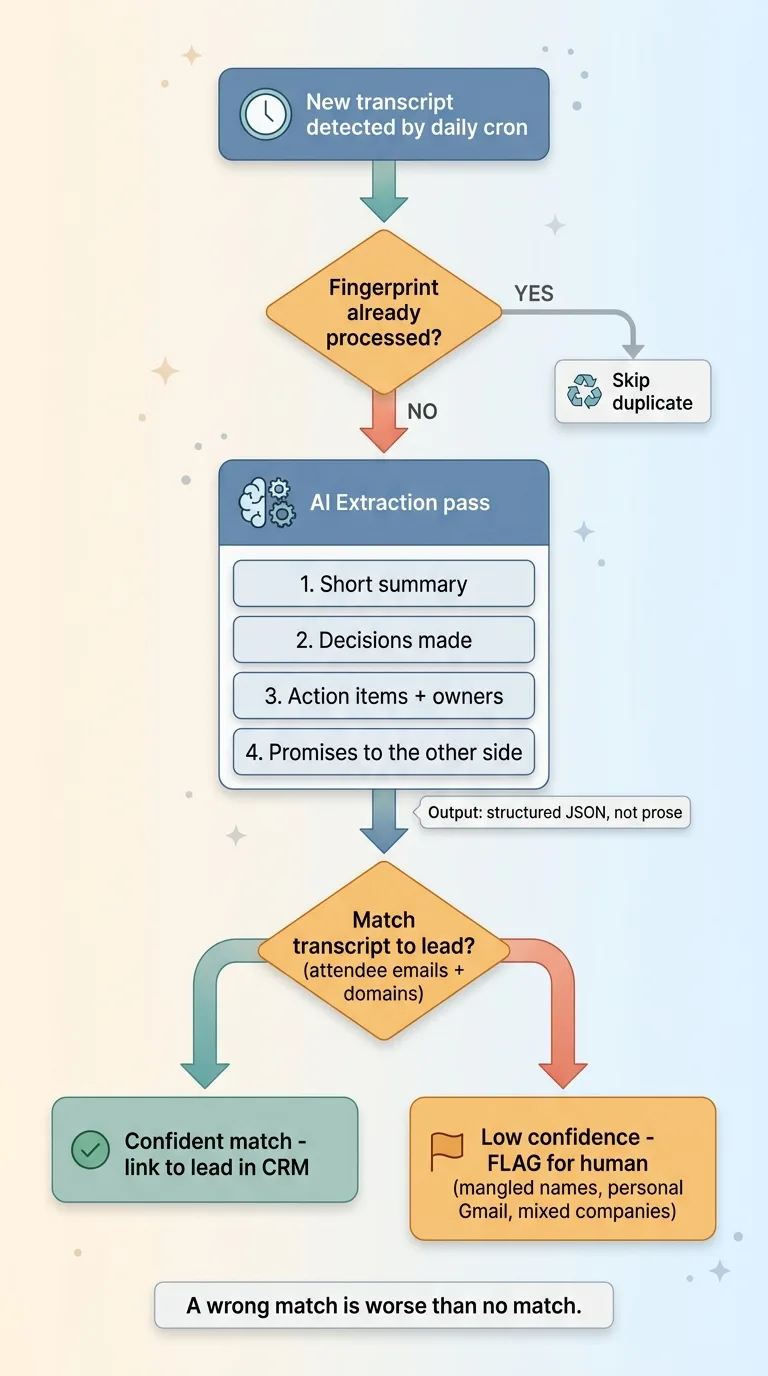 Transcript-to-structured-memory extraction with lead matching and flagging
The daily cron that scans for new recordings
A daily cron job scans the recordings folder from the calendar and meeting tools the team already uses. Google Meet drops transcripts, Zoom drops recordings, and most of these just pile up unread until the end of time. The cron pulls any new ones it has not seen before.
Deduplication matters more than it sounds. The same meeting can show up under two slightly different file names or get re-synced. Without a dedup check you process the same call three times and pollute the lead's history with duplicate summaries. So every transcript gets a fingerprint, and if I have already processed that fingerprint, it gets skipped.
Extracting decisions, action items, and promises
Each new transcript runs through an AI extraction pass. I do not ask for "a summary." I ask for four specific things: a short summary, the decisions made, the action items with owners, and anything explicitly promised to the other side.
The output is structured JSON, not prose. That is deliberate. A wall of text reads fine once and is useless to query. Structured fields let the brief drafter later ask "what do we owe this lead?" and get an actual answer.
Then comes the hard part: matching the transcript to the right lead in the CRM. The pipeline matches on attendee emails and email domains, so a call with three people from one company links to that company's lead automatically.
Here is the honest limitation. Transcripts are messy. Names get mangled ("Mike Hodgen" becomes "Mic Hodgkin"), people dial in from personal Gmail addresses that match nothing, and a meeting with two prospects from different companies confuses the matcher. When the system cannot confidently match a transcript to a lead, it flags it for a human instead of guessing. A wrong match is worse than no match, because now you are briefing someone with another company's history.
That matching step is where most of the real engineering went. The summarization is the easy 20%.
Step Two: The Cron That Drafts a Brief Before Every Call
Now the memory exists. The second cron's job is to surface it at the right moment, automatically, so nobody has to remember to do anything.
Reading the calendar ahead
A second cron reads upcoming calendar events on a rolling window, looking a day or two ahead. For each meeting it identifies who the call is with by matching the attendees back to leads in the CRM, the same email-and-domain logic the transcript pipeline uses.
If the meeting is with a known lead, it qualifies for a brief. Internal standups and dentist appointments get ignored. The filtering keeps the system from drafting briefs for calls that do not need one.
Pulling the right history into the brief
For each qualifying meeting, the cron pulls that lead's full history out of the CRM: every prior meeting summary, every decision, and crucially every open action item. Then it drafts a one-page brief with a consistent shape.
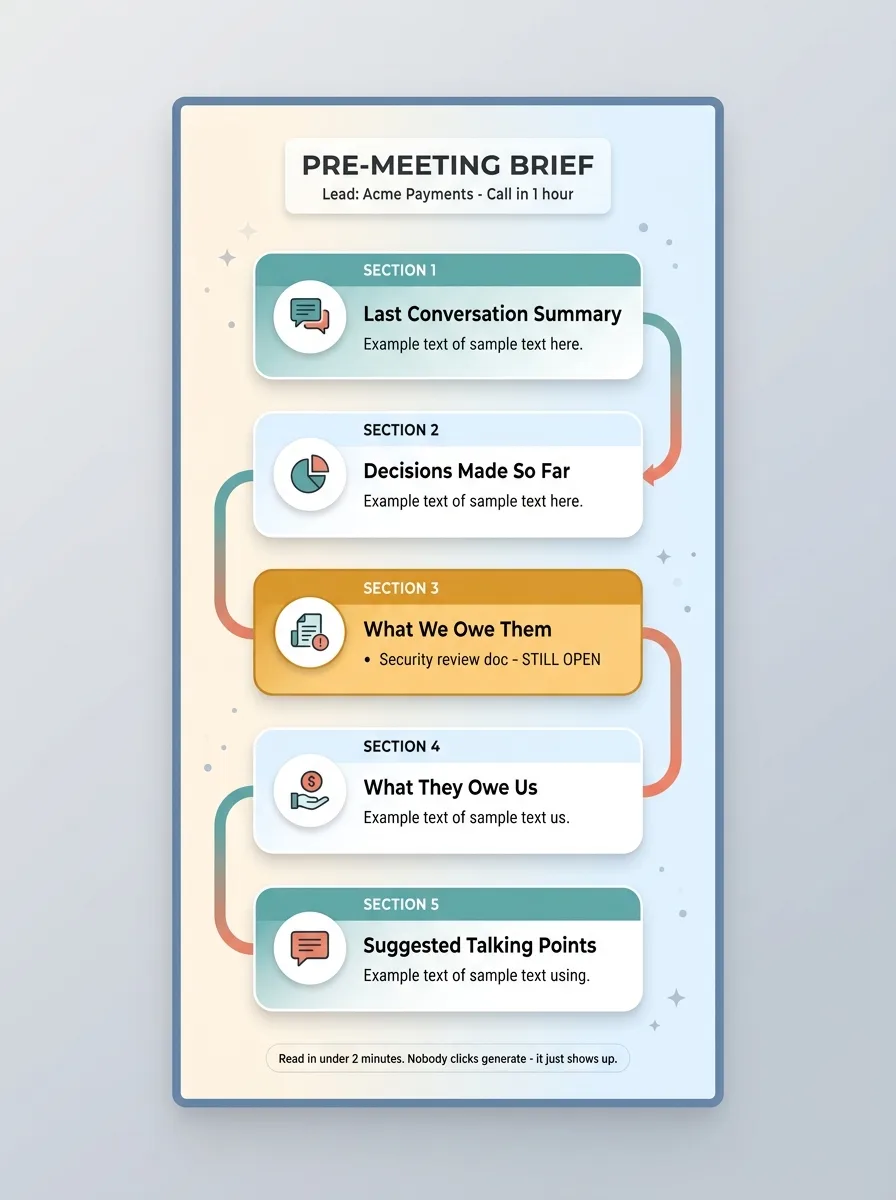 Anatomy of the one-page pre-meeting brief
Last conversation summary. Decisions made so far. What we owe them. What they owe us. And a few suggested talking points based on where the relationship actually stands.
The brief lands before the call. Your rep opens it, reads it in under two minutes, and walks in knowing they promised a security doc and still have not sent it. No "let me check my notes." No restarting from zero.
The invisibility is the feature. Nobody runs a script. Nobody clicks "generate brief." The cron handles it on a schedule and the document is just there when you need it. I walk through the full build of this in more detail in automated pre-meeting briefs.
Remember the rep at the payments client who forgot the compliance summary? With this running, that promise would have been sitting at the top of his brief under "what we owe them," flagged as still open. He would have shown up with it done. The deal does not stall on a forgotten commitment when the system refuses to let you forget.
Follow-Up Emails That Reference What Was Actually Said
The same structured meeting history powers something else: follow-up email drafts that actually reference the call.
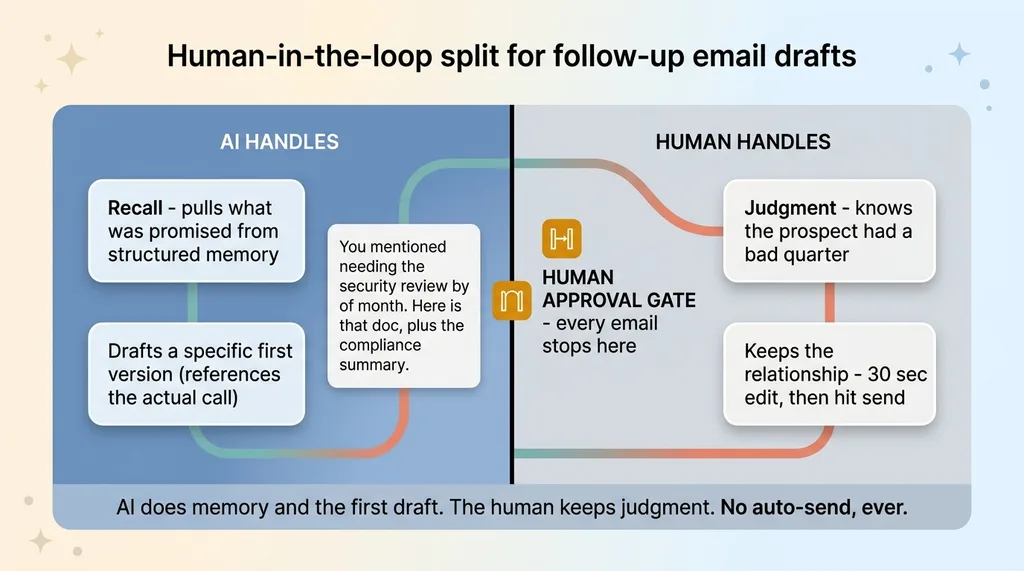 Human-in-the-loop split for follow-up email drafts
Most follow-up emails are generic sludge. "Great chatting today, looking forward to next steps." The prospect has read that exact sentence 200 times and it tells them nothing. It signals that you were not really listening.
Because the system already knows what was promised, the auto follow-up email drafter writes something specific instead. "You mentioned needing the security review wrapped by end of month. Here is that doc, plus the compliance summary we discussed." That email proves you were paying attention. That is where memory turns into revenue.
Now the honest part. These are drafts, not auto-sends. The AI did the recall and wrote a strong first version. It did not hit send.
A human reads and approves every email before it goes out. This is not me being cautious for the sake of it. It is by design, and I treat it as a hard rule across everything I build, which I explain in every AI action stops for a human. The AI is good at recall and drafting. It is not good at knowing that this particular prospect just had a bad quarter and a chipper email would land wrong.
So the split is clean: the AI handles memory and the first draft, the human keeps the judgment and the relationship. The rep spends 30 seconds editing instead of 10 minutes reconstructing what to say. The email is better and it took less time. That is the trade I want every time.
What This Replaces and What It Doesn't
I am allergic to overpromising, so let me be precise about what this system does and does not do.
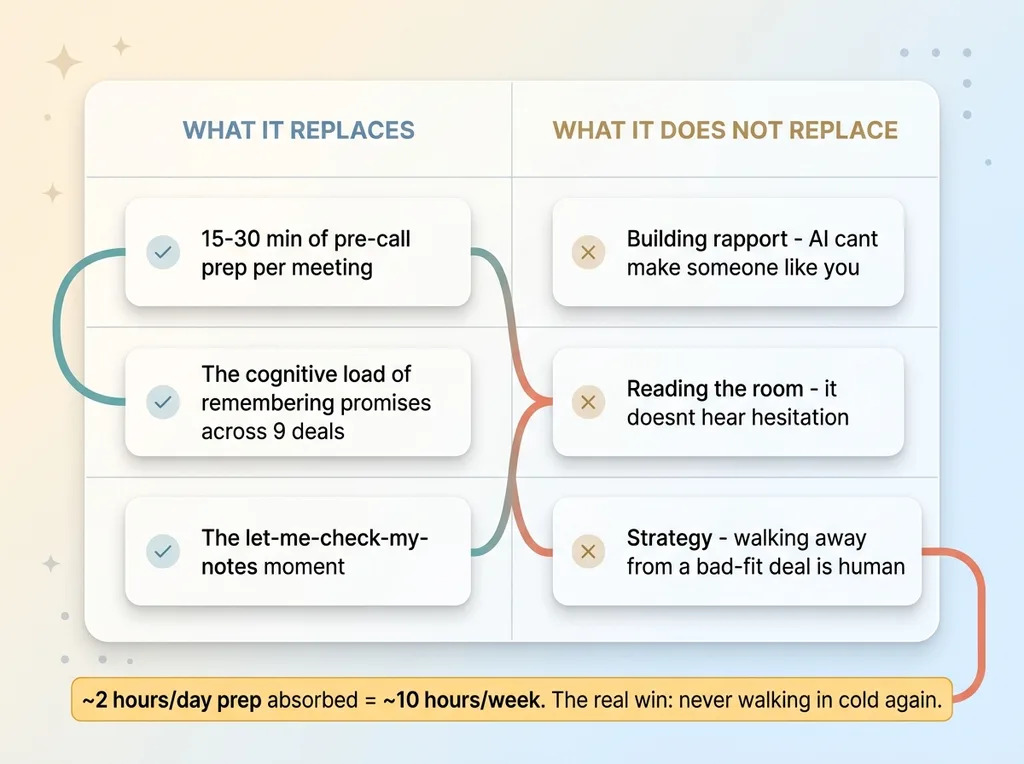 What the system replaces vs what it does not replace
What it replaces:
- The 15 to 30 minutes of pre-call prep per meeting, digging through notes and email
- The cognitive load of trying to remember what you promised three weeks ago across nine deals
- The "let me check my notes" moment that quietly tells the prospect you were not paying attention
A rep doing five calls a day was spending somewhere around two hours daily just prepping and reconstructing context. That is ten hours a week of work the system absorbs, and more importantly, that rep never walks in cold again. The hours are nice. Never losing a deal to a forgotten promise is the real number.
What it does not replace:
- Building rapport. The AI cannot make someone like you.
- Reading the room. It does not hear the hesitation in a prospect's voice.
- Strategy. Deciding to walk away from a bad-fit deal is a human call.
The AI handles recall and prep. The human handles the conversation. Anyone selling you "AI that closes deals" is selling you a fantasy.
And here is where it breaks. If a transcript does not capture, there is nothing to summarize. Off-platform calls, the phone conversation in the parking lot, the hallway chat at a conference, none of that enters the system unless someone logs it. Leads with ambiguous matching get flagged rather than briefed, which means a human still has to resolve them.
This is a tool that makes a good rep faster and more reliable. It does not turn a bad rep into a good one. Set the expectation there and everyone is happy.
Wiring This Into the Tools Your Team Already Uses
The thing I want you to take away is that this is not a rip-and-replace project.
It bolts onto the calendar and meeting tools your team already uses and feeds an existing CRM. Google Meet, Zoom, your shared calendar, whatever you have. The transcripts are almost certainly already being generated and almost certainly piling up unread. You have the raw material sitting there doing nothing.
The wedge is boring plumbing. Connecting what already exists into a pipeline that turns it into memory. There is no flashy new product to roll out, no team-wide tool adoption fight, no six-month migration. Two cron jobs, a CRM that can hold structured meeting history, and the matching logic to tie it all together.
That boring quality is exactly why it works. The systems that actually get used are the ones nobody has to remember to use. The brief shows up. The draft is waiting. The rep just does their job better.
If your team is prepping for calls manually, or worse, showing up cold and winging it, this is one of the highest-ROI systems to build first. The transcripts are free. The deals you are losing to forgotten promises are not.
Get the next build note.
I write up each system I build, including what broke. Subscribe to my newsletter and I'll send you the next one.