The Symptom: "I Can't Type Anything"
The complaint came in plain. "Your chat is broken. I answer a question, and then I just sit there. I can't type anything for like five seconds."
This was an AI intake agent for a professional-services firm. A potential client lands on the site, starts chatting, and the agent walks them through an intake conversation. Name, situation, urgency, the basics. The reply showed up fast. Tokens streamed in, the answer finished, everything looked great.
Then the text box sat dead for three to six seconds.
No error. No spinner that meant anything. The user saw a complete answer on screen, reached down to type their next message, and the input wouldn't take it. From their seat, the thing looked frozen. Most people don't wait that out gracefully. They click around, retype, refresh, or just leave.
Here's the part that makes this kind of bug so dangerous: it never shows up in a demo. Demos are single-turn. You ask one thing, you watch one beautiful answer stream in, you nod, you close the tab. Nobody in a demo is racing to fire off the second message half a second after the first reply finishes. So the dead input never surfaces.
It only surfaces with a real human typing fast on the second and third turns. Which is exactly the moment an intake chat earns its keep, because that's when the lead is warm and giving you information.
The whole problem traces back to one wrong assumption baked into the architecture. We treated the visible reply finishing as the same thing as the request finishing. They are not the same thing. The reply was instant. The request was very much still running.
Why the Stream Was Still Open
Let me be honest about how this was built, because the mistake is in the architecture, not the model.
What ran inside the response
Every turn of the intake did three things. First, it streamed the conversational reply, the words the user actually reads. Second, it ran a separate frontier-model extraction that read the conversation so far and pulled structured fields out of it: name, phone, matter type, urgency. Third, it took those fields and upserted them into a lead record in the database.
That second and third step together are an AI agent that takes a real action. It's not just generating text. It's reading context, deciding what's there, and writing to a system of record.
The problem was that all three of these ran inside the same open HTTP response.
Why the client stayed blocked
The reply tokens streamed first, so the answer appeared and looked done. But the stream stayed open. Behind the finished-looking reply, the server was still firing off the extraction (an entire extra model call, often two to four seconds on its own) and then waiting on the database write to confirm.
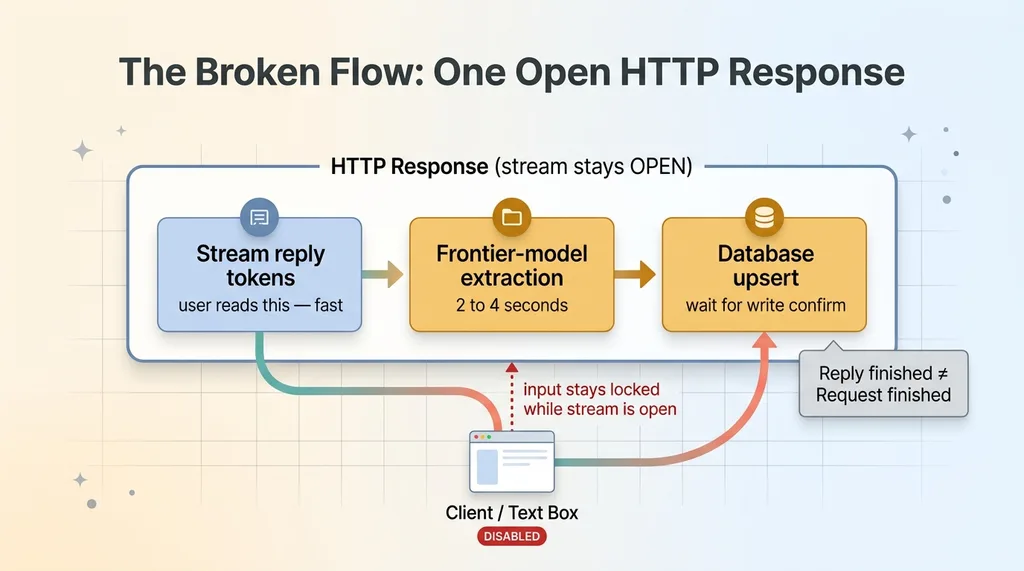 Blocking architecture: three steps inside one open stream
The browser doesn't know any of that. The client treats an open stream as an in-flight request. As long as that stream is open, the chat component keeps the input disabled, because as far as it knows, the server is still talking.
So the user saw a complete reply and a locked text box at the same time. The reply had ended. The request had not.
This is the core lesson, and it's worth saying flatly: in an AI chat with streaming, the moment the last visible token lands is not the moment the work is done. If you've stacked extra model calls and database writes inside the same response, the user pays for all of it, even the parts they will never see.
The fix is not to make extraction faster. The fix is to get it off the path the user is waiting on.
The Fix: Stream the Reply, Then Run the Rest in the Background
The principle is simple once you say it out loud. Keep expensive, non-user-facing work off the critical path.
The user needs the reply. That's the whole reason they're here. The user does not need to wait on the lead-scoring extraction. They do not need to wait on the database write. None of that changes what's on their screen. So none of it should hold the stream open.
Close the stream the moment the reply ends
The first move is to close the stream the instant the last reply token lands. Reply finishes, stream closes, input frees up. That's it. The browser sees the request complete, re-enables the text box, and the user can keep typing.
But you can't just throw away the extraction and the database write. You still need them. You just need them to happen somewhere the user isn't waiting.
after() and waitUntil keep the work alive
This is where the platform primitives matter. In Next.js you've got after(). On Vercel there's waitUntil. Most serverless platforms have an equivalent. They all do the same essential thing: they let server-side work continue running after the response has already been returned to the client, and they keep that work alive even if the client disconnects.
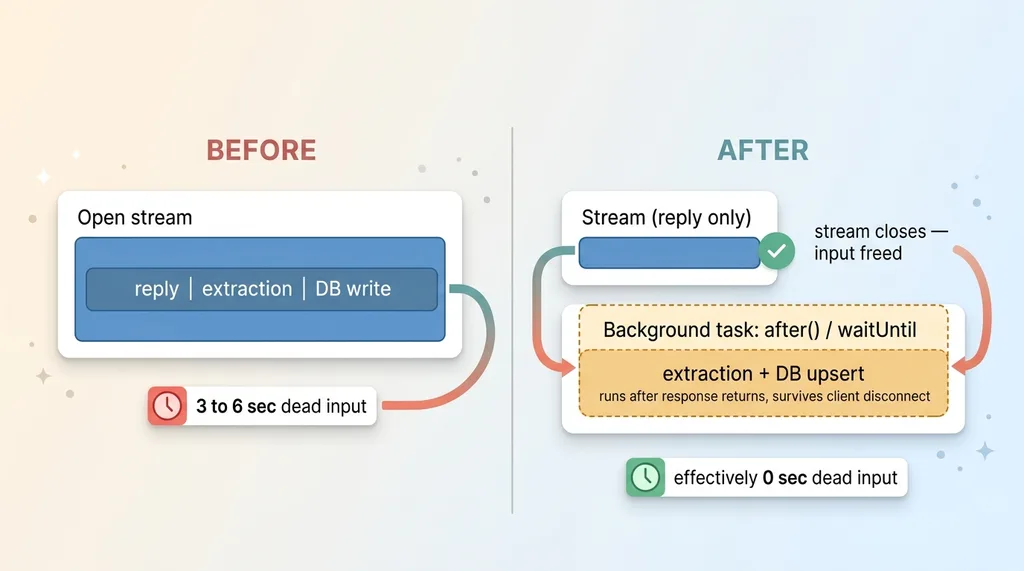 Before/after: stream-then-background fix
So the new flow is: stream the reply, close the stream the moment it ends, and schedule the extraction plus the database write as a background task using after() or waitUntil. The user gets their reply and their text box back immediately. The extraction and the upsert run a beat later, on their own, with nobody waiting.
The UX delta was exactly what you'd hope. Three to six seconds of dead input dropped to effectively zero. The chat went from feeling frozen between turns to feeling instant.
The mental model worth keeping is llm extraction off the critical path. Any AI work that doesn't change what the user sees right now belongs after the stream closes, not inside it. The user-facing path should carry the user-facing payload and nothing else.
That single change fixed the complaint. It also introduced a new bug I didn't see coming.
The Bug This Exposed: Extractions Finishing Out of Order
Moving work to the background fixed the dead input. It also broke the data, and I want to be honest about that because it's the more interesting failure.
Why background tasks race each other
Once extraction ran as a detached background task, every single turn fired its own extraction independently. Turn 2 fired one. Turn 4 fired another. These tasks didn't wait for each other and didn't finish in turn order.
A short turn-2 extraction could easily complete after a richer turn-4 extraction. Model calls don't take a fixed amount of time. A simpler prompt might come back faster, a busier moment on the API might come back slower. The order they finish in has nothing to do with the order the user sent the messages.
An early empty scorecard overwriting the full one
Here's how that played out in the worst way. On turn 2, the user hadn't given their phone or full name yet, so that extraction produced a sparse scorecard: mostly empty fields. On turn 4, the user had given everything, so that extraction produced a rich, complete scorecard, and it wrote first.
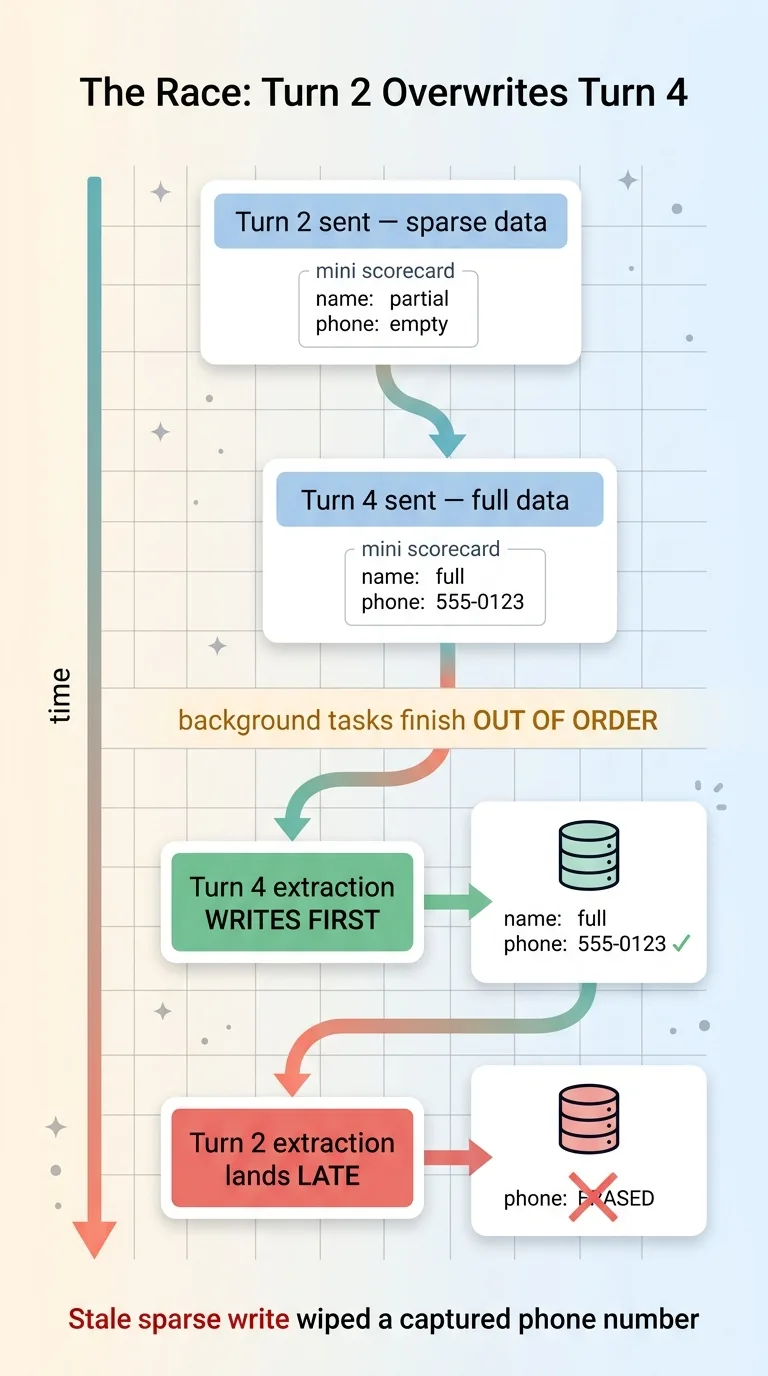 Out-of-order extraction race condition erasing data
Then the slow turn-2 extraction finally landed, after turn 4, and overwrote the full record with its sparse one. The phone number the user had typed got erased by a stale write from two turns earlier.
Read that again, because it's brutal. The user gave their phone number. The system captured it correctly. Then a late background write from an earlier turn quietly wiped it out. The lead record ended up worse than if I'd done nothing.
This is the ai chat concurrency bug that nobody anticipates until they move work off the request thread. The lesson underneath it: detaching work from the response also detaches it from ordering guarantees. The request thread gave me ordering for free. Background tasks gave that up, and I hadn't replaced it with anything.
The Real Fix: A No-Downgrade Coalesce
The instinct is to add locks or queue the extractions so they run in order. That works, but it drags you back toward the slow, serialized world you just escaped. There's a cleaner answer.
Keep the richest value per field
The real fix lives at the write layer, not the scheduling layer. Instead of last-write-wins, the persistence step merges the lead record field by field, with one rule: no downgrades.
For each field, keep the existing value if the incoming one is empty or weaker. Accept the incoming value only if it actually adds information. A captured phone number can never be overwritten by a null. A full name can't be replaced by a partial one. The record only ever gets richer, never poorer, no matter what lands when.
Never let a sparse extraction erase a captured field
You implement this right at the write, not in the application logic above it. Either a coalesce in the upsert (keep the non-null, more complete value), or a transaction that reads the current record, merges field by field, and writes the result.
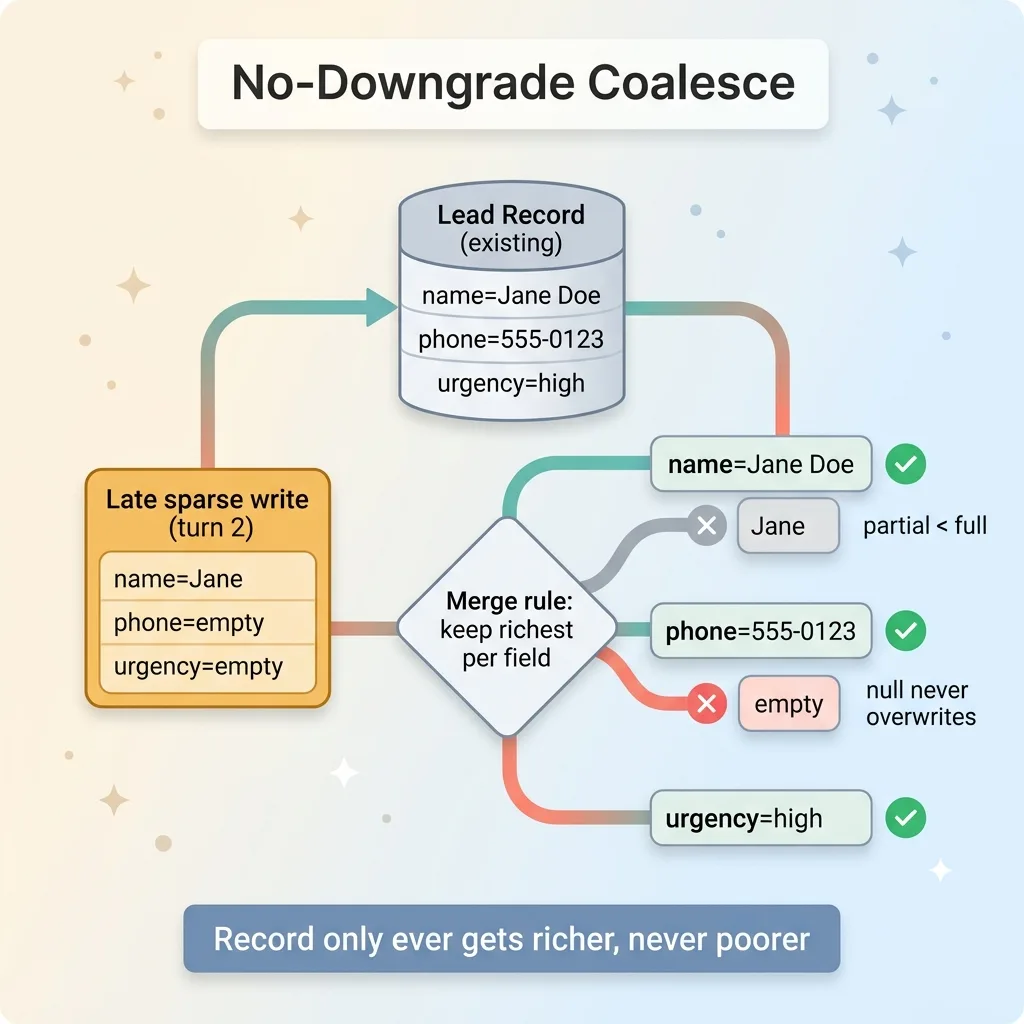 No-downgrade coalesce merge at the write layer
The reason it has to live at the write layer is that the write layer is the one place that sees the truth regardless of ordering. It doesn't matter which extraction was scheduled first or finished last. When a sparse turn-2 write arrives after a full turn-4 write, the merge looks at each field, sees the incoming value is empty or weaker, and keeps what's already there. The phone number survives.
This is the broader principle, and it applies far beyond intake chats. When your AI output is non-deterministic and runs out of order, the durable record needs deterministic merge rules. Not raw overwrites. The model can be as unpredictable as it wants, as long as the thing writing to your database is boringly predictable about what it keeps.
This was the streaming ux fix and the data-integrity fix working together. Closing the stream early gave the user a responsive chat. The no-downgrade coalesce made sure that responsiveness didn't quietly corrupt the lead. You need both. One without the other ships a product that either feels broken or loses data.
The General Pattern for Any AI Chat
Strip away the specifics and you've got a checklist for anyone shipping a multi-turn AI chat. I keep these four in my head now whenever I build one.
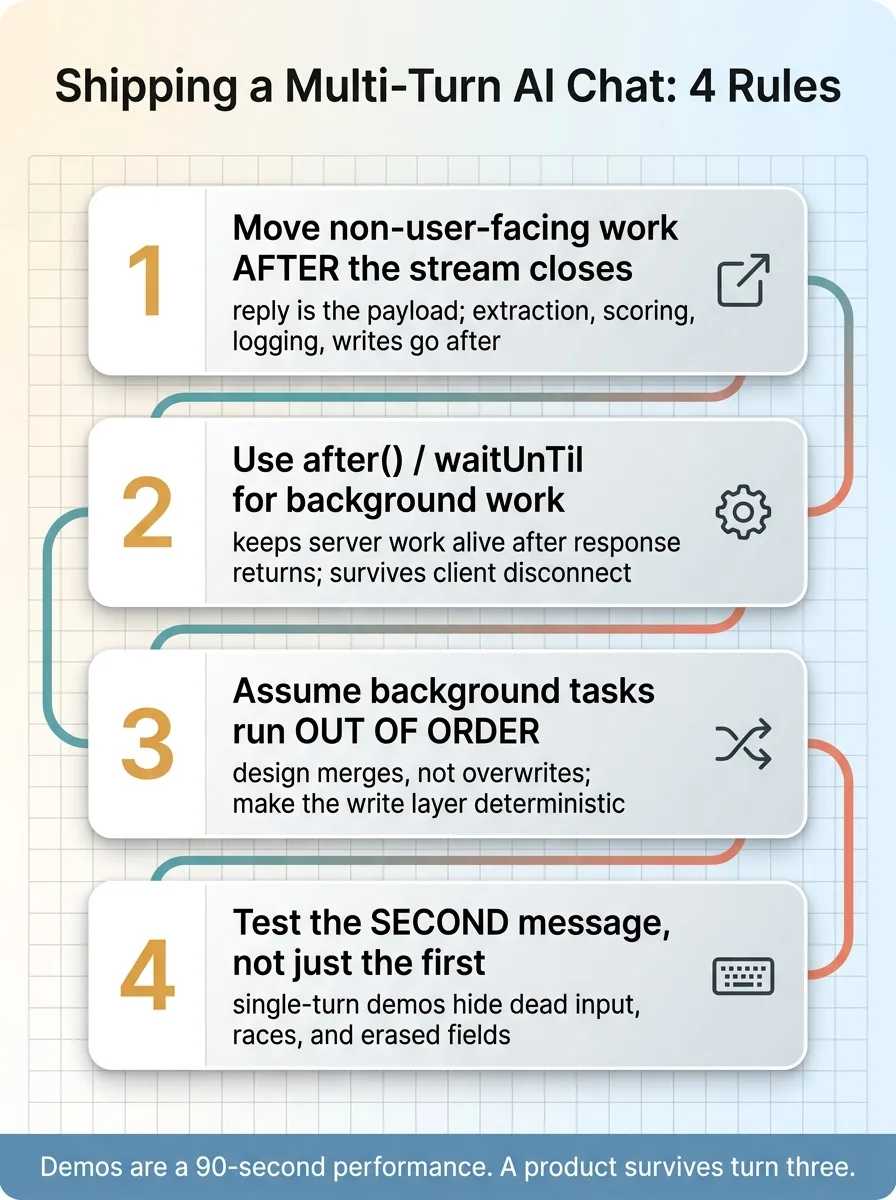 The four-point checklist for any AI chat
One. Anything the user is not waiting on goes after the stream closes. The reply is the payload. Extraction, scoring, logging, database writes, notifications, none of that should hold the stream open. Stream the reply, close it, do the rest in the background.
Two. Use the platform's after() or waitUntil for that background work. Don't just fire a promise and hope. Use the primitive built to keep server work alive after the response returns and survive the client disconnecting. In Next.js that's after(). On Vercel it's waitUntil. There's an equivalent almost everywhere.
Three. The moment you detach work, assume it runs out of order. Background tasks race. They finish in whatever order they finish, not the order you fired them. Design merges, not overwrites. Make your write layer deterministic so it doesn't matter who lands last.
Four. Test the second message, not just the first. Single-turn demos hide every one of these problems. The dead input, the race condition, the erased phone number. None of it shows up until someone fires turn two fast and then turn three faster. Sit down and type like an impatient human. That's where the bugs live.
This is the difference between something that works in a demo and something that survives a real user typing fast on a real keyboard. The first is a 90-second performance. The second is a product.
Demos Don't Have Users. Shipped Products Do.
The gap between a slick AI demo and a product people actually trust is a hundred bugs exactly like this one. None of them appear in the walkthrough. A disabled input for five seconds. A phone number quietly erased by a race condition that only fires when two extractions overlap.
These aren't edge cases you can wave off. For an intake chat, they're the entire job. A dead text box loses the lead because the person gives up and leaves. An erased phone number loses the lead because you can't follow up. The model gave a beautiful answer in both cases, and the business still walked away empty-handed.
This is why every AI system I ship stops for a human and gets stress-tested under real use. The demo is the easy 10 percent. The hundred small failures under real load are the other 90, and they're the part that decides whether the thing earns its place or quietly costs you money.
Get the next build note.
I write up each system I build, including what broke. Subscribe to my newsletter and I'll send you the next one.