Why I Needed a Website in One Day
I launched my Chief AI Officer practice on a Tuesday. By Wednesday morning, I had three inbound requests from CEOs who'd heard about the work I did at my DTC fashion brand. By Thursday, I realized I had a problem.
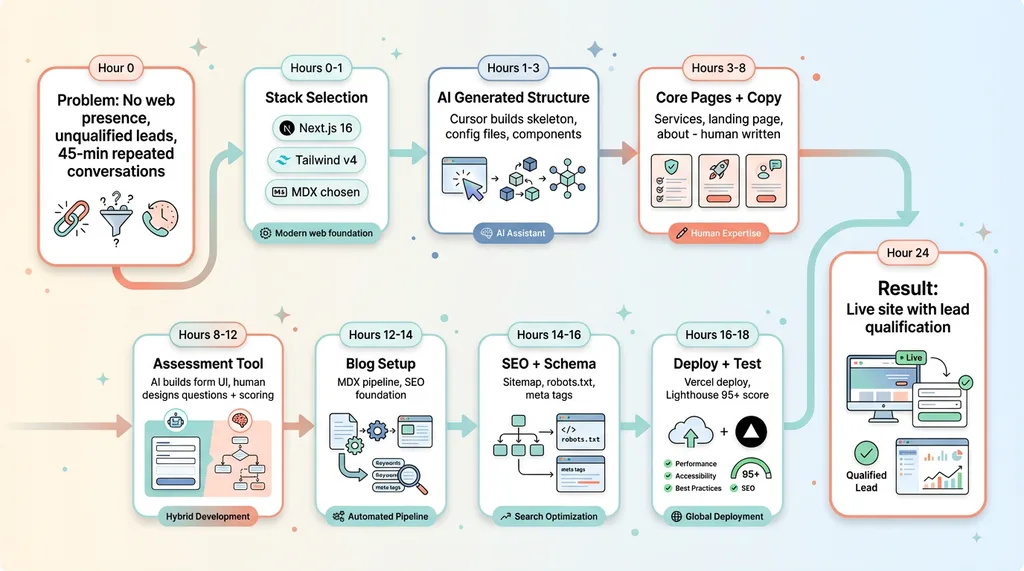 One-Day Build Timeline
I had no web presence. No way to explain what a Chief AI Officer actually does. No way to filter serious buyers from tire-kickers. I was having the same 45-minute conversation five times a week with people who either weren't ready or couldn't afford the engagement.
I couldn't wait six weeks for an agency to build a site. I couldn't spend $15K on something I needed immediately. And frankly, if I'm telling companies I can help them ship AI systems fast, I better be able to ship my own stuff fast.
So I gave myself one day to build an AI consultancy website that could capture leads, explain the value proposition, and qualify prospects automatically. This wasn't just about having a business card online. It was a test. If I couldn't use AI tools to build and deploy a professional site in 24 hours, why should anyone trust me to build their AI systems?
I treated it like a product sprint. One day. Real stakes. No excuses.
The Tech Stack: Next.js 16, Tailwind v4, MDX
I didn't pick this stack because it's trendy. I picked it because AI can help me build with it faster than anything else.
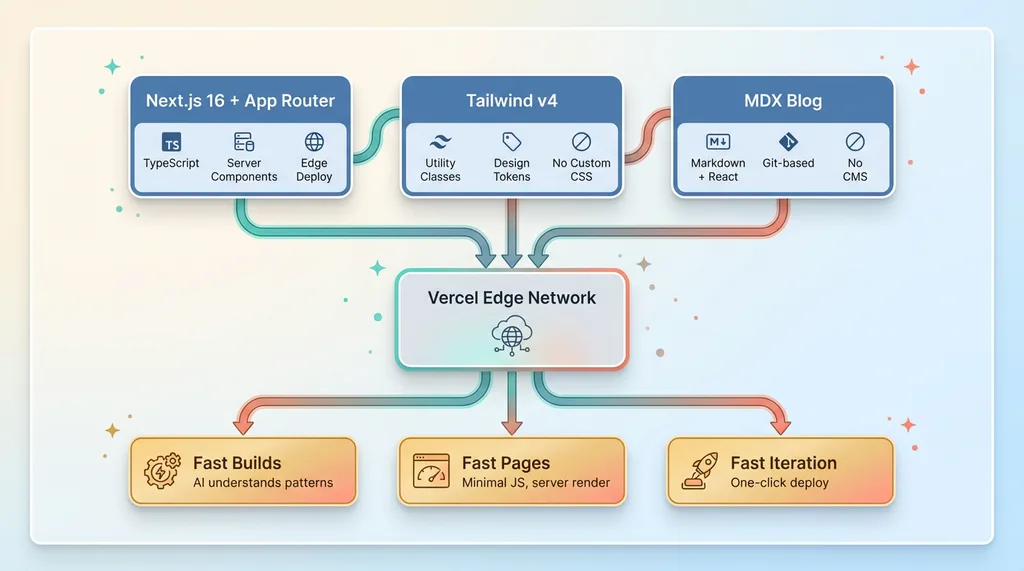 Tech Stack Architecture
Why Next.js 16 and App Router
Next.js 16 with App Router is the foundation. It's production-ready, SEO-friendly out of the box, and deploys to Vercel's edge network in one click. The App Router gives me a clean file-based routing structure where every folder becomes a URL path. AI tools like Cursor understand this pattern because it's well-documented and consistent.
The server components architecture means I can render content on the server, send minimal JavaScript to the browser, and still have interactive pieces where I need them. For a consultancy site, this is perfect — fast page loads, great SEO, and room to add complex tools like the assessment form without slowing everything down.
I'm using TypeScript for type safety. When you're moving fast with AI assistance, types catch bugs that would otherwise ship to production.
Tailwind v4: Faster styling with AI
Tailwind v4 made styling trivial. Instead of writing custom CSS that AI has to guess at, I use utility classes that have clear, documented behavior. AI tools can write Tailwind much faster than they can write maintainable custom CSS because the patterns are consistent.
Need a centered card with shadow and padding? Tell AI "create a centered card component with Tailwind" and it writes className="flex flex-col items-center p-6 shadow-lg rounded-lg" instantly. No debates about class naming conventions. No specificity wars. Just compose utilities.
Tailwind v4 also introduced CSS variables for design tokens, which means I can define brand colors and spacing once, then reference them everywhere. Change one variable, update the whole site. AI respects these tokens when generating new components.
MDX for the blog: Content meets code
MDX is markdown that can render React components. That's it. But that's huge.
Every blog post is an MDX file in the /blog directory. Frontmatter defines the title, description, keywords, and publish date. The content is markdown — headers, paragraphs, lists, code blocks. But I can drop in React components anywhere.
Want an interactive assessment tool inside a blog post? Import the component and render it inline. Want a pricing calculator? Same thing. The AI-powered blog system I built can generate MDX files that include both content and functionality.
This setup means no CMS, no database, no admin panel. Content lives in git. I write in VSCode. Commit and push. The site rebuilds automatically. Version control for everything. AI can help me draft posts because it's just text files with a clear structure.
What I Automated vs What I Hand-Crafted
This is where most people get AI wrong. They either try to automate everything and ship garbage, or they refuse to use AI and waste time on boilerplate. You need both. The question is knowing which is which.
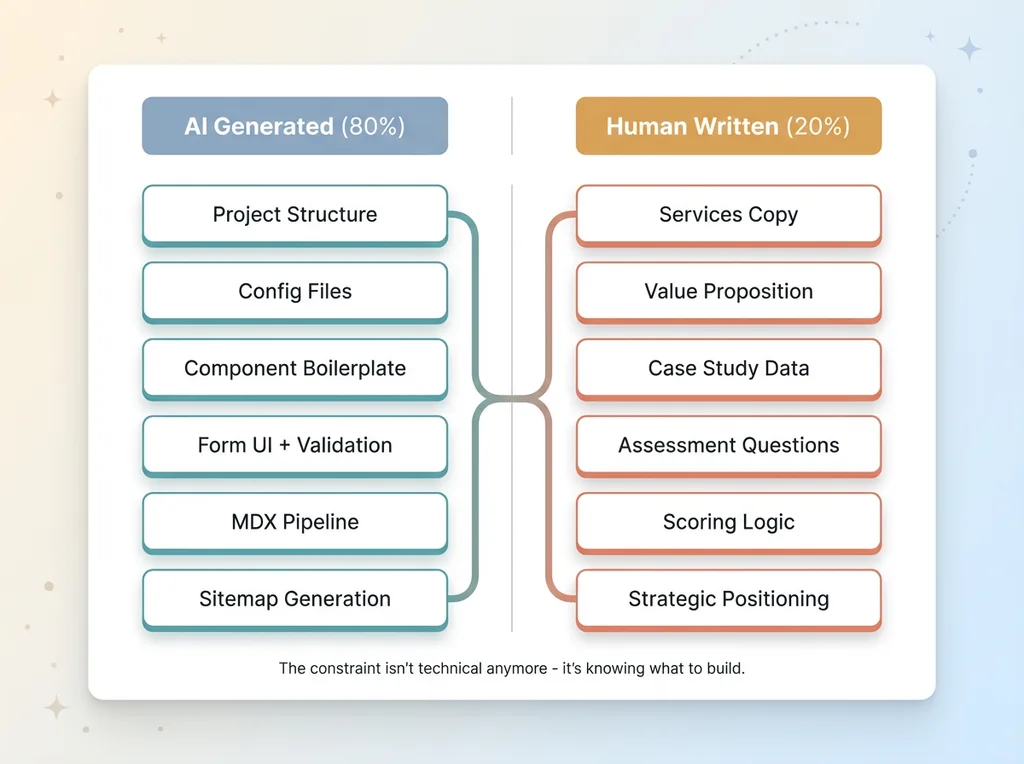 AI vs Human Work Split
AI wrote 80% of the boilerplate
I used Cursor to generate the entire Next.js project structure. Gave it a prompt: "Create a Next.js 16 site with App Router, TypeScript, Tailwind v4, and MDX blog support. Include a contact form with Resend integration."
Five minutes later, I had a working skeleton. All the config files: next.config.js, tailwind.config.js, tsconfig.json. The app directory structure with layout and page files. A reusable Button component. A contact form with Zod validation and Resend email sending. Sitemap generation. Robots.txt. Basic SEO meta tags.
AI wrote all of it. I reviewed every file, but I didn't write any of this code from scratch. Why would I? These are solved problems with established patterns.
AI also generated the initial styling for components. Navigation bar, footer, card layouts, form inputs. I tweaked spacing and colors to match brand, but the structure was there.
For the blog, AI generated the MDX rendering pipeline. It reads files from the filesystem, parses frontmatter, renders markdown to HTML, and generates the blog index page with post previews. I specified the behavior, AI wrote the implementation.
I wrote the copy that matters
Every word on the services page, I wrote. The value proposition on the landing page, I wrote. The case study data from my DTC fashion brand, I pulled from real metrics I track.
AI can't do positioning. It doesn't know my ideal customer. It doesn't know which pain points actually convert. It doesn't know what promises I can deliver on versus what's just consultant theater.
When I explain that I built 15+ AI systems that generated +38% revenue per employee, those numbers come from real spreadsheets. When I say we eliminated 42% of manual operations time, I measured that. AI can format this information, but it can't create the strategic narrative.
The assessment questions — which I'll detail in the next section — came from actual conversations with prospects. AI helped me build the form UI, but I designed the questions based on patterns I saw: who was ready to buy versus who was just exploring.
The assessment tool: half AI, half human logic
The AI Readiness Assessment is the most important piece of the site. It's also the best example of human-AI collaboration.
AI generated the form structure. React Hook Form for state management. Zod for validation. Tailwind for styling. Radio buttons, text inputs, the whole UI. I told AI "build me a multi-step form with progress indicator" and it did.
But I wrote every question. I wrote the scoring logic. I defined what constitutes a qualified lead versus someone who needs more education.
AI can't do that because AI doesn't have $100K in opportunity cost from spending time on unqualified leads. I do. So I designed the qualification criteria, and AI implemented it.
Building the AI Readiness Assessment Tool
Most consultancy sites have a contact form that says "tell us about your project." Then you spend 30 minutes on a call with someone who has a $50K problem but a $5K budget and wants to start "exploring options" in six months.
I built a qualification tool instead.
Why lead qualification matters
At my DTC brand, I learned that the companies who get value from AI work have specific characteristics. They're doing $1M+ in revenue. They have repeatable processes that are currently manual. They have a real budget, not a "let's see what this costs" budget. And they have decision authority — the person talking to me can actually sign a contract.
If I'm doing free discovery calls, I need to talk to people who match this profile. Everyone else should get educational content first.
The assessment tool does this automatically. It's a 7-question form embedded at /apply. But unlike a contact form, it gives the prospect immediate value — a scored assessment with specific next steps — while giving me the data I need to prioritize my time.
The 7 questions that filter serious buyers
Question 1: Current revenue range. Options from "Pre-revenue" to "$10M+". This filters out companies too early for AI operations work.
Question 2: Team size. Below 5 employees usually means the founder is still doing everything and can't delegate AI implementation. Above 200 means enterprise complexity I'm not set up for. Sweet spot is 5-200.
Question 3: Biggest operational bottleneck. Options include manual data entry, content creation, customer support, inventory management, reporting. This tells me where to focus the conversation and whether I have relevant experience.
Question 4: Current tech stack. Are they on Shopify, custom Rails, spreadsheets, or modern SaaS tools? This affects implementation complexity. Not a disqualifier, but it matters.
Question 5: Timeline. "Just exploring" versus "Need to implement in 30 days" versus "Ready in 90 days". I want people who have urgency but realistic timelines.
Question 6: Budget awareness. I don't ask for a specific number, but I ask if they understand that meaningful AI implementation costs $10K+ and takes 30-90 days. If they're expecting $2K and two weeks, we're not aligned.
Question 7: Decision authority. Are you the decision maker, an influencer, or just researching? I'll talk to anyone in the buying committee, but I need to know who I'm talking to.
Instant scoring with actionable next steps
Each answer has a point value. Revenue and team size are weighted heavily. Budget awareness is critical. Timeline and decision authority matter.
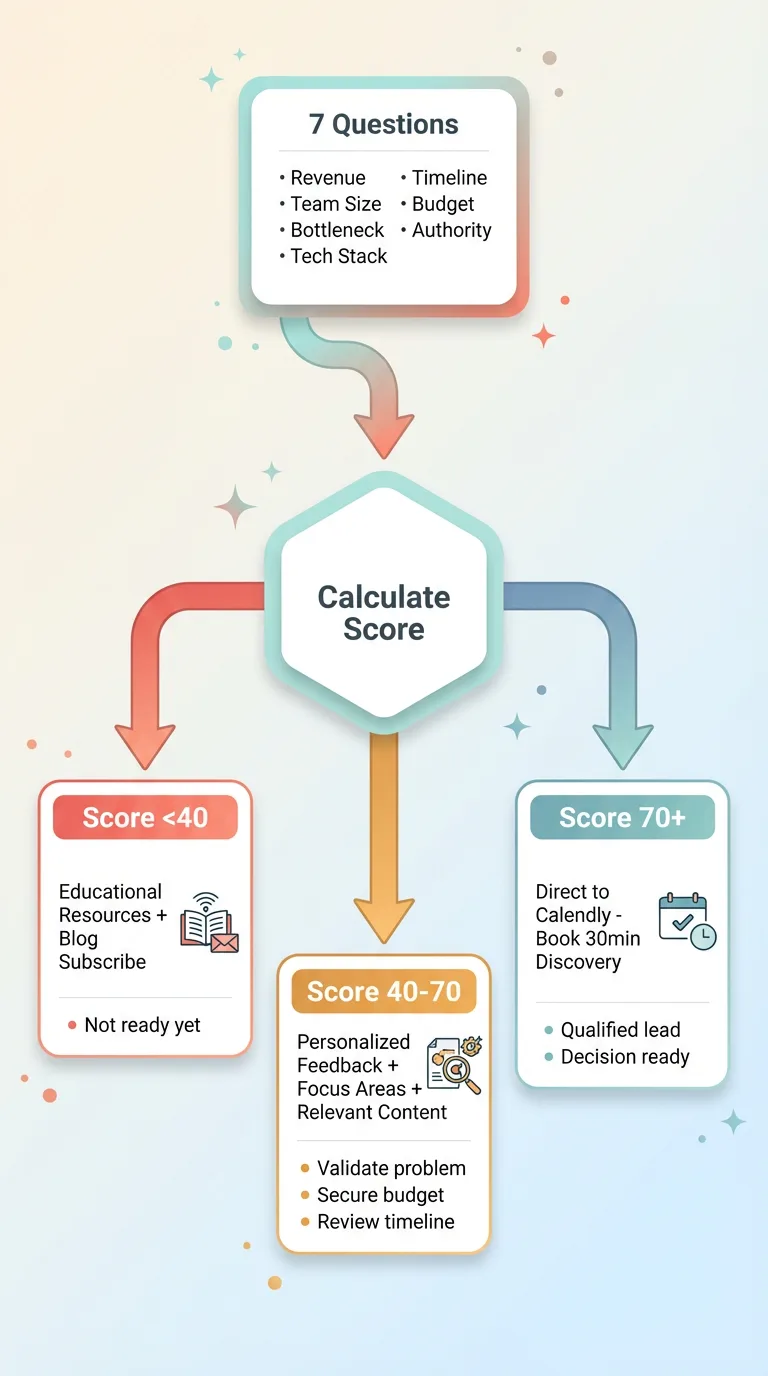 Assessment Tool Scoring Flow
Score above 70: You get routed directly to my booking page to book a free 30-minute discovery call. No friction. You're qualified. Let's talk.
Score 40-70: You get a personalized message explaining what you should focus on before we talk, plus links to relevant blog content. Maybe you need to validate the problem more. Maybe you need to secure budget. The feedback is specific based on your answers.
Score below 40: You get educational resources and an invitation to subscribe to the blog. You're not ready yet, and that's fine. I'm not going to waste your time or mine pretending a call will help.
The form itself is React with Zod validation. When you submit, a serverless function calculates your score, stores the response in a lightweight database for my review, and returns the appropriate next step.
AI wrote the form validation and UI. I wrote the questions and scoring algorithm based on real patterns from my first dozen conversations. It's human strategy implemented with AI tools.
SEO Foundation: Built Right From Day One
At my DTC brand, I retrofitted SEO onto a four-year-old site. It worked — we manage 313 blog articles with AI assistance now — but it was harder than building it right from the start.
For hodgen.ai, I built SEO into the foundation.
Sitemap and robots.txt automation
The sitemap is generated programmatically. I have a Next.js API route at /sitemap.xml that scans the /blog directory at build time, reads the frontmatter from every MDX file, and outputs valid XML with URLs, last modified dates, and change frequency.
Every time I publish a new blog post, the sitemap updates automatically on the next build. No manual maintenance. No forgetting to add pages. No stale URLs.
The robots.txt file allows all legitimate crawlers (Google, Bing, etc.) and blocks known bad bots. It points to the sitemap so crawlers find content immediately.
This took about 30 minutes to set up. It will save hours over the life of the site because I never have to think about it again.
Meta tags and schema markup
Every page has a unique meta title, description, and Open Graph tags for social sharing. I wrote them by hand for the core pages (home, services, about, contact) because that's strategic copy. For blog posts, the frontmatter defines the title and description, and the template injects them into the page head.
I added Schema.org structured data using JSON-LD. The site has Organization schema with my business name, logo, and contact info. The about page has Person schema for me with credentials and social profiles. Every blog post has Article schema with author, publish date, and keywords.
This helps search engines understand the content and potentially show rich results in search. It's free ranking potential that most consultancy sites ignore.
Blog structure for programmatic SEO
Each blog post is a file in /app/blog/[slug]/page.mdx. Clean URLs like /blog/build-ai-consultancy-website. No dates in URLs (because content can be updated without breaking links). No query parameters.
Frontmatter includes target keywords. I'm building a topic cluster around AI strategy, operations automation, and Chief AI Officer services. Every post targets a specific search intent and links to related posts.
The blog index page lists all posts with title, description, and publish date. It's server-rendered, so crawlers see everything on first load. No client-side JavaScript required to see the content list.
I'm planning category pages next — /blog/category/ai-operations — which will create topical authority and more internal linking opportunities.
Total time investment to build this SEO foundation: about 2 hours. Compare that to the alternative of launching fast and fixing SEO later. You lose months of potential ranking time.
Deployment and Performance: Vercel Edge
I pushed the code to GitHub. Connected the repo to Vercel. Deployed to production. Total time: 10 minutes.
Vercel's edge network means the site loads fast globally. A user in Singapore and a user in New York both get served from the nearest edge location. No servers to manage. No DevOps complexity. No downtime worries.
SSL certificate was automatic. Custom domain setup (hodgen.ai) took three minutes — just point the DNS records at Vercel's nameservers. Done.
Every commit to the main branch triggers an automatic production deployment. Every pull request gets a preview URL for testing. I can share a preview link with someone to get feedback before publishing.
The site scores 95+ on all Lighthouse metrics. Performance, accessibility, best practices, SEO — all green. This isn't because I'm some performance optimization wizard. It's because Next.js 16 with App Router is optimized by default.
Server components mean minimal JavaScript ships to the browser. Tailwind keeps CSS small. next/image automatically optimizes images and serves them in modern formats with lazy loading. The framework handles all of this.
I'm running on Vercel's hobby plan, which is free. When traffic scales, I'll upgrade to Pro ($20/month). Compare that to traditional hosting: server costs, CDN costs, SSL certificate costs, scaling complexity. Modern tools collapsed all of that.
The constraint isn't technical anymore. It's not "can I deploy a production-grade site?" It's "do I know what to build?"
What This Means for Your Business Website
If I can build a consultancy website in one day using AI and modern tools, what's holding your business back?
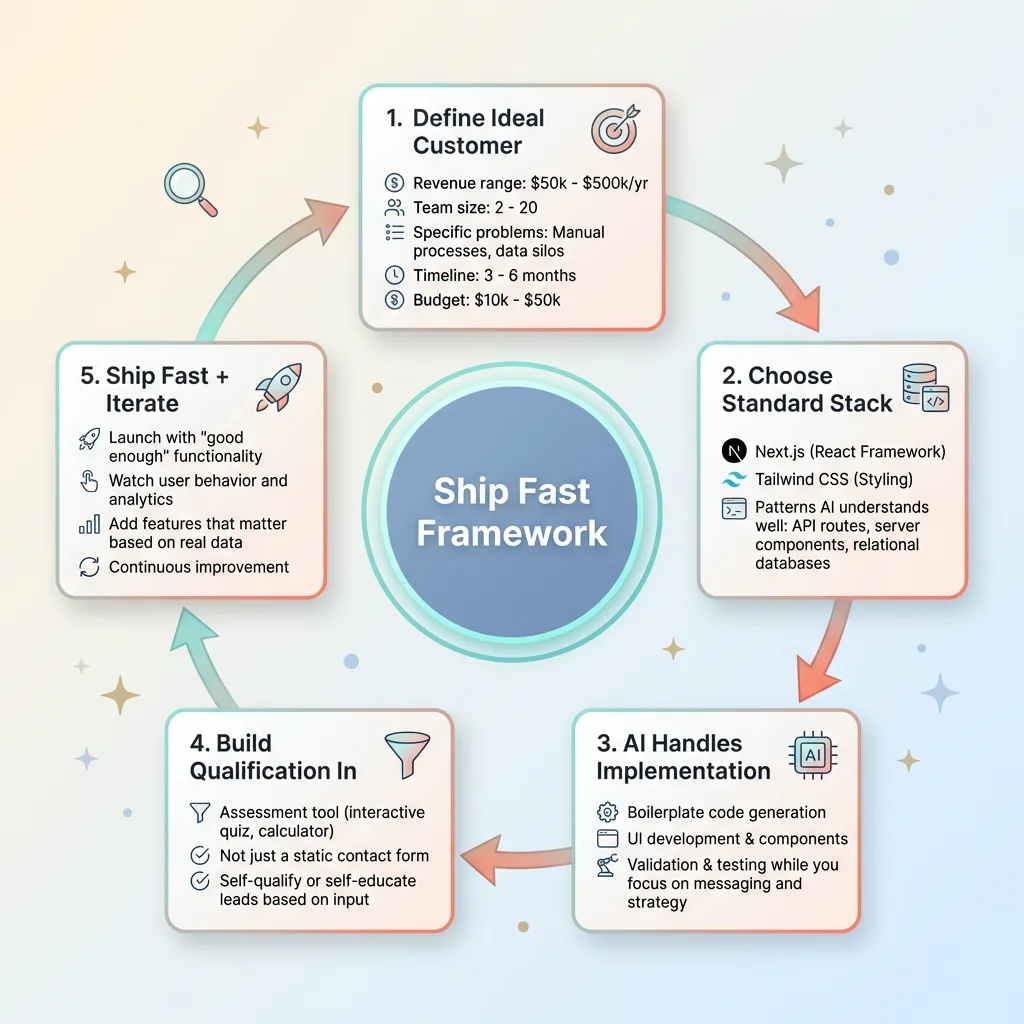 Ship Fast Framework
I see companies spend three months building a site. Not because the implementation is hard — it's not — but because of indecision. Committee review. Agency timelines. Revision cycles. Waiting for the "perfect" design.
Meanwhile, opportunities are slipping through. Leads are bouncing because you have no web presence or your site is embarrassingly outdated. Competitors are shipping faster.
The technical barrier is gone. Next.js, Vercel, Tailwind, AI coding assistants — these tools let anyone with basic technical knowledge ship production-grade sites in days, not months.
The real barrier is strategic. Do you know who you're building for? Do you know what they need to hear to take action? Do you know how to qualify them so you're not drowning in unqualified leads?
Most businesses don't. That's why they spend months in agency limbo, because they're using the build process to figure out their positioning. That's backwards.
Here's the framework I used:
First, define your ideal customer in painful detail. Not "small businesses" or "enterprise clients." Specific revenue range, team size, problems they're willing to pay to solve, timeline, budget. Write it down.
Second, choose a modern tech stack that AI tools understand well. Next.js, Tailwind, standard patterns. Don't get cute with obscure frameworks. The more standard your stack, the more AI can help.
Third, let AI handle implementation while you focus on messaging. AI writes the form validation, the API routes, the responsive layouts. You write the value proposition, the case studies, the qualification criteria.
Fourth, build qualification into your site, not just a contact form. Every visitor who lands on your site should either self-qualify or self-educate. Don't make everyone fill out a form and wait for you to respond.
Fifth, ship fast and iterate based on real behavior. Launch with good enough. Watch what pages people visit. See where they drop off. Add the interactive tools and features that actually move the needle.
This isn't just about websites. It's about treating every business asset like a product sprint. Your website. Your customer onboarding. Your internal tools. Your reporting dashboards.
Stop waiting for perfection. Start shipping.
Get the next build note.
I write up each system I build, including what broke. Subscribe to my newsletter and I'll send you the next one.