The Import Wizard Is Where Software Rollouts Go to Die
Every B2B app I've built or audited needs a CSV import. And almost every team builds the same thing: a hardcoded column-mapping wizard that works beautifully for the file formats they imagined and breaks on everything else. If you've shipped software that customers migrate into, you already know where this is going. AI CSV import mapping is the fix, but let me first show you the wreckage it replaces.
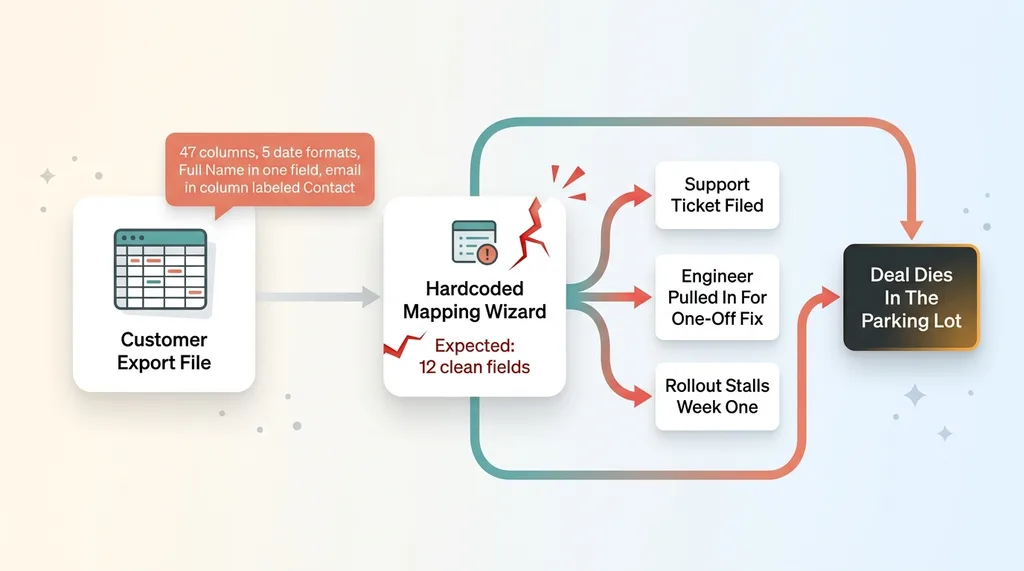 The brittle hardcoded importer failure pattern
Here's the pattern I see again and again. A new customer signs the deal. They're excited. The product is genuinely better than what they're leaving. Then comes the migration, and they show up with an export from their old tool that looks nothing like what your importer expects.
Your schema has 12 fields. Their export has 47 columns. Half of them are junk the old system tacked on. The dates are in five different formats. The full name is jammed into one column when you need first and last separated. The email lives in a column labeled "Contact."
The mapper chokes. The customer files a support ticket. An engineer gets pulled in to write a one-off fix. The rollout that was supposed to take a day stalls in week one.
This is the silent killer of software adoption. Nobody talks about it on the sales call. The deal is signed, the product demos great, everyone's optimistic. And then the whole thing dies in the parking lot because nobody can get the data in.
I've watched migration friction kill more rollouts than missing features ever did. The product was never the problem. The import wizard was. When you're selling to a customer switching off a competitor, the moment they can't move their data is the moment they start regretting the decision. Get that wrong and you lose them before they ever use the thing they paid for.
Why Hardcoded Column Mapping Always Breaks
The combinatorial problem
A traditional mapper assumes first_name maps to your firstName field. Clean, simple, and wrong the moment a real file shows up.
Because every tool exports differently. That same field arrives as "First Name," "fname," "Given Name," "Contact First," or "F. Name." So you start writing a lookup table of known aliases. It works. Then a new customer brings a format you've never seen, and you add three more aliases. The table grows forever and you're never done.
Now stack the messy cases on top. A single "Full Name" column that needs splitting into two. Address fields scattered across "Street," "Street 2," "City/State," and a separate "Zip." A phone number with the country code merged in. None of these fit a name-matching table because the problem was never about names.
The per-competitor tax
Then there's the part that quietly destroys your engineering roadmap. Every new tool a customer migrates from needs its own import profile. Someone has to study the export, write the mapping rules, and maintain them as the competitor changes their format.
That's not a feature. That's a support backlog disguised as a feature. Each switching customer becomes a small engineering project, and the cost scales linearly with the number of competitors you steal customers from. The better you are at winning switchers, the worse this gets.
The core impossibility is simple: you cannot pre-anticipate the shape of a file you've never seen. Any approach built on string matching against a fixed table is permanently one unexpected export away from breaking.
Let the Model Read the File and Infer the Meaning
What the AI actually does
In a SaaS product I built, I stopped matching column names against a fixed table entirely. Instead, I let the AI read the actual file.
It sees two things: the headers and a sample of the real row values underneath each one. Then it infers what each column means relative to my target schema. This is the shift that changes everything.
The header says "Contact," but every value below it is an email address. The model maps it to the email field, because it read the data, not just the label. A column full of values like "90210" and "10001" gets recognized as a postal code even when the header is something useless like "Loc." A column of "2024-03-15" and "03/15/2024" gets recognized as a date regardless of what it's called.
This is pattern recognition over real data, not string matching over labels. The model reads meaning.
Why this generalizes to any format
Here's why that matters so much. Because the AI infers meaning from the values, it doesn't need to recognize the format. It doesn't care that this export came from Competitor A and the last one came from Competitor B.
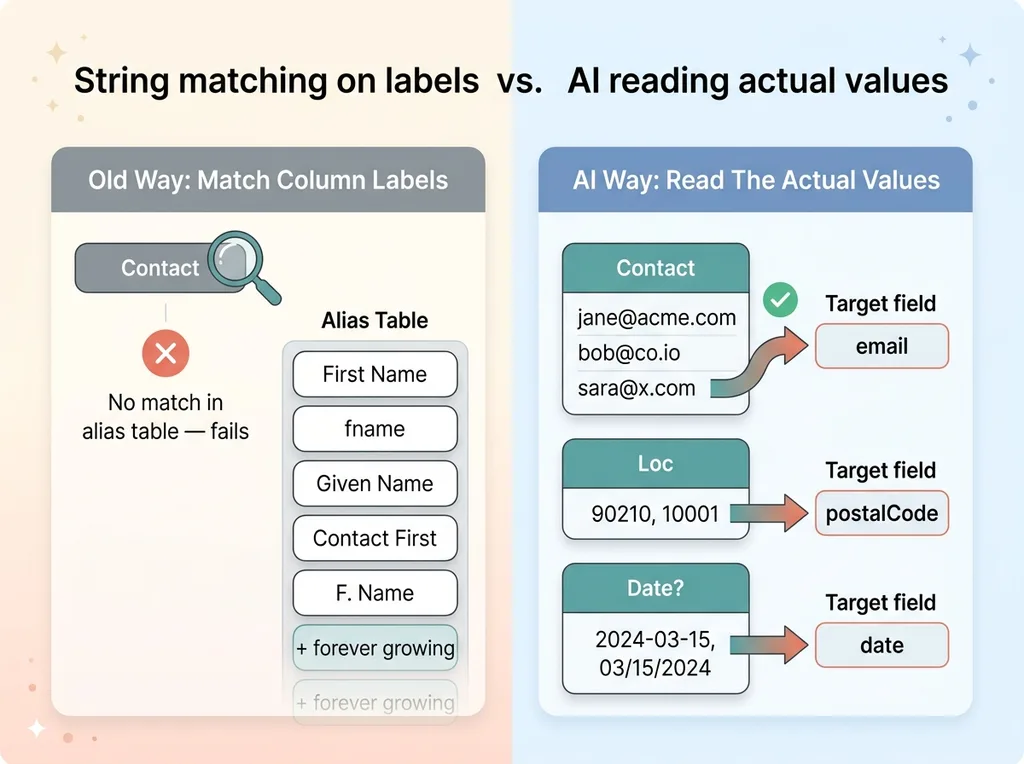 String matching on labels vs AI reading actual values
Any export from any tool imports without writing a single per-format profile. The 47-column mess and the clean 12-column file both go through the same path. The junk columns get flagged as unmapped. The "Full Name" column gets recognized for what it is. The model handles a file it has never seen because it reasons about content, the way a human would if you handed them a spreadsheet and your schema.
This is what people mean, or should mean, by smart data import. Not a longer alias table. A system that reads what the data actually is and maps it to where it belongs. The per-competitor tax goes to zero, because there are no competitors to anticipate. There's just data, and a model that understands it.
The AI Proposes, the Human Confirms, the Code Commits
This is the part that earns trust, so let me walk through the production flow carefully. Because the obvious fear is "you're letting a language model touch my customer data," and the answer is in how the stages are separated.
The three-stage flow
Stage one: the AI proposes. It analyzes the headers and sample values and produces a proposed mapping. Your column "Contact" maps to our email field. Your "Loc" maps to postalCode. Each mapping comes with a confidence read, so low-confidence guesses are visibly flagged rather than buried.
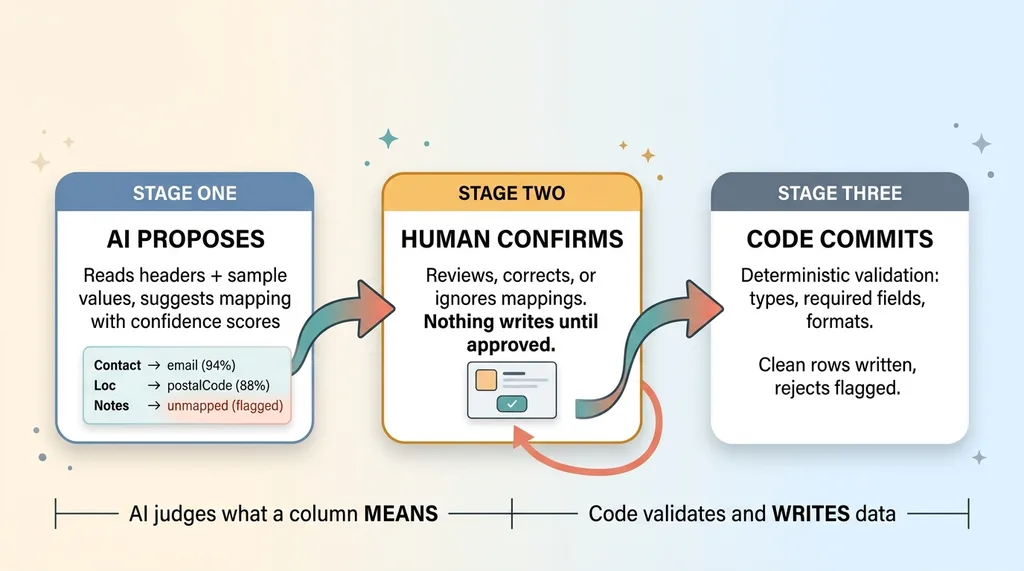 Three-stage flow: AI proposes, human confirms, code commits
Stage two: the human confirms. The user sees the proposed mapping in a simple review screen before anything is written anywhere. They can correct any mapping the AI got wrong, reassign a column, or mark one to ignore. This is the every AI action stops for a human checkpoint, and it's not optional. Nothing touches the database until a person says go.
Stage three: the code commits. Only after confirmation does deterministic code take over. It validates every row against the schema (types, required fields, format rules), commits the clean rows, and flags the rejects for review.
Where AI stops and deterministic code takes over
The line is sharp and worth stating plainly. The AI judges what a column means. The code validates and writes the data. Those are two different jobs and they never blur together.
This is the let the model judge, let the code compute split applied to imports. The model is good at the fuzzy question, "what is this column," and bad at the precise one, "is every value in it a valid email." So I never ask it the precise question. After it proposes the mapping, the model is done. It never silently transforms a value, never writes a row, never decides what's valid.
That separation is the whole answer to "can I trust AI with my customer data." The model's mistakes get caught at the confirm screen and again at validation. It proposes; it does not commit.
Keeping the AI Inside the Lines
The obvious objection: what stops the model from inventing a field that doesn't exist, or confidently hallucinating a mapping?
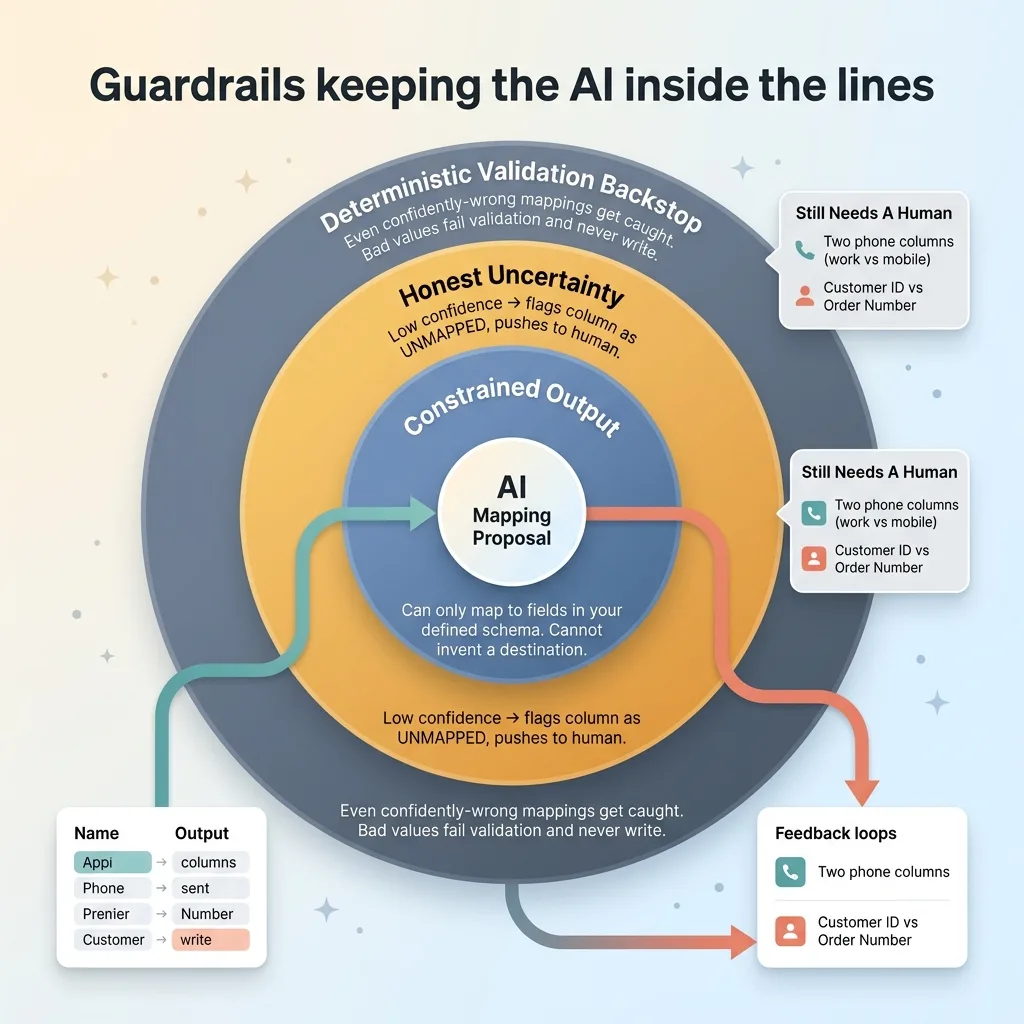 Guardrails keeping the AI inside the lines
The answer is constraint. The model can only map to fields you've actually defined in your target schema. It cannot invent a destination, because the list of valid destinations is fixed and passed in as part of the task. This is the constrain what the AI is allowed to output pattern, and it removes an entire category of failure. A column either maps to a real field or it doesn't map at all.
It also has to handle "I don't know" gracefully. When the model can't confidently place a column, it doesn't guess. It flags the column as unmapped and pushes the decision to the human at the confirm step. A flagged unknown is a feature, not a failure. It's the model being honest about its uncertainty instead of forcing a wrong answer.
And validation is the backstop underneath all of it. Even a confidently-wrong mapping gets caught. If the model maps a column of names to your email field, the row values fail email validation and never get written. The deterministic layer doesn't care how confident the AI was. Bad data bounces.
What doesn't work perfectly yet, and I'll be straight about it: deeply ambiguous columns still need a human. Two "phone" columns with no context to distinguish work from mobile. A column that could be a customer ID or an order number. The model can't reliably resolve those, and it shouldn't pretend to. That's exactly why the confirm step exists. The system isn't trying to be right 100% of the time with no human. It's trying to be right most of the time and honest about the rest.
What This Means for Onboarding a Customer From a Competitor
Step back from the mechanics, because the thing keeping a CEO up isn't column mapping. It's stalled migrations and the deals that die in them.
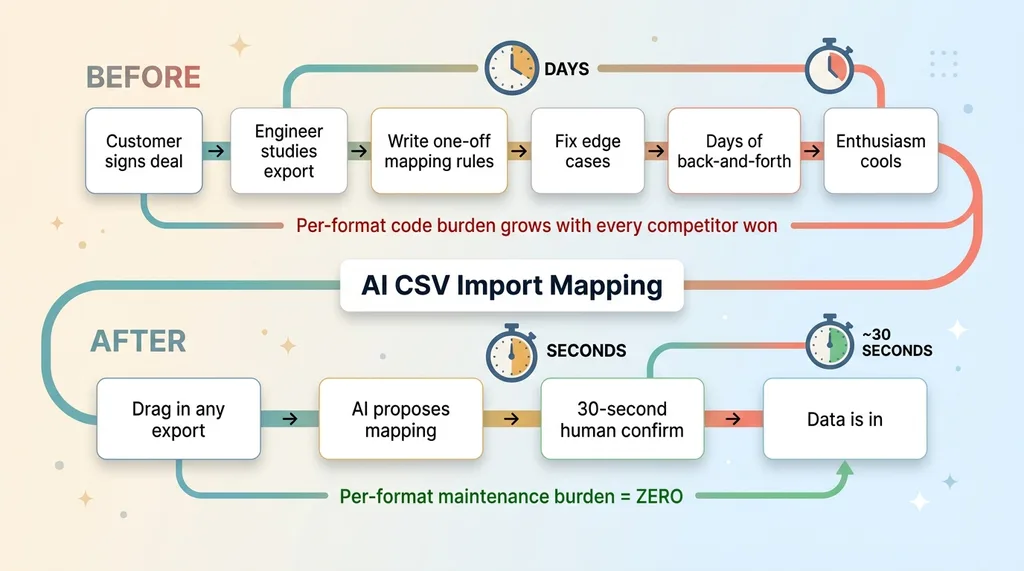 Before vs after: competitor migration onboarding
Before this pattern, a new customer's migration is a custom engineering project. Days of back-and-forth. An engineer studying their export, writing one-off mapping rules, fixing the edge cases that didn't show up until real data hit them. The rollout is blocked the entire time, and the customer's enthusiasm cools with every day they can't use what they bought.
After, the customer drags in whatever their old tool spat out and the import just works. The AI proposes the mapping, they spend 30 seconds confirming it, and their data is in. Whatever format. Whatever competitor. No engineer required.
That changes the sales conversation. "We'll lose all our data" goes from a deal-killing objection to a non-issue you can demo live. Migrating off a competitor stops being the scary part and becomes the easy part. For a buyer who's been burned by a painful migration before, that's often the thing that closes them.
And the per-format import code goes from a growing maintenance burden to zero. You're not writing a new profile for every tool you win customers from. The same system handles all of them.
I've spent the last couple years replacing per-case manual work with systems like this across a lot of apps. The strategic point is always the same: this is the difference between winning a switching customer and losing them to migration friction. The product was never going to be the reason they left their old tool. The migration was the reason they almost didn't.
Build This Into Your App, Not Around It
The mistake is treating this as a bolt-on import tool you go buy. It isn't. It's an architectural pattern you build into the product so onboarding stops being a bottleneck in the first place.
And the pieces are simpler than they sound. You need a schema definition that names your valid target fields. A model call that reads the uploaded file plus a sample of its values and proposes a mapping constrained to that schema. A confirm UI where a human reviews and corrects before anything commits. And a deterministic validation-and-commit step that does the actual writing.
That's it. Four primitives. I've built versions of this for several apps now, and the pattern transfers cleanly from one to the next because the hard part, reading meaning from messy data, is the same problem everywhere. You're not rebuilding it per customer or per competitor. You build it once and it absorbs whatever shows up.
Get the next build note.
I write up each system I build, including what broke. Subscribe to my newsletter and I'll send you the next one.