I Built an AI Job Search Command Center That Actually Works
AI job search automation that scores resumes against real listings, scrapes company intel, and surfaces matches. Here's how I built it for a client.
By Mike Hodgen
The job search process is fundamentally broken, and almost nobody is building real systems to fix it. A client came to me in the middle of a career transition — senior-level, strong background, doing everything the career coaches tell you to do. They'd applied to over 50 roles in six weeks. One callback. One. That's not a resume problem. That's a systems problem. So I built an AI job search automation system that treats the search like what it actually is: a sales pipeline, not a lottery ticket.
Why Job Searching in 2026 Still Feels Like 2014
Here's what most job seekers are working with: Indeed, LinkedIn, maybe Glassdoor. They open eight browser tabs, scroll through listings that are half-duplicates, copy-paste the same resume into another ATS portal, and hit submit. The Bureau of Labor Statistics puts the average job search effort at around 11 hours per week. Most of that time is spent on activities that produce nothing — browsing listings they'll never apply to, reformatting resumes for different upload systems, and staring at the same "tailor your resume to each role" advice that every career blog repeats without telling you how.
The advice itself is correct. Tailoring works. The problem is execution. Nobody is going to meaningfully customize their resume 40 or 50 times. So they don't. They send the same document to a marketing manager role, a product manager role, and a strategy director role, and they wonder why they get ghosted.
My client was doing exactly this. Smart person, good experience, completely wasting their time. They didn't need a better resume template. They needed a system that could do the research, the matching, and the gap analysis at speed — so they could focus their limited energy on the applications that actually had a shot.
That's what I built. Not a chatbot. Not a Chrome extension. A command center.
What the AI Job Search Command Center Actually Does
The system has three core components that work together. Each one handles a specific part of the job search workflow that humans either do poorly, do inconsistently, or skip entirely.
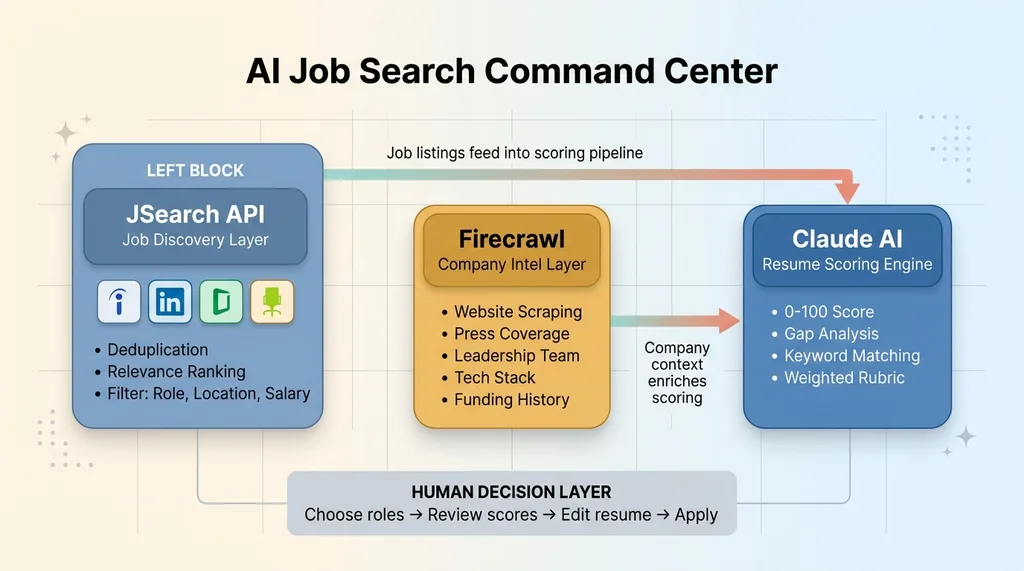 AI Job Search Command Center Architecture
Live Job Search via JSearch API
The first layer is job discovery. The system connects to the JSearch API, which aggregates live listings across multiple job boards — Indeed, LinkedIn, Glassdoor, ZipRecruiter, and dozens of smaller niche boards. Instead of opening five tabs and running the same search with slightly different keywords, the client sets their filters once: role type, location (or remote), salary range, experience level, recency.
The system returns deduplicated results ranked by relevance. No more finding the same posting three times across different boards. No more clicking into a listing only to discover it was posted six weeks ago. The filters are tight enough that you're looking at 15-30 high-relevance results instead of scrolling through 400 mediocre ones.
Company Intel Scraping With Firecrawl
Before you apply anywhere, you should know what you're walking into. The second component uses Firecrawl to scrape the target company's website, recent press coverage, leadership team info, tech stack (from job postings and engineering blogs), funding history, and any recent layoffs or restructuring.
This gets compiled into a one-page briefing document. Think of it like a pre-meeting dossier. The kind of research that a good executive recruiter does before making an introduction — except the system produces it in about 90 seconds per company. I built a competitive intelligence system using a similar approach for ecommerce competitor monitoring, and the architecture translated directly to this use case.
AI Resume Scoring Against Specific Descriptions
The third component is where the real value lives. The system takes the client's master resume — their complete, everything-included document — and scores it against each specific job description on a 0-100 scale.
Claude handles the scoring and analysis. It doesn't just look at keyword overlap. The rubric evaluates keyword match percentage, years-of-experience alignment, hard skill coverage, soft skill relevance, and industry context. Each factor is weighted differently depending on the role type. A technical role weights hard skills heavier. A leadership role weights management experience and scope of impact.
The output isn't just a number. It's a detailed breakdown: here are the keywords you're missing, here's where your experience is thin, here's what you should lead with. This is AI resume scoring with actual teeth, not the vague "your resume looks good!" that most tools produce.
These three components are coordinated, not siloed. JSearch results feed into the scoring pipeline automatically. Company intel enriches the context for each application. It's a system, not three separate tools duct-taped together. The multi-model architecture — using different AI models for different tasks based on what they're actually best at — is what makes this work reliably.
Why Generic Resume Advice Fails (And AI Matching Changes the Math)
"Tailor your resume for each role."
 Resume Score Transformation: 34 to 78
You've heard this a hundred times. It's correct. It's also nearly impossible to execute at the scale a real job search demands. If you're applying to 30-50 roles over a few weeks, and each tailoring session takes 45 minutes to an hour if you're doing it properly — that's 22 to 50 hours of just resume editing. On top of the searching, the researching, the networking, the interview prep. People burn out after five applications and revert to copy-paste mode. Completely understandable. Completely self-defeating.
The command center changes this math by telling you exactly what to change for each role. Not "make it more relevant." Specific changes.
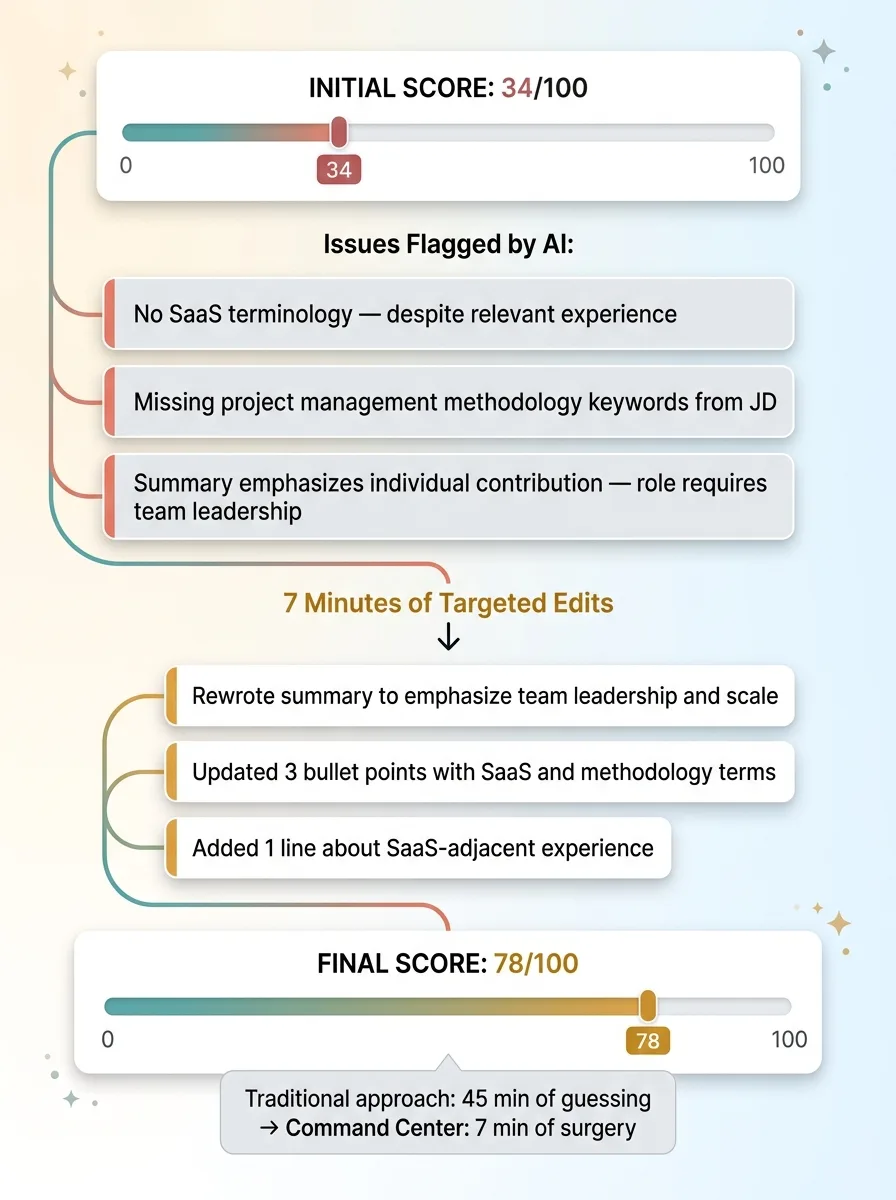
Here's what happened with the client. Their master resume scored 34/100 against their top-choice role — a director of operations position at a mid-market SaaS company. The system flagged three issues: no mention of SaaS anywhere in the resume (despite relevant experience), no reference to the specific project management methodologies listed in the JD, and a summary section that emphasized individual contribution when the role description emphasized team leadership.
The client didn't rewrite their resume. They edited the summary, updated three bullet points to include the right terminology, and added one line about their SaaS-adjacent work. Rescored: 78/100. That's not a reinvention. That's surgery. Seven minutes of edits versus 45 minutes of guessing.
This is also what AI career tools should be doing with ATS optimization. The system identifies exact phrases from the job description — not just general keywords, but the specific compound terms like "cross-functional stakeholder management" or "revenue operations strategy" — that are missing from the resume. When recruiters say "tailor your resume," this is what they mean. They just never spell it out because most of them do it intuitively.
The Company Intel Layer Most Job Seekers Skip
I've hired people. I've read hundreds of cover letters. The ones that stand out are the ones where the candidate clearly knows something about the company beyond what's on the job posting. It signals effort, genuine interest, and the kind of research mindset that translates directly to job performance.
The problem is that this research takes time. Thirty to forty-five minutes per company if you're being thorough. Reading their About page, checking Crunchbase for funding, scanning LinkedIn for the hiring manager, reading their blog to understand their voice, looking for recent news. Multiply that by 30 applications and you're looking at 15-20 hours of research alone.
The Firecrawl-powered briefing layer compresses this to about 90 seconds per company. It pulls the same information you'd find manually — what they actually do (not the LinkedIn tagline), who's on the leadership team, what their tech stack looks like, recent press mentions, funding rounds, headcount changes.
One briefing flagged that a target company had just closed their Series B and was actively expanding their data team. The client mentioned this specific detail in their cover letter — referenced the funding round, connected it to the company's stated growth goals, and explained how their experience scaling data operations at a similar stage would apply. They got a callback within 48 hours. Were they the most qualified applicant? Maybe not. Were they the most prepared? Almost certainly.
Ninety-five percent of applicants skip this research entirely. The command center made it trivially easy to be in the other five percent.
Building It: The Technical Decisions That Mattered
Why Not Just Use ChatGPT?
The most common question I get when I describe systems like this: "Couldn't you just paste your resume and the job description into ChatGPT?"
 ChatGPT vs Command Center: Why Standalone AI Falls Short
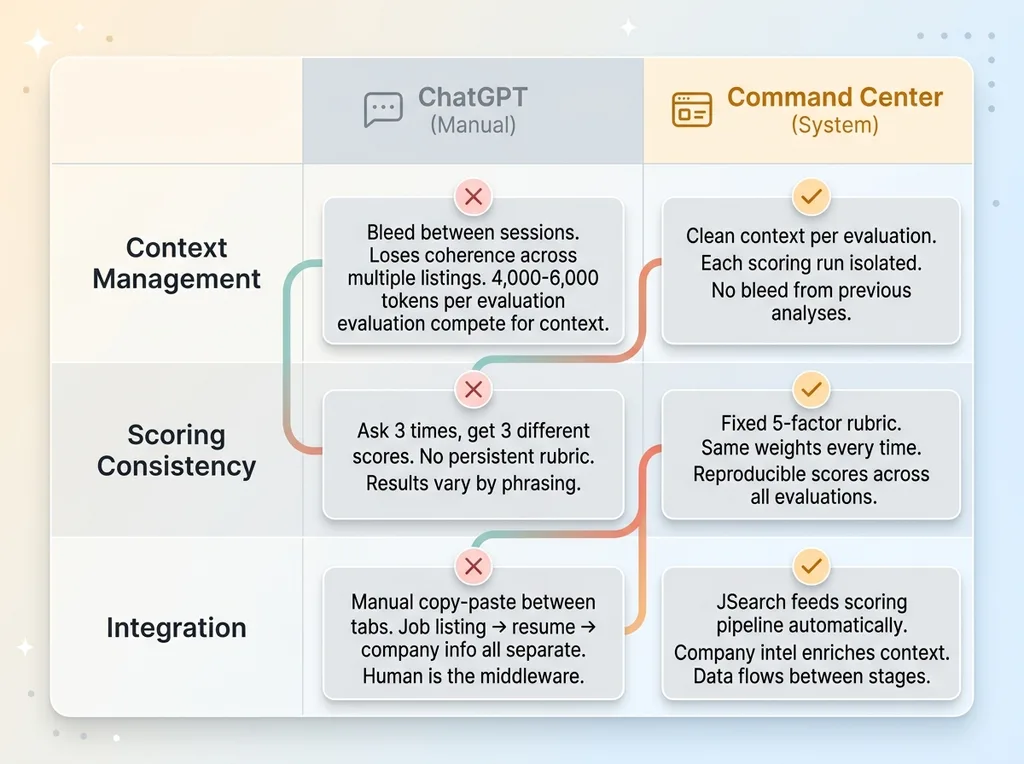
You could. It would give you something. But there are three specific reasons why that approach breaks down for serious use.
First, context management. A detailed resume, a full job description, and meaningful company intel together can run 4,000-6,000 tokens of input. That's within most model context windows, but once you're working across multiple listings in a session, you start losing coherence. The command center manages context per-evaluation, so each scoring run gets clean, complete input without bleed from the last one.
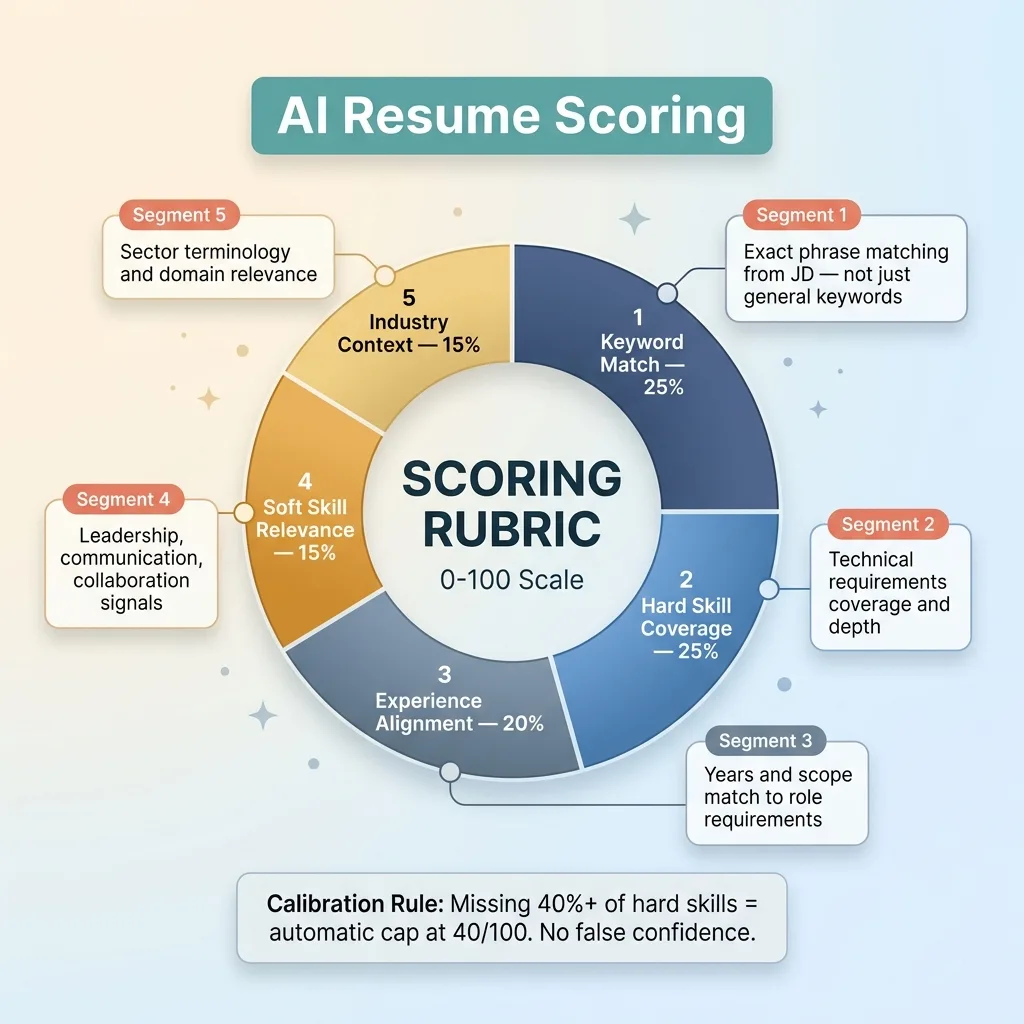
Second, consistency. Ask ChatGPT to score a resume three times and you'll get three different numbers. There's no persistent rubric. The command center uses a fixed evaluation framework — keyword match percentage (weighted 25%), experience alignment (20%), hard skill coverage (25%), soft skill relevance (15%), and industry context (15%). Same weights, same scoring bands, every time.
Third, integration. In the command center, JSearch results feed directly into the scoring pipeline. Company intel enriches the scoring context. You're not copy-pasting between browser tabs. The system moves data between stages automatically.
Scoring Calibration and Honest Feedback
The first version of the scoring engine was useless. Everything scored between 58 and 75. Claude, by default, is polite. It wants to be encouraging. For a job search tool, that's dangerous. Telling someone their resume is a 65/100 when it's actually a 34 means they submit it, get rejected, and blame the market instead of fixing the document.
 Resume Scoring Rubric Weights
I had to explicitly calibrate the rubric for honesty. The scoring prompt includes blunt instructions: a resume missing more than 40% of the role's stated hard skills should not score above 40 regardless of other factors. A resume with no industry-specific terminology should be flagged, not scored around. The client needed to see that 34 on their first pass. That number is what motivated the edits that produced the 78.
False confidence wastes time. In a job search, time is the one resource you can't get back.
Results: From 2% Response Rate to 38%
Before the command center, my client was running a spray-and-pray operation. Roughly 50 applications over six weeks. One callback. That's a 2% response rate, which is actually close to the national average for untargeted applications. Average doesn't mean acceptable.
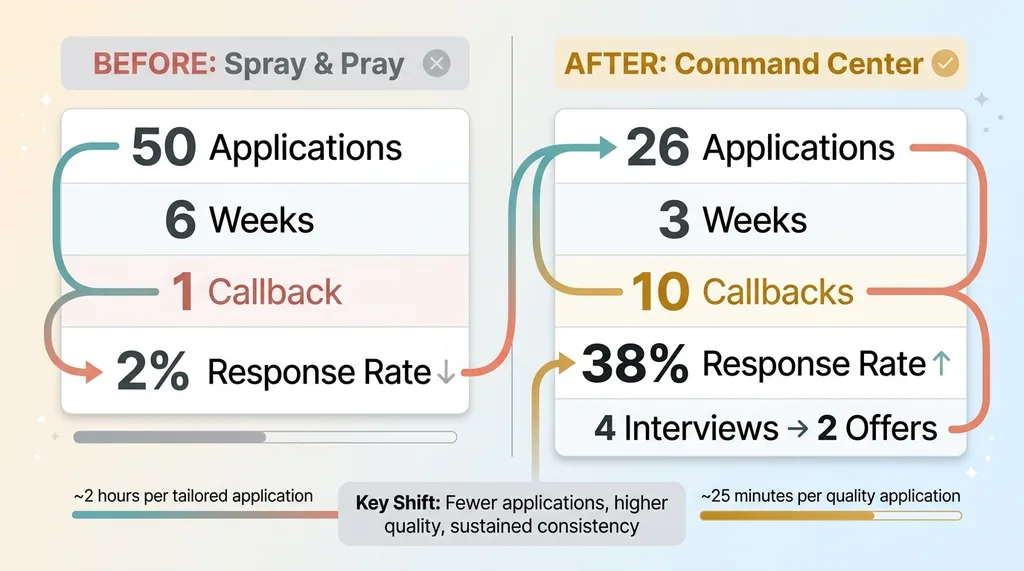 Before vs After: Job Search Results Comparison
After three weeks using the system, the numbers looked different:
- 26 applications sent (down from 50 — fewer, more strategic)
- 10 callbacks received (38% response rate)
- 4 interviews scheduled
- 2 offers received
The key metric isn't the response rate, though that's obviously better. It's the time investment per quality application. Before the system, the client estimated about 2 hours per genuinely tailored application — when they bothered to tailor at all. With the command center, that dropped to roughly 25 minutes. Research, scoring, gap analysis, and targeted edits included.
That's not just faster. It means they could sustain quality across every single application instead of burning out after five and reverting to the generic resume. Consistency is the thing that automated job search systems make possible. Not perfection on one application — sustained quality across all of them.
This Pattern Works Beyond Job Searching
The job search command center is a specific application of a pattern I build over and over. Take a process that people do manually — badly, inconsistently, or not at all. Break it into components. Let AI handle the parts it's genuinely good at: research aggregation, pattern matching, scoring against rubrics, data compilation. Keep humans in the decision seat for the parts that matter: which roles to pursue, how to frame their experience, whether an opportunity actually fits their life.
My client still chose which jobs to apply to. Still wrote the final drafts. Still decided which offers to negotiate. The AI handled the tedium that determines whether the human effort lands or gets buried.
If you're running a business, this same architecture applies to sales prospecting, vendor evaluation, competitive analysis, candidate screening — anywhere you have humans doing repetitive research and matching work before making a judgment call. The pattern is the product.
Want to Build Something Like This for Your Team?
If any of this resonated — whether you're thinking about your own hiring pipeline, your sales process, or any workflow where smart people are spending hours on tasks that should take minutes — I'd like to hear about it.
I do free 30-minute discovery calls where we look at your operations and figure out where AI systems could actually move the needle. No pitch deck. Just an honest conversation about what's possible and what isn't.
Book a Discovery Call or tell me about your situation and I'll follow up personally.
Get AI insights for business leaders
Practical AI strategy from someone who built the systems — not just studied them. No spam, no fluff.
Hodgen.AI
Ready to automate your growth?
Book a free 30-minute strategy call with Hodgen.AI.
Book a Strategy Call