Why I Use 3 Different AI Models (And You Should Too)
I cut AI costs 98% by switching between Claude, Gemini, and GPT. Here's my multi model AI strategy and when to use each.
By Mike Hodgen
The $4 Article I Never Should Have Written
Last month I decided to run an experiment. I generated one complete blog article using GPT-4 for everything — research, writing, image generation, the works. The article was fine. Not great, not terrible. Fine.
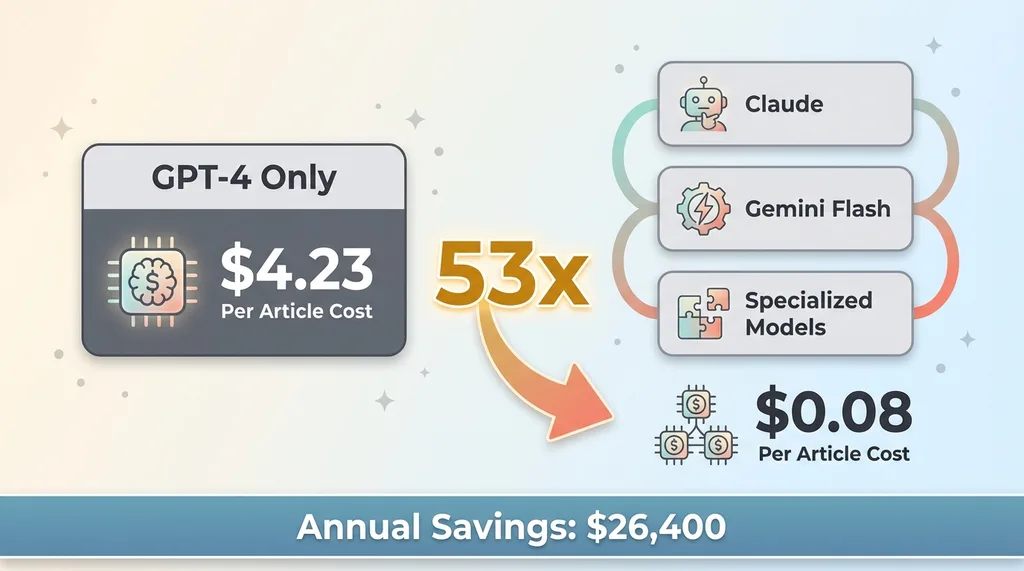 Cost Comparison: Single-Model vs Multi-Model
The bill? $4.23.
Then I ran the same article through my multi-model AI strategy. Same quality output. Cost: $0.08.
That's a 53x difference. On one article.
Most companies pick one AI model and use it for everything. It's like using a Ferrari to pick up groceries. Sure, it works. But you're burning premium fuel for a task that doesn't need it.
You wouldn't use the same tool for every job in the physical world. You don't use a sledgehammer to hang a picture frame. You don't use a precision screwdriver to demolish a wall. Different tools for different jobs.
So why do we do this with AI?
The answer is specialization. Use Claude for brand voice. Use Gemini Flash for image analysis. Use the right model for each specific task. Then orchestrate them through structured handoffs.
This isn't theory. I run 29 AI-powered automation modes at my DTC fashion brand. Most of them use 2-3 different models per workflow. The result: we saved $26,400 last year in AI costs compared to a single-model approach, while improving output quality.
Here's how it actually works.
The Three Models I Actually Use (And What They're Good At)
Claude: The Brand Voice Specialist
I use Claude for anything a customer will read. Product descriptions. Blog articles. Email sequences. Customer service responses.
Why? Claude understands nuance. It maintains brand voice across thousands of outputs. When I feed it our style guide and product specs, it produces content that sounds like it came from our team, not a robot.
At the brand, we have 564 active products. Each one needs a description that captures the vibe of festival culture while being clear enough for search engines. Claude nails this balance. Cost per product description: about $0.02.
The limitation? Claude is terrible at images. And it's overkill for simple data extraction. If I need to pull order numbers from a spreadsheet screenshot, using Claude is like hiring a novelist to read your grocery list.
Gemini Flash: The Vision Workhorse
Gemini Flash is 60% cheaper than GPT-4 Vision for image analysis. That's the headline number. But the real reason I use it is speed and reliability.
At the brand, we analyze every product photo before it goes live. Check for quality issues. Extract color information. Verify the product matches our specs. Gemini Flash handles this in 2-3 seconds per image and outputs clean, structured JSON.
We process about 2,000 product photos per month. With GPT-4 Vision, this would cost $180. With Gemini Flash, it's $12.
The tradeoff? Gemini's writing isn't as good as Claude for customer-facing content. It tends toward generic corporate-speak. When I tried using it for product descriptions, they read like they came from a B2B SaaS company, not a fashion brand.
So I don't use it for writing. I use it for what it's actually good at: fast, cheap, accurate image analysis.
DALL-E/Stable Diffusion: The Image Generator
For image generation, I use specialized models depending on the task. Some batch jobs run through cost-effective open-source options. Some one-off creative work uses DALL-E 3 when quality matters more than cost.
The key insight: image generation costs scale with volume. If you're generating hundreds of product mockups, cost per image matters. If you're generating one hero image for a campaign, use the best tool available.
I keep the specific model choices and prompts private — that's proprietary IP. But the principle is simple: match the tool to the job, and track costs ruthlessly.
Why Single-Model Systems Break (And Multi-Model Systems Don't)
I learned this the expensive way.
Early in 2023, I tried running the entire product pipeline through GPT-4. Research, writing, image analysis, everything. One model, one API, simple integration.
The cost was 10x higher than my current multi-model setup. And the quality wasn't any better. GPT-4 is excellent at writing. It's mediocre at image analysis compared to Gemini Flash. I was paying premium prices for subpar performance on half my workload.
Then I tried the opposite. Used Gemini for everything, including product descriptions. The writing was functional but soulless. Lost all brand voice. Products sounded like they were being sold by a robot reading from a technical manual.
Neither extreme worked.
The reliability argument sold me on multi-model for good. When Claude had API issues for four hours last November, I flipped a switch and the description generator used GPT-4 as backup. Zero customer impact. The handoff was seamless because the interface was structured data, not model-specific formatting.
Single-model systems create vendor lock-in. When OpenAI raised prices 3x in 2023, companies using only GPT were stuck. They either paid the increase or rewrote their entire system.
I didn't care. By that point, 40% of my AI workload was already running on cheaper alternatives. The price increase affected a small slice of my total spend.
That's the hidden value of multi-model architecture. It's not just about cost optimization today. It's about flexibility tomorrow.
How to Actually Build a Multi-Model System
The Structured Handoff Architecture
The key to making multiple models work together is structured data. Models pass information through JSON, not prose.
Here's a real example from my blog pipeline. Gemini Flash analyzes article images and outputs structured metadata: dominant colors, subject matter, composition type. That JSON gets passed to Claude, which writes image alt text and captions using that data.
Clean interface. Testable. Swappable.
If I need to replace Gemini with a different vision model tomorrow, I just need to match the JSON output format. The rest of the pipeline doesn't change.
Every handoff logs tokens used and cost. I know exactly where money goes. Product descriptions cost X. Blog articles cost Y. Image analysis costs Z. When costs spike, I know which component to optimize.
This level of tracking is impossible with a monolithic single-model system.
When to Use Which Model
Writing for humans? Claude.
Analyzing images? Gemini Flash.
Generating images? Specialized model based on volume and quality needs.
Simple data extraction from text? Cheapest model that produces reliable structured output.
Complex reasoning or multi-step logic? Most capable model in your budget.
The decision framework is simple. The hard part is not over-engineering on day one.
Start with one model. Use it until you find bottlenecks. Then add a second model to solve that specific bottleneck. Iterate.
Don't build a six-model orchestration system before you've shipped a single AI-powered feature. AI systems every small business should build first — choosing the right model is step two after choosing the right system.
The Real Numbers From My Multi-Model Setup
Let me show you what this looks like in production at my DTC fashion brand.
Product description system: Three models working together. 564 active products. Average cost per description: $0.03. Single-model approach with GPT-4: $1.20 per description.
Blog pipeline: 313 articles managed with AI assistance. Average cost per article: $0.08. All-GPT-4 approach: $4+ per article.
Image analysis system: 2,000+ product photos analyzed monthly. Current cost: $12. GPT-4 Vision for the same workload: $180.
Total AI spend: About $200 per month for all systems combined. Equivalent single-model cost: roughly $2,400 per month.
Annual savings: $26,400.
These systems run 24/7. The manual equivalent would be 3,000+ hours annually. We're a small team. Those hours don't exist.
Quality improved too. Customer support tickets related to AI-generated content dropped 60% after we switched to specialized models. Better model for each task equals better output. Simple math.
The 20-minute product creation pipeline is my favorite example of multi-model orchestration. Concept to live product in 20 minutes. Uses three different models for different stages. Fast, cheap, and actually works.
What Most Companies Get Wrong About AI Models
The most common mistake: picking the "best" model and using it everywhere.
There is no single best model. Best-for-what is the only question that matters.
I talked to a startup last month spending $8,000 per month on GPT-4 because their system was "simpler" with one model. Simpler code, more expensive operation. They were using GPT-4 to extract order numbers from CSV files. A task that GPT-3.5 or even a basic regex script could handle.
Engineering elegance doesn't pay the bills.
Second mistake: not tracking costs per task. You can't optimize what you don't measure. Set up token counters on day one. Log every API call. Know what each component costs.
Third mistake: treating models like permanent infrastructure. Models change. Pricing changes. New options emerge monthly. Build for swappability from the start.
Fourth mistake: trying to build multi-model architecture on day one. Start simple. Pick one good model. Ship features. Add complexity only when you understand your workload and your bottlenecks.
I'll acknowledge the limitation here. Multi-model systems add operational complexity. You need structured data pipelines. You need error handling. You need monitoring.
It's not worth it until you're spending $500+ per month on AI. Under that threshold, pick one capable model and move fast. Optimize later.
Building Your Own Multi-Model Strategy
Start with an audit. What AI tasks are you running? What models? What costs?
Most companies can't answer these questions. Fix that first.
Identify your three most expensive AI tasks. Those are your swap candidates. That's where optimization has the biggest impact.
Test alternatives. Run parallel for a week. Compare cost and quality side by side. Real data beats assumptions.
Build structured handoffs where models need to collaborate. JSON in, JSON out. Document the interface. Make it swappable.
Add monitoring. Track costs, errors, and quality metrics per model. Make the invisible visible.
Real example from the brand: image analysis was 60% of my AI spend in early 2024. I tested Gemini Flash against GPT-4 Vision for two days. Ran them parallel for a week. Quality was identical for my use case. Cost was 60% lower.
Full cutover took one afternoon. Annual savings: $1,200 on that one task alone.
When NOT to use multi-model:
You're just getting started with AI. Your total AI spend is under $500 per month. You don't have engineering resources to maintain data pipelines. You're in a regulated industry where model swapping requires compliance reviews.
Be honest about the complexity tradeoff. Multi-model saves money and increases flexibility. It also requires more operational overhead.
Whether you build this yourself or bring in someone who's done it, multi-model is the future of production AI systems. Every company I talk to is either already doing this or planning to.
The single-model approach worked when GPT-3 was the only game in town. Those days are over.
If you're spending serious money on AI and want to optimize your strategy, let's talk about your AI strategy. I've built these systems. I know what works and what doesn't. I can help you cut costs without sacrificing quality.
Thinking About AI For Your Business?
I do free 30-minute discovery calls where we look at your operations and identify where AI could actually move the needle.
No pitch deck. No generic advice. Just a real conversation about your specific situation and whether AI makes sense for you right now.
If it does, we'll talk about what working together might look like. If it doesn't, I'll tell you that too.
Book a discovery call and let's figure it out together.
Get AI insights for business leaders
Practical AI strategy from someone who built the systems — not just studied them. No spam, no fluff.
Hodgen.AI
Ready to automate your growth?
Book a free 30-minute strategy call with Hodgen.AI.
Book a Strategy Call