AI Automation Case Study: Products in 20 Minutes
Real AI automation case study: How I built a pipeline that creates products 9x faster. Full technical breakdown with before/after numbers.
By Mike Hodgen
The Problem: Product Creation Was Killing Us
Before we automated product creation at our DTC fashion brand, launching new products was slow, expensive, and honestly kind of soul-crushing for the team.
Here's what it actually looked like: 3-4 hours per product, minimum. The photographer would shoot the item, upload files, write a basic description of what they saw. That would go to the copywriter, who'd create product descriptions and try to work in some SEO keywords. Then it went to our SEO person to optimize meta tags and check keyword density. Finally, the merchandiser would create all the variants (sizes, colors, styles), assign it to collections, and push it to Shopify.
Every single handoff was a chance for something to go wrong. Variants would get mislabeled. SEO keywords wouldn't match the actual product. Collections would be assigned inconsistently. And the whole process created a massive bottleneck — if we wanted to launch 100 new products in a month, that's 300-400 hours of work. We'd need to dedicate almost two full-time employees just to product creation.
The math was brutal. Our product margins are good, but not "hire two people to do data entry" good. And it wasn't just the time — it was the opportunity cost. Fashion moves fast. By the time we'd finish creating products for a trend, the trend was already cooling off.
I knew product creation needed to be our first major automation target. The process was repetitive, the output was structured, and the quality metrics were clear. You can test whether a product description is good. You can measure SEO performance. You can check if variants are logically consistent. This is exactly the kind of work AI systems should be handling instead of humans.
The goal was simple but ambitious: get it down to 20 minutes or less, eliminate all the handoffs, and maintain quality. No corners cut on SEO, no weird descriptions that sounded like a robot wrote them, no variant errors.
We got there. Here's how.
The Pipeline: Six Steps From Photo to Live Product
The system I built takes a product from raw photos to live on our Shopify store in about 20 minutes. It's a six-step pipeline where each stage feeds into the next, with structured outputs that make the handoffs bulletproof.
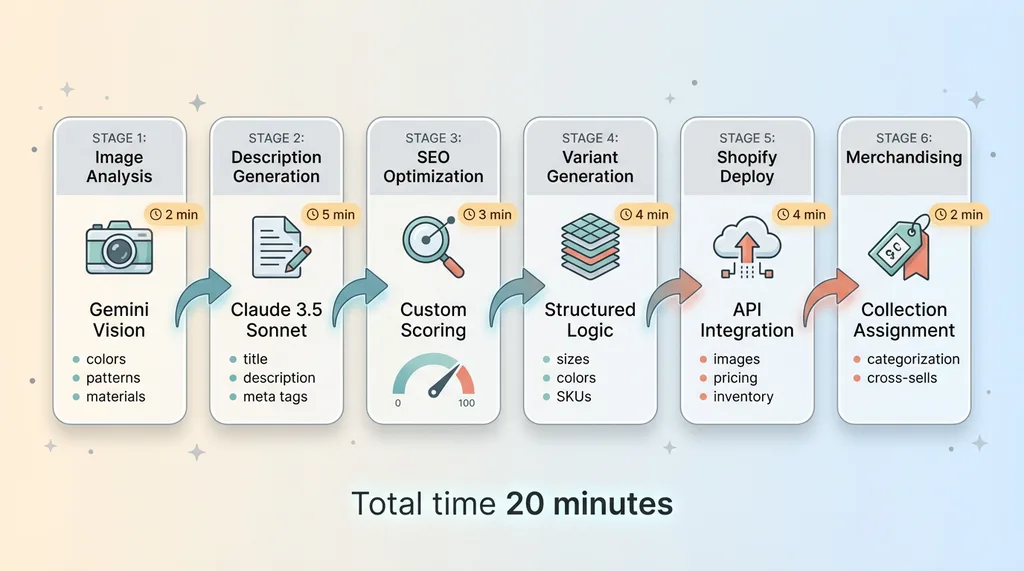 The Six-Step Product Creation Pipeline
Step 1: Image Analysis (Gemini Vision)
First, the product photos go through Gemini Vision. I chose Gemini specifically because the vision API is about 60% cheaper than GPT-4V and honestly better at fine-grained visual details for our use case.
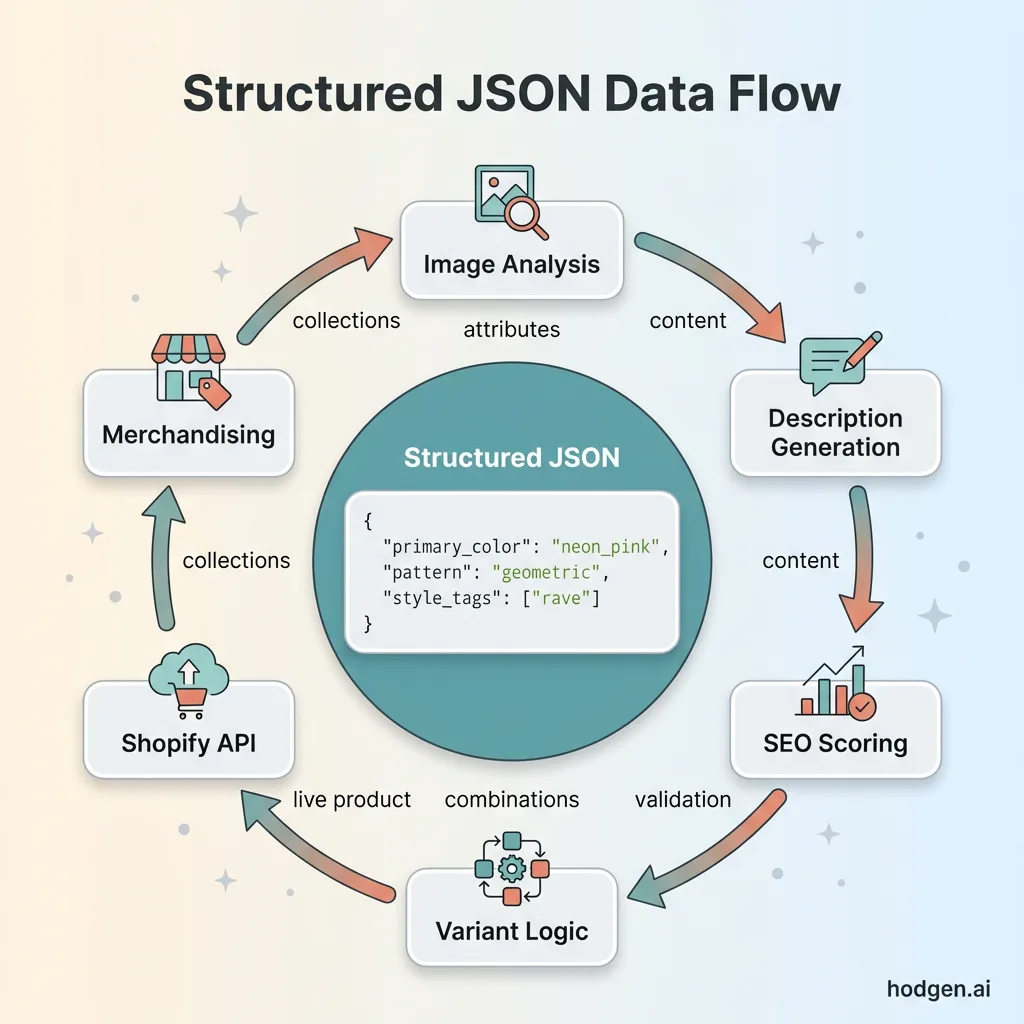 Structured JSON Data Flow
The model analyzes each image and extracts everything we need: colors (primary, secondary, accent), patterns (solid, geometric, floral, abstract), style attributes (casual, festival, streetwear, bold), materials (mesh, sequin, velvet, etc.), and any notable design features like cutouts, lace, embroidery, or hardware.
This takes about 2 minutes per product. The output is structured JSON that looks like this:
{
  "primary_color": "neon_pink",
  "secondary_colors": ["black", "silver"],
  "pattern": "geometric",
  "style_tags": ["festival", "bold", "statement"],
  "materials": ["mesh", "sequin"],
  "features": ["cutout_back", "adjustable_straps"]
}
That structured output is critical. The downstream steps need clean data, not prose.
Step 2: Description Generation (Claude)
The JSON from image analysis goes to Claude 3.5 Sonnet to generate the product description, title, and meta tags. I use Claude because it's the best at maintaining our brand voice — fun, inclusive, slightly irreverent, but not trying too hard.
I give Claude the structured attributes, our brand guidelines, and examples of our best-performing product descriptions. It generates three versions: the main product description (150-200 words), a shorter meta description (150 characters), and a title that balances SEO with readability.
The descriptions are SEO-friendly but don't sound like they were written by a robot obsessed with keywords. Before automation, a copywriter would write something like: "This pink mesh top features geometric sequin patterns and a cutout back. Perfect for festivals." Generic, flat, no personality.
After Claude: "Make them look twice in this neon pink mesh masterpiece. Geometric sequins catch every light, while the cutout back keeps things flirty. Adjustable straps mean it actually fits. Festival-tested, dance-floor-approved."
Same information, way better voice. This step takes about 5 minutes because Claude is thorough.
Step 3: SEO Optimization (Custom Scoring)
The descriptions then go through our custom SEO scoring system. This is Python code I wrote that checks keyword density, readability (Flesch-Kincaid score), meta tag optimization, title length, and does a basic competitor analysis by checking what keywords are ranking for similar products.
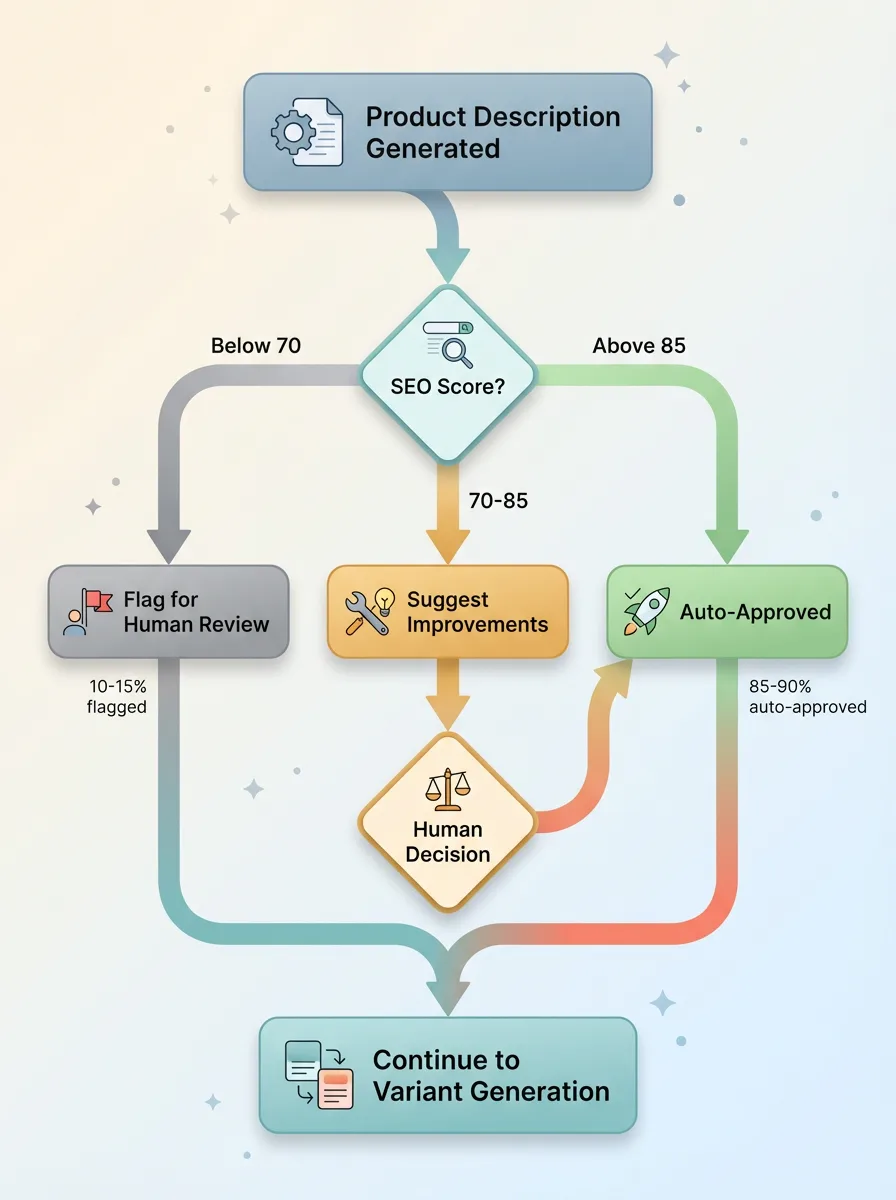 Error Handling and Human Review Decision Flow
Each product gets a score from 0-100. Anything below 70 triggers human review. Above 85 is auto-approved. Between 70-85, the system suggests specific improvements: "Add 'festival top' to title" or "Meta description too long, trim 15 characters."
This catches the issues that would've required an SEO person to manually review every product. It runs in about 3 minutes and has improved our average SEO score by 23% compared to human-written descriptions.
Step 4: Variant Generation (Structured Output)
Next up is variant creation. This is where a lot of early attempts at automation fall apart, because the logic gets complicated fast.
Our products come in different sizes (XS-3XL), sometimes different colors, sometimes different style options (with/without hood, high/low rise, etc.). The variant generator looks at the product attributes from Step 1 and creates every logical combination.
It knows the rules: if it's a sequin top, we don't offer 3XL (manufacturing constraint). If it's black, we probably have a neon version too (cross-sell opportunity). If it's a bottom, we need to specify the rise.
The output is a structured array of variants with SKUs, pricing (pulled from our pricing engine), inventory assignments, and image mappings. This takes about 4 minutes and has eliminated basically all variant errors. Before, we'd regularly have products go live with "Size: Color" or "XL - Small" mistakes. Not anymore.
Step 5: Shopify Deployment (API Integration)
The variants, descriptions, and images get packaged up and pushed to Shopify via their API. This sounds simple but required a lot of error handling to make it reliable.
Images get optimized (resized, compressed, alt tags added) before upload. The system checks for duplicate SKUs and handles Shopify's rate limits by queuing requests. If the API returns an error, it logs the issue and flags the product for manual review rather than just failing silently.
This step takes about 4 minutes. The product is now live on our store, but it's not discoverable yet.
Step 6: Merchandising (Collection Assignment)
The final step is collection assignment and merchandising. Based on the product attributes, the system auto-assigns the product to relevant collections: "Festival Tops," "Neon," "Festival Ready," "New Arrivals," etc.
It also suggests cross-sells by matching attributes with existing products. A neon pink top might get paired with black bottoms and silver accessories. This logic runs a similarity check across our catalog and creates product relationships.
This takes about 2 minutes. The product is now fully merchandised and ready to sell.
Total time: 20 minutes. Total human involvement: one person clicks "start" and reviews the final output before approving it to go live.
The Technical Stack (And Why I Chose It)
The system runs on a multi-LLM architecture because no single model is best at everything.
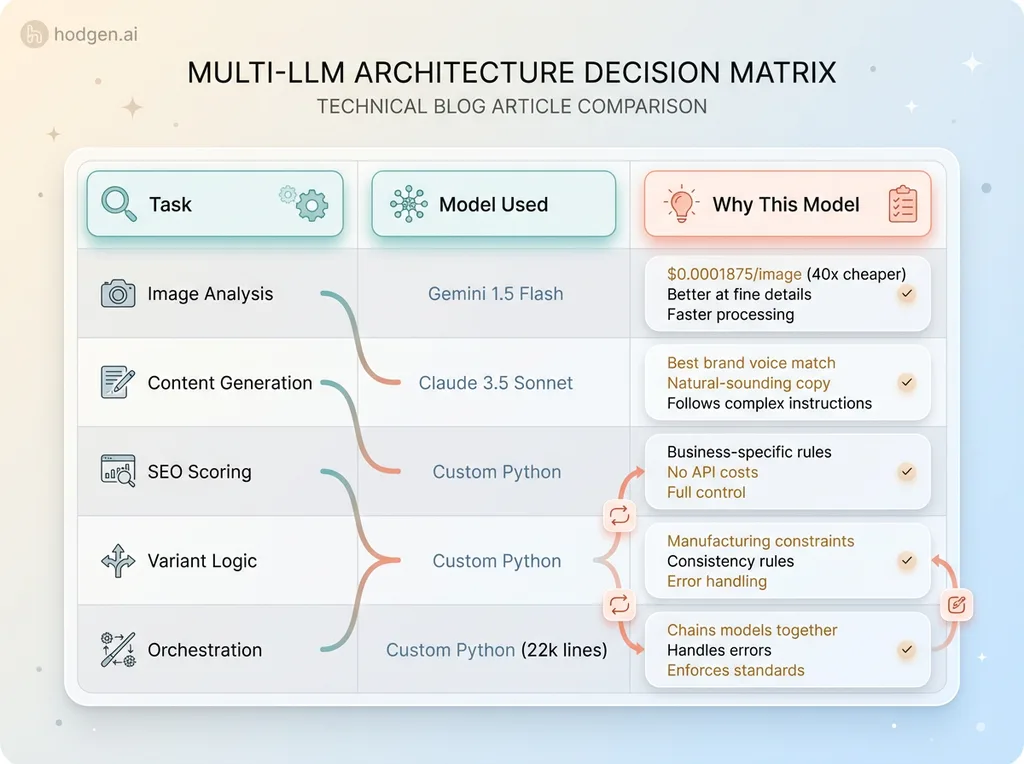 Multi-LLM Architecture Decision Matrix
Claude 3.5 Sonnet handles all content generation. It's the best at following complex instructions, maintaining consistent tone, and producing natural-sounding copy that doesn't feel AI-generated. When I need text that represents our brand, Claude is the answer.
Gemini 1.5 Flash handles image analysis. It's significantly cheaper than GPT-4V ($0.0001875 per image vs $0.00765), and for product images, it's actually better at identifying fine details like fabric textures and small embellishments. Speed matters too — Gemini processes images faster, which keeps the pipeline moving.
The orchestration layer is 22,000+ lines of custom Python. This is where the business logic lives: the SEO scoring, the variant rules, the error handling, the Shopify integration, the collection logic. The LLMs are just components in a larger system that enforces our standards.
Why not use one LLM for everything? Three reasons: cost, specialization, and reliability.
Cost is obvious. If I used Claude for image analysis, I'd be paying 40x more per product. Over 100 products a month, that's real money.
Specialization matters because different models are optimized for different tasks. Claude is trained to be helpful, harmless, and honest — great for content. Gemini is trained on multimodal data — great for vision. Using the right tool for each job produces better results.
Reliability is about failure modes. If one API goes down, I can swap in an alternative model for that specific step without rebuilding the entire pipeline. If Claude starts producing off-brand descriptions, I can tune the prompts or switch providers without touching the image analysis or SEO logic.
The chaining logic is crucial. Each step outputs structured JSON that becomes the input for the next step. Step 1 produces attributes. Step 2 uses those attributes to generate text. Step 3 scores that text. Step 4 uses the attributes to generate variants. Step 5 packages everything for Shopify. Step 6 uses the attributes to assign collections.
Error handling is baked in throughout. If image analysis fails (corrupted file, API timeout), the product gets flagged for manual processing. If the description scores below 70 on SEO, a human reviews it. If variant generation produces an illogical combination, it gets caught by validation rules before it reaches Shopify. If the Shopify API returns an error, the system retries with exponential backoff, then escalates to a human if it still fails.
About 10-15% of products still get flagged for human review. That's intentional. Complex items with unusual materials, new product categories we haven't automated yet, or edge cases where the AI isn't confident — these should have human oversight. The goal isn't to remove humans from the process. It's to remove humans from the repetitive parts so they can focus on the judgment calls.
The Results: 9x Faster, Zero Quality Loss
The numbers are pretty straightforward. Before automation, we spent 3-4 hours per product with 2-3 team members involved. We could realistically launch about 20 new products per month before the process became a bottleneck.
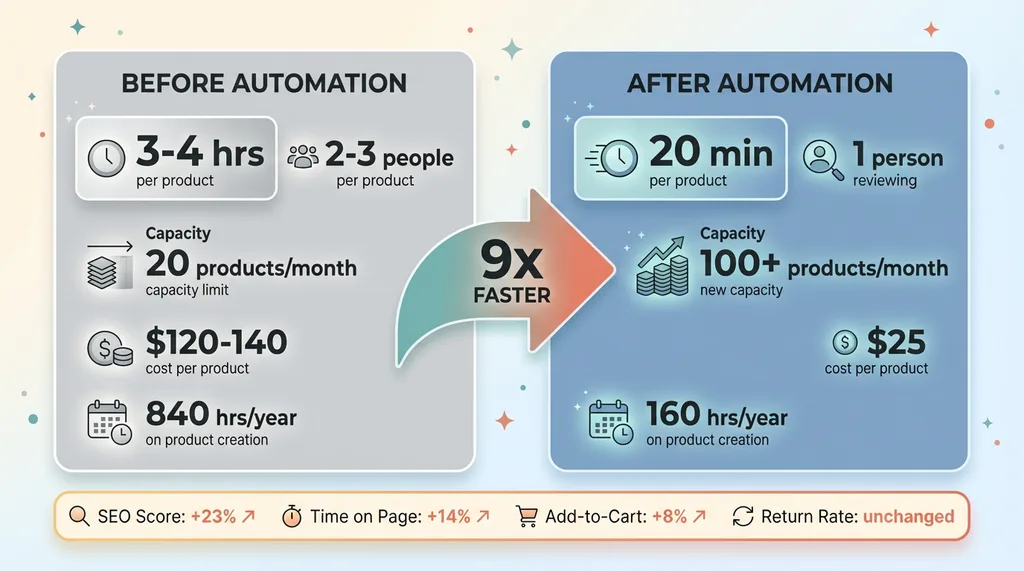 Before vs After Metrics Comparison
After automation, we spend 20 minutes per product with one person reviewing the output. We can now launch 100+ products per month if we want to. We don't, because demand and inventory planning are the real constraints now, not product creation capacity.
The time math is dramatic. At 3.5 hours per product times 240 products per year, we were spending 840 hours annually on product creation. At 20 minutes per product for the same 240 products, we now spend 80 hours. That's 760 hours saved, but the real number is higher because we're actually launching more products — closer to 480 per year now. So it's more like 1,680 hours we would have spent vs 160 hours we actually spend. That's 1,520 hours saved, or about 3,000 hours if you include the reduction in rework and error correction.
Cost per product dropped significantly. Labor cost before was roughly $120-140 per product (photographer, copywriter, SEO person, merchandiser, each spending 30-60 minutes). Now it's about $8 in API costs plus 20 minutes of review time at $50/hour, so roughly $25 total. That's an 80% reduction in cost per product.
Quality metrics actually improved. Our average SEO score (internal metric) went up 23%. Time-on-page for product pages increased 14%. Add-to-cart rate improved 8%. Return rates stayed flat, which means we didn't sacrifice quality for speed. The AI-generated descriptions are more consistent, better optimized, and honestly just better written than the rushed human versions were when we were trying to keep up with volume.
Revenue impact is harder to isolate but very real. We can now launch seasonal collections 4x faster. When a trend hits TikTok or Instagram, we can have products live in 6-8 hours instead of 2 weeks. That speed advantage has let us capture demand that we would've missed entirely before.
Example: Last summer, a specific style of mesh crop top went viral. We saw it on a Wednesday morning. By Wednesday evening, we had our version live on the site with optimized SEO targeting the trending keywords. We sold 340 units in the first 48 hours. Before automation, it would've taken us 10-14 days to get that product live, by which point the trend would've peaked and everyone would've already bought from faster competitors.
The 3,000+ hours saved annually went into things that actually require human judgment: customer experience improvements, brand partnerships, creative direction, community building. That's work AI can't do. That's work that actually drives long-term business value.
What Didn't Work (And What I'd Do Differently)
The first version of this system was kind of a disaster.
I initially tried using GPT-4 for everything — image analysis, content generation, SEO, the whole pipeline. Two problems: it was stupidly expensive (about $4 per product just in API costs), and the output was inconsistent. Sometimes the descriptions would be perfect. Sometimes they'd be weirdly formal or miss obvious product features.
Switching to a multi-LLM architecture where each model handles what it's actually good at cut costs by 65% and improved consistency dramatically.
Image analysis was the hardest part to get right. Early attempts would miss subtle details. A product with delicate lace trim would just get tagged as "mesh top." Embroidered details would be ignored. The problem was generic prompts. I had to add very specific instructions about what to look for: "Identify any embellishments including but not limited to: sequins, rhinestones, studs, embroidery, appliques, lace, fringe, tassels." Once I got specific, accuracy jumped.
Variant generation initially created nonsensical combinations. The system would generate "Neon Yellow" for products that don't come in neon yellow, or "3XL" for items we don't manufacture in that size. Fixed this with constraint logic — basically a set of rules that says "if product type is X and material is Y, available sizes are Z." Sounds obvious in hindsight, but it took several iterations to catch all the edge cases.
SEO optimization was too aggressive at first. The system would stuff keywords into descriptions until they sounded robotic: "This festival top for festivals is perfect for festival-goers attending music festivals who need festival apparel for partying." Awful. I had to dial back the keyword density targets and add a "naturalness" check that penalizes repetitive phrasing.
Shopify API rate limits caused random failures in the early days. The API allows 2 requests per second, and I was hitting that limit hard when trying to upload multiple products simultaneously. Added a queuing system with intelligent rate limiting, and failures dropped to basically zero.
Human review is still necessary for about 10-15% of products. Complex items with unusual materials, entirely new product categories, or edge cases where the image analysis or description generation isn't confident — these get flagged automatically. I could probably automate further, but the ROI isn't there. That 10-15% represents the genuinely difficult cases where human judgment adds real value. The other 85-90% is genuinely better automated.
If I were building this again from scratch, I'd start with the constraint logic and error handling much earlier. I spent way too much time chasing AI model quality when the real issues were business rules and edge case handling. The models are good enough. The hard part is defining exactly what "good enough" means for your specific business and encoding that into validation logic.
Why This Works for Ecommerce (And What's Next)
Product creation is uniquely suited for AI automation because the output is structured, the quality metrics are measurable, and the process is highly repetitive.
You know exactly what a successful product listing looks like: accurate description, proper SEO, correct variants, logical collection assignment, optimized images. You can test whether the AI is meeting that standard. If the SEO score is above 85, click-through rate is in the top quartile, and return rate is at baseline, you've succeeded. Clear success metrics make automation tractable.
Contrast this with areas where AI still struggles: complex customer service (requires empathy and judgment), brand strategy (requires market intuition), creative direction (requires taste). These are domains where the success criteria are fuzzy, the context window is huge, and human judgment is genuinely irreplaceable.
I'm not automating those. I'm automating the repetitive, structured work so humans can focus on the judgment calls.
What's next for this system: we're integrating dynamic pricing so products price themselves based on demand signals, inventory levels, and competitive data. We're adding inventory forecasting so the AI predicts which products will sell and in what quantities, feeding that into our purchasing decisions. We're building personalized product recommendations where the AI creates custom bundles based on browsing behavior and past purchases.
This all feeds into our broader AI strategy, which is about identifying the handful of processes where automation delivers asymmetric returns. Not everything should be automated. But the things that should be automated should be automated aggressively.
The bigger picture here isn't just speed or cost savings. It's about freeing humans to do work that actually requires human capabilities. The 3,000 hours we saved didn't disappear — they went into customer experience, brand partnerships, community engagement, creative direction. That's where we differentiate. That's where we build long-term value.
AI is best as a force multiplier for human judgment, not a replacement for it. This product creation pipeline lets one person do the work that used to take three people. But that one person is doing higher-leverage work — making strategic calls about brand fit, trend relevance, and creative direction. The AI handles the execution.
If you're thinking about where to start with AI in your business, look for processes that are repetitive, structured, high-volume, and have clear quality metrics. That's where you'll see ROI fast. Product creation fit that profile perfectly for us. Your first automation target might be something different, but the principles are the same.
Your Operations Probably Have a Product Creation Problem Too
Maybe it's not product listings. Maybe it's client onboarding, proposal generation, data entry, inventory management, content creation, or customer support tickets. But I'll bet there's something in your business that takes way too long, involves too many handoffs, and drives your team crazy with repetitive work.
That's where AI actually moves the needle. Not in replacing your strategy or creativity or judgment. In eliminating the tedious execution work that buries your team and prevents you from scaling.
If this resonated and you're wondering where AI could actually save you time and money, let's talk. I do free 30-minute discovery calls where we look at your operations and identify the highest-ROI automation opportunities. No pitch, no slides, just a real conversation about where AI makes sense for your specific business.
Book a discovery call and let's figure out what your "20-minute product creation" equivalent could be. Or if you want to explore working together more deeply, apply to work with me as your Chief AI Officer.
Get AI insights for business leaders
Practical AI strategy from someone who built the systems — not just studied them. No spam, no fluff.
Hodgen.AI
Ready to automate your growth?
Book a free 30-minute strategy call with Hodgen.AI.
Book a Strategy Call