5 AI Systems Every Small Business Should Build First
Real AI for small business: 5 systems I built that saved 3,000+ hours and increased revenue 38%. No hype, just what actually works.
By Mike Hodgen
I've spent the last three years building AI systems for my own DTC fashion brand. We're a company doing $1M-$10M in revenue, and I've deployed 15+ AI systems that now handle everything from product creation to pricing to customer service.
Here's what I learned: most small businesses start with the wrong AI systems.
They buy a chatbot because everyone says you need a chatbot. Or they invest in some enterprise AI platform that promises to "transform their business." Six months and $50k later, they've got nothing to show for it except skepticism about AI's actual utility.
The right approach is simpler: automate what you're already doing manually that's expensive or time-consuming. Not what's sexy. Not what your competitor is hyping on LinkedIn. What actually costs you money or hours every single week.
I'm going to walk you through the five AI systems we built first at the brand. I chose these five because each had measurable ROI within 90 days. These aren't theoretical — they're running in production right now, handling thousands of operations per month.
Before we dive in, you should know whether your business is ready for AI at all. If your operations are chaos, AI will just automate the chaos. But if you have documented processes and you're spending serious time on repetitive work, keep reading.
System 1: Content and SEO Automation
What It Actually Does
This system generates the scaffolding for content — not the final product. AI writes first drafts of product descriptions, outlines blog articles, creates meta descriptions, and suggests internal linking opportunities.
I'm emphasizing "scaffolding" because I tried full automation and it produced garbage. AI-generated articles that go straight to publish without human editing are obvious, and they don't rank. What works is using AI to do the grunt work — the research, the outline, the keyword placement, the basic structure — then having a human polish it.
At the brand, this system manages 313 blog articles. It doesn't write them start to finish. It gives me a solid outline with keyword research, suggests related articles to link to, and generates meta descriptions optimized for click-through rate.
Real Numbers From Production
Before AI: producing a piece of content took 4 hours. Research, outline, writing, editing, SEO optimization, internal linking.
After AI: 45 minutes. The AI does research and outlining in 5 minutes. I spend 40 minutes writing and editing the actual content with AI assistance.
That's a 70% time reduction. For a content strategy that publishes 2-3 articles per week, that's 15-20 hours saved monthly.
We also improved keyword coverage by 60%. The AI is better at identifying related keywords and naturally weaving them into content than I am. It doesn't forget to include semantically related terms. It doesn't skip meta descriptions because it's tedious.
Our organic traffic is up 43% year over year. Not entirely because of AI — we also improved our content strategy generally — but the AI made it possible to execute that strategy without hiring two more writers.
How To Build It Without a Data Science Team
We use a multi-LLM setup. Claude for writing because its output sounds the most natural. Custom prompts trained on our brand voice and product categories. All integrated with our CMS via API so the AI can pull existing content for context and suggest internal links.
Cost: about $200/month in API calls to Anthropic and OpenAI.
Time to ROI: six weeks. After the initial setup and prompt refinement, the time savings started compounding immediately.
What doesn't work: fully automated publishing. We tried it. Google's algorithm spotted it within weeks and our rankings tanked. You still need human quality control. Also, generic prompts produce generic content. You need to train the AI on your specific business, products, and voice. That takes time upfront but pays off.
System 2: AI-Powered Customer Service (That Doesn't Sound Like a Bot)
The Problem With Most Chatbots
Most chatbots feel like talking to a drunk robot. They can't handle nuance. They give canned responses that don't actually answer the question. They frustrate customers more than they help.
We almost didn't build this system because of that reputation. But then I looked at our support tickets and realized 80% of them were asking the same five questions: shipping times, sizing, order status, return policy, and product availability.
How We Built Ours
Our AI handles the 80% of repetitive questions. When it encounters something complex — a damaged product, a billing issue, an upset customer — it escalates to a human with full context. The human sees the entire conversation and can pick up immediately without making the customer repeat themselves.
Real numbers: the system handles 400+ inquiries per month. That's 60 hours of support time we don't have to pay for. Our customer satisfaction score stayed at 4.7/5. It didn't drop, which was my biggest fear.
The system is trained on two years of actual support tickets. It knows our products, our policies, and our tone. It's integrated with Shopify and our shipping provider's APIs, so it can give real-time order status and tracking information. It doesn't just say "your order will arrive in 3-5 business days" — it says "your order shipped yesterday via USPS and will arrive Thursday."
Cost: $150/month in API calls and hosting.
The 80/20 Rule In Action
Here's the critical point: you must have good documentation and clear policies before building this. AI can't fix unclear or contradictory policies. It will just confidently tell customers the wrong thing.
We spent two weeks before building the AI just documenting our support processes. What do we actually tell customers when they ask about sizing? What's our real return policy, not the vague one on the website? How do we handle damaged items?
That documentation became the training data. Without it, the AI would have been useless.
System 3: Dynamic Pricing Engine
Why Static Pricing Leaves Money On The Table
Most small businesses set prices once and forget about them. Or they manually adjust prices when they remember to check competitors or when inventory piles up.
That approach leaves money on the table. You're either pricing too high and losing sales, or pricing too low and losing margin. Probably both, depending on the product.
We were definitely doing both. Our bestsellers were probably underpriced. Our slow movers were sitting in inventory for months because we didn't discount them aggressively enough.
The ABC Classification System
Our pricing engine analyzes demand signals, competitor pricing, and inventory levels daily. It classifies our 564 products across a four-tier system: A-tier (high volume movers), B-tier (steady sellers), C-tier (slow movers), and D-tier (dead stock).
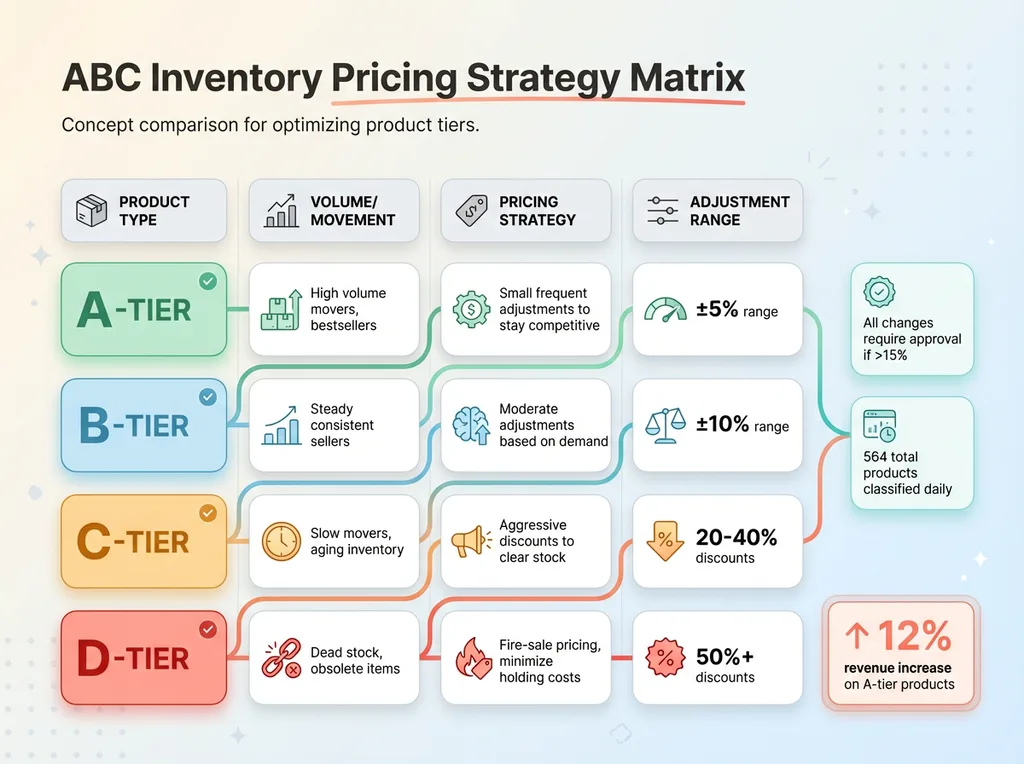 ABC Inventory Pricing Strategy Matrix
Each tier has different pricing rules. A-tier products get small, frequent price adjustments to stay competitive — usually within a 5% range. C-tier products get aggressive discounts to clear inventory before trends change. D-tier products get fire-sale pricing because holding costs exceed any margin we might salvage.
The system doesn't change prices automatically. It generates recommendations that I review daily. Takes five minutes. I approve most of them, override a few when I have context the AI doesn't (like knowing a product is about to go viral on TikTok).
Results: More Revenue, Less Guesswork
Real numbers: 12% revenue increase on A-tier products. We were underpricing our bestsellers because I was worried about losing sales. The AI showed me we had pricing power we weren't using.
We cleared 30% more slow-moving inventory through strategic discounts. Products that would have sat for six months sold out in weeks once we hit the right price point.
Technical details: Python script runs daily, pulls data from Shopify and Google Analytics, outputs price recommendations to a dashboard. I built it in 40 hours over two weeks.
Cost: $0 in API fees. It runs on data we already have. The only cost was my time building it.
ROI: three weeks. The first price optimizations paid for the development time within 21 days.
I learned one lesson the hard way: still requires human approval for large changes. Early version automatically dropped prices by 40% on three products due to a data parsing error. Sold out immediately at a loss. Now all price changes over 15% require manual approval.
System 4: Product Pipeline Automation
From Concept to Live Product in 20 Minutes
This is the crown jewel. The system with the highest ROI of everything we built.
Creating a new product manually used to take 3-4 hours. Product photos, descriptions, SEO optimization, categorization, initial pricing, uploading everything to Shopify with proper metadata.
Now it takes 20 minutes with AI assistance.
The 5-Stage Pipeline
Stage 1: AI generates product concept variations. I give it a basic idea ("festival top with butterfly print"), it generates 8-10 variations with different styles, colors, and target audiences.
Stage 2: Gemini creates or edits product images. We start with base photography of our products, and Gemini modifies colors, adds graphics, or generates entirely new mockups. Not perfect, but good enough for 70% of use cases.
Stage 3: Claude writes descriptions optimized for SEO. Product name, tagline, full description, bullet points, meta description. All incorporating relevant keywords without sounding robotic.
Stage 4: Pricing engine sets initial price based on similar products, competitor analysis, and cost structure.
Stage 5: Everything auto-populates into Shopify with proper metadata, tags, categories, and internal links to related products.
I review the output, make adjustments, and hit publish. 20 minutes from concept to live product page.
Why This System Has The Highest ROI
We went from launching 2-3 products per week to 15-20. That's a 6x increase in product velocity with the same team size.
Revenue per employee is up 38%. Not because people are working harder — because we removed the bottleneck in product creation.
The technical stack: custom Python orchestrating three different LLMs (Claude for writing, Gemini for images, GPT-4 for product classification), integrated with Shopify's API and our internal product database. 22,000+ lines of code written over six months.
I need to be honest: this system took significant time and technical expertise to build. If you're not technical, you're not building this in-house without hiring engineers. But even a simplified version — just automating product descriptions and image editing — saves massive time.
System 5: Automated Reporting and Analytics Dashboard
The Data You're Not Looking At
You have data everywhere. Google Analytics, Shopify, Facebook Ads, email marketing platform, inventory system. But you don't have time to actually look at it, much less synthesize insights across platforms.
Most dashboards are just metric vomit. Fifty numbers on a screen with no context about what matters or what to do.
I was spending 10 hours per week digging through analytics. And I still missed important signals because I was looking at the wrong metrics or didn't notice a trend until it was too late.
What Our Dashboard Actually Shows
Our AI-powered dashboard doesn't just show metrics. It explains why they changed and what to do about it.
Every morning I get an email with a summary of yesterday's key metrics plus AI commentary. "Sales down 8% yesterday due to Facebook ad set 'Butterfly Tops - 18-24' underperforming. Recommend pausing and reallocating budget to 'Holographic Bodysuits - 25-34' which is converting at 2.3x."
Every Monday I get a weekly deep dive on trends. Revenue by product category, customer acquisition cost trends, inventory alerts, content performance. With actual analysis, not just numbers.
How AI Surfaces The Insights That Matter
The system pulls from multiple APIs — Shopify, Google Analytics, Facebook, our email platform. Claude analyzes patterns and generates natural language summaries that actually make sense.
Real numbers: I now spend 1 hour per week on analytics instead of 10. That's 36 hours saved monthly.
More importantly, we've caught three major issues before they became expensive. An ad campaign burning $200/day with zero conversions (caught after two days instead of two weeks). An inventory shortage on our bestseller that would have led to stockouts during peak season (ordered more with three weeks to spare). A pricing error that had a product listed at $12 instead of $120 (caught within 12 hours).
Cost: about $100/month in API calls.
The key insight: this system gets better over time. It learns what matters to your specific business. Early on it flagged everything. Now it knows which metrics are noise and which are signals. It knows that sales always drop on Tuesdays, so it doesn't alert me. It knows that a 5% traffic spike on a blog article probably means nothing, but a 5% conversion rate drop on a product page is urgent.
The Build vs Buy vs Hire Decision
Here's the reality check: not every business can or should build these systems in-house.
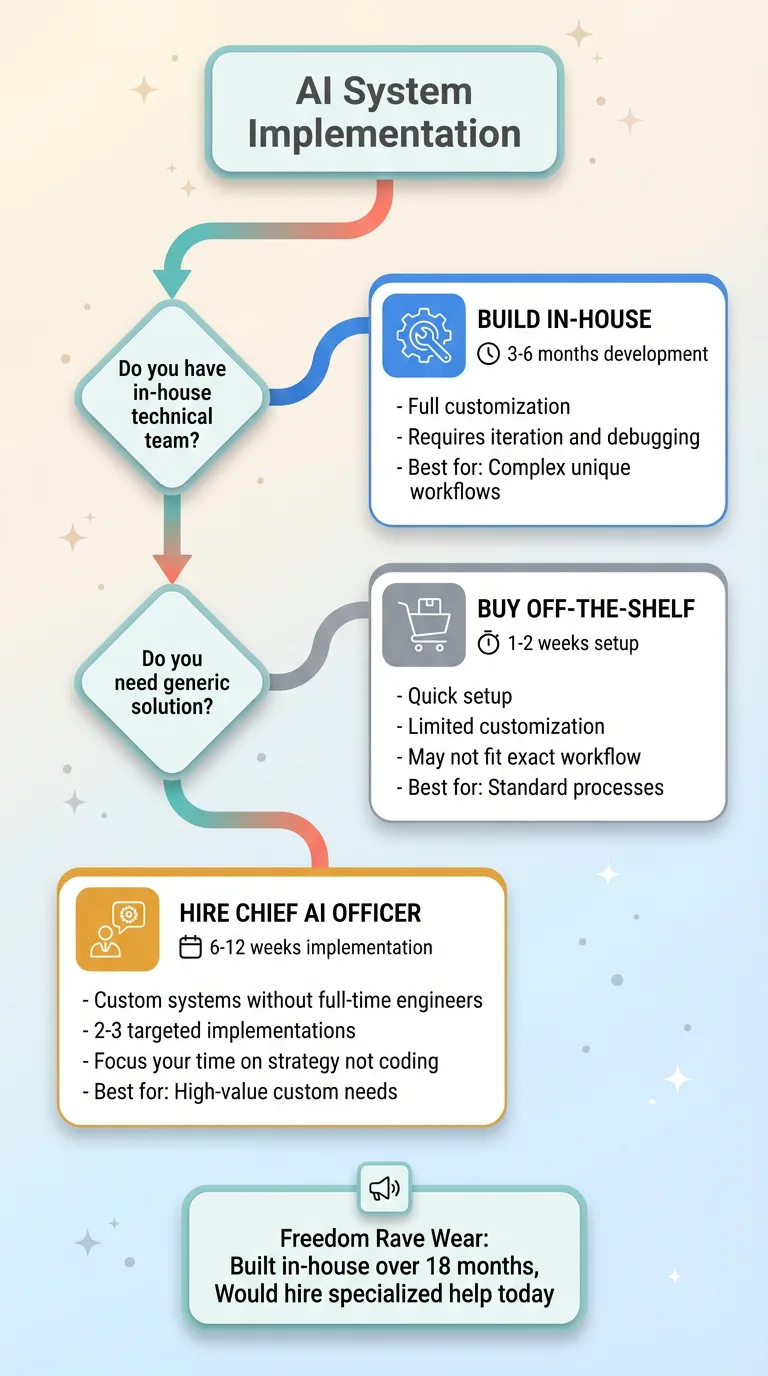 Build vs Buy vs Hire Decision Tree
You have three paths.
Build in-house if you have a technical team, budget for 3-6 months of development, and willingness to iterate. The systems I described took me 18 months to build and refine. I had technical background and could write code myself. Even then, several systems failed before I got them right.
Buy off-the-shelf tools for some of these. Customer service bots exist. Basic analytics dashboards exist. But they're generic. They won't be optimized for your specific business or integrated with your exact workflow. You'll spend time fighting with the tool instead of getting value from it.
Bring in a Chief AI Officer if you want custom systems without hiring full-time engineers. This is the fastest path to production systems that actually fit your business.
At my brand, we built in-house because I had the technical skills. But even I wouldn't start from scratch today. I'd bring in specialized help for 2-3 of these systems and focus my own time on the business logic and strategy, not debugging API integrations.
These five systems aren't theoretical. They're running in production right now, processing thousands of operations monthly, generating measurable ROI. The pricing engine ran this morning. The customer service bot answered 14 questions yesterday. The product pipeline created three new listings this week.
If you're spending more than 20 hours per week on manual work that fits these patterns — content creation, customer service, pricing decisions, product launches, analytics — the ROI is there. The question isn't whether AI can help. It's which systems to build first and in what order.
I've built these systems and 10+ others. The implementation path depends on your specific operations, your team's technical capability, and where you're bleeding the most time or money. Let's talk about your specific situation and figure out which systems make sense for your business and in what order.
Want to explore what AI could do for your business?
Book a free 30-minute strategy call with me. No pitch deck, no sales team — just a real conversation about your operations and where AI actually fits. I'll tell you honestly which systems would have ROI for your business and which ones would be a waste of time.
Get AI insights for business leaders
Practical AI strategy from someone who built the systems — not just studied them. No spam, no fluff.
Hodgen.AI
Ready to automate your growth?
Book a free 30-minute strategy call with Hodgen.AI.
Book a Strategy Call