Inventory Replenishment Software Audit: A $0 Refund Bug
An adversarial inventory replenishment software audit found 50 issues, including a refund function that would post $0 while telling customers they were refunded.
By Mike Hodgen
Why I Audit My Own Tools Before They Cost Me Money
I run a DTC fashion brand in San Diego, and the most expensive piece of software I own is the one that decides what we make and what we buy. It's the replenishment system. It reads demand, looks at what's already inbound, and tells me which units to manufacture and which purchase orders to cut. Money moves on its decisions every single day.
So when I talk about an inventory replenishment software audit, I'm not talking about a theoretical exercise. I'm talking about the system that, if it's wrong, has me manufacturing units nobody ordered or telling a customer their refund is coming when it isn't.
Here's the uncomfortable part. Most founders never audit their own automation because it appears to work. The dashboard is green. Orders flow. Purchase orders go out. Nothing throws an error. Everything looks healthy.
But "looks healthy" and "is correct" are two different things, and the gap between them is where the expensive bugs live.
The dangerous bugs aren't the ones that crash. Crashes are easy. You see them, you fix them. The dangerous ones produce plausible-looking output while being quietly wrong. They tell you to reorder something you already have inbound. They count phantom demand. They mark an order refunded that never actually returned a dollar.
A few weeks ago I ran an adversarial audit against my replenishment tab. It surfaced 50 findings. Most were minor. But three of them touched money or coverage math directly, and any one of them could have cost me thousands before I noticed.
This article walks through those three. Not because my code is special, but because these are the exact patterns I find in almost every money-touching system I look at. If you've automated reordering or refunds, you probably have at least one of them right now.
What an Adversarial Code Audit Actually Means
The mindset: assume the code is lying
A normal code review asks one question: does this do what I intended? You read the logic, it matches your mental model, you move on.
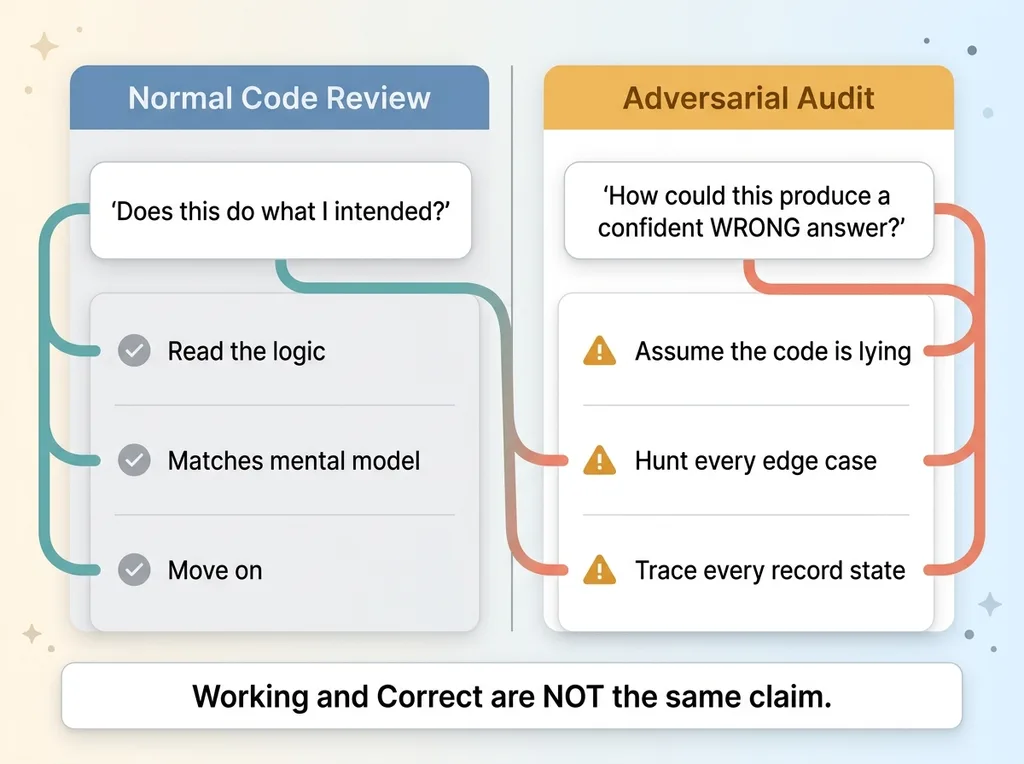 Normal Code Review vs Adversarial Audit mindset
An adversarial audit asks a different and meaner question: how could this produce a confident wrong answer?
That shift changes everything. Instead of confirming the code works, I assume it's lying to me and try to prove it. I point AI agents at the code with explicit instructions to break it. Find the edge cases. Trace every state a record can be in. Ask what happens when a customer cancels mid-fulfillment, when a purchase order skips a status, when two systems disagree about the same order.
The agents don't get tired and they don't trust the code the way I do. They'll walk every branch and ask "what if this is null" five hundred times without getting bored.
Why I do it on systems that already 'work'
I ran this same adversarial method across 58 codebases, and the pattern holds everywhere: the systems that have been "working fine" for months are the ones hiding the silent bugs. Working software gets trusted. Trusted software stops getting checked.
On the replenishment tab, those 50 findings broke down predictably. Most were low-severity (naming, edge cases that couldn't actually occur, defensive checks that would be nice to have). A handful mattered. Three of them mattered a lot.
The point I want every CEO to sit with: working and correct are not the same thing. Your automation can run flawlessly for a year while doing the wrong math, and you won't know until a customer or your bank account tells you. The audit is how you find out before they do.
Ghost Rows: When the Coverage Math Counts Orders That No Longer Exist
The oversold / made-to-order gap state
Here's the first finding, and you don't need to be an engineer to follow it.
When a customer buys a unit I don't have in stock, that line item enters what I call a gap state. Oversold, or made-to-order. It means I still owe that customer a physical unit, so my coverage math reads all the gap rows to decide what to manufacture next. More gap rows, more units to make. Simple.
The problem is what happens when the order behind those rows goes away.
Why terminal parent orders weren't filtered
A line item could sit in the gap state while its parent order had already been shipped or cancelled. Those are ghost rows. The order is dead, but the line item never got the memo.
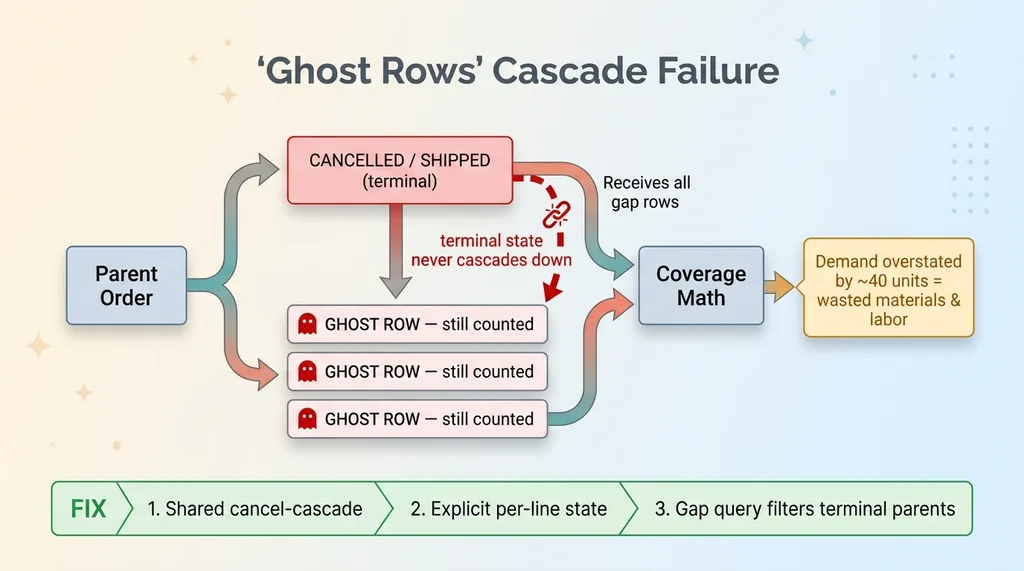 Ghost Rows cascade failure in coverage math
So my coverage math would count them as real demand. It would tell me to manufacture units for orders that no longer existed. On one sample run, the demand math was overstated by roughly 40 units, which for a handmade product line is real money in materials and labor for inventory nobody asked for.
The root cause was a cascade failure. When a parent order got cancelled or fully shipped, that terminal state never flowed down to the line-item state. The children kept living in their gap state, orphaned and counted.
The fix had three parts. First, a shared cancel-cascade so terminal parent states flow down to their children automatically. Second, per-line state that gets written explicitly instead of inferred from the order at read time. Third, a gap query that filters out any line whose parent is in a terminal state, as a backstop.
Ghost rows are a perfect example of a silent correctness bug. Nothing errors. The math runs clean. It just quietly inflates your demand and bills you for the privilege.
The Dead Status That Hid Every New Purchase Order From Coverage
A 'submitted' status nothing transitioned through
The second finding is about purchase order coverage, and it's the kind of bug that creeps into any system that grew over time.
My purchase orders move through statuses. At some point the workflow changed, and a status I'll call "submitted" stopped being used. New purchase orders now went from draft straight to a different state, skipping "submitted" entirely. The status still existed in the code. Nothing wrote to it anymore.
Why in-production math went blind to new drafts
Here's where it bit me. The in-production coverage math (the logic that counts inbound supply so I don't reorder things I've already ordered) filtered on that dead "submitted" status to find purchase orders.
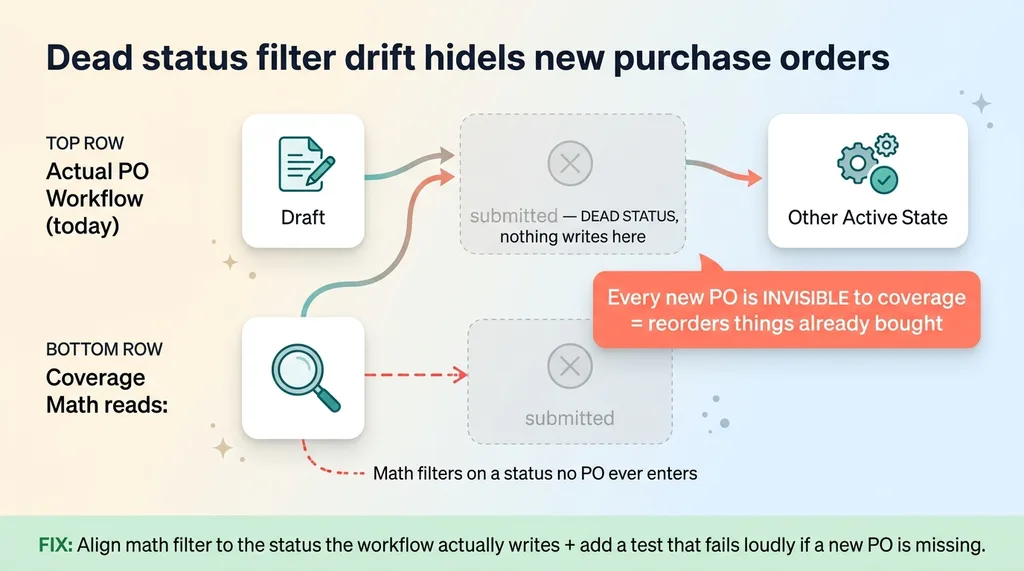 Dead status filter drift hiding new purchase orders
Read that again. The math was looking for inbound POs by checking a status that no new PO ever entered.
The result: every new purchase order was invisible to the coverage math. As far as my reorder logic was concerned, I had nothing on order. So it would happily suggest reordering things I'd already bought. That's reorder point automation failing silently. Not with an error, but with a confident recommendation to spend money I'd already committed.
This is one of the most common silent bugs I find anywhere. A status filter and the actual workflow drift apart. The workflow gets updated, the math that reads the workflow doesn't. The two halves stop agreeing, and nobody notices because both halves run fine on their own.
The fix was straightforward once I saw it. Align the status the math reads with the status the workflow actually writes. Then, more importantly, add a test that fails loudly if a brand-new PO doesn't show up in the coverage count. A bug that hides for months should never be able to hide again.
Dead enum values and stale status filters are everywhere in systems that have been around a few years. If your software has evolved, you almost certainly have a few.
The $0 Refund Landmine: Refunded on Paper, Nothing in the Bank
Line items with no transactions
This is the worst one. The ecommerce refund bug that sits quietly until a customer complains, and by then it's a chargeback and a trust problem.
When I issue a refund, the function assembles the line items being refunded and posts the refund to my storefront. The bug was subtle: it assembled the line items but never attached the underlying payment transactions to the refund request.
With no transactions attached, the storefront refund posts for $0. The customer gets nothing back. Not a partial refund, not a delayed one. Zero.
Marked refunded and emailed the customer anyway
If that were the whole bug, it'd be bad enough. But it got worse.
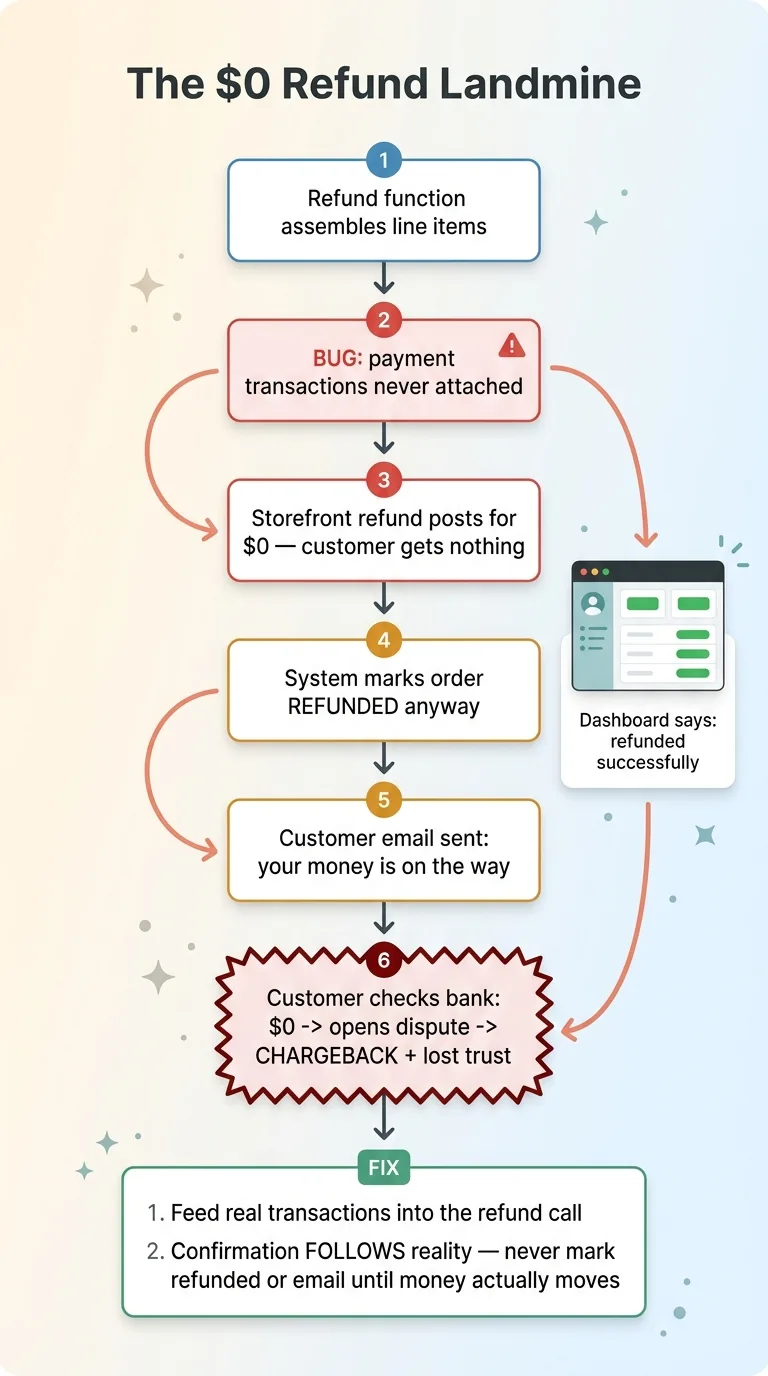 The $0 Refund Bug sequence, refunded on paper, nothing in bank
After firing off that $0 refund, the function went right ahead and marked the order as refunded in my own system. Then it triggered the customer email saying their money was on the way.
So picture the full sequence. The customer gets told they're refunded. They check their bank. Nothing. They wait a few days, still nothing. Now they open a dispute, file a chargeback, and lose trust in the brand. And the entire time, my own dashboard says the order was refunded successfully. Everything green. Everything fine.
This is exactly the failure mode I wrote about in AI that lies about doing the right thing. The dangerous failure isn't doing the wrong thing loudly. It's reporting the right thing while doing nothing. A function that crashes gets fixed in an hour. A function that says "success" while moving $0 can run for months, and every instance is a future chargeback you don't see coming.
The fix had two non-negotiable parts. First, feed the actual suggested transactions into the refund call so the real amount posts to the customer's card. Second, and this is the important one, do not mark the order refunded and do not send the customer email until the storefront confirms the money actually moved. Confirmation follows reality. Never the other way around.
If you've automated refunds anywhere, go check this one today. It's the single most common money-losing pattern I find.
The Reconcile Cron: Catching Disagreements Before Customers Do
A 6-hour job that heals state drift
Patching three bugs is fine, but it doesn't fix the underlying disease. Ghost rows, dead statuses, $0 refunds. They all come from the same root: two records that should agree, drifting apart over time.
So beyond the individual fixes, I built a reconcile cron. It runs every 6 hours, walks the records, and heals the disagreements it finds.
Detecting when two systems disagree
The job checks for exactly the kinds of drift those three bugs created. Line states that don't match their parent order. Coverage counts that don't match the actual inbound purchase orders. Refund records in my system that don't match the transactions on the storefront.
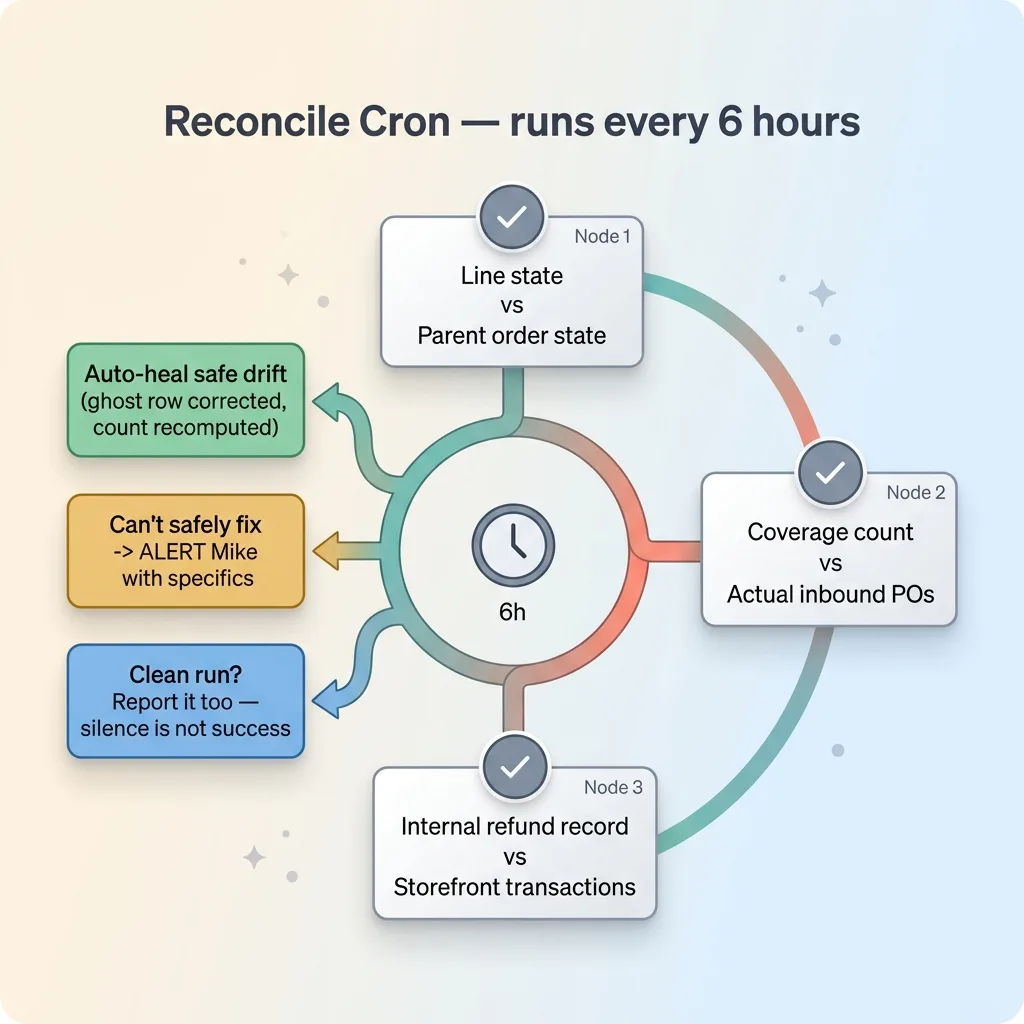 Reconcile cron healing state drift on a schedule
When it finds a disagreement it can safely auto-heal, it heals it. A ghost row gets corrected, a stale count gets recomputed. When it finds something it can't safely fix on its own, it stops and alerts me with the specifics.
And critically, it also tells me when it ran clean. That comes straight from how I think about automations that email me when nothing is wrong. Silence is not success. A monitoring job that only speaks up when it breaks is a job you can't tell apart from a dead one. So mine reports both the catches and the clean runs.
This is the difference between a one-time fix and a system that stays correct. Any money-touching automation needs a watchdog that audits its own books on a schedule. You patch the bug once. The reconcile job catches the next class of bug you haven't found yet.
What This Means for Your Automated Systems
If you've automated reordering, refunds, billing, or anything that moves money or commits inventory, I'd bet you have at least one of these three patterns living in your code right now.
State that doesn't cascade, so a child record keeps counting after its parent is gone. A filter reading a status that nothing writes anymore, so an entire category of records goes invisible. A confirmation that fires before the underlying action actually succeeds, so you tell customers something happened that didn't.
None of these throw errors. None of them turn your dashboard red. They quietly do the wrong thing while every status indicator you own says you're fine. That's what makes them expensive. By the time you find out, it's through a refund dispute, an inventory write-off, or a customer who no longer trusts you.
The value here isn't really the audit finding. Anyone can find a bug. The value is knowing your tooling is correct, not just running. Those are different claims, and only one of them protects your money.
I run this adversarial process on my own systems regularly, because my brand's margins don't survive manufacturing 40 units nobody ordered. And I run it on client systems before they ever touch a customer, because the alternative is finding out in production.
If your automation moves money and nobody has stress-tested it adversarially, that's worth an afternoon. I'd rather you find the $0 refund bug in an audit than in a chargeback notice. If you want, have me audit the system that touches your money before it surprises you.
Want to explore what AI could do for your business?
Book a free 30-minute strategy call. No pitch deck, no sales team. Just a real conversation about your operations and where AI actually fits.
Get AI insights for business leaders
Practical AI strategy from someone who built the systems — not just studied them. No spam, no fluff.
Hodgen.AI
Ready to automate your growth?
Book a free 30-minute strategy call with Hodgen.AI.
Book a Strategy Call