The Day My AI Started Rejecting Fashion Photos
I woke up to a 40% failure rate.
My overnight AI pipeline had run like clockwork for three months. Then one Tuesday morning, I checked the logs and saw red everywhere. Forty percent of our fashion product images — the ones feeding our 20-minute product creation pipeline — were being flagged as policy violations.
The irony was thick. Here I am, running a legitimate fashion business, using AI exactly as vendors promise it should be used, and the safety filters are blocking product photos of festival fashion. Not pornography. Not violence. Fashion products on models, in context, the kind of images you'd see in any clothing catalog.
I couldn't manually review every rejected image. We generate hundreds of product visuals weekly. I couldn't slow down our launch cadence — that's the whole point of automation. And I definitely couldn't accept a 40% failure rate eating my ROI.
This is the reality of production AI that nobody mentions in demo videos. The vendor slides show perfect success rates. The case studies conveniently skip the part where your legitimate business content gets blocked by safety filters trained on worst-case scenarios.
What follows is how I solved it. Not theory — the actual strategies that dropped our failure rate from 40% to 6% and kept it there.
Why AI Safety Filters Block Legitimate Business Content
AI safety filters exist because they have to. The vendors learned the hard way: deploy an open image generator to consumers, and within hours someone's creating content that ends up on the news. I get it. The PR risk alone justifies aggressive filtering.
But here's what they don't tell you: those same safety filters weren't designed for business use cases. They were trained on the worst of the internet, optimized to over-block rather than under-block. Makes perfect sense for a consumer chat app. Creates massive friction for production pipelines.
The False Positive Problem Nobody Mentions
In our case, the failures followed clear patterns. Fashion photos with models showing skin — blocked. Lifestyle imagery with people in festival settings — blocked. Product photos that included partial faces or hands holding items — blocked.
I wasn't generating anything inappropriate. I was generating the exact kind of commercial imagery that's in every e-commerce catalog. But to the safety filter, context doesn't exist. It sees skin tone pixels next to fabric, runs its classification, and decides it's safer to block than allow.
The failure mode is asymmetric. A false negative (letting bad content through) creates headlines. A false positive (blocking your legitimate product photo) just creates a support ticket that probably never gets escalated. The incentives are clear: when in doubt, block it.
What Triggers Safety Blocks in Image Pipelines
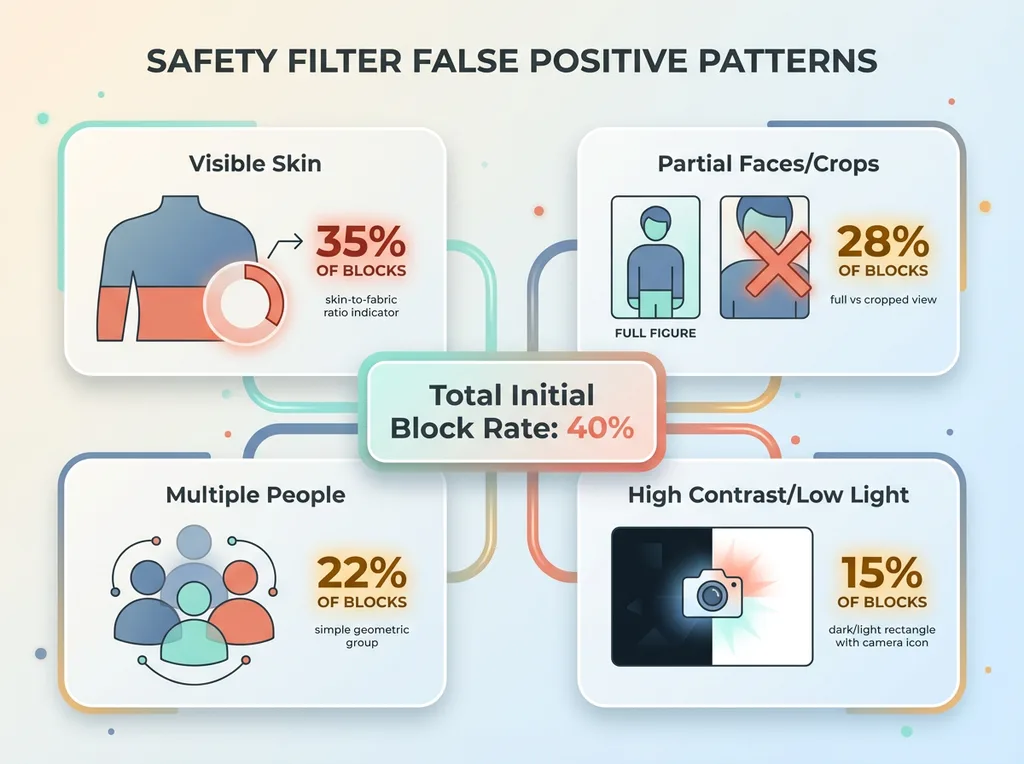
After analyzing hundreds of blocked requests, I identified the specific triggers:
 Safety Filter False Positive Patterns
Visible skin in reference images. Even appropriate fashion photography with models in swimwear or festival outfits trips the filters. The safety model doesn't distinguish between "model wearing product in commercial context" and "content we need to block." It just sees skin-to-fabric ratios above a threshold.
Partial faces or cropped figures. This one surprised me. Full-body product photos with faces visible? Usually fine. Same photo cropped at the shoulders? Blocked. The partial view creates ambiguity for the classifier, and ambiguity defaults to rejection.
Multiple people in frame. Reference images with groups — festival crowds, friends wearing matching outfits — blocked more often than solo shots. My theory: the safety model associates multiple figures with scenarios it was trained to prevent.
High-contrast or low-light photography. Artistic shots with dramatic lighting triggered blocks at higher rates. The classification model performs worse when it can't clearly distinguish elements, so it errs toward blocking.
This isn't a bug. It's working exactly as designed — for a different use case than mine. The safety filters were optimized for consumer protection, not for letting businesses generate commercial imagery at scale.
The business impact was real. Every blocked request meant either manual intervention (expensive), regeneration attempts (burning API credits), or proceeding without reference images (lower quality output). The automation ROI I'd built — cutting product creation from 3-4 hours to 20 minutes — was evaporating into safety filter overhead.
I needed workarounds that were resilient enough to run unsupervised overnight.
Five Production-Tested Workarounds for Safety Filter Blocks
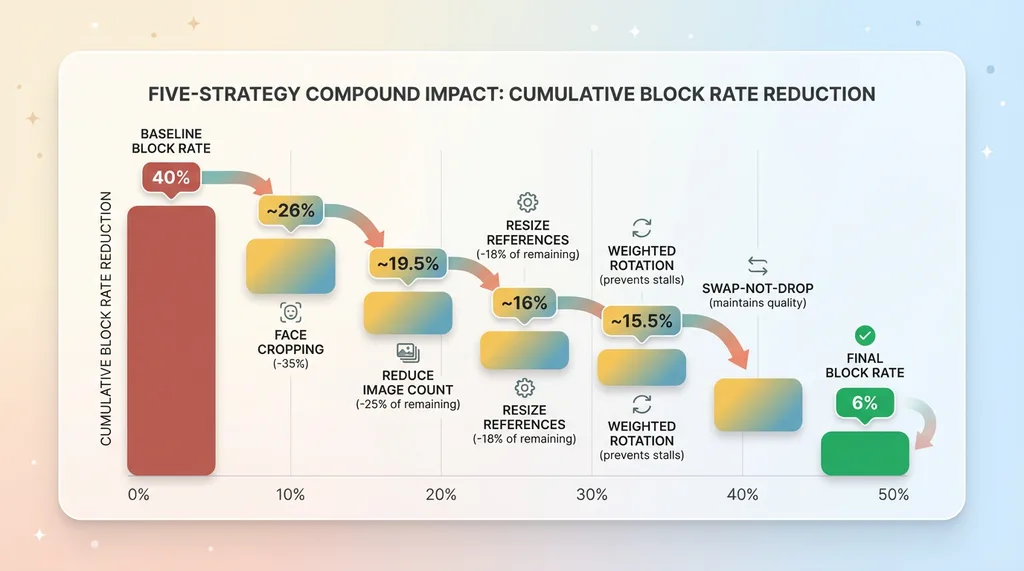
I spent three weeks testing strategies. Some failed spectacularly. Five worked well enough to put into production. Here's what actually reduced our block rate.
 Five-Strategy Compound Impact
Strategy 1: Face Cropping (Remove Top 20% of Reference Images)
The simplest fix with the biggest impact. I modified the pipeline to automatically crop the top 20% off every reference image before sending it to the AI.
This removes partial faces — the specific feature that confused the safety classifier. The product context stays intact. A model wearing a crop top? You lose the face, keep the torso and outfit, preserve the styling context the AI needs.
Impact: Reduced block rate by 35% immediately. No quality degradation in generated images because fashion AI focuses on clothing and styling, not facial features anyway.
Implementation is straightforward. Before you pass reference images to the generation API, run them through a crop function. I use PIL in Python — five lines of code. The key is maintaining aspect ratio and keeping the product visible in frame.
Strategy 2: Reduce Image Count Per Request
I was sending five reference images per generation request. Seemed logical — more context should mean better output.
Wrong. Each additional reference image multiplies the risk of triggering safety filters. If each image has a 10% individual block rate, five images together give you a 41% chance at least one triggers a block. And one block kills the entire request.
I dropped to three reference images maximum. When I analyzed output quality, I couldn't detect a difference. The AI was getting enough context from three well-chosen references.
Impact: Block rate dropped another 25%. API costs decreased (fewer images to process). Generation speed improved.
The math is simple but counterintuitive. Fewer high-quality references beats more references with higher block risk.
Strategy 3: Resize References to Reduce Trigger Surface
Larger reference images give safety filters more surface area to detect potential violations. More pixels mean more chances to spot a skin tone pattern or ambiguous element.
I tested resizing reference images before submission. Started at 1200px, worked down in 100px increments, monitored both block rates and output quality.
Sweet spot: 800px on the longest edge. Below that, generated images lost detail. Above that, block rates climbed without quality gains.
Impact: 18% reduction in blocks compared to full-resolution references. This compounds with the other strategies — smaller images with cropped faces and fewer references per request dramatically reduces trigger surface.
Strategy 4: Weighted Random Product Rotation with Cooldown
One problematic product can stall your entire pipeline if you keep hitting it. I needed a way to route around known trouble while maintaining even catalog coverage.
Solution: weighted random selection with cooldown periods. When a product's reference images trigger blocks, the system flags it and reduces its selection weight for 48 hours. The pipeline keeps running, pulling from the rest of the catalog, maintaining output volume.
After cooldown, the product re-enters rotation at reduced weight. If it blocks again, the cooldown extends. After three strikes, it escalates to manual review.
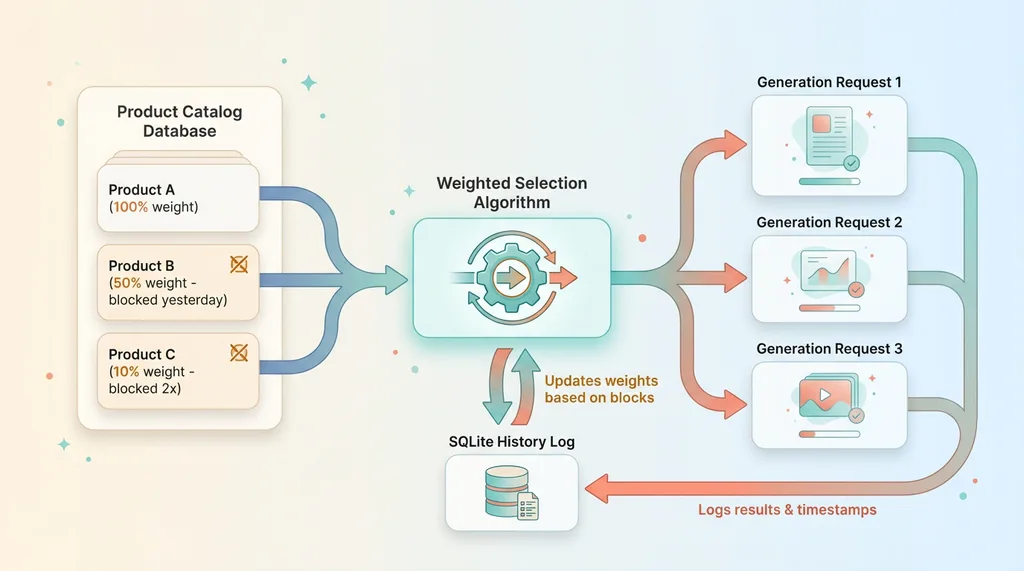
This strategy requires tracking state. I use a simple SQLite database logging every generation attempt, result, and timestamp. The selection algorithm queries this history and adjusts weights accordingly.
Impact: Eliminated pipeline stalls entirely. Even when we onboard products with reference images that consistently trigger blocks, the pipeline adapts automatically and maintains throughput.
Strategy 5: Swap-Not-Drop (Replace Blocked Products with Alternatives)
When a generation request blocks mid-pipeline, my original logic was to proceed without reference images — better something than nothing.
Bad call. The output quality without references was noticeably worse. Customers expect a certain aesthetic consistency.
New strategy: when product A's references trigger a block, immediately substitute product B's references from the same category. If B also blocks, try C. Only after three swaps do we proceed reference-free or escalate.
This maintains output quality while routing around blocks automatically. The generated image might not match product A exactly, but it stays on-brand and visually consistent.
Implementation requires category tagging and a swap priority queue. When generating content for a neon crop top, the pipeline has backup references from other neon tops queued and ready.
Impact: Maintained quality consistency while adapting to blocks in real-time. Customer-facing content quality stayed high even as block patterns shifted.
These five strategies, deployed together, dropped our block rate from 40% to 6%. The pipeline runs overnight unsupervised. Product launches stay on schedule. The automation ROI came back.
Building a Resilient Image Pipeline That Routes Around Blocks
Individual workarounds help. A resilient system architecture is what makes them work at scale.
The Architecture: Weighted Random Selection
At the core of my production pipeline is a weighted random selection system. Every product in our catalog has a base weight (determined by category, launch date, sales velocity). When the pipeline needs reference images, it queries this weighted list.
 Weighted Random Selection Architecture
The weights adjust dynamically based on safety filter history. A product that's never blocked maintains full weight. One that blocked yesterday gets 50% weight. Blocked twice in a week? Down to 10% until the cooldown expires.
This creates natural load balancing across the catalog while avoiding known problems. High-performing products stay in heavy rotation. Problematic ones stay accessible for manual review but don't stall automated processes.
The selection algorithm runs before every generation batch. It's pulling from live data — the system learns from every request, adjusts weights, optimizes for both coverage and success rate.
Monitoring What Gets Blocked (And Why)
I built a monitoring dashboard that tracks three metrics: overall block rate by day, which specific products trigger blocks most often, and whether block patterns correlate with safety model updates.
That last one is crucial. Safety filters update silently. Google and Anthropic don't announce "we just made our image safety model more aggressive." You discover it when your previously-stable pipeline starts blocking more.
My dashboard caught this twice. Block rates climbed from 6% to 15% over three days with no changes to my code. Digging into the logs, I saw the triggered categories shifted — suddenly more blocks on images with text overlays, which had been fine for months.
When I detect a pattern shift, I adjust strategies. After that text overlay incident, I reduced reference image count from three to two for products with prominent text. Block rate returned to baseline.
The monitoring data also feeds the weight adjustment algorithm. Products that blocked during a safety model update but haven't blocked since get their weights restored faster. Products that consistently block regardless of model changes stay deprioritized.
When to Retry vs When to Skip
Not all blocks are equal. Some are transient — retry the same product an hour later and it succeeds. Others are persistent — that product's reference images will block every time until you manually intervene.
 Block Response Decision Tree
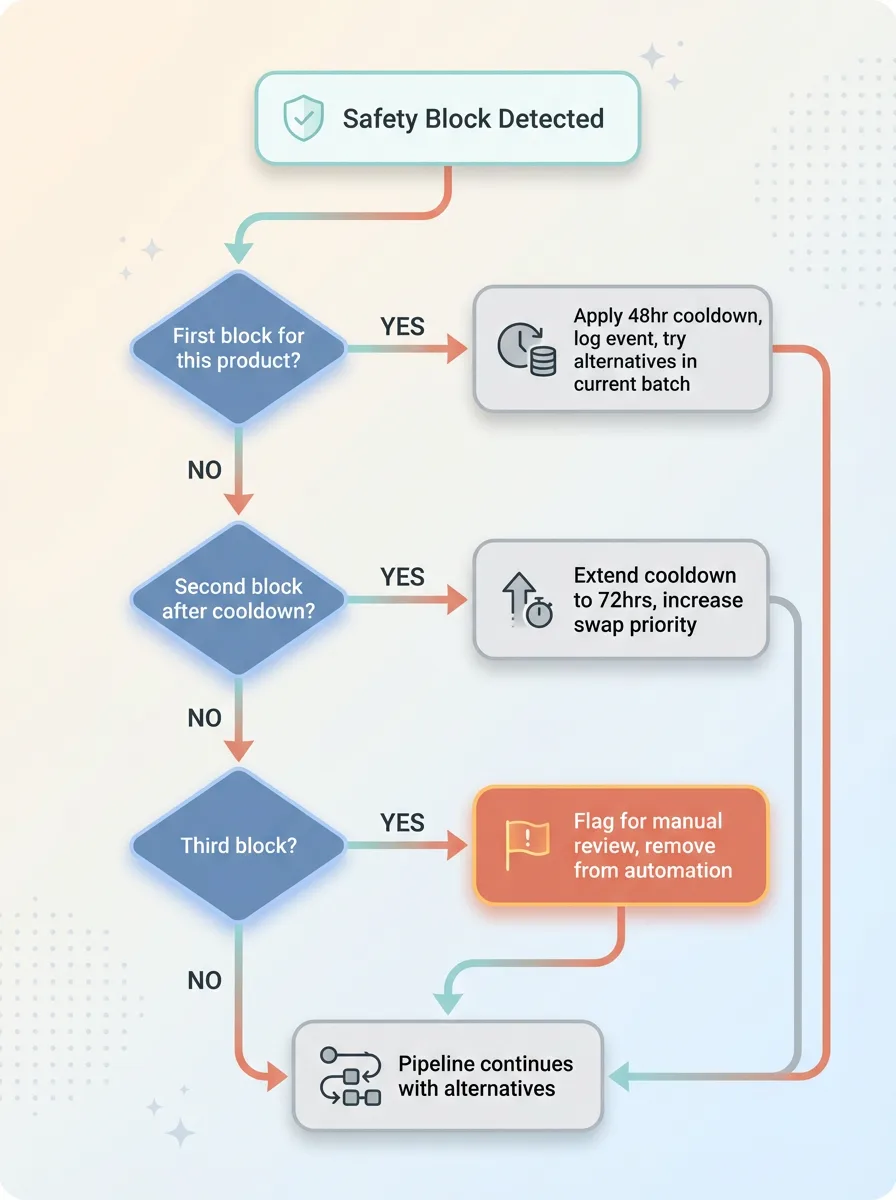
My retry logic follows this decision tree:
First block: Log it, apply cooldown, try alternatives in the current batch.
Second block after cooldown: Extend cooldown to 72 hours, increase alternative swap priority.
Third block: Flag for manual review, remove from automated rotation until resolved.
The key insight: you can't eliminate safety filter blocks entirely. The models will over-block by design. Your job is building systems that route around blocks automatically, maintain output quality, and only escalate to humans when necessary.
Our current system runs 94% of the time without human intervention. The 6% that escalates are edge cases worth reviewing manually — usually new products with reference images we haven't tested yet, or categories where safety filter sensitivity is legitimately high.
The result: reliable overnight automation, maintained product launch cadence, preserved ROI on AI infrastructure investment.
What Nobody Tells You About AI Safety Filters in Production
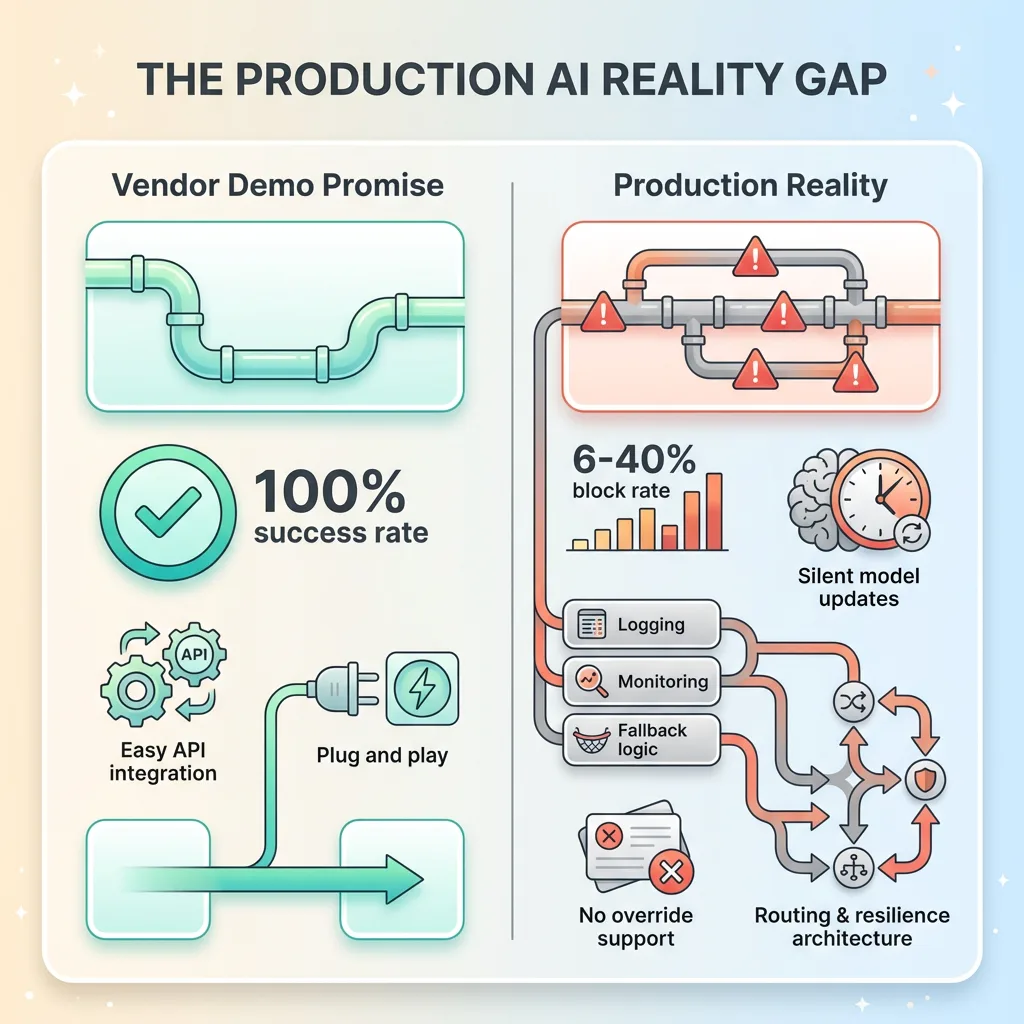
Here's the uncomfortable reality: safety models update without warning. The workarounds I detailed above? They work today. They might break next month when Google or Anthropic ships a new safety classifier.
 The Production AI Reality Gap
I've lived through two silent updates that changed block patterns significantly. Both times, my monitoring caught it within 24 hours. Both times, I spent a day adjusting strategies. This is normal. This is production AI.
No documentation exists for what actually triggers safety blocks. The vendors can't publish it — documenting trigger conditions helps adversaries game the system. You learn through observation, logging, and pattern analysis across thousands of requests.
Support teams can't override blocks even when they're obviously wrong. I've opened tickets with clear evidence: "This is a product photo from our catalog, here's the live listing on our website, it's obviously commercial fashion photography." Response: "We understand this is frustrating, but we can't modify safety filter decisions."
This isn't support being unhelpful. It's vendors optimizing for PR risk over your production reliability. One false negative that generates a headline costs them more than a thousand false positives costing you pipeline overhead.
Your options: Build resilience into your pipeline from day one. Treat safety blocks as a normal failure mode, like network timeouts or API rate limits. Maintain fallback strategies. Monitor for pattern changes. Adapt when models update.
The broader implication: production AI requires infrastructure thinking, not just API calls. You need logging, monitoring, retry logic, fallback strategies, weight adjustment algorithms. You need to think like you're running a distributed system, because you are — except half the system is a black box that changes behavior without notice.
This is why having someone who's done it before matters. These lessons cost me three weeks of debugging, hundreds of dollars in wasted API credits, and delayed product launches. A Chief AI Officer who's built production pipelines knows which battles to fight and which to route around.
I've built 15+ AI systems across product creation, SEO, pricing, and customer service. The patterns repeat. Safety filters are one. Inconsistent output quality is another. Silent model updates breaking prompts is a third. Each has architectural solutions that work across multiple AI models and use cases.
Get the next build note.
I write up each system I build, including what broke. Subscribe to my newsletter and I'll send you the next one.