Why AI Cold Email Gets Ignored (And Reps Won't Send It)
If you want an AI SDR to write in your voice and actually get replies, you have to understand why most AI cold email fails first. And it fails in two distinct ways.
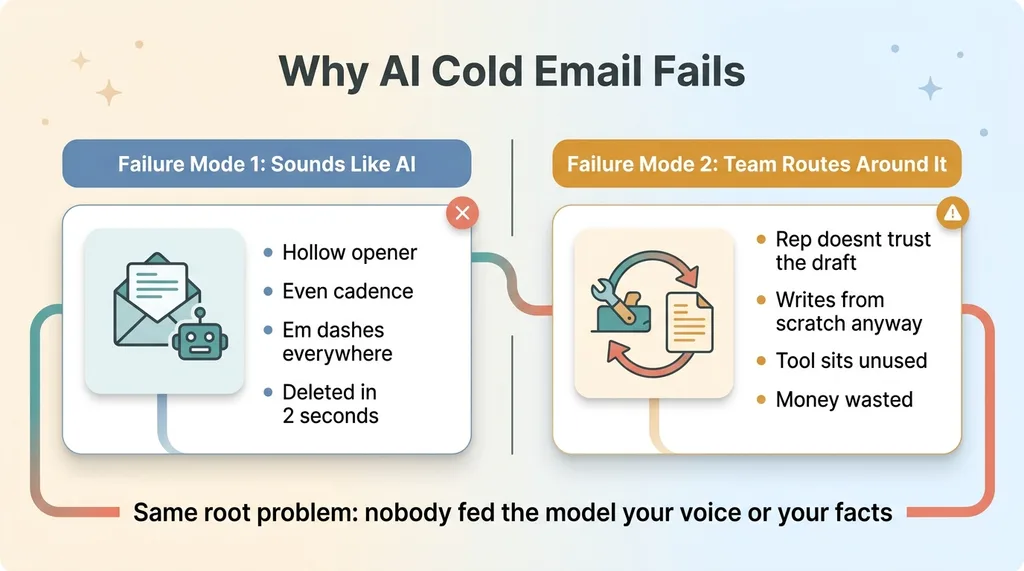
The first is obvious the second you read one. Every AI-generated email has the same shape. The same hollow opener. "I noticed your company is scaling and thought I'd reach out." Scaling from what? Reaching out about what? It could be addressed to anyone, which is exactly why it lands like spam.
Prospects pattern-match this stuff in about two seconds. The cadence is too even. The transitions are too smooth. There are em dashes everywhere, because models love them. I strip em dashes out of everything I write, because to anyone paying attention they read as machine-written. Your prospect is paying attention. They delete it before they finish the first line.
The two failure modes
So that's failure mode one: the email sounds like AI, so nobody replies.
 The two failure modes of AI cold email
Failure mode two is quieter and more expensive. The rep reads the draft, doesn't trust it, and writes their own from scratch anyway. The tool you bought sits there unused. You paid for a workflow that your team routes around because the output embarrasses them.
I've watched this happen. A team buys an AI outreach tool, the drafts are generic, and within a month everyone's back to copy-pasting their old templates.
The trust problem inside your own team
Here's the thing most vendors won't tell you. The model isn't the problem. The frontier models are more than capable of writing a sharp, human email.
The problem is nobody fed it your voice or your facts. You handed it a generic instruction and asked it to guess. It guessed generically, because that's the safest thing to do with no information.
A clever prompt does not fix this. I'll explain why next.
The Fix Isn't a Better Prompt. It's Voice Samples Plus Retrieval.
When people hit the generic-email problem, their instinct is to fix the prompt. "Write in a friendly, professional tone. Be concise. Sound human."
It never works. And it never works for a specific reason.
What a prompt can't do
Tone instructions are abstractions. "Professional" means something different to every person and the model has no idea which version you mean. "Friendly" produces exclamation points and "Hope you're having a great week," which is the opposite of how most sharp salespeople actually write.
You're asking the model to interpret an adjective. It interprets it toward the statistical average of every email it's ever seen, which is precisely the bland, machine-sounding email you were trying to avoid.
You can't describe a voice in adjectives. You have to show it.
The two inputs that actually matter
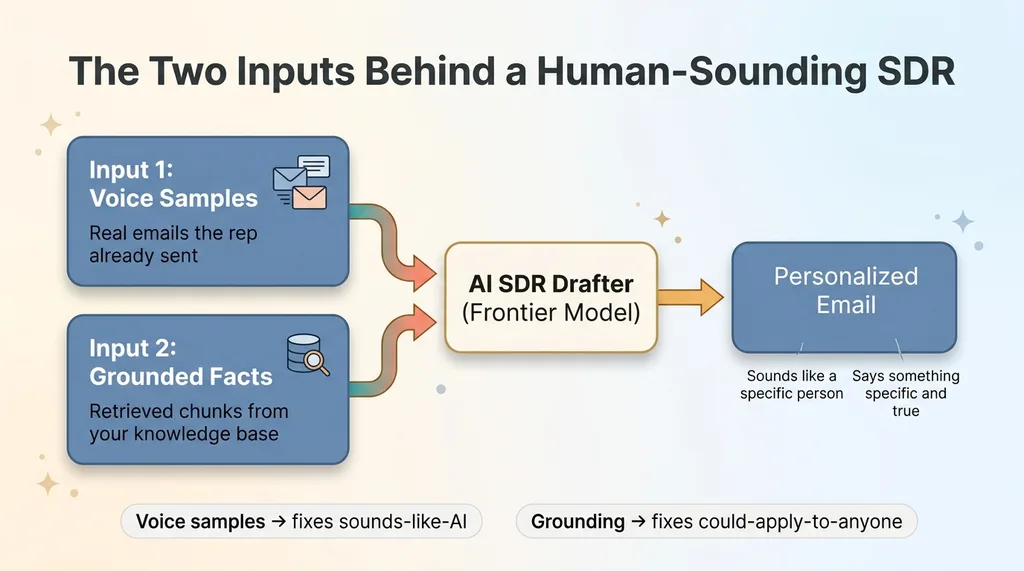
This is the AI SDR I built into a sales tool, part of the AI sales pipeline I built in a weekend. The SDR drafts outreach, and it relies on two inputs. Neither is a prompt trick. Both are data.
 Voice samples plus grounding as two inputs that produce a good email
First, real emails the user has already sent. Actual examples of how that specific person writes, handed to the model as reference.
Second, retrieved chunks from the company's own knowledge base, so every claim in the email is specific and true instead of vague filler.
Voice samples solve the "sounds like AI" problem. Grounding solves the "could apply to anyone" problem. Together they produce an email that sounds like a particular person said something particular to a particular prospect.
That's the whole thesis. Let me show you how each half works.
How the SDR Learns Your Actual Writing Voice
A voice sample is just an email the user actually sent. The mechanism for collecting them is deliberately low-friction, because if it's annoying, nobody does it.
Paste real emails, or extract from a thread
The rep can paste in a handful of emails they've already sent. That's the simple path.
The better path: they paste a full thread, back and forth with a prospect, and the system separates their own messages from the other person's automatically. It pulls out only the lines the rep wrote and discards the rest. So instead of hunting through your sent folder and cleaning up quoted text, you drop in a conversation and the system keeps just your half.
Those extracted messages get stored as voice samples tied to that user.
Feeding the 5 most recent into the drafter
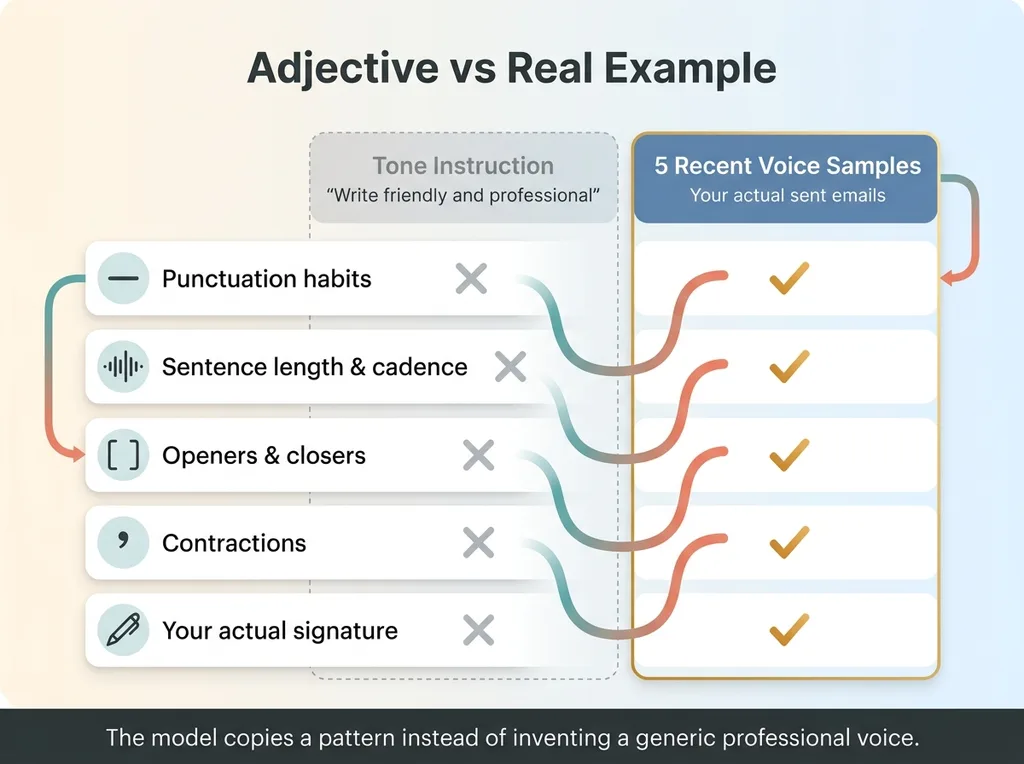
When the SDR drafts, it's handed the five most recent voice samples as in-context examples. Not a description of your voice. Your actual voice.
 What the model learns from real voice samples vs a tone instruction
Here's what the model picks up from real examples that a tone instruction never could.
- Punctuation habits. Do you use em dashes? Semicolons? Do you end on a period or trail off? The model copies what it sees.
- Sentence length and cadence. Some people write in tight, clipped lines. Others run long. The pattern is in the samples.
- Openers and closers. Maybe you never say "Hi [Name]," you just start. Maybe you sign off with your first initial instead of your full name.
- Contractions. "I am" versus "I'm" changes how human the email reads. The model matches you.
- Your actual signature. It reproduces how you actually close, not a generic "Best regards."
Say you write short, never use exclamation points, and always open with a one-line question. The model picks that up from three examples and produces a draft that does the same. No adjective could have told it that.
The result is the model matching a pattern instead of inventing a generic professional voice. And matched patterns are what stop the two-second spam reflex.
Grounding Every Draft in Your Own Knowledge (So It Isn't Boilerplate)
Voice gets you an email that sounds like you. It doesn't get you an email worth reading. For that you need something specific to say, and that's where grounding comes in.
Why ungrounded AI invents vague claims
When the model has nothing concrete to work with, it fills the space with safe, generic claims. "We help companies improve efficiency and drive growth." That sentence is technically true of almost any business, which is exactly why it persuades no one.
The model isn't being lazy. It literally has no specifics, so it reaches for the blandest defensible statement. Garbage in, boilerplate out.
The fix is to give it real facts to cite. This is the same principle behind grounding AI in your own facts instead of letting it guess. If the model can only speak from your verified knowledge, it stops inventing.
Retrieval before drafting
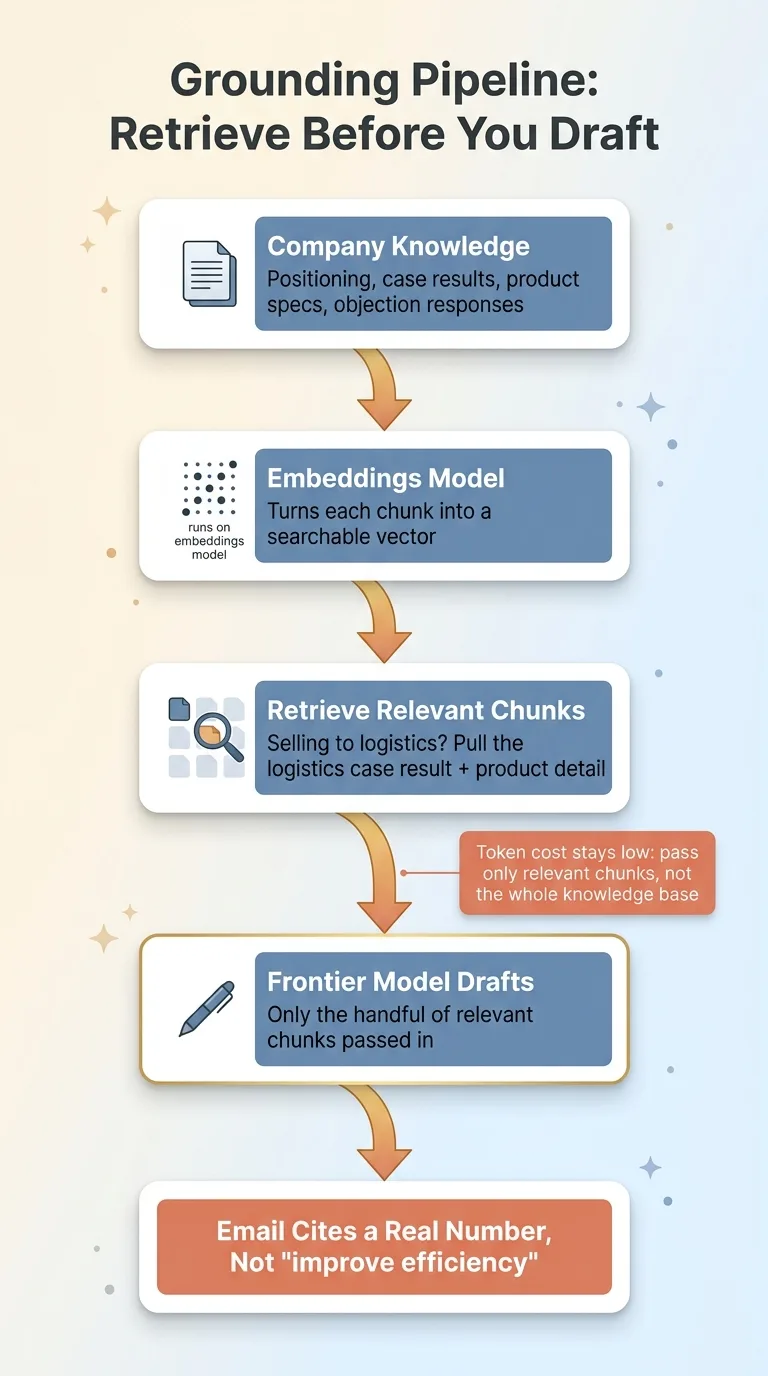
Here's the mechanism. You store the company's knowledge as embeddings: your positioning, real case results, product specifics, objection responses. An embeddings model turns each chunk into a vector you can search by meaning.
 Retrieval-before-drafting grounding pipeline
Before drafting, the system retrieves the chunks most relevant to that prospect and context. Selling to a logistics company? It pulls the logistics case result and the relevant product detail. Those specific chunks get fed into the draft, so the email cites a real number or a real outcome instead of "improve efficiency."
The generation runs on a frontier model. The retrieval runs on the embeddings model. Two different jobs.
There's a cost reason this matters too. You don't stuff your entire knowledge base into the prompt every time. You retrieve from an index and pass only the handful of relevant chunks. That keeps the token cost down and the relevance up, which I broke down in search the index, not the whole library.
Voice plus grounding. An email that sounds like you and says something true and specific. That's a personalized outreach AI worth sending.
Nothing Sends Without a Human (And Auto-Send Is Off by Default)
Here's the fear every CEO has when I describe this. "So your tool is going to blast my prospect list with robotic garbage and torch my brand." Fair. That's exactly what a badly built version would do.
So let me be direct about the control structure, because the design answers the fear.
Per-template auto-send is opt-in
Every draft is human-reviewed before it goes out. By default, the SDR produces a draft and stops. The rep reads it, edits it, sends it. Nothing leaves on its own.
Auto-send exists, but it's off by default and only enabled per-template. A rep has to use a given template enough times to watch it consistently produce drafts they would have sent anyway. Once they trust that specific template, they can turn auto-send on for it. Not for everything. For the one thing they've verified.
So trust is earned per workflow, not granted to the whole system on day one.
Why this is the design, not a limitation
This is intentional. It's the same principle behind everything I ship: every AI action I ship stops for a human.
The rep stays the editor and the brand owner. The AI removes two things: the blank-page problem and the time cost of writing from scratch. It does not remove judgment. The human still decides what's good enough to represent the company.
A tool that auto-sends everything from day one isn't more advanced. It's reckless. The version that earns trust before it earns autonomy is the one you can actually deploy without lying awake about what it's saying to your best prospects.
What Actually Changes: Indistinguishable From a Good Rep, At Scale
Let me show you the before and after on a single email, because that's where the value is concrete.
The before/after on a single email
Before: the rep opens a blank draft. They either write from scratch, which takes ten or fifteen minutes per prospect and doesn't scale, or they paste a generic template and change the company name, which scales but gets deleted.
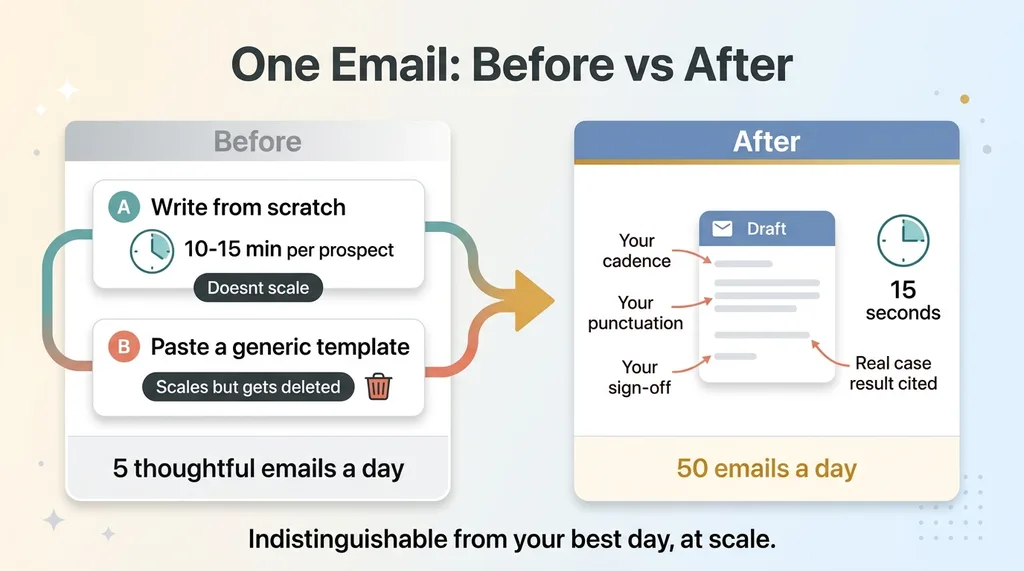 Before and after: writing a cold email manually vs with the SDR
After: the rep opens the SDR and gets a draft in a few seconds. It's written in their cadence, with their punctuation and their sign-off. It cites a real specific pulled from the knowledge base, the case result that fits this prospect. They read it, tweak one line, send it.
The email is indistinguishable from one the rep would have written on their best day, except it took fifteen seconds instead of fifteen minutes. That's the difference between five thoughtful emails a day and fifty.
What it still can't do
Now the honest part, because I don't sell magic.
It won't manufacture a relationship. If you've never spoken to this person and have no warm angle, the AI can't invent one. It writes a good cold email, not a fake friendship.
It won't research a prospect it has no data on. Grounding works off what you've stored. If the knowledge base is thin, the draft is thin.
And a lazy reviewer who rubber-stamps every draft will still send mediocre email. The tool raises the floor and removes the friction. It does not replace knowing your customer.
This is an AI email that sounds human because a human is still in the loop. Take the human out and you're back to the spam everyone deletes.
Where This Fits If You're Drowning in Manual Outreach
So look at your own situation honestly. Either your team is ignoring the AI outreach tool you already bought, or they're sending the generic stuff that gets deleted. Both are the same problem wearing different clothes.
The missing pieces are voice samples and grounding. And the good news is those are data problems, not model problems. You don't need a better AI. You need to feed the one you have your real emails and your real facts.
That's the work. Collect how your reps actually write. Get your positioning and case results into an index the system can retrieve from. Build the human review step so nothing embarrassing ever ships. Get those three right and the AI SDR writes in your voice instead of a robot's.
I build these systems into the actual sales workflow my clients already use, not into a slide deck about what's theoretically possible. If you want an SDR that drafts in your team's real voice, grounds every claim in your own knowledge, and stays under human control, that's exactly the kind of thing I build.
Get the next build note.
I write up each system I build, including what broke. Subscribe to my newsletter and I'll send you the next one.