AI Product Visualization on Photo That Closes Sales
AI product visualization on photo lets sales reps render real products onto a customer's actual room. Here's how I made it photoreal enough to close.
By Mike Hodgen
Why most AI room renders look fake (and lose the sale)
Most AI product visualization on a photo looks fake. The customer knows it in half a second, and the moment they clock it as fake, you've lost them.
Picture the scene. An in-home sales rep for a window-covering company is standing in someone's living room. The customer is interested but not sold. So the rep pulls out a phone, snaps a photo of the actual window, and wants to show what a particular shade or drape would look like on it. Right there. In their actual space.
That's the dream. The reality, with most off-the-shelf tools, is ugly.
The flat-tint problem
What usually happens is a generic image-to-image AI render drops a flat color wash over the glass. The treatment reads like someone took a paintbrush in Photoshop and filled the window with one solid tint. No folds. No depth. No way light interacts with fabric.
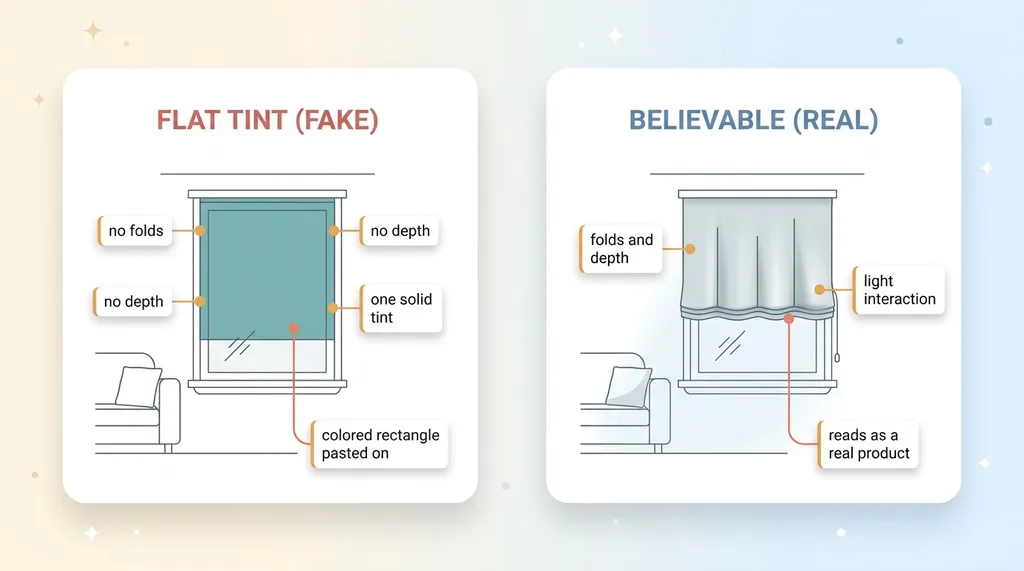 Flat-tint failure vs believable product render
It's not a product. It's a colored rectangle pasted onto a window.
The model isn't drawing a shade hanging in space. It's smearing a hint of color across the area where it thinks a shade might go. That's the failure mode that kills the sale.
What a customer actually notices
Customers don't think in technical terms. They don't say "the geometry is wrong." They say "that doesn't look real," and they stop trusting everything else you show them.
The win condition isn't a pretty render. It's a believable product-on-my-actual-room image. The customer needs to look at the screen and think, that's my window, with that shade on it.
Done right, this is an augmented reality alternative that needs no app install and no 3D model library. Just a photo and the right instructions. The hard part is the instructions.
The first pipeline assumed every product was the same
When I first built a render pipeline like this, it worked great. For exactly one product family.
The roller-shade default
The first version baked in roller-shade assumptions. Lower it 60 percent down the window. Show the fascia at the top. Use this mount type. Hang it flat against the glass.
For roller shades, that's correct. A roller shade is basically a flat sheet that drops vertically. The assumptions matched the product, so the renders looked believable.
I thought I'd solved it. I'd actually solved one twelfth of it.
Where drapery, roman, cellular, and woven-wood broke
Then I ran a drapery panel through the same prompt. It came out as a flat tint over the glass. Run a roman shade through it: flat tint. Cellular: flat tint. Woven-wood: flat tint.
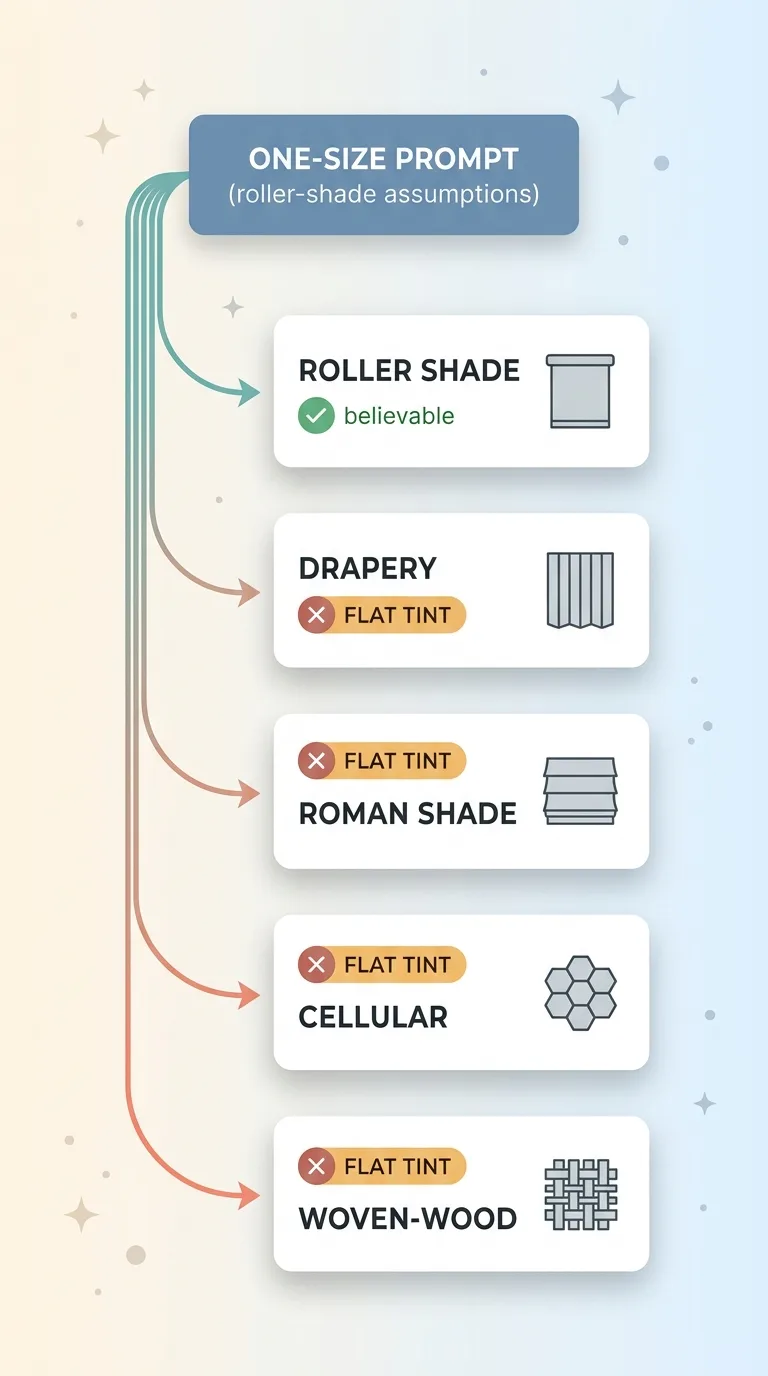 One-size prompt breaking across product families
The exact same failure mode I was trying to avoid, now showing up on every product that wasn't a roller shade.
Here's the thing that took me a beat to accept. The model wasn't the problem. The instructions were.
Each treatment hangs differently. Drapery falls in vertical folds and pools at the floor. A roman shade stacks in horizontal pleats as it raises. Cellular has that honeycomb structure that catches light. Woven-wood has texture and gaps that let slivers through.
They cover the glass differently, fold differently, and interact with light completely differently. A one-size prompt can only ever look right for one family. For everything else, the model has no idea what it's drawing, so it defaults to the only thing it can do with bad instructions: smear a tint.
The fix wasn't a better model. It was better instructions, per family.
Making the prompt builder product-family-aware
The actual solution was a product-family-aware prompt builder. Instead of one prompt with roller-shade assumptions, each product family gets instructions written for how that family actually behaves.
Geometry, coverage, and light physics per family
Every family gets four things defined specifically for it.
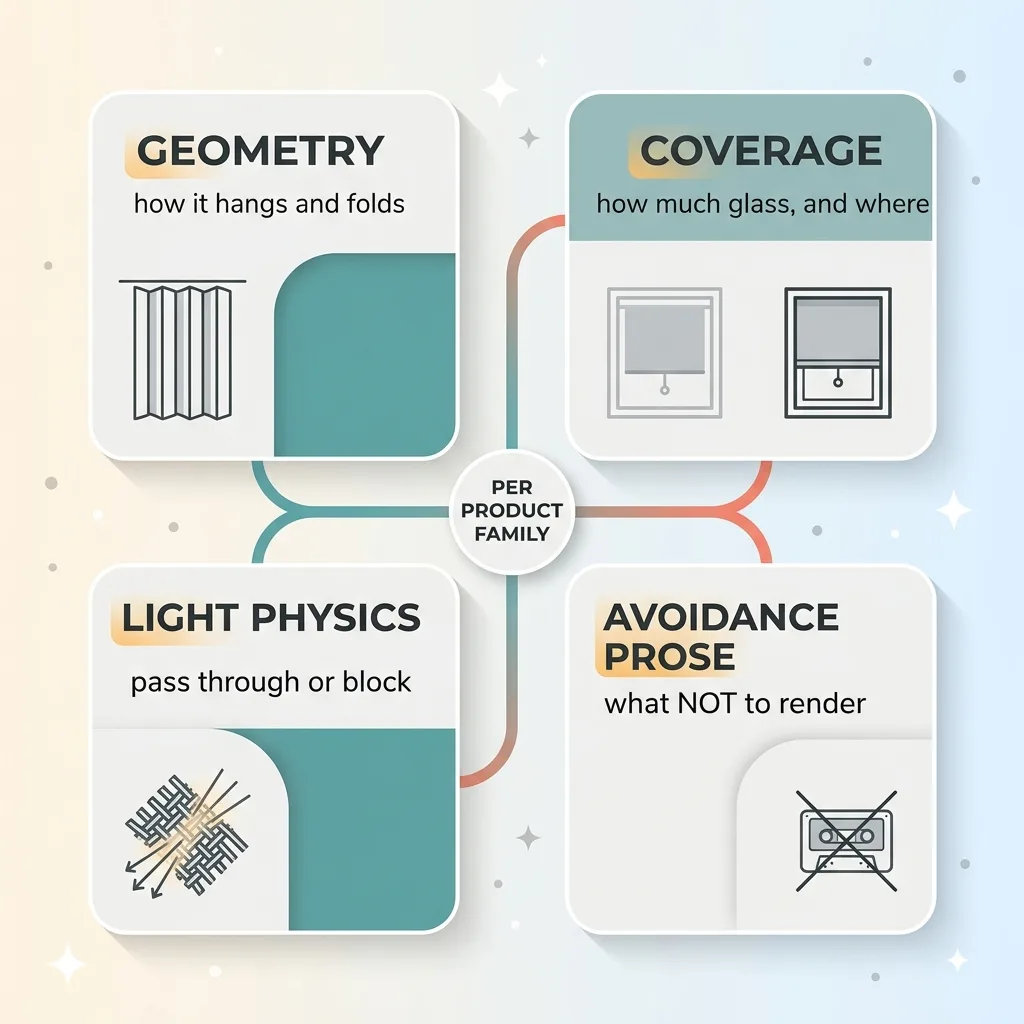 Four-part per-family prompt instruction set
Geometry: how it hangs and folds. Drapery gets vertical fold language. Roman gets horizontal pleat stacking. Cellular gets its honeycomb cell structure.
Coverage: how much glass it covers and where. A drape might extend past the window frame on both sides. A roller shade sits inside the frame.
Light physics: how light passes through or blocks. Woven-wood lets light leak through the weave. A blackout fabric stops it cold.
Avoidance prose: what NOT to render. Don't draw a roller cassette on a drapery panel. Don't put pleats on a flat roller. The negative instructions matter as much as the positive ones, because the model will happily hallucinate a hardware part that has no business being there.
This is the core of photoreal AI rendering. The believability lives in product-specific instruction, not in some magic model that figures it all out on its own.
Opacity and solar fabric as tiebreakers
Sometimes families overlap and the geometry alone isn't enough to tell them apart. That's where numeric properties come in.
Opacity and solar fabric values act as tiebreakers. A 5 percent openness solar shade behaves differently in light than a 14 percent. Those numbers feed the light physics so the render gets the translucency right.
And all of this only works because the render is grounded in the customer's real photo. You composite the real thing instead of generating it rather than asking the model to invent a room from scratch. The window stays the customer's window. The product gets rendered onto it with family-correct instructions.
The fabric color bug: stored but never rendered
Here's a bug that taught me something. The system was capturing the customer's chosen fabric color perfectly. It just never made it into the actual prompt.
Why metallic bronze came out flat brown
A customer would pick a specific fabric: a metallic bronze, let's say. The system stored that selection. Everything looked fine in the data.
Then the render came out as flat brown. No metallic sheen, wrong tone, basically a different product than the one they'd chosen.
The color was captured. It was sitting right there in the system. It just wasn't being threaded through into the prompt that actually generated the image. So the model was rendering a generic fabric in a generic color and ignoring the one specific thing the customer cared about most.
Customer picks a fabric. Render shows the wrong thing. Sale's gone. They don't trust a single render after that.
Backlit vs front-lit color blocks
The fix was threading the real color through to the prompt, but with a twist. The same fabric reads differently depending on the light.
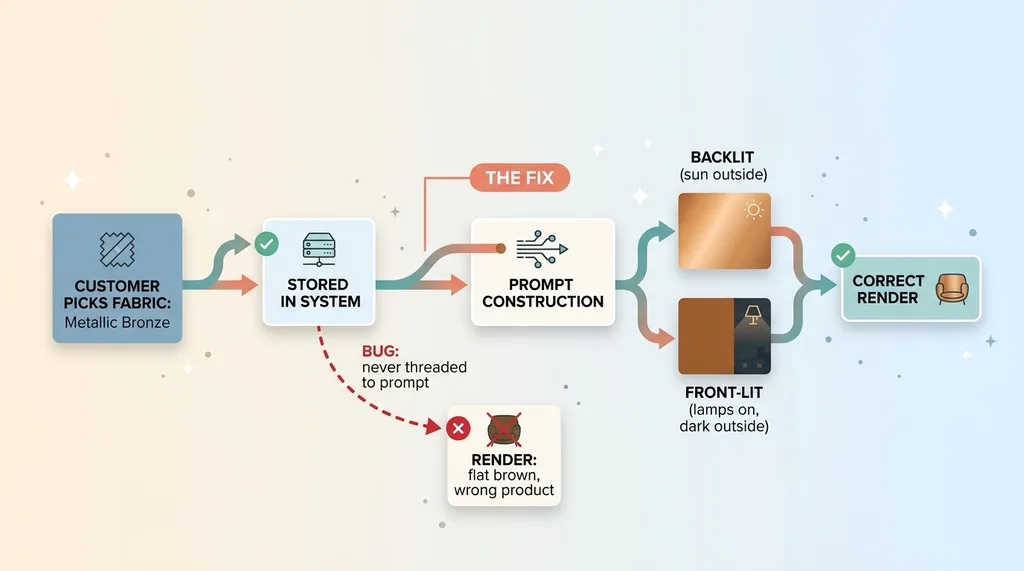 Fabric color threading bug and backlit vs front-lit fix
A window lit from behind (sun outside) shows the fabric one way. A room lit from the front (lamps on, dark outside) shows it another way. Metallic bronze backlit looks luminous. Front-lit it looks deeper and more solid.
So I built a backlit-versus-front-lit color block into the prompt, so the fabric reads correctly either way.
This is the kind of detail that separates a demo from a tool reps actually trust in front of a customer. It's also why you have to lock the AI to the catalog and thread the real product attributes through, instead of letting the model improvise.
Motorized vs corded: suppressing what shouldn't be there
Smaller detail, but it tells the whole story about what photoreal rendering really is.
A shade can be motorized or corded. The motorized flag had to be threaded through to the prompt so the render would suppress visible cords and chains.
Why does this matter? Because a motorized shade with a dangling cord in the image is an instant tell. Anyone who knows the product looks at it and thinks, that's not motorized, this whole thing is fake. And it's worse than just looking fake. It misrepresents the actual product the customer is paying for.
So the motorized flag goes into the prompt with explicit instruction: no cords, no chains, no operating hardware on the side.
Here's the broader principle. Photoreal rendering is as much about removing the wrong details as adding the right ones.
It's tempting to think the work is all about drawing the product correctly. Half the work is making sure the wrong stuff doesn't show up. A cord that shouldn't be there. A cassette on a drape. A pleat on a flat shade.
Every attribute the customer selected has to do one of two things. Show up correctly, or be deliberately suppressed. There's no neutral. Anything the model adds on its own that doesn't match the configuration is a crack in the believability, and customers find cracks fast.
Why this beats AR apps for in-home sales
People hear "show the product in the customer's room" and immediately think augmented reality. Build an AR app. I'd push back on that for most product companies.
No app, no 3D models, no special hardware
Traditional AR has three problems baked in. It needs the customer to install an app, which a lot of them won't. It needs a maintained 3D model library for every single SKU, which is enormous ongoing work as your catalog changes. And honestly, it tends to look like floating CGI sitting awkwardly in the room.
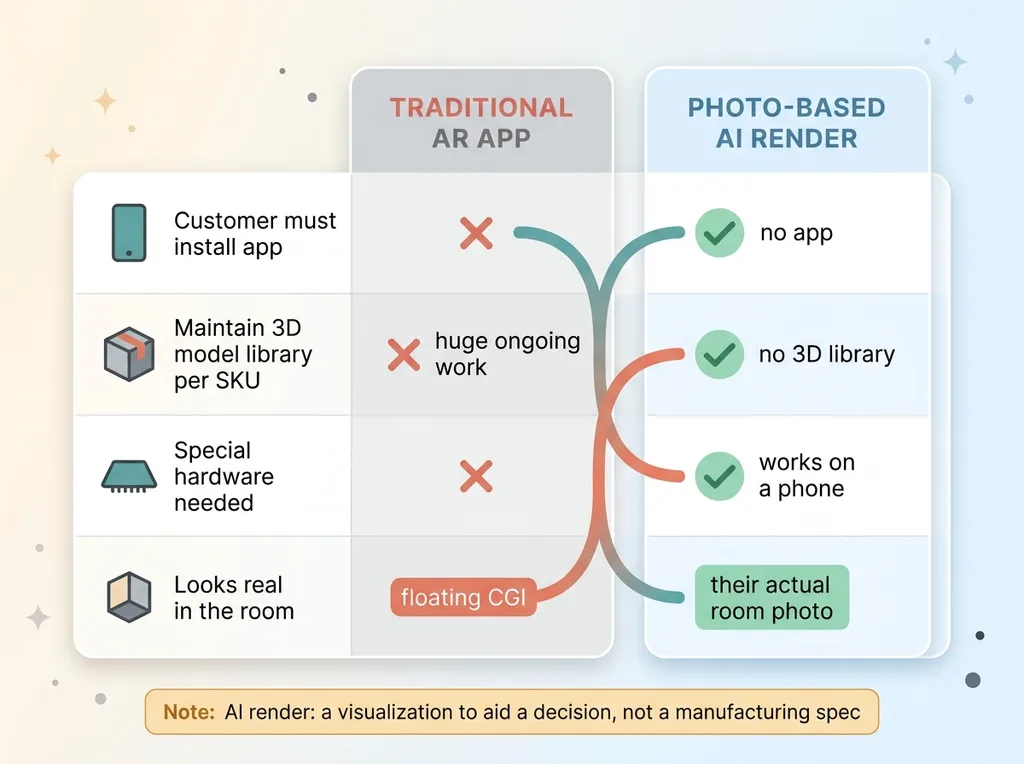 Image-to-image render vs traditional AR app for in-home sales
You're maintaining hundreds of 3D models and the result still doesn't look real.
Their actual room, not a generic mockup
The image-to-image AI render approach skips all of that. The rep takes a photo of the real window. The system renders the selected product onto that exact photo, with the family-correct geometry, the real fabric color, the motorized cord suppression, all of it.
The customer sees their actual room with the actual product they configured. No app to install. No 3D library to maintain. No special hardware. It works on a phone in someone's living room.
Now the honest part. This is a visualization to help a decision, not a manufacturing-accurate spec. It won't replace a measure or a quote. And it falls apart the second the product-family logic is wrong, which is the whole reason this article exists.
Get the logic right and it's a genuine in-home sales tool. Skip the logic and you're back to flat tints. If you want to go deeper on the technical build, here's how I render the actual shade onto a real window photo.
What it takes to make a render a customer believes
Pull the thread together and the lesson is simple. Believable AI product visualization on a photo isn't a model choice. It's a hundred product-specific decisions threaded through correctly.
Geometry per family. Fabric color threaded all the way to the prompt. Light physics that change with backlit versus front-lit. Cords suppressed on motorized units. Avoidance prose so the model doesn't add hardware that doesn't belong.
Any one of those wrong and the render reads fake. And fake loses the sale.
This is buildable for most product companies whose reps sell in person or over a shared screen. Furniture, flooring, cabinetry, window treatments, anything a customer wants to picture in their own space before they commit. The technology is here. The model can do it.
What it needs is someone who'll get the product-family logic right rather than ship a roller-shade default and call it done. That distinction is the entire difference between a demo that impresses in a meeting and a tool a rep trusts in a stranger's living room.
So here's the offer. If your reps are trying to show customers what a product looks like in their own space, tell me what they're trying to show. I'll tell you straight whether this is worth building for your catalog or whether you'd be fighting the geometry the whole way.
Thinking about AI for your business?
If this resonated, let's have a conversation. I do free 30-minute discovery calls where we look at your operations and find where AI could actually move the needle, not where it sounds good on a slide.
Get AI insights for business leaders
Practical AI strategy from someone who built the systems — not just studied them. No spam, no fluff.
Hodgen.AI
Ready to automate your growth?
Book a free 30-minute strategy call with Hodgen.AI.
Book a Strategy Call