The One Thing Generative AI Cannot Do: Your Label
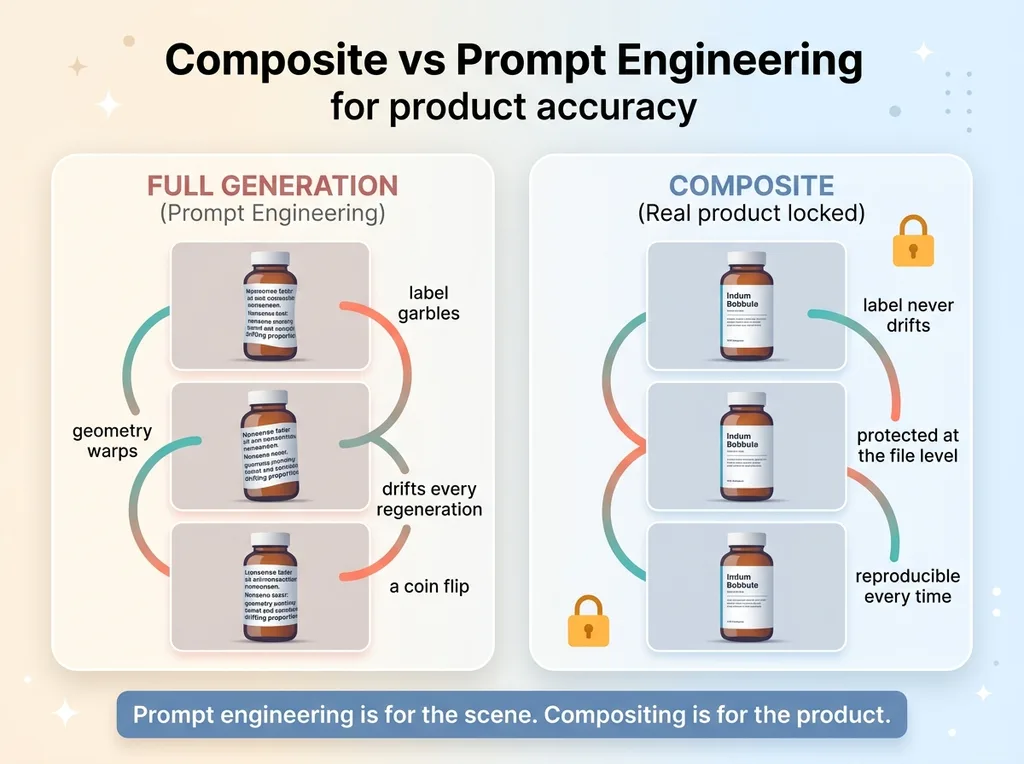
Ask any image model to "generate a bottle of my product on a marble counter" and watch what happens to the label. The text turns to garbled nonsense. The logo geometry warps. The model invents ingredients that don't exist. The proportions drift just enough to look wrong without you being able to say why.
For a brand, that's not a cosmetic problem. It's fatal. A customer who sees a mangled label doesn't think "interesting AI artifact." They think fake. Or worse, counterfeit. And once someone suspects your product photo is fake, you've lost the sale and probably the trust.
This is the single rule I've built every imaging system around: an ai product photography composite never regenerates a labeled product from scratch. Ever.
I run a small DTC fashion brand handmade in San Diego, and I've built imaging pipelines for clients across other industries. The rule held in every single case. Across a winery's bottle lineup, an apparel catalog, and collection imagery where multiple products share one frame, the answer was always the same.
You do not let the model draw the part that has to be true.
The label, the logo, the cut, the print, the proportions. Those are facts about a physical thing your customer will receive and hold in their hands. If the photo and the product don't match, you've shipped a lie. Generative AI is brilliant at inventing plausible-looking pixels. That's exactly the problem when the pixels need to be accurate instead of plausible.
So I stopped asking AI to render products. I started asking it to render everything except the product. That one shift is the difference between imagery that looks fake and imagery a real brand can put on its store.
Composite, Don't Generate: The Rule That Makes It Safe
What compositing actually means here
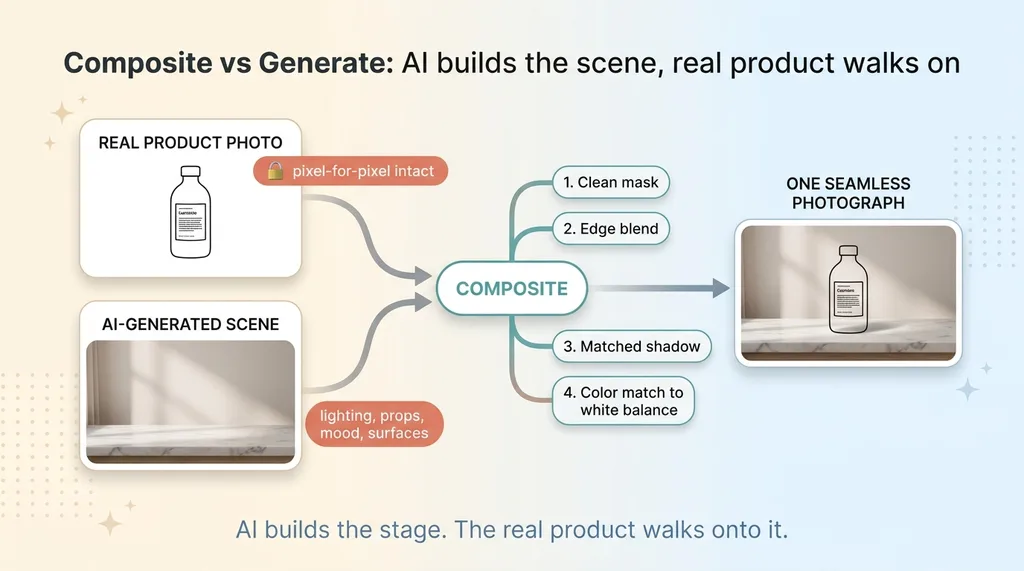
You photograph the real product on a clean background, or you use a photo you already have. AI generates only the scene: the lighting, the environment, the surfaces, the props, the mood.
 Composite vs Generate: AI builds the scene, real product walks on
Then you composite the untouched real product photo into that AI-generated scene. The actual label, the real proportions, the true geometry stay pixel-for-pixel intact. The model never touches the part that has to be correct.
That's the whole technique. AI builds the stage. The real product walks onto it.
To make the composite read as a single photograph and not a cut-and-paste job, four things have to happen. You mask the product cleanly off its background. You blend the edges so there's no hard cutout halo. You cast a shadow that matches the scene's light direction and softness. And you color-match the product to the scene's white balance so it doesn't look like it was lit on a different planet.
Do those four well and nobody can tell. The composite looks like one frame shot in one place.
Why this beats prompt engineering
People keep trying to prompt their way out of this. They write longer and longer descriptions hoping the model will finally render the label correctly.
 Composite vs Prompt Engineering for product accuracy
It won't. Reliably accurate text rendering is not something current image models do, and even when one frame looks close, the next regeneration drifts. Different garbling, different distortion, same problem. You can't build a catalog on a coin flip.
Compositing removes the gamble entirely. The label can't drift because the AI never generates it. You're protecting the truth at the file level, not hoping a prompt holds. This is why the ai product image pipeline I run treats the real product photo as untouchable input, not as something the model gets to reinterpret.
Prompt engineering is for the scene. Compositing is for the product. Don't mix them up.
Three Real Cases, One Rule
A winery's bottle lineup
A winery had dozens of bottles, each with a distinct label and a distinct vintage. Regenerating any one of them wouldn't just look slightly off. It would invent fake wines. A wrong vintage year. A label for a varietal that doesn't exist. That's not a typo, that's a product that isn't real.
So every real bottle photo got composited into AI-generated scenes: a candlelit cellar, a set dinner table, rows of vines at golden hour. The scenes were generated freely and varied endlessly. The bottles stayed exactly what they are. The 2019 reads 2019. The label geometry is the actual label.
A DTC apparel catalog
Apparel is unforgiving because the cut, the stitch, and the print have to match what ships. If the AI rounds off a collar or smooths out a seam, the customer notices the gap between photo and garment the moment the box arrives.
So the garment is always the real product, photographed flat or on a form. AI builds the model context and the environment around it. The garment itself gets composited in, print intact, proportions intact. This matters because AI edits silently mutate the subject when you let them touch it, which I covered in why AI keeps changing the subject mid-edit. The fix is to never give the model permission to edit the thing that has to be accurate.
Product and collection imagery at scale
Hero shots and category banners often need multiple real products sitting together in one AI-generated scene. A few SKUs arranged on a shelf, a tabletop, a styled flat lay.
Same rule, more pieces. Each real product is composited individually into the generated scene, each with its own mask, shadow, and color match. The scene is invented. The products are real, down to the label and the proportions.
Across all three cases, the part that varies is the world. The part that stays locked is the product. That's the discipline that scales from one bottle to an entire ai product photography ecommerce catalog without a single fake-looking frame.
How the Composite Survives a Real Printer
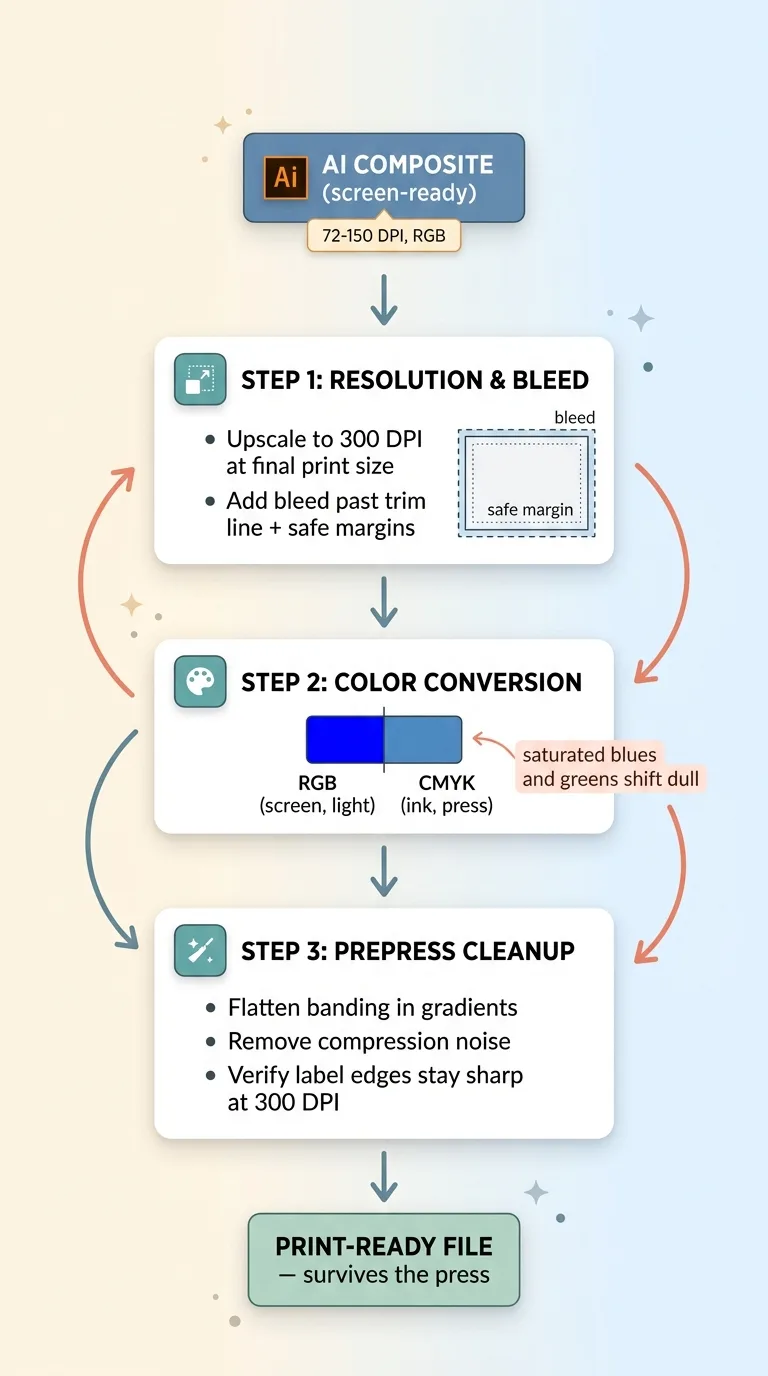
A composite that looks flawless on a product page can fall apart the moment it hits a press. AI images come out at screen resolution and in RGB, and a printer wants neither.
 Print prep pipeline: resolution, bleed, RGB to CMYK, artifact cleanup
Resolution and bleed
Screen images are typically 72 to 150 DPI. Print wants 300 DPI at the final physical size. If you take an AI composite straight off the screen and blow it up to poster size, you get mush.
So you upscale to 300 DPI at the actual print dimensions, then add bleed (extra image past the trim line so nothing white shows after cutting) and safe margins (keeping important elements away from the edge). Skip this and your beautiful composite gets cropped wrong or trimmed into a thin white border.
Color: screen RGB vs print CMYK
Screens make color with light (RGB). Presses make color with ink (CMYK). The two don't cover the same range, and converting between them shifts the image.
Saturated blues and greens are the worst offenders. That electric blue background that pops on screen can come back from the printer dull and muddy because CMYK ink simply can't hit that brightness. You convert to CMYK during prep so you see the shift and can correct for it, instead of discovering it on the proof.
Why AI output needs prepress cleanup
AI output also carries artifacts you don't notice at screen size: faint banding in gradients, soft compression noise, slightly fuzzy edges. At 300 DPI those show up.
So you check that the composited label edges hold sharp at print resolution, flatten any artifacts, and verify the gradients don't band. A composite that ships to print without this step can come back muddy or striped even though it looked perfect online. Surviving contact with a real printer is its own discipline, and it's the step most AI imagery never gets put through.
Rendering Three Variants Without Wrecking Page Speed
Once you have the finished composite, you don't ship one giant file everywhere. AI-generated imagery tends to be heavy, and dumping a raw high-res file onto a product page will tank your Core Web Vitals and your rankings with it.
 One composite, three rendered output variants
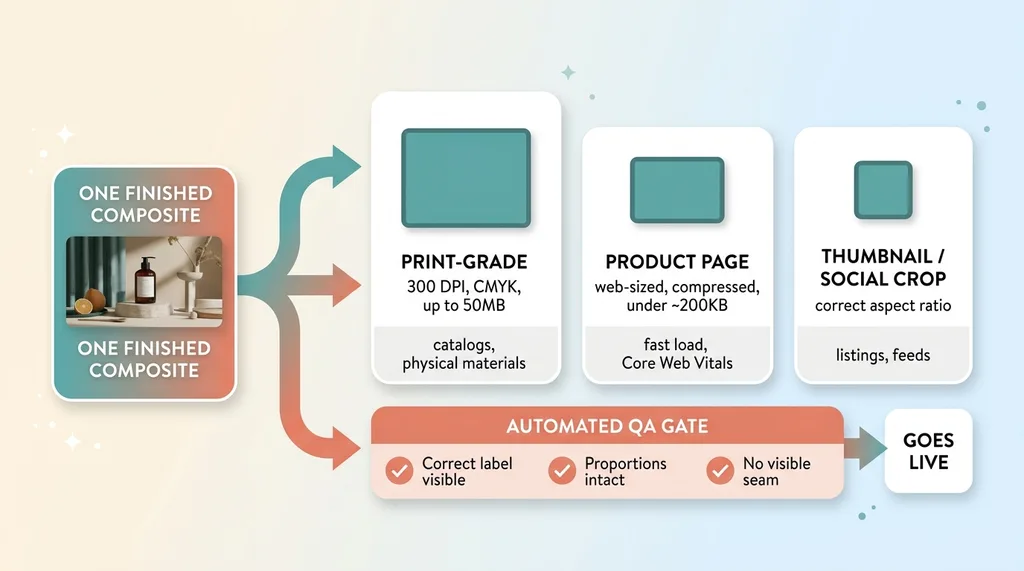
So one composite becomes three outputs. A high-res, print-grade version for catalogs and physical materials. A product-page version sized and compressed for fast web loading. And a thumbnail or social crop at the right aspect ratio for listings and feeds.
Each variant gets the right dimensions and the right compression for where it lives. The print file can be 50MB. The product-page file has no business being more than a couple hundred KB. Same image, completely different jobs.
This is the same approach I used cutting 92% off my site's image weight, and it's not optional once you're running real traffic. A slow page loses sales no matter how good the photo looks.
Before any variant goes live, it should pass an automated check: correct label visible, proportions intact, no visible seam where the product met the scene. I gate this the same way I built an AI that rejects its own bad work, so a bad composite never reaches a customer. The check is cheap. A live product page with a garbled label is expensive.
When AI Drawing the Product Is Actually Fine
I'm not telling you to never use full generation. There are plenty of cases where letting the model draw everything is exactly right.
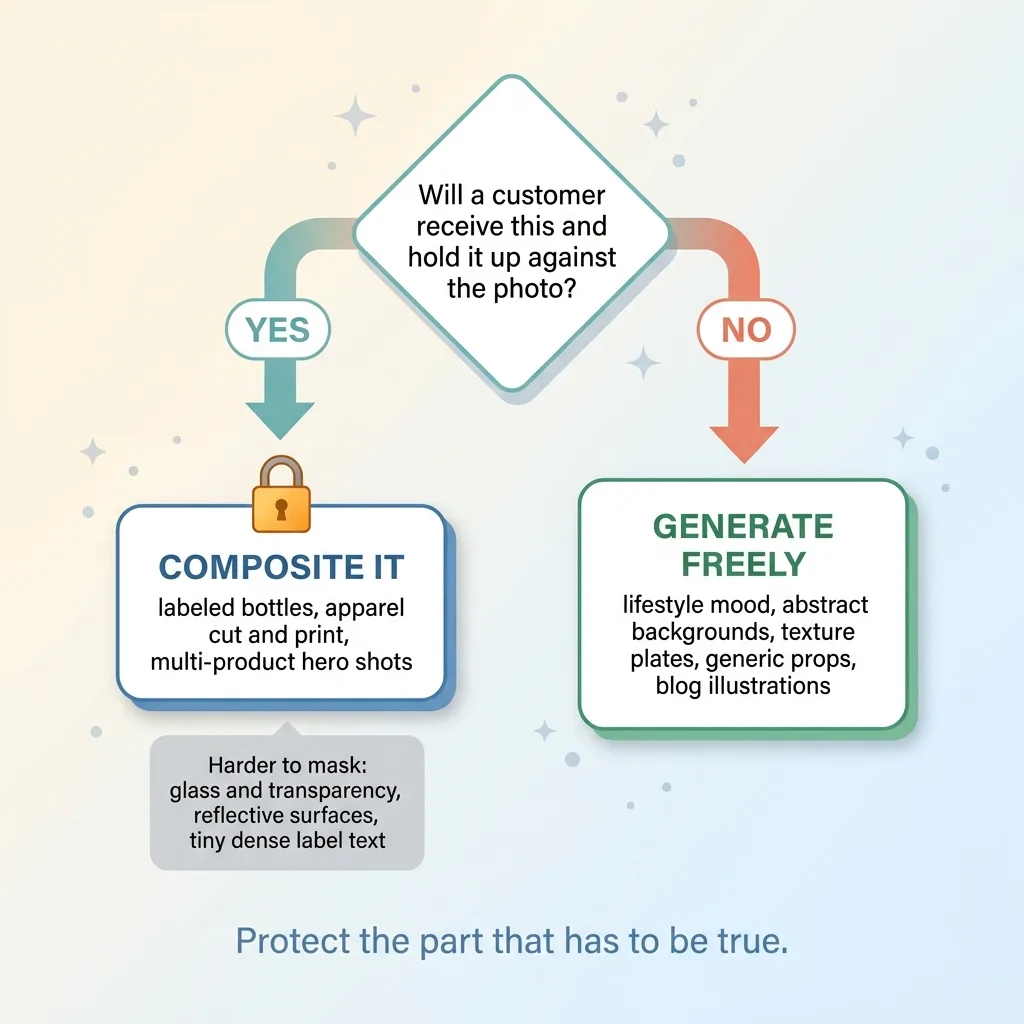 Decision test: composite it or generate it
Lifestyle mood imagery with no branded product in frame? Generate it. Abstract backgrounds, texture plates, atmospheric scenes? Generate them. Generic props that nobody will compare against a real object? Fine. Blog illustrations and editorial imagery? Generate freely, that's where these tools shine.
The rule is specifically about labeled, identifiable, must-be-accurate products. Here's the test I use. If the thing in frame is something a customer will receive and hold up against the photo, composite it. If it's atmosphere, generate it.
And I'll be honest about the cost. Compositing takes more setup than a one-line prompt. You need a clean product shot, a mask, edge work, shadow and color matching. It's more steps than typing a sentence and hitting generate.
Some products are also genuinely harder to mask cleanly. Transparent things like glass and bottles. Highly reflective surfaces. Labels with tiny dense text. None of these are impossible, but they take more care, and anyone who tells you compositing is effortless on every product hasn't done enough of it.
The point isn't that compositing is always easy. It's that for the part that has to be true, it's the only approach that holds.
The Difference Between a Demo and a Brand That Ships
The gap between an impressive AI image demo and a system a real brand can put on its store comes down to one thing: knowing which pixels must stay true, and building the pipeline to protect them.
Most AI product imagery looks fake for exactly one reason. Someone let the model draw the part that had to be real. The label, the logo, the cut. They prompted harder instead of compositing, and the result drifted into something a customer would clock as fake in half a second.
I run this discipline across my own brand's catalog and for clients. Composite first so the product stays real. Prep it so it survives a real printer. Render multiple variants so it doesn't wreck page speed. Gate everything behind QA so a garbled label never goes live. It's the same backbone as the pipeline that scores its own product shots, built so the truth about the product is never up for negotiation.
A demo proves the model can make a pretty picture. A brand that ships proves the picture is accurate enough to send a customer. Those are not the same problem.
Get the next build note.
I write up each system I build, including what broke. Subscribe to my newsletter and I'll send you the next one.