It started with a PDF I needed signed.
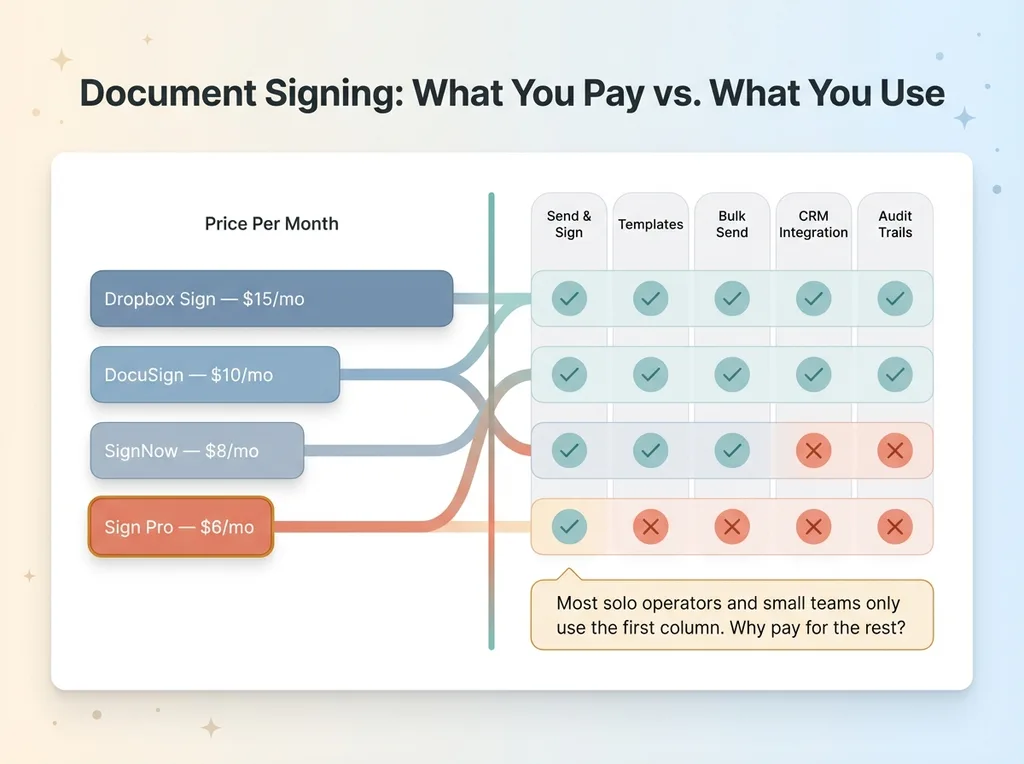
I was staring at DocuSign's pricing page — $10/month for their Personal plan — and thinking about how absurd it is to pay that much for what is fundamentally a simple transaction: send a document, someone signs it, you get it back. Dropbox Sign wants $15/month. SignNow charges $8/month. All of them bundle features most people never touch — templates, bulk send, CRM integrations, audit trails with legal certification levels that solo operators and small teams don't need.
So I decided to build a SaaS with AI and see what happened. Not as a hackathon stunt or a blog post gimmick, but as a real product with real billing, real authentication, real usage tracking, and real email notifications. Something I'd actually use and charge money for.
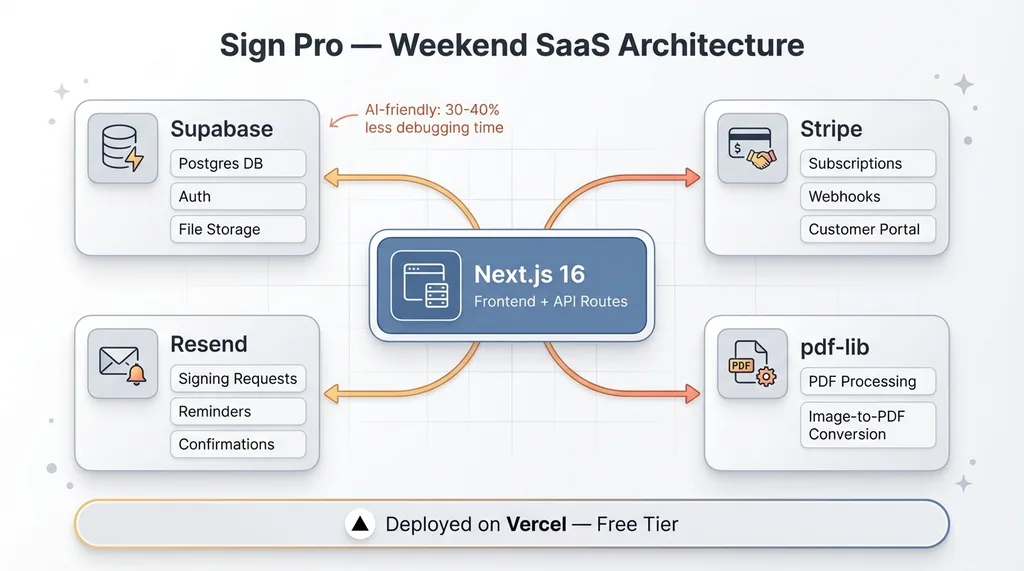
The stack: Next.js 16, Supabase, Stripe, Resend, pdf-lib. Everything deployed on Vercel. I've done fast builds like this before — I built my consultancy website in a day using a similar AI-assisted approach. But a marketing site is one thing. A SaaS product with subscription billing, usage limits, and a multi-step signing workflow is a different animal.
Here's the thing most people miss about building fast with AI: the interesting part isn't that AI writes code quickly. It's that AI changes which decisions you make about the product itself. When your build time drops from months to a weekend, you stop asking "can we build this?" and start asking "should we?" That shift is where the real value lives.
The Stack: What I Chose and What AI Chose for Me
Every "how to build a SaaS" guide gives you a clean stack diagram like the decisions were obvious. They weren't. Some of my choices were deliberate. Others were driven by a factor most guides ignore entirely: how well AI can work with the tools.
 Tech Stack Architecture
Frontend and Hosting
Next.js 16 on Vercel. This was the easy call. Zero-config deployment, edge functions, server components for the heavy lifting. Vercel's free tier is generous enough that early-stage hosting costs are effectively zero. The framework is mature, the deployment pipeline is frictionless, and I've built enough projects on it that my prompts to Claude are specific and contextual.
Backend and Auth
Supabase for the database, authentication, and file storage. This is where the AI factor matters. I chose Supabase partly on its technical merits — Postgres under the hood, row-level security, built-in auth — but also because Claude has deep training data on Supabase's SQL-based approach. When I describe a schema or a policy, Claude generates accurate, working code on the first or second attempt. Compare that to a less-documented backend tool where you're spending half your time correcting AI hallucinations about API methods that don't exist.
This is a real consideration when you're doing AI-assisted SaaS development. Your stack choices are partly driven by how much context the AI has on the tooling. Supabase plus Next.js is an AI-friendly combination. I'd estimate it saved me 30-40% of the debugging time I would have spent with a less well-represented stack.
Payments and Email
Stripe for billing because there's no real alternative at this scale for subscription management. Resend for transactional email — signing requests, reminders when documents go unsigned, confirmation when a signing is complete. Both have clean APIs and excellent documentation, which again matters when AI is writing most of the integration code.
The one piece of the stack that surprised me: pdf-lib. I needed a way for Pro users to upload JPG or PNG images — snap a photo of a physical document with your phone — and convert them to PDFs for signing. pdf-lib handles this entirely on the server side. Claude wrote the conversion logic in one pass.
What Claude Code Built in a Single Session
I want to be specific about what "built in a weekend" actually means, because the phrase gets thrown around loosely. Here's what shipped.
Core Signing Workflow
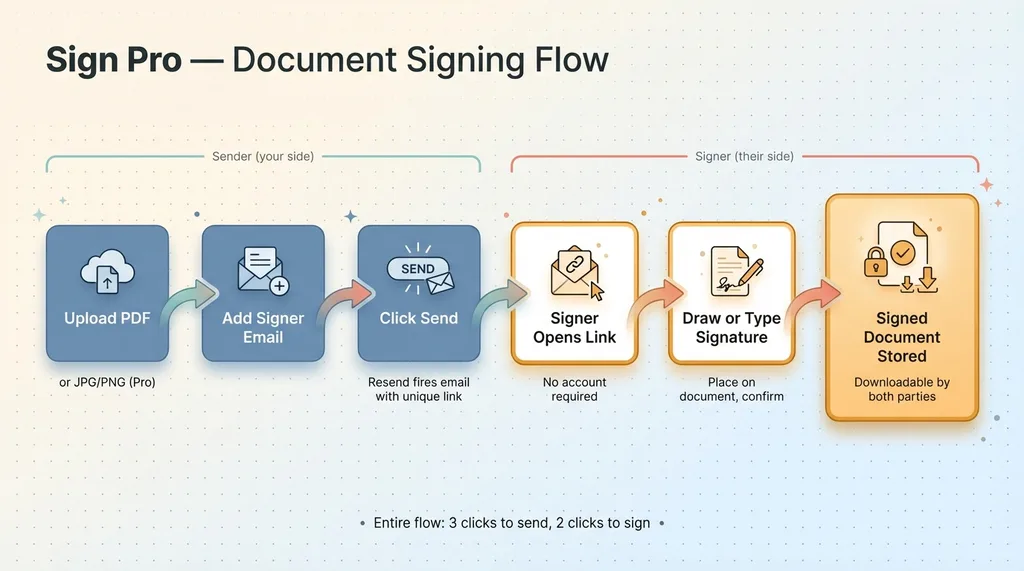
Upload a PDF. Add the signer's email address. Click send. Resend fires off a signing request email with a unique link. The signer opens the link — no account required — and either draws their signature with a mouse or trackpad, or types it and selects a font. They place it on the document, hit confirm. The completed signed document gets stored in Supabase and is downloadable by both parties.
 Core Signing Workflow
That's the product. It does one thing well.
The Boring Stuff That Takes Forever
Here's where AI-assisted development earns its keep. The core signing flow is the demo-worthy feature. But the stuff that makes a product real — the infrastructure nobody sees — is where human developers typically burn days or weeks.
Usage tracking. Every user has a document count that resets each billing cycle. Free users get 3 documents per cycle. Pro users get unlimited. The system tracks sends, enforces limits, and displays remaining usage in the dashboard.
Stripe subscription management. Upgrade from Free to Pro. Downgrade back. Cancel. Handle webhook events for failed payments. Reactivate. All the flows that Stripe supports and that users expect to work seamlessly.
Signing reminders. If a document goes unsigned, the system sends reminder emails. Simple feature. Tedious to build manually. Claude wrote the cron logic and email templates in about ten minutes.
Document deletion, password change flows, proper error handling across every form and API route. None of this is exciting. All of it is necessary.
The principle here applies beyond this project and beyond code. I use different AI models for different jobs across my entire operation at my DTC fashion brand — Claude for content and code, Gemini for images, custom chaining for cost efficiency. The same thinking applies: AI is disproportionately valuable for the tedious infrastructure that makes something real. The billing integration, the edge cases, the email templates. That's where the hours go, and that's where AI compresses them most aggressively.
I Dropped a Pricing Tier Because I Hadn't Built It Yet
This is the section I think matters most, because it's about a decision AI helped me make — not a feature AI helped me build.
The Three-Tier Trap
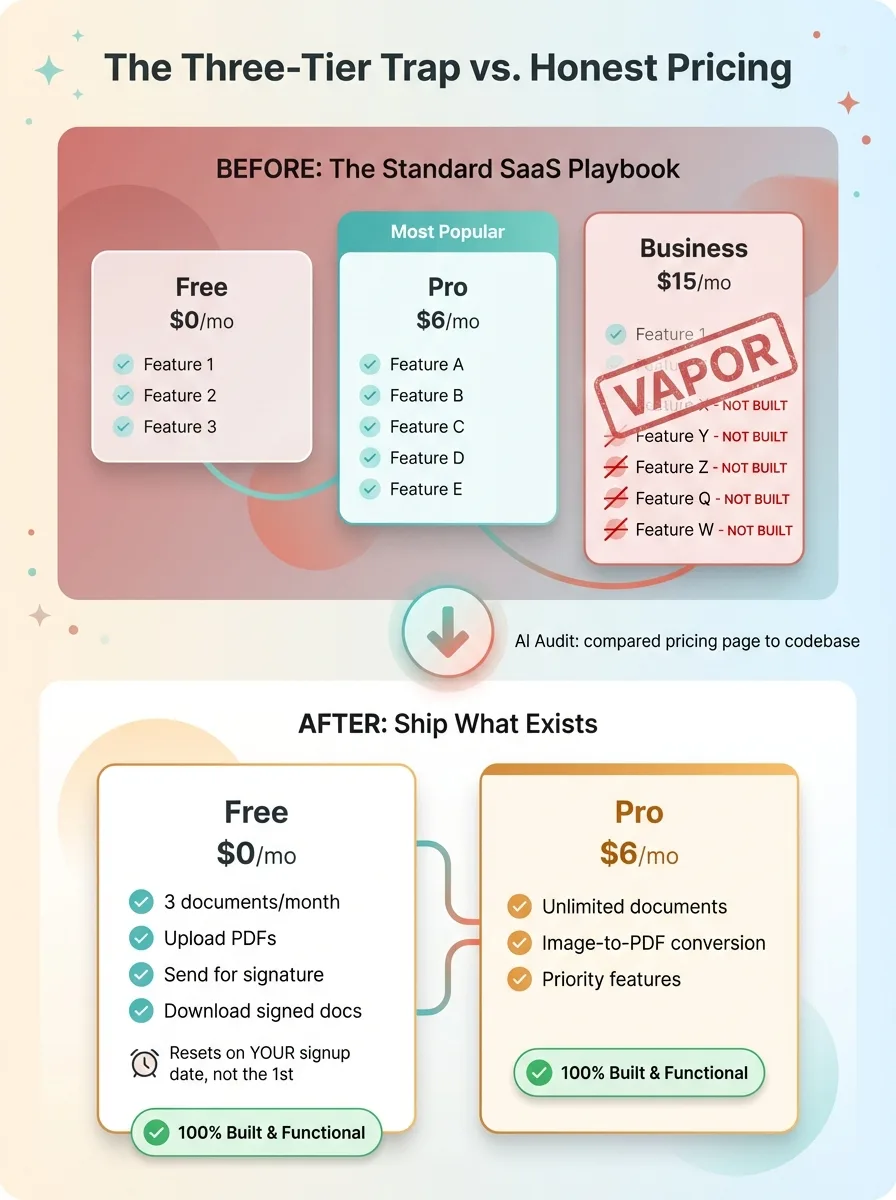
I started with the standard SaaS playbook. Three pricing tiers: Free, Pro, Business. The Business tier had team workspaces, custom branding, API access. Classic enterprise-adjacent features designed to anchor the Pro tier as the obvious choice and capture bigger accounts at $15 or $20/month.
There was one problem. None of the Business features existed. They were bullet points on a pricing page. Marketing promises with zero code behind them.
This is incredibly common in SaaS. Founders design their pricing page first and their product second. I know because I nearly did it myself. The three-tier pricing grid is so standard that it feels wrong to ship without one, like showing up to a meeting without a slide deck.
What Honest Pricing Looks Like
AI actually helped me see this clearly. When I audited the feature list against what was actually built and functional — literally asked Claude to compare my pricing page copy to my codebase — the Business tier was pure vapor. Every feature in it would have taken another weekend or two to build, test, and ship.
 Three-Tier Trap vs. Honest Pricing
So I dropped it. Two tiers: Free and Pro.
Free: 3 documents per month. Upload PDFs, send for signature, download completed documents. Enough to be useful, limited enough to drive upgrades.
Pro: $6/month. Unlimited documents. Image-to-PDF conversion for uploaded photos. Priority in future feature rollouts.
One detail I'm proud of: the Free tier's usage resets on the user's signup anniversary, not the first of the calendar month. If you sign up on March 15th, you get your full 3 documents until April 15th. Most SaaS products reset on the 1st, which means someone who signs up on the 28th gets three days of "free" before their counter resets. It's a small decision, but it's the kind of thing that shows you're building for the user, not just for the billing system.
The meta lesson here goes beyond document signing. AI is useful not just for building features but for auditing your own decisions. Ask it to pressure-test your pricing page against what's actually shipped. Ask it to compare your feature claims to your codebase. It will be more honest than your marketing instincts. Your marketing brain wants three tiers because that's what DocuSign has. Your AI auditor will tell you that two of those tiers are fiction.
Pricing at $6: The Math Behind Undercutting DocuSign
Let's talk numbers.
 Competitive Pricing Comparison
DocuSign Personal: $10/month. Dropbox Sign Essentials: $15/month. SignNow Business: $8/month. Sign Pro: $6/month.
The $6 price isn't a race to the bottom. It's a reflection of what this product actually costs to run and what the target user actually needs.
Infrastructure costs are near zero at early scale. Vercel's free tier covers the hosting. Supabase's free tier handles the database, auth, and storage for the first tranche of users. Stripe takes its percentage per transaction. Resend's free tier covers the first 3,000 emails per month, which is a lot of signing requests.
The product is simpler than the incumbents — intentionally. Most individuals and small businesses sending documents for signature don't need template libraries, bulk send to 50 recipients, Salesforce integrations, or advanced audit trails. They need to send a PDF and get it signed. That's it.
I used AI to run the competitive analysis. Pulled pricing pages, compared feature matrices, identified which features the incumbents charge for that Sign doesn't need and shouldn't build. The output was clear: there's a massive gap between what individuals actually use and what they pay for.
Here's my startup pricing strategy advice: price based on your actual costs and actual feature set, not based on what competitors charge for a fundamentally larger product. Most SaaS founders anchor to incumbent pricing and discount 20%. That's lazy. If your costs are lower and your scope is smaller, your price should reflect that. $6 isn't a discount off DocuSign. It's the honest price for a focused product with minimal infrastructure costs.
What AI-Assisted SaaS Development Actually Looks Like
Time for the honest assessment.
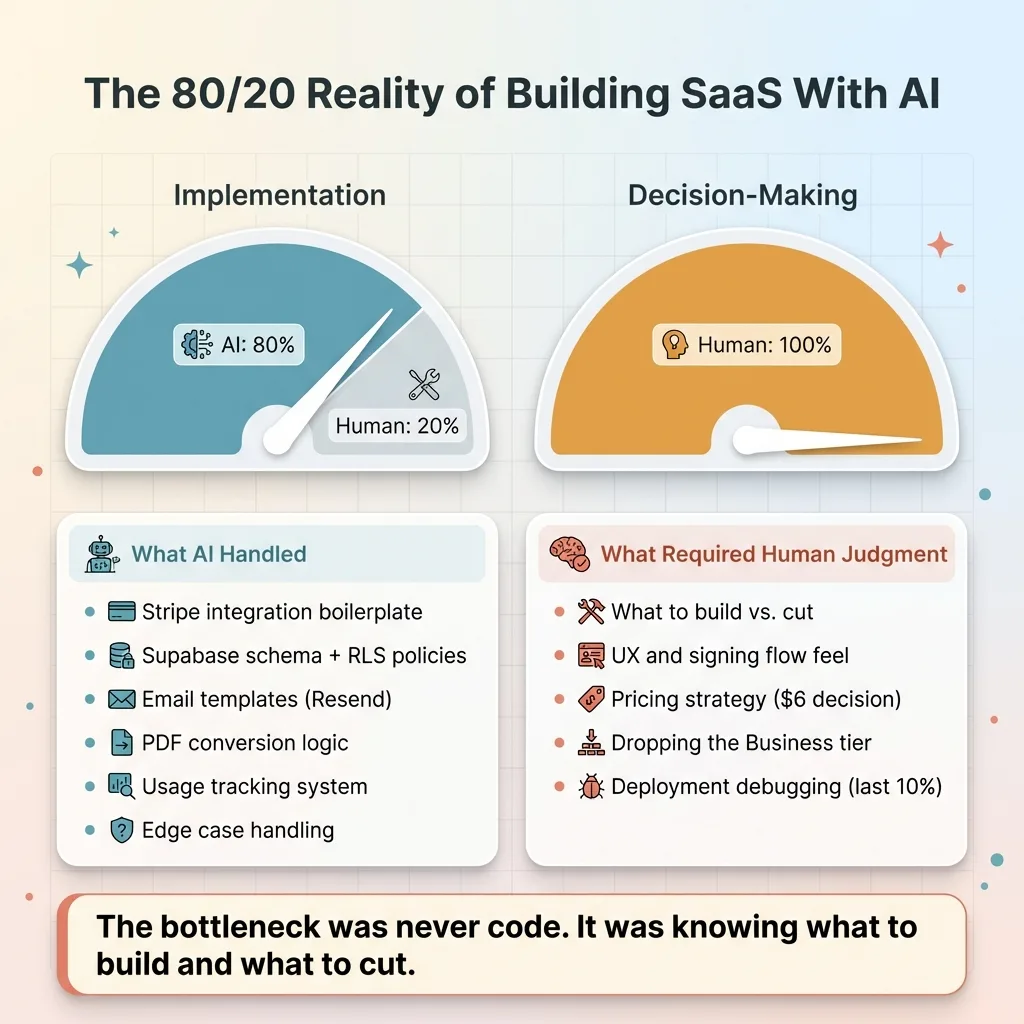 The 80/20 AI-Human Split
Where AI Saved Hours
Stripe integration boilerplate — subscription creation, webhook handling, customer portal links. This stuff is well-documented but verbose. Claude generated working Stripe integration code in minutes that would have taken me hours to write and debug manually.
Supabase schema design, including row-level security policies. Resend email templates for every notification type. The pdf-lib image-to-PDF conversion logic. The usage tracking system with cycle-aware reset logic. Edge case handling across the signing flow — what happens when a link expires, when a signer visits twice, when a document is deleted while a signing request is pending.
Where AI Still Needed Me
Product decisions. What to build, what to cut, what to defer. AI can list features; it can't tell you which ones matter for your specific user.
UX judgment calls. How should the signing experience feel? How many clicks from upload to sent? Where does friction belong and where does it hurt? These are human decisions informed by experience, not generated by prompts.
Pricing strategy. AI provided the competitive analysis and the cost modeling, but the decision to charge $6 — and the decision to drop the Business tier — those were mine.
Deployment debugging. Vercel-specific configuration issues, environment variable handling across preview and production, edge function cold start behavior. AI got me 90% there; the last 10% was manual troubleshooting.
The ratio was roughly 80/20. AI handled 80% of the implementation. I handled 100% of the decision-making. That's the part most people get wrong about building SaaS with AI. The bottleneck was never code. It was knowing what to build and what to cut. AI compresses build time so dramatically that your product judgment becomes the limiting factor, not your engineering capacity.
The Real Skill Is Knowing What to Build Next
The weekend build proved something I've seen across every AI system I've deployed — at my DTC fashion brand, where we run 29 AI-powered automations across pricing, product creation, SEO, and operations, and with every client I've worked with.
AI compresses execution time so much that strategy becomes the bottleneck.
When you can build a feature in an hour, the question stops being "can we build it" and becomes "should we." That's a product decision, a business decision, a customer decision. It requires judgment that no model provides on its own.
Get the next build note.
I write up each system I build, including what broke. Subscribe to my newsletter and I'll send you the next one.