Web Application Security Hardening: The 3-Layer Stack
9 of my 12 projects had no content security policy. Three layers of protection would have caught 80% of the holes I found in a weekend security audit.
By Mike Hodgen
I shipped 12 projects in about 18 months. Some for my DTC fashion brand, some for clients, some to scratch my own itch. Most were built fast, many with heavy AI assistance. And when I finally sat down to run a proper security check across all of them, the results were embarrassing.
Nine out of twelve had no rules telling web browsers which software was allowed to run on the page — meaning anyone could sneak in malicious code. Seven were accepting data from users without checking if it was legitimate. Eleven had nothing stopping someone from bombarding the system with thousands of requests per second.
These weren't side projects. They were real systems handling real payments, real user data, real documents.
I wrote about the full audit in my piece on security debt from vibe coding. The short version: AI-assisted development makes you incredibly fast at building features and dangerously fast at building security holes.
After cataloging everything, a pattern jumped out. Three specific protections would have caught roughly 80% of the problems I found. Not theory. Not something a vendor sold me. This is the exact web application security hardening approach I now put into action on every project before it goes live.
The Three Layers, in Plain English
Think of your web application like a building. You need three things: a guest list at the front door, a metal detector in the lobby, and a limit on how many people can come in per hour. That's essentially what these three security layers do.
Layer 1: Browser Rules (Content Security Policy)
Every time someone visits your website, their browser loads and runs all sorts of code — your code, but potentially also code an attacker snuck in. A Content Security Policy is basically a guest list for your browser. It says: "Only run software from these approved sources. Reject everything else."
Without this guest list, an attacker can inject their own code into your page — maybe a script that steals your customers' credit card numbers or redirects them to a fake site. With the guest list in place, the browser refuses to run anything that's not on it.
Setting this up takes about 30 minutes. Thirty minutes of work blocks the single most common type of attack on the internet. There is genuinely no excuse to skip it.
Layer 2: Input Checking (Data Validation)
Every form on your website — login, checkout, search, contact — sends data to your server. The question is: does your server check what it receives, or does it just trust that the data is legit?
Most applications I audited were just trusting. Someone could type a malicious command into a search bar, submit a negative number on a payment form, or send a massive wall of text designed to crash the system. The application would accept it all without blinking.
The fix is straightforward: before your system does anything with incoming data, it checks the data against a strict set of rules. Is this supposed to be an email address? Does it look like one? Is this supposed to be a dollar amount? Is it actually a positive number? Anything that doesn't match gets rejected instantly.
Adding these checks to a medium-sized application takes about a day. One person, one day. The cost of skipping it is letting garbage data into your system — and once bad data is in your database, you're cleaning up messes forever.
Layer 3: Traffic Limits (Rate Limiting)
This is the bouncer. It controls how many requests any single visitor can make in a given time window.
Why does this matter? Without traffic limits, a bot can try thousands of password combinations against your login page in minutes. A competitor can scrape your entire product catalog. And here's the expensive one — if you have any AI-powered features that call services like ChatGPT behind the scenes, an attacker can trigger thousands of those calls and run up a bill that hits four or five figures overnight. I've seen it happen.
The limits I start with: 5 login attempts per minute (kills automated password guessing), 100 general requests per minute (stops scrapers), and 10 requests per minute for anything AI-powered (because those cost real money per call).
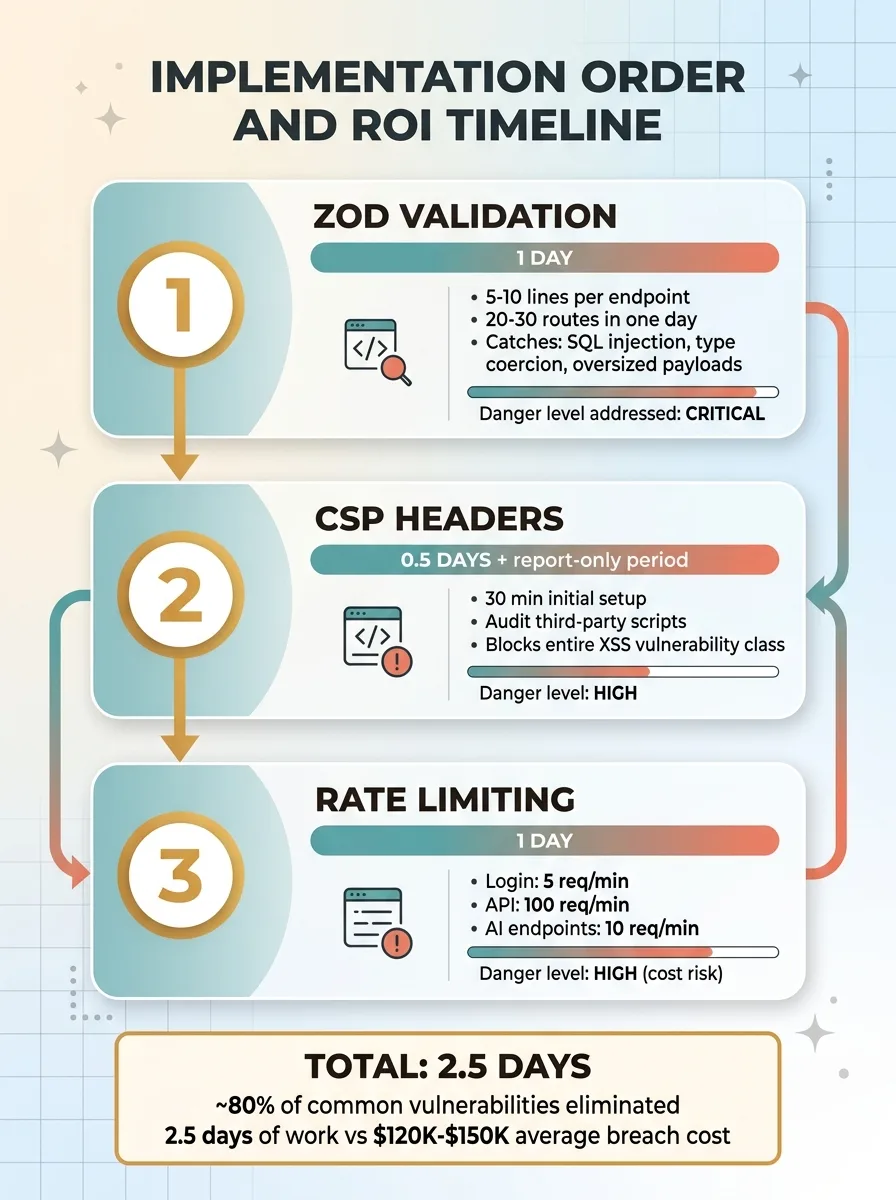 Implementation Order and ROI Timeline
2.5 Days of Work. 80% of Vulnerabilities Eliminated.
Here's what gets me: the total time to put all three layers into action is roughly two and a half days. One developer. Two and a half days.
Compare that to the cost of a data breach. For small businesses, the average runs $120,000 to $150,000 when you factor in legal exposure, notification requirements, and lost customer trust. Or compare it to one unprotected AI feature burning through your budget overnight.
Two and a half days is the highest-return investment in your technical foundation. Period.
Now, I'd lose credibility if I pretended this covers everything. It doesn't. These three layers won't fix broken login systems, sloppy permissions, leaked passwords stored in code, or outdated software with known flaws. But here's the honest reality: most businesses in the $1M to $50M range aren't facing sophisticated government hackers. They're facing automated bots running off-the-shelf attack tools. The three-layer stack stops almost all of that.
Why This Matters Beyond Security
Most businesses in that revenue range don't have a security team. They have developers who are busy building features. Security gets pushed off until a breach forces the conversation — and by then it costs 10x what it would have cost to just do it right.
This is part of what I do as a Chief AI Officer. I don't just build AI systems — I make sure the foundation under those systems is solid. When I start working with a business, the security audit is one of the first things that happens. No smart assistant handling customer service or automated pricing engine matters if the underlying application is leaking data through unchecked entry points.
I've built 15+ AI systems across my own DTC fashion brand and client projects. Those systems drove a 38% increase in revenue per employee and cut manual operations time by 42%. But none of that matters if the building has no locks on the doors.
If you're shipping fast and putting off security basics, the math is simple: fix it now for 2.5 days of effort, or fix it later for 10x the cost plus whatever damage happens in between.
Thinking About AI for Your Business?
If this resonated — whether it's the security gaps or the broader question of how to build technical systems that actually hold up — I'd like to talk. I do free 30-minute discovery calls where we look at your operations and figure out where AI, and the infrastructure around it, could actually move the needle.
Get AI insights for business leaders
Practical AI strategy from someone who built the systems — not just studied them. No spam, no fluff.
Hodgen.AI
Ready to automate your growth?
Book a free 30-minute strategy call with Hodgen.AI.
Book a Strategy Call