Web Application Security Hardening: The 3-Layer Stack
CSP headers, Zod validation, and rate limiting eliminated 80% of vulnerabilities across my projects. A practical web application security hardening guide.
By Mike Hodgen
I shipped 12 projects in about 18 months. Some for my DTC fashion brand, some for clients, some to solve my own problems. Most were built fast, many with heavy AI assistance. And when I finally sat down to run a proper security audit across all of them, the results were embarrassing.
Nine out of twelve had no Content Security Policy headers. Seven had API routes accepting unvalidated input — just trusting that whatever came in matched what the frontend sent. Eleven had zero rate limiting. These weren't side projects. They were production systems handling real user data, real payments, real documents.
I wrote about the full audit in my piece on security debt from vibe coding. The short version: AI-assisted development makes you incredibly fast at shipping features and dangerously fast at shipping vulnerabilities.
After cataloging everything, a pattern emerged. Three specific layers — CSP headers, Zod validation, and rate limiting — would have caught roughly 80% of the vulnerabilities I found. Not theoretical. Not a framework someone sold me. This is the exact web application security hardening stack I now implement on every project before it touches production.
Here's how each layer works, why it matters, and exactly how I deploy them.
Layer 1: Content Security Policy Headers That Actually Work
Content Security Policy is a set of HTTP headers that tell the browser exactly which scripts, styles, images, and connections are allowed on your page. Without it, any cross-site scripting (XSS) attack can inject arbitrary JavaScript into your application. With it, the browser refuses to execute anything that doesn't match your policy.
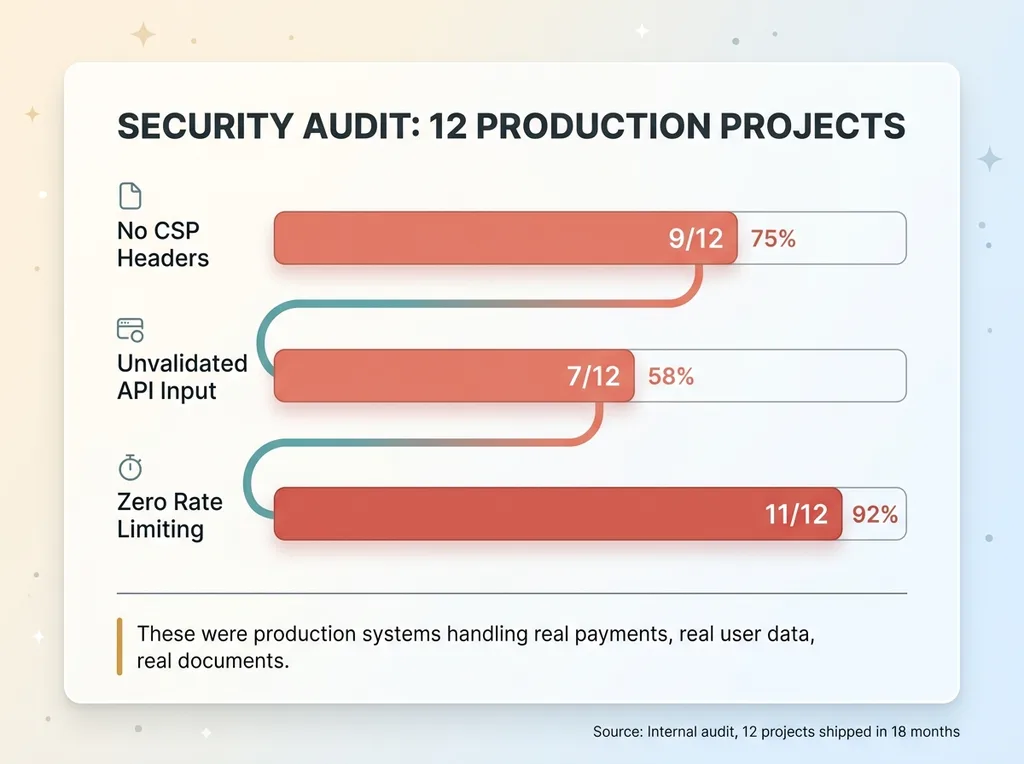 The Security Audit Results — Before the 3-Layer Stack
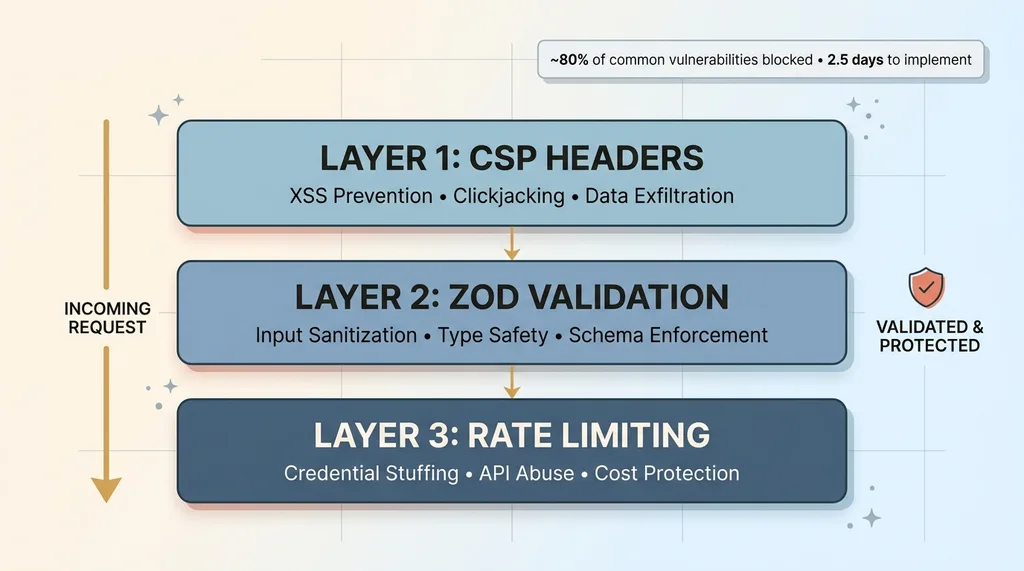 The 3-Layer Security Stack Architecture
That's the entire concept. It's a whitelist for your browser.
What CSP Prevents (and What It Doesn't)
CSP blocks the most common class of web vulnerability: XSS. Specifically:
- Inline script injection — an attacker injects a
<script>tag via a form field or URL parameter, and the browser executes it. CSP withscript-srcrestrictions kills this dead. - Data exfiltration to third-party domains — malicious scripts that phone home to an attacker's server.
connect-srcrestricts which domains your app can talk to. - Clickjacking —
frame-ancestorsprevents your site from being embedded in an iframe on a malicious page.
What CSP doesn't prevent: server-side attacks, business logic flaws, authentication bypass, SQL injection. It's a browser-side defense. It's one layer, not the whole stack. But it's the layer that blocks the single most common vulnerability class on the web.
The CSP Configuration I Ship on Every Project
The pattern I use across every Next.js project follows a progression:
Start in report-only mode. Set Content-Security-Policy-Report-Only instead of enforcing. This logs violations without breaking anything. I run this for at least a week in production to catch everything.
Audit the violations. This is where you discover that Google Analytics, Stripe.js, your analytics pixel, and that embedded YouTube video all need explicit allowlisting. Every third-party script that loads on your page needs a corresponding entry in your CSP.
Tighten and enforce. Once violations are clean, switch from report-only to enforced Content-Security-Policy.
The base configuration I start with:
default-src 'self'— block everything not explicitly allowedscript-src 'self' 'nonce-{random}'— only allow scripts from your domain with a per-request noncestyle-src 'self' 'unsafe-inline'— unfortunately most CSS-in-JS solutions still need thisimg-src 'self' data: https:— images from your domain plus HTTPS sourcesconnect-src 'self'plus your API domains and any third-party servicesframe-ancestors 'none'— prevent iframe embedding
The gotchas are real. Stripe.js requires script-src entries for js.stripe.com. Google Analytics needs multiple domains. Any embedded content — maps, videos, chat widgets — needs explicit permission. This is why report-only mode matters. You will break something if you skip that step.
Total implementation time: about 30 minutes for the initial setup, plus whatever time you need in report-only mode to catch third-party dependencies. There is genuinely no excuse not to have this. Thirty minutes of web application security hardening blocks the most exploited vulnerability class on the internet.
Layer 2: Zod Validation on Every API Route, No Exceptions
This is the layer most teams think they have but actually don't.
Why TypeScript Types Aren't Enough
Here's the gap that burns people: TypeScript types disappear at runtime. Completely. They exist only during development and compilation. Your API endpoint might define its input as {email: string, amount: number}, and TypeScript will helpfully check that during development. But when a real HTTP request hits that endpoint in production, there is no type checking. None.
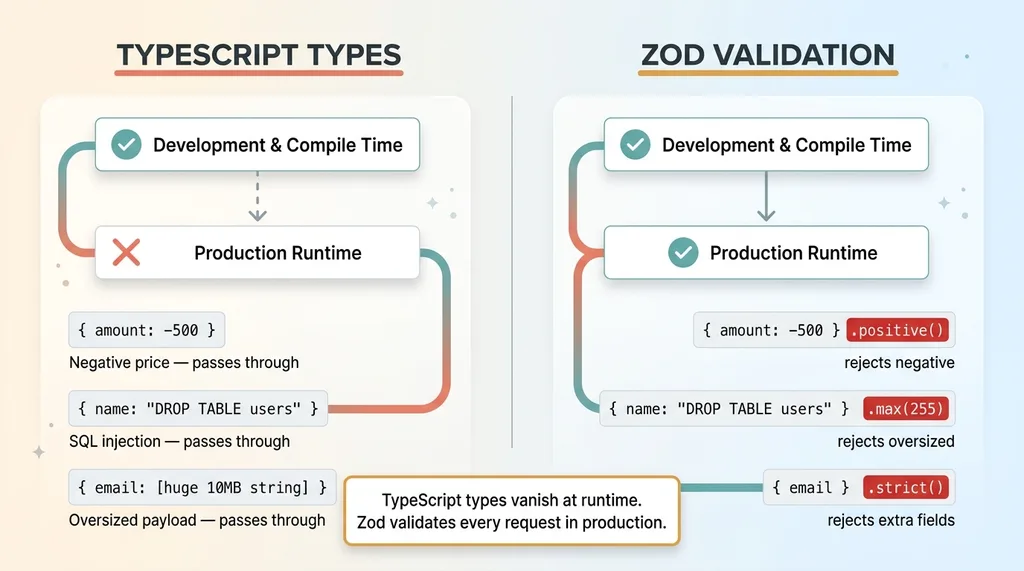 TypeScript Types vs Zod Runtime Validation
An attacker can send literally anything. A string where you expect a number. A 50,000-character payload in a field you expect to be 100 characters. A nested object designed to exploit prototype pollution. SQL injection strings in your search field. TypeScript won't save you because TypeScript isn't there.
Zod validates at runtime. It parses incoming data against a schema and rejects anything that doesn't match before your business logic ever sees it.
Zod Patterns That Catch Real Attacks
The pattern is straightforward: define a Zod schema for every API route's input. Parse the incoming request body against that schema as the first line of your route handler. If parsing fails, return a structured error. If it passes, you have data you can trust.
Here's what this actually catches in practice:
- SQL injection strings —
'; DROP TABLE users;--in a name field gets rejected because it fails format validation or exceeds expected patterns - Negative numbers in price fields — Zod's
.positive()or.min(0)catches someone trying to submit a negative amount on a payment form - Oversized strings —
.max(255)on a name field prevents someone from sending a 10MB string designed to overwhelm your processing or database - Type coercion attacks — sending
"true"(string) where you expecttrue(boolean), or an array where you expect a string - Prototype pollution — Zod's
.strict()mode rejects any properties not defined in the schema, preventing extra nested objects from sneaking through
The discipline I enforce on every project: zero API routes without Zod schemas. It adds maybe 5-10 lines per endpoint. That's it. The cost of skipping it is accepting arbitrary, unvalidated data into your system. Once bad data is in your database, you're playing defense forever.
One important note: validation confirms the shape of the data. It doesn't confirm whether the user has the right to access or modify that data. That's authorization — a different problem. I pair Zod validation with proper authorization checks on every route. Input validation is half the battle. The other half is making sure users can only access their own resources. I wrote about the IDOR vulnerabilities AI developers miss separately because it deserves its own deep dive.
Layer 3: Rate Limiting Patterns for Next.js
Rate limiting is the layer most small teams skip entirely. It's also the one that can save you from the most expensive failures.
Token Bucket vs. Sliding Window (and When Each Matters)
Most people think rate limiting is just about DDoS protection. It's not. Here's what actually hits small and mid-sized applications:
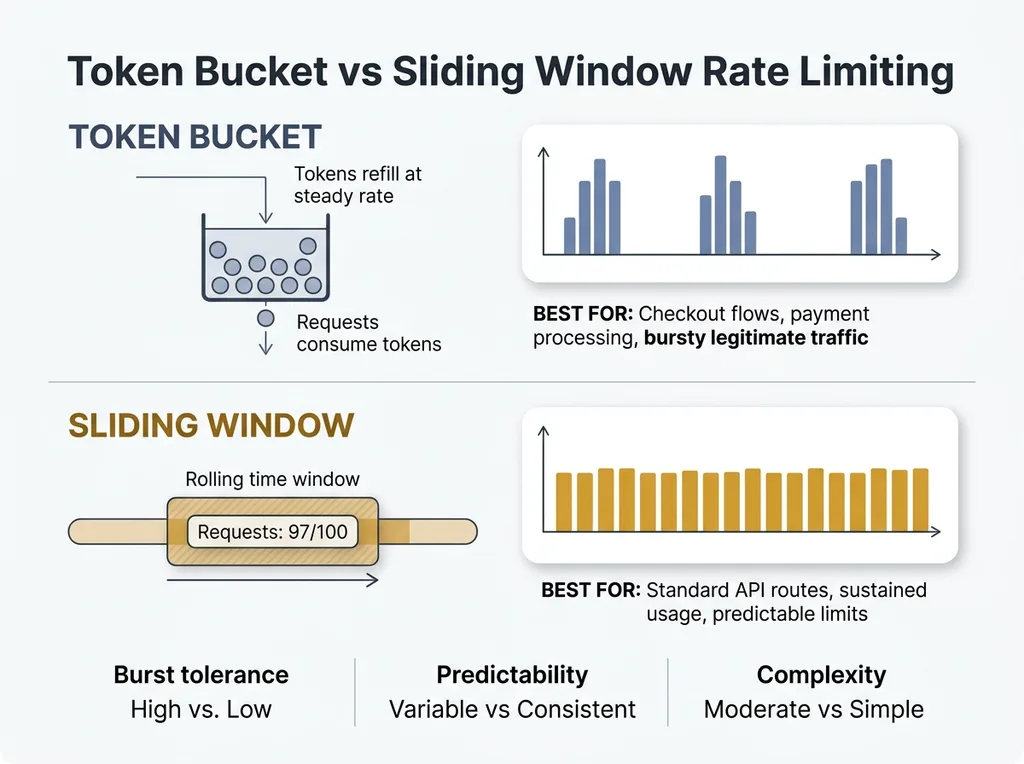 Token Bucket vs Sliding Window Rate Limiting
- Credential stuffing — bots trying thousands of username/password combinations against your login endpoint
- API key brute-forcing — systematically guessing API keys or session tokens
- Product data scraping — competitors or aggregators hammering your product pages
- AI endpoint abuse — this is the one that costs real money. An unprotected endpoint that calls GPT-4 or Claude can rack up thousands of dollars in API costs in minutes. I've seen it happen.
Two rate limiting patterns cover most situations:
Token bucket works well for bursty traffic. Think checkout flows — a user might make several rapid requests during payment processing, and you don't want to block legitimate behavior. The bucket refills at a steady rate but allows short bursts.
Sliding window is better for sustained API usage. It counts requests within a rolling time window and enforces a hard cap. Simpler to reason about, more predictable.
Rate Limiting Without External Dependencies
For Next.js, rate limiting lives in middleware. The implementation depends on your deployment:
- Single server — an in-memory store works. Simple Map with IP-based keys and timestamp tracking. It won't survive a restart, but it handles 90% of abuse scenarios.
- Distributed/serverless — you need an external store. Redis or Upstash (which offers a Redis-compatible API designed for serverless) handles this cleanly.
The thresholds I use as starting points:
- Login endpoints: 5 attempts per minute per IP. Credential stuffing dies here.
- Standard API routes: 100 requests per minute. Generous enough for legitimate use, tight enough to stop scrapers.
- AI-powered endpoints: 10 requests per minute. These are expensive. Protect them aggressively.
When I built the document signing SaaS, rate limiting was non-negotiable from day one. A system handling sensitive documents can't afford to have someone brute-force their way through signing URLs or overwhelm the PDF generation pipeline. That project had rate limiting in the middleware before the first feature was complete.
Vercel now has built-in rate limiting options, which is helpful. But understanding the mechanics matters because you need to tune thresholds for your specific use case. Default settings from a platform rarely match your actual traffic patterns.
The Implementation Order That Matters
If you're staring at a project with none of these three layers, here's the sequence I follow:
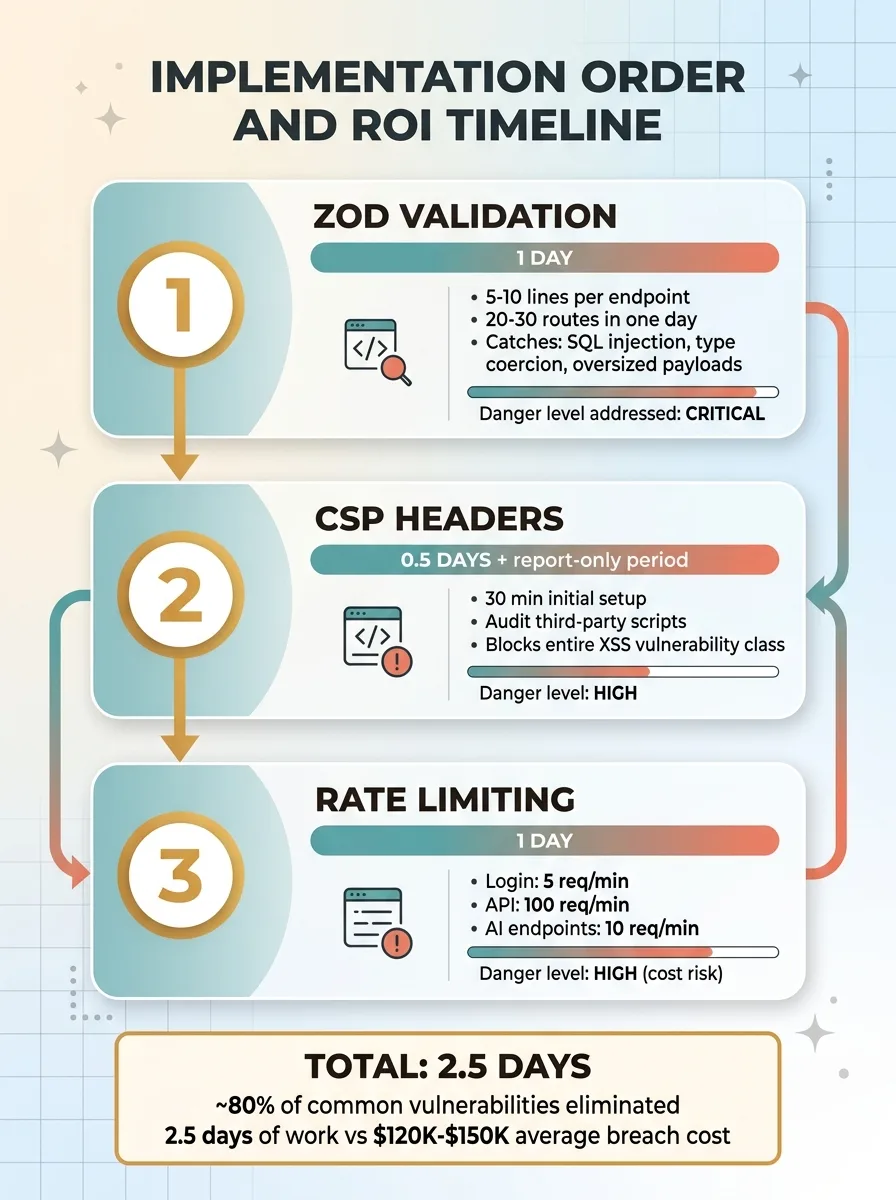 Implementation Order and ROI Timeline
First: Zod validation. It's the fastest to implement and catches the most dangerous class of bugs — accepting bad data into your system. Bad data in your database causes cascading problems that are expensive to unwind. Adding Zod schemas to a medium-sized API with 20-30 routes takes about a day. One developer, one day.
Second: CSP headers. Takes slightly longer because you need to audit third-party scripts, and the report-only period adds calendar time. But the actual implementation is half a day. The protection-to-effort ratio is massive — 4 hours of work blocks the entire XSS vulnerability class.
Third: Rate limiting. Requires more thought about thresholds and architecture decisions (in-memory vs. Redis). Budget a full day including the Redis setup and testing across different endpoint types. This is the most important layer to have in place before any public launch.
Total: roughly 2.5 days to eliminate approximately 80% of common web application vulnerabilities. Two and a half days.
Compare that to the cost of a data breach. For small businesses, the average is $120,000-$150,000 when you factor in notification requirements, legal exposure, and lost customer trust. Or compare it to the cost of a single exploited AI endpoint burning through your API budget overnight. Two and a half days of web application security hardening is the highest-ROI investment in your technical stack.
What These Three Layers Don't Cover
I'd lose credibility if I pretended this was a complete security posture. It's not.
These three layers don't address: authentication and session management flaws, authorization bypass (IDOR), secrets management, database security, dependency vulnerabilities with known CVEs, or infrastructure misconfiguration. Auth libraries like NextAuth handle some of this, but they need proper configuration — the defaults aren't always secure enough.
Here's the honest framing: most businesses at $1M-$50M revenue aren't facing nation-state threat actors. They're facing opportunistic bots, automated scanners, and script kiddies running off-the-shelf exploit toolkits. The three-layer stack stops almost all of that traffic.
The remaining 20% requires deeper security work. But you can't do the advanced stuff without the basics in place first. A web app security checklist that starts with penetration testing before you've implemented CSP headers is backwards.
Security Shouldn't Wait Until You Can Afford a Security Team
Most businesses in the $1M-$50M range don't have a security team. They have developers who are busy shipping features. Security gets deferred until a breach forces the conversation, and by then the cost is 10x what it would have been to do it proactively.
The three-layer stack I've outlined — CSP, Zod, rate limiting — is designed for exactly this situation. A small team that needs meaningful protection without a dedicated security hire. 2.5 days of work. No exotic tooling. No expensive vendors.
This is part of what I do as a Chief AI Officer. Not just building AI systems, but making sure the technical foundation under those systems is solid. When I start working with a business, the security audit is one of the first things that happens. No AI-powered customer service bot or automated pricing engine matters if the underlying application is leaking data through unvalidated API routes.
If you're shipping fast and deferring security basics, the math is simple: fix it now for 2.5 days of effort, or fix it later for 10x the cost plus whatever damage happens in between.
Thinking About AI for Your Business?
If this resonated — whether it's the security gaps or the broader question of how to build technical systems that actually hold up — I'd like to talk. I do free 30-minute discovery calls where we look at your operations and figure out where AI (and the infrastructure around it) could make a real difference.
Get AI insights for business leaders
Practical AI strategy from someone who built the systems — not just studied them. No spam, no fluff.
Hodgen.AI
Ready to automate your growth?
Book a free 30-minute strategy call with Hodgen.AI.
Book a Strategy Call