AI CRM Data Entry Automation: The Paste Box Fix
Your CRM is empty because nobody does data entry. Here's how AI CRM data entry automation lets you paste an email and auto-populate contacts, notes, and tasks.
By Mike Hodgen
Why Your CRM Is Always Empty
I worked with a distribution business whose CRM was a graveyard. Stale records, half-empty fields, deals sitting in pipeline stages that hadn't moved in months. The owner had paid for all of it: custom fields, automated sequences, pipeline stages a vendor had spent weeks configuring. He had the full setup. And none of it mattered, because nobody ever entered the data.
That's the thing about AI CRM data entry automation that most people miss. The CRM wasn't broken. The expensive automation rules weren't broken. The one step that was broken was the human typing things into it.
Think about how a sales rep's day actually goes. They get off a call. They've got the next call in four minutes. There's an email thread three replies deep that needs a response. A site visit at two. Logging what just happened into the CRM is the last thing on the list, and the list never ends. So they don't log it. Ever.
Logging an interaction is friction nobody clears. It's not laziness. It's that the math doesn't work. Five minutes of data entry per interaction, twenty interactions a day, and suddenly you're spending nearly two hours typing summaries of things you already know.
Every CEO I talk to has a dead CRM. And almost every one of them blames the software. They start shopping for a new tool, convinced the next one will magically get used. It won't.
The fix isn't a better CRM. It's removing the data entry. If capturing an interaction takes five seconds instead of five minutes, people do it. If it takes five minutes, they don't, and no amount of pipeline automation saves you. The data has to get in the door first.
The Reframe: Data Entry Is the Product
The owner didn't need more fields. He didn't need a smarter automation rule or a fancier tool. He needed the act of capturing an interaction to take five seconds.
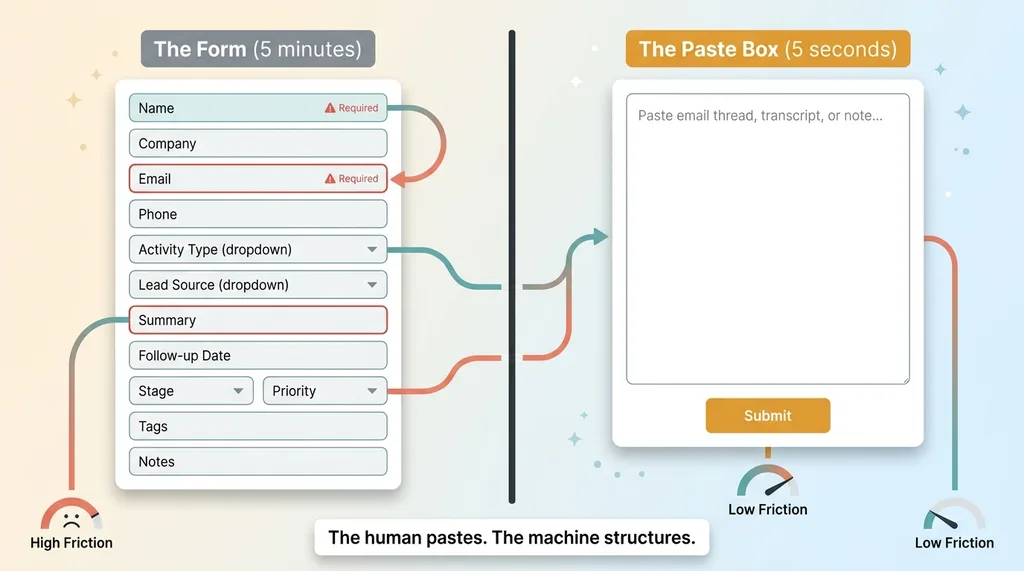 Form vs Paste Box comparison
So I gave him one thing. A single paste box.
That's it. A textarea on a screen. Drop in raw text, an email thread, a voice-note transcript, a quick recap a rep typed on their phone, and the system does the rest. No 12-field form. No dropdowns. No required fields turning red because you forgot to pick a "lead source."
The interface was the whole design decision. I'd already built the broader system: a full AI-powered CRM in one session, with contacts, activities, pipeline, the works. But the broader CRM wasn't what made people use it. The capture endpoint was.
Here's why the paste box matters more than everything behind it. A form asks the user to do the structuring. Name goes here, company goes there, pick the activity type, write a summary, set a follow-up. Every field is a decision, and every decision is friction. People don't fill out forms when they're busy. They abandon them.
A paste box asks the user to do nothing except paste. The structuring becomes the machine's job, not the human's. That's the entire reframe. Data entry isn't a task you make easier. It's a task you delete.
I've watched a dozen CRM rollouts fail because someone built a beautiful form nobody filled out. The form is the problem. The textarea is the answer. You let the human do the one thing humans do effortlessly (copy and paste) and you let the AI do the tedious part.
What the AI Actually Extracts From Raw Text
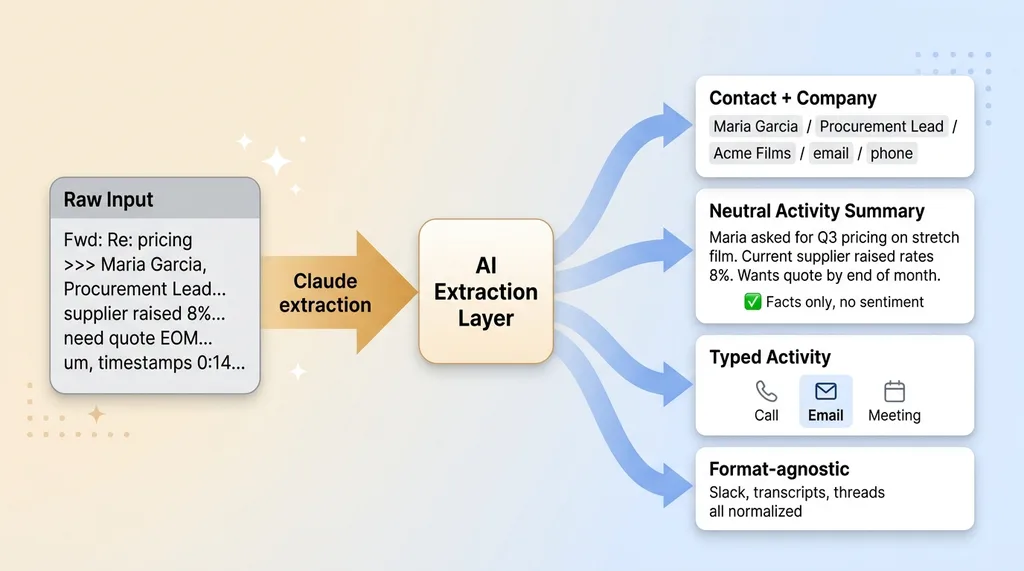
So you paste in a messy email thread. What comes back?
 What the AI extracts from raw text
Contact and company details
Claude reads the unstructured text and returns a structured contact: name, role, company, email, and phone if it's anywhere in the text. This is the core of email to CRM extraction. A forwarded thread usually has the person's name in the signature, their title under it, the company in the domain, a phone number buried at the bottom. The model pulls all of it out and hands it back clean.
A neutral activity timeline
This is the part I'm most particular about. The AI writes a summary in plain past tense. "Maria asked for Q3 pricing on stretch film. She mentioned her current supplier raised rates 8%. She wants a quote by end of month."
What it does not do is editorialize. It doesn't say the prospect is "highly motivated" or "showing strong buying signals." It doesn't invent intent that wasn't in the text. It records what happened. Facts only.
That neutrality matters because the moment an AI starts guessing at sentiment, it starts hallucinating. A summary that says "the customer is excited" when the email was lukewarm pollutes your pipeline with optimism that isn't real. I'd rather have a boring, accurate record than a flattering, wrong one.
Typed activities, not generic notes
Every extraction comes back typed. Was this a call, an email, or a meeting? The system reads the format and classifies it. A transcript with timestamps becomes a meeting. A copy-pasted email thread becomes an email activity. A "talked to Dave, he wants samples" becomes a call.
The reason this works on any input is that the model normalizes the mess. I lean on the same approach I describe when I let the AI read any file you throw at it. Forwarded threads with quoted replies, copy-pasted Slack messages, a transcript full of "um" and timestamps. The format doesn't matter. The model reads through the noise and pulls out the structure underneath.
From Note to Next Action: AI That Proposes Real Tasks
Capturing what happened is half the job. The other half is what happens next. This is the AI note taker to tasks part, and it's where the system earns its keep.
Specific over generic
A bad task management system produces tasks like "follow up with customer." That's useless. It's a reminder that you have a thing to do without telling you what the thing is. So it gets ignored, same as an empty CRM field.
The system proposes concrete next actions. Instead of "follow up," it returns "Send Q3 stretch-film pricing to Maria." That's a task you can actually do. You read it, you know exactly what it means, you do it. Specificity is what separates a task that gets done from a task that rots.
The AI can write specific tasks because it read the actual conversation. It knows Maria asked for pricing. It knows it was stretch film. It knows the quarter. A dropdown can't do that. A human filling out a form usually won't bother. The AI does it for free because it already parsed the text.
Inferring due dates from natural language
This is the part that genuinely beats a template. People don't talk in dates. They say "next week," "after the holiday," "once they get budget approval in March."
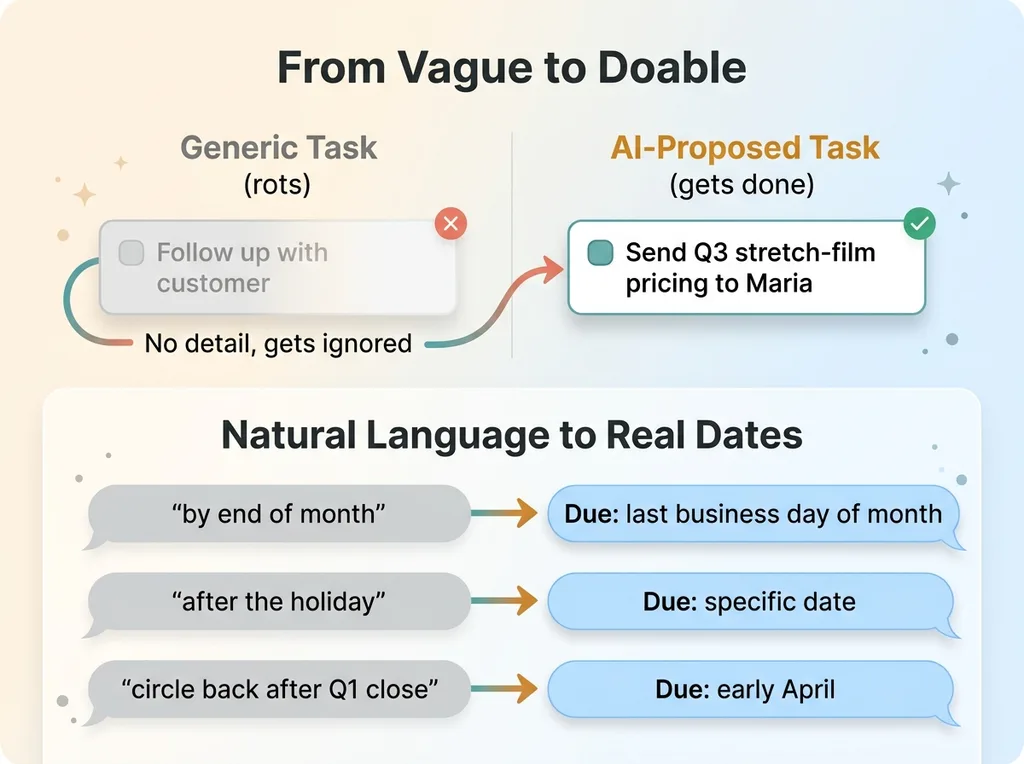 Generic task vs specific task with inferred due dates
The AI converts that language into an actual date on the task. "She wants a quote by end of month" becomes a due date for the last business day of the month. "Circle back after their Q1 close" becomes a date in early April. The model reads intent from how people actually speak, not from a calendar picker nobody touches.
That's the difference. A form makes you translate human language into structured data. The AI does the translation for you, which is exactly the work no rep wants to do at 4:45 on a Friday.
One Action Writes Everything (But a Human Approves It First)
Here's the full flow for auto-populate CRM with AI. You paste raw text into the box. The endpoint returns a structured proposal: the contact, the neutral summary, the typed activity, and the tasks with inferred due dates. One paste, and the whole record is drafted.
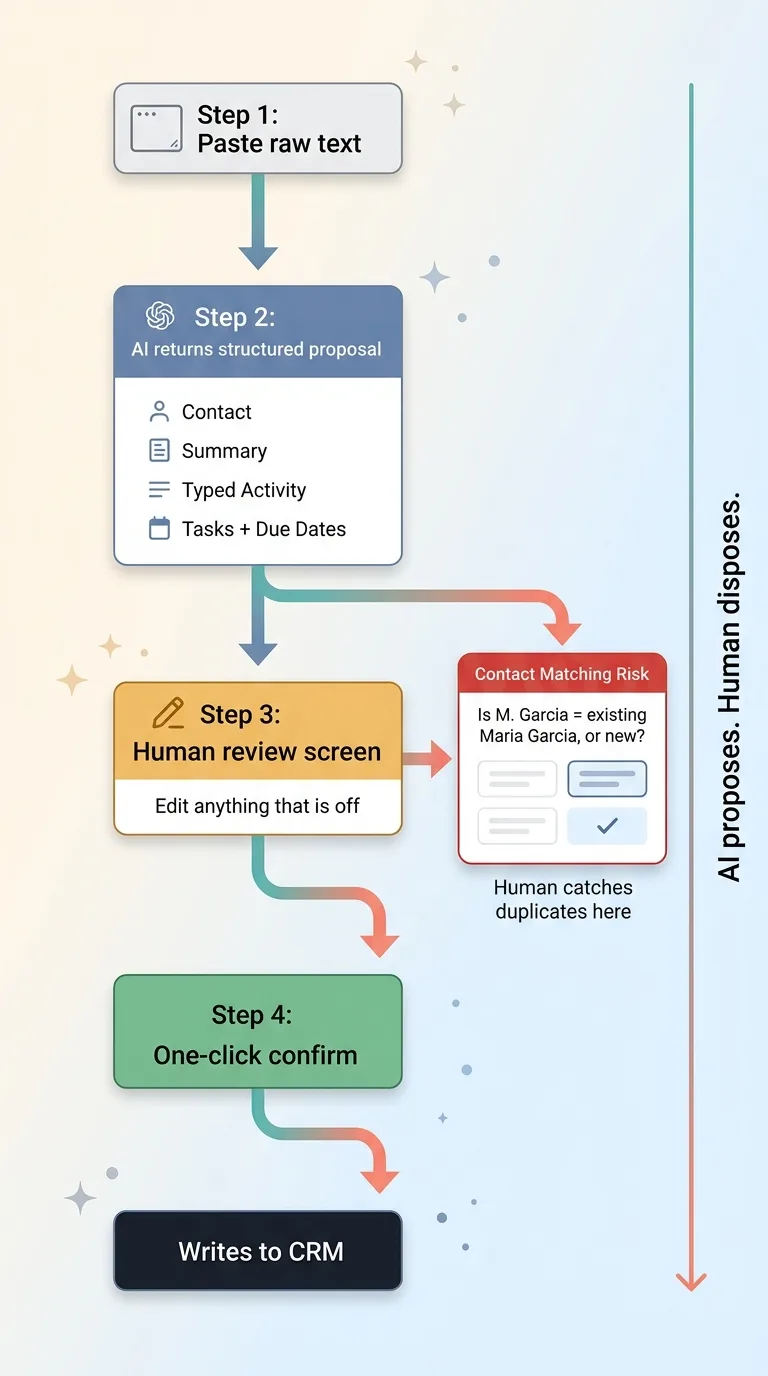 Human-in-the-loop capture flow
But it does not silently write to the database. That's the part I want to be clear about.
The user sees the extraction first. The proposed contact, the summary, the tasks, the dates. They can edit anything that's off. Then they confirm with one click. Nothing auto-submits. This is the same principle I follow everywhere, the one I wrote about in every AI action stops for a human. The AI proposes. The human disposes.
And I'll be honest about why that review step exists, because it's not decoration. The AI gets contact matching wrong sometimes. You paste a thread from "M. Garcia" and the system has to decide: is this the existing Maria Garcia in the database, or a new contact? Sometimes it guesses wrong. Without the review step, you'd end up with two Marias and a CRM that's worse than the empty one you started with.
The human catches that. They see "create new contact" when it should be "Maria Garcia, existing," and they fix it in one click before anything writes.
This is the difference between a capture accelerator and an autonomous agent that quietly fills your CRM with duplicates. I built the first one on purpose. An AI that writes to your database unsupervised will eventually make a mess you have to clean up, and cleaning up a polluted CRM is worse than data entry ever was. The five-second flow only works if the data going in is trustworthy. The review step is what keeps it trustworthy.
What Changed When Capture Took Five Seconds
The CRM went from stale to live. Not because the AI got smarter, but because the friction was gone.
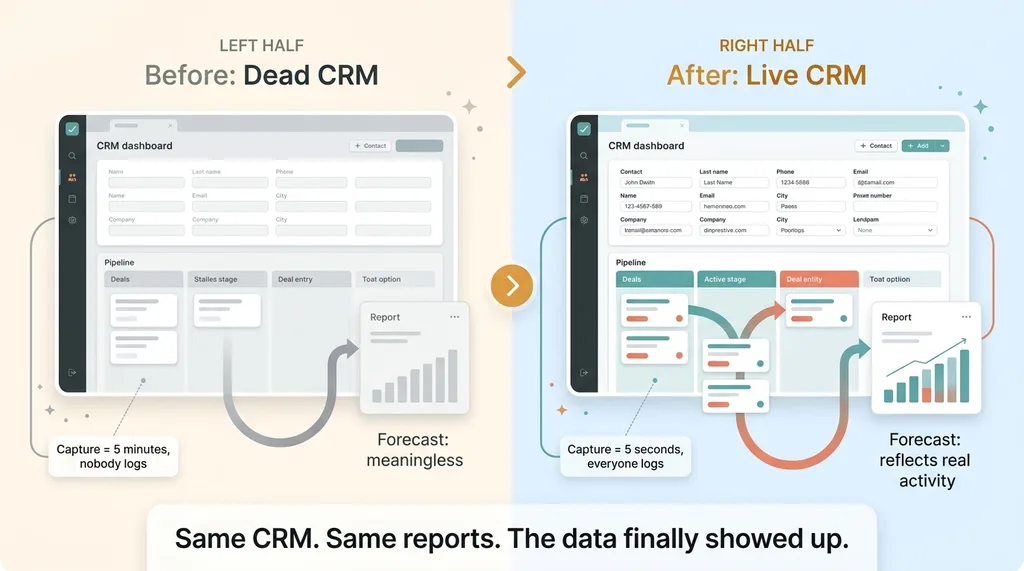 Before and after: dead CRM to live CRM
That's the real win, and it's worth being precise about. The AI isn't doing anything magical. It's reading text and writing structured output, which models have done for a while now. What changed is that the rep will actually paste an email thread when it costs one paste and one click. They never would when it cost five minutes of typing into a form.
Once the CRM had real data in it, something second-order happened. The owner had pipeline reports and forecasts he'd been ignoring for a year, because they were built on empty fields and meant nothing. Suddenly they meant something. The forecast reflected real activity. The pipeline showed deals that were actually moving. The reports he'd paid for finally worked, not because the reports changed, but because the data underneath them showed up.
I'll be honest about what we didn't solve. Somebody still has to remember to paste. The system doesn't read minds and it doesn't watch your inbox. If a rep has a phone call and never pastes the recap, that call never makes it in. We solved effort. We did not solve memory.
But effort was the actual problem the whole time. People remember the interaction fine. What they avoid is the work of logging it. Remove the work, and they log it.
That's the broader point I'd leave you with. Most CRM problems are interface problems wearing an adoption-problem costume. The team isn't undisciplined. The interface is asking too much. Fix the interface, and the "adoption problem" disappears.
Your CRM Doesn't Need Replacing. The Data Entry Does.
If you're a skeptical CEO reading this, here's the thesis one more time. You don't need to rip out your CRM and migrate to a new platform. You don't need another vendor, another contract, another six-week implementation. You need to remove the one step nobody does.
A paste box and an AI extraction layer bolt onto whatever you already run. Your CRM stays. Your pipeline stages stay. Your reports stay. All that changes is that the data finally shows up, because capturing it stopped being a chore.
This is the kind of small, surgical work I do. I don't come in and tell you to replace everything. I find the one piece of friction that's killing adoption, remove it, and leave the rest of your stack alone. A textarea and an extraction endpoint isn't a glamorous project. It's just the thing that makes the expensive system you already bought actually get used.
If your CRM is a graveyard, the problem is almost certainly the same one this distribution owner had. The data entry, not the database. I can build the capture box for your team and have it bolted onto your existing CRM faster than most vendors take to schedule a kickoff call.
Want to explore what AI could do for your business?
Book a free 30-minute strategy call. No pitch deck, no sales team, just a real conversation about your operations and where AI actually fits.
Get AI insights for business leaders
Practical AI strategy from someone who built the systems — not just studied them. No spam, no fluff.
Hodgen.AI
Ready to automate your growth?
Book a free 30-minute strategy call with Hodgen.AI.
Book a Strategy Call