Every B2B App Has the Same Broken Import
Every app that takes data from another tool ships the same thing: a column-mapping wizard. You know the screen. A user uploads a CSV, and the app shows two columns of dropdowns. "Map your column to our field." Then the user clicks through 30 mappings before they can do anything useful.
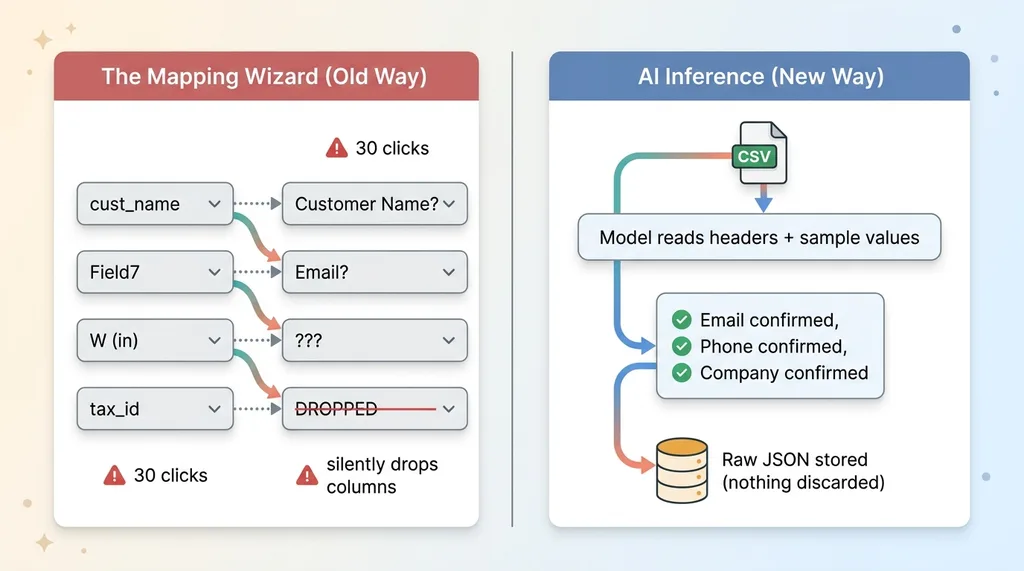 Old mapping wizard vs AI inference import flow
It works fine in the demo. It breaks the moment real data shows up.
The source tool renames a header. Someone adds a field. The export comes out in a slightly different order. And the wizard either throws an error or, worse, silently drops the column it doesn't recognize. The user never finds out until the data they needed is gone.
I've built import flows for three different systems: a CRM, a custom-manufacturing order importer, and an e-commerce onboarding flow. Three different industries, three different teams, three completely different data shapes. And the mapping wizard pattern failed the exact same way in all three. Brittle, high-maintenance, and quietly lossy.
After the second one I stopped patching mappers and changed the approach entirely. The fix is not a better wizard. The fix is to stop mapping and let the model read the file.
That's the entire thesis of this article. AI CSV import mapping done right means the user uploads a file, the model figures out what's in it, a human confirms, and the original data is preserved no matter what. No dropdowns. No 30 clicks. No support tickets when a header changes.
Here's how it works, why the old way keeps breaking, and what it's worth to you if import is the first thing your customers touch.
Why Mapping Wizards Break (And Keep Breaking)
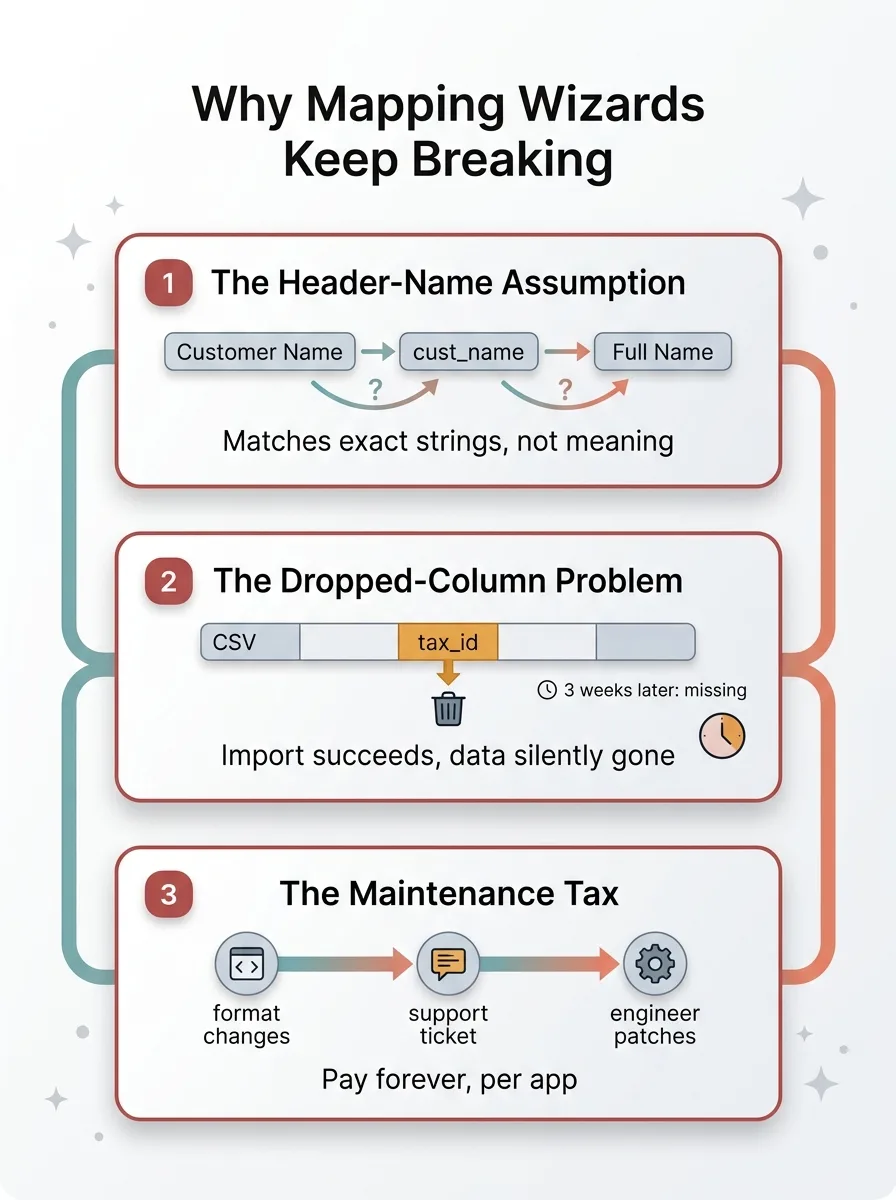 Three failure modes of mapping wizards
The header-name assumption
Mapping wizards assume the source format is stable. It never is.
"Customer Name" in one export is "cust_name" in another and "Full Name" in a third. The wizard treats these as unrelated because it matches on exact header strings. So either the user maps it manually every time, or the logic silently fails to recognize the column.
Real exports are messier than that. Merged cells. Extra metadata rows at the top. Trailing summary rows. Columns the app has never seen. The wizard was built for a clean grid and the world does not hand you clean grids.
The dropped-column problem
This is the dangerous one.
When a wizard hits a column it doesn't recognize, the safe-looking behavior is to ignore it. No error, no warning. The import "succeeds." Everyone moves on.
Then three weeks later someone goes looking for a field that mattered (a tax ID, an order note, a custom property) and it isn't there. It was in the source file. It got dropped at import and nobody noticed. That's not a bug you find in QA. That's a bug you find in a compliance review or an angry customer email.
The maintenance tax
Every time a source tool updates its export format, something breaks. Someone files a support ticket. An engineer patches the mapping logic. Repeat forever.
Across my three apps, the old way meant maintaining three separate brittle mappers, indefinitely, each one breaking on a different schedule. That's not a feature. That's a recurring tax you pay for as long as the product exists.
The Pattern: Let the Model Infer, Keep the Raw Row Forever
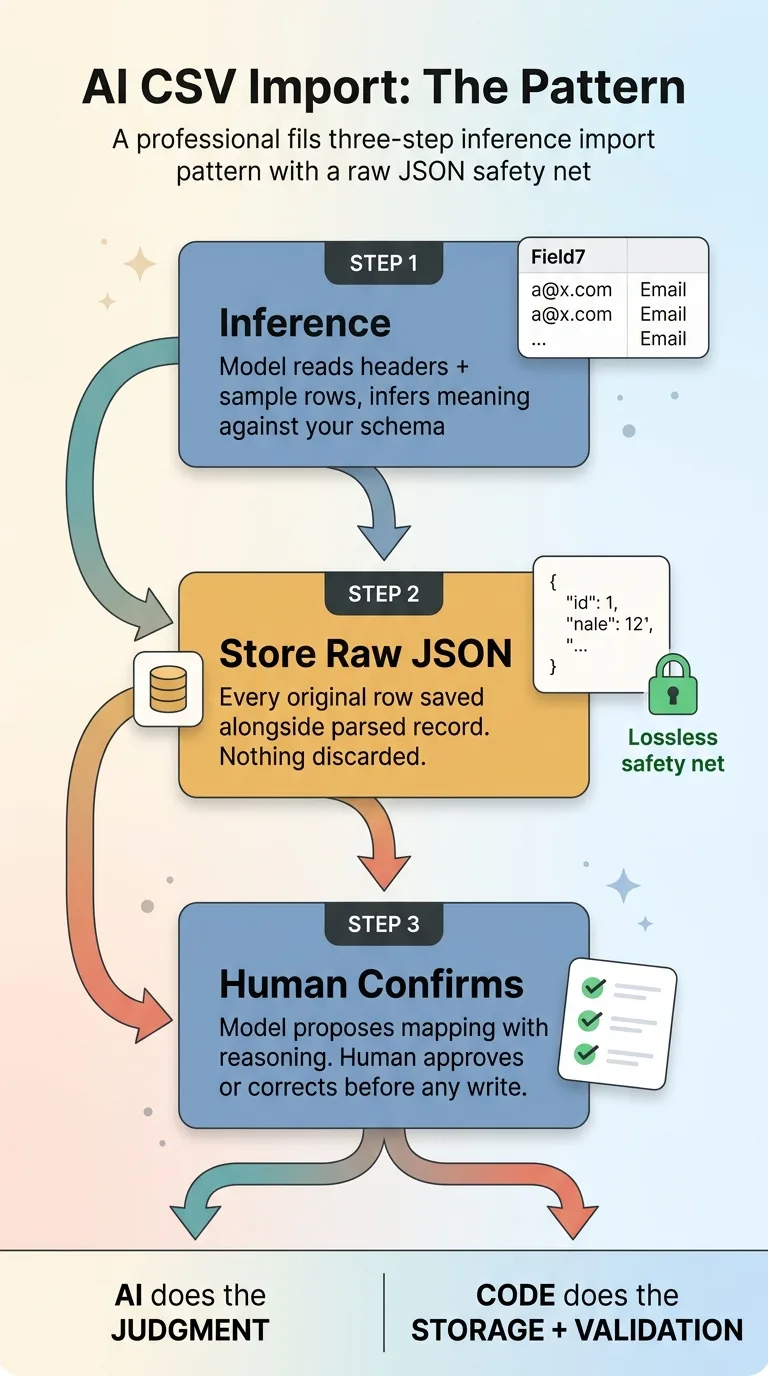 The three-step inference import pattern with raw JSON safety net
Inference instead of mapping
Step one: hand the model the column headers plus a handful of sample rows and ask it to infer what each column means against your schema.
The model handles "Full Name," "cust_name," and "Customer" mapping to the same field without anyone touching a dropdown. It reads the sample values, not just the header string, so even a badly named column gives itself away. A column labeled "Field7" full of email addresses gets recognized as email. The wizard could never do that.
This is the part the model is genuinely good at: fuzzy judgment over messy human-named data.
Store the original row as raw JSON
Step two is non-negotiable, and it's the part most people skip.
Store the entire original row as raw JSON alongside the parsed record. Every column, including the ones the model ignored or didn't understand. Nothing is ever discarded.
If the model guesses wrong, or skips a column it didn't recognize, the source data is still sitting there, recoverable. This is what makes it a lossless data import instead of a hopeful one. You can re-parse, re-map, and backfill later because you never threw the original away. The dropped-column problem simply cannot happen.
The confirmation step
Step three: the model proposes the mapping, but a human confirms it before a single record gets written.
The user sees "I think this column is Email, this one is Phone, this one is Company" with the model's reasoning, and approves or corrects it. One screen, pre-filled with intelligent guesses, instead of 30 empty dropdowns.
This is the division of labor I use everywhere: the AI does the judgment, deterministic code does the storage and validation. I wrote about this split in let the model judge and the code compute. The model infers what the columns mean. Code handles parsing, type-checking, and writing rows. You never let the model do math it can't be trusted to do, and you never let code make a judgment call it isn't smart enough to make.
And nothing commits until the system stops for a human before it commits. The model's confidence is an input, not a decision.
Three Apps, One Import Engine
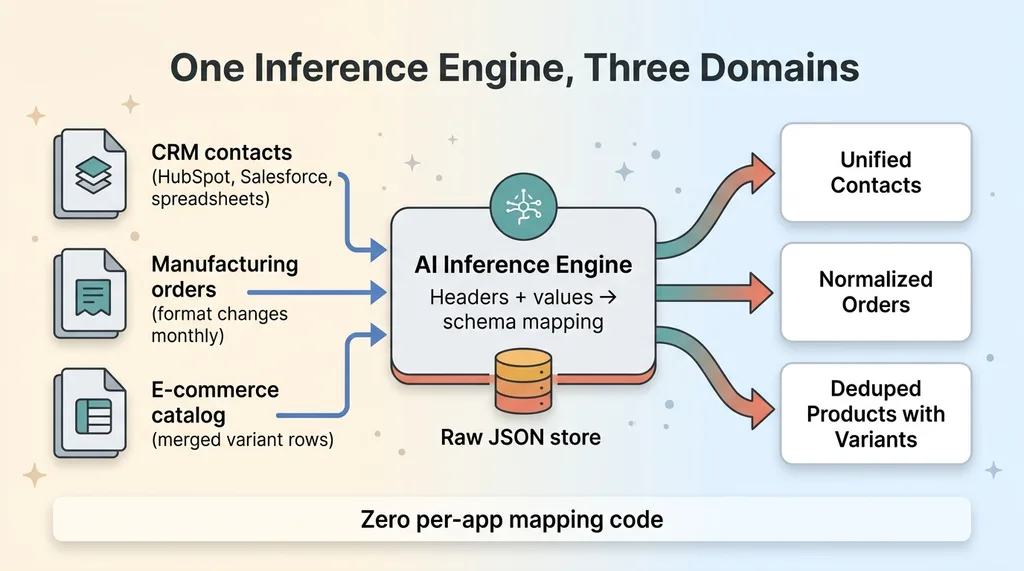 One import engine serving three different domains
A CRM that ingests any contact export
The first real test was a sales team migrating off a legacy CRM with a chaotic contact export. They had data coming out of HubSpot, Salesforce, and a few raw spreadsheets that someone had been maintaining by hand.
The engine read all of them without a single mapping screen. HubSpot's column names, Salesforce's column names, and the spreadsheet's invented names all resolved to the same internal schema because the model inferred intent from headers plus values. This was part of the CRM I built in one session, and the import was the piece that would have taken the longest the old way.
A custom-manufacturing order importer
Next was a custom-manufacturing client whose supplier sent order sheets in formats that changed almost monthly. Same product line, different layout every time.
The model inferred SKU, dimensions, fabric, and quantity from headers that kept shifting. When the supplier renamed "Width (in)" to "W" one month, nothing broke. The old mapper would have needed a patch and a support ticket. The inference engine just read the values and kept going.
An e-commerce onboarding flow
The third was a brand migrating its product catalog into a new platform. The export was a mess: merged variant rows, multiple lines for one product, partial revisions scattered through the file.
The engine deduped those rows onto a single product record with its variants attached. Same import engine that handled contacts and manufacturing orders, applied to product data.
That's the whole point. Same engine, three domains, zero per-app mapping code. I'm not maintaining three brittle mappers anymore. I'm maintaining one inference layer and a raw-JSON store, and it adapts to formats I've never seen.
The Hard Part: Deduping Revisions Onto One Record
I'll be honest about where this gets genuinely difficult.
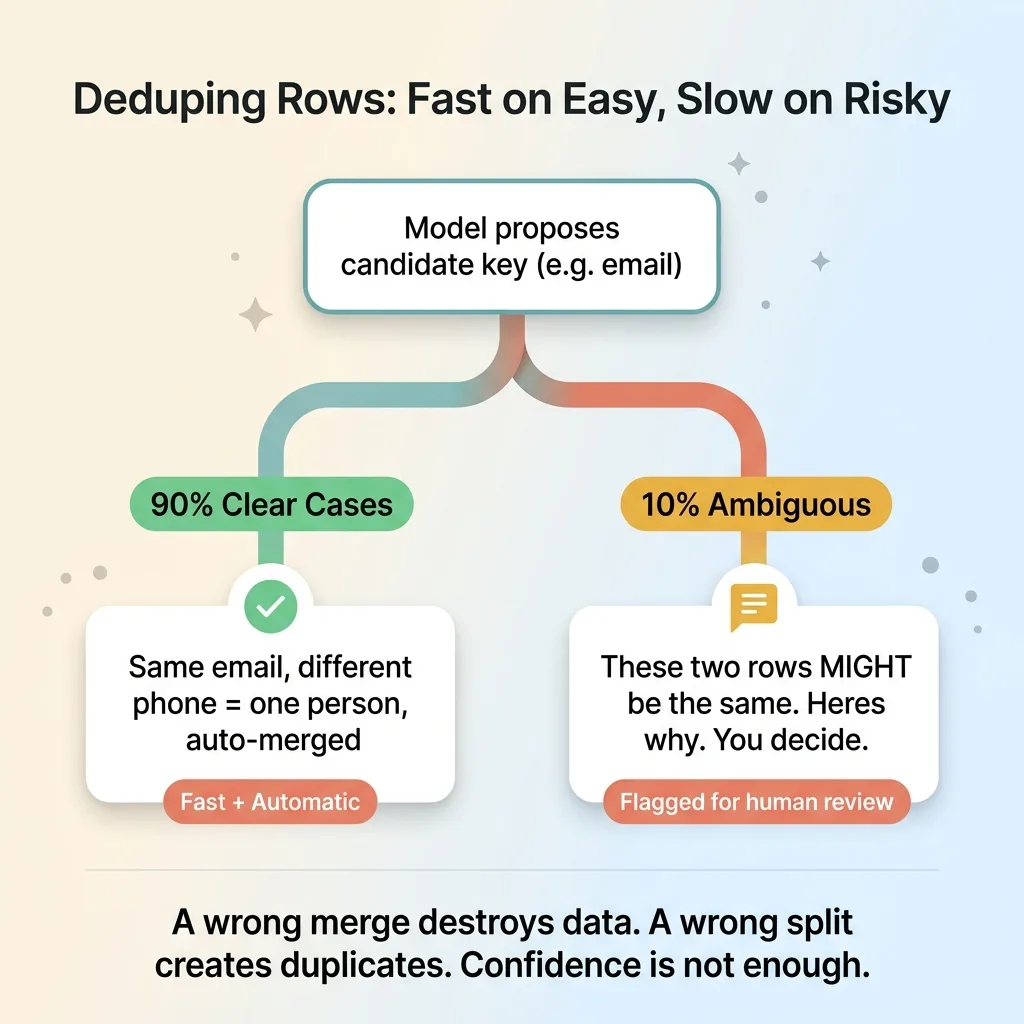 Dedupe logic: automatic on easy 90%, human review on risky 10%
Exports often contain multiple rows for what is logically one entity. An updated contact that appears twice. A revised order line. A product with three variants spread across three rows. The naive import creates duplicates. A too-aggressive import merges things that should have stayed separate.
The model is good at proposing a candidate key (the field or combination of fields that identifies a unique record) and flagging which rows look like revisions of the same entity versus genuinely distinct records. It reads "same email, different phone" and correctly guesses that's one person with updated info.
But this is where I keep a human in the loop the hardest. A wrong merge destroys data. A wrong split creates duplicates that pollute the system for months. Neither is acceptable, and the cost of the mistake is high enough that confidence isn't enough.
So the model does not auto-merge silently. It proposes the dedupe key, applies it to the clear cases, and flags ambiguous matches for review. "These two rows might be the same record. Here's why I think so. You decide." The human resolves the edge cases the model isn't sure about.
What doesn't work yet, fully autonomously, is trusting the model to merge without a check on the borderline cases. I've tested it. It's right most of the time, and "most of the time" is not a standard I'll ship for something irreversible. So the engine is fast and automatic on the easy 90% and deliberately slow on the risky 10%. That's the right tradeoff, and pretending otherwise would just be selling you a future data-loss problem.
Why This Beats Buying an Import Tool
You can buy an import service. Flatfile-style products exist and they're polished.
But look at what they actually do. They still make the user map columns. They just make the wizard prettier. The fundamental pattern (human matches source columns to target fields) is unchanged. You've paid to decorate the problem, not solve it.
And they charge for it. Per row, per seat, per import volume. Meanwhile you still own the brittleness. When a source format changes, the mapping still has to be redone, and you're still fielding the support ticket.
The inference approach costs a few model calls per import. Read the headers, read the sample rows, propose the mapping. Pennies of inference per file. And it adapts to new formats automatically instead of requiring a re-map.
Run the math. A few cents of inference per file, versus a SaaS subscription plus the engineering time to maintain mappers and integrations. Over a year, across thousands of imports, the build pays for itself fast and keeps paying.
The raw-JSON safety net is the part you can't buy off the shelf in any way you'd trust. Because you store every original row, you never have a silent-drop problem, which means you never have a compliance or data-loss incident born from an import. That's not a nice-to-have when you're handling customer records.
This is the same build-versus-buy logic I apply to every system. Buy the commodity. Build the thing that's core to how customers experience your product. Import is core.
What an Import That Just Works Is Worth to You
Import is the first thing a new customer touches.
Think about that for a second. Before they see your dashboards, your features, your value, they have to get their data in. If that first step is a 30-dropdown wizard that breaks on their real export, you've created a churned customer before they ever experienced the product. Onboarding completion drops, and you never find out why because they just quietly leave.
If the problem is on your side, your team is manually cleaning up exports, fixing mappings, and re-importing. Those are hours an inference engine eliminates entirely. Real hours, every week, on work that produces nothing.
I've built this engine three times now, and it gets faster and more reliable each time because the pattern transfers. The hard thinking is done. What's left is fitting it to your schema and your edge cases.
Get the next build note.
I write up each system I build, including what broke. Subscribe to my newsletter and I'll send you the next one.