The Free Tier I Shipped Was a Blank Check in My Name
I built a consumer AI app with a free tier. The pricing page looked clean. The UI told users they got three generations per week before they needed to upgrade. Reasonable. Generous, even.
There was one problem. Nothing on the server enforced that limit.
The "3 per week" lived in the interface. It was a label, not a rule. The actual API route that called the AI model never checked how many times you'd already called it. So anyone who wanted to could hit that endpoint over and over, all week, all month, and I would pay for every single request.
This is the thing nobody tells you when you're moving fast: an unenforced limit isn't a limit. It's a promise to the user that you're the one paying for. The number on the screen meant nothing to my bill.
And it gets worse. The route was wired straight to the most expensive model I had. Not a cheap model for the free tier and a premium one for paying customers. The heavy, costly model was the default, available to anyone with a free account. Every free request called a paid API I get billed for.
I can't give you a verified dollar figure on what that would have cost, because I caught it before it spiraled. But the principle is concrete enough without a number: I had shipped an open tab with my name on it.
So here's the doubt I hear from every CEO when I bring up free AI tiers: if I offer a free tier, won't people just abuse it?
Yes. They will. But the problem isn't the free tier. The problem is shipping one without the meter built first. Let me show you how to rate limit AI API usage so the free tier becomes an asset instead of a liability.
Why a Limit in the UI Is Not a Limit at All
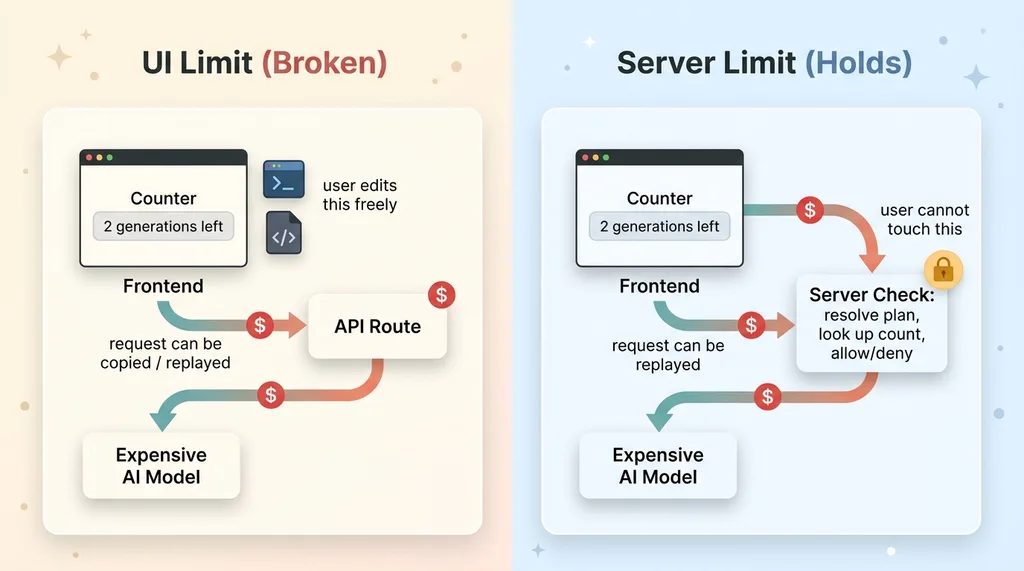 Client-side limit vs server-side limit (the vending machine problem)
The request you can edit, you don't control
Here's what most people don't understand about a browser. Everything in it is editable. The user owns that environment completely.
My "limit" was a counter the frontend tracked and displayed. The interface said "2 generations left." But the API route that did the actual work never asked the question. It just generated.
So a user could open dev tools, watch the network request fire, copy it, and replay it as many times as they liked. They could call the endpoint directly with a script. The counter in the UI never moved, and even if it did, the server didn't care. The expensive model ran every time.
Trusting the client is trusting the attacker
The rule I follow now, and the rule I should have followed then: any control that lives in the browser is a suggestion, not a constraint.
Authorization and metering belong on the server. They have to live somewhere the user can't touch. The moment you trust the client to tell you how many requests it has made, you are trusting the attacker to be honest.
The analogy I use with non-technical clients: I put a "limit one per customer" sign on a vending machine and then left the machine unlocked. The sign is a polite request. The lock is the actual control. I shipped the sign and forgot the lock.
This is exactly the same failure mode as server-side authorization the request can't bypass. If the user can edit the request, the user controls the outcome.
I want to be honest here, because pretending I'm above this helps nobody. This is an embarrassingly common mistake in fast AI builds. I made it in my own. When you're racing to ship a feature that works, the demo path is "does it generate?" Nobody's demo path is "can a stranger drain my API budget at 3am?" That's the part you only think about after the bill, or if you're lucky, right before it.
How to Rate Limit AI API Usage Without a Whole Billing System
You do not need Stripe metered billing or a usage events pipeline to stop this. You need a counter that lives somewhere the user can't reach. Here's what I built.
Track usage on the user record
I added a generation-limits module that tracks usage directly on the user's profile record. Two columns: a count of how many generations they've used, and the ISO week that count applies to.
When a request comes in, the server does three things before it touches the AI model. It resolves the user's plan from their verified session. It looks up their usage count for the current week. Then it decides: allow or deny.
That's it. No new service. No external metering provider. A count column and a week column on a table you already have.
ISO weeks so the window resets cleanly
The week column is the part I'm proud of, because it solves the reset problem without any moving parts.
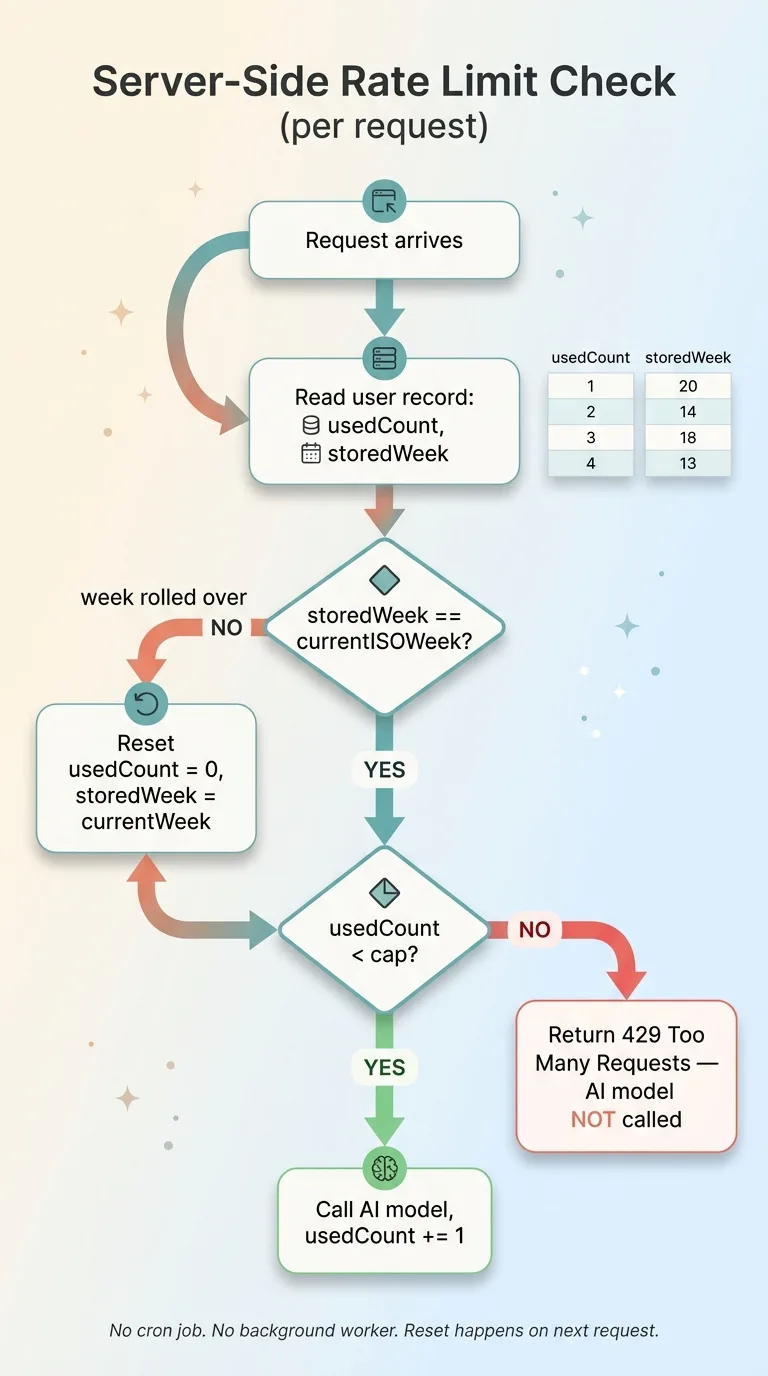 ISO-week counter logic for resetting rate limits without a cron job
Most people reach for a rolling window: "5 requests in the last 7 days." That sounds clean until you build it. Now you need to store a timestamp for every request, query a range, and count rows. That's an extra table and a query that gets heavier as usage grows.
ISO weeks sidestep all of it. I store the ISO week number (and year) the count belongs to. When a request comes in, I compare the stored week to the current week. If they match, I check the count. If they don't, the week has rolled over, so I reset the count to zero and update the stored week.
No cron job. No scheduled reset task. No background worker that might fail silently and leave everyone's counter stuck. The reset happens naturally on the next request after the week changes, computed in a couple of lines.
This is what metered AI endpoints look like when you keep them simple. The entire check is server-side, so there is nothing in the browser to edit. The user can't reset their own counter because they can never see or touch the column that holds it.
For most consumer AI apps, this is enough. You're not building a financial ledger. You're building a wall that holds.
Return a Hard 429 When the Cap Is Hit
When a user hits their weekly cap, the endpoint returns a hard 429 Too Many Requests. Not a warning. Not a soft nudge the client can ignore. A real HTTP error that stops the request cold.
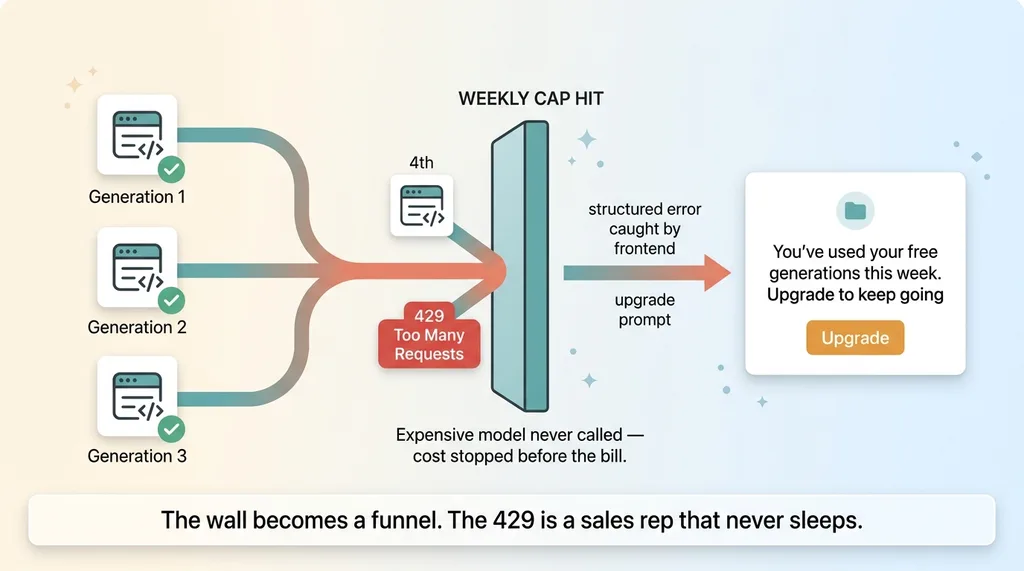 The 429 wall turning abuse prevention into a conversion funnel
The single most important detail: the expensive model never gets called for an over-cap request. The server checks the count, sees the cap is hit, and returns the 429 before it spends a cent on the AI call. That's the entire point. The cost is stopped before the bill is incurred.
A soft warning that still runs the generation defeats the purpose. You've added a polite message and paid for the request anyway. The 429 is what makes the limit real.
Now, what good looks like on the frontend. The 429 should carry a clear, structured error the client can catch and handle. When my frontend sees that response, it doesn't show a broken-app error. It shows an upgrade prompt: "You've used your free generations this week. Upgrade to keep going."
That turns the wall into a funnel. The 429 stops becoming abuse prevention and starts becoming a conversion moment. The user just hit the exact edge of the value you gave them for free. That's the best possible time to ask them to pay.
Let me be honest about what this does and doesn't do. A hard 429 with server-side counting stops casual abuse and accidental infinite loops. It stops the user who replays the request fifty times. It stops a bug in someone's integration that fires in a loop.
It does not stop a determined attacker who spins up fake accounts to get fresh free quotas each time. That's a different problem, solved with email verification, IP heuristics, and signup friction. I'm not solving that here, and you should be suspicious of anyone who claims one trick covers both. The 429 covers the 95% case that actually shows up in practice.
Gate the Most Expensive Routes Behind a Paid Plan
Rate limiting answers "how often." Plan gating answers "who at all." Some routes shouldn't be free under any cap.
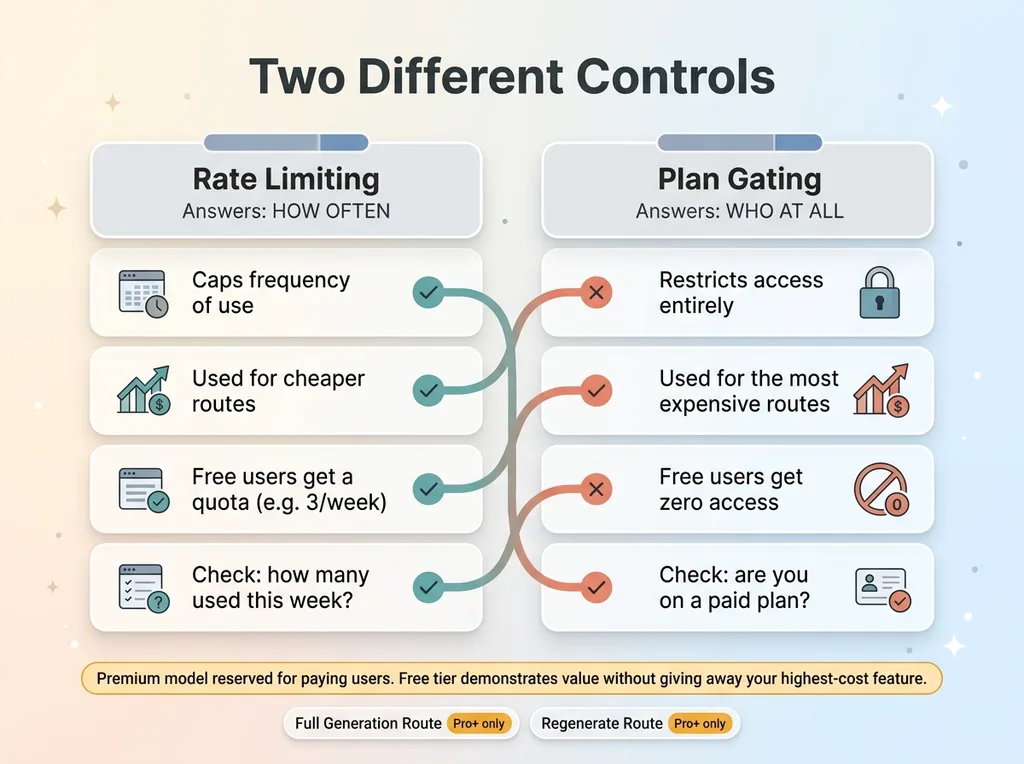 Rate limiting vs plan gating, how often vs who at all
Plan-gated routes, not just rate-limited ones
In my app, the genuinely heavy operations were the full generation route and a regenerate route. These are the ones that chain multiple model calls and rack up real cost per invocation. I gated them behind Pro and above.
Free users don't get a smaller quota of these. They don't get them at all. The check isn't "how many have you used this week," it's "are you on a plan that includes this." A free user who calls that endpoint gets a clean rejection pointing them to the paid tier.
Reserve the premium model for people who pay
The distinction matters because the economics are different. Rate limiting caps how often someone uses a cheap-ish thing. Plan gating decides who can touch the expensive thing in the first place.
This is usage-based gating, and it's how you make a free tier sustainable. Your free tier should demonstrate value and create desire. It should not give away your highest-cost feature.
The mistake I made originally was wiring the most expensive model straight to free. The fix isn't just capping it. It's reserving it. Free users get a real, useful taste of what the product does, enough to want more. The costly compute is reserved for people who pay for it.
If you want to think clearly about per-action cost and how to align price with what each operation actually costs you, I wrote about how to price AI by the credit instead of the seat. The short version: know what each route costs before you decide who gets it free.
Done right, the free tier stops being a liability and becomes a genuine funnel. This is the same pattern behind free users farming an expensive endpoint, just solved at the route level instead of the count level.
Move Every Route to Server-Side Auth So Limits Can't Be Edited Away
None of the above holds unless one structural thing is true: the user's identity and plan are resolved on the server, from a verified session, not passed in the request.
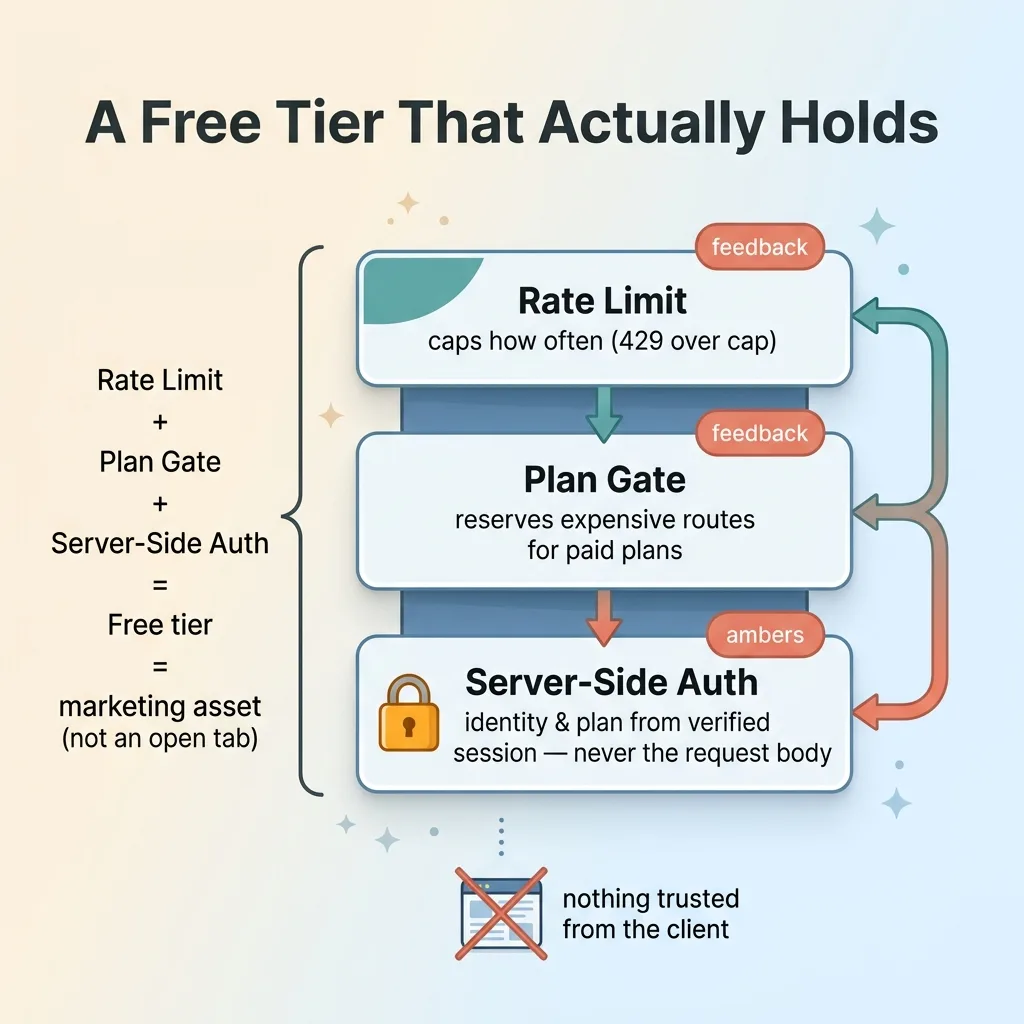 The three-layer stack that makes a free tier hold
That was the final fix. I moved every protected route to server-side authentication. The server reads who you are and what plan you're on from your authenticated session. It never trusts a plan value, a user ID, or a counter that arrives in the request body, because anything in the request can be forged.
This is what makes the limits real. A user can't edit a request to claim they're on Pro. They can't reset their own counter, because the counter check uses the server-resolved identity, not anything the client sent. The whole system collapses without this piece.
Stack the three together and you have something that actually holds. Rate limit plus plan gate plus server-side auth equals a free tier that's a marketing asset instead of an open tab.
I'll be candid: retrofitting server-side auth onto routes you already shipped is annoying. It's tedious. It's the kind of work that feels like going backward. But it's non-negotiable.
And I'd take this trade every time: I would much rather find this gap in a 100-line consumer app during a review than discover it from a five-figure surprise on my API invoice. The annoying fix is always cheaper than the bill.
A Free AI Tier Is Worth It, If You Build the Meter First
Back to the doubt I started with. Can you offer a free AI tier without people running up your bill?
Yes. But only if the meter, the hard cap, the plan gate, and the server-side auth are built before you ship. Not bolted on after the first scary invoice.
The mistake was never offering free. The mistake was offering free with the cost controls as an afterthought. Those are completely different decisions with completely different outcomes.
Reframe the whole thing. A properly metered free tier is one of the cheapest acquisition channels you have. It lets people feel the value, hit a natural wall, and convert at exactly the right moment. The 429 becomes a sales rep that never sleeps.
This is exactly the kind of gap I find when I review a company's AI stack. The difference between an AI product that makes money and one that quietly bleeds it often comes down to whether the cost controls actually hold or just look like they do.
Get the next build note.
I write up each system I build, including what broke. Subscribe to my newsletter and I'll send you the next one.