How to Prevent Committing Secrets to Git for Good
Cleaning a leaked API key out of git history is painful. Here's the near-zero-cost gitleaks pre-commit hook I use to prevent committing secrets entirely.
By Mike Hodgen
The Leak You Can't Take Back
Across the repos I work in, I've found real secrets sitting in git history. Not test keys. Not placeholders. An admin token. A database service-role key with full read-write access. Third-party API keys that got scraped into committed content and quietly sat there for months.
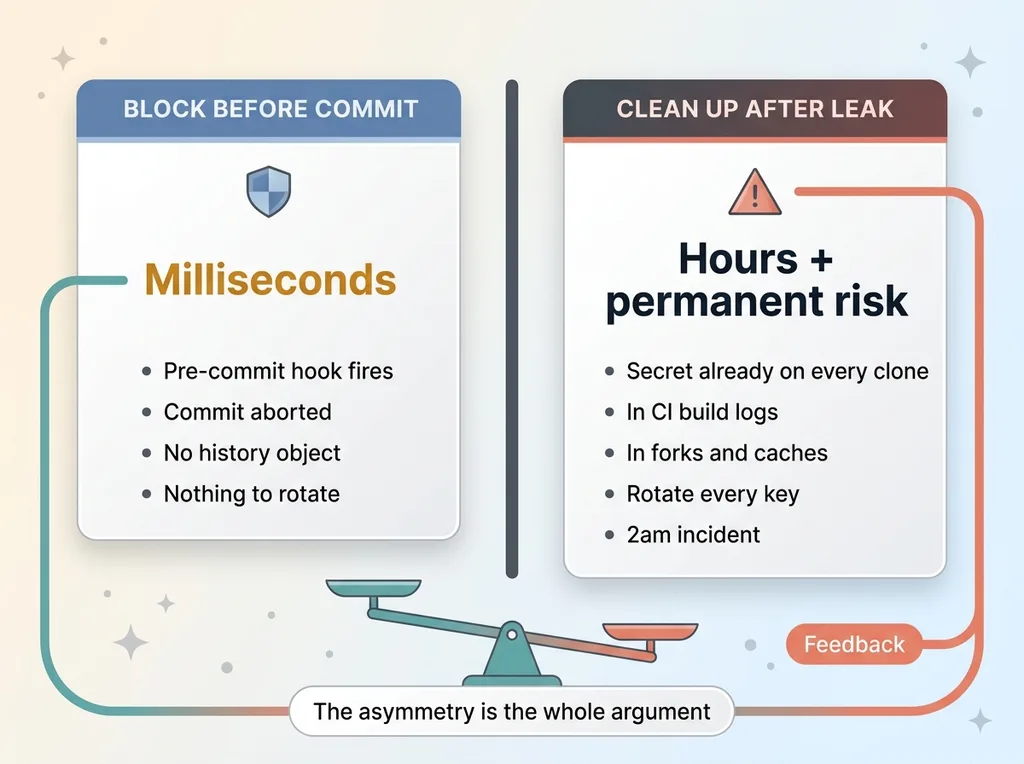 Cost asymmetry: blocking a commit vs cleaning up a leak
Here's the part most people don't internalize until it bites them: once a secret is in a commit, it is in history. It's on every clone. It's on every machine that ever pulled the repo. It's in the CI logs that built off that commit. You cannot un-leak it. There is no delete button that reaches across every laptop and fork and cache that already has a copy.
When I want to prevent committing secrets, this is the mental model I start with. The leak isn't the moment someone notices. The leak is the moment the commit object exists.
So what do you actually do when a key gets out? You rotate it. Which sounds clean until you live it. Rotating a service-role key means downtime, coordination across services that depend on it, and the real risk that you miss a consumer and break production at the worst possible time.
Now compare the costs. Cleaning a leaked key out of history and rotating it takes hours, and the key is already burned the second it hit a remote. Blocking that same commit before it happens costs milliseconds.
That asymmetry is the whole argument. The cheapest, highest-leverage security control I install on any machine is a pre-commit hook that makes leaking a secret structurally hard. Not a policy. Not a reminder. A wall the commit physically cannot pass through.
Why Cleanup Is the Wrong Place to Fight This
Most teams fight this battle at the wrong end. They find a leaked key, panic, and reach for history-rewrite tools. That instinct is understandable. It's also mostly theater.
The key is already compromised
Tools like git filter-repo and BFG can rewrite history and scrub the secret out of the commit tree. Great. But rewriting your history doesn't recall the secret from the dozen clones on developer laptops, the forks, the CI build logs, or the person who pulled the repo an hour before you noticed.
The moment a secret touches a remote, you have to assume it is compromised. Full stop. Someone could have scraped it. A bot could have indexed it. You don't get to know. So you rotate, every time, no exceptions.
That makes cleanup necessary for hygiene but never sufficient for safety. Scrubbing history is housekeeping. It is not protection.
History rewrites are messy
Rewriting history also breaks everyone's local copies, forces re-clones, and creates the kind of coordination headache that makes teams put off doing it at all. I've watched repos sit with a known leak in history for weeks because nobody wanted to deal with the rewrite.
The real win is at the other end: stop the secret before the commit object ever exists. No object, no history, no rotation, no 2am incident.
This matters more than ever because of how fast code gets written now. AI-generated code is especially prone to hardcoding keys and pasting credentials directly into content, which is one of the same five security holes in AI-built apps I see over and over. When you can ship a feature in 20 minutes, you can leak a key in 20 minutes too.
The Pre-Commit Hook That Blocks Secrets
The solution I run is gitleaks (version 8.30.1 in my setup) installed as a pre-commit hook that scans staged changes before the commit completes.
The mechanics are simple once you see them. Git has a pre-commit hook that runs before the commit object is created. If that hook exits non-zero, the commit is aborted and nothing enters history. That's the leverage point. The hook is the gate, and gitleaks is the guard standing at it.
What gitleaks actually checks
gitleaks scans the staged diff against a ruleset built for exactly this problem. It looks for high-entropy strings (the random-looking blobs that real keys are made of) and known key patterns: AWS access keys, service-role tokens, generic API key shapes, and dozens of other provider-specific formats.
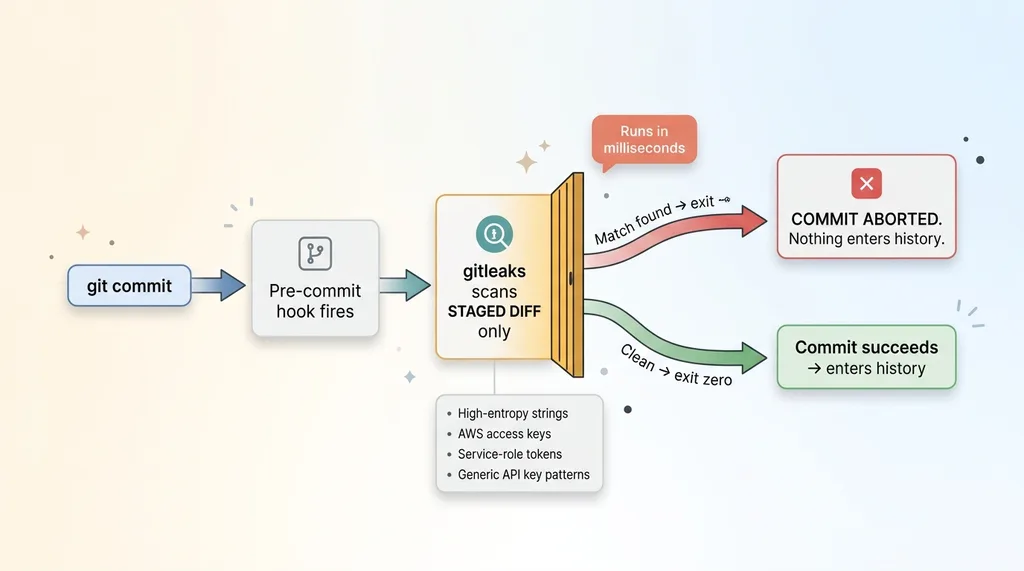 Pre-commit hook as a gate where gitleaks scans staged changes
So if you stage a file with SUPABASE_SERVICE_ROLE_KEY=eyJhbGci... in it, gitleaks matches the pattern, exits non-zero, and your commit dies right there. The key never becomes a commit. There is nothing to rotate, nothing to scrub, nothing to explain to your board.
Running it on staged changes only
The trufflehog vs gitleaks question comes up a lot. Trufflehog is the main alternative, and it's a strong tool, especially for deep verification of whether a found secret is actually live. I chose gitleaks for the pre-commit job for three reasons: it's fast, it installs globally with almost no ceremony, and it has low false-positive friction when you scan staged changes only.
That last point is the one that actually keeps the control alive. If you scan the entire working tree or full history on every commit, the hook gets slow and noisy, and slow noisy hooks get disabled. A gitleaks pre-commit hook that only scans the staged diff runs in milliseconds. Developers don't even notice it's there until the day it saves them.
A security control your team disables is worse than no control, because it ships a false sense of safety. Speed is a security feature.
Making It Global So Every Repo Inherits It
Here's where this goes from a nice per-project habit to actual coverage. You can install this once per machine and have it cover every repo automatically.
The core.hooksPath approach
Git lets you set a global hooks directory with git config --global core.hooksPath. Point that at a central hook script that calls gitleaks on the staged content, and every repo on that machine inherits the hook. New repo, old repo, repo you cloned five minutes ago. Covered.
For a CEO reading this, the takeaway is what matters: this isn't a chore your developers have to remember to set up on every project. It's installed once and it covers everything by default. Default-on is the only security posture that survives contact with a busy engineering team.
Verifying it blocks real keys and passes clean commits
I don't trust a security control I haven't tried to break. So after installing the global hook, I ran three tests.
First, I staged a real key literal and tried to commit. The hook fired, gitleaks exited non-zero, and the commit was aborted. Good. It blocks.
Second, I made a clean commit with no secrets. It passed. The hook didn't get in the way of normal work.
Third, I tested the first commit in a brand-new empty repo, because that's an edge case where hooks sometimes behave oddly. It passed clean too.
That verification step is not optional. A hook that silently fails open (passes everything because it errored out quietly) is more dangerous than no hook at all, because everyone believes they're protected when they aren't. You have to prove it blocks bad commits and prove it allows good ones. Both halves.
The Gotcha: Repos That Override Your Global Hook
There is one gotcha worth knowing, and it's the kind of thing that separates a hook that works in a demo from one that works across a real fleet of repos.
Husky and local hooksPath
Husky-based repos override your global hook path. So does any project that sets its own core.hooksPath locally. When a repo sets its own hooks directory, git uses that one and ignores your global setting entirely. Your scanner is simply not in the chain.
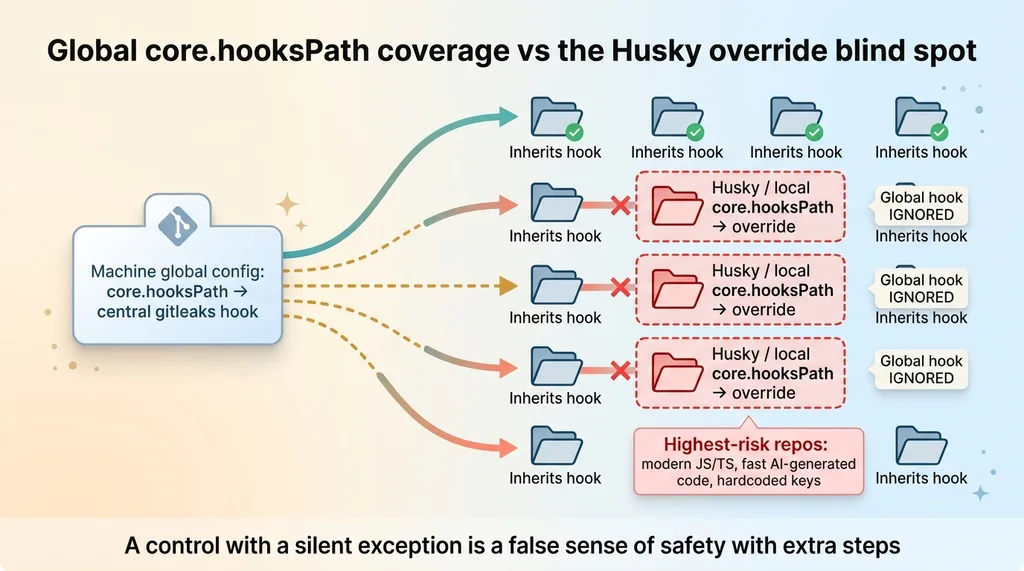 Global core.hooksPath coverage vs the Husky override blind spot
Sit with the irony for a second. The repos most likely to set up Husky are modern JavaScript and TypeScript projects. Those are exactly the repos most likely to hardcode keys, paste credentials into config files, and ship fast AI-generated code. So your developer feels protected everywhere, but has a blind spot in precisely the projects with the highest leak risk.
How to catch the silent gap
The fix is straightforward once you know to look. Either add gitleaks into the project's existing hook chain (drop it into the Husky pre-commit config so it runs alongside whatever else is there), or audit which repos override hooksPath and patch each one.
When I work across a large set of codebases, I do this audit explicitly. The scale matters here. When I audited 58 codebases in a day, finding which repos quietly overrode the global hook was one of the first things I checked, because a security control with a silent exception isn't protection. It's a false sense of safety with extra steps.
You don't get credit for the repos you covered. You get a breach from the one you didn't.
Do the One-Time History Sweep First
Prevention stops the next leak. It does nothing about what's already sitting in your history right now. Before you rely on the hook and call it done, you have to deal with the secrets already committed.
Find what's already leaked
This is where gitleaks switches modes. Instead of scanning staged changes, you run gitleaks detect across the entire repo history. That surfaces everything already committed: the admin token, the database service-role key, the third-party keys that got scraped into content months ago.
When I did this at scale, the results were not abstract. I found the six real credential leaks sitting in history across the repos I work in, and the real discipline was separating actual live secrets from the false positives the scanner flagged. A long random string in a test fixture isn't a leak. A service-role key in a committed .env is. You have to look at each one.
Rotate before you celebrate
Every real secret you find in history is already compromised. It hit a remote. Assume it's burned. So you rotate every single one, no matter how confident you are that nobody saw it.
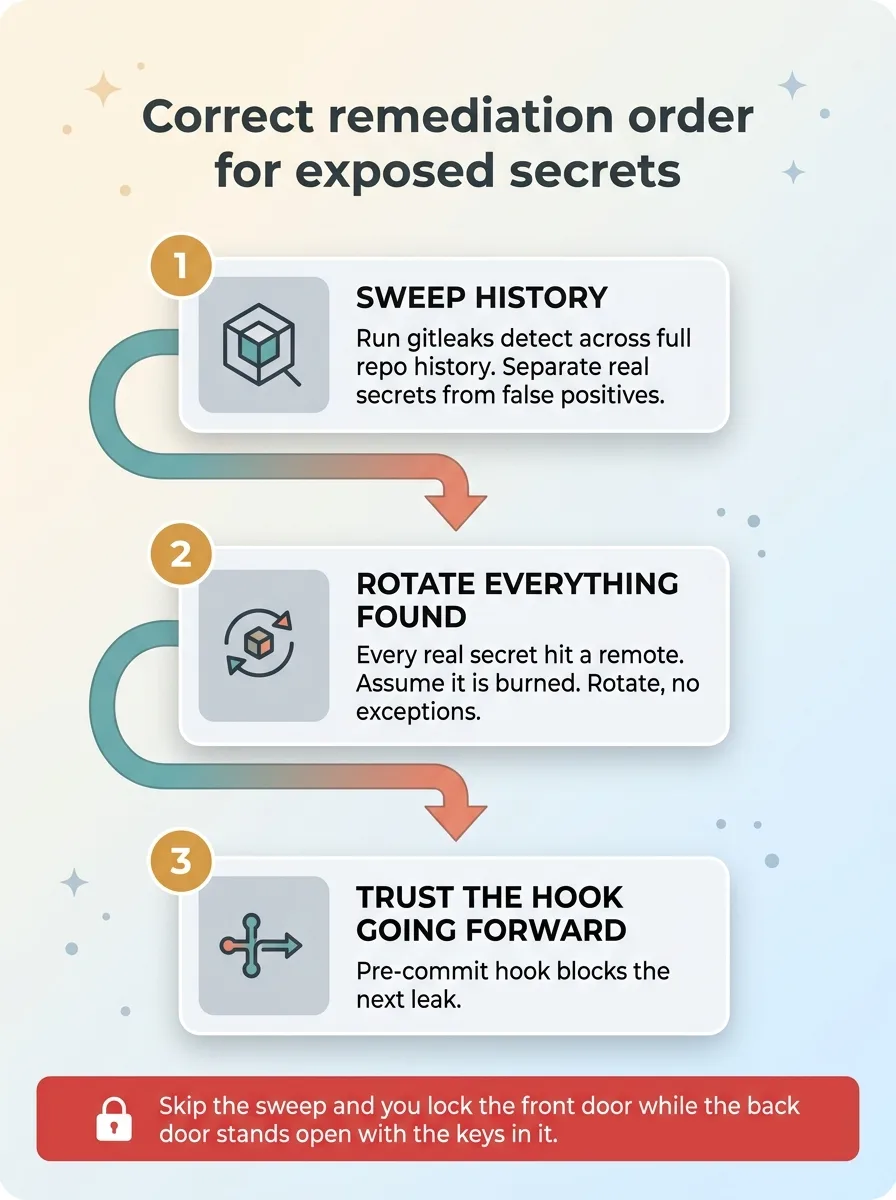 Correct remediation order: sweep, rotate, then trust the hook
The order matters and it's not negotiable: sweep first, rotate everything you find, then trust the hook going forward. If you install the hook and skip the sweep, you've locked the front door while the back door stands wide open with the keys still in it.
Near-Zero Cost, Structural Protection
If your developers occasionally leak keys, you don't need a policy memo. You don't need a training session that everyone forgets by Friday. You need a structural control that makes leaking hard.
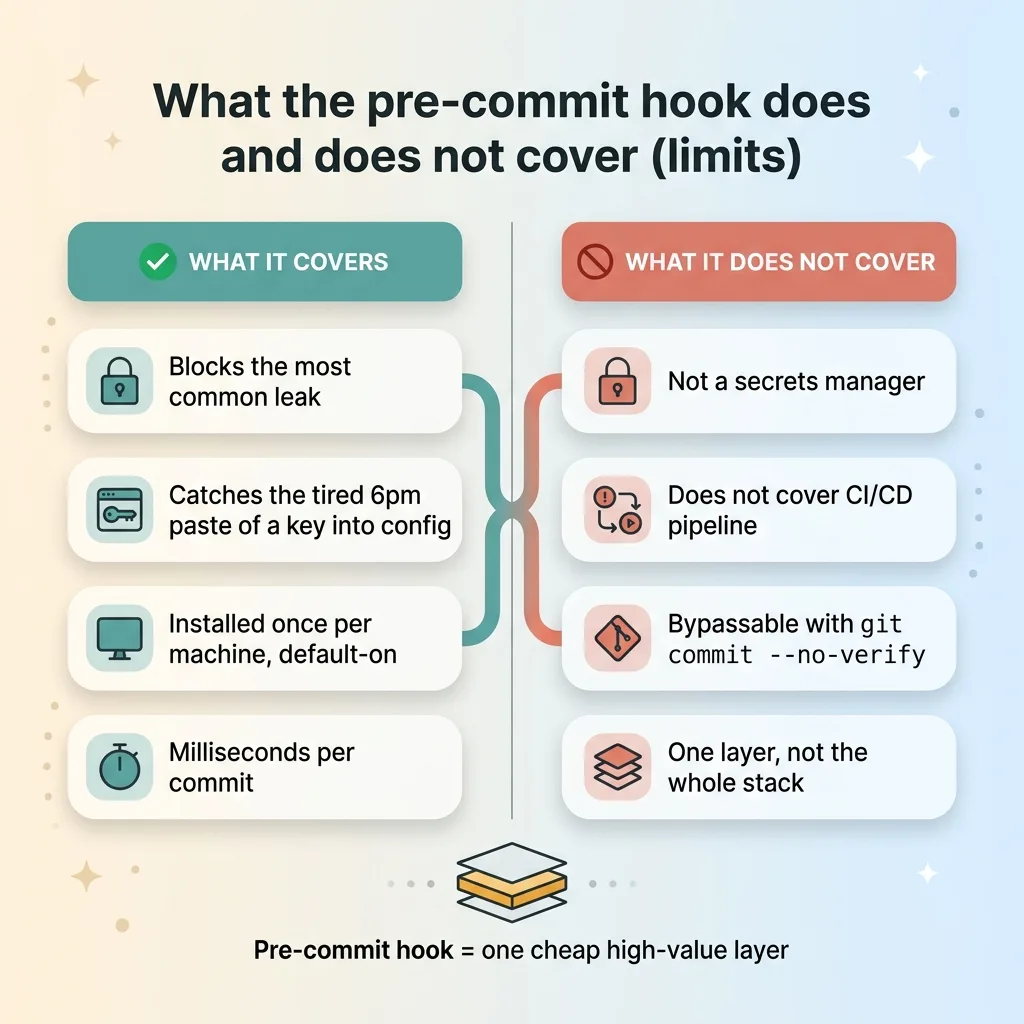 What the pre-commit hook does and does not cover (limits)
The full setup costs milliseconds per commit and a one-time install per machine. That's it. For a CEO lying awake about a single leaked service-role key turning into a breach, a customer data dump, and a disclosure obligation, this is the highest-leverage hour your security budget will ever buy.
Let me be honest about the limits, because a control oversold is a control you'll resent later. A pre-commit hook is not a secrets manager. It doesn't cover what happens inside your CI/CD pipeline. And it won't stop a determined developer who bypasses it with git commit --no-verify. It's one layer. A cheap, high-value layer, but one layer in a stack, not the whole stack.
What it does is make the most common, most expensive mistake structurally hard to make by accident. Most leaks aren't malicious. They're a tired engineer pasting a key into a config file at 6pm. This catches that.
I install controls like this across every codebase I touch, and the same approach scales from one repo to dozens. If you want me to look at your stack, I'll find the gaps before they cost you a rotation at 2am, a burned key, and a breach disclosure you didn't budget for.
Ready to bring AI leadership into your company?
I work with a small number of companies at a time. If you're serious about AI, apply to work together and I'll review your application personally.
Get AI insights for business leaders
Practical AI strategy from someone who built the systems — not just studied them. No spam, no fluff.
Hodgen.AI
Ready to automate your growth?
Book a free 30-minute strategy call with Hodgen.AI.
Book a Strategy Call