The AI App Security Checklist: 5 Holes I Find Every Time
Audit enough fast-built apps and the same five flaws repeat. Here is the AI app security checklist I use to fix defaults, not patch leaks one at a time.
By Mike Hodgen
Same Five Holes, Different App
I expected chaos.
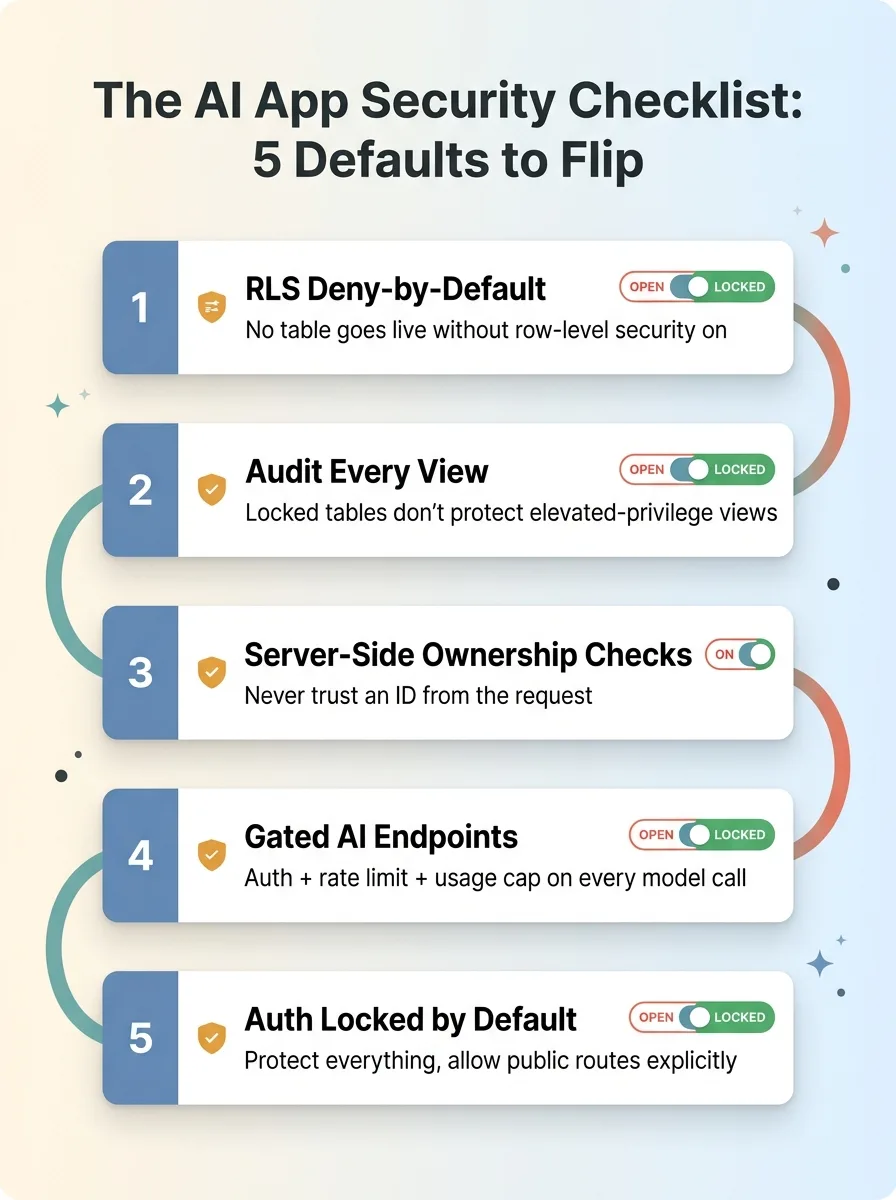 The 5 Security Holes Overview Checklist
When I started auditing a dozen fast-built projects, apps shipped in days using AI coding tools, the kind of thing one founder builds over a weekend and puts in front of real users, I figured I'd find a mess of unique, weird bugs. Every app its own snowflake of broken.
That's not what happened. Across all of them, I kept finding the same five problems. Different stacks, different industries, different people behind the keyboard. Same five root causes, over and over.
That pattern is the whole point of this article. Because once you see it, your AI app security checklist stops being a long list of things to patch and becomes five defaults to flip.
Here's the thing nobody tells you about vibe coding security. AI coding tools optimize for "it works." They do not optimize for "it is locked." When you ask a model to build a feature, it builds the happy path. The data shows up, the button does the thing, the demo looks great. Security is invisible in a demo. So it gets skipped, silently, by default.
The result ships open. Not because anyone was careless, but because the tool's definition of "done" and your definition of "safe" are not the same thing.
I run model calls across production systems every day in my own DTC fashion brand and in client work. I've shipped fast myself. I'm not here to scare you off building this way. I'm here to hand you the checklist I run before any AI-built app touches a paying customer.
These are not bugs you fix one at a time. They are defaults. Flip them once and the safe state becomes automatic.
Let's go through all five.
Hole 1: Tables That Ship World-Readable
This is the one I find most. It's almost universal.
Why row-level security is off by default
Most fast-built apps use a hosted Postgres or backend-as-a-service. You spin up a table, the app talks to it, everything works. What you don't see is that row-level security is off by default. Until you explicitly turn it on, the table has no per-row access rules at all.
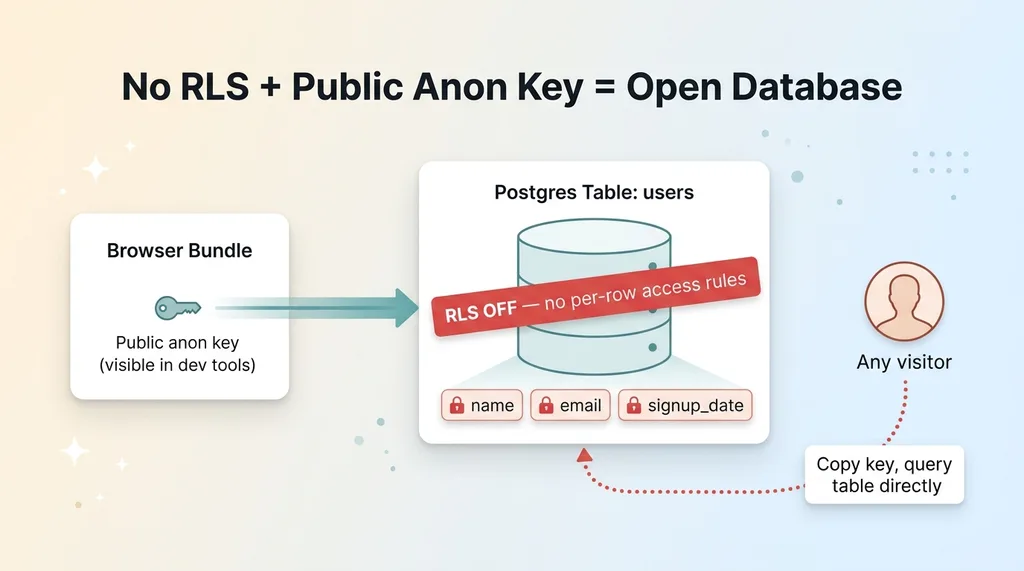 No RLS + Public Anon Key = Open Database
Now layer in how these platforms authenticate. They ship a public "anon" key that lives in the browser bundle. That's by design, the frontend needs it to talk to the backend. But it means anyone who opens dev tools has that key.
No RLS plus a public key equals a database anyone can read.
On one app I audited, the entire user table was readable by any visitor. Names, emails, signup dates, the lot. You didn't need to log in. You didn't need to hack anything. You opened the network tab, copied the key, and queried the table directly. Every user, exposed, to anybody who knew where to look.
The fix: deny-by-default at the table
The wrong fix is reactive: find an exposed table, add a policy, move on. You'll miss one. You always miss one.
The right fix is a convention. No table goes live without RLS enabled and a row level security default that denies everything, then you add policies to allow specific access. Deny-by-default. The table starts locked and you open precisely what you need.
Enforce it. A migration trigger that rejects any new table without RLS, or a CI check that fails the build if a table ships with policies off. Make the safe state the only state that deploys.
I go deep on the patterns for this in my row-level security playbook for 50+ tables. At scale, convention is the only thing that holds.
Hole 2: Views That Leak After You Lock the Tables
Here's the trap people fall into right after they fix Hole 1.
You enable RLS on every table. You add deny-by-default policies. You feel good. You're locked down. And then a database view quietly serves up the exact same data you just spent a day securing.
Views created with elevated privileges, security definer in Postgres terms, run with the permissions of whoever created them, not whoever queries them. So your RLS policies, which scope access to the requesting user, get bypassed entirely. The view inherits the creator's god-mode access and hands it to anyone who hits it.
On one app, the underlying tables were properly secured. Solid policies, deny-by-default, the works. But a reporting view built for an internal dashboard exposed aggregate financial data to any authenticated user. The tables were locked. The view was a window in the back wall.
The lesson is uncomfortable: locking tables is necessary but not sufficient. RLS protects tables. It does not automatically protect everything that reads from those tables.
So you audit every view, not just every table. Check the security mode on each one. A view that needs to bypass RLS for legitimate reasons should be a deliberate, documented decision, not the silent default.
This is exactly why checklists beat instinct. Instinct says "I locked the tables, I'm safe." The checklist says "now check the views." Your gut will tell you you're done well before you actually are. The list doesn't have a gut.
Hole 3: IDs Trusted Straight From the Request Body
This one is sneaky because the app looks like it works perfectly. It does work. For the person testing it.
What IDOR looks like in a fast build
IDOR stands for Insecure Direct Object Reference, and it's the vulnerability that hides in plain sight. The app takes an ID from the client, order_id, user_id, document_id, and returns that record. No check that the person asking actually owns it.
Change the number in the URL or the request body. Get someone else's data.
On a consumer app I looked at, any logged-in user could pull any other user's records by incrementing an ID. Order 1041 was yours. Order 1042 was a stranger's. The endpoint didn't care. It saw a valid ID and a valid login and returned the record.
AI-generated CRUD endpoints do this constantly. Ask a model to "build an endpoint that returns an order by ID" and it builds exactly that. It returns the order by ID. The ownership check, does this logged-in user own this order, is invisible in the demo because in the demo you only ever request your own stuff. Nobody types in someone else's ID during a happy-path test.
Authorize on the server, every time
The fix is a hard rule: never trust the ID from the request to imply permission.
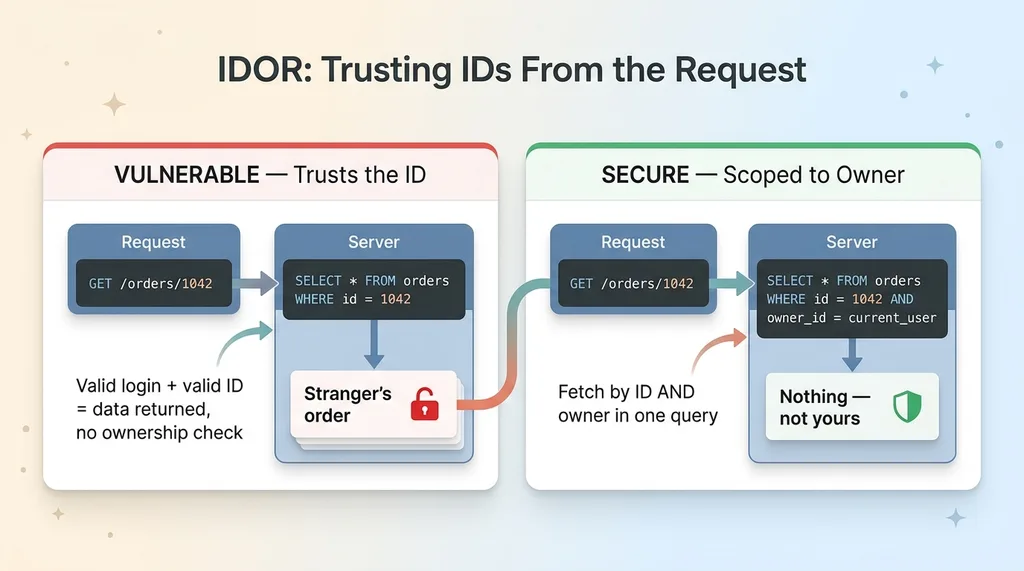 IDOR, Trusting IDs From the Request
A valid login proves who you are. It does not prove you're allowed to see the thing you're asking for. Those are two separate questions and the second one gets skipped.
Scope every query to the authenticated user on the server. Don't fetch the record by ID and then check ownership, fetch it by ID and owner in the same query, so a mismatched record never comes back at all. The database returns nothing if it isn't yours.
I wrote a full breakdown on why IDOR is the vulnerability AI developers never think about. IDOR protection isn't exotic. It's just invisible until someone goes looking.
Hole 4: AI Endpoints Anyone Can Drain
This one is unique to AI-built apps, and it's the most expensive mistake on the list.
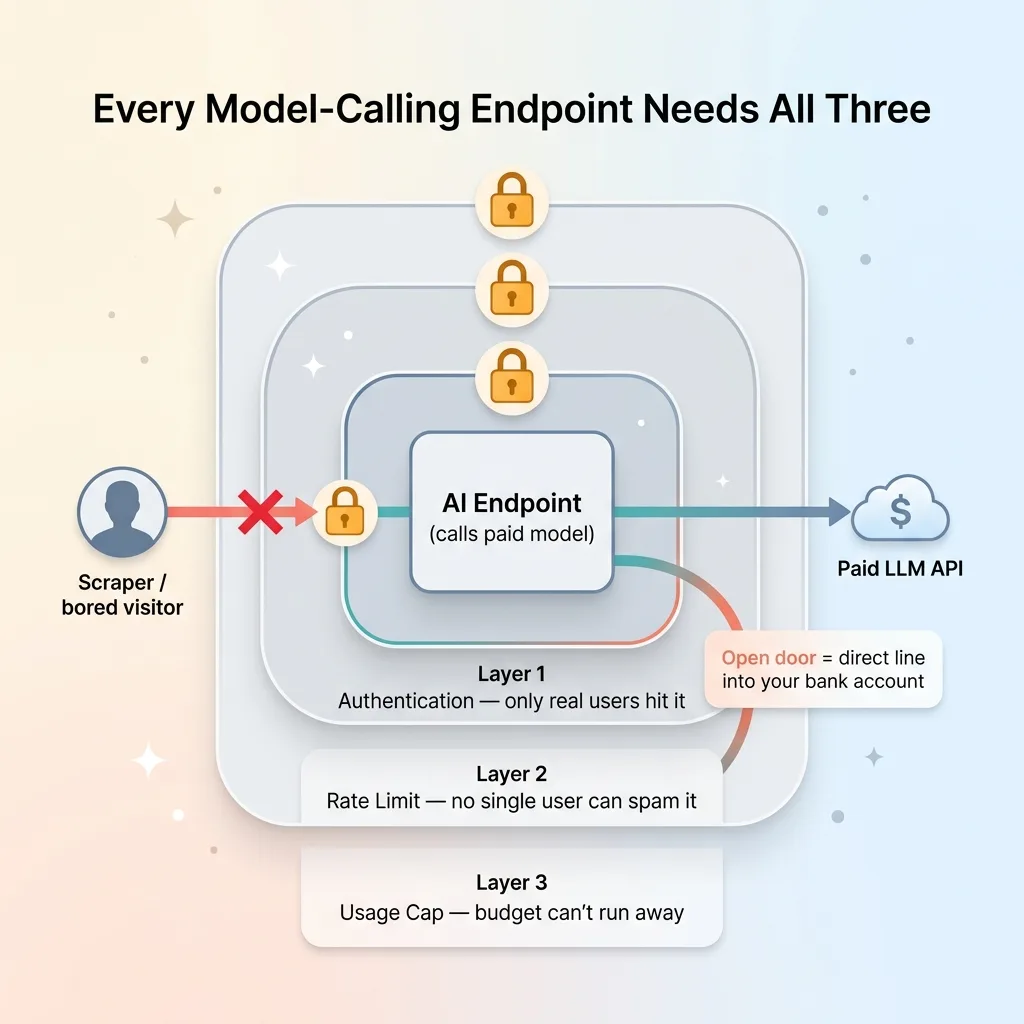 The Three Locks Every AI Endpoint Needs
The app exposes an endpoint that calls a paid model. Image generation, chat, vision, whatever. And it sits there with no rate limit, no auth gate, no per-user quota. Open to the world.
A scraper finds it. Or a bored visitor. Or a competitor who wants to be unkind. They start hammering it. Every call costs you money, and you're paying for every one of them.
On one app, a free generation endpoint was being farmed by anonymous traffic. No login required, no cap. Someone wrote a loop and ran it. The bill was real, and it climbed fast because there was nothing to stop it.
I think about this constantly because I run model calls across production systems in my own brand. My product creation pipeline, my content generation, my pricing engine, they all call paid models. I use a multi-LLM setup partly for capability and partly for cost: Claude for content, Gemini for images, custom chaining to route each task to the cheapest model that does the job well. Cost discipline isn't optional when you're running thousands of calls. An open endpoint blows all of that up in an afternoon.
The fix: treat every model-calling endpoint as infrastructure, not a feature. By default it needs three things, authentication so only real users hit it, a rate limit so no single user can spam it, and a usage cap so even legitimate use can't run away with your budget. All three. Not one.
This sits alongside the broader hardening work I cover in rate limiting, validation, and CSP hardening. For a normal endpoint, an open door is a data risk. For an AI endpoint, it's a direct line into your bank account.
Hole 5: Auth That Is Opt-In Per Route Instead of Locked by Default
This is the structural root cause behind half the others, and it's the one I want you to remember most.
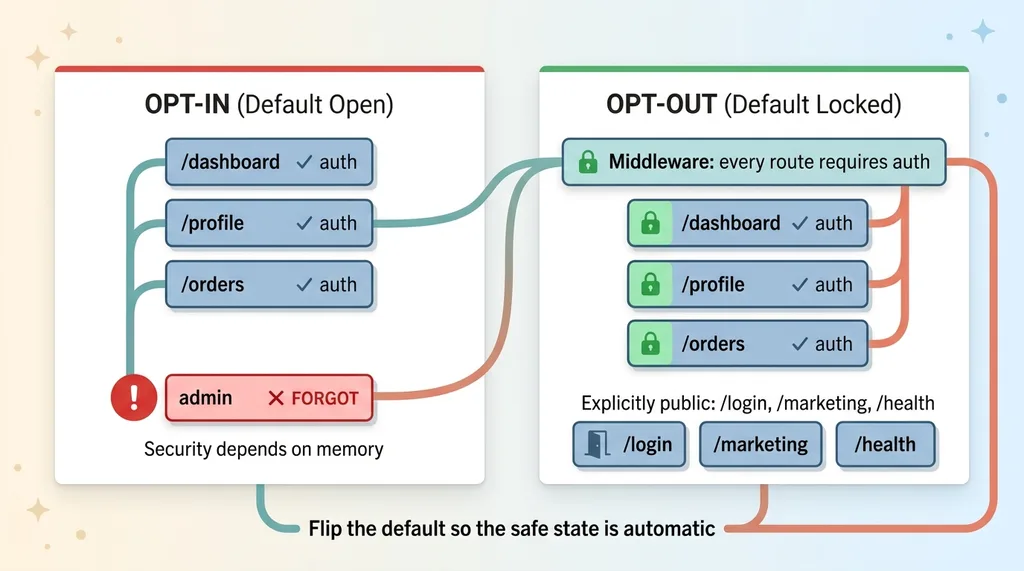 Opt-In vs Opt-Out Auth Defaults
The app protects routes one at a time. Each route gets its auth check added individually. Which means security is a thing you have to remember. And the moment security depends on memory, it fails, not today, but the day you add the fifteenth route in a hurry.
Forget one and it ships open.
The classic example: an internal admin route added after all the protected ones. The first batch of routes got auth checks because that's what you were thinking about that day. Then weeks later someone adds an admin panel, copies the route pattern, and forgets the one line that locks it. Now there's an unauthenticated admin endpoint in production and nobody knows.
The fix is to invert the default. Lock everything at the middleware layer, every route requires auth unless told otherwise. Then explicitly allow the handful of genuinely public routes: the login page, the marketing pages, the health check.
Opt-out, not opt-in.
This is the meta-lesson of the entire checklist. When the default is open and security is something you add, every new piece of code is a chance to forget. When the default is locked and exposure requires a deliberate exception, you can't forget your way into a breach. The worst case is that you accidentally lock something that should be public, annoying, but loud and harmless. You find out immediately because the feature doesn't work, instead of finding out later because the data already walked out the door.
Flip the default so the safe state is automatic.
The Checklist Is the Point, Not the Patches
Here's the whole thing, scannable:
- RLS deny-by-default, no table goes live without row-level security on and a deny policy. Enforce it in CI.
- Audit every view, locked tables don't protect views with elevated privileges. Check the security mode on each one.
- Server-side ownership checks, never trust an ID from the request to imply permission. Scope every query to the authenticated user.
- Gated and rate-limited AI endpoints, auth, rate limit, and usage cap on every model-calling endpoint, by default.
- Auth locked by default, protect everything at the middleware layer, then allow the few public routes explicitly.
Let me be honest about the trade-off. AI lets one person ship in a weekend what used to take a team a quarter. That's not hype, that's just true now. But speed has a tax. These five holes are the tax. They show up because the tools optimize for working, not locked, and that gap is predictable.
Predictable is good. Predictable means you can pay it down with discipline instead of finding it with a breach. None of this is a reason to stop building fast. It's the checklist you run before the fast thing meets a real customer.
This is the exact pass I run before any AI-built app touches paying users. Not a vibe, not instinct, a list. Because instinct tells you you're done about three steps before you actually are.
If you've shipped something fast and you haven't run this pass yet, that's the audit I do. I go deeper on the full process in the security pass every AI-built SaaS needs before a paying customer, read that next if you want to see how the whole thing comes together.
Want to explore what AI could do for your business?
Book a free 30-minute strategy call. No pitch deck, no sales team, just a real conversation about your operations and where AI fits.
Get AI insights for business leaders
Practical AI strategy from someone who built the systems — not just studied them. No spam, no fluff.
Hodgen.AI
Ready to automate your growth?
Book a free 30-minute strategy call with Hodgen.AI.
Book a Strategy Call