False Positive Secret Scanning: Finding the Real Leaks
Most committed secret alerts are noise. Here's how I triaged a false positive secret scanning estate down to the six repos that actually mattered.
By Mike Hodgen
The Alert List Lied to Me
I ran a secret scan across my entire portfolio one afternoon. Every project, every repo, the whole estate. Dozens of repositories, years of code, side projects I'd half-forgotten.
The scanner came back with a wall of red. "Committed secret" flagged over and over. Database keys, API tokens, .env files everywhere. My first instinct was the same one you'd have: panic. Every flagged file looked like a fire I'd left burning.
Then I started reading the actual flags, and most of them were nonsense.
Here's the single most important thing nobody tells you about false positive secret scanning: a scanner that reads your working directory flags every .env.local sitting on disk. Those are files that were gitignored and never actually entered git history. They live on my laptop. They were never committed, never pushed, never exposed to anyone.
That's not a leak. That's just my hard drive.
The scan itself is trivial. You install a tool, you point it at your code, you get a list. Anyone can do that in five minutes. The scan is the easy part.
Triage is the whole game.
Out of that entire intimidating list, once I actually did the work of sorting signal from noise, only about six repos had genuine git history leaks. Six. Everything else was either a file that never left my machine, a key that wasn't even mine, or a dead repo nobody deploys.
The hard part isn't finding alerts. It's knowing which six matter.
Working-Tree Noise vs. Real Git-History Leaks
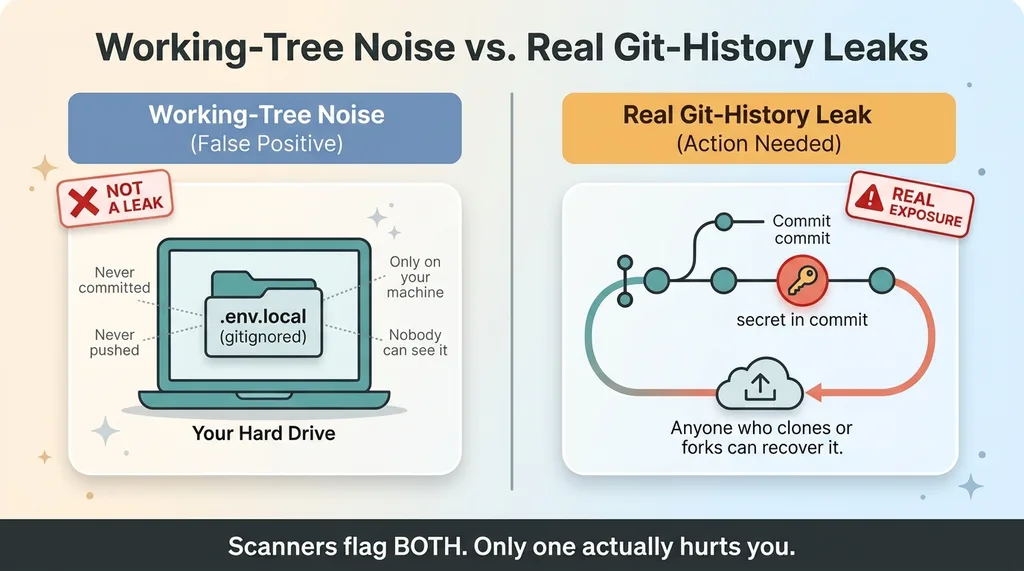 Working-Tree Noise vs. Real Git-History Leaks
Why scanners flag files that were never committed
The biggest source of false positive secret scanning is the gap between what's on disk and what's in git history.
A gitignored .env.local is a working-tree file. It's present locally so your app can run. It was never committed, never pushed, and it's not in any clone anyone could pull. Nobody can see it but you.
A real leak is different. It's a secret that lives inside a commit, recoverable by anyone who clones or forks the repo. That's the thing that actually hurts you.
Scanners that read your working directory can't tell the difference at a glance, so they flag both. And honestly, that's the right default. Erring toward noise beats missing a live credential. But a default that's safe is useless without the triage step that comes after.
The one verification step that kills 80% of alerts
Don't trust the scanner's flag. Verify whether the secret actually appears in git history.
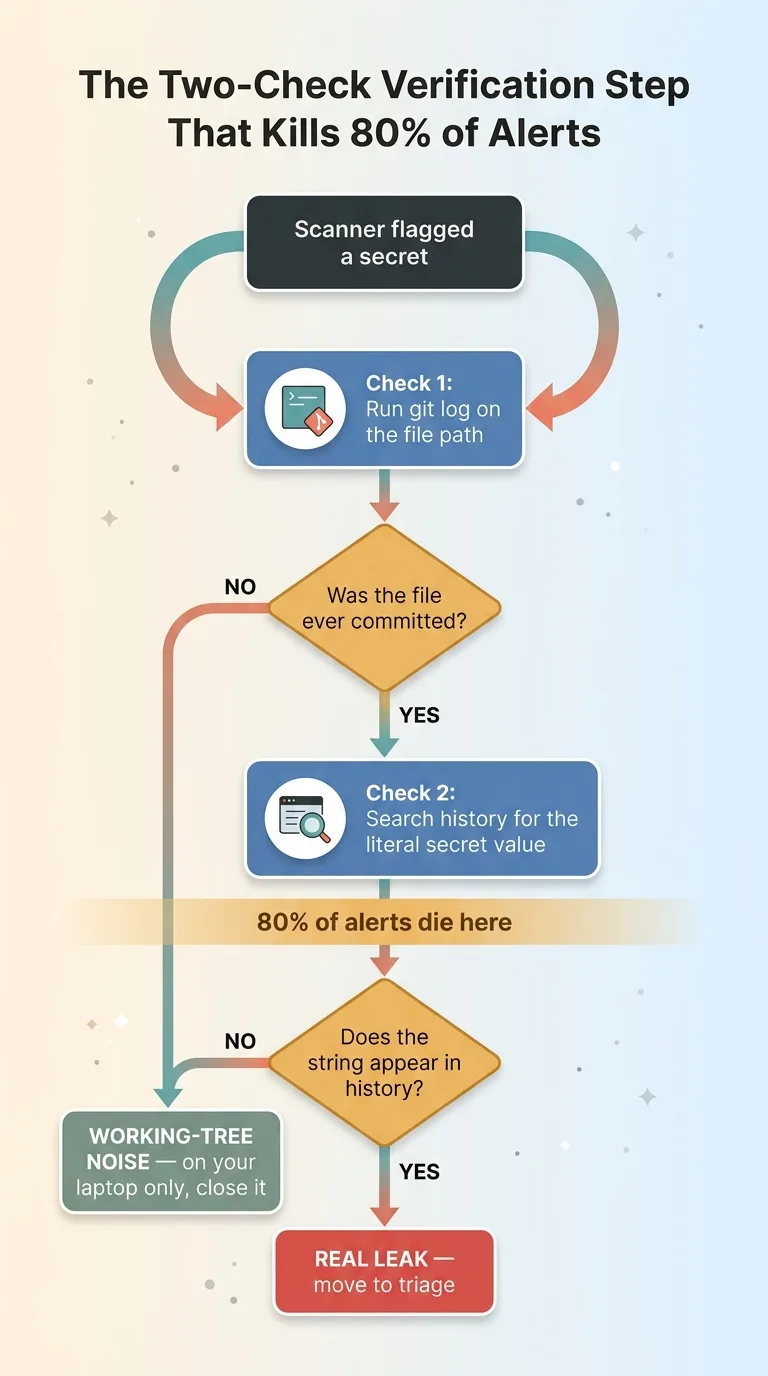 The Two-Check Verification Step That Kills 80% of Alerts
Two checks. First, run git log against the file path to see if the file was ever committed. Second, search the history for the literal value of the secret itself. If the file shows no commits and the string appears nowhere in history, it's working-tree noise. It's on your machine and nowhere else.
When I did this, the list collapsed. The long, terrifying wall of red shrank to a handful of real items the moment I stopped asking "did the scanner flag this?" and started asking "is this in history, or just on my laptop?"
That one question is the difference between a week of panic and an afternoon of cleanup. Most flags die right here.
Triage by Exploitability, Not by Alert Count
Once you've stripped out the working-tree noise, you've got your real history leaks. But here's the next trap: not all of them are equal, and chasing your alert count to zero is the wrong goal.
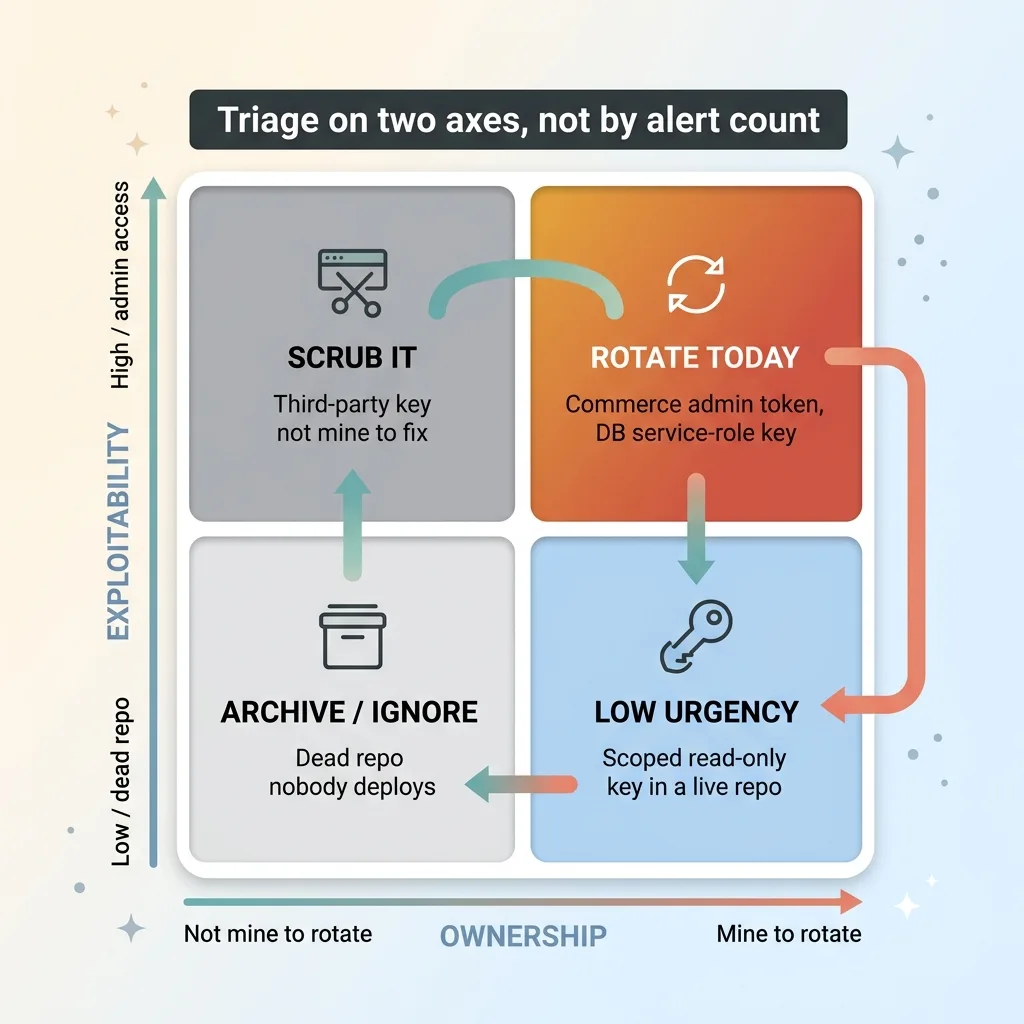 Triage Matrix: Exploitability vs. Ownership
Triage on two axes. Exploitability and ownership.
What makes a leaked secret actually dangerous
Exploitability is "what can someone actually do with this?"
An admin-level token is a same-day rotation. A commerce admin token, a database service-role key, anything that grants real write access to a live system. If that's sitting in history, someone who finds it can do real damage. Rotate it today.
A scoped read-only key buried in a dead repo nobody deploys? Low urgency. It might technically be "leaked," but the blast radius is close to zero. It can wait.
Sort by damage potential, not by how many times the scanner yelled.
Ownership: is it even yours to rotate?
This one surprised me. Some of my flagged "secrets" were third-party keys that had been scraped into private content. They weren't my credentials at all. Not mine to rotate, not my problem to fix beyond removing them.
There's also a special category worth flagging: an AI key shipped inside a public mobile app bundle. That's extractable by design. It's not technically a git history leak, but it's real exposure. Anyone can pull a key out of a shipped binary.
The mental model for a CEO buried in alerts is simple. For each real hit, ask two things: "what can someone actually do with this?" and "can I even fix it?" That sorts your list faster than any tool.
The Six That Were Real
When I finished the triage, six repos had genuine history leaks. Here's what they actually were, anonymized.
A commerce admin token sitting in commit history. Admin-level access to a store I run. Same-day rotation, no debate.
Database service-role keys, the high blast radius kind. A service-role key bypasses row-level security and gives full database access. Those got rotated immediately.
AI keys shipped in a public mobile bundle. Extractable by anyone who decompiles the app. I rotated them and re-scoped them to limit what a stolen key could do.
A vendor secret committed by mistake, a one-off slip where a credential got pasted into a config file and pushed.
Every one of these required my own hands-on rotation. Mike-only work, because they were live credentials to systems I personally run. You can't delegate rotating a database key to a checklist.
Now contrast that against the false categories. Third-party keys that weren't mine to rotate, so the right move was just to scrub them. And dead scaffolds, abandoned starter repos I'd cloned and forgotten, where the answer wasn't to patch anything. The answer was to archive them and make them private.
I wrote up the full breakdown in the six repos that actually leaked, if you want the deeper walkthrough.
The honest point is this: knowing which six is the entire exercise. Everything else on that scary list was either noise or someone else's job. The value wasn't in the scan. It was in the sorting.
The Honest Discount: The Live-Dangerous Surface Was Smaller Than the Estate
Let me deflate my own scare numbers, because they were inflated.
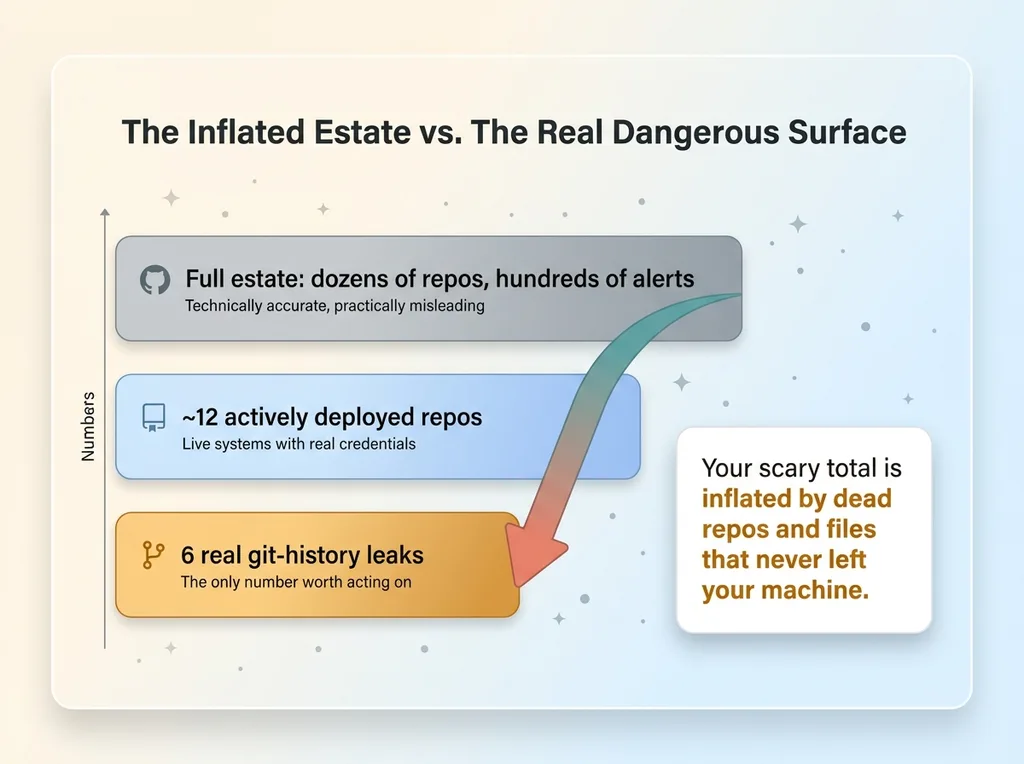 The Inflated Estate vs. The Real Dangerous Surface
The full estate is dozens of repos. If you ran a scan and reported "hundreds of secrets across my entire portfolio," that would be technically accurate. It would also be practically misleading.
The truly live, dangerous surface was about twelve active repos. The ones that actually deploy, that hold real credentials, that someone could exploit today. The rest were experiments, archived scaffolds, or local-only tools that never see the internet.
A scan screaming "hundreds of secrets" across the whole estate counts every dead repo and every working-tree file the same as a live admin token. The number is real. The implication is wrong.
Reframe it for yourself. Your scary alert total is almost certainly inflated by inactive repos and files that never left your machine. The question that matters isn't "how many alerts do I have?" It's "how many actively-deployed systems hold a live admin credential in their history?"
That number is usually small. And it's the only number worth acting on.
This is also where this article differs from when I went mapping my own secret sprawl. That piece is about blast radius and how the value of a single credential fans out across connected systems. This one is narrower: it's about triage and killing false positives. Different problem, different fix. Sprawl is about understanding your exposure. Triage is about not drowning in noise while you do it.
How to Make This a 30-Minute Job Instead of a Week
This whole thing is repeatable. Here's the process I'd hand any ops leader.
The triage checklist
- Run the scan estate-wide. Point your scanner at everything. Don't pre-filter.
- Filter to git-history hits only. Drop the working-tree noise. Verify with
git logon the path and a search for the literal value. This step alone kills most of your list. - Classify each real hit by exploitability and ownership. Admin beats scoped beats dead. Mine to rotate beats third-party beats ignore.
- Rotate the live admin and service-role keys same-day. These are the actual fires. Don't batch them. Don't schedule them. Do them now.
- Archive dead scaffolds, don't patch them. If a repo doesn't deploy and never will, make it private and archive it. Patching a corpse is wasted effort.
- Install a pre-commit hook so this can't recur.
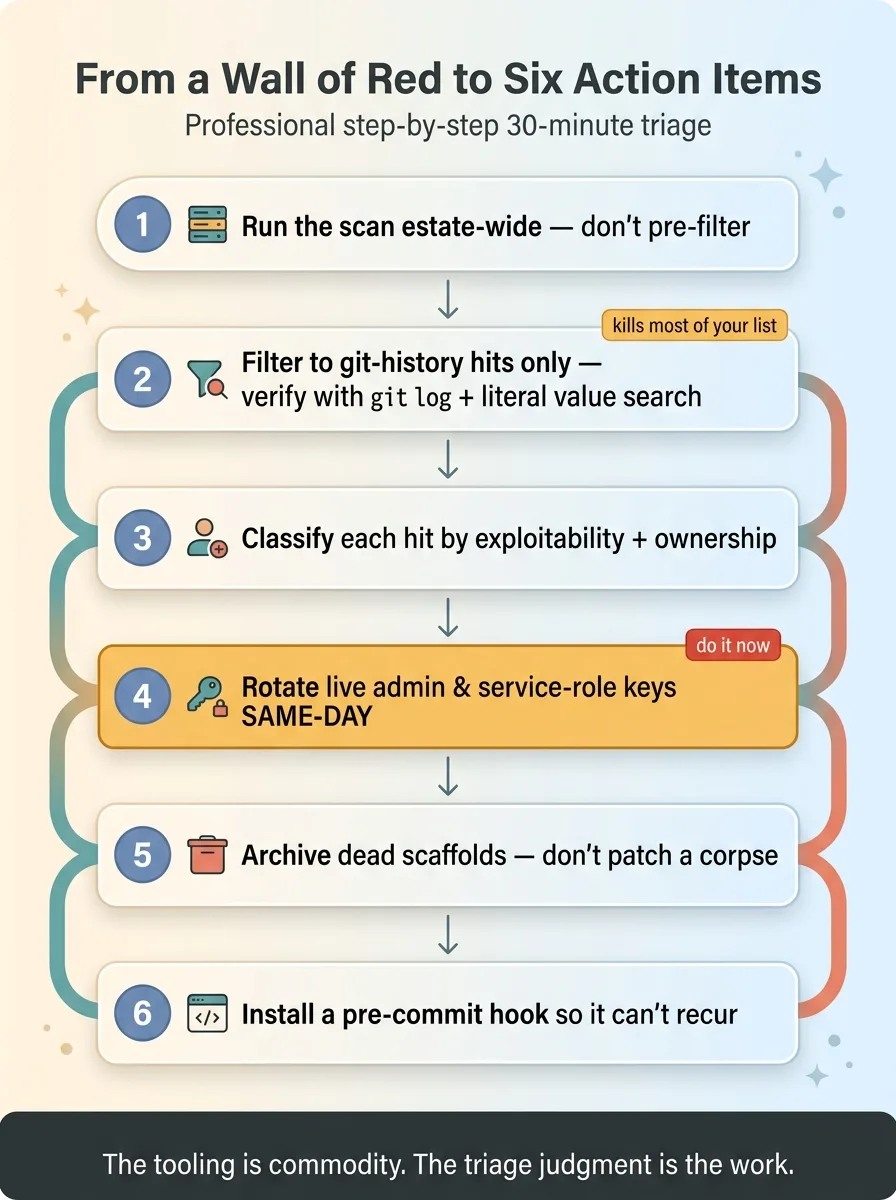 The 30-Minute Triage Process Checklist
Stop the next leak before it commits
The best cleanup is the one you only do once. A pre-commit hook scans your changes before they ever enter git history, so a key gets blocked at the door instead of buried in a commit you find two years later. I walked through exactly how to make it physically impossible to commit a key using gitleaks. It's an afternoon of setup that saves you this entire exercise next time.
Now the honest part. Scanners still overflag, and they always will. And removing a secret that's already in git history is its own painful job. Rotating the key is the real fix. Scrubbing the history is a separate, ugly task because rewriting git history isn't a simple delete, it touches every clone and every collaborator.
The discipline here isn't the tooling. The tooling is commodity. The discipline is the triage judgment that turns a wall of red into six action items.
If Your Scanner Is Screaming and You Can't Tell What Matters
Here's the situation I see. A CEO or ops leader turns on secret scanning because the board asked, or because a competitor got breached. The scan comes back with hundreds of alerts. They freeze. Nothing gets fixed, because everything looks equally on fire.
The value I bring isn't running the scan. Anyone can run the scan. It's the triage judgment underneath it.
Separating working-tree noise from real git history leaks. Sorting by what someone can actually exploit instead of by alert count. Knowing which credentials are mine to rotate this afternoon, which to archive, and which aren't even mine to worry about.
I did this across my own portfolio, and it took hours, not weeks. Not because I have a magic tool, but because I knew where to look and which questions to ask in what order.
If your alert list looks like a fire and you can't tell signal from noise, that's a same-afternoon conversation. I can tell you which handful of items actually matter and which hundred you can close without touching. Sometimes the most useful thing I do is shrink your problem from "hundreds of secrets" to "six things, here's the order."
If that's where you are, bring in someone who's done this triage.
Want to explore what AI could do for your business?
Book a free 30-minute strategy call. No pitch deck, no sales team, just a real conversation about your operations and where AI fits.
Get AI insights for business leaders
Practical AI strategy from someone who built the systems, not just studied them. No spam, no fluff.
Hodgen.AI
Ready to automate your growth?
Book a free 30-minute strategy call with Hodgen.AI.
Book a Strategy Call