Your Data Is Locked in Someone Else's Tool. Here's the Real Problem.
A window-treatment dealer called me with a problem that has nothing to do with window treatments. Their entire business history lived inside a third-party quoting tool, and the only way out was a spreadsheet export. The catch: that export was a mess. AI data migration spreadsheet import was the only path that wasn't going to lose half their business.
Here's what made it ugly. The export changed column order depending on the product type. A "Width" column for roller shades became "Panel Width" for drapery. Then a software update silently renamed three fields overnight, and nobody told them. So the same data point had three different names depending on what you ordered and which version of the software generated the file.
The CEO said the thing I hear from every business sitting on a tool they've outgrown: "We've got years of orders in there. If we move and lose half the fields, we're worse off than staying."
That fear is correct. It's not paranoia.
The stakes here were dozens of orders representing a substantial order history. That's not a spreadsheet, that's the company's memory. Every spec, every revision, every customer note. Lose a field and you don't just lose a number, you lose the ability to answer a customer question two years from now.
Most migrations fail in exactly this spot. The data comes out technically, but fields get dropped, columns get misread, and nobody notices until a report is wrong months later.
The dealer wasn't afraid of the move itself. They were afraid of a quiet, partial loss they wouldn't catch until it was too late. That's the real problem with messy CSV parsing, and it's the problem worth solving properly.
Why Rigid Parsers Break (and Lose Fields Silently)
The obvious approach is a traditional importer. You write code that says column 3 is the width, column 7 is the price, and you parse accordingly. It works on the file you tested it against.
Then reality shows up.
The naming drift problem
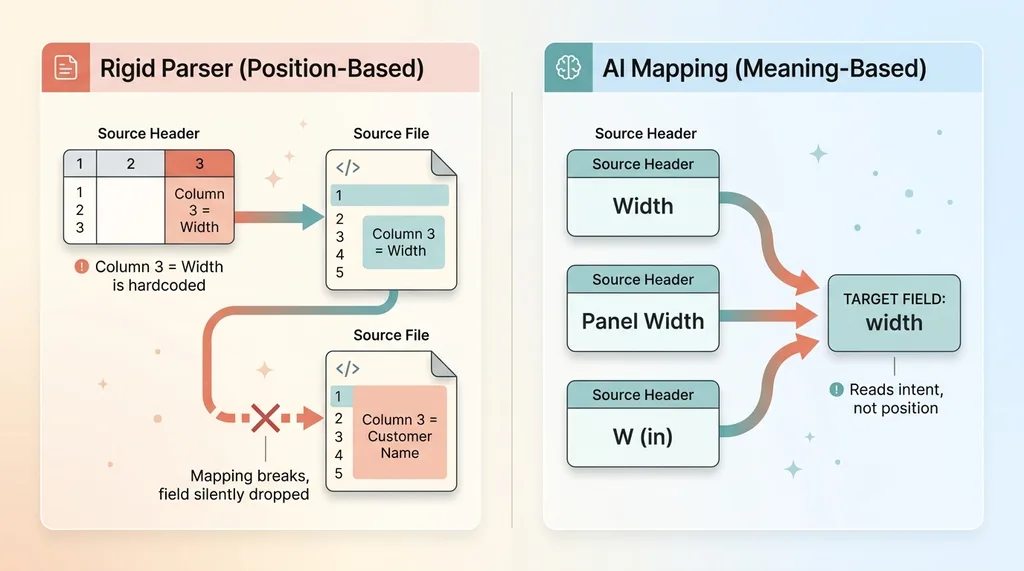
The moment that export reorders its columns, your mapping is wrong. Column 3 is now the customer name, not the width. The moment "Width" becomes "Panel Width" for a different product type, your importer looking for "Width" finds nothing.
This is naming drift, and it's not a rare edge case. It's the default behavior of most third-party tools. They change exports between product types, between software versions, between Tuesday and Wednesday. Your rigid parser was built against a snapshot of a format that doesn't hold still.
A hardcoded column map is a bet that the source will never change. That bet always loses eventually.
Silent loss is the worst kind
Here's the part that actually hurts. When the mapping goes wrong, the parser usually doesn't crash. It just reads the wrong column or skips a field it can't find. No error. No alert. The import "succeeds."
A parser that crashes is doing you a favor. It's telling you something broke while you still have time to fix it. A parser that quietly drops a column you didn't anticipate tells you nothing at all.
You find out six months later when someone runs a report and the lead-time numbers are blank, or the widths are off, and now you're trying to reconstruct what happened during a migration nobody documented.
The worst bug isn't software that fails. It's software that looks like it works. A clean migration that silently lost a third of its fields is far more dangerous than one that loudly refused to run. You can fix loud. You can't fix the loss you never noticed.
Let AI Do the Column Mapping
The fix is to stop hardcoding positions and start mapping meaning. This is where AI earns its place in the pipeline.
 Naming drift breaking rigid parsers vs AI meaning-based mapping
It maps meaning, not position
Instead of writing "column 3 equals width," I hand the AI the header row plus a few sample rows and ask it to map each source column to a target field in my schema. The AI reads the headers and the example values and figures out what each column actually represents.
So "Width," "Panel Width," and "W (in)" all map to the same target field, because the AI understands they mean the same thing. It's reading intent, not counting positions.
How it survives naming drift
This is exactly the drift that destroys rigid parsers. When the export renames a field or shuffles its columns, the AI doesn't care, because it was never relying on the name or the position. It's reading the content and reasoning about what belongs where.
 AI maps the boundary, deterministic code handles money (guardrail architecture)
I wrote more about this approach in let the AI read any file you throw at it. The short version: stop building mapping wizards that assume a fixed format. Let the model handle the messy boundary where formats refuse to behave.
Now the honest part, because this only works with guardrails.
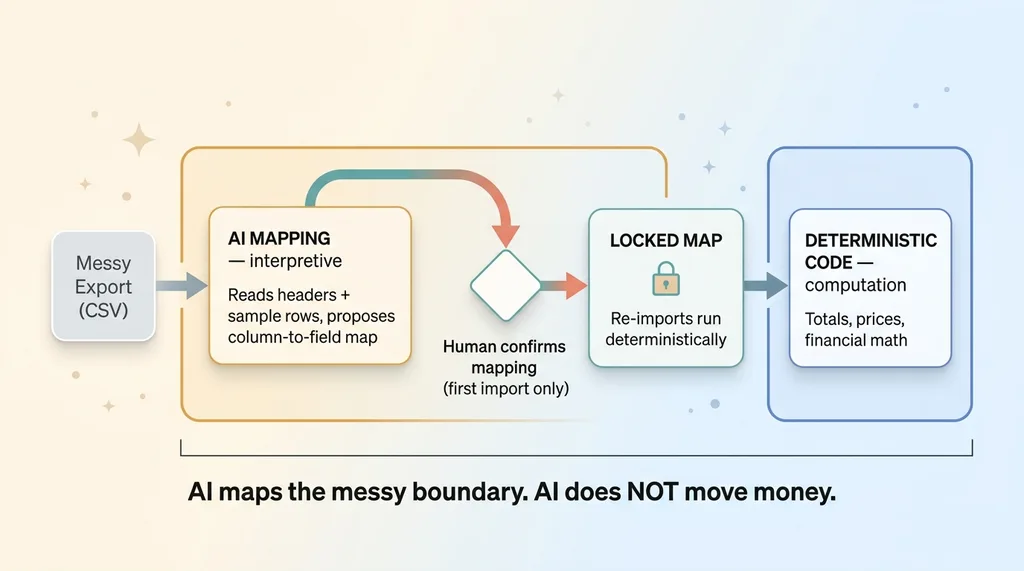
The AI proposes the mapping. It does not get the final word. On the first import for each file type, a human confirms the mapping. Once confirmed, I lock it, so every re-import of that file type runs deterministically against the same locked map. The AI does the hard interpretive work once. After that, it's repeatable and predictable.
And one rule I never break: AI maps the messy boundary, it does not move money. The mapping is interpretive. The actual computation (totals, prices, anything financial) stays deterministic code. AI decides which column is the price. It does not decide what the price is.
Keep Every Original Row as Raw JSON So Nothing Is Ever Lost
This is the design choice that lets the dealer stop being afraid. It's the answer to "what if we lose a field we didn't think about."
The raw_import safety net
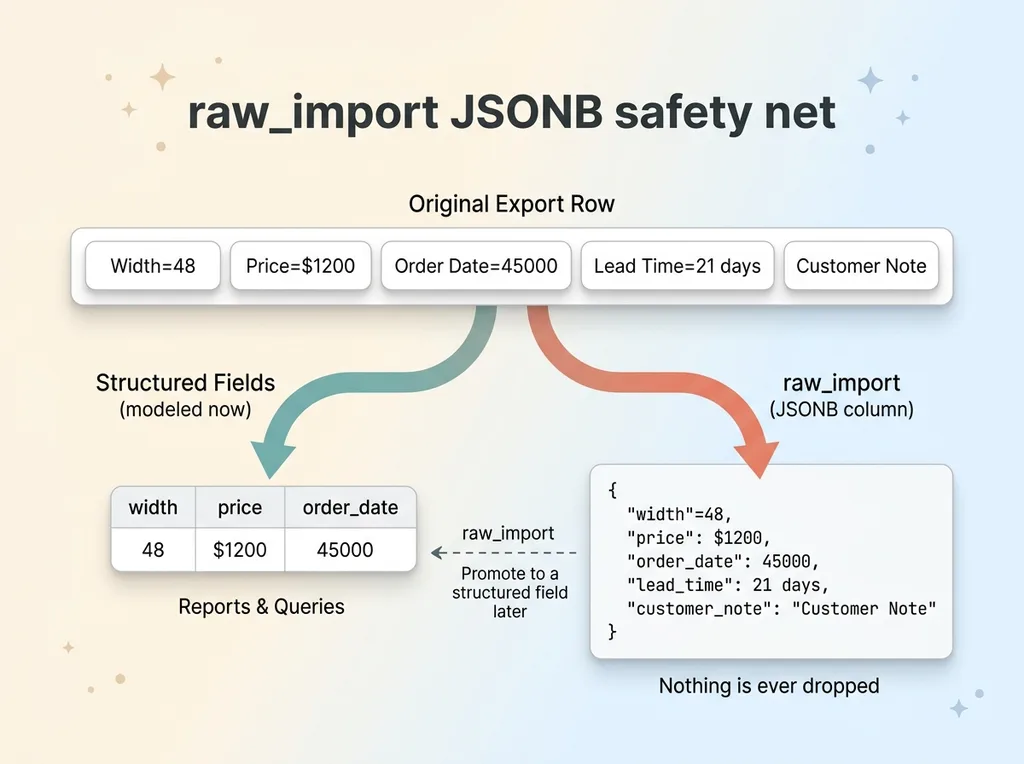
Even with good AI mapping, there's a real risk: you might not have modeled every field yet. Maybe your schema has width, price, and order date, but the export also carried a "lead time" field you didn't plan for.
 raw_import JSONB safety net, structured fields plus full original row
A normal importer drops anything it doesn't have a home for. That's the silent loss again.
So I do something simple. Alongside the parsed, normalized fields, I store the entire original row as raw JSON in a JSONB column. The structured fields are what your reports and queries use. The raw row is the insurance policy.
Nothing is ever dropped. Every original value sits there in raw_import, exactly as it came out of the export.
Model fields later, lose nothing now
Six months from now, if I realize the export had a lead-time field I never modeled, I don't have to re-run the migration or beg the old vendor for another export. The data is already there in the raw JSON, waiting to be promoted into a structured field whenever I need it.
This is the entire difference between a lossy migration and a lossless one.
The argument is plain: you do not have to perfectly understand every field on day one to safely capture it. That expectation is what makes people afraid to migrate. Drop it. Model what you need right now, keep everything else in raw form, and decide later.
Lossless data import isn't about predicting every field correctly upfront. It's about never throwing anything away. Capture first, model when ready.
Cleaning the Mess: Dates, Dedupe, and Idempotent Re-Imports
Capturing the data losslessly is half the job. The other half is making it actually usable, because a faithful copy of a mess is still a mess.
 Three cleaning operations: serial dates, revision dedupe, idempotent re-import
Excel serial dates to ISO
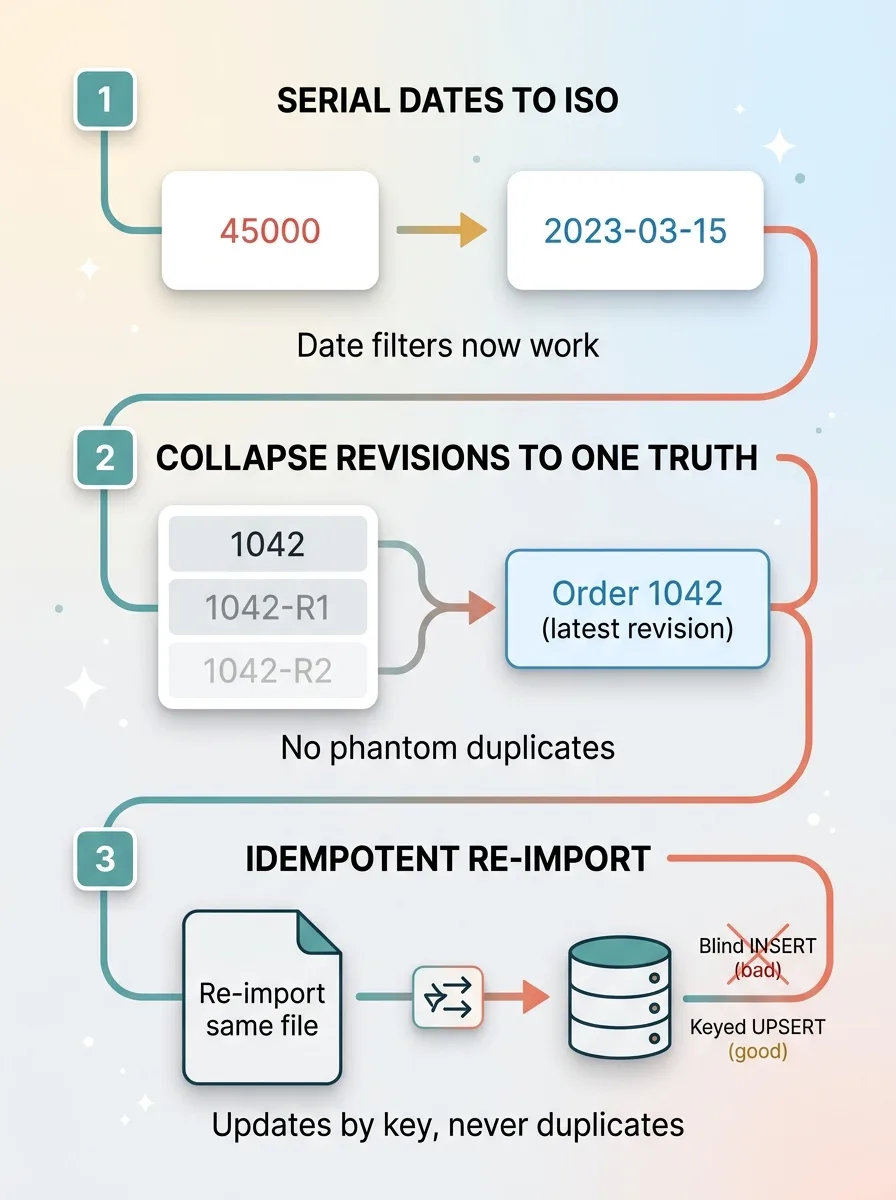
If you've ever opened a spreadsheet export and seen dates showing up as numbers like 45000, that's an Excel serial date. It's the number of days since a fixed origin, and it's useless in a query. You can't filter "orders in Q3" against a column of raw integers.
So I normalize every one of those to proper ISO dates on import. Now the dates are real dates, and reports and date-range queries just work.
Collapsing revisions onto one record
This export had a nasty habit. Every revision of an order showed up as a separate row, distinguished by a revision suffix on the base order number. Order 1042, 1042-R1, 1042-R2, all separate rows for what is really one order.
Import that naively and you've got duplicate orders inflating your counts and your pipeline. So I deduped on the base order number, collapsing the revisions onto a single record and keeping the latest revision as the source of truth.
One order, one record, with its current state. Not three rows pretending to be three orders.
Re-importing updates instead of duplicating
The last piece is idempotency, and it matters more than people expect. When you re-import the same file, it should update existing records by key, not create a second copy of everything.
This is what lets you run the import twice safely. It's also what saves you when the old vendor sends a corrected export next week and you need to re-run without nuking and rebuilding. I covered the mechanics of this in idempotent writes, but the principle is simple: keyed upserts, not blind inserts.
I'll be honest about the residue, too. There's always cleanup after a migration that the automated pass doesn't catch, the long tail of leaving any vendor. I wrote about that reality in the long tail of leaving a vendor. Plan for a spot-check pass, not a one-click finish.
The Result: A Full Order History Loaded Cleanly
Every order. The full order history. Loaded with zero fields lost.
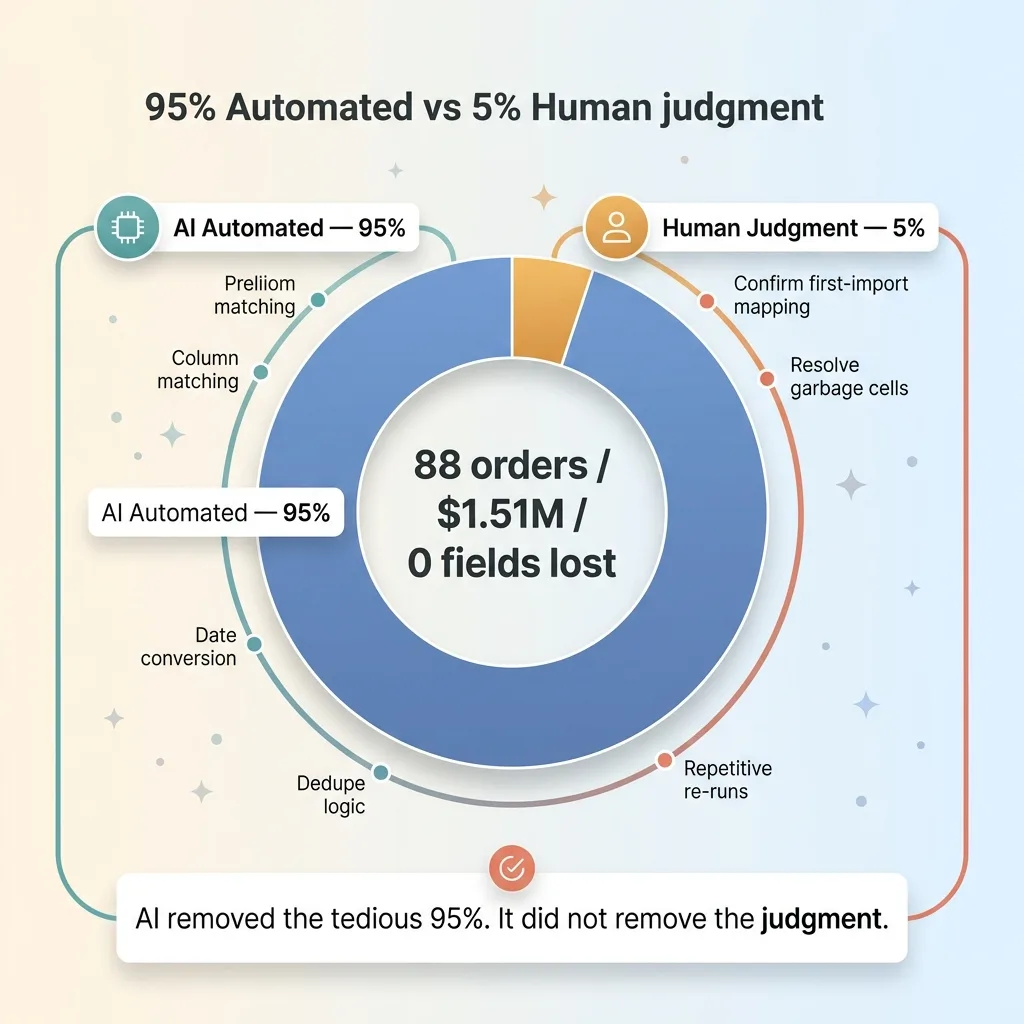 The 95% automated vs 5% human judgment split
The dealer went from afraid to move to owning their complete order history in a system they control. Queryable. Reportable. Safe to re-run whenever they need to.
Let me be specific about what "cleanly" actually means here, because the word gets thrown around:
- Every original row preserved as raw JSON. Nothing dropped, ever, even fields nobody modeled.
- Dates normalized to ISO. Reports and date filters work instead of choking on serial numbers.
- Revisions deduped to one truth per order. No phantom duplicates inflating the numbers.
- The whole import is re-runnable. Run it twice, re-run after a corrected export, no mess.
Now the limits, because anyone who tells you a migration is fully hands-off is selling you something.
The first import for each file type needs a human to confirm the AI's mapping. That's by design, not a gap. And genuinely malformed source data, the kind where a human typed garbage into a cell years ago, still needs a human eye to sort out.
AI removed the tedious 95%, the column matching, the date conversion, the dedupe logic, the repetitive re-runs. It did not remove the judgment. That last 5% is where a person still earns their keep, and that's exactly how it should be.
Getting Your Data Out Without Losing It
So here's the doubt the dealer started with, reframed as an answer: yes, you can get your data out of a messy export trapped in someone else's tool without losing or corrupting it.
The specifics here were window treatments, but nothing about the pattern is industry-specific. It works for any vendor lock-in with ugly exports, any tool you've outgrown that only hands you a spreadsheet with shifting columns and silent renames. I've run versions of this for clients in completely different industries. The export is always a mess. The fix is always the same shape.
Two design choices make it lossless, and they're worth repeating because they're the whole thing.
First, AI maps the messy columns based on meaning, so naming drift and reordered columns can't quietly break your import. Second, the original row is always preserved as raw JSON, so you never have to perfectly understand the data before you capture it.
That combination is what turns a scary, one-shot migration into something repeatable and safe.
Get the next build note.
I write up each system I build, including what broke. Subscribe to my newsletter and I'll send you the next one.