Connecting to QuickBooks Is Not 'Add an API Key'
You can build something on the QuickBooks API in an afternoon. I've done it. Pull up the docs, grab your client ID, fire off a few calls, and watch invoices and P&L data come streaming back. It feels like you've shipped.
Then you look closer and realize everything you touched is fake. Sandbox data. The moment you want to read a real customer's books, you hit a wall most builders don't see coming: Intuit's production app assessment. Passing the quickbooks api production review is the actual project. The afternoon of coding was the warmup.
I went through this on a finance integration I built that pulled real numbers out of an accounting platform. And here's where most people stall. They assume the assessment is either trivial (it isn't) or impossible (it isn't that either). Both assumptions kill projects. The trivial crowd submits a sloppy application and gets bounced. The impossible crowd never submits at all and tells the client "the API doesn't support that."
The truth is in between. It's a documented process with six tabs covering your app type, your data scope, whether you read or write, your hosting IP ranges, and your security posture. None of it is mysterious. All of it is gateable if you walk in unprepared.
If you're weighing whether a real accounting integration is even worth it, I wrote separately about when to fire QuickBooks and when not to. Assuming you've decided you need it, this is the path through the review that actually works. I'll show you how I scoped the app to pass fast, and the one production problem that breaks approved integrations weeks after launch.
Sandbox vs. Production: Why the Wall Exists
QuickBooks gives you two worlds, and they could not be more different.
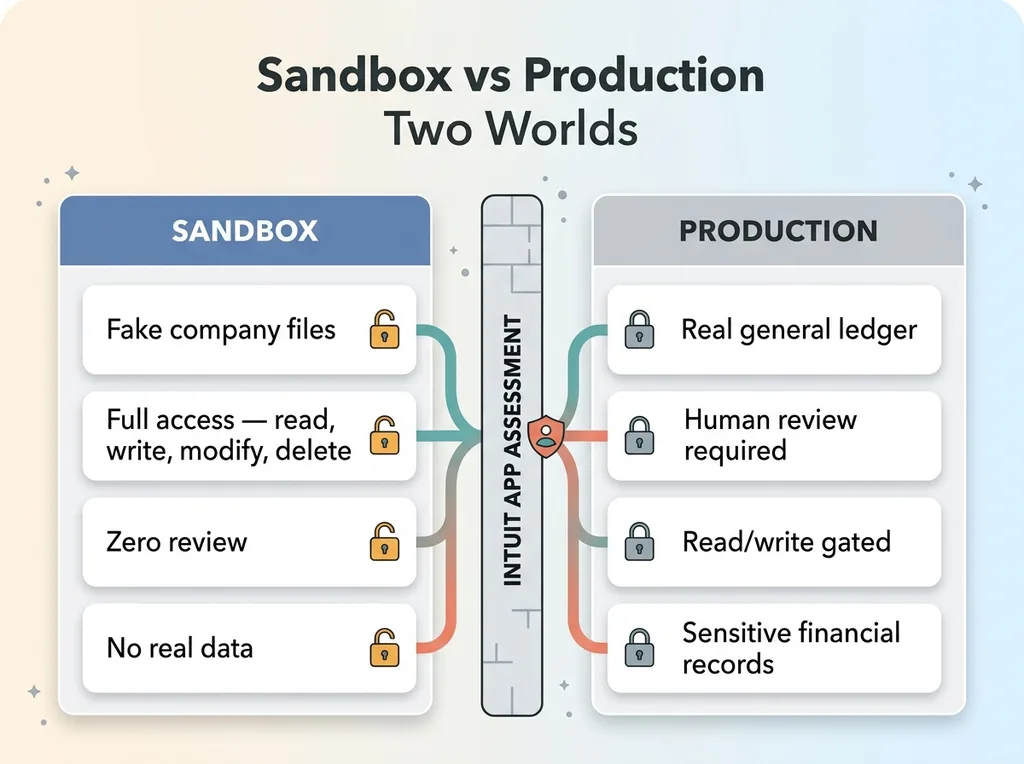 Sandbox vs Production Two Worlds
In the sandbox, you get fake company files and full access with zero review. Read, write, modify, delete. Nobody's watching because nobody's data is real. This is great for development and it lulls builders into thinking the whole thing is this easy.
Production is the other world. The moment you want to read an actual business's general ledger, their invoices, their profit and loss, Intuit puts a human between you and that data. They review your app before you ever touch a real customer's books.
Why the wall? Because this is someone's financial records. Intuit treats API access the way a bank treats account access, and they should. If your integration leaks a customer's revenue numbers or modifies their books incorrectly, that's not a bug ticket. That's a business in trouble during tax season.
Here's the part that matters for you if you're the one paying for this build. The gate is a feature, not a bug. It's the reason you can trust an approved integration with your numbers. The review exists precisely because the data is sensitive enough to deserve it.
Which brings me to the vendors. Anyone who promises you an instant, frictionless accounting integration with no waiting period has one of two problems. Either they've never shipped to production and only know the sandbox, or they're lying to close the deal. There is no instant path to a customer's real general ledger. There's a process, and the process takes preparation.
So set your expectations correctly. The intuit app assessment is neither a rubber stamp nor an impenetrable wall. It's a documented review you can prepare for and pass, if you architect the integration to make passing easy.
The Six Tabs Intuit Actually Reviews
The assessment breaks into six areas. Walk into each one knowing what they're looking for and your odds change dramatically.
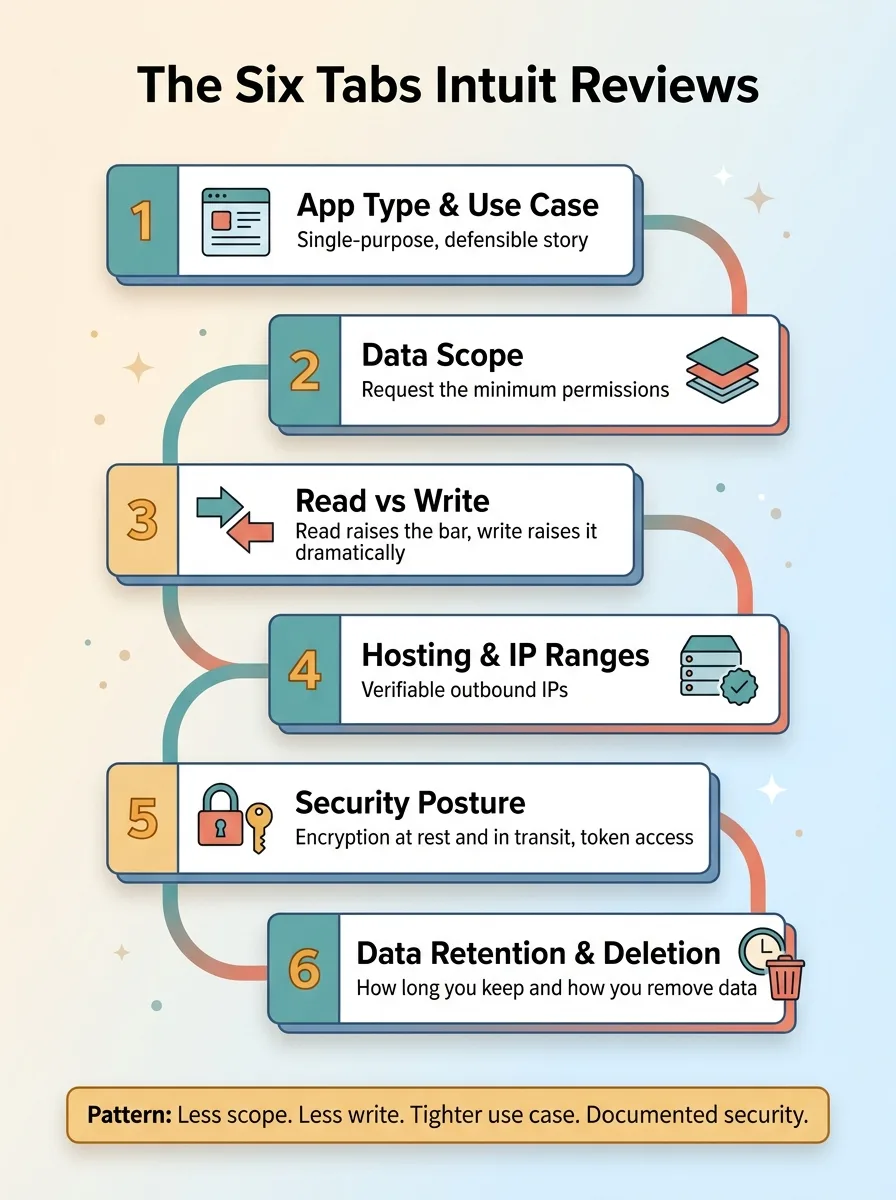 The Six Assessment Tabs Intuit Reviews
App type and use case
The first tab asks what your app actually does and who uses it. App category, primary function, target users. This sounds like paperwork, but it sets the frame for everything after it. If you say your app reads financial data to display dashboards to the business owner, that's a tight, defensible story. If your description is vague or sprawling, you've given the reviewer reasons to dig.
Be specific and be narrow. A clear, single-purpose use case is easier to approve than a Swiss Army knife.
Data scope and read-vs-write
This is the single biggest lever you have, so I'll say it plainly: request the minimum.
Every scope you ask for is more surface area the reviewer has to question. If you only need to read invoices and P&L data, don't request the full accounting scope just because it's convenient. Each permission you add is another thing someone has to evaluate, another risk they have to weigh, another reason to send your application back with questions.
Then there's read versus write, which deserves its own consideration. Reading a customer's data raises the bar. Writing back to their books raises it dramatically. The moment your app can modify someone's general ledger, the reviewer is no longer asking "could this leak data." They're asking "could this corrupt a business's financial records." That's a much harder question to answer to their satisfaction.
Hosting, IP ranges, and security posture
The remaining tabs cover the technical and security details. Where your app is hosted, including the outbound IP ranges Intuit can verify. Your security posture: encryption at rest, encryption in transit, and who on your side can access the OAuth tokens. And finally, data retention and deletion: how long you keep customer data and how you remove it.
None of these are trick questions. They're the questions any responsible party would ask before handing over financial access. The integrations that fail here are the ones that improvise the answers. The ones that pass have documented, defensible answers ready before they're asked.
The pattern across all six tabs is the same. Less scope, less write access, tighter use case, documented security. The fastest path to qbo integration approval is asking for less and proving you can be trusted with it.
How I Scoped the App to Pass Fast
When I built my finance integration, I made a deliberate decision before writing a line of production code: read-only.
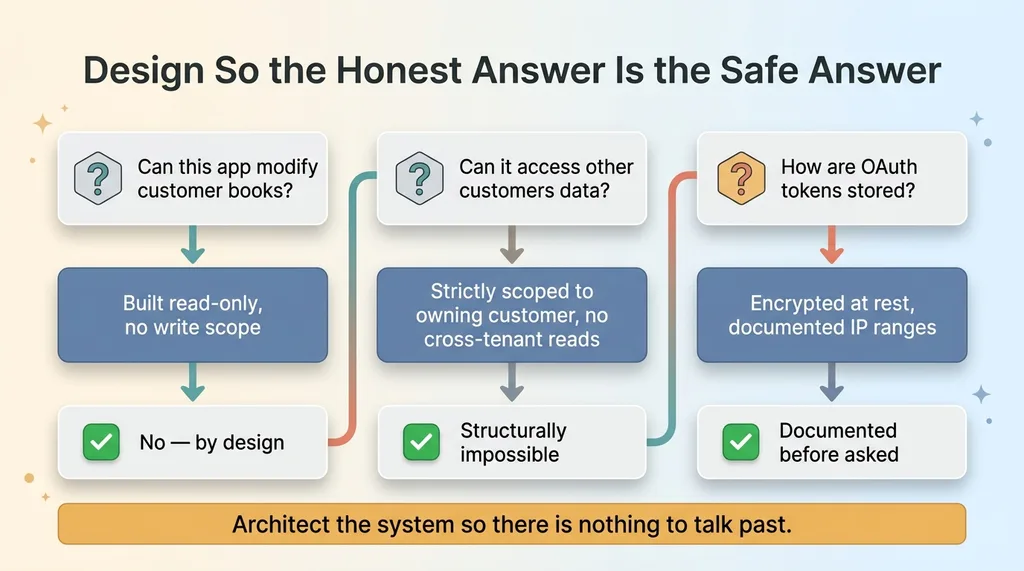 Design So the Honest Answer Is the Safe Answer
No write access. The app could never modify a customer's books, which removed an entire category of reviewer concern in one stroke. When the assessment got to the read-versus-write question, the honest answer was the safe answer. There was nothing to argue about because there was nothing to write.
I scoped data strictly to the owning customer. No cross-tenant reads, ever. One customer's connection could only see one customer's books. This matters because cross-tenant data access is exactly the failure mode reviewers worry about, and designing it out means I never had to explain how I prevented it. It was structurally impossible.
I documented encryption at rest and my hosting IP ranges up front, before anyone asked. When the security tab came up, I wasn't scrambling to describe how tokens were stored. I had already built the integration to encrypt those tokens at rest, and I could point to it directly.
Here's the principle that runs through all of it: design the integration so the honest answer to every security question is the safe answer. You don't talk your way past the review. You architect the system so there's nothing to talk past. When the reviewer asks "can this app modify customer books," the answer isn't a careful explanation of your safeguards. It's "no, it can't, by design."
There's a bonus here that surprises people. Read-only isn't a compromise for most finance use cases. It's what they actually need. Dashboards, reporting, financial analysis, syncing numbers into another system. These all pull data out. They don't push it back. When a client says they want a QuickBooks integration, nine times out of ten they want to read numbers, not write them.
So scoping to read-only didn't limit the integration. It matched the real requirement and made the accounting api integration dramatically easier to approve. Less surface area, faster review, and a system that does exactly what the business actually uses it for.
The Part Nobody Warns You About: Production Token Refresh
You pass the assessment. You're approved. You demo it for the client and real numbers flow. Everyone's happy.
Then three weeks later the data stops, and nobody knows why.
This is where approved integrations quietly break, and it's the part nobody warns you about until it bites you in production.
Why connections silently die
QuickBooks OAuth refresh tokens rotate. This is the detail that catches builders who only tested in the sandbox or only ran the integration for a few days.
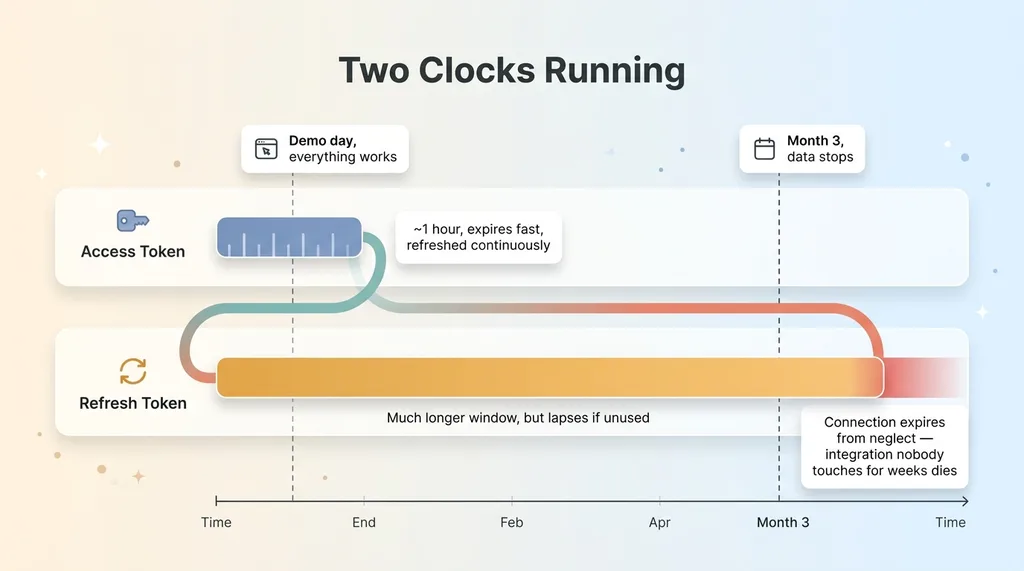 Two Clocks: Access Token vs Refresh Token Lifespans
Here's the mechanism. Your access token is short-lived. To keep the connection alive, you use a refresh token to get a new access token. Simple enough, and most builders handle that part. But here's the catch with quickbooks oauth token refresh: every time you refresh, you also get a new refresh token, and the old one immediately becomes invalid.
If your code refreshes the access token but doesn't persist the new refresh token before the next cycle, you're holding a dead credential. The next refresh attempt fails. The connection silently dies. The customer has to reconnect, and they have no idea why their dashboard suddenly shows nothing.
Persisting the rotated refresh token
The fix is a discipline, not a feature. Treat the stored refresh token as something that changes on every single cycle, not as a static credential you set once and forget.
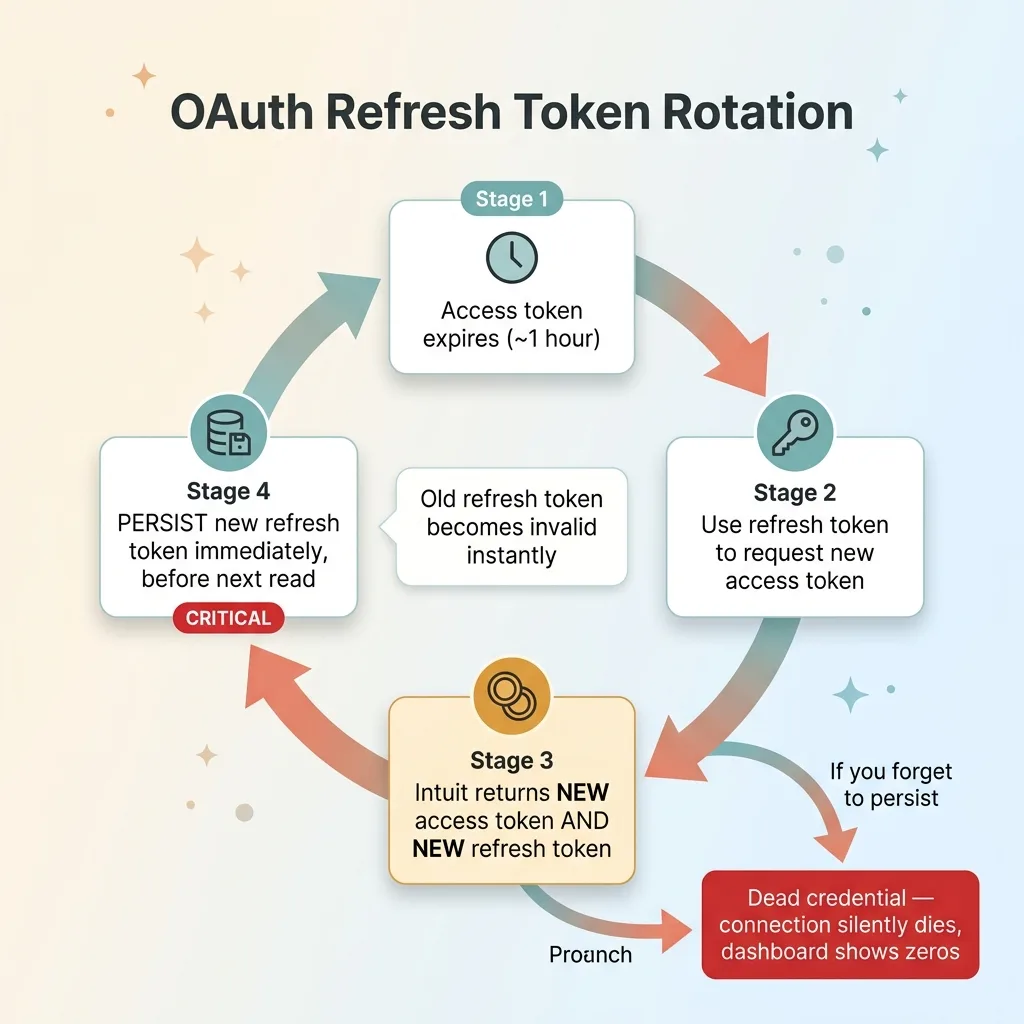 QuickBooks OAuth Token Refresh Rotation Cycle
The pattern I use: refresh and persist the rotated refresh token before the next read, every time. The moment a refresh returns a new token, that new token gets written to storage immediately, replacing the old one. There's no window where the application is holding a token it hasn't saved.
You also have to understand the two clocks running. The access token expires fast, in about an hour. The refresh token has a much longer window, but if the connection sits unused long enough, the refresh token itself lapses and the whole connection expires. An integration nobody touches for weeks can die just from neglect.
The reason this is so dangerous is that it fails silently. No error appears in the customer's face. The dashboard just shows zeros, or yesterday's numbers, and everything looks fine until someone notices the data is stale. I wrote about this exact category of problem in silent pipeline failures, because it's the difference between an integration that works in the demo and one that's still working in month three.
Handle the rotating refresh token correctly and the connection stays alive indefinitely. Handle it carelessly and it works perfectly right up until it doesn't.
What This Tells You About Hiring Someone to Build It
Here's what I want you to take from all of this. A finance integration is not hard because the API is hard. The API is straightforward. You can call it in an afternoon.
It's hard because of three things the afternoon doesn't show you. There's a review process with a real human and a real security bar. There's a scoping strategy that determines whether you pass in days or fight for weeks. And there's a token lifecycle that bites you in production, well after launch, when nobody is watching for it.
The builders who haven't actually shipped to production don't know about the rotating refresh token until a customer's data stops flowing and they're debugging it live. They've never sat in the assessment. They guess at the security answers. They build for the demo, not for month three.
I've walked the full path. The scoping decisions, the assessment itself, the approval, and the unglamorous production maintenance that keeps the connection alive long after everyone stopped paying attention to it. That last part is the part that matters, because an integration that breaks in month three is worse than no integration at all. It teaches your team to distrust the numbers.
If you need to pull real data out of an accounting platform and have it still work in six months, that's exactly the kind of system I build. Not a sandbox demo. A production integration that passes review and survives contact with real customers.
Get the next build note.
I write up each system I build, including what broke. Subscribe to my newsletter and I'll send you the next one.