PHI Data Leak in Supabase: How I Found and Closed It
A health app I built was leaking lab results through the public anon key. Here's the exact PHI data leak Supabase fix: drop allow-all RLS, lock PHI to service-role.
By Mike Hodgen
What I Found: Lab Results Readable by Anyone With the URL
I built a private AI health dashboard for a family member. It parses real medical records, lab panels, blood work, the kind of data that has actual legal weight, and turns them into something readable and trackable over time. It runs on Supabase, like a lot of the things I build fast.
During a routine review, I did something I do on every project now. I checked what the anonymous Supabase key could actually read. Not what I assumed it could read. What it could.
The answer was a lab_results table with full PHI in it, completely exposed. Anyone with the project URL and the public anon key could run a SELECT and pull every row. No login. No session. No friction.
Here is the part that should make you uncomfortable. The anon key ships in client-side code by default. It is supposed to be public. It sits in the browser bundle of your front end, visible to anyone who opens dev tools. So this was not a hidden door someone had to pick. It was the front door, propped open, with a sign that said "labs this way."
This is a textbook phi data leak supabase scenario. It is the exact category of mistake that gets companies fined under HIPAA, and it is far more common than anyone wants to admit.
I caught it myself before any of it mattered. No one accessed it. No harm done. But that is not the point, and I want to be honest about that. The point is it should never have been live in that state in the first place. The fact that I found it on my own project, a project I built and understood completely, tells you how easy it is to miss.
So let me walk you through exactly why this happens, how to check your own app today, and the precise lockdown I applied.
Why PHI Ends Up Exposed by Default in Supabase
This is not a story about me being careless. It is a story about two defaults that compound into a leak. Once you understand the mechanism, you can check your own app in ten minutes.
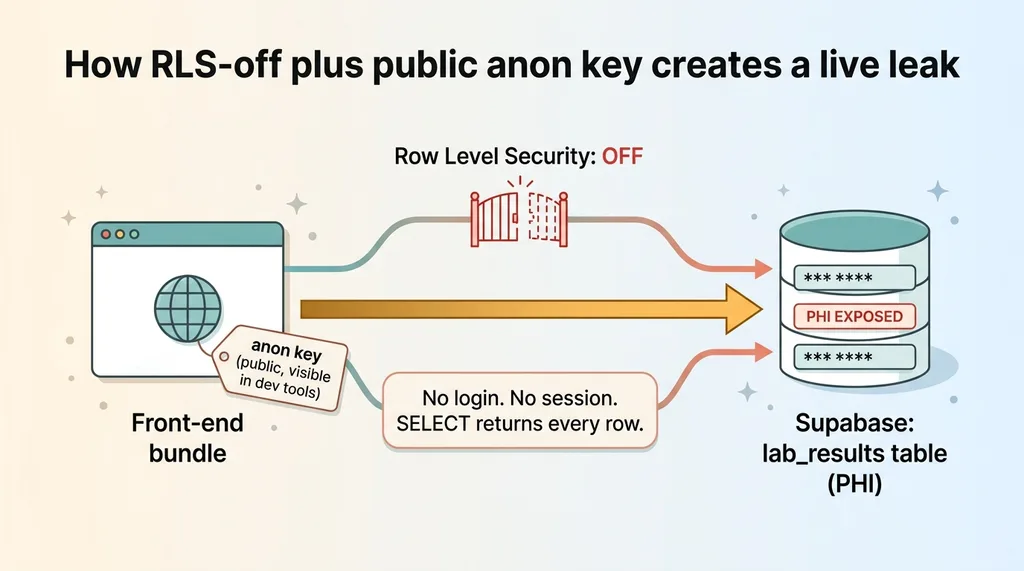 How RLS-off plus public anon key creates a live leak
Objects created in the SQL editor start with RLS off
When you create a table through the Supabase SQL editor, Row Level Security is OFF unless you explicitly turn it on. That is the default behavior, and it is easy to forget because nothing warns you.
RLS off, plus a published anon key, equals public read access. Full stop. The database has no rule telling it to deny the anonymous role, so it allows. A table with PHI in it and RLS disabled is a live leak the moment your front end goes online.
The 'Allow all' policy nobody removes
The second default is more insidious because it looks like you did the right thing.
When you are building, it is common to enable RLS and then slap an "Allow all" policy on a table so the app just works. You are iterating fast. You do not want to fight permissions while you are still figuring out the schema. So you grant the anon role full access and move on.
That policy is meant to be temporary. It almost never gets removed. The rls allow all policy risk is that "temporary" becomes "production" the day you ship, and nobody circles back.
I have written before about how the same five security holes show up in every AI-built app. This is the first one, and it is the most expensive.
Remember the anon key is designed to be public and embedded in the browser. So any permissive policy on a PHI table, whether it is RLS-off or an allow-all rule, is not a theoretical vulnerability. It is patient data exposed anon key, live, right now, to anyone who looks.
How to Check Whether Your App Is Leaking Right Now
If you have shipped anything on Supabase that touches customer, health, or financial data, here is the question keeping you up at night: could my app be leaking data right now? You do not have to guess. You can answer it this afternoon.
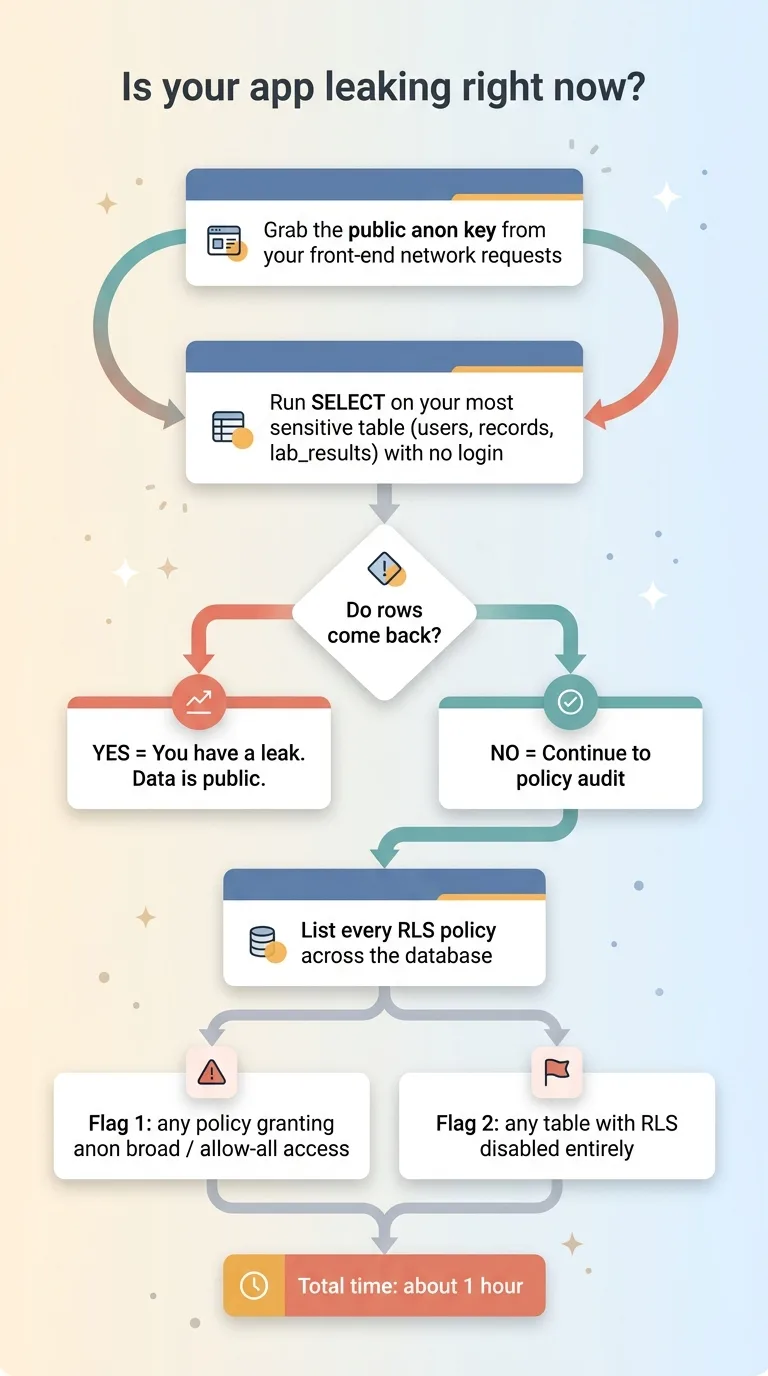 Two-step self-audit: query as anon and list policies
Query your own database as the anon role
Grab the public anon key. It is the one already sitting in your front-end code, so you do not need anyone's permission to find it. Open dev tools on your own app and it is there in the network requests.
Now, from outside any logged-in session, try to SELECT from your most sensitive table. Your users table. Your records table. Whatever holds the data you would least want on the front page of a newspaper.
If rows come back, you have a leak. It is that binary. There is no "well, it is technically accessible but unlikely." If the anon key returns rows from a sensitive table, that data is public.
List every policy and look for the wide-open ones
Step two is an audit. List every RLS policy across your database and flag two things.
First, any policy that grants the anon role broad access. Anything that reads like "allow all" or applies to the anonymous role without a tight condition. Second, any table where RLS is disabled entirely. That second one is easy to miss because there is no policy to review, just an absence of protection.
Here is the uncomfortable truth for teams who moved fast. "We built it quickly with AI" makes this more likely, not less. The AI assistant scaffolds permissive defaults precisely so things keep working while you build. It optimizes for "the app runs," not "the app is safe in production." Every permissive default it set is still there unless a human went back and tightened it.
Run both checks. It takes an hour. The supabase rls phi problem is invisible until you go looking, and most teams never look.
The Exact Lockdown I Applied
Once I confirmed the leak, the fix was methodical. Here is exactly what I did, in order.
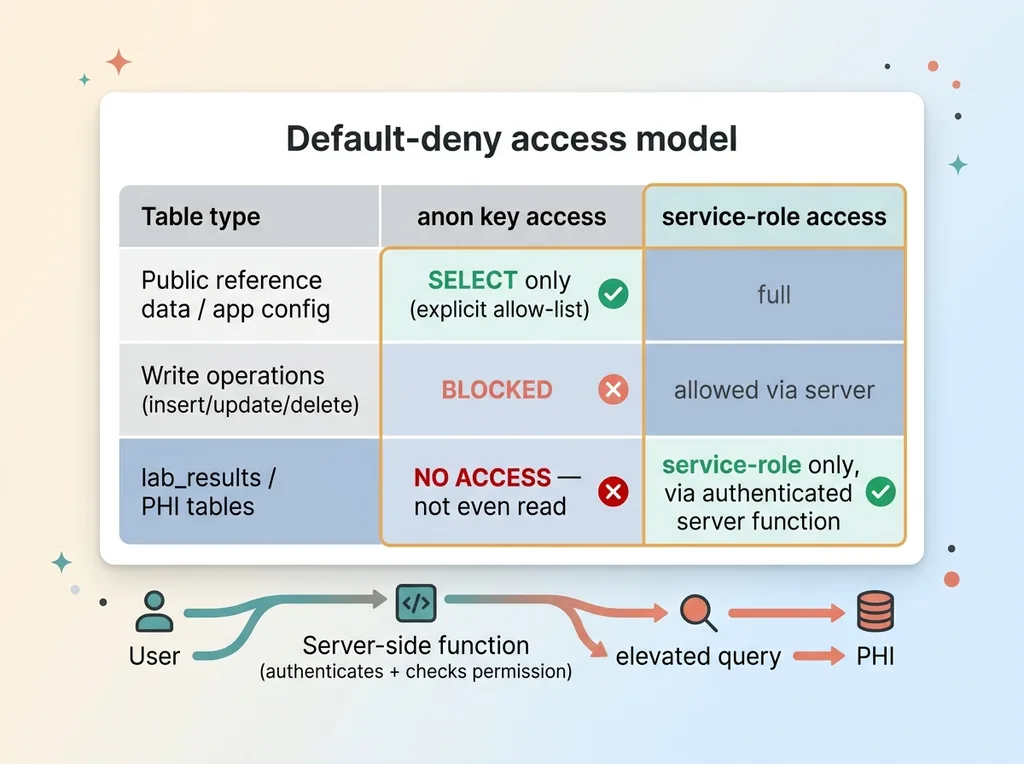 The default-deny lockdown: anon vs service-role access tiers
Drop every allow-all policy
I dropped every allow-all policy across the entire database. No exceptions. Even on tables that looked harmless, like reference data and config.
The reason for no exceptions is simple. "Looks harmless" is a judgment call, and judgment calls are how leaks happen in the first place. Default-deny means you start from zero access and add back only what is provably needed. You do not start from "this one seems fine."
Anon gets SELECT-only on non-sensitive tables
Then I re-granted the anon role narrow, explicit access only to the tables the front end genuinely needs without a login. Public reference data. App config. The stuff that is supposed to be public.
And only SELECT. Not insert, not update, not delete. The anonymous role has no business writing to your database under any circumstance I can think of.
This is explicit allow-listing. Each grant is a deliberate decision, written down, that I can point to and justify.
PHI tables go service-role only
The lab_results table and everything PHI-adjacent got locked to service-role only. That means the front-end anon key cannot touch it at all. Not read, not anything.
Any legitimate read now goes through a server-side function that authenticates the user first, checks they are allowed to see that specific data, and only then queries with elevated privileges. The public key never reaches protected data. That is the whole principle.
Let me be blunt about one thing, because it trips people up. "SELECT-only" is not the same as "safe." For a PHI table, SELECT is the entire problem. Reading the lab results is the breach. So locking PHI to service-role only is not paranoia, it is the baseline.
The pattern for the whole exercise: default-deny everything, then explicitly allow the narrow set of things your app actually requires. If you find yourself granting broad access "to be safe," you have it backwards.
The Second Leak Nobody Talks About: PHI in Your Git Repo
Closing the RLS hole fixed the live database. I thought I was done. I was not.
Digging further, I found a second problem that had nothing to do with Supabase policies. The raw health record and the embeddings generated from it were sitting in the git repository.
That is PHI in version control. Which means it is replicated to every clone of the repo, sitting in the history on every developer machine, and exposed through anyone who has access to the repository. A locked-down database does nothing if the same data is committed in plain text two directories over.
The fix was to move the raw record and the embeddings out of git entirely, into a service-role-only health_blobs table where the same access rules apply as the rest of the PHI.
Here is the harder truth. Deleting a file from git does not remove it from history. The data lives in every past commit. So cleaning this up properly is a bigger job than dragging a file to the trash. It means rewriting history, force-pushing, and getting every clone re-synced. It is real work, and skipping it leaves the leak in place.
The lesson is that data leaks are not only in the database. They are in your repo, your logs, your backups, your error-tracking tool that helpfully captured a request body full of PHI.
And even after all of this, RLS plus storage hygiene is necessary but not sufficient. Locking down access is a security control. It is not the same as HIPAA compliance. As I have written, encryption alone doesn't make you HIPAA compliant, and neither does tight RLS. Those are pieces. Compliance is the whole picture, including paperwork most teams have not touched.
The Pattern Behind All of These Leaks
Step back and look at all three problems together. RLS off. Allow-all policies. PHI in git.
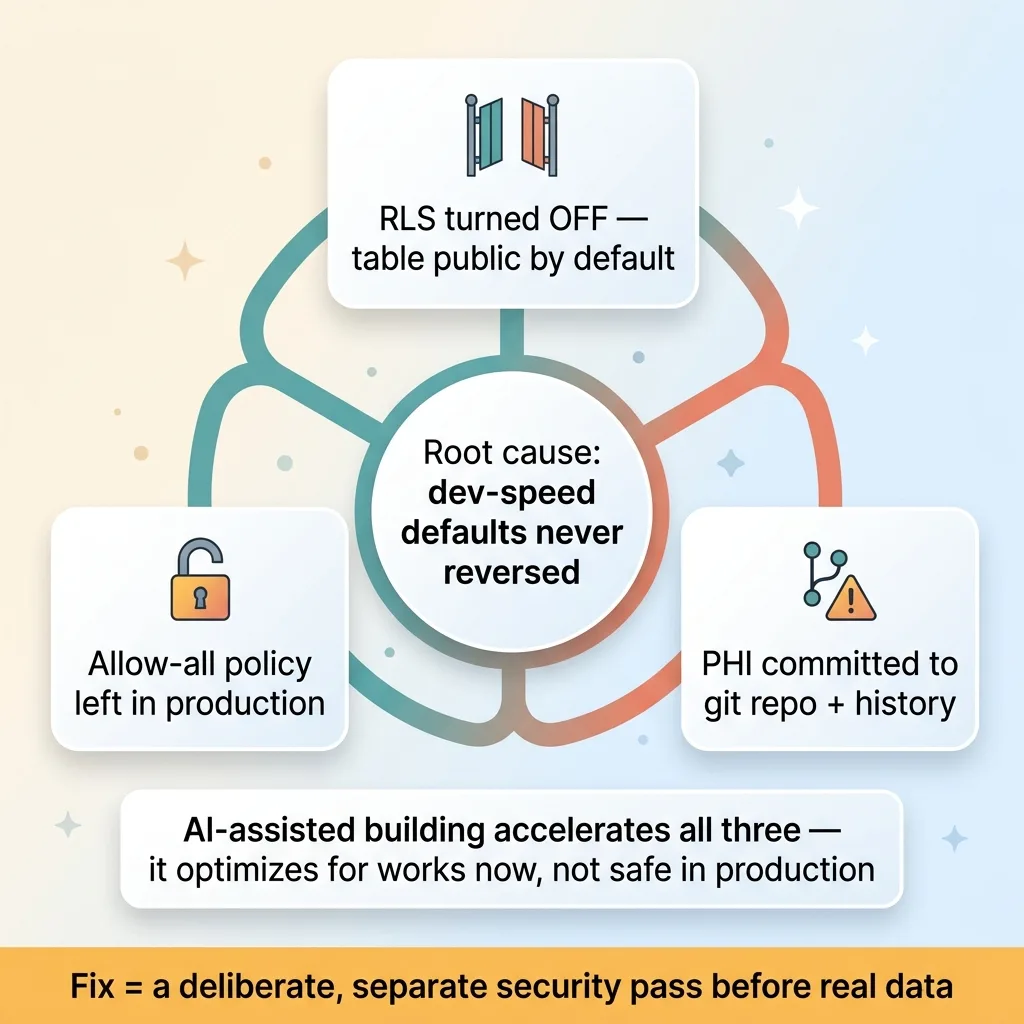 Three leaks from one root cause: dev-speed defaults never reversed
Every single one came from a default chosen for development speed that nobody went back and reversed. None of them were malicious. None of them were even unusual. They were the natural state of a project that got built fast and shipped before anyone ran a deliberate security pass.
AI-assisted building accelerates every one of these. The model optimizes for "works now," not "safe in production." It will happily scaffold an allow-all policy and commit a data file because that gets you to a running app faster. That is what you asked it for. Safe defaults were never part of the request.
The fix is not to slow down. Speed is the whole reason to build with AI in the first place. The fix is to run a deliberate, separate security pass before anything touches real data. Treat it as its own step, not something you hope happened along the way.
I now do this systematically across every project. I ran a security audit across 58 codebases in a day using the same checks I described above.
Here is my honest acknowledgment. I built this app. I knew it inside out. I caught the leak myself. And I still found it sitting there in production. If someone who does this professionally can leave an allow-all policy on a PHI table, an in-house team shipping their first AI app almost certainly has one too. Probably more than one.
If You've Shipped an AI App, Get It Audited Before a Customer Finds the Hole
The question every CEO should be asking right now is simple: do we actually know what our public key can read?
Not "do we think it is fine." Not "the developer said it was locked down." Do you know, because someone queried the database as the anonymous role and confirmed it.
Most teams that built fast, especially anything touching health, financial, or customer data, have at least one default that was never closed. A health app security incident does not start with a hacker. It starts with a forgotten allow-all policy and someone curious enough to try the anon key.
The cost of finding it yourself is an afternoon. The cost of a customer or a regulator finding it is a fine, a breach disclosure, and a very bad week explaining to your board how patient data ended up readable from a browser.
This is exactly the pass I run. Query the database as anon, list every policy, find the data sitting where it should not be, and close it. If you want, have me audit what you've already shipped. It is cheaper and a lot quieter to do this now than after.
Ready to bring AI leadership into your company?
I work with a small number of companies at a time. If you're serious about AI, apply to work together and I'll review your application personally.
Get AI insights for business leaders
Practical AI strategy from someone who built the systems — not just studied them. No spam, no fluff.
Hodgen.AI
Ready to automate your growth?
Book a free 30-minute strategy call with Hodgen.AI.
Book a Strategy Call