PIN Login Web App: A Secure Front Door With Zero Dependencies
How I built a POS-style PIN login web app for a field crew using only platform crypto. No auth vendor, no new dependency, role-based navigation included.
By Mike Hodgen
The wrong front door for a field crew
A window-treatment company came to me with a problem that had nothing to do with window treatments. Their field installers were signing into the company app on their phones at job sites, and the login was a mess.
Everyone shared one site password.
That meant no accountability. When something got logged wrong or a quote went out with the wrong number, there was no way to know who did it. It meant no per-person control, so you couldn't cut off access when someone left. And it meant a password that lived in a group text from eight months ago, never rotated, slowly leaking to anyone who'd ever worked a shift.
A shared password isn't a login. It's a liability wearing a login costume.
A shared password is a liability, not a login
The whole point of authentication is knowing who did what. A shared credential erases that. You get the security cost of a password (someone has to remember it, it can leak) with none of the benefit (you can't tell people apart).
For a 30-person crew, that's not a minor gap. That's the foundation of every downstream feature you might want: per-user history, role permissions, audit trails. None of it works if everyone is "the company."
Email-and-password fails on a job site
So the obvious fix is a normal login form, right? Email, password, sign in.
Try typing your email and a complex password on a cracked phone screen, in the sun, with work gloves half-on, standing in a customer's driveway. Standard auth is friction designed for someone sitting at a desk. On a job site it's a tax the crew pays a dozen times a day.
The login itself is a workflow decision, not just a security checkbox. Get it wrong and your best installer is fighting the keyboard instead of measuring the window.
Which raises the question every CEO asks me: do we need a heavy auth vendor for an app used by 10 to 40 named people? Short answer, no. Here's why.
Why I didn't reach for an auth vendor
I want to be fair to the auth vendors, because they're genuinely good products. Auth0, Clerk, the whole category. If you need single sign-on, social login, multi-factor, and you're onboarding thousands of strangers who sign themselves up, you should pay them. They've solved hard problems you don't want to solve yourself.
This wasn't that.
What a vendor would have cost in friction and lock-in
This was a closed roster. A known list of employees. No self-signup, no social login, no public anything. Every user is a name the company already has on payroll.
Reaching for a vendor here buys you a monthly bill, a new SDK to install, a redirect dance every time someone logs in, and lock-in for a problem you can solve with what's already in the runtime. You'd be paying per-user-per-month forever to authenticate the same 30 people who never change.
That's not a security investment. That's a subscription you'll forget you're paying until you audit your stack.
The platform already ships the crypto you need
My rule on builds like this is simple: pay for primitives and build the logic yourself. The hard cryptographic math is a solved problem that ships in the standard library. The business logic on top of it is yours to write.
For this app the primitives were already sitting in the runtime. scrypt from the standard crypto library to hash PINs. Web Crypto HMAC to sign a cookie. Both are battle-tested, both are free, both are already there.
I added zero new dependencies for authentication. Not one package. The whole front door is built on crypto the platform already shipped.
Be honest about the limit: this is the right call for a closed roster of known employees. The day this company wants public signup or enterprise SSO, the math flips and you go pay the vendor. But that day isn't today, and building for a day that may never come is how you bloat a budget.
How a POS-style PIN login web app actually works
Here's the part the crew actually touches. I built the login to work like a restaurant POS terminal, because that's a model field workers already understand without any training.
Tap your name, type a PIN
You open the app and you see a roster. Names, faces, tap yours. No email, no typing, just find yourself in a list and tap.
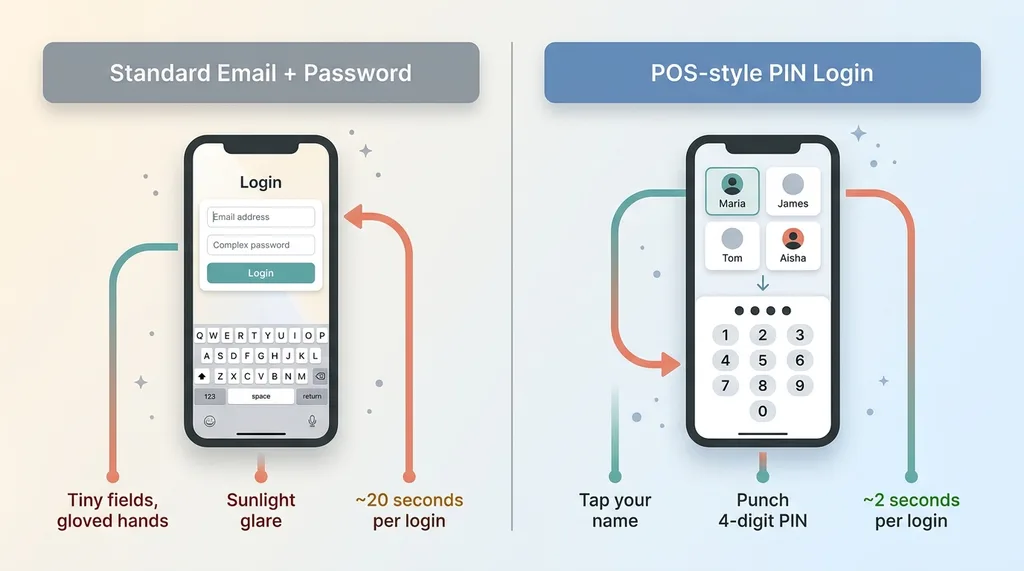 PIN login flow vs traditional email/password on a job site
Then a numeric keypad comes up and you punch in a four-digit PIN. That's it. You're in.
This matches how a crew already thinks. Nobody on a job site wants to type credentials. They want to tap their name and start working, the same way they'd clock in. A PIN login web app shaped like a POS terminal turns a 20-second login fight into a two-second tap.
Five tries, then a fifteen-minute lockout
Now the security mechanics, because a four-digit PIN is low entropy and I'm not going to pretend otherwise.
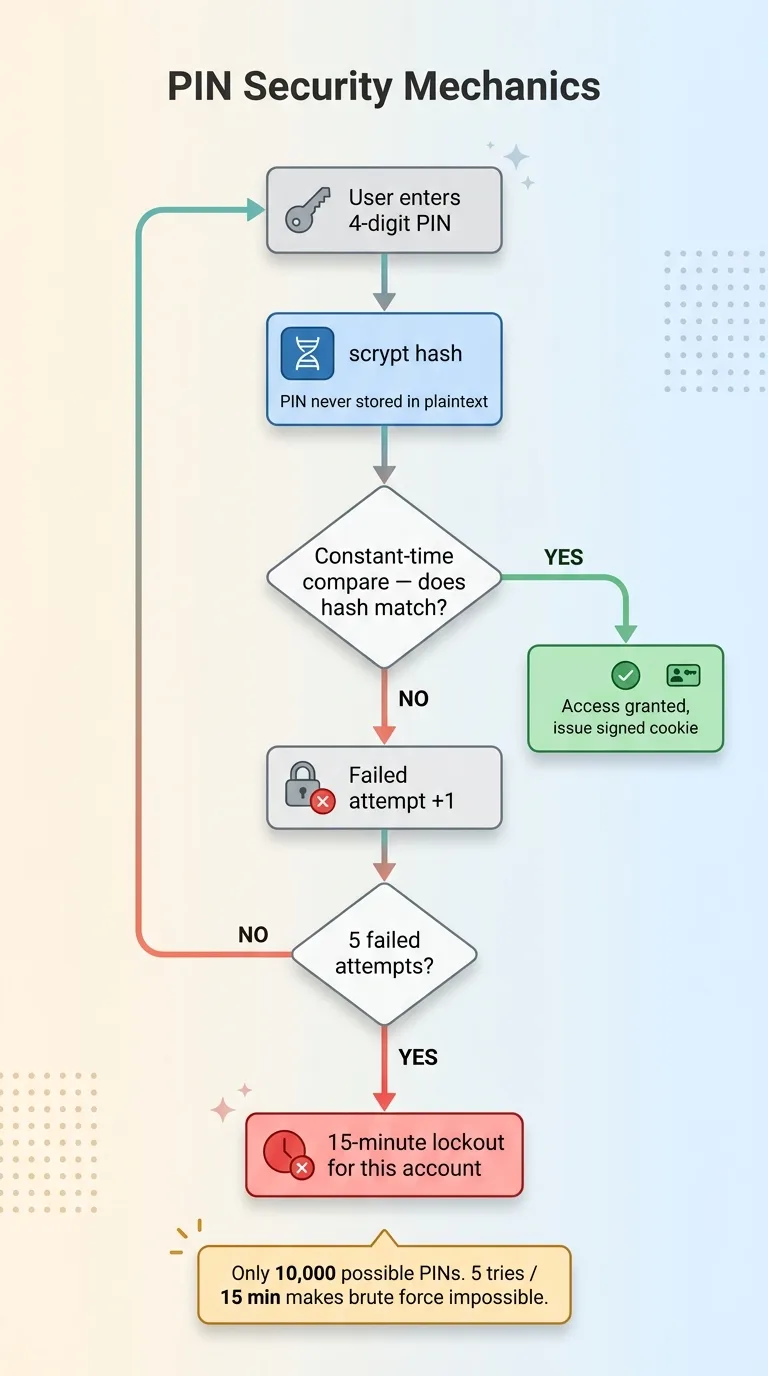 PIN security mechanics: hashing, constant-time compare, and rate-limit lockout
PINs are never stored in plaintext. Each one is hashed with scrypt, so what lives in the database is a hash, not the number. On login I do a constant-time compare so the verification doesn't leak timing information about how close a guess was.
The big one is rate limiting. Five failed attempts triggers a fifteen-minute lockout for that specific person. A four-digit space is only 10,000 combinations, which a script could chew through in seconds if you let it. The lockout is what makes that space safe. You can't brute-force a PIN when you only get five tries every fifteen minutes per account.
Getting these details right is exactly where most AI-generated code falls down. I've written before about the security holes most AI-built apps ship with, and weak or missing rate limiting is near the top of the list. A PIN without a lockout is a toy. A PIN with scrypt hashing, constant-time compare, and a per-person lockout is a real front door.
Admins set and reset PINs per person. Someone forgets theirs, the office resets it in a few clicks. Someone leaves, you remove them from the roster. Per-person control, finally.
Stateless signed cookie auth in two places at once
Once the PIN checks out, the server has to remember you're logged in. The standard way is a session table: store a session ID, look it up in a database on every single request. I didn't do that.
Why HMAC-signed beats a session table
After PIN verification, the server issues a stateless signed cookie. The payload holds the user's id and role. Then it gets signed with a Web Crypto HMAC.
That signature is the whole trick. It proves the server issued the cookie and that nobody tampered with it. If someone tries to edit the role inside the cookie to promote themselves to admin, the signature breaks and the server rejects it instantly.
The win is what I don't need. No session table to query on every request. No Redis to run and maintain. The cookie carries everything, and the signature makes it trustworthy. Stateless signed cookie auth means the server can verify you with math instead of a database lookup, which is faster and one less moving part to keep alive.
Verifying in edge middleware AND node routes
Here's the detail that separates a secure build from a leaky one. The same signature gets verified in two different places.
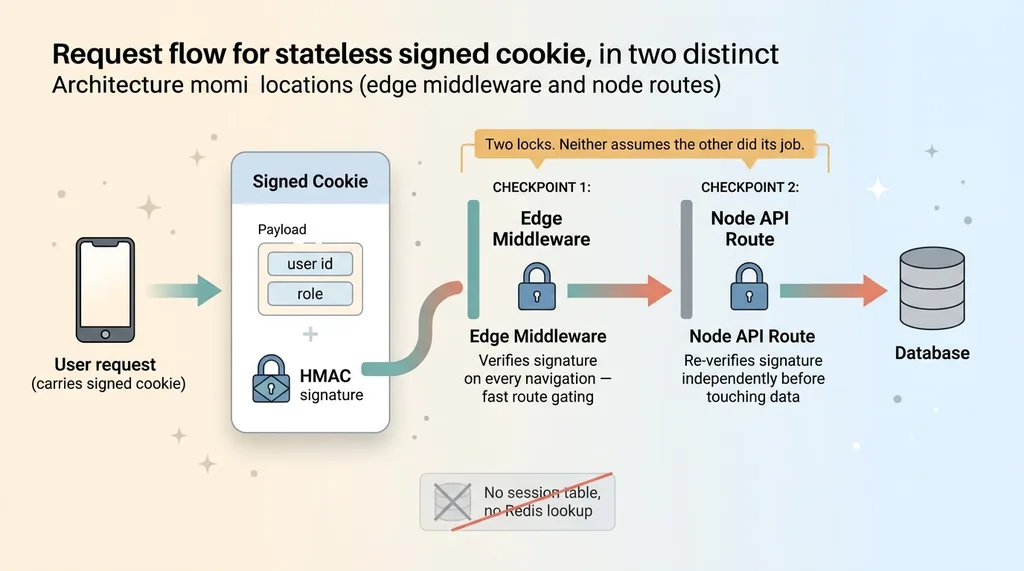 Stateless signed cookie verified in two places (edge middleware and node routes)
Edge middleware checks the cookie cheaply on every navigation. Tap to a new page, middleware verifies the signature and decides whether to let you through. It's fast and it gates routes before anything heavy loads.
But middleware can't be the only check. If your edge layer is the sole line of defense, anyone who finds a way around it walks straight into your data. So every node API route re-verifies the same signature independently before it touches any data. The route doesn't trust that middleware already checked. It checks again itself.
Two locks on the door, and neither one assumes the other is doing its job. The edge check makes navigation fast. The route check makes sure the edge check is never the only thing standing between a request and your database.
Role-based navigation that strips back-office clutter
Authentication was half the problem. The other half was what the crew sees after they log in.
Field roles get three items: assess, quote, install
Showing an installer the full back-office navigation is a mistake. Inventory, accounting, reports, settings, all of it. That's noise. It slows them down and it invites errors, because every menu item is a chance to tap the wrong thing and end up somewhere they shouldn't be.
The role lives in the signed cookie. So navigation renders per role with no extra lookup, no database call. The cookie already says you're a field installer, and the app draws the menu accordingly.
Field roles get a lean three-item flow: assess the job, build the quote, log the install. That's the whole job in three taps. If a field user somehow lands on the office dashboard, they get redirected straight back to their flow. The clutter simply isn't there for them.
Office keeps the full dashboard
Office and admin roles see everything. The full dashboard, all the reports, all the controls. Same app, same login, completely different surface depending on who you are.
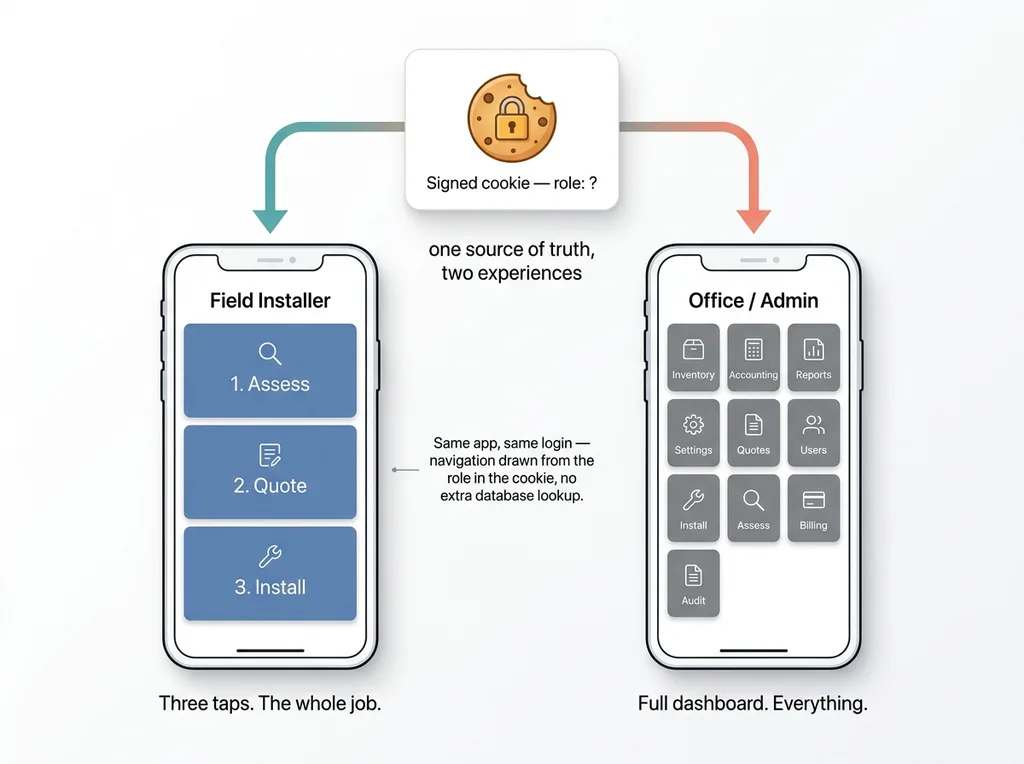 Role-based navigation: field role vs office role from one signed cookie
This is the same design principle as the login itself. A field app shouldn't be a shrunken office app. The login is shaped for the field (tap a name, punch a PIN) and the navigation is shaped for the field (three items, not thirty). You don't take the desktop tool and squeeze it onto a phone. You build the field tool for the field.
Role based navigation that flows straight from the signed cookie means there's no separate permission system to keep in sync. The role you authenticated with is the role that draws your screen. One source of truth, two very different experiences.
What this approach is good for, and where it isn't
I'd rather draw this line clearly than oversell the pattern, because no-dependency authentication is the right answer in a narrow lane and the wrong answer outside it.
Right call: closed rosters, small teams, known users
This works when you control the roster, there's no public self-signup, the team is small to mid-size, and you want zero recurring auth cost with zero lock-in. Known users, named employees, a list you manage. That's the sweet spot.
The math is easy to see. A vendor at a per-monthly-active-user price for a 30-person crew is a bill that runs forever and grows with headcount. A one-time build that adds nothing to your dependency tree and nothing to your monthly invoice pays for itself fast and keeps paying.
Wrong call: public signup, SSO, regulatory MFA
It's the wrong call the moment you need social login, enterprise single sign-on, self-service signup at scale, or regulatory multi-factor requirements. The day you have to support thousands of strangers signing themselves up, or a compliance rule mandates MFA, you go pay the vendor and you don't argue about it.
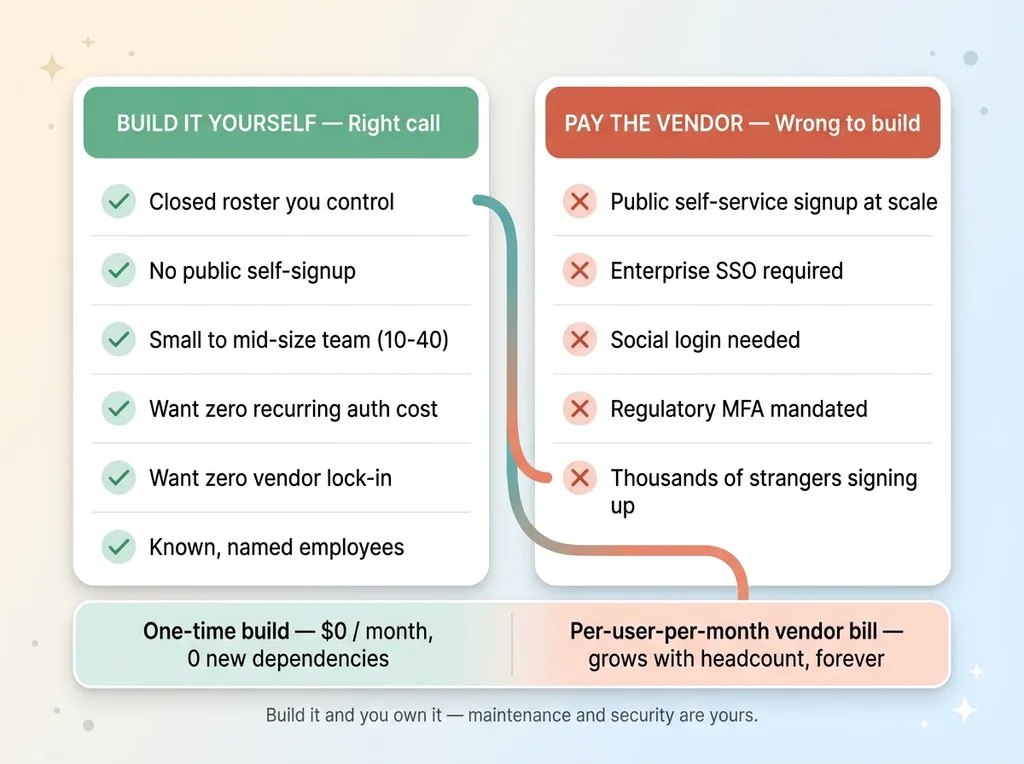 When no-dependency auth is the right call vs the wrong call
And be straight about the trade you're making: when you build it, you own it. The maintenance is yours. The security burden is yours. That's a real cost, not zero. For a closed roster it's a cost worth carrying. For a public consumer app it isn't.
A login is a product decision, not a checkbox
The PIN front door and the role-aware navigation weren't security features bolted on at the end. They were product decisions that made the crew faster and the system safer at the same time. The tap-your-name login removed friction. The lockout and the dual signature check added real protection. The per-role nav cut the clutter. None of those traded speed for safety. They delivered both.
That's the kind of call I make on every system I build. Where to pay for a primitive, where to build the logic, and how to shape the tool around the person actually using it. A four-digit PIN sounds insecure until you wrap it in scrypt and a lockout. A stateless cookie sounds risky until you verify the signature in two places. The details are the whole job.
This instinct pays off across a stack, not just at the login screen. I've documented the SaaS subscriptions I've deleted by building in-house, and the pattern repeats. A tool you control beats a tool you rent when the problem is small, known, and yours.
If you're staring at an auth vendor invoice for an app a few dozen people use, or your field tool is just your office app squeezed onto a phone, that's a conversation worth having. Not every problem needs a vendor, and not every vendor is solving the problem you actually have.
Want to explore what AI could do for your business?
Book a free 30-minute strategy call. No pitch deck, no sales team, just a real conversation about your operations and where AI fits.
Get AI insights for business leaders
Practical AI strategy from someone who built the systems — not just studied them. No spam, no fluff.
Hodgen.AI
Ready to automate your growth?
Book a free 30-minute strategy call with Hodgen.AI.
Book a Strategy Call