How I Killed a $3,700/yr Sales Tax SaaS With a Script
I replaced sales tax software with a script that filed in multiple states for ~$60/yr. Here's how to replace sales tax software without losing the audit trail.
By Mike Hodgen
The $3,700 Invoice That Started It
Last year I added up what I was paying to file sales tax for my DTC fashion brand, the one I run out of San Diego. The number was $3,700.
The provider charged $75 per filing. I had roughly 43 filings a year across the states where my handmade products sold. Multiply it out, add the occasional "reconciliation drift" penalty when a number didn't match cleanly between their system and my storefront, and you get a number that made me stop and stare at the invoice.
Then I found the kicker. They had registered my brand in a state where I never actually owed tax, under an economic-nexus rule that state quietly dropped in 2024. So every month, the software dutifully filed a zero-or-near-zero return in a jurisdiction I had no business being registered in. A filing I never needed. A liability they created.
That was the moment the whole thing clicked into a question I couldn't un-ask: what am I actually paying for here?
Because here's the structural problem with the per-filing model. The price scales with your state count, not with any value delivered. The software does the exact same arithmetic in month twelve that it did in month one. There's no learning curve, no compounding benefit, no reason the cost should keep climbing as I expand except that someone decided to price it that way.
When I want to replace sales tax software, I'm not trying to dodge compliance. I'm trying to stop paying a subscription that grows with my footprint while the work underneath stays identical. So I did what I do with most tools that feel overpriced: I took it apart to see what was really inside.
What Sales Tax SaaS Actually Does (And Why It's Not Magic)
Strip a sales-tax compliance tool down to its core and you find three jobs. Not thirty. Three.
The three jobs underneath the price tag
One: aggregate taxable sales per jurisdiction. The tool adds up what you sold and what tax you collected, broken out by state, and sometimes county and city. That's a sum. A GROUP BY in SQL terms.
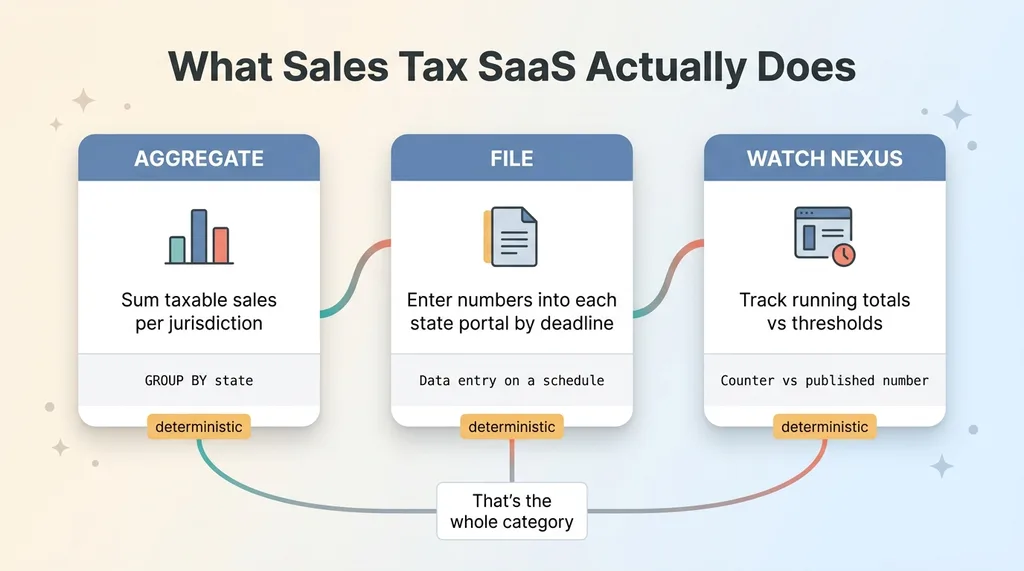 The three core jobs of sales tax SaaS
Two: file the return on each state's portal by the deadline. The tool logs into a government website and enters numbers into a form. That's data entry against a known schedule.
Three: watch for nexus thresholds. The tool keeps a running total of your sales and transactions per state and tells you when you cross the line that triggers a registration requirement. That's a counter compared against a published number.
That's it. That's the category. None of it is exotic.
Where the per-filing model breaks down
The aggregation is deterministic math. The filing is form-entry on a portal that publishes its own instructions. The nexus watch is addition against a threshold any state will tell you in plain English on its Department of Revenue site.
What the SaaS sells you is convenience, not difficulty. And convenience is genuinely worth paying for in the right situation. If you're collecting in 45 states with constant product churn and a tax team that needs one dashboard, buy the software. It earns its keep.
But for a brand that owes tax in a handful of states, you're renting a calculator. You're paying $75 a month, per state, for arithmetic you could reproduce yourself in an afternoon.
This is exactly the pay for primitives, build the logic principle in practice. The infrastructure underneath (databases, scheduled jobs, browser automation) is cheap and available. The logic on top is yours, and it's not complicated. The SaaS bundles the two and charges you for both as if they were inseparable. They aren't.
Making the Storefront the System of Record
The first thing I had to get right wasn't the filing. It was the source of truth.
My storefront already knows everything. Every order, every ship-to address, every tax line it calculated and collected at checkout. That data exists whether or not I pay a third party. The SaaS wasn't generating it. It was reading it, summing it, and handing the total back to me with a markup.
So I made the storefront the system of record, the way it should have been all along.
Nightly order sync
I built a nightly job that pulls every order from the store into a database I control. Order ID, line items, ship-to jurisdiction, tax collected, the works. It runs while I sleep. By morning, my database is a complete mirror of every transaction, no manual export, no copy-paste.
This is the foundation, and it's the part that makes everything downstream safe instead of reckless.
Per-jurisdiction aggregation
From that database, I aggregate taxable sales and tax collected by jurisdiction (state, county, and city where a state requires that breakdown). It's a query. It runs the same way every time and produces the same answer given the same data.
There is zero AI in this layer, and that's deliberate. Aggregating money for a tax return is not a place for a model that might be "mostly right." It's deterministic math or it's nothing.
Here's the point that matters if you're nervous about leaving a vendor: every filed number traces back to specific order IDs. If a state ever asks how I arrived at a figure, I can show them the exact orders that built it. That's a tighter audit trail than most SaaS tools expose, because I own the whole chain.
I'm careful about where I let AI judge and where I don't, and tax aggregation lives firmly on the deterministic side of that line. The math is locked down before anything else touches it. Automating away from a SaaS isn't a leap of faith when your own data is the system of record and every figure is reproducible on demand.
Headless-Browser Filing and the Pre-Submit Sanity Check
Once the numbers are clean, something has to actually file them. This is the part people assume is impossible to do yourself. It isn't.
Automating the state portals
Each state has a tax portal. I automate filling and submitting the return with a headless browser. One routine per state, because the forms differ. California's portal doesn't look like Texas's, which doesn't look like Florida's. So each one gets its own routine that knows where the fields are and what the period structure looks like.
It's tedious to build the first time and trivial to run forever after. The routine logs in, enters the aggregated figures for the period, and submits.
A Claude review before anything submits
Here's the detail that makes me comfortable letting this run: nothing files blind.
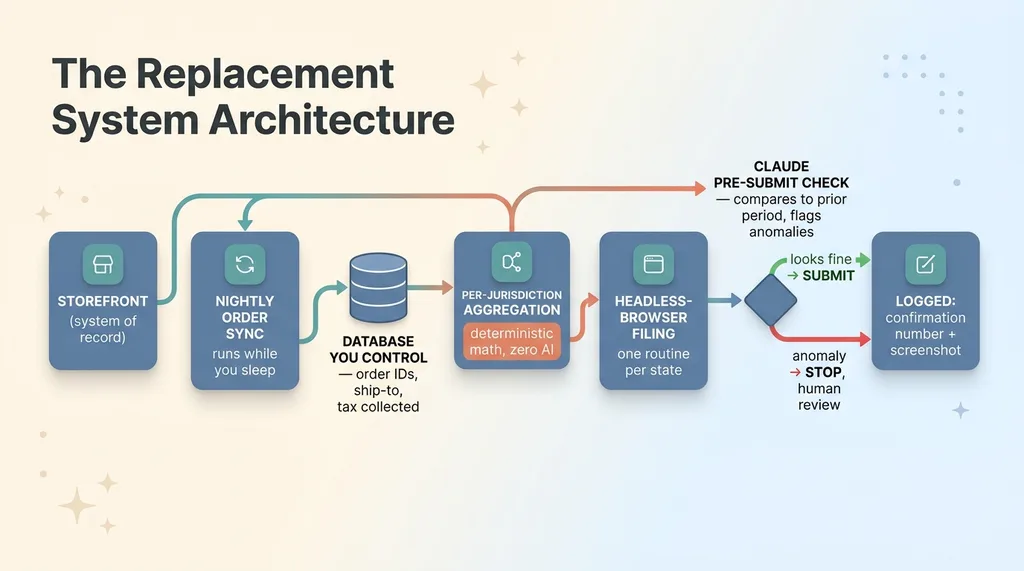 DIY sales tax automation architecture pipeline
Before any return is submitted, a Claude pre-submit check reviews the prepared numbers against the prior period. It's looking for anomalies. A jurisdiction where the tax suddenly doubled. A figure that's an order of magnitude off from last month. A county that should be there and isn't.
If something looks wrong, it raises a hand and stops the submission for me to look at. That's the entire job. It doesn't decide what to file. It doesn't touch the math. The arithmetic is already locked by the deterministic layer. The model is a second set of eyes, the way a sharp bookkeeper glances at a return and says "that number looks weird, check it."
Every filing gets logged with a confirmation number and a screenshot of the submitted return. Same audit trail the SaaS produced, sitting in my own storage where I can pull it instantly.
This is what defensible state tax portal automation looks like. The execution is automated, but a human-reviewable checkpoint sits between the data and the submit button, and a permanent record gets written every single time.
Catching Nexus and Mailed Notices Before They Cost You
Two things make people nervous about cutting the SaaS. They assume only software can track when they cross a nexus threshold, and they worry about missing a letter from a state. Both are solvable, and the second is where DIY compliance usually actually fails.
The nexus monitor
I keep a running per-state total of sales and transaction counts, compared against each state's economic-nexus threshold. Most states use something like $100,000 in sales or 200 transactions, but the exact numbers vary and they change.
The monitor alerts me before I cross a threshold, not after. That timing is the whole game. Register on time and you're fine. Cross the line and find out three months later, and you owe back-tax plus penalties on every sale since you should have been collecting. The alert buys me the window to register cleanly instead of paying for the gap.
Notice triage for DOR letters
States still mail paper letters. The Department of Revenue sends rate changes, filing reminders, registration confirmations, and the occasional actual assessment, on paper, to a physical address.
This is where most people doing sales tax compliance automation themselves get burned. Not the filing. The letter that sits in a pile until it becomes a problem.
So I scan every notice that comes in, and a pipeline reads it, classifies it (rate change, filing reminder, real assessment, registration confirmation), and routes the ones that actually need action to me. The rate changes get logged. The reminders get checked against my filing schedule. The assessments get flagged loud and immediate.
And remember that phantom state the SaaS had registered me in? I deregistered it. That cut one filing entirely and removed an ongoing liability the software had created and was charging me to maintain. One fewer return, one fewer thing that could go wrong, and a small annual cost gone for good.
The Real Cost Comparison: $3,700 to About $60
Let me give you the honest accounting, including the parts that don't flatter the number.
Where the new cost comes from
The replacement runs on a database and a handful of scheduled jobs, plus modest API and LLM costs for the notice triage and the pre-submit reviews. All in, it lands around $60 a year.
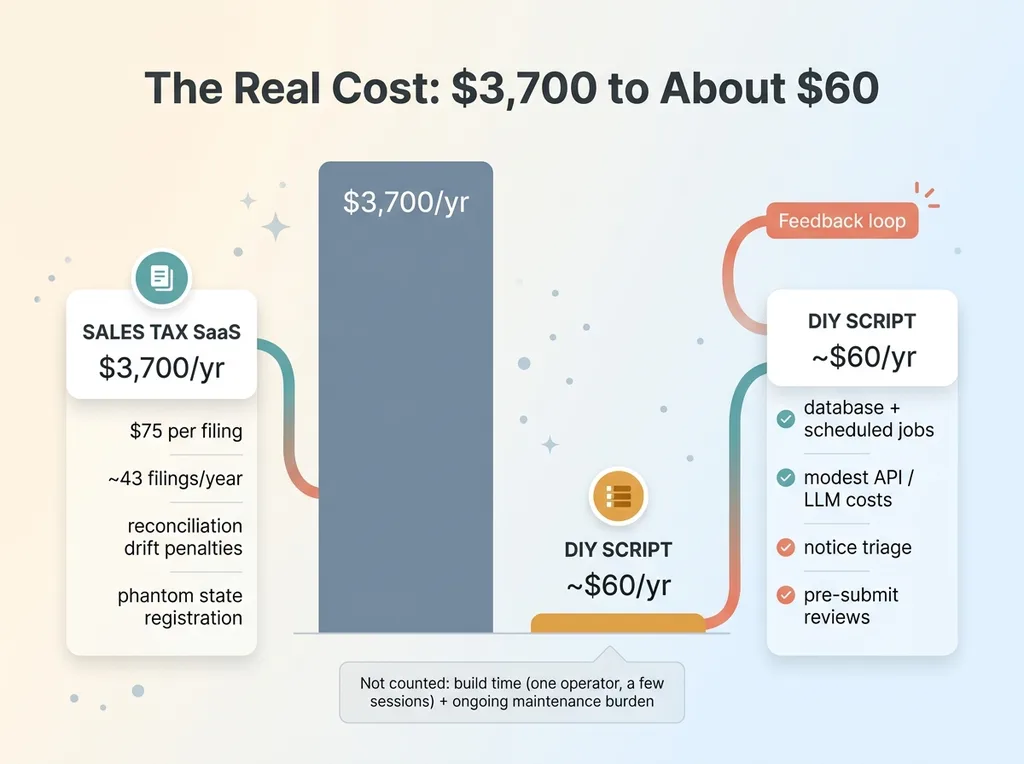 Cost comparison: $3,700 SaaS vs $60 DIY
$3,700 down to roughly $60. That's the headline, and it's real.
But I'm not going to pretend that's the whole picture. What I'm not counting is the time I spent building it. That was one operator (me) across a few focused sessions, plus the per-state filing routines that each took an afternoon. And the ongoing responsibility now lives with me instead of a vendor. When a state redesigns its portal, my routine breaks and I have to fix it. The SaaS would have absorbed that for me.
This was one module in the AI platform running my brand, so I already had the database, the order sync, and the automation patterns in place. If you're starting from zero, the build is bigger than a weekend.
When you should NOT do this
I'm not anti-SaaS, and I'd be lying if I told you to rip out your tax software no matter what.
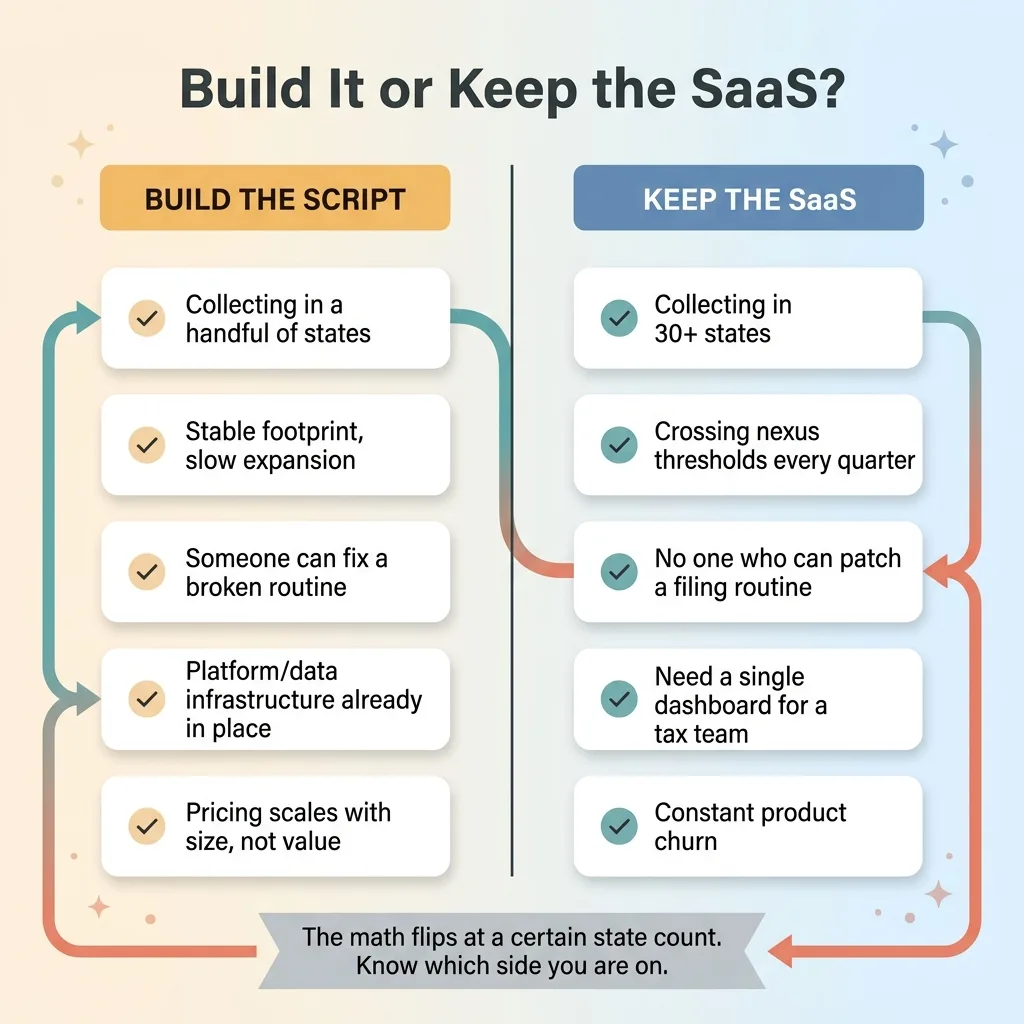 Build vs Buy decision criteria
If you're collecting in 30-plus states, the per-state routines stop being worth maintaining. If you're expanding fast and crossing new nexus thresholds every quarter, the SaaS handling registration for you is genuinely valuable. And if there's no one on your team who can fix a filing routine when Ohio changes its form, don't build this. A broken routine that fails silently is worse than a $3,700 invoice.
The math flips at a certain state count. For me, in a handful of states with a platform already built, it flipped hard toward building. For you it might not. This is right-sizing, not a crusade. Know which side of the line you're on.
The Pattern Isn't Sales Tax. It's Every Per-Seat Tool You Rent.
Sales tax was one tool. The thinking behind it is the part worth keeping.
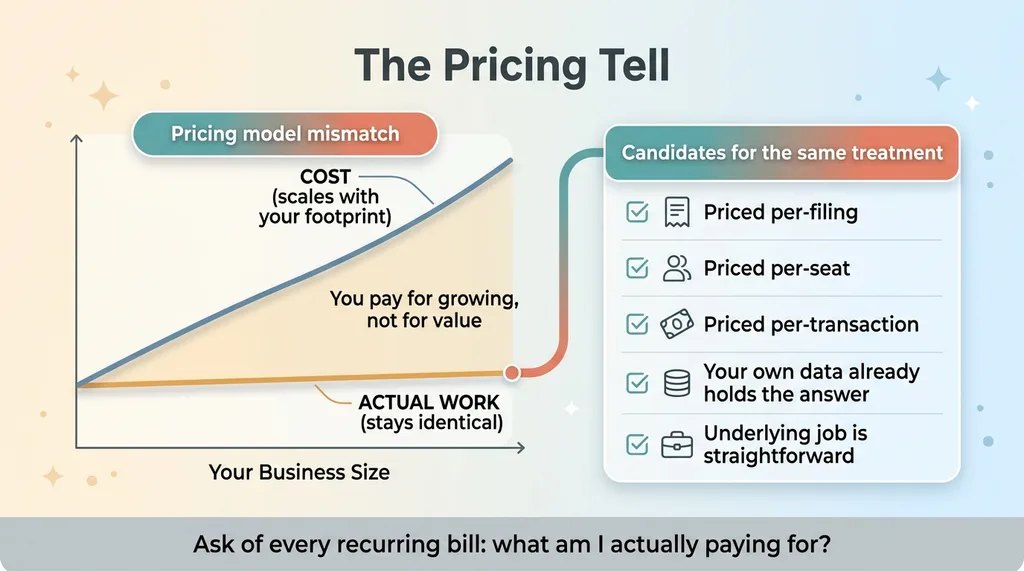 The per-seat pricing red flag pattern
Any SaaS priced per-filing, per-seat, or per-transaction, where the underlying job is straightforward and your own data already holds the answer, is a candidate for the same treatment. The pricing model is the tell. When the cost scales with your size but the work stays flat, you're paying for the privilege of growing, not for anything the tool does better at scale.
This is the same logic behind the other SaaS subscriptions I've deleted. Not all of them, and not on principle. Some tools earn every dollar because the job underneath is genuinely hard or the maintenance burden is real. The skill is telling those apart from the ones renting you a calculator with a nice dashboard wrapped around it.
The question I ask of any recurring software bill is the same one that started this whole thing: what am I actually paying for? Convenience I can't reproduce, or arithmetic I already own the inputs to?
Most ops and finance stacks have at least one tool that fails that test. Often several. They scale in cost without scaling in value, and nobody questions the renewal because it's "just how we do compliance" or "just what the team uses." That's exactly the kind of audit I run as a Chief AI Officer, and it's usually where the fastest wins hide. If your stack is full of tools that grow your bill without growing your business, see where your stack is overpaying.
Thinking about AI for your business?
If this resonated, let's talk. I run free 30-minute discovery calls where we look at your actual operations and find the places where AI, or sometimes just a well-aimed script, could genuinely move the needle. No slides, no pitch, just a straight look at what you're paying for and whether you have to.
Get AI insights for business leaders
Practical AI strategy from someone who built the systems — not just studied them. No spam, no fluff.
Hodgen.AI
Ready to automate your growth?
Book a free 30-minute strategy call with Hodgen.AI.
Book a Strategy Call