Replace SaaS With Custom Software: A Quoting Tool Story
How I helped a manufacturer replace a $200/seat quoting SaaS with a custom software configurator they own. Build vs buy, CPQ, and server-side price validation.
By Mike Hodgen
The Tool That Owned Their Data
Here is the most expensive thing I see businesses do without realizing it: they pay every month to rent the database that runs their company. If you want to know whether you should replace SaaS with custom software, start by asking who owns the data your decisions depend on.
I worked with a window-treatment manufacturer and its install arm that ran every single order through a third-party quoting platform. Sales built the quote inside the rented tool. Then someone exported the whole thing to XLSX and re-ingested it into the company's own system. Every day. Like clockwork.
The daily export-and-reimport ritual
Think about what that ritual actually means. The data the business cared about most (what was sold, at what price, with what configuration) lived in someone else's database first. Their own system was downstream of a vendor.
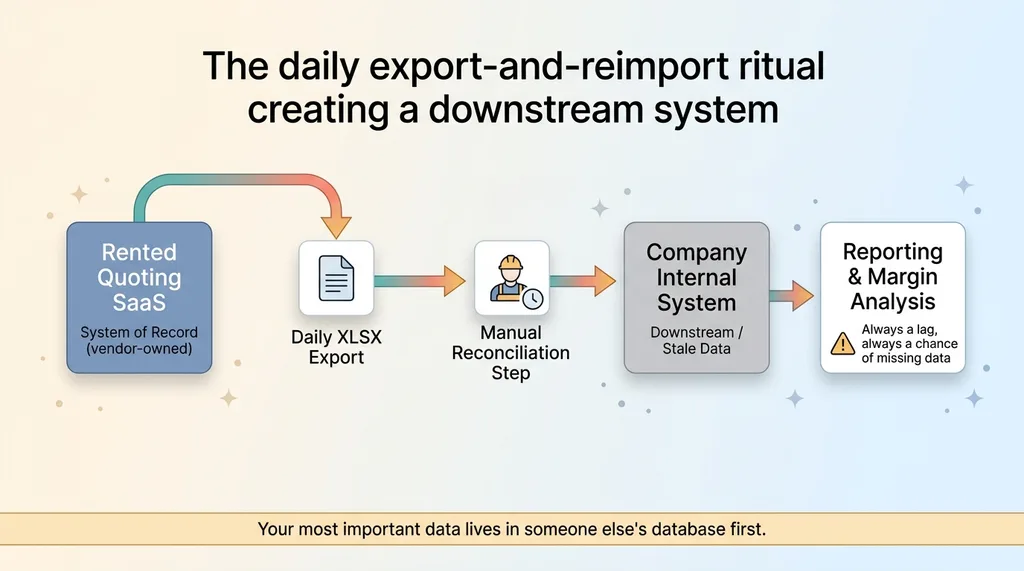 The daily export-and-reimport ritual creating a downstream system
So every reporting question, every margin analysis, every "how did we do last quarter" started with a stale export and a reconciliation step. You cannot make confident business decisions on data you have to keep re-importing. There is always a lag, always a chance the export missed something, always a person whose job is to babysit a spreadsheet.
Paying per seat to rent your own system of record
The pricing made it worse. Around $200 per seat, per month, forever. Every new salesperson and every install coordinator added to the bill.
So the company was paying more, every quarter, to grow a process that produced data they then had to copy out of the tool to actually use. The rented quoting platform had quietly become the system of record for the most important thing the business does: sell its product at the right price.
That is the absurdity. You are renting your own business and paying more as you succeed.
Why Per-Seat Forever Stops Making Sense
If you have ever been burned by a vendor who overpromised, you are right to be skeptical of "just build it custom." So let me argue against the SaaS honestly, with the actual math.
The math nobody runs
Per-seat pricing scales with headcount, not with value. That is the whole problem. The tool does not get more valuable when you hire your fifteenth salesperson. It just gets more expensive.
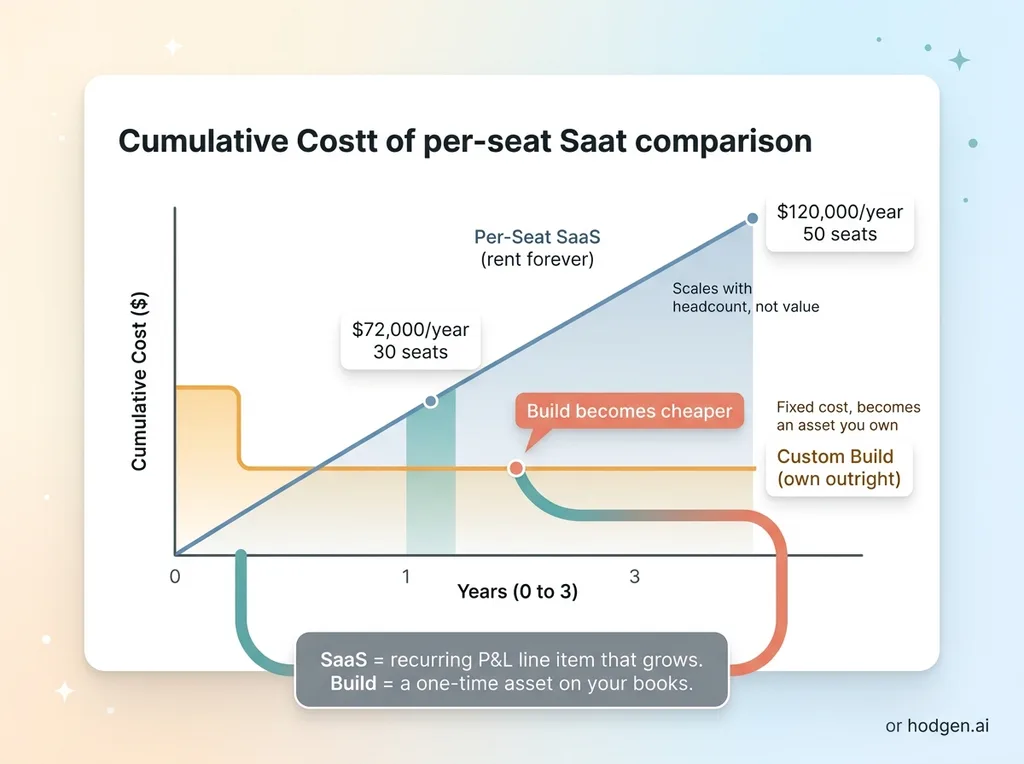 Per-seat SaaS rent vs one-time custom build cost over time
Run it out. Thirty seats at $200 a month is $72,000 a year. Grow the sales and install team to fifty and you are past $120,000 annually, every year, indefinitely. None of that spend builds an asset. You are renting.
Compare that to a one-time build you own outright. The engineering work is real money up front, but it is a fixed, finite cost that produces an asset on your books instead of a line item on your P&L that grows forever.
The hidden cost of rented data
The monthly invoice is not even the real cost. The real cost is that your system of record is something you can be cut off from, repriced on, or locked into.
If that vendor raises prices 30%, you pay it. If they get acquired and sunset the product, you scramble. If you want to do something their roadmap does not cover, you wait or you do without.
I have written before about the rule I use: pay for primitives and build the logic yourself. And I want to be fair here, because buying off-the-shelf is absolutely the right call for commodity functions. You should not build your own payroll or email.
But quoting that sits at the center of your sales motion is not a commodity. It encodes how you price, what you sell, and how you win deals. That is exactly the logic worth owning. If you want the full version of how I make this call, here is my full build vs buy framework for CEOs.
Building a Configurator With a Real BOM Brain
Replacing a quoting tool is not just rebuilding a form. The hard part is the math underneath: how a product configuration turns into a bill of materials and then into a price. Get that wrong and you have a prettier version of the same problem.
The 891-line god-component I refused to ship
The first cut of the configurator logic was a mess. I am being honest because this is the part nobody shows you. It was an 891-line calculator component with the UI, the math, and the validation all tangled together in one file.
I refused to ship that. A component that big is impossible to test, impossible to trust, and impossible for the next engineer to touch without breaking something. If the math is buried inside the buttons and dropdowns, you can never be sure the price is right.
Extracting a pure buildBom(config, parts) function
So I pulled the math out into a single pure function: buildBom(config, parts). Pure means the same inputs always produce the same outputs, with no side effects and no UI mixed in.
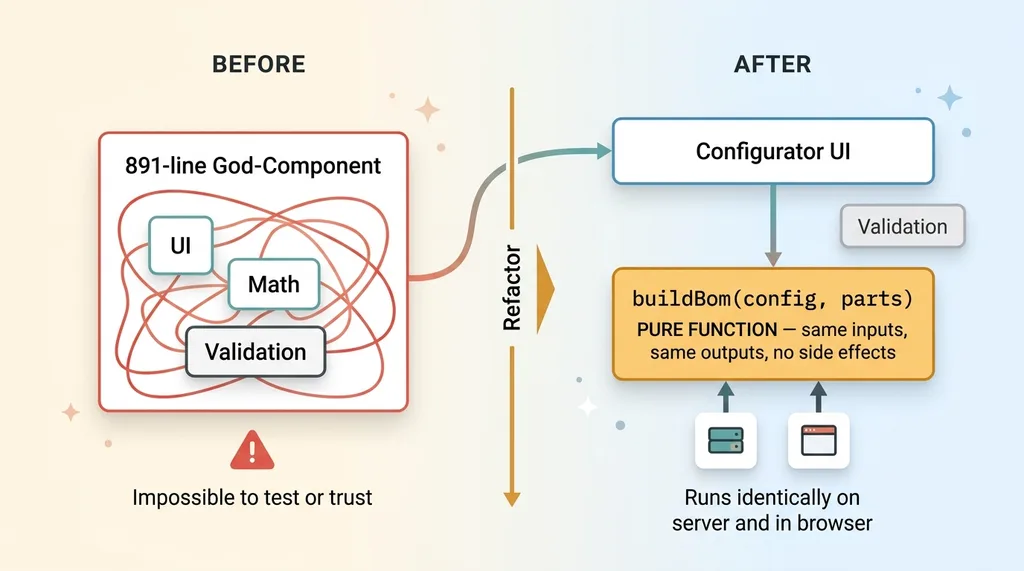 Refactoring the 891-line god-component into a pure buildBom function
Why that matters in plain terms: it is testable, predictable, and you can trust it. I can feed it a thousand configurations and check every result. There is no hidden state, no "it depends what screen you were on."
That same function runs identically on the server and in the browser. The math is the math, wherever it executes. The configurator (a shade configurator, in this case) sits on top of that brain, so quotes are built in-house from the actual product spec, not from a rented tool's baked-in assumptions about how shades work.
If you want the deeper version of how this engine works, I broke it down in a parametric bill-of-materials calculator.
A Product Engine Registry: Add a Family With One File
The most common objection to building your own tool is flexibility. "The SaaS already handles every product type. If we build it, we will be rebuilding it forever." That is exactly backwards if you architect it right.
Roller and accessory engines
Instead of one monolith trying to handle every product type, I wrapped the BOM logic in a product-engine registry. A roller engine knows how to build rollers. An accessory engine knows how to build accessories. Each one is registered independently and the system knows how to find the right one for a given product.
The configurator does not need to know the internals. It asks the registry for the engine that matches the product family, hands it the config, and gets back a bill of materials.
Why one file beats a rewrite
Here is the payoff. Adding a new product family means adding one file. You write the engine for the new family, register it, and the rest of the system already knows how to use it.
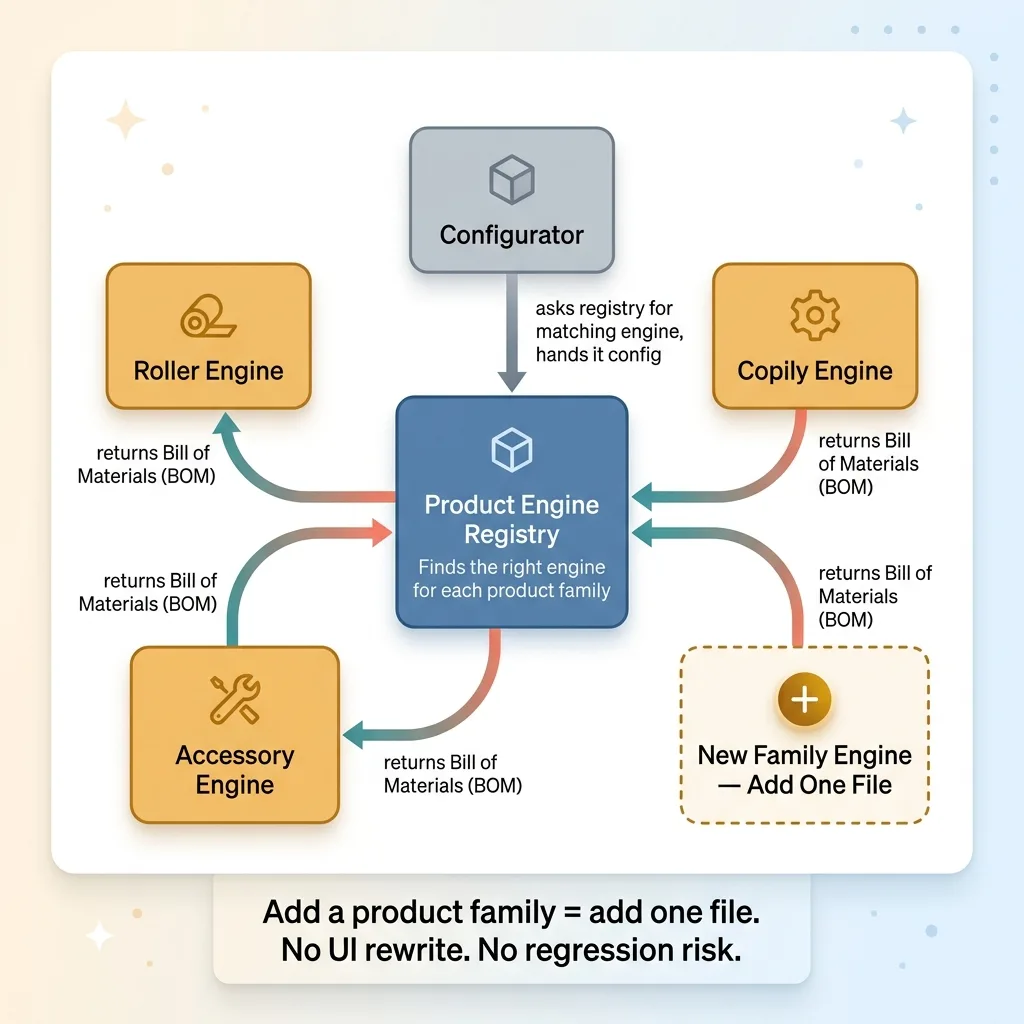 Product engine registry that adds a product family with one file
No rewriting the calculator. No touching the configurator UI. No regression risk across the products that already work.
This is the part that proves a custom build can be more flexible than the SaaS it replaced, not less. The vendor's tool shipped with whatever families it shipped with, and you waited on their roadmap for anything new. This one expands at the speed of one file. It is software the company owns and can grow on its own schedule, which is the entire point of owning it.
Making the Price API the Trust Boundary
This is the section that separates a real quoting system from a glorified spreadsheet. When real money is on the line, you cannot trust the browser. Ever.
The client can never submit a price it made up
The configurator shows a price in the browser. That number is for the customer's experience, so they see the cost update as they pick options. It is good UX. It is never trusted.
When an order gets submitted, the price the browser sends is treated as a suggestion, not as truth. The system does not save what the client says the price is.
Server-side price validation in plain English
Here is what happens on submit. The server takes the sanitized config, recomputes the BOM from scratch using the same buildBom function, recomputes the price, and re-runs validation. If the price the client sent does not match what the server calculated, the server wins. Every time.
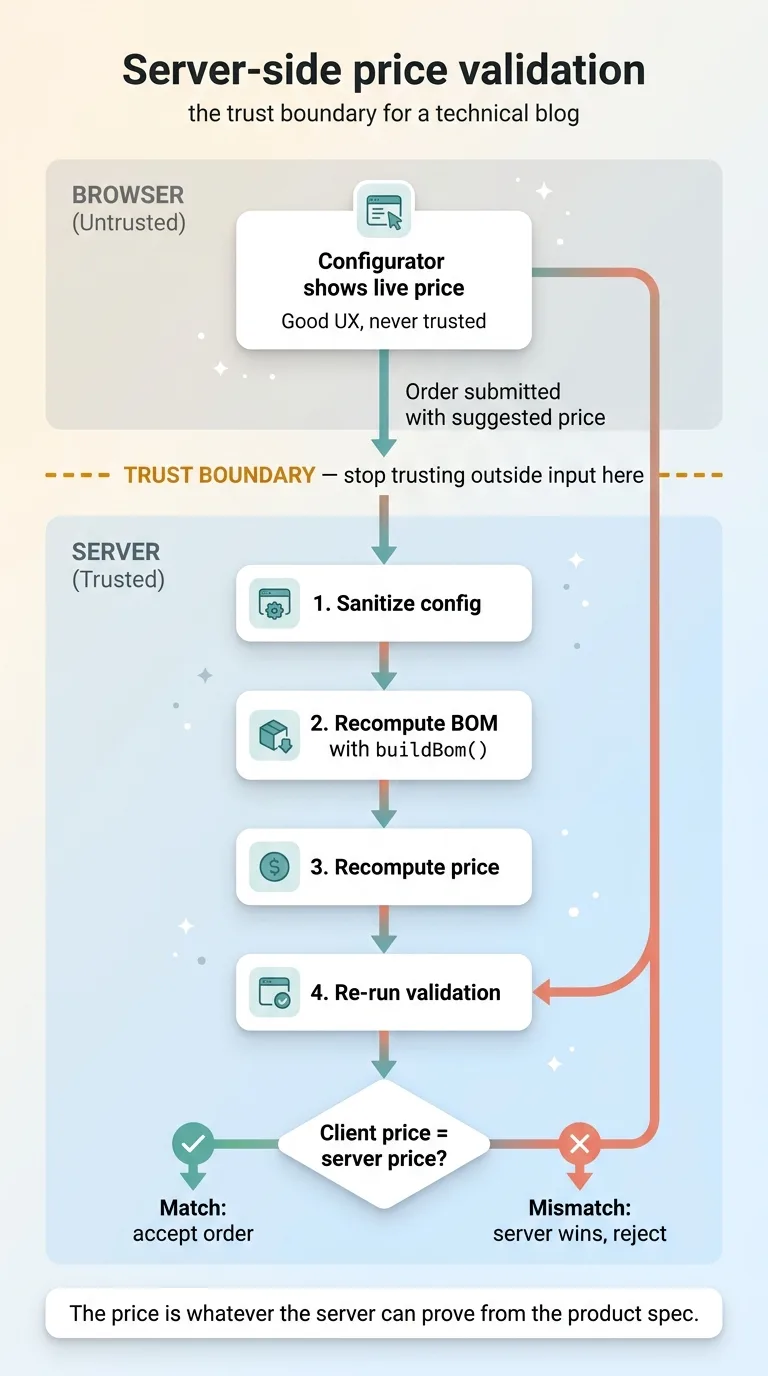 Server-side price validation as the trust boundary
The price API is the trust boundary. That term means there is one line in the system where you stop trusting whatever the outside world sends you and verify everything yourself.
In plain English: a customer poking at the browser to hunt for a discount cannot talk your system into honoring a wrong number. A buggy frontend after a bad deploy cannot quietly start selling product at the wrong price. The server recomputes and rejects anything that does not add up.
This is the integrity guarantee that a rented tool's exported XLSX never gave them. With the old setup, the price was whatever the spreadsheet said, and the spreadsheet was whatever the export produced. Now the price is whatever the server can prove from the product spec. That is what configure price quote (CPQ) is supposed to mean: the configuration drives the price, and the price is validated, not just displayed.
Turning Off the Rented Tool
Once the configurator, the BOM brain, and the price API were live, the rented tool had no job left to do.
Data finally lives where decisions get made
Quotes are now created in-house, in the company's own system. There is no daily export. There is no re-ingest. There is no reconciliation step where someone copies data out of a vendor's database and hopes nothing got dropped.
The data is native, queryable, and theirs. When leadership wants to know margin by product family or quote-to-close rates, they query their own system. No lag, no spreadsheet babysitter.
And the rented quoting tool can be switched off. The per-seat bill goes to zero, and it stops growing every time they hire.
What changed for the sales and install team
Operationally, quote creation got faster because the team works in one system instead of bouncing between the rented tool and their own. The reconciliation step is gone, which was an entire recurring task that produced nothing but copies of data.
Sales and install now work from one source of truth. The quote a salesperson builds is the quote the install team sees, with the same validated price, no export in between.
I will be honest about what this took, because it was not magic. It was real engineering: extracting that god-component, building the registry, standing up the price API, and running a migration period where both systems overlapped before the rented tool got turned off. This is the kind of work that pays back, but it is work.
It is also a pattern, not a one-off. Here are other SaaS subscriptions I've deleted and replaced using the same logic.
When It's Worth Replacing the SaaS You Rent
You should not rip out every subscription you have. Most of them are fine. The trick is knowing which one is secretly running your business.
The test I use
Ask three questions. Is the SaaS your system of record for something core, meaning the data you actually run the business on lives there first? Do you pay per seat for logic that is central to how you sell or operate? And are you already exporting its data to use it somewhere else?
If you answered yes to all three, you are renting your own business. That is the window-treatment situation exactly: per-seat pricing on core sales logic, with a daily export because the real work happened somewhere else.
Commodity tools fail this test, and that is good. Email, payroll, accounting, the boring stuff that works the same for everyone, should stay bought. There is no advantage in owning your own payroll engine.
Where to start
Start by finding the export. Whatever data you copy out of a vendor's tool every day or every week, that is the tendril worth examining. The thing you keep re-importing is almost always the thing that should have lived in your own system from the start.
Then run the per-seat math out three years and put it next to a one-time build. If the build is cheaper than the rent and produces an asset you own, the decision makes itself.
This is the work I do as a Chief AI Officer: finding the rented tool that is quietly your system of record and replacing it with software you own and can grow. If that sounds like a process you are stuck in, let's talk about it.
Want to explore what AI could do for your business?
Book a free 30-minute strategy call. No pitch deck, no sales team, just a real conversation about your operations and where the rented tools are costing you more than you think.
Get AI insights for business leaders
Practical AI strategy from someone who built the systems — not just studied them. No spam, no fluff.
Hodgen.AI
Ready to automate your growth?
Book a free 30-minute strategy call with Hodgen.AI.
Book a Strategy Call