Building a Parametric BOM Calculator With AI Sizing Rules
How I built an AI bill of materials calculator that auto-sizes parts, adjusts costs across suppliers, and prints fabrication labels with QR codes.
By Mike Hodgen
Every custom manufacturer I've talked to has the same story. They looked at ERP systems, got sticker shock, and went back to their spreadsheets. That's exactly where a custom manufacturing client of mine was when we started talking — a window and door fabrication shop doing somewhere between $500K and $2M in annual revenue, building made-to-order products with variable dimensions on every single order. They needed an AI bill of materials calculator, but nothing on the market actually fit.
The Problem: ERP Systems Weren't Built for Small Manufacturers
What a $500K/year Manufacturer Actually Needs
This client builds custom windows and doors. Every order is different. A standard window might have 47 parts on the BOM, but change the width by 6 inches and 23 of those parts change — different cut lengths, different material quantities, different costs. That's not a product variant. That's a fundamentally different BOM every time.
Their process before we started: sales rep takes the order, manually calculates each part size using a combination of memory and a reference spreadsheet, manually looks up material costs from three different suppliers, manually builds the BOM in Excel, and then hand-writes fabrication instructions for the shop floor.
One BOM took 45 to 90 minutes. Errors were common. And every error that made it to fabrication meant rework — at roughly $200 a pop.
Why Off-the-Shelf BOM Tools Miss the Mark
They'd looked at SAP, Oracle NetSuite, Fishbowl. The licensing alone on the enterprise platforms would have eaten their margins. The mid-market tools could handle static BOMs fine — fixed products with fixed part lists — but couldn't handle parametric complexity where every dimension changes the entire bill of materials.
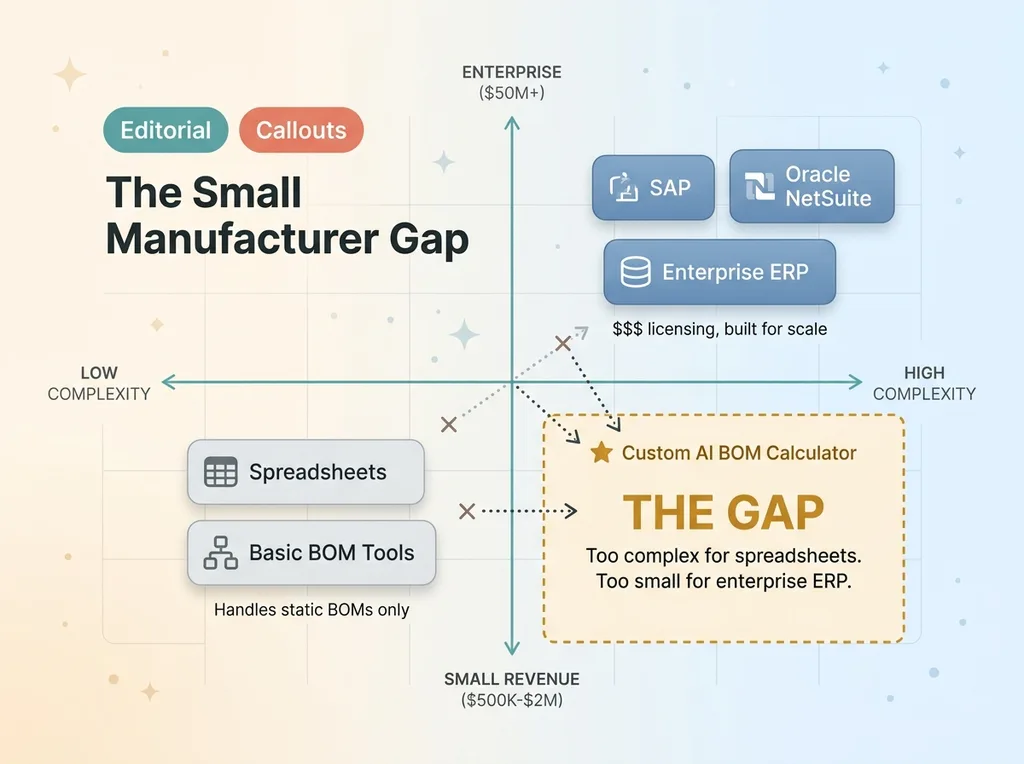 The Small Manufacturer Gap
This is the gap nobody talks about. Small custom manufacturers are too complex for spreadsheets and too small for enterprise ERP. They fall right through the middle.
I'd seen this pattern before. When I built an AI production management system for my own DTC fashion brand, the lesson was the same: custom tools built around your actual workflow often outperform enterprise software for sub-$5M businesses. The software you need doesn't exist on the shelf because your process is specific to you. So you build it.
What a Parametric BOM Calculator Actually Does
From Customer Dimensions to Full Parts List
If you're not familiar with the term, "parametric" just means the system uses rules and input variables to calculate outputs. Instead of looking up a fixed part list, you feed in the customer's dimensions and configuration choices, and the system calculates every part, every cut length, every quantity automatically.
Here's a concrete example. Customer orders a 48x72 window with a specific glass type. The parametric BOM calculator does the following in about 20 seconds:
- Derives frame rail cut lengths from the overall dimensions minus specific offsets (the 48-inch width becomes a 46.25-inch horizontal rail after accounting for corner joints and gasket channels)
- Calculates glass panel dimensions accounting for gasket compression tolerances — the glass isn't 48x72, it's 46.875 x 70.875
- Determines hardware quantities based on size thresholds — windows above 60 inches tall need four hinges instead of three
- Selects weatherstripping lengths based on total perimeter plus overlap allowances
- Flags any dimension that exceeds standard material lengths and requires special ordering from the supplier
The output is a complete parts list with quantities, precise dimensions, and costs. Generated in seconds instead of 45 minutes.
The Difference Between Static and Parametric BOMs
A static BOM says: "Model A requires these 47 parts in these exact quantities." If you sell five SKUs, you have five BOMs. Simple.
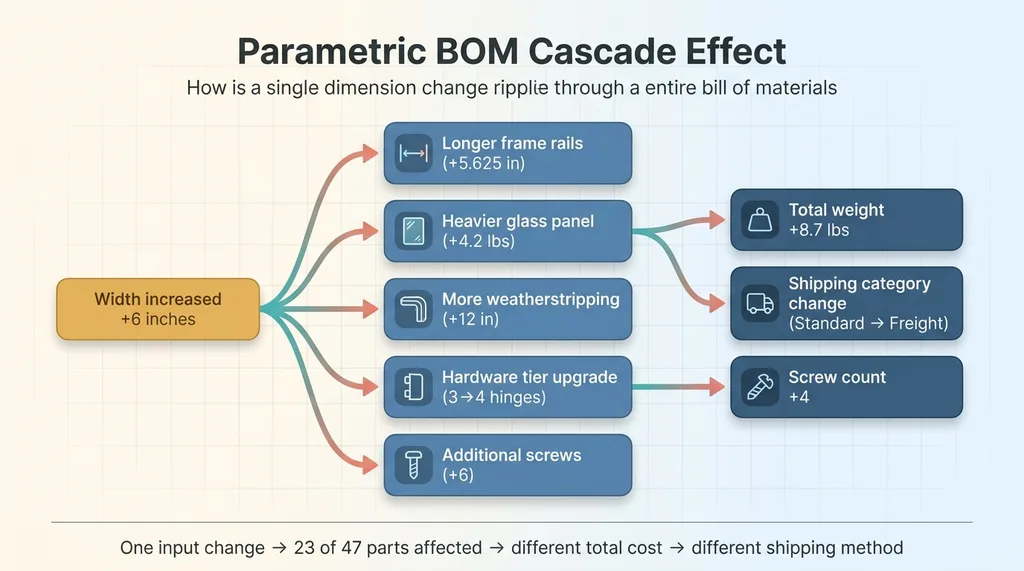 Parametric BOM Cascade Effect
A parametric BOM says: "Given these input dimensions and this configuration, here are the 47 parts with their calculated sizes and quantities." If you sell custom products, you effectively have infinite BOMs — and the parametric calculator generates each one on the fly.
This isn't just a spreadsheet formula. The sizing rules have conditional logic, edge cases, and interdependencies. When one dimension changes, it can cascade through dozens of parts. A wider window needs longer rails, which means heavier glass, which triggers a different hardware tier, which changes the screw count, which affects the total weight, which might push the product into a different shipping category. That cascade is what makes spreadsheets break down and what makes a parametric BOM calculator essential.
The AI-Powered Sizing Rules Engine
How Rules Get Created From Historical Data
Here's where people get confused about AI in manufacturing. The sizing rules themselves are deterministic. You absolutely do not want AI "guessing" that a frame rail should be 46.5 inches. It's either 46.25 or it's wrong, and wrong means a part goes in the scrap bin.
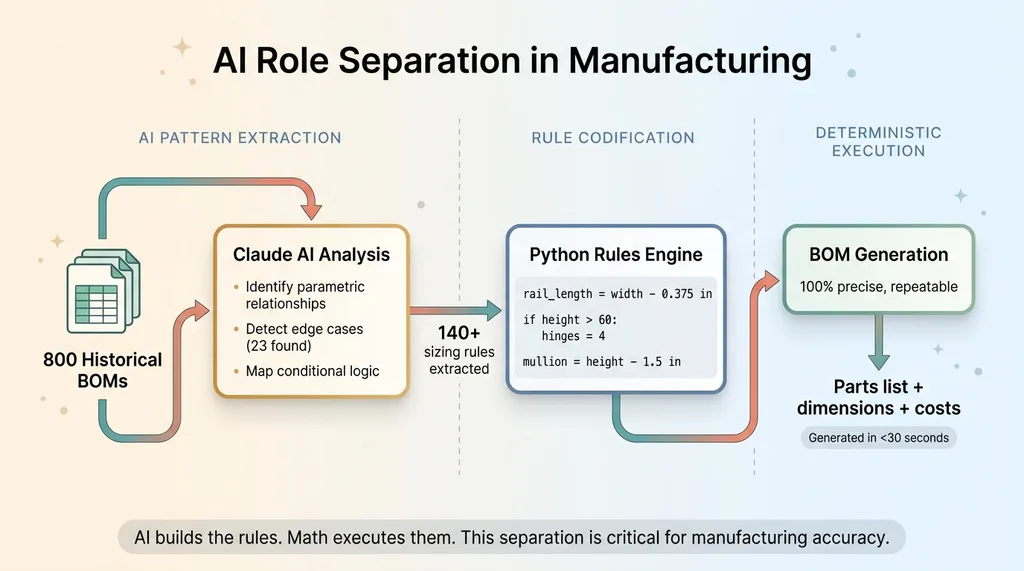 AI Role Separation in Manufacturing
But AI is invaluable in building the rules in the first place. This client had approximately 800 past orders in spreadsheets. Each one was a manually calculated BOM with all the part dimensions spelled out. That's training data.
I fed those historical BOMs through Claude and asked it to identify the parametric relationships. The results were specific and actionable: "When width increases by 1 inch, the horizontal frame rail increases by 1 inch minus 0.375 inches for the gasket offset." "When height exceeds 60 inches, hinge count steps from 3 to 4." "Mullion bar length equals panel height minus 1.5 inches."
AI extracted 140+ sizing rules from that historical data. Doing this manually — interviewing the fabricator, testing each relationship, documenting the offsets — would have taken weeks. AI did the pattern extraction in hours.
The architecture matters here. I used Python for the rules engine, Claude for analyzing the historical spreadsheets and extracting relationships, and then deterministic execution once the rules were codified. AI builds the rules. Math executes them. That separation is critical for manufacturing accuracy.
This is similar to how I handle complex parametric decisions in my product creation pipeline — AI does the heavy lifting on pattern recognition and relationship mapping, but the execution is precise and repeatable.
Handling Edge Cases That Break Simple Formulas
The second place AI earned its keep was edge case detection. When analyzing the 800 historical BOMs against the extracted rules, AI flagged 23 cases where the human fabricator had deviated from the normal formula.
These weren't errors. They were real edge cases. Reinforcement bars added above certain span widths. Different hardware kits for triple-wide configurations. A thicker gasket spec for coastal installations exposed to salt air.
A simple formula would have missed all 23. The fabricator had this knowledge in his head, applied it instinctively, and never documented it. AI found the deviations, I sat down with the fabricator and confirmed each one, and we added conditional rules to handle them.
The third function — ongoing validation — runs every time a new BOM is generated. The system cross-checks outputs against historical patterns and flags anomalies before they reach the shop floor. It caught a rule conflict in week two that would have produced undersized glass panels on a non-standard configuration. That single catch probably saved $400 in material and a week of lead time.
Multi-Level Cost Adjustments: Global, Supplier, and Part
Three Tiers of Pricing Logic
Generating the right parts list is only half the problem. Costing it accurately is the other half, and this is where the client was bleeding money without knowing it.
The manufacturing cost calculator I built handles pricing at three tiers:
- Global adjustments: Material cost multipliers that ripple across every BOM. Aluminum extrusion up 8% this quarter? One setting change adjusts every quote. Tariff adjustments, overhead rates, and waste factors all live here.
- Supplier-level pricing: Different vendors charge different rates for the same material. Supplier A charges $3.20 per linear foot for the primary frame extrusion. Supplier B charges $2.85 but has a 3-week lead time versus 5 days. The system stores both and can generate BOMs costed against either supplier.
- Part-level overrides: Individual component pricing for special-order items, custom hardware, or negotiated volume discounts on high-use parts.
Real-Time Cost Accuracy Without Manual Updates
Here's a real scenario from the first month: a particular window configuration cost $847 when costed against Supplier A but $791 when costed against Supplier B — with 12 additional days of lead time. The system presents both options. The sales rep can make an informed decision with the customer instead of quoting from memory.
Before this system, the client was using material costs that were 3 to 6 months stale. Updating the pricing spreadsheet was a full-day project that kept getting pushed off. They were unknowingly losing margin on more than 30% of their orders — sometimes quoting below actual material cost on larger configurations where the price drift compounded across dozens of parts.
After deploying the parametric BOM calculator with real-time costing, their average quoting accuracy improved from roughly 85% to approximately 97% against actual material costs. That's the difference between knowing your margins and hoping your margins are what you think they are.
Fabrication Labels With QR Codes: Closing the Shop Floor Loop
What Goes on a Fabrication Label
A BOM calculator that lives in a browser is useless if the information doesn't make it to the person running the saw. The last mile of this system is fabrication label generation.
Once a BOM is finalized, the system generates thermal-printed labels for each part. Every label includes the part description, cut dimensions to 1/16th precision, material type, order number, and sequence in the assembly process.
QR Codes That Link Back to the Full BOM
The QR code on each label is what ties the shop floor back to the system. Scanning it with any phone pulls up the full BOM for that order, with the specific part highlighted in context. Assembly instructions, special notes, the works.
This replaced a system of handwritten tags and printed spreadsheet pages that got covered in sawdust and became unreadable by mid-afternoon. The most common fabrication error — cutting a part to the wrong dimension because someone misread a handwritten measurement — dropped from roughly 1 in 15 units to 1 in 60 or better.
Practical details: the thermal label printer cost about $300. Labels run $0.02 each. The ROI on the label system alone paid for the hardware in the first week.
This BOM module became one skill in a broader AI manufacturing platform, similar to how I structured my 14-skill AI ecommerce platform — each capability is a distinct module that connects to a shared data layer.
What This System Replaced (And What It Cost to Build)
I want to be transparent about the investment because I think too many AI case studies skip this part.
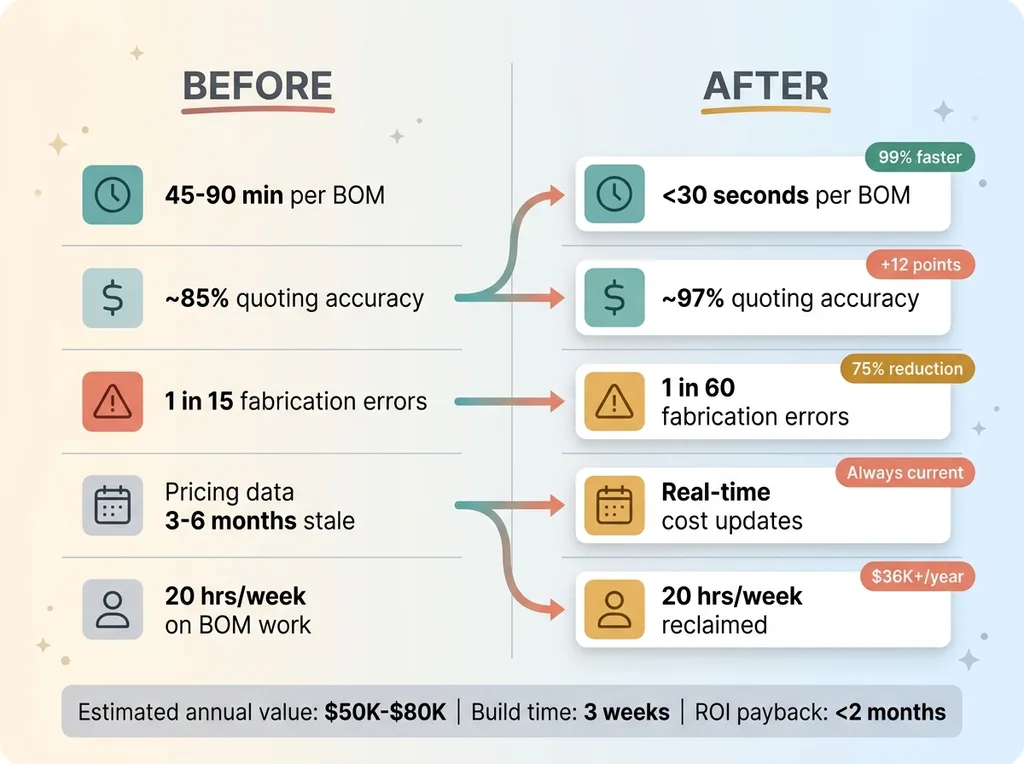 Before and After System Impact
Before: 45-90 minutes per BOM. 15-20 BOMs per week. Stale pricing data. Fabrication errors requiring rework at ~$200 per incident. One person spending roughly 20 hours per week on BOM-related work.
After: BOM generation in under 30 seconds. Real-time accurate costing. Automated fabrication labels. 20 hours per week reclaimed. Rework costs cut by approximately 75%.
The build took about 3 weeks of focused development. Not trivial. But the ROI math is straightforward: 20 hours per week at $35/hour is $700 in labor. Rework reduction saves roughly $800/month. Margin improvement from accurate costing is harder to pin down, but the client estimated $2K-$4K per month in previously invisible margin erosion. Total estimated annual value: $50K-$80K.
What the system doesn't do yet: it doesn't handle procurement automation, it doesn't integrate directly with their accounting software (they export CSVs for now), and adding an entirely new product type still requires manual rule configuration. I want to be honest that the 3-week build timeline assumes I already had my AI toolkit and patterns in place. A from-scratch effort by someone building these systems for the first time would take significantly longer.
When a Custom BOM System Makes Sense for Your Operation
This isn't for everyone. A custom parametric BOM calculator makes sense when:
- Your products have variable dimensions or configurations — not just SKU selection from a catalog
- You're doing 10+ unique BOMs per week — below that, the ROI timeline stretches past where it makes sense
- Someone is manually calculating part sizes — that's where the automation value lives
- You've looked at ERP and it doesn't fit — either the cost or the parametric complexity is wrong for your operation
- You're quoting with stale costs — and you suspect you're losing margin you can't see
If that sounds like your operation, this is exactly the kind of system I build as a Chief AI Officer. Not as a one-off project, but as part of a broader operational AI strategy. Not chatbots. Not dashboards. Systems that do the actual work.
Thinking About AI for Your Manufacturing Operation?
If any of this hit close to home, let's talk. I do free 30-minute discovery calls where we look at your specific operations and figure out where AI would actually move the needle — not in theory, but in the kind of dollars-and-hours terms I've laid out here.
Get AI insights for business leaders
Practical AI strategy from someone who built the systems — not just studied them. No spam, no fluff.
Hodgen.AI
Ready to automate your growth?
Book a free 30-minute strategy call with Hodgen.AI.
Book a Strategy Call