Redirect Domains SEO Risk: How My Old Domains Leaked Toxic Links
Old marketing domains 301-redirecting to your store are a redirect domains SEO risk. Here's how toxic links flowed into my homepage and the one-line fix.
By Mike Hodgen
The marketing move that turned into a backdoor
I run a DTC fashion brand in San Diego, handmade goods, the kind of business where the name is the asset. Over the years I did what every brand does: I bought a dozen keyword-variant domains. The .net version, the .store version, the common typo of my brand name, the ones a competitor might grab if I didn't.
This is standard defensive practice. You protect your name, you catch a little typo traffic, you keep someone else from squatting on a near-match. And the textbook move is to 301-redirect all of those domains straight to your main store homepage. Clean. Tidy. One canonical home.
It feels completely harmless. Everyone does it. I did it without a second thought, years ago, across whatever registrar happened to have the cheapest renewal that month.
Then I got hit with a link attack, and those redirects became a backdoor.
Here's the thing nobody tells you about redirect domains seo risk: a 301 doesn't just forward visitors. It forwards link equity. So when an attacker started pointing toxic spam links at one of my forgotten satellite domains, every one of those poisoned links flowed straight into my homepage's backlink profile. The exact page that ranks for my head term. The page that makes the most money.
I caught this because I was already running an AI system that fights negative SEO daily, monitoring my link profile in real time during the attack. Without that, I'd have had no idea the poison was even entering, let alone where.
Let that sink in. The page worth the most to my business was the one inheriting the most toxicity, and it was happening through a domain I'd forgotten I owned, sitting in a registrar account I logged into maybe once a year.
The marketing move had quietly become an open pipe.
Why a 301 redirect passes link equity (the part nobody mentions)
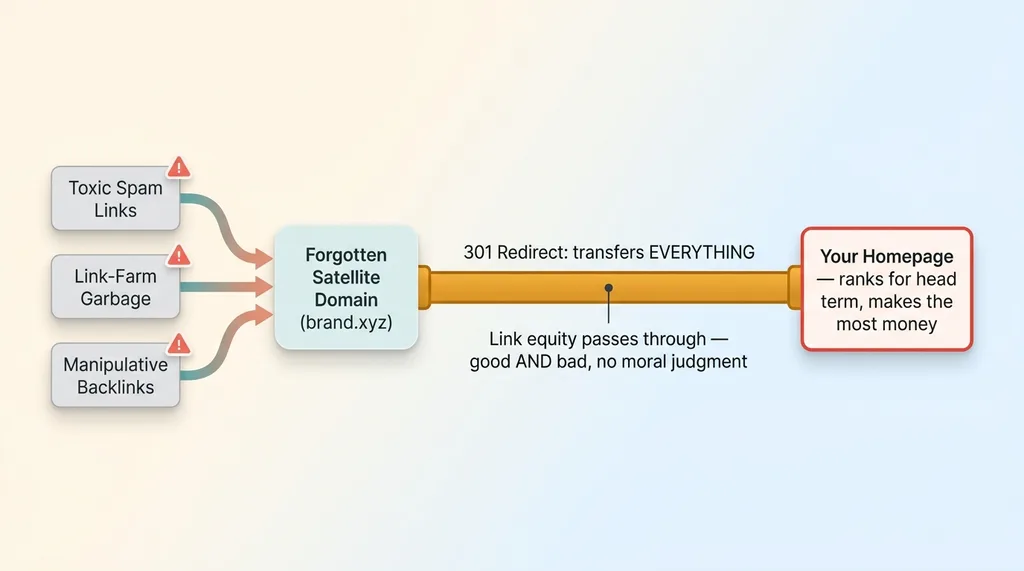 How a 301 redirect pipes toxic links into your homepage
301 forwards both good and bad signals
A 301 redirect tells Google one thing: "this content permanently moved over here, transfer everything to the new location." That word, everything, is the whole problem.
Everything means the backlink profile. Every link that ever pointed at the old domain. Google treats those links as if they now point at the destination. Good links, sure. But also every spammy, toxic, manipulative link an attacker decides to throw at it.
The redirect makes no moral judgment. It's a pipe. Whatever you pour in one end comes out the other. When you 301 a satellite domain into your homepage, you're declaring that the homepage should inherit the entire link history of that domain, forever.
Your homepage inherits the worst of it
So picture the setup from an attacker's view. You have a domain you forgot about, on a registrar you barely touch, with a 301 pointed at your most valuable page. That's not a redirect. That's an unguarded door into the page that pays your bills.
The nasty part is that this is nearly invisible in normal SEO tools. The satellite domain often doesn't show up in your main domain's backlink report until the equity has already flowed through. By the time the toxic links appear under your primary domain, the damage is already in motion. You're seeing the symptom, not the source.
I only caught the source because I was running active monitoring during an attack and saw the the way I detected the PBN attack in hours, not weeks. Most businesses would never connect the spike in toxic links to a domain they don't even remember buying.
Auditing redirects across three registrars
Once I knew the redirects were the vector, I had to find every one of them. My domains were scattered across three registrars, which I'll refer to generically as Cloudflare, GoDaddy, and Porkbun. Different accounts, different eras, different assumptions.
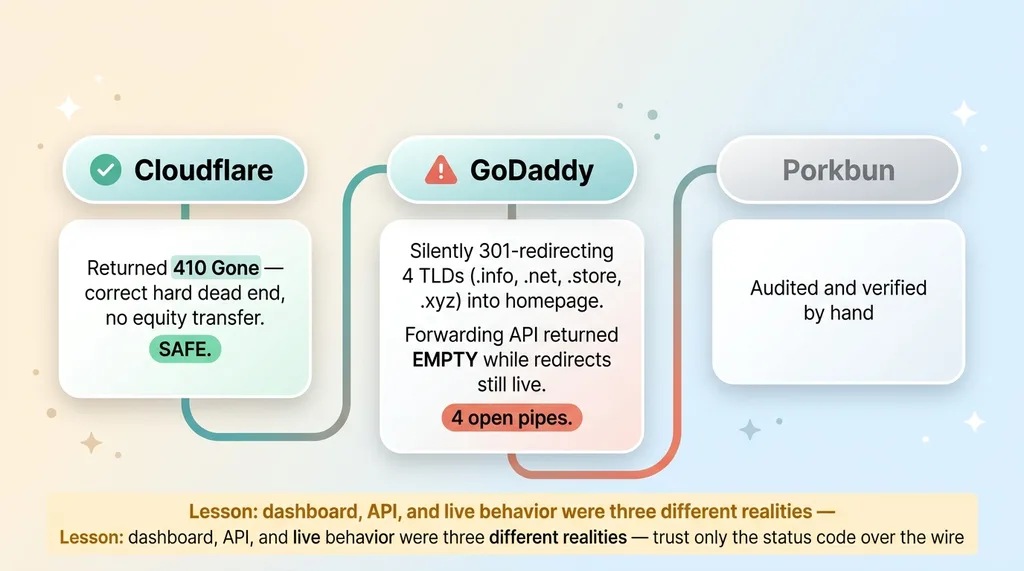 Three-registrar audit findings
Cloudflare satellites were already safe
The good news first. The domains I'd set up on Cloudflare were already returning 410 Gone. That's the correct behavior, a hard dead end, no equity transfer. Past me had done something right there, probably by accident. Those weren't the problem.
GoDaddy was silently 301'ing four TLDs
GoDaddy was where it fell apart. The apex A-record forwarding was silently issuing 301 redirects on four TLD variants (.info, .net, .store, and .xyz) straight into my homepage. I didn't configure those as 301s on purpose. The platform's default forwarding behavior did it for me, quietly, years ago.
That's four open pipes I didn't know existed, all pointed at my money page. This is exactly the pattern of satellite domains quietly piping toxic links into a profile, and it was happening under my own account the whole time.
The forwarding API came back empty
Here's the kicker. When I went to fix it programmatically through GoDaddy's forwarding API, the endpoint returned empty. Nothing. No forwarding config to delete.
Except the forwarding was obviously still active, because the domains were still 301'ing. The config lived on a newer backend that the API simply didn't expose. So the dashboard showed one reality, the API showed another, and the actual live behavior was a third thing.
The fix had to be a manual DNS and forwarding deletion in the dashboard, domain by domain, verified by hand.
The lesson burned in hard: you cannot trust that "I set it up correctly once" holds across registrars and across time. Configs drift. Backends change. Defaults get rewritten under you. The setup you made in 2019 is not the setup running today, and nobody sent you a memo.
301 vs 410: why I made every non-primary domain return 410
I didn't want to fix four domains. I wanted a policy that made this class of problem impossible. So let's talk 301 vs 410 redirect seo as a rule, not a one-off cleanup.
What 410 tells Google
A 301 says "moved, transfer all equity here." A 410 says something completely different: "gone, permanently, do not associate this with anything." It severs the pipe. No equity flows, good or bad. The domain becomes a true dead end.
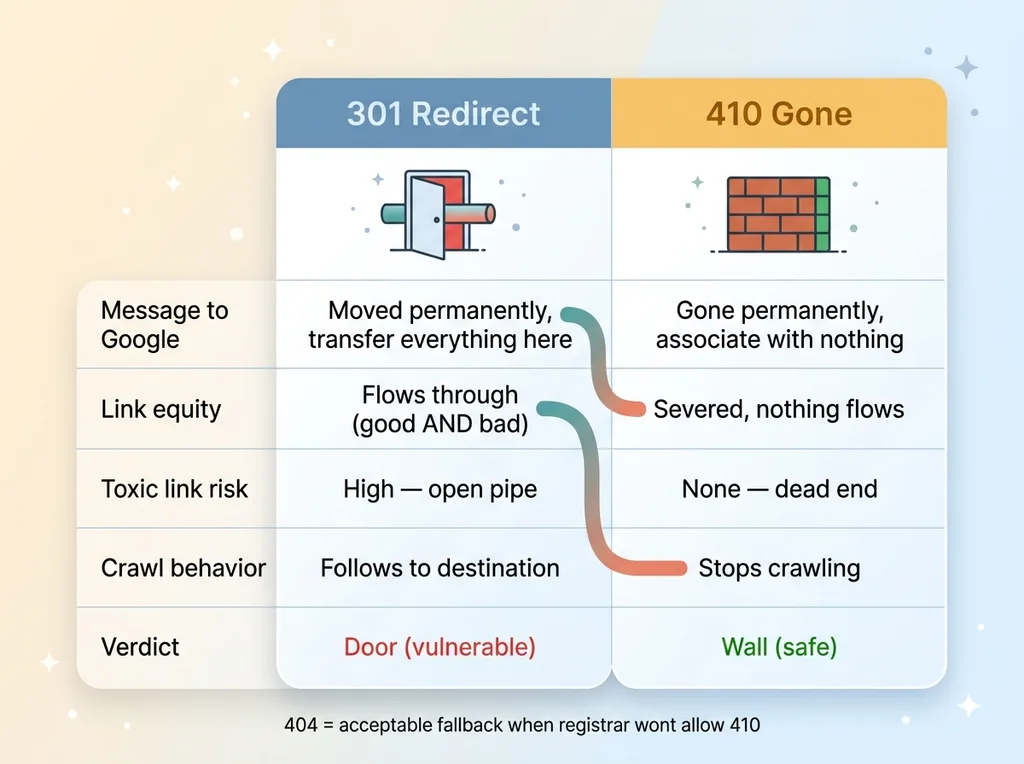 301 vs 410 comparison as link-equity behavior
So I locked a rule across everything I own: every non-primary domain returns 410 (or 404 as a fallback), never 301. The only domain allowed to be a canonical destination is the primary store itself. Everything else is a wall, not a door.
Why 404 is the fallback, not the default
410 is the cleaner signal because it explicitly tells Google "this is intentional and permanent, stop crawling, stop associating." A 404 just says "not found," which Google treats as possibly temporary and will keep checking. 410 is the precise message. 404 is the acceptable fallback when a registrar won't let you set a clean 410.
Now the obvious objection: doesn't 410 throw away the typo and brand-protection traffic?
Honestly, yes, a little. But let's be real about what that traffic is worth. The trickle of direct-type visitors who manually type a .xyz variant of my brand is tiny. The value of protecting my head-term page from inherited toxic links is enormous. That's not a close call.
If you genuinely want to capture variant traffic, do it with a clean parked landing page that loads its own content. Don't run a 301 pipe straight into your money page. There's no version of "catch a few typos" worth leaving an open channel into the page you most need protected.
What a competitor could actually do with this
Let me spell out the attack, because once you see how cheap it is, you'll never leave a 301 satellite open again.
A hostile competitor or a negative-SEO operator doesn't need access to your website. They don't need your passwords, your CMS, or your server. They need one thing: to know which of your own domains are pipes.
And that's all public. They can pull your forgotten satellite domains from public WHOIS records, trace redirect chains, and just guess brand-name variants (everyone buys the same obvious ones). Then they check which of those domains still return a 301 into your homepage. The ones that do are loaded guns you handed them.
From there it's trivial. They blast spam links, link-farm garbage, the worst toxic backlinks they can manufacture, at whichever of your domains still 301. Your homepage inherits all of it. You did the hard part for them years ago when you set up the redirect.
This is domain forwarding toxic links as a weapon, and it costs the attacker almost nothing.
So during any link attack now, the first thing I check is which of my domains forward and how. Before I look at anything else. Because the satellite domain backlinks flowing through my own forgotten redirects are the path of least resistance, and any competent attacker checks it first.
The reason this exposure exists is the reason most of them do: the setup happened years ago, by different people (or a younger, lazier version of you), under assumptions nobody wrote down. Then nobody ever re-audited it. The decision was reasonable at the time. It just quietly became a liability.
The 20-minute audit you can run on your own domains today
You don't need me to do this part. Here's the exact audit, and it takes about 20 minutes if your accounts are organized and an hour if they aren't.
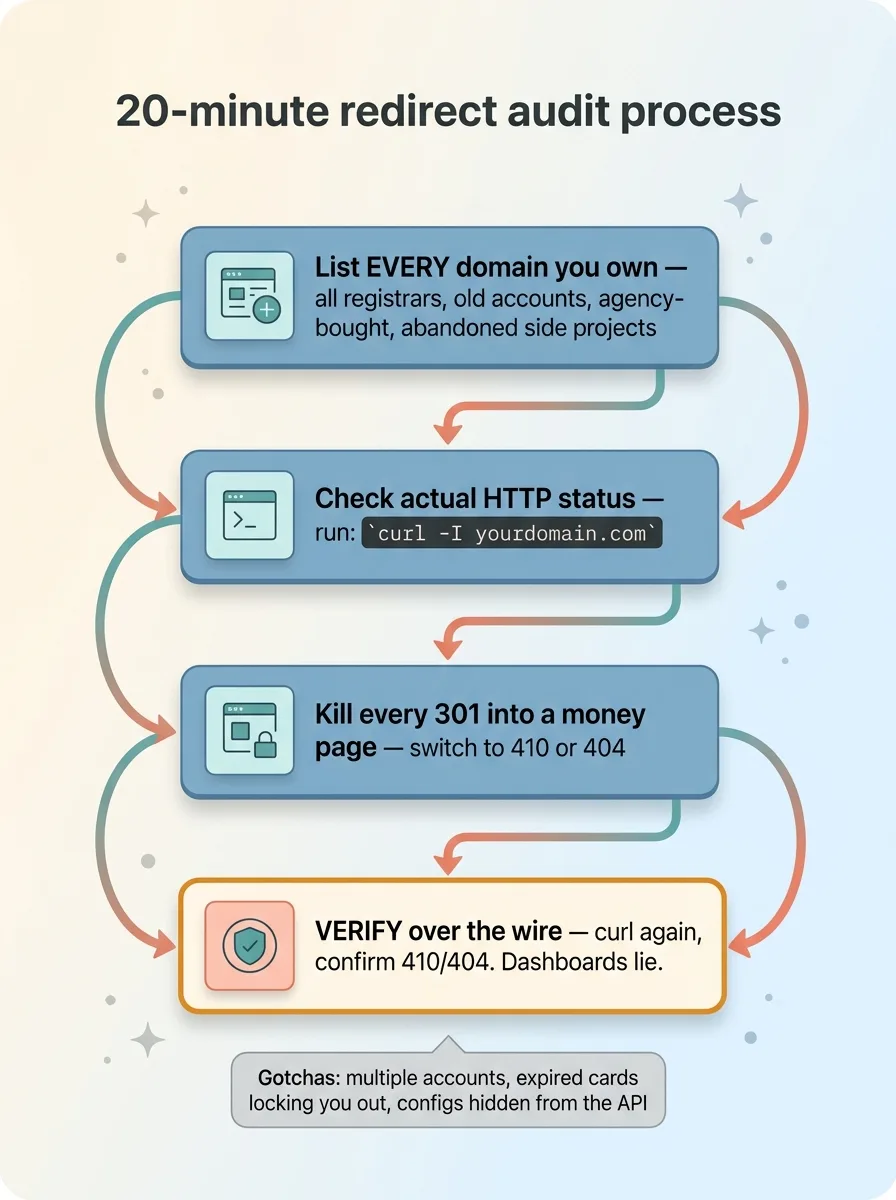 The 20-minute redirect audit process
List every domain you own
Step one, and the one everyone underestimates: list every domain you've ever bought. Not the ones you remember. All of them. Across every registrar, including old accounts, including the side project you abandoned, including the ones your agency bought on your behalf and never told you about.
Check old email for renewal receipts. Check every registrar login you've ever made. The godaddy domain forwarding defaults are the usual suspects, but the domain you forgot is the one that gets you.
Check the HTTP status each one returns
Step two: hit each domain and check the actual HTTP status code it returns. Not what you think it does. What it actually does, right now, today.
Run curl -I yourdomain.com from a terminal, or use any free redirect checker. You're looking for one thing: 301s pointing at your primary domain. Each one of those is an open pipe.
Kill the 301s into your money pages
Step three: for every non-primary domain returning a 301, switch it to 410 or 404. Then verify it actually changed.
That verification step is where almost everyone stops too early. They click save in the dashboard, see a confirmation message, and move on. But registrar dashboards lie. APIs return empty while the old config keeps running on a backend you can't see. I learned that the hard way.
So after you make the change, hit the domain again with curl and confirm it now returns 410 or 404. Don't trust the dashboard. Trust the status code coming back over the wire.
Watch for the gotchas: multiple registrar accounts, expired credit cards on old registrars that lock you out, forwarding configs that don't appear in the API. The mess is the point. The mess is where the exposure hides.
Most hidden exposures aren't bugs, they're forgotten decisions
Here's what I want you to take from this. The redirect leak wasn't a sophisticated vulnerability. There was no clever exploit, no zero-day, no genius attacker. It was a reasonable marketing decision from years ago that nobody ever revisited. It sat there as an open door, behaving exactly as designed, until an attack came along and found it.
That's the real pattern across nearly every technical exposure I find when I audit a business. Not exotic bugs. Stale config and forgotten choices that quietly turned into liabilities. The 301 that made sense in 2019. The integration nobody owns anymore. The default setting from a platform migration. The access nobody revoked.
I find these because I'm building and re-auditing these systems constantly, in my own brand and for clients, not reading about them in a blog post. When you're hands-on with this stuff every week, you develop a nose for the decision that made sense once and never got a second look.
If you've got a domain setup, a redirect history, or a stack you inherited and never re-examined, that's exactly the kind of thing worth having me look at. I'll audit your domain and redirect setup and tell you what's actually live versus what you think is live. Those are usually two different things.
Want to explore what AI could do for your business?
Book a free 30-minute strategy call. No pitch deck, no sales team, just a real conversation about your operations and where AI fits.
Get AI insights for business leaders
Practical AI strategy from someone who built the systems — not just studied them. No spam, no fluff.
Hodgen.AI
Ready to automate your growth?
Book a free 30-minute strategy call with Hodgen.AI.
Book a Strategy Call