Landing Page Inventory Automation: No More Dead Pages
How I built landing page inventory automation that heals sold-out ad pages in real time and pauses ads only when a page can't be saved.
By Mike Hodgen
The Ad Was Working. The Page Was Dead.
One of my best-performing carousel ads was quietly setting money on fire and the dashboard told me everything was fine.
This was on my DTC fashion brand, the one I run out of San Diego. The ad had a strong click-through rate. It was still delivering. It was still spending. By every metric Meta showed me, it was a winner I should have been scaling.
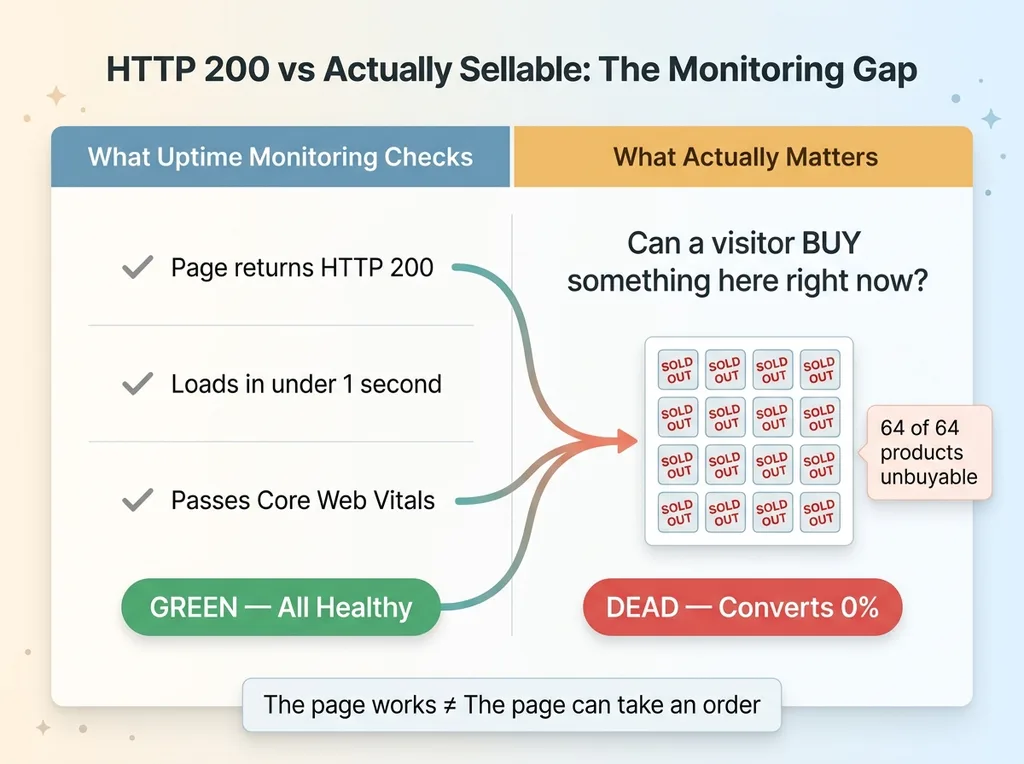
Then I clicked the destination myself. Out of 64 products on that landing page, zero were buyable. Every single one was sold out. The ad was paying to send warm, ready-to-buy people to a wall of "Sold Out" buttons.
No alarm fired. No error logged. Nothing broke, technically. The page returned a perfectly healthy HTTP 200, rendered fast, and passed every uptime check I had running. The machine that was supposed to tell me something was wrong had nothing to report, because by its definition nothing was.
That is the problem with landing page inventory automation done the normal way. Most monitoring confirms the page loads. Almost none of it confirms the page sells.
Here is the cost. Every click to a dead page is two losses stacked on top of each other. You burned the ad spend, and you burned the customer, because a buyer who hits a wall of sold-out products does not think "this one collection is empty." They think your brand is out of stock everywhere. They leave and they do not come back.
The worst part is how invisible this is by default. A 404 you would catch in an hour. A 500 would page you. But a fully sold-out page that loads beautifully? That can run for weeks, eating budget, looking like a star performer the whole time.
HTTP 200 Does Not Mean Healthy
 HTTP 200 vs Actually Sellable: The Monitoring Gap
The check everyone runs
Standard uptime monitoring asks one question: did the page load? It pings the URL, gets a 200 back, and reports green. Maybe it checks response time. Maybe it watches Core Web Vitals.
All of that can pass while the page converts at zero percent.
A landing page can load in under a second, score perfectly on every technical benchmark, and still sell nothing, because "the page works" and "the page can take an order" are two completely different statements. Uptime tools measure the first. Revenue depends on the second.
The check almost nobody runs
The check that actually matters is: can a visitor buy something here right now?
That means defining what "healthy" means for an ad destination, and being specific about it. For my brand, a healthy ad landing page has at least some minimum number of buyable products visible above the fold. Not products that exist. Products you can actually put in a cart.
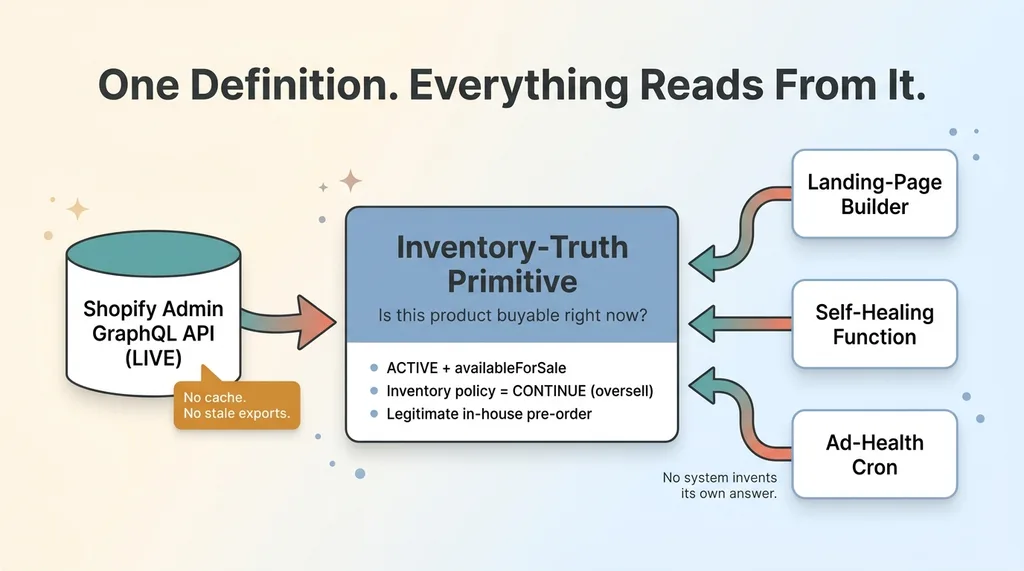
So I had to encode what "buyable" means. Here is the definition the entire system reads from. A product counts as buyable if:
- It is ACTIVE and availableForSale, or
- Its inventory policy allows overselling (CONTINUE), or
- It is on a legitimate in-house pre-order.
That third condition matters more than it looks. A pre-order product is genuinely buyable even though it shows zero on-hand inventory. If I treated raw stock count as the only signal, I would kill ads pointing at products people can absolutely purchase right now.
This is the inventory-truth definition. Everything downstream, the page builder, the healer, the ad-health check, reads from this one definition. No system gets to invent its own.
Building an Inventory-Truth Primitive
One function the whole stack trusts
Before I could heal anything, I needed one component that could answer a single question without lying: for any given product or collection, is it actually buyable right now?
 Inventory-Truth Primitive as Single Source of Truth
So I built an inventory-truth primitive. It queries the Shopify Admin GraphQL API and returns, for any product or collection, whether it passes the buyable definition above. That is its whole job. It is small, boring, and load-bearing.
The architecture argument here is the one I make on almost every project. Inventory truth has to live in exactly one place that everything else reads from. The moment you let two systems each compute "is this in stock" their own way, you get two slightly-wrong answers that drift apart, and you spend the next year debugging why your ad system thinks a product is dead while your storefront sells it fine.
This is the same reason I push clients toward a single source of truth for inventory. One primitive. Everyone trusts it. No exceptions.
Why I pulled it from the Admin API, not a cache
I deliberately did not build this on a cached inventory snapshot or a nightly export.
Inventory moves in minutes during a good sale. A cache that is four hours stale will happily tell you a collection is full while it is actually wiped out. For a system whose entire purpose is preventing ad spend from hitting empty pages, reading stale data defeats the point.
So the primitive hits the live Admin API. It is slightly slower and slightly more expensive in API calls, and I accept that tradeoff completely, because the alternative is making expensive decisions on wrong data.
This primitive is the shared dependency for the three things that come next: the landing-page builder, the healer, and the ad-health cron. They all ask the same component the same question and get the same honest answer, including the pre-order logic so genuinely-buyable products never get flagged as dead.
Self-Healing Landing Pages That Backfill Sold-Out Grids
This is the part that actually saves the spend.
Filter featured products to buyable
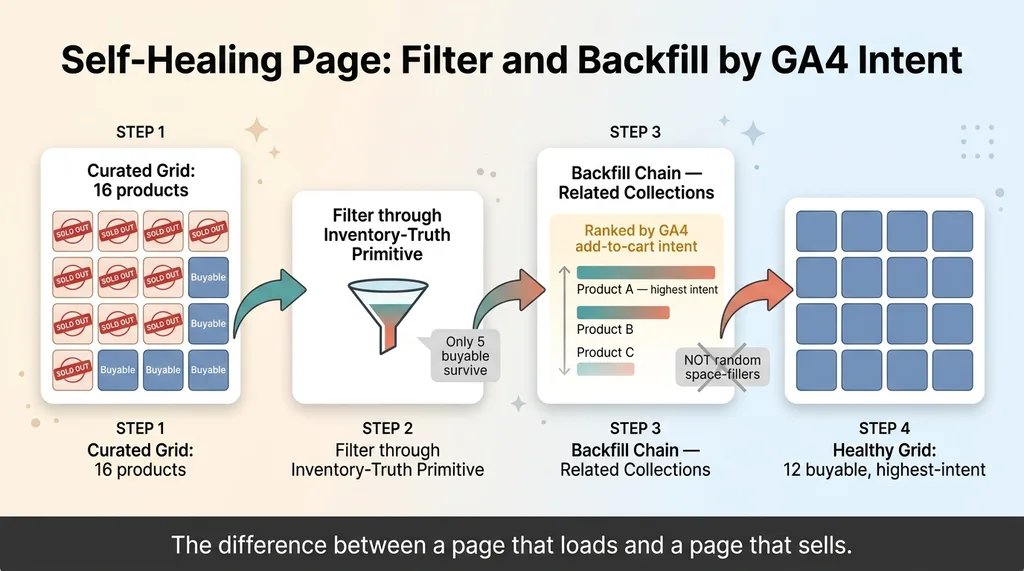
When a landing page builds, it does not just render whatever products were curated into it. First it runs every featured product through the inventory-truth primitive and filters down to only the buyable ones.
So if I hand-picked 16 products for a campaign page and 11 of them sold out overnight, the page does not render 11 dead tiles. It renders the 5 that survive and then it notices it has a problem.
Backfill from a data-ranked fallback chain
I target a minimum grid of 12 products, a clean 3x4. If filtering to buyable leaves fewer than that, the page backfills the gap from a fallback chain of related collections.
 Self-Healing Page: Filter and Backfill by GA4 Intent
Here is the detail that makes this work instead of just filling space. The fallback is ranked by GA4 add-to-cart intent, not by product count, not by recency, not by whatever happens to be alphabetically first. I want the replacement products to be the ones people actually try to buy.
A sold-out grid backfilled with random in-stock products is technically healthy and practically useless. A sold-out grid backfilled with the products that historically pull the most add-to-carts keeps the page converting. That ranking is the difference between a page that loads and a page that sells.
Then there is healing pages that are already live. Plenty of my custom landing pages were built and published weeks ago. When their featured grid goes sold out, I do not want to rebuild them from scratch. So I built a heal function that re-heals an already-published custom landing page in place, filtering and backfilling its grid without touching anything else about the page.
This is what I mean by self-healing landing pages. The page does not die quietly when inventory shifts under it. It notices, it repairs its own grid with the highest-intent products available, and it keeps working. I do not get paged at midnight. The page just fixes itself and keeps converting.
The whole point of dynamic landing page generation is this: the page is not a static snapshot of inventory from the day you built it. It is a live reflection of what is buyable right now.
The Cron That Probes Every Delivering Ad
The healer fixes a page when someone hits it. But I do not want to wait for a customer to be the one who discovers a page went bad. So there is a cron.
Probe, heal, and only then pause
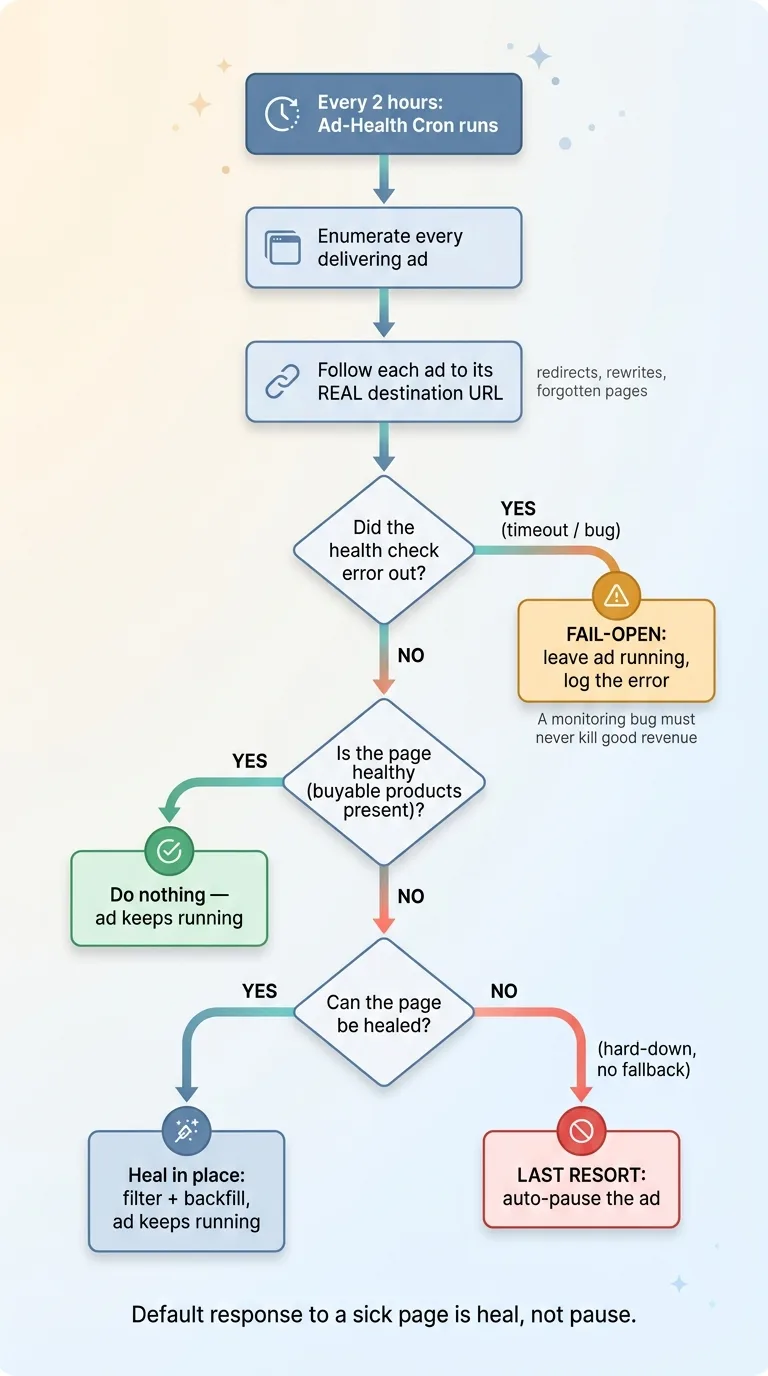
Every two hours, an ad-landing-page-health cron runs. It enumerates every currently-delivering ad, follows each one to its actual destination, and probes whether that page is healthy under the buyable definition.
Notice it follows the ad to the real destination. Ads redirect, get rewritten, point at pages I forgot existed. The only URL that matters is the one a customer actually lands on, so that is the one it checks.
If a custom landing page is unhealthy, the cron heals it in place first. Filter, backfill, done. The ad keeps running and the page is now fixed.
Only if a page is genuinely hard-down and cannot be healed, say a sold-out product page with no fallback path, does the system auto-pause the ad. Pausing is the last resort, not the first move. The default response to a sick page is to make it well, not to shut off the traffic.
Fail-open so a bug never kills good ads
This is the design decision I care about most. The system is fail-open.
 Ad-Health Cron Decision Tree: Probe, Heal, Pause, Fail-Open
If the health check itself errors out, an API timeout, a bad response, a bug in my own code, it does not pause the ad. It logs the error and leaves the ad running.
Here is the reasoning. A monitoring system that fails closed will, the first time it has a bug, silently pause your best-performing ads and tell you nothing is wrong. That is a far more expensive failure than the occasional dead page slipping through. A monitoring bug should never be allowed to kill good revenue. So when in doubt, the system leaves the ad alone and tells me something looked off.
That ties into a broader principle I build into everything: monitoring that emails me when nothing is wrong. Silence from a monitor is not proof of health. It might mean the monitor is dead. So my systems confirm they ran, not just shout when they fail.
A side win from this cron: it surfaced 32 collections that were rendering blank category tiles. No image, just an empty box. A blank tile converts nobody even when there is a perfectly buyable product sitting behind it, so the system auto-filled those images. Free conversions I did not know I was leaving on the table.
What This Actually Prevents
Let me put real dollars on this.
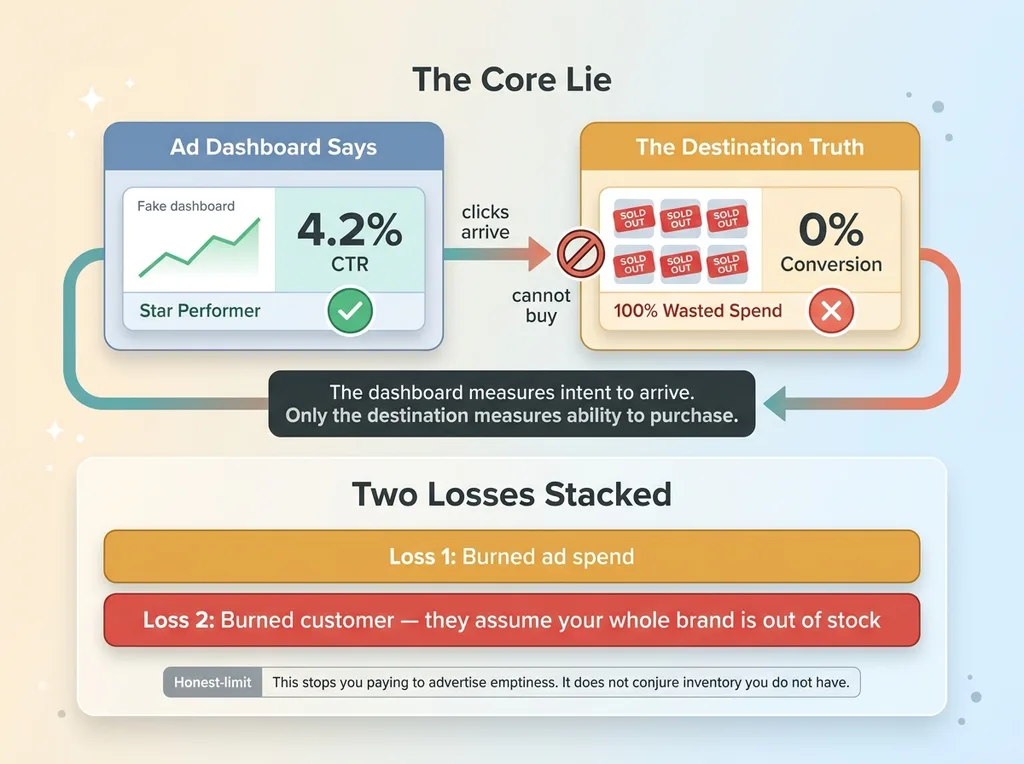 The Stacked Loss of a Dead Page vs The Dashboard Lie
A top ad sending all its traffic to a fully sold-out page is a 100% wasted spend channel. And it looks like a winner in the ad dashboard, because clicks and click-through rate stay high. People still click. They just cannot buy. The dashboard reports a star while the destination converts zero.
That is the core lie. The ad dashboard measures intent to arrive. Only the destination measures ability to purchase. If you are optimizing off the dashboard alone, you can scale spend on an ad that is making you exactly nothing.
Here is what the system now guarantees:
- No ad delivers to a page with zero buyable products. The cron catches it within two hours and heals or pauses.
- Sold-out grids backfill with the products people actually add to cart, ranked by real GA4 intent, not random space-fillers.
- Ads pause only when a page genuinely cannot be saved, and never because the health check itself hiccuped.
Now the honest limit. This does not fix a brand that is broadly out of stock. If your whole catalog is wiped, no amount of clever backfilling conjures inventory you do not have. What this system does is stop you from paying to advertise the emptiness. It is a safety net, not an inventory strategy. It keeps you from burning budget on dead pages while you sort out the real supply problem.
That distinction matters. I am not selling you a way to sell stock you do not have. I am selling you a way to stop lighting money on fire when stock runs out.
Where Your Ad Spend Is Probably Leaking Right Now
Here is what I would bet on without seeing your account.
You have at least one delivering ad pointed at a page that is stale, sold out, or rendering blank tiles, and you have no way to know, because everything returns a clean 200. The ad looks healthy. The destination is not.
The fix is not a dashboard you remember to check. You will not check it, and even if you did, "16 products, 5 buyable" is not something a human eye catches in a grid. The fix is a system that probes every destination on its own, heals the pages it can, and pauses only the ones it genuinely cannot.
The gap between "the page loads" and "the page sells" is exactly where ad budgets quietly die. And it is plumbing nobody sells you, because it is unglamorous and invisible until you go looking.
If you run ads to product or collection pages, I will audit your destinations and tell you where the leaks are. Not a slide deck. The actual list of ads pointing at pages that cannot take an order. You can see where your ad spend is leaking and decide what to do with it.
Want to explore what AI could do for your business?
Book a free 30-minute strategy call. No pitch deck, no sales team, just a real conversation about your operations and where AI actually fits.
Get AI insights for business leaders
Practical AI strategy from someone who built the systems — not just studied them. No spam, no fluff.
Hodgen.AI
Ready to automate your growth?
Book a free 30-minute strategy call with Hodgen.AI.
Book a Strategy Call