The Symptom: Order Confirmations Landing in Spam
I run about a dozen projects on one transactional email sending account. My DTC fashion brand, a few client apps, some internal tools. (Here's how I run email for a dozen businesses on one account if you want the architecture.) For a long time it just worked. Then it didn't.
Deliverability complaints started piling up. Order confirmations going to spam. Password reset emails buried in junk. Campaign sends that customers swore they never received. The same problem hit transactional and marketing mail at once, which should have been the first clue, but I'll get to that.
Here's why this matters if you're a CEO and not an email nerd. A customer who never sees their order confirmation assumes the order failed. So they reorder, or they open a support ticket, or they file a chargeback. Every one of those costs you money and trust. A password reset in spam means a locked-out user who churns instead of logging back in.
Emails going to spam is not a cosmetic problem. It's a revenue leak that hides behind a clean-looking dashboard. Your sending platform shows "delivered" in green. The email provider accepted the message. Technically it was delivered. It was delivered straight into a folder nobody opens.
The reflex everyone has, including me for about an hour, is to blame authentication. SPF, DKIM, DMARC. Those three acronyms are where every consultant, vendor, and forum thread points you first. So that's where I started too.
It was the wrong place to start. Authentication was fine. It had been fine the whole time. And the actual cause was a feature my marketing instincts had switched on years ago and never questioned.
Let me walk you through the whole diagnosis, because the lesson here is bigger than one bug.
Why Everyone Blames SPF, DKIM, and DMARC First
What each one actually does
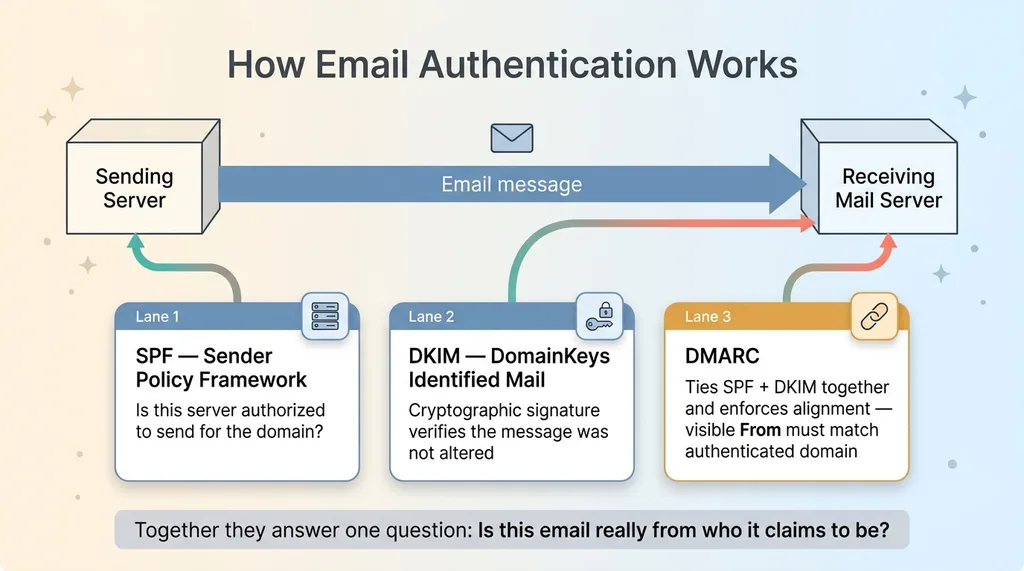
These three records authenticate that your email is really from you. Quick version:
 What SPF, DKIM, and DMARC Each Do
- SPF (Sender Policy Framework) publishes a list of servers authorized to send mail for your domain. The receiving server checks whether the message came from one of them.
- DKIM (DomainKeys Identified Mail) adds a cryptographic signature to your message. The receiver verifies the signature against a public key in your DNS, confirming the message wasn't altered in transit.
- DMARC ties the two together. It tells receivers what to do when SPF or DKIM fail, and it enforces "alignment," meaning the domain in your visible From address has to match the authenticated domain.
Together they answer one question: is this email actually from who it claims to be from? That's it.
Why it's the wrong default suspect
These are the first things everyone checks for a good reason. They're well-documented, they're easy to test, and there are a hundred free tools that grade them. When you're staring at a deliverability problem, DNS records are a comforting place to look because the answer is binary. Pass or fail.
The trouble starts when they all pass and people keep poking at them anyway.
I've watched this happen on client engagements before they hired me. Someone gets paid to fix deliverability, runs an authentication check, sees a minor warning, and spends a week "hardening" DNS records that were already working. Then the emails still go to spam, so they tweak the records again. The CEO is paying real money for fixes that change nothing.
Here's the thing nobody says clearly: authentication is necessary but not sufficient. Passing SPF, DKIM, and DMARC gets you in the door. It does not guarantee inbox placement. A spam filter that confirms you are who you say you are can still decide your message looks like garbage and route it to junk.
So when you've got SPF DKIM DMARC pass still spam, you've already learned the most important thing: stop touching the DNS. The problem is somewhere else.
The Forensics: Proving Authentication Was Fine
Reading real inbox headers
I don't trust sending dashboards. They tell you what the platform thinks it did, not what actually landed. So the first real move is to send a test email to an inbox you control and read the raw headers of the received message.
In Gmail, that's "Show original." The block you want is Authentication-Results. Here's what mine showed:
dkim=pass header.i=@mydomain.com
spf=pass smtp.mailfrom=mydomain.com
dmarc=pass header.from=mydomain.com
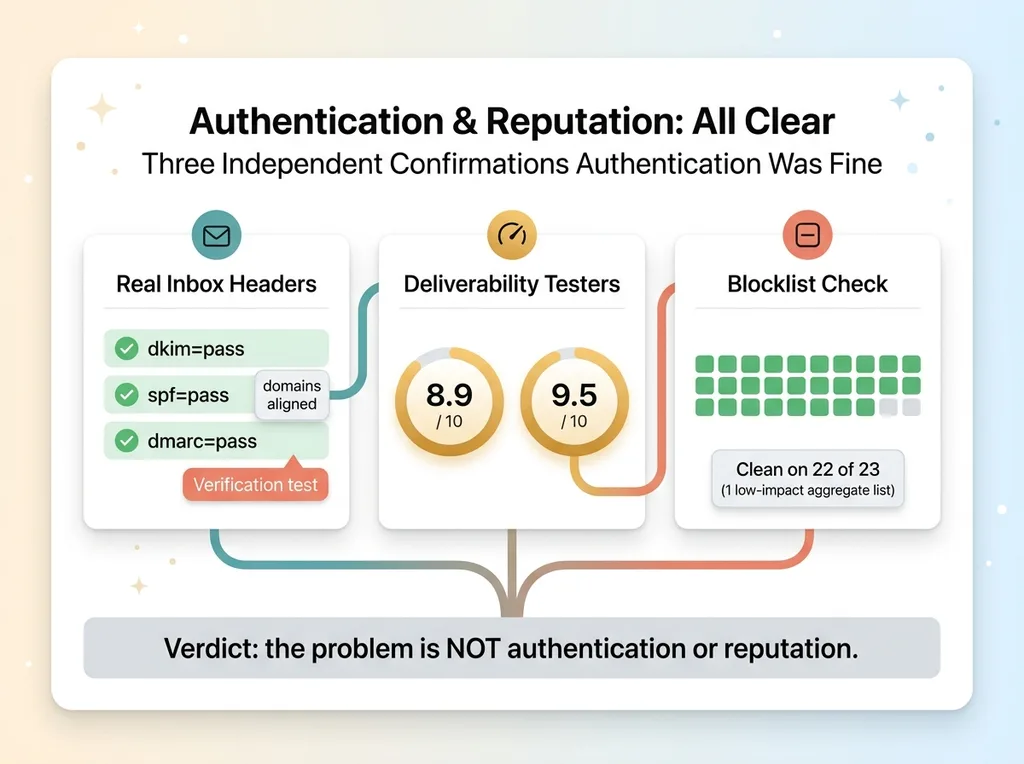
All three passed. And critically, the domains aligned. The DKIM signing domain, the SPF mailfrom, and the visible From all matched. That alignment is what DMARC actually enforces, and it's the part people forget to check.
So right there, in the headers of a real received message, the data said authentication was not the problem. Not "probably fine." Confirmed fine.
Deliverability scores and blocklist checks
Headers told me authentication was clean. Next I needed to rule out reputation. A domain or IP with a bad sending history gets filtered no matter how perfect the records are.
 Three Independent Confirmations Authentication Was Fine
I ran the message through two deliverability testers. These tools give you a unique address to send to, then score the message on content, authentication, and reputation. I scored 8.9 out of 10 on one and 9.5 out of 10 on the other. Strong scores. No reputation red flags.
Then blocklists. There are a couple dozen major DNS blocklists that filters consult before accepting mail. I checked my sending domain and IP against 23 of them. Clean on 22. The one hit was a low-impact aggregate list that doesn't move the needle on Gmail or Outlook placement.
So now I had three independent confirmations:
- Real inbox headers: SPF, DKIM, DMARC all pass and align.
- Deliverability testers: 8.9 and 9.5 out of 10.
- Blocklists: clean on 22 of 23.
The data was unanimous. Authentication and reputation were not the issue. If I'd kept editing DNS records at this point, I'd have been billing for theater.
The cause had to be in the message itself. So I read the message itself.
The Real Culprit: The Open-Tracking Pixel
How tracking rewrites your email
Most email platforms offer open and click tracking. It sounds harmless. You flip a toggle, and suddenly you can see who opened your email and what they clicked. Marketing teams love it. I'd had it on for years.
Here's what that toggle actually does to your message, mechanically.
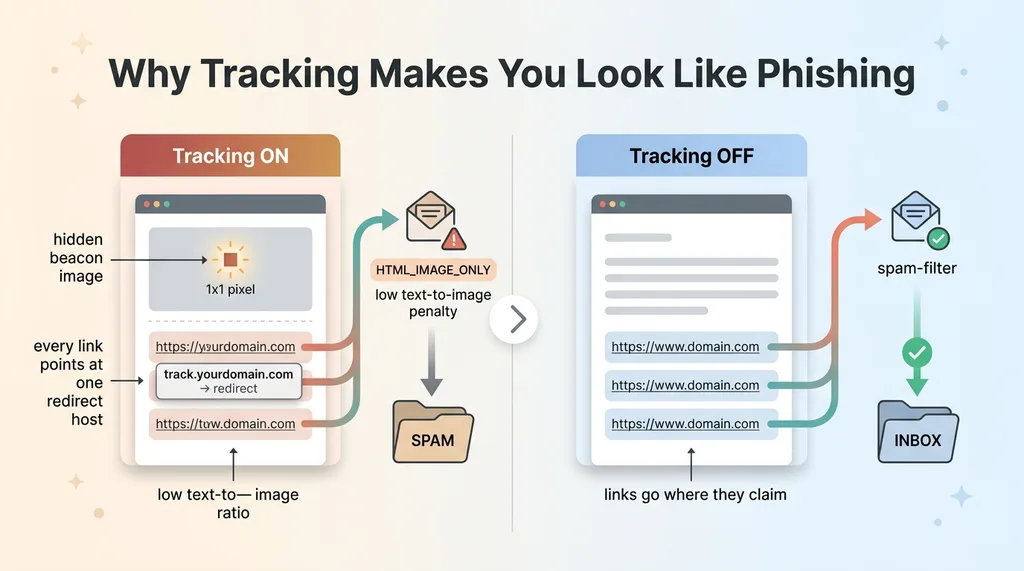
Open tracking injects a hidden 1x1 pixel image into the body of your email, usually right before the closing tag. When the recipient opens the email, their client requests that tiny image from the tracking server, and that request registers as an "open."
Click tracking rewrites every link in your email. Instead of pointing directly at your destination, each link now routes through a tracking subdomain, something like track.yourdomain.com, which records the click and then redirects. Every link in the email points at that one host.
When I decoded the raw body of an actual test send, there it was. The 1x1 pixel sitting in the HTML, and every single link rewritten to route through the tracking subdomain. This was the open-tracking pixel was the real problem in plain sight.
Why filters punish it
Now look at that email through a spam filter's eyes.
 How the Tracking Pixel Makes Email Look Like Phishing
It sees a message with a hidden image pixel, a low ratio of text to images, and every link pointing at a single redirect host instead of going where they claim to go. To a filter, that is the exact fingerprint of a phishing email or a bulk blast. The whole point of phishing is to hide the real destination behind a redirect and trigger an invisible beacon. Spam filters have rules with names like HTML_IMAGE_ONLY and low text-to-image-ratio penalties specifically for this pattern.
So the features designed to measure engagement were making my legitimate, authenticated, well-reputed emails look like phishing attempts. The marketing tooling was quietly tanking deliverability on the same emails I needed customers to actually see.
That's the cruel part. The better your tracking setup, the more your email resembles the thing filters are built to catch.
The Fix: Turning Off Tracking (and the Gotcha)
Disabling open and click tracking
The fix is conceptually simple. Turn off open tracking and click tracking. I disabled both open_tracking and click_tracking through the provider's API.
For transactional mail this is an easy call. Order confirmations and password resets don't need engagement analytics. Nobody is A/B testing the subject line of a receipt. The tracking was pure downside.
Verify the body, not the API flag
Here's the gotcha that costs people days, and it cost me a couple of hours before I caught it.
 Trust the Output, Not the Status Flag
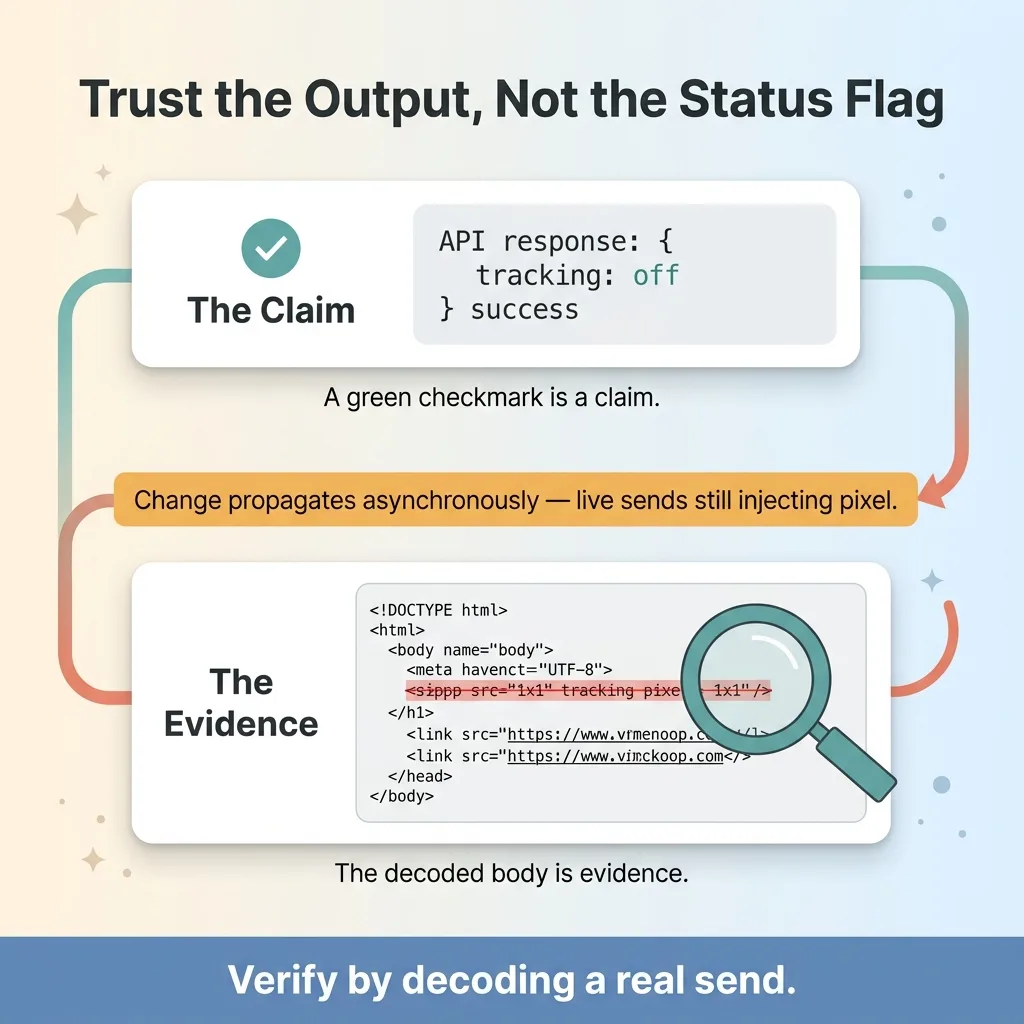
When you change that setting through the API, the call returns success. The dashboard updates. Everything says you're done. But the change propagates to the underlying mail-sending config asynchronously. For a window after the API confirms success, live sends are still injecting the pixel and still rewriting links.
So I sent another test, decoded the raw body, and the pixel was still there. The API said tracking was off. The actual outgoing email said tracking was on. If I'd trusted the status flag, I'd have declared victory while customers kept landing in spam.
This is a theme I hit over and over with systems that fail silently. Trust the output, not the status flag. A green checkmark is a claim. The decoded body is evidence. I waited, sent again, decoded again, and this time the pixel was gone and the links pointed straight at their real destinations. Then I knew it was fixed.
The honest tradeoff: you lose open-rate and click data. For transactional email that's nothing, you didn't need it. For genuine marketing campaigns it's a real decision, and you might keep tracking on a separate sending subdomain that you isolate from your important transactional mail. But for the receipts and resets that drive revenue and retention, drop the tracking and don't look back.
A Diagnostic Order That Saves You From Paying for the Wrong Fix
Here's the checklist I wish someone had handed my team before we burned any time looking at DNS. Hand this to whoever runs your email.
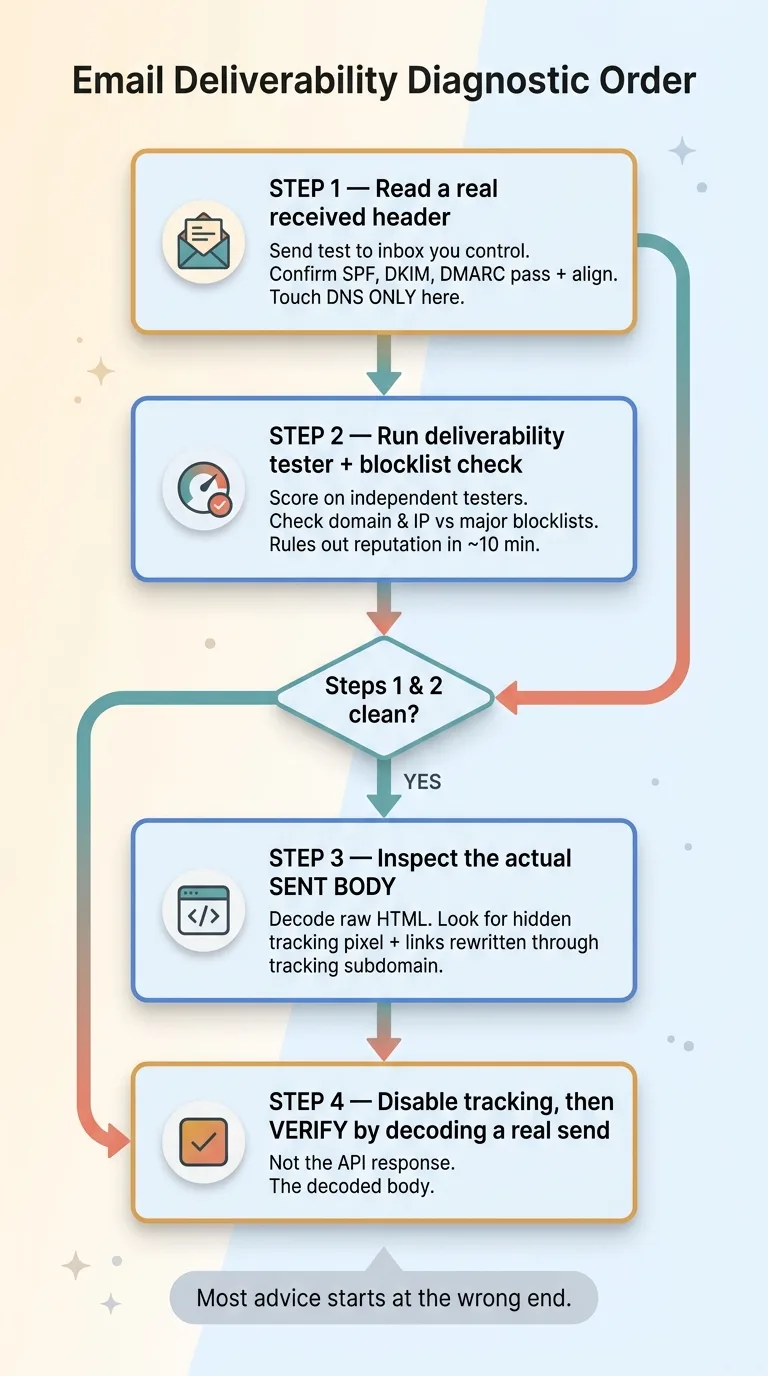 The 4-Step Deliverability Diagnostic Order
1. Read a real received header. Send a test to an inbox you control, view the raw source, and confirm SPF, DKIM, and DMARC all pass and align. Don't trust the sending dashboard. Read the headers of the message that actually arrived.
2. Run a deliverability tester and a blocklist check. Score the message on a couple of independent testers and check your domain and IP against the major blocklists. This rules out reputation in about ten minutes.
3. If steps 1 and 2 are clean, inspect the actual sent body. Decode the raw HTML of a real send. Look for a hidden tracking pixel and links rewritten through a tracking subdomain. This is where the real problem usually hides.
4. Disable tracking on transactional mail, then verify by decoding a real send. Not by trusting the API response. Decode the body and confirm the pixel and rewritten links are actually gone.
Notice the order. You only touch DNS in step one, to confirm it's fine, and then you move on. Most deliverability advice starts at the wrong end, obsessing over authentication you've already validated.
It's the same mistake I see in most AI projects. People start with the loud, well-documented suspect and never check whether the actual system is doing what they think it's doing.
When the Obvious Answer Is the Expensive Wrong One
Step back from this one bug and you see the pattern.
Across a dozen projects on a single sending account, the visible, well-documented suspect was clean. SPF, DKIM, DMARC, reputation, blocklists, all fine. The real cause was a feature nobody thought to question, because it was a feature, not a bug. It was supposed to be there. It was doing exactly what it was designed to do, and what it was designed to do happened to look like phishing.
This is the work I actually do for clients. Not charging you to re-tighten settings that were already fine, but diagnosing the real system to find the thing nobody thought to question.
I find these failures because they cost me money first. I run a real DTC brand and real client systems on this stuff. When my order confirmations go to spam, that's my revenue, so I dig until I find the actual cause instead of the comfortable one.
Get the next build note.
I write up each system I build, including what broke. Subscribe to my newsletter and I'll send you the next one.