The Supabase RLS Mistake That Left My Ledger Public
A supabase row level security mistake left a sensitive financial database readable through the public anon key. Here's the exact one-hour fix.
By Mike Hodgen
The Email That Said CRITICAL
The subject line just said CRITICAL. I almost ignored it because Supabase sends a lot of email.
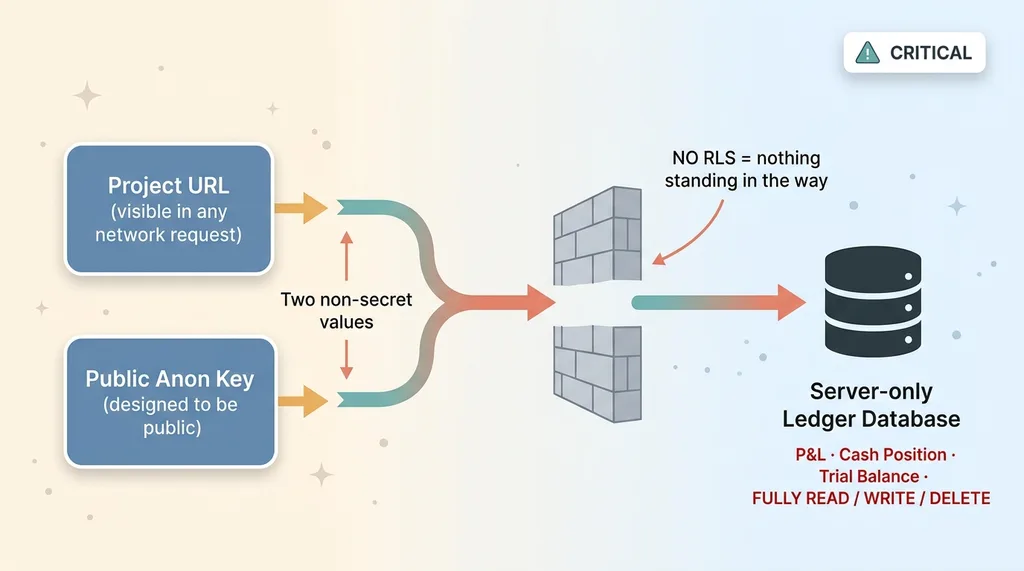 The exposure math: public anon key + project URL = open ledger
I'm glad I didn't. The supabase security advisor had flagged a table with row-level security disabled. Not on some throwaway prototype. On a server-only database holding the full financials for one of my businesses. The ledger. P&L, cash position, the whole thing.
Here's what that warning actually meant in plain terms. Until I fixed it, anyone with my project URL plus the public anon key could read, write, or delete the entire ledger. Both of those values ship in client code or are trivially guessable. The project URL is right there in any network request. The anon key is designed to be public.
So the math was simple and ugly. Two values that aren't secret, pointed at a database full of money numbers, with nothing standing in the way.
The part that made my stomach drop: this database was never supposed to be reachable from a browser at all. It was a backend service. No frontend. No users logging in. It existed to do server-side math and store results. And yet it was sitting on the open internet, fully writable, because of one default setting I never thought about.
I built that system fast. It worked. It had been working for months. And the whole time it was wide open.
This is the supabase row level security mistake that almost nobody catches until something forces them to look. If you built a backend with Supabase, or had an AI tool spin one up for you, here's the question worth sitting with: is it actually secure by default?
No. It isn't. Let me show you exactly why.
Why SQL-Editor Objects Start Insecure
The convenience of building fast in the SQL editor is exactly where the hole is. Two defaults do most of the damage.
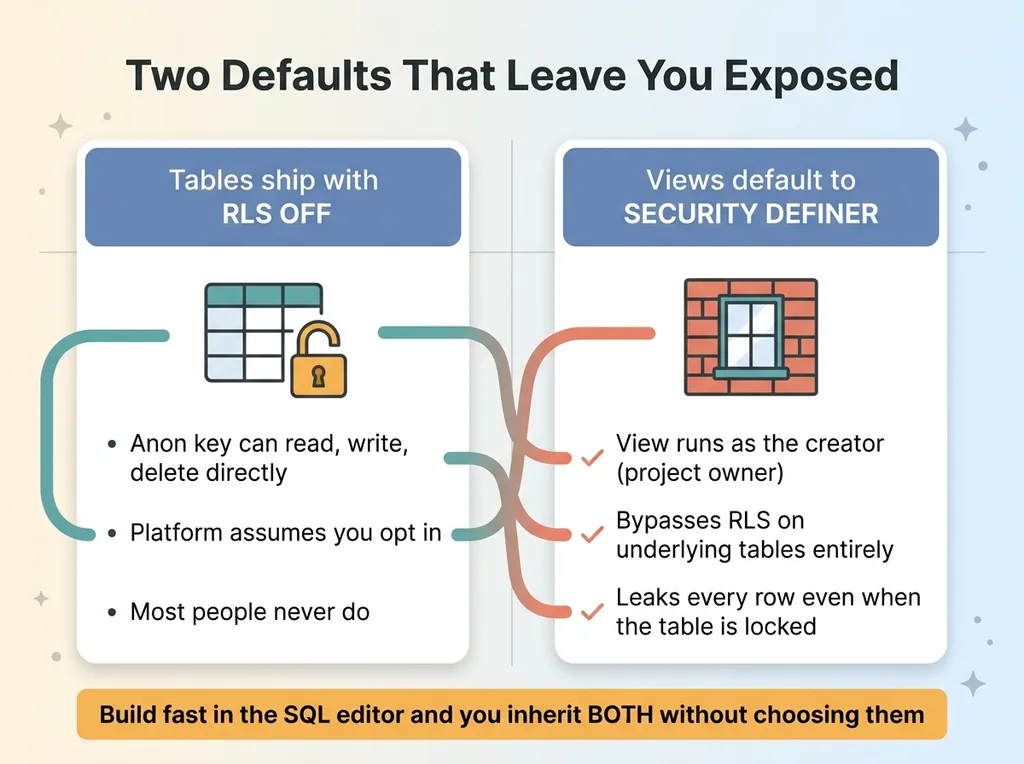 Two compounding insecure defaults: RLS off + SECURITY DEFINER views
Tables ship with RLS off
When you create a table through the Supabase SQL editor, or through an MCP server letting an AI agent run SQL for you, row-level security is off by default.
RLS off means the anon key can hit the table directly. Read it, write it, delete it. The platform doesn't stop you because the platform assumes you'll opt in to protection when you're ready.
Most people never opt in. They assume the platform has them covered because the dashboard looks clean and the app works. It doesn't cover you. It hands you a loaded tool and trusts you to know it's loaded.
Views default to SECURITY DEFINER
This is the bigger trap, and it's the one nobody warns you about.
Views created in the SQL editor default to SECURITY DEFINER. That means the view runs with the permissions of whoever created it, which is usually you, the project owner. It bypasses RLS on the underlying tables entirely.
Read that again, because it's the whole game. You can enable RLS on a table, lock it down properly, see the green checkmark, and feel safe. Then a view sitting on top of that table leaks every row anyway, because the view runs as you and ignores the table's policies completely.
That's a security definer view leak. The protected table is fine. The window someone cut into the wall above it is wide open.
So you've got two compounding defaults. Tables that start unprotected, and views that route around protection even when you add it. Build fast in the SQL editor and you inherit both without ever choosing them.
The Advisor Only Emailed Me One Line
Here's the detail that changed how I treat every Supabase project I touch.
The email only showed me the CRITICAL items. One line. One table with RLS off. I figured I'd fix that one thing and be done.
Then I opened the full supabase security advisor inside the dashboard. Three more leaks the email never mentioned.
Three SECURITY DEFINER views, each one exposing something sensitive. One leaked the P&L. One leaked the cash flow. One leaked the trial balance. None of them made the email. They sat there quietly in the dashboard, flagged, but never escalated to my inbox.
And here's the part that matters most. Even after I enabled RLS on the underlying tables, those three views kept leaking. Because that's what SECURITY DEFINER does by design. The view doesn't care that the table is locked. It runs as the creator and reads everything.
So if I'd trusted the email, fixed the one CRITICAL table, and walked away, I'd have left three of the most sensitive financial views fully exposed and felt good about it.
The lesson is blunt: never trust the emailed summary. Pull the full advisor every time. The most dangerous findings on my project were the ones that didn't make the email.
The email is a smoke alarm that only goes off for one type of fire. The supabase security advisor in the dashboard is the actual inspection. Do the inspection.
The One-Hour Lockdown for a Server-Only Database
The fix took about an hour. Most of that hour was finding the views, not fixing them. Once you know the four moves, the work itself is mechanical.
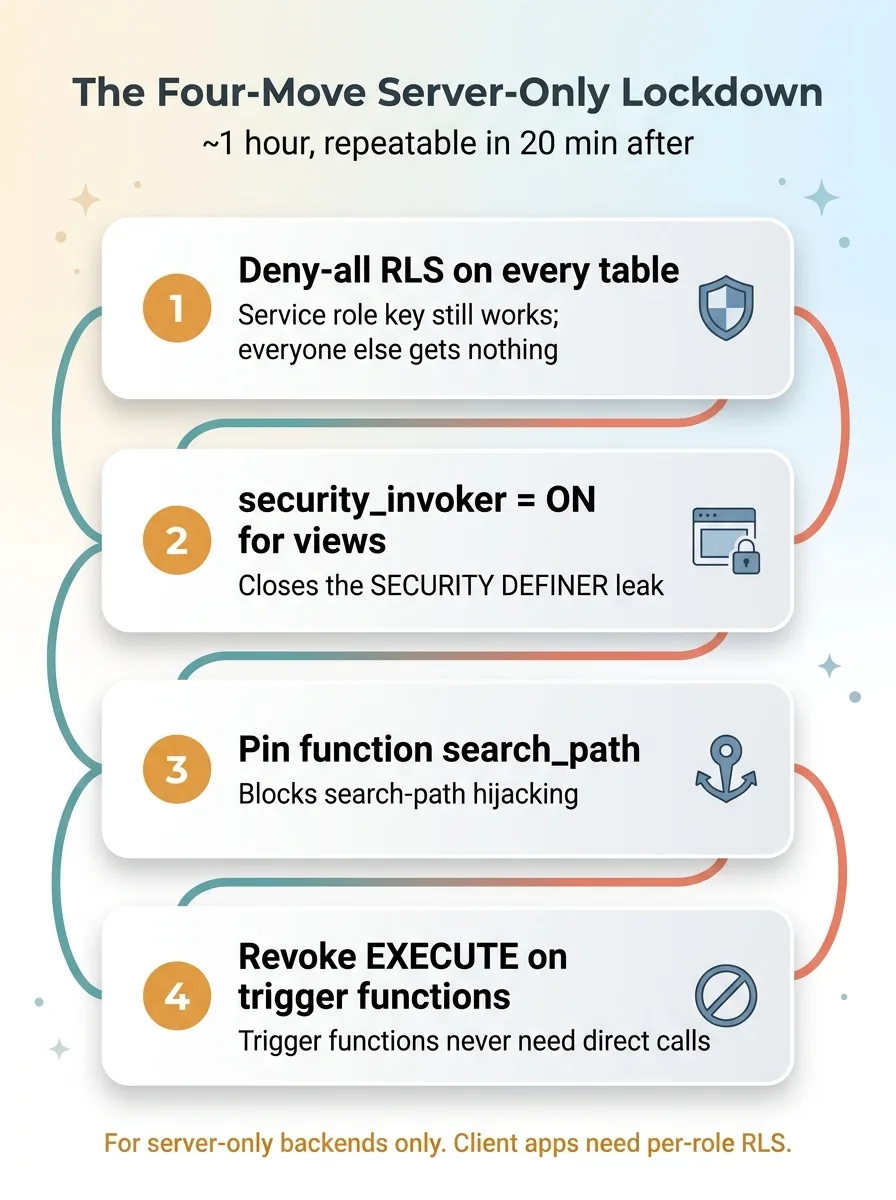 The four-move one-hour lockdown checklist
This database is server-only. No users log in. The server talks to it using the service role key, which bypasses RLS entirely. That changes everything, because it means I can lock out every other role without breaking a single thing.
Deny-all RLS on every table
I enabled RLS on every table and added a deny-all policy. No row reachable by the anon or authenticated roles. Period.
This sounds aggressive. For a server-only project it costs nothing. The server uses the service role key, which ignores RLS by design, so it keeps working. Everyone else gets nothing. That's the correct posture for a backend that was never meant to face a browser.
security_invoker=on for views
I set security_invoker=on on every view.
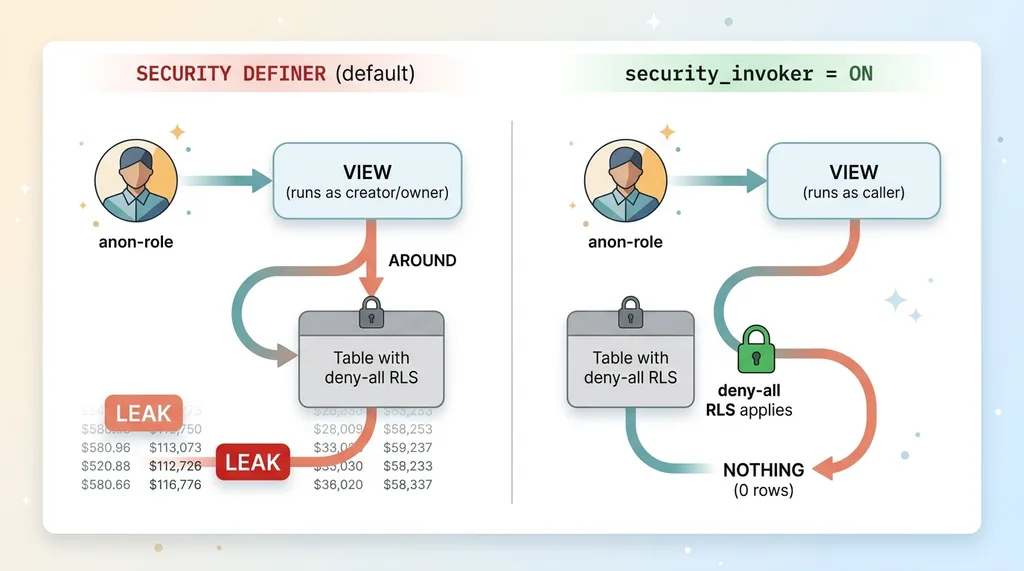 SECURITY DEFINER vs security_invoker view behavior
This is the move that closes the SECURITY DEFINER leak. With security_invoker on, the view respects the RLS of whoever is calling it, instead of running with the creator's permissions. So the moment a view runs under the anon role, the deny-all policies on the underlying tables apply, and the view returns nothing.
That single setting turned three leaking financial views into three locked doors.
Pin function search_path and revoke EXECUTE
Two cleanup moves that close subtler holes.
First, I pinned the search_path on every function. An unpinned search_path lets an attacker who can create objects redirect what your function actually calls, a trick called search-path hijacking. Pinning it removes that.
Second, I revoked EXECUTE on the trigger functions from public roles. Trigger functions don't need to be callable directly by anyone, so there's no reason to leave that open.
Four moves. Deny-all RLS, security_invoker on views, pinned search_path, revoked EXECUTE. About an hour start to finish, and the only slow part was hunting down every view to confirm I'd caught them all.
The fix is repeatable. That's the point. Once you've done it on one project, you can do it on the next in twenty minutes.
Then I Checked the Other 39 Projects
One leak is a clue, not a conclusion. So I swept all 40 of my Supabase projects looking for the same pattern. I'd already ran a security audit across all my codebases, so I knew how fast small mistakes multiply across an estate.
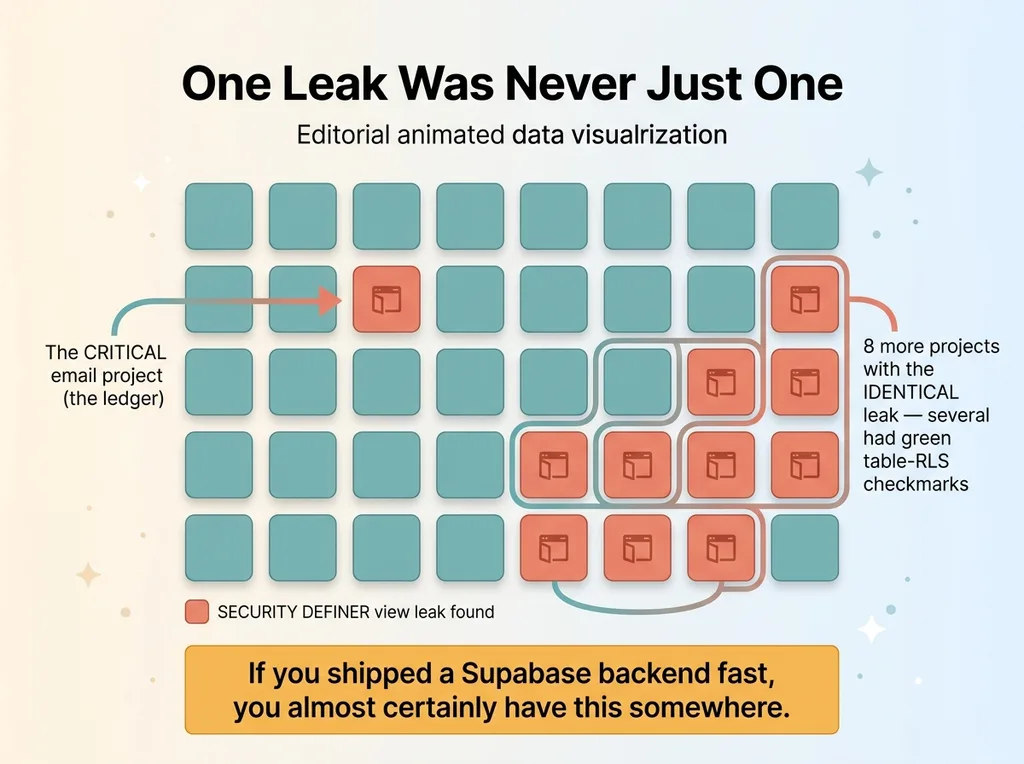 Portfolio sweep results: 1 incident became 9 leaking projects
I found 8 more projects with the identical SECURITY DEFINER view leak.
Several of them were projects I'd have sworn were locked down. I'd enabled table RLS on them months ago. Green checkmarks across the board. The tables were genuinely protected. And views sitting on top of those tables were leaking the data anyway, because the view bypass hides behind the table's green checkmark.
That's the trap in one sentence. The dashboard shows you the table is secure, and the table is secure, and the data still walks out through a view you forgot existed.
This isn't a Supabase-specific failing or a me-specific failing. It's a pattern. I've watched the same shape show up before, including leaking patient data through the public anon key on a different system entirely. Same root cause. Fast build, default settings, sensitive data, nobody looking until something forced the look.
Here's the gut-punch for anyone who built quickly: if you shipped a Supabase backend fast, you almost certainly have this somewhere. Not maybe. Almost certainly. The defaults make it the likely outcome, not the unlucky one.
One incident tells you the hole exists. The value is in sweeping the entire estate, because the hole is rarely in just one place.
Secure by Default Is a Myth You Have to Fix
The platforms that let you ship in a weekend ship insecure by default on purpose.
They optimize for getting started, not for getting locked down. That's a real product decision and an understandable one. A platform that forced you to write RLS policies before you could read your own table would lose every developer who just wanted to test an idea.
That tradeoff is fine if you know it exists. It's a disaster if you assumed the platform had your back.
This is the honest limitation of building fast, and I'm not pretending otherwise because I build fast all the time. Speed has a tax. The tax is usually paid in security debt nobody sees, until an advisor emails one CRITICAL line about a ledger that's been public for months.
The four-move lockdown is repeatable. An hour per project, less once you've done a few. It belongs on a standing checklist for every server-only database you run. Deny-all RLS, security_invoker on views, pinned search_path, revoked EXECUTE. Run it, confirm it, move on.
One caveat I won't skip. Deny-all only works because this backend has no real users hitting it directly. For client-facing apps where people log in and need to see their own data, the policies get more nuanced. You're writing real RLS rules per role, per row, and supabase rls server-only thinking doesn't transfer cleanly. Deny-all is the right answer for a backend, the wrong answer for an app. Know which one you're building.
What I'd Check on Your Backend First
If you want to check your own backend today, here are the first three things, in order.
One. Open the full security advisor in the dashboard. Not the email. The email shows you a slice. Pull the whole report and read every finding, not just the CRITICAL ones.
Two. List every view and confirm security_invoker is on. This is where the anon key exposure usually hides, behind a view that bypasses the protection you already added. If even one view is still SECURITY DEFINER over sensitive data, you have a live leak.
Three. Confirm RLS is enabled with an actual policy on every table. RLS enabled with no policy still blocks correctly in most setups, but you want to see the deny-all or the real policy spelled out, not assume it.
Do those three and you'll know more about your exposure than most teams who shipped with AI ever bother to find out. Because the same security holes show up in every AI-built app, sitting quietly under a green checkmark.
This is the audit I run across an entire portfolio in a day. One incident is a clue. The sweep is where the real risk lives, and most teams that built fast have exactly this hole somewhere they're not looking. If you want a second set of eyes on it, have me run the same audit on your backend.
Want to explore what AI could do for your business?
Book a free 30-minute strategy call. No pitch deck, no sales team. Just a straight conversation about your operations, what you've built, and where AI actually fits.
Get AI insights for business leaders
Practical AI strategy from someone who built the systems — not just studied them. No spam, no fluff.
Hodgen.AI
Ready to automate your growth?
Book a free 30-minute strategy call with Hodgen.AI.
Book a Strategy Call