The Day AI Studio Stopped Working
I was 180 images into a 312-image batch for our blog when everything stopped.
Error 429: Resource has been exhausted (e.g. check quota).
Our AI blog automation pipeline generates custom visuals for every article we publish. Product shots, lifestyle scenes, abstract concepts — all created with Gemini 1.5 Flash through Google's AI Studio API. The system runs every Tuesday morning, processing the week's content calendar in one sweep.
Except this Tuesday, it hit a wall at 11:47am.
AI Studio has a hard limit of 250 requests per day on their Paid Tier 1. I knew this going in. What I didn't know — and what Google doesn't make obvious — is that requesting a tier upgrade doesn't reset your current day's quota. You're stuck until midnight Pacific regardless of what tier you pay for.
We had 132 images left to generate. Publishing was scheduled for Thursday. The articles were written, SEO was locked in, and the content calendar depended on those visuals being ready.
This wasn't a prototype anymore. This was production infrastructure that revenue depended on.
I migrated to Vertex AI that afternoon. Same models, completely separate quota pool, back online in 2 hours. By 3pm we were processing images again.
That migration taught me something important about the Vertex AI vs AI Studio decision: it's not about features or capability. It's about quotas and production constraints. And if you're running AI systems that matter to your business, you need to understand this before you hit the wall like I did.
AI Studio vs Vertex AI: What's Actually Different
Google markets these as the same models with different access patterns. That's technically true, but it misses the infrastructure differences that matter in production.
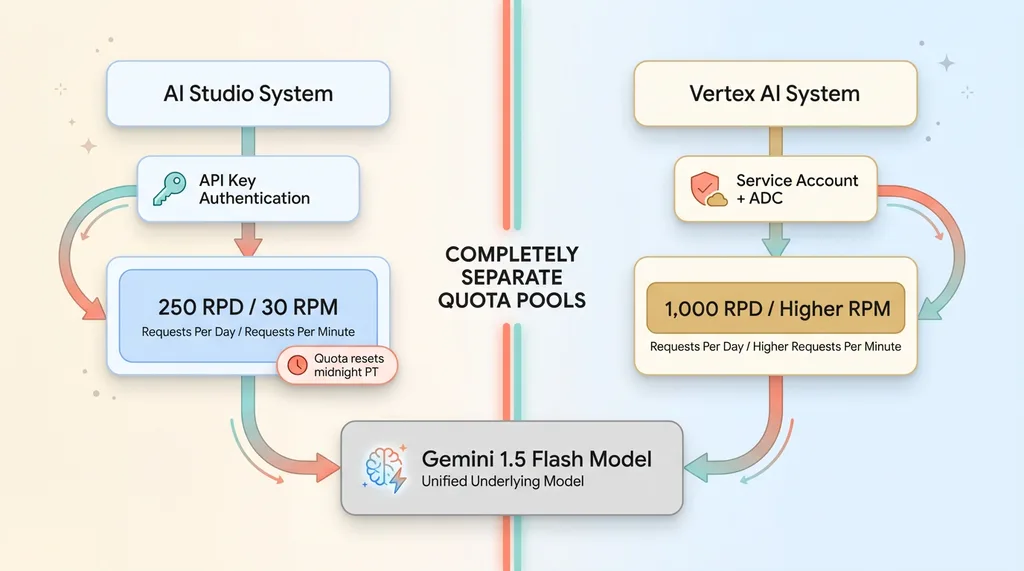 AI Studio vs Vertex AI Quota Architecture
Quota Pools Are Completely Separate
This is the critical one. AI Studio and Vertex AI maintain entirely separate quota pools, even for identical models.
When I hit 250 requests per day on AI Studio's Gemini 1.5 Flash, my Vertex AI quota for the same model was untouched. I had 1,000 requests per day available there — a completely separate limit tied to my Google Cloud project instead of my AI Studio API key.
The quota separation works both ways. If you exhaust your Vertex AI limits, AI Studio still works. They're treated as different products by Google's rate limiting infrastructure, even though they're calling the same underlying models.
This means you can run parallel workloads across both platforms if needed. I don't recommend it as a long-term strategy, but it's a valid escape hatch when you're scaling up and hitting quota walls.
Authentication: API Keys vs Application Default Credentials
AI Studio uses simple API keys. You generate one in the console, drop it in an environment variable, and you're live. No Google Cloud project required, no service accounts, no IAM complexity.
Vertex AI uses Google Cloud's Application Default Credentials (ADC). For local development, you run gcloud auth application-default login and authenticate with your Google account. For production, you create a service account, download the JSON key file, and point the GOOGLE_APPLICATION_CREDENTIALS environment variable at it.
The ADC approach is more secure — service accounts have granular IAM permissions, automatic key rotation options, and audit logging. But it's also more setup. If you're prototyping on a Saturday afternoon, AI Studio's API key is faster. If you're deploying to production infrastructure, Vertex AI's service account model is the right choice.
Endpoint Format Changes
AI Studio endpoints look like this:
https://generativelanguage.googleapis.com/v1beta/models/gemini-1.5-flash-002:generateContent
Vertex AI endpoints are region-specific:
https://us-central1-aiplatform.googleapis.com/v1/projects/{project}/locations/us-central1/publishers/google/models/gemini-1.5-flash-002:generateContent
The URL format is more complex, but you gain control over regional deployment. If you're serving European customers, you can route to europe-west1. If you need low latency for Asia-Pacific traffic, asia-southeast1 is available.
Model names are mostly consistent. gemini-1.5-flash-002 works in both systems. The version suffix (-002) updates when Google releases new model versions, so hardcoding it is fine — you want explicit version control in production anyway.
Pricing Model Differences
Per-request costs are nearly identical between AI Studio and Vertex AI. Gemini 1.5 Flash costs $0.075 per 1 million input tokens and $0.30 per 1 million output tokens on both platforms.
The difference is billing infrastructure. AI Studio charges go through Google's API Console billing. Vertex AI charges flow through Google Cloud's unified billing, alongside your Compute Engine, Cloud Storage, and other GCP services.
For accounting purposes, Vertex AI is cleaner if you're already running infrastructure on Google Cloud. Everything shows up in one bill with consolidated usage reports. AI Studio is simpler if you're not a GCP customer and don't want to set up a Cloud Billing account.
The Rate Limit Problem Nobody Tells You About
Rate limits in production are different from rate limits in prototypes. You don't notice them when you're making 10-20 test requests. You hit them hard when you're processing real workloads.
RPD vs RPM: Two Ways to Hit a Wall
Google enforces two types of limits: requests per day (RPD) and requests per minute (RPM).
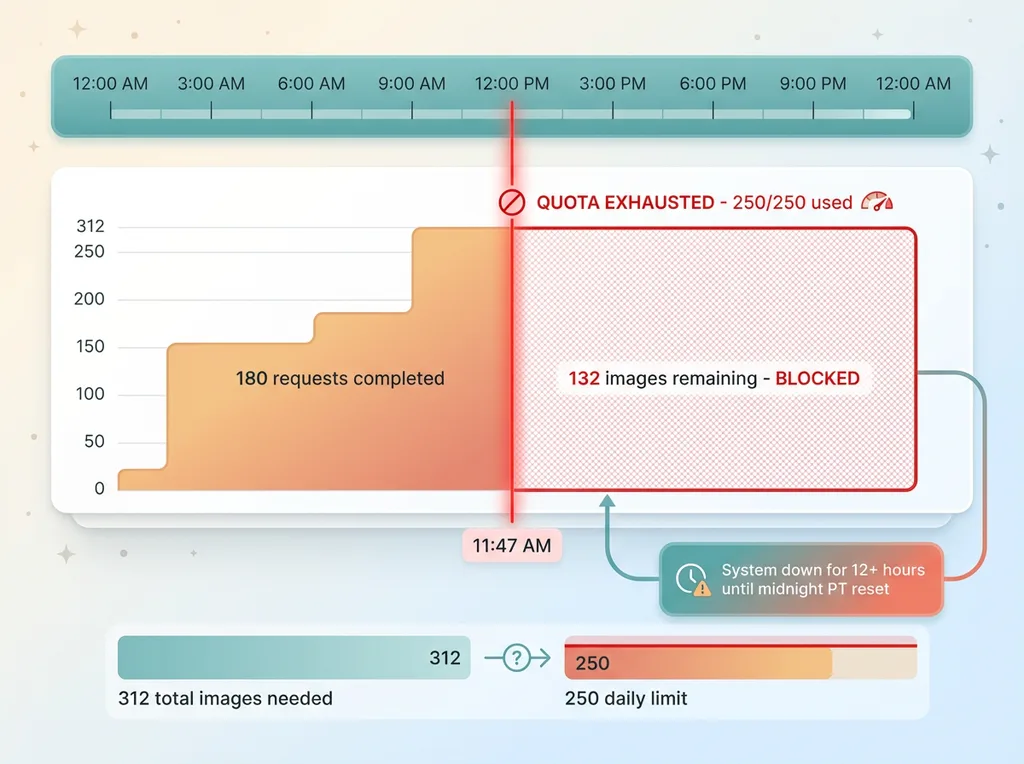 The 250 RPD Quota Problem
AI Studio Paid Tier 1 gives you 250 RPD and 30 RPM for Gemini 1.5 Flash. Those numbers sound reasonable until you run the math on real workloads.
Our blog visual generation pipeline processes 312 images in a batch. That's 312 API requests if you're generating one image per call. At 250 RPD, we can't complete a single batch in one day.
The RPM limit compounds the problem. If you're processing sequentially with no delays, you'll hit 30 requests in the first minute. Then you're throttled for the next 60 seconds. Total throughput: 30 requests per minute maximum, 1,800 per hour theoretical max — but you'll hit the 250 daily cap after 8.3 minutes of running.
Image generation burns through quotas faster than text generation because the requests are more expensive from a model perspective. A single Gemini image generation call uses more compute than 100 text prompts. Google prices them the same per request, but their internal rate limiting treats them differently.
Why Tier Upgrades Don't Save You
When I hit the 250 RPD limit at 11:47am, my first instinct was to request a tier upgrade. Google offers higher tiers with increased quotas, but there's a catch they don't advertise clearly.
Tier upgrades take 1-2 business days to process. Google reviews them manually to prevent abuse. Reasonable from their perspective, painful when you're blocked in production.
But here's the real gotcha: requesting an upgrade doesn't reset your current day's quota. If you've used 250 out of 250 requests at 11:47am, you're at zero capacity until midnight Pacific — regardless of what tier you're approved for.
The quota counter resets at midnight Pacific, not midnight in your timezone. I'm in San Diego, so it's local midnight for me. If you're on the East Coast, you're waiting until 3am. If you're in Europe, you're waiting until 8am or 9am.
This timing matters when you're planning production deployments. If you hit your quota mid-afternoon, you can't just wait an hour for reset. You're down for the rest of the business day.
Parallel Requests Are a Trap
My initial pipeline implementation used parallel requests. Generate 10 images simultaneously, move to the next batch of 10, repeat. Fast in theory.
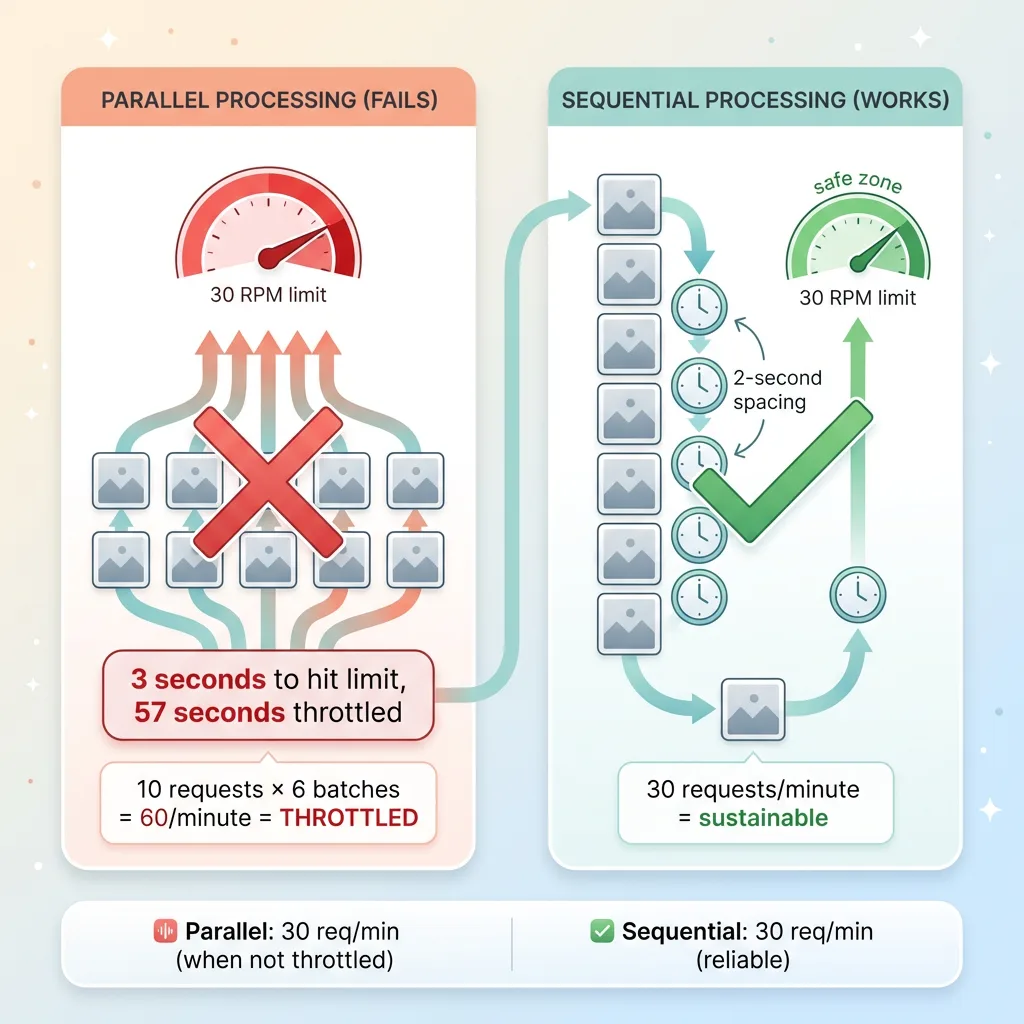 Sequential vs Parallel Request Processing
In practice, parallel requests hammer the RPM limit. Ten simultaneous requests hit in the same second count as 10 toward your per-minute cap. You burn through 30 RPM in 3 seconds, then you're throttled for 57 seconds.
The error messages you get are confusing:
429 Resource has been exhausted
No explanation of whether you hit RPD or RPM. No indication of when the limit resets. No suggestion to slow down or retry later.
I rewrote the pipeline to run sequentially with a 2-second delay between requests. Slower — about 30 requests per minute vs. the theoretical 60 with instant parallel processing — but reliable. The 2-second delay keeps us safely under the RPM limit while maximizing throughput.
Sequential processing with delays is the wrong architectural choice for a system that needs horizontal scaling. But it's the right pragmatic choice when you're dealing with hard quota caps that don't scale with infrastructure spend.
How I Migrated in 2 Hours
The actual code changes were minimal. This wasn't a rewrite — it was a configuration swap.
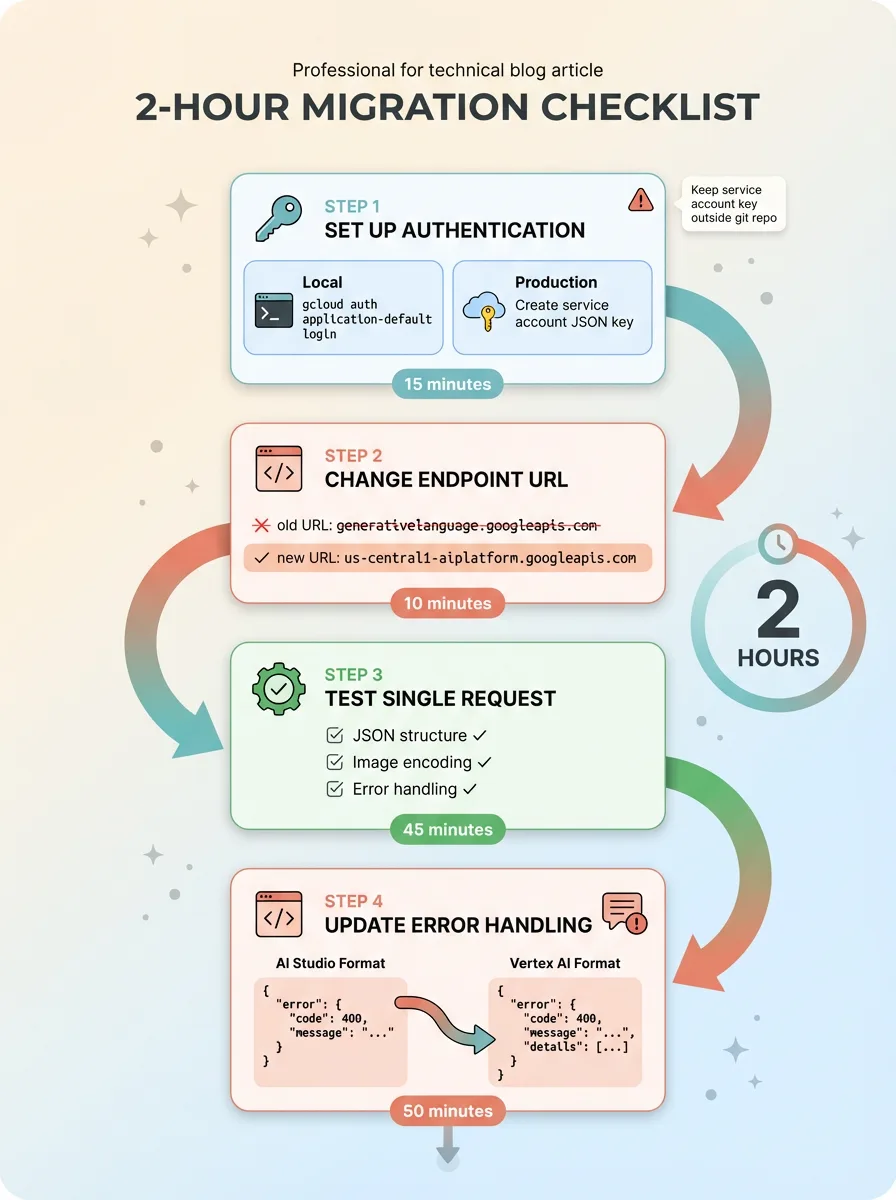 2-Hour Migration Checklist
Step 1: Set Up Vertex AI Authentication
For local development, I ran:
gcloud auth application-default login
That authenticated my local machine with my Google account. Google's Python client libraries automatically detect ADC and use it for API calls.
For production deployment, I created a service account in Google Cloud Console:
- IAM & Admin → Service Accounts → Create Service Account
- Grant the "Vertex AI User" role
- Create a JSON key and download it
Then I set the environment variable to point at the key file:
export GOOGLE_APPLICATION_CREDENTIALS="/path/to/service-account-key.json"
I stored the key file outside the git repository and added the path to .gitignore. Committing service account keys is a security incident waiting to happen — they're equivalent to passwords with full API access.
The whole authentication setup took 15 minutes, including reading Google's docs to verify I was following current best practices.
Step 2: Change the Endpoint
I updated the base URL in my configuration:
Old (AI Studio):
https://generativelanguage.googleapis.com/v1beta/models/gemini-1.5-flash-002:generateContent
New (Vertex AI):
https://us-central1-aiplatform.googleapis.com/v1/projects/my-project-id/locations/us-central1/publishers/google/models/gemini-1.5-flash-002:generateContent
I chose us-central1 because it's Google's primary region and has the most model availability. Our workload doesn't have latency requirements that justify regional optimization — images are generated in batches overnight, not in response to user requests.
The model name stayed the same: gemini-1.5-flash-002. Request and response formats are identical between AI Studio and Vertex AI. The same JSON payloads work with both endpoints.
Step 3: Test With a Single Request
I isolated a single image generation call and ran it against the new endpoint. Success on the first try — the response format matched exactly what AI Studio returned.
I verified:
- Response JSON structure (same
candidatesarray format) - Image data encoding (base64 in the same field)
- Error handling paths (intentionally sent a malformed request to see error format)
The error structure was slightly different. AI Studio returns:
{
  "error": {
    "message": "...",
    "code": 429
  }
}
Vertex AI returns:
{
  "error": {
    "message": "...",
    "status": "RESOURCE_EXHAUSTED",
    "code": 429
  }
}
I updated my error handling to check for both error.code and error.status. Defensive coding — if Google changes error formats again, I want the system to handle both.
Step 4: Update Error Handling
My existing retry logic worked without changes. I was already catching HTTP 429 errors and retrying with exponential backoff. The quota limits are different between AI Studio and Vertex AI, but the error codes are the same.
I did add more detailed logging:
if response.status_code == 429:
    logger.error(f"Rate limit hit: {response.json()}")
    logger.info(f"Quota remaining: {response.headers.get('x-ratelimit-remaining', 'unknown')}")
Vertex AI includes quota information in response headers. Not always present, but useful for debugging when limits are approaching.
Total migration time: 2 hours including testing. The system was back online and processing images by 3pm the same day.
When AI Studio Is Fine (And When It's Not)
Not every system needs Vertex AI. I ran on AI Studio for three months before hitting the limits. That was the right choice — simpler setup, faster iteration, no Google Cloud overhead.
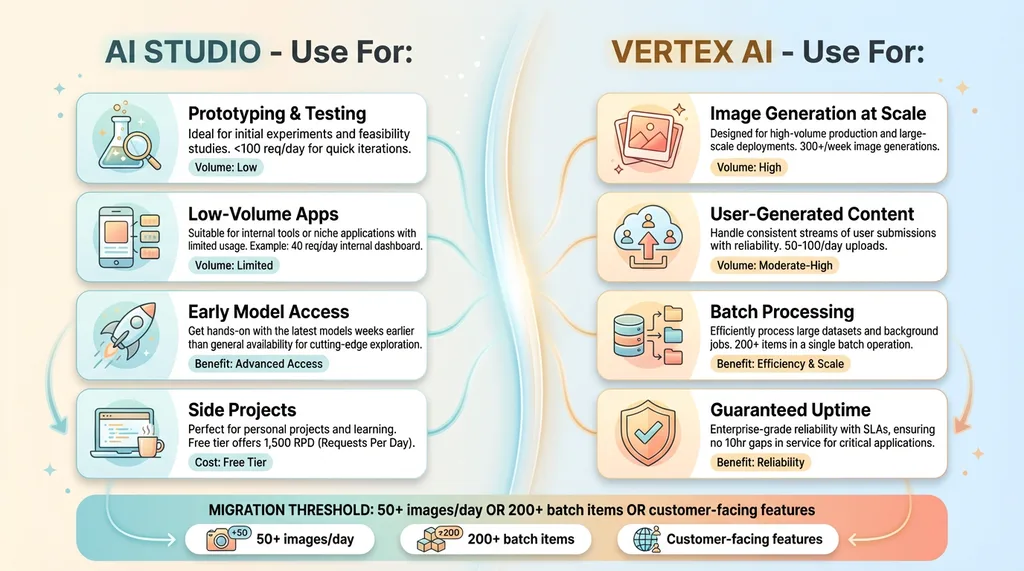 When to Choose AI Studio vs Vertex AI
AI Studio makes sense when you're:
Prototyping new features. API keys are faster than service accounts. You can go from idea to working code in 10 minutes. I still use AI Studio for testing new prompt structures or trying out model updates before deploying to production.
Running low-volume applications. Under 100 requests per day, AI Studio's quotas are fine. We have a customer service tool that uses Gemini to suggest responses — averages 40 requests per day, never hit a limit.
Testing new models quickly. Google releases new models to AI Studio first, sometimes weeks before Vertex AI. When Gemini 1.5 Flash-8B launched, I had it running in test environments immediately through AI Studio.
Building side projects. Anything that doesn't generate revenue can live on AI Studio indefinitely. The free tier is genuinely useful — 15 RPM and 1,500 RPD is plenty for weekend projects.
AI Studio breaks down when you're:
Generating images at scale. Our blog pipeline generates 300+ images per week. That's 60 per weekday at minimum, more during content pushes. AI Studio's 250 RPD can't sustain that — we'd be hitting limits multiple times per week.
Processing user-generated content. One of our image optimization pipelines uses Gemini to analyze product photos and generate alt text. That's 50-100 images per day from customer uploads alone. Add internal product photography and you're over 200 requests daily.
Running batch processing jobs. Any workflow that needs to process large datasets in one sweep will hit quota walls. Our SEO content refresh system processes 313 blog articles in a single overnight run — that's 313+ API calls just for content analysis, plus additional calls for meta description generation and image optimization.
Maintaining guaranteed uptime. AI Studio quotas reset at midnight Pacific. If you hit your daily limit at 2pm, you're down for 10 hours. That's acceptable for internal tools, not acceptable for customer-facing features.
The specific numbers that matter: if you're generating 50+ images per day, Vertex AI makes sense. If you're running a chatbot with 200+ daily users, same answer. If you're processing any batch job over 200 items, you need Vertex AI's higher quotas.
This isn't a value judgment on either platform. It's a maturity curve. Start with AI Studio, migrate when you hit limits. Optimize for speed in prototyping, optimize for reliability in production.
What This Means for Your Production AI Systems
If you're building AI systems that matter to your business, rate limits will bite you eventually. The specific platform doesn't matter — Google, OpenAI, Anthropic all have quota systems designed for reasonable use, not production scale.
The migration from AI Studio to Vertex AI wasn't hard. Two hours of focused work, minimal code changes, back online the same day. But I only knew how to execute it quickly because I'd already deployed 15+ AI systems and hit similar walls before.
This is one example of dozens of production gotchas I've encountered across my DTC brand's AI infrastructure. The pattern is consistent: prototypes work great, production reveals infrastructure gaps.
Other examples from our systems:
- Safety filters blocking valid fashion industry terms, requiring custom moderation layers
- Cost spiraling from using GPT-4 for tasks that Gemini Flash handles at 1/10th the price
- Latency killing user experience when synchronous API calls take 3-4 seconds per request
- Image generation producing inconsistent styles until we implemented style reference libraries
- Content going stale because AI-generated text wasn't connected to real-time inventory data
Each of these took days to diagnose and fix the first time. Now I spot them in design reviews before they hit production.
The lesson I keep learning: plan for production constraints from day one, or budget time to migrate later. Rate limits, cost optimization, safety filters, latency requirements — these aren't edge cases. They're the default state of running AI in production.
Get the next build note.
I write up each system I build, including what broke. Subscribe to my newsletter and I'll send you the next one.