The Tradeoff Nobody Warns You About: Wildcard SSL vs. Keeping Your DNS
When I started building a multi-tenant SaaS where every customer gets their own subdomain, I hit a wall nobody warns you about in the tutorials. Setting up multi tenant subdomain ssl sounds trivial until you read the fine print: to get automatic wildcard certs (*.yourapp.com), most hosts want you to hand over your nameservers.
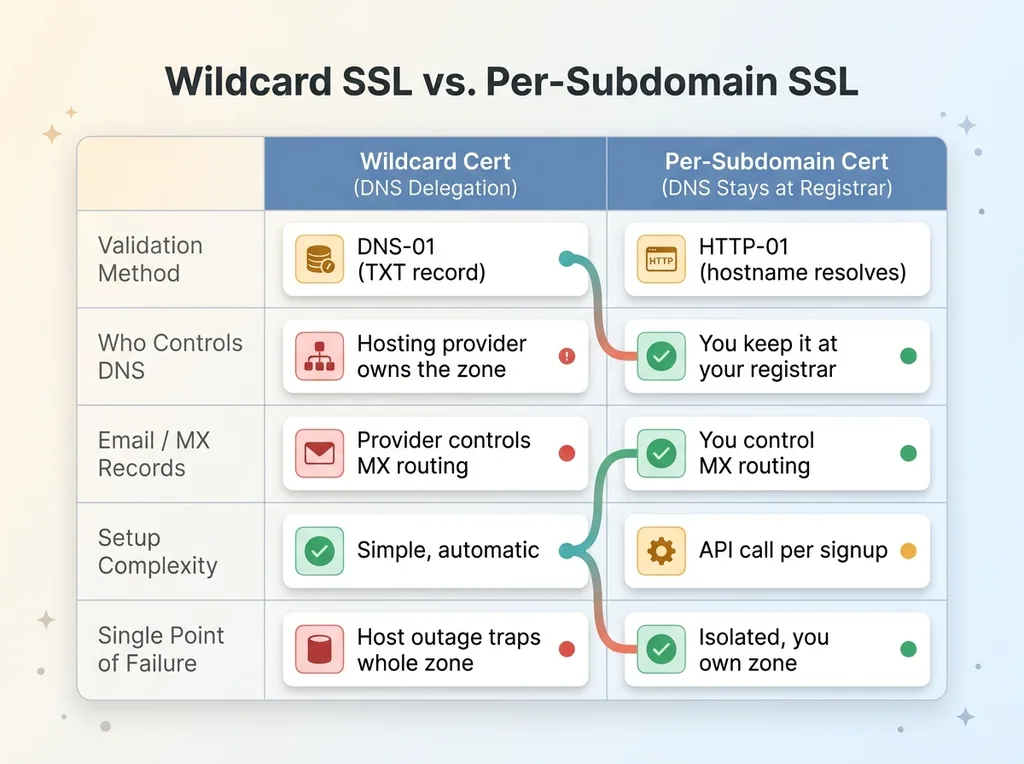 Wildcard SSL with DNS delegation vs. per-subdomain SSL keeping DNS at registrar
That is the catch buried in the happy path. Automatic wildcard SSL means automatic DNS management, and automatic DNS management means delegation.
Why hosts want your nameservers
A wildcard cert is validated over DNS-01. To prove you control *.yourapp.com, the certificate authority needs a TXT record placed at your domain, on demand, every time the cert renews. The only clean way for a host to do that automatically is to own your DNS zone.
So they ask you to point your nameservers at them. Once you do, they control everything in that zone: your apex, your CNAMEs, and critically your MX records. The same provider issuing your certs now controls where your email lands.
Why I refused to hand them over
I run a portfolio of projects, including my DTC fashion brand in San Diego. My DNS lives at my registrar on purpose. I want one place to manage records across every domain, and I do not want a hosting provider sitting in the middle of my email delivery and apex routing.
There is also the single-point-of-failure argument. If the host has an outage or locks my account, I do not want my entire DNS zone trapped behind their dashboard.
The cost of keeping DNS at my registrar is real: no automatic wildcard cert. I had to solve multi tenant subdomain ssl another way. That is the rest of this article.
Provisioning Each Subdomain at Signup (Instead of a Wildcard)
If you cannot get a wildcard cert without delegating DNS, the alternative is to provision certs one subdomain at a time, exactly when a customer needs one. This is the pattern that lets you build per-customer subdomain workspaces without ever touching your nameservers.
The signup-time API call
Here is the flow. A customer creates a workspace and picks a slug, say acme. The moment they do, I call the host's API and explicitly register acme.yourapp.com as a domain on the project.
The host sees a new domain, checks that it already resolves to their infrastructure, and issues a cert over HTTP-01. No DNS-01 challenge, no TXT record, no delegation. The validation happens over HTTP on a hostname that already points at the host.
That is the whole trick to wildcard subdomain without dns delegation. You skip the wildcard entirely and issue per-subdomain certs on demand.
Per-subdomain HTTP-01 certs
For HTTP-01 to work, every possible subdomain has to already resolve to the host before the cert is requested. I handle that with the one record I do keep at my registrar: a wildcard CNAME, *.yourapp.com, pointing at the host.
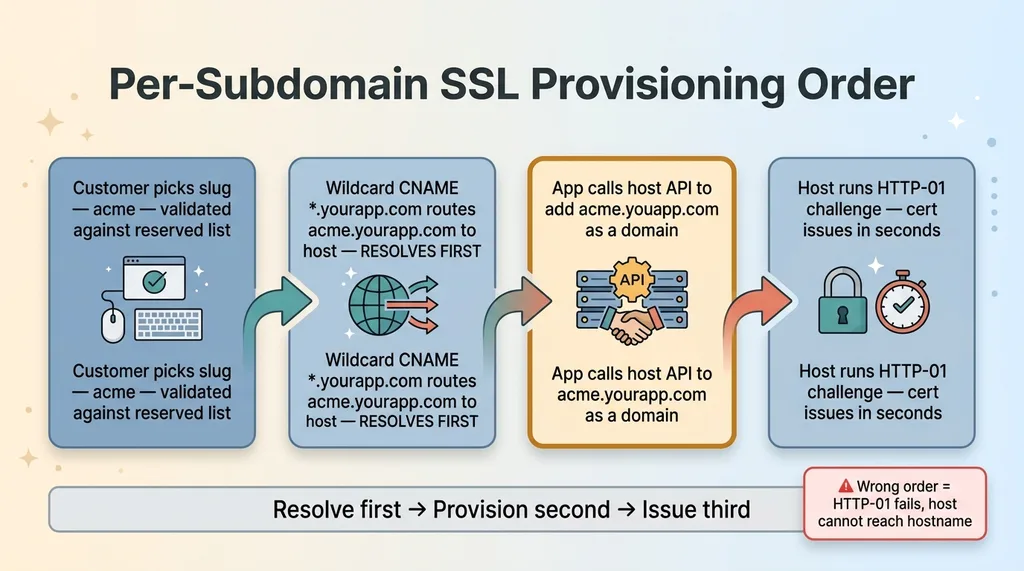 Signup-time subdomain provisioning order: resolve, provision, issue
That CNAME is a routing record, not a cert. It means any subdomain resolves to the host immediately, but no SSL exists for it until I explicitly provision it.
The ordering matters and it is easy to get wrong:
- Customer picks a slug, I validate it (more on that later).
- The wildcard CNAME means
acme.yourapp.comalready resolves. - I call the host's API to add the domain.
- The host runs HTTP-01 and the cert issues in seconds.
Resolve first, provision second, issue third. Get that order wrong and the HTTP-01 challenge fails because the host cannot reach the hostname yet. For per customer subdomain saas, this is the core loop, and it has been running in production for me, not in a demo.
The Cross-Subdomain Cookie Trick That Carries Login Everywhere
Here is the problem that breaks more multi-tenant apps than SSL ever will. A user logs in on your marketing site, www.yourapp.com or the apex, then clicks through to their workspace at acme.yourapp.com. And their session is gone.
Set the cookie domain to the apex
By default, a cookie is scoped to the exact host that set it. Log in on www.yourapp.com and the auth cookie is bound to www. The instant the user crosses to acme.yourapp.com, the browser does not send that cookie. They look logged out.
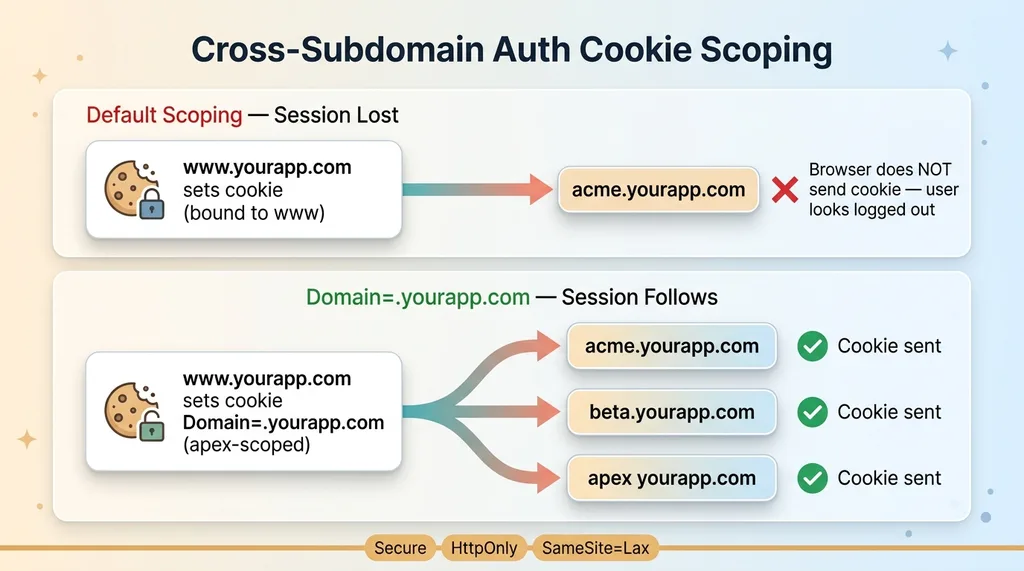 Cross-subdomain cookie scoping with apex Domain attribute
The fix is the Domain attribute. Set the auth cookie's domain to .yourapp.com with a leading dot, scoped to the apex, and the browser sends it on every subdomain. That is the cross subdomain auth cookie pattern in one line of config.
Now a login on the marketing site follows the user into their workspace, and from workspace to workspace, without a re-auth round trip.
Why a login on the marketing site has to follow the user
This is not a nice-to-have. The signup-to-workspace handoff is the first thing a paying customer does, and a broken session there reads as "this product is broken."
But apex-scoped cookies cut both ways. If the cookie is readable on .yourapp.com, then any subdomain can read it. That includes whatever slug a customer just claimed. So you have to control who gets a subdomain, which is exactly why the reserved-slug section below is a security control, not a UX nicety.
Set the cookie right: Secure so it only travels over HTTPS, HttpOnly so client JavaScript cannot touch it, and SameSite=Lax, which works here because all your subdomains share the same registrable domain. The browser treats acme.yourapp.com and www.yourapp.com as same-site, so Lax carries the cookie on top-level navigation without exposing it cross-site.
Host-Based Routing in the Edge Proxy (And Why NODE_ENV Lied to Me)
Once SSL and sessions work, requests still have to land in the right tenant. That happens in the edge middleware, before the request reaches your app code.
Reading the Host header at the edge
The middleware reads the Host header on every request, parses the subdomain out of it, looks up the matching tenant, and rewrites the request into that workspace's context. So acme.yourapp.com/dashboard gets internally routed to the dashboard with the acme tenant already resolved and attached.
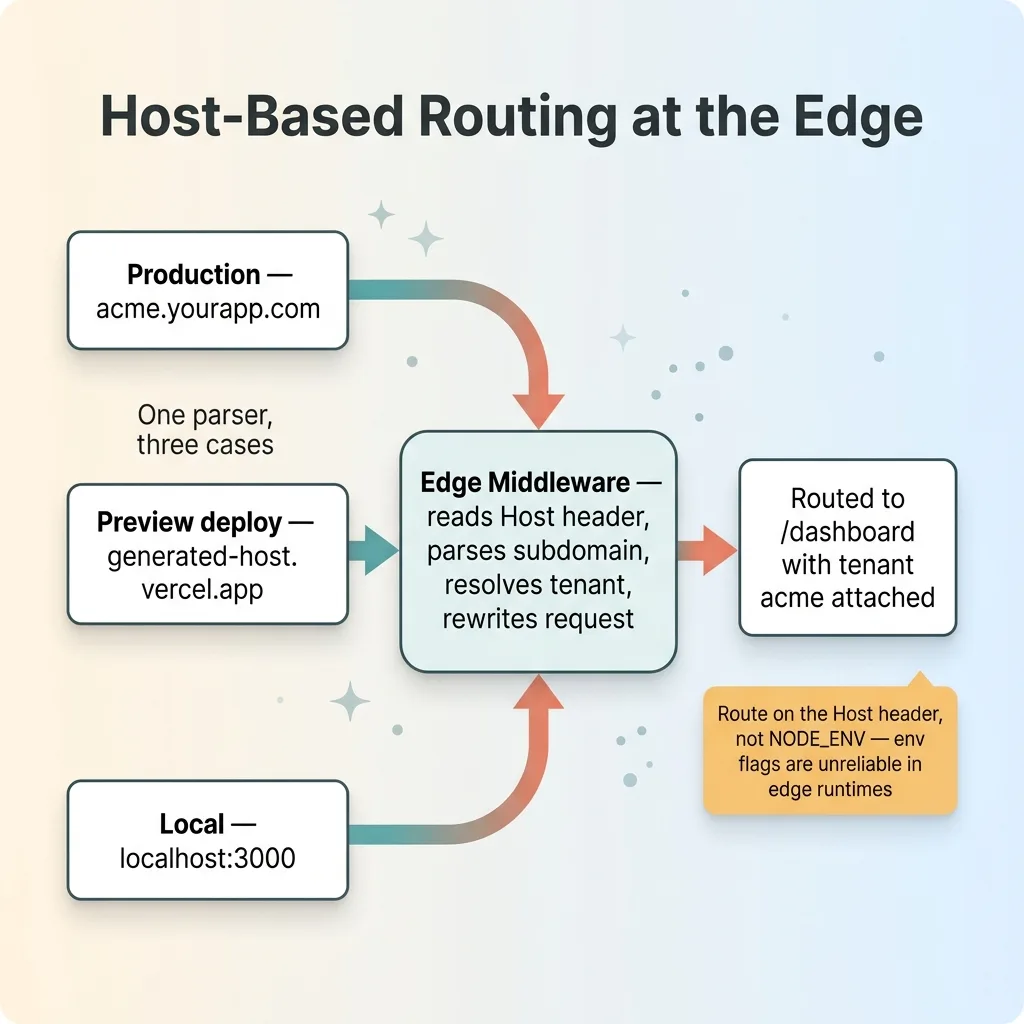 Edge proxy host-based routing parsing three hostname shapes
The parser handles three shapes in one place: production hosts like acme.yourapp.com, preview deploys with their generated hostnames, and localhost during development. One function, three cases, so routing behaves the same everywhere.
Why environment variables are unreliable in edge runtimes
Here is the debugging story that cost me an afternoon. I had a routing rule keyed off NODE_ENV to decide whether I was local, preview, or prod, and route accordingly. It silently failed in the edge runtime.
Edge runtimes do not populate environment variables the same way a Node server does. NODE_ENV and similar flags do not always reflect what you set, and they are not reliably present in the edge context. My rule branched on a value that was effectively undefined, and routing fell through to the wrong default.
The fix was to stop trusting env flags for routing decisions. I route on the actual Host header and the resolved hostname, because those are the real facts about the request in front of me. The hostname tells me the environment and the tenant at the same time.
If you take one vercel subdomain provisioning lesson from this section: route on what the request actually tells you, not on what an environment variable claims to know.
Stopping Tenants From Grabbing System Names: Reserved-Slug Validation
Remember that the auth cookie is scoped to the apex, so every subdomain can read it, and subdomains map directly to tenants. That makes the slug a security boundary. If a customer can claim admin, api, www, app, mail, or login, you have a real problem.
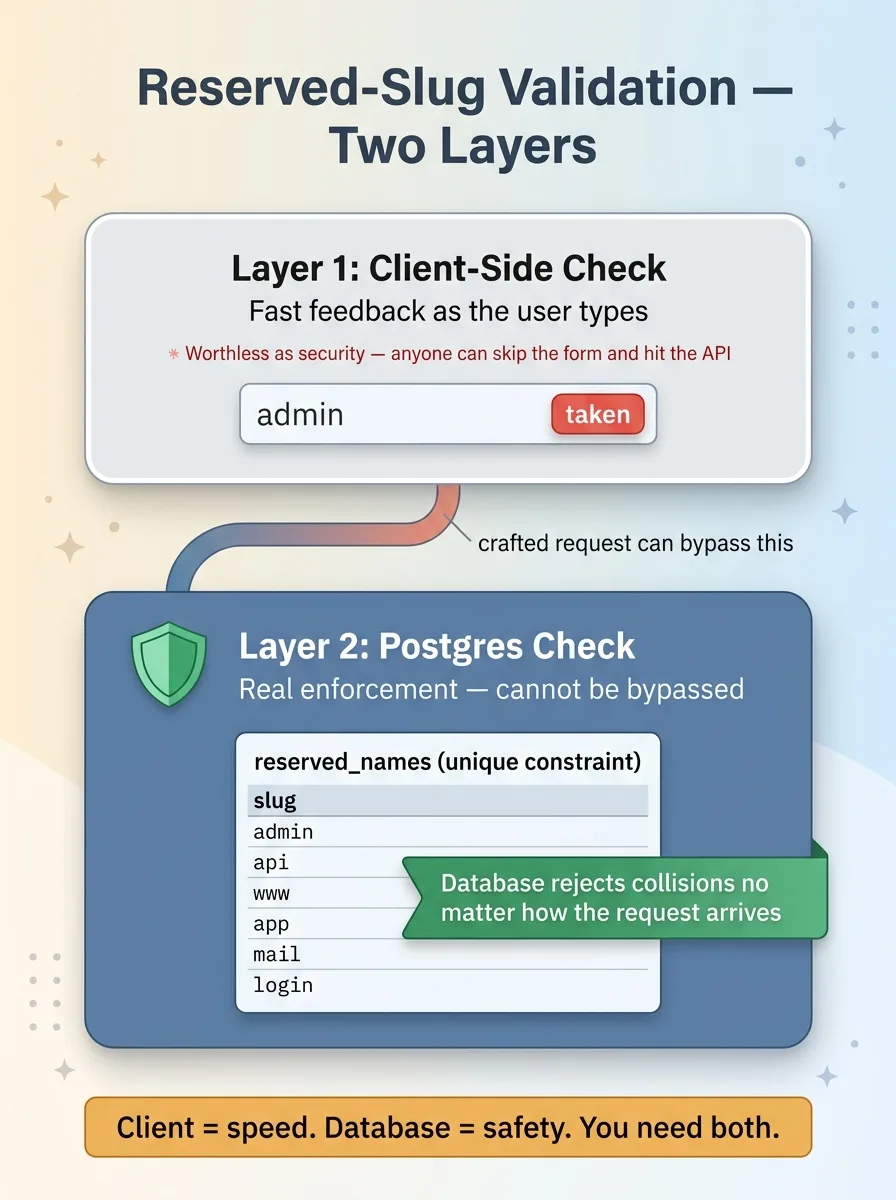 Defense-in-depth reserved-slug validation: client vs. database
A tenant on login.yourapp.com could mimic your login flow on a hostname that legitimately receives your apex-scoped session cookie. So reserved-slug validation is part of how you give every client their own isolated data without letting one tenant impersonate the platform.
Client-side check for fast feedback
In the signup form, I check the slug against the reserved list as the user types. They get instant feedback that admin is taken, no round trip needed.
That is good UX. It is also worthless as security, because anyone can skip the form and hit the API directly with a crafted request.
Postgres-side check because the client can't be trusted
The real enforcement lives in the database. I keep a reserved-names table with a unique constraint, plus a check that rejects any slug on the reserved list, so a tenant slug can never collide with a system name no matter how the request arrives.
This is the same defense-in-depth I apply with row-level security across every table. The client check is for speed. The database check is for safety. You need both, and you should never confuse one for the other.
The argument is simple: if the only thing standing between a tenant and the admin slug is JavaScript in a form, you do not have a control. You have a suggestion.
What This Pattern Costs and When You'd Skip It
I will be honest about the downsides, because pretending there are none is how vendors lose technical evaluators.
Per-subdomain provisioning adds an API call at signup, and that call can fail. The host might be slow, rate-limited, or briefly down right as a customer signs up. You have to design for that: queue the provisioning, retry with backoff, and fall back to a path-based workspace like yourapp.com/acme until the subdomain cert issues. The customer should never be blocked at signup because a cert is still pending.
There is also a ceiling. Some hosts cap how many custom domains a single project can hold. If you are provisioning a subdomain per customer, you can hit that limit at scale, and you need to know the number before you design around it.
And here is the part most articles will not say: if you are fine delegating DNS, just get the wildcard cert. It is genuinely simpler. One cert, no per-signup API call, no provisioning failures to handle.
This pattern is for a specific situation. I run a portfolio and keep DNS centralized at my registrar. Maybe you have email and other records you will not move. If that is you, wildcard subdomain without dns delegation is the right trade. If it is not, do not adopt this complexity to solve a problem you do not have.
Why I Build the Plumbing Before the AI
Multi-tenant subdomains, cross-subdomain sessions, reserved-slug enforcement at the database layer. None of this is exciting. It is the kind of work that never shows up in an AI demo.
It is also the work that decides whether your SaaS survives its first real customer. A leaking session or a tenant who grabbed admin is not a polish problem. It is the thing that ends trust on day one.
I have shipped this exact pattern in production, not as a prototype. Most of the value I deliver is precisely this unglamorous, correct plumbing that the flashy demos skip right over. The AI features sit on top of infrastructure that has to be right first.
Get the next build note.
I write up each system I build, including what broke. Subscribe to my newsletter and I'll send you the next one.