RLS on 50+ Tables: A Supabase Row Level Security Guide
A Supabase row level security guide from auditing 50+ tables across 12 projects. Real RLS patterns, common mistakes, and the policies that actually work.
By Mike Hodgen
I manage 12 active Supabase projects right now. They range from a product pipeline powering my DTC fashion brand to client-facing SaaS apps, internal tools, and API backends. Some have 3 tables. Some have 10+. A few months ago, I decided to do something I should have done sooner: a systematic row level security audit across every single one of them.
The results were not pretty.
Out of 50+ tables across those 12 projects, 11 had RLS not enabled at all. Eight had policies that looked correct at a glance but were effectively permissive — they used USING (true), which grants access to every row for every user. Three had policies referencing auth.uid() on tables where the user_id column either didn't exist or was nullable, which creates behavior most developers wouldn't predict.
Roughly 30% of my tables had some kind of RLS issue. Not "theoretical vulnerability." Actual gaps where data could be read or modified by anyone with the public anon key.
If that's happening across my projects — and I've written 22,000+ lines of custom Python, built 29 automation modes, and think about system architecture every day — then most teams running Supabase are sitting on open databases they don't even know about.
This Supabase row level security guide is the result of that audit. Not theory. Not documentation summaries. The actual patterns, mistakes, and audit queries I use across production systems. If you're building on Supabase, this is the stuff that keeps your data from leaking.
Why Row Level Security Is Non-Negotiable in Supabase
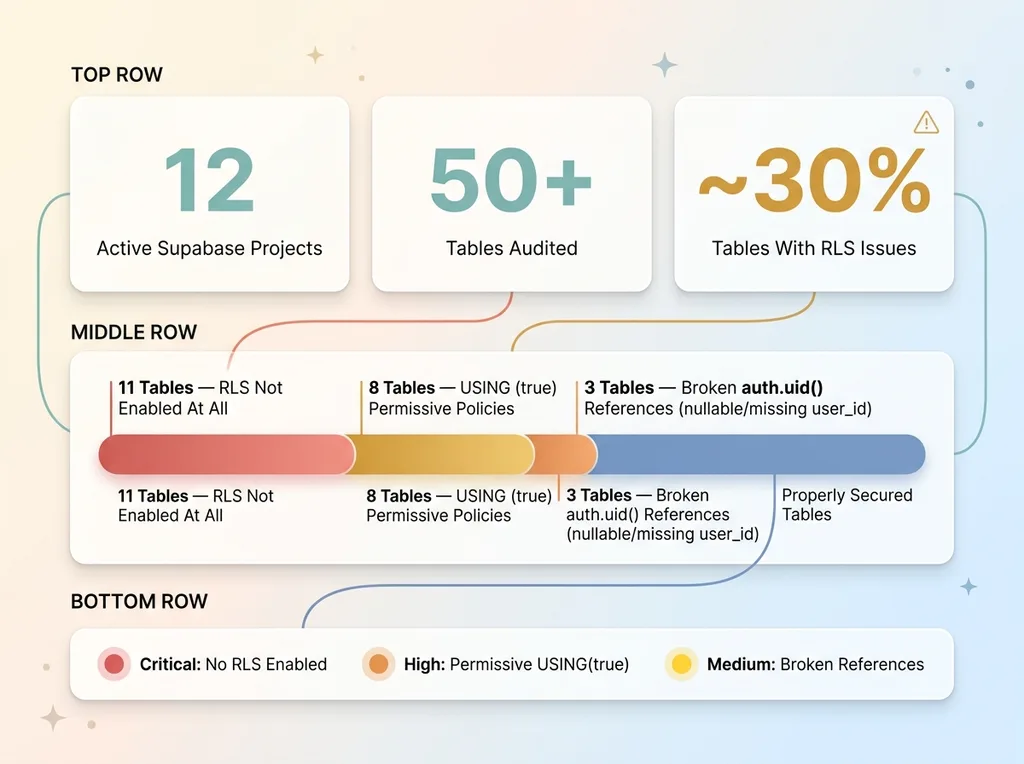 RLS Audit Results: 30% of Tables Had Issues
Supabase Exposes Your Database Directly
Here's the architectural reality most people gloss over: Supabase uses PostgREST to expose your Postgres database directly to the client. Your frontend JavaScript is making SQL-level queries against your actual database. The anon key that enables this is public. It's embedded in your client-side code. Anyone can extract it from your browser's network tab in about 10 seconds.
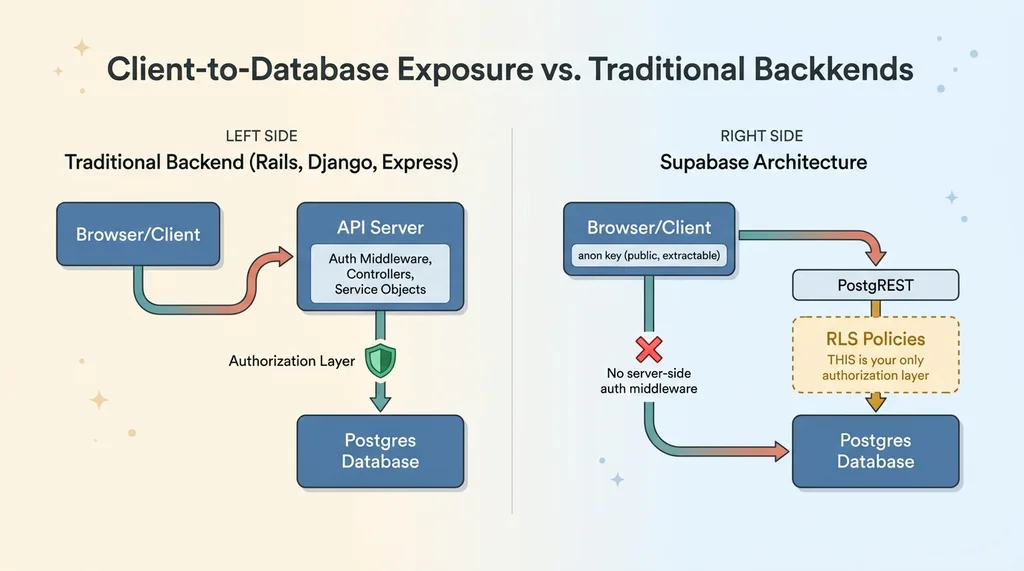 Supabase Architecture: Client-to-Database Exposure
Without RLS, that public key grants full read and write access to every row in every table. This isn't a theoretical attack vector. It's the default behavior.
In a traditional backend — Rails, Django, Express — you'd have a server-side layer that checks authorization before any database query executes. Controllers, middleware, service objects. That layer doesn't exist in Supabase's client-to-database model. Postgres itself IS the authorization layer.
RLS Is Your Last Line of Defense
This means RLS isn't a nice-to-have security feature you add during a hardening phase. It's the equivalent of having authentication on your API endpoints. Without it, you effectively have no API security at all.
The class of attack this prevents is called IDOR — Insecure Direct Object Reference. A user changes an ID in a request and accesses someone else's data. I wrote a deeper piece on IDOR vulnerabilities that RLS prevents if you want the full picture of the attack vector. But the short version: without RLS, every table in your Supabase project is vulnerable to it by default.
The Four RLS Patterns That Cover 90% of Use Cases
This is the core of the Supabase row level security guide. I've found that four patterns handle the vast majority of real-world scenarios. Learn these and you can secure most projects in under an hour.
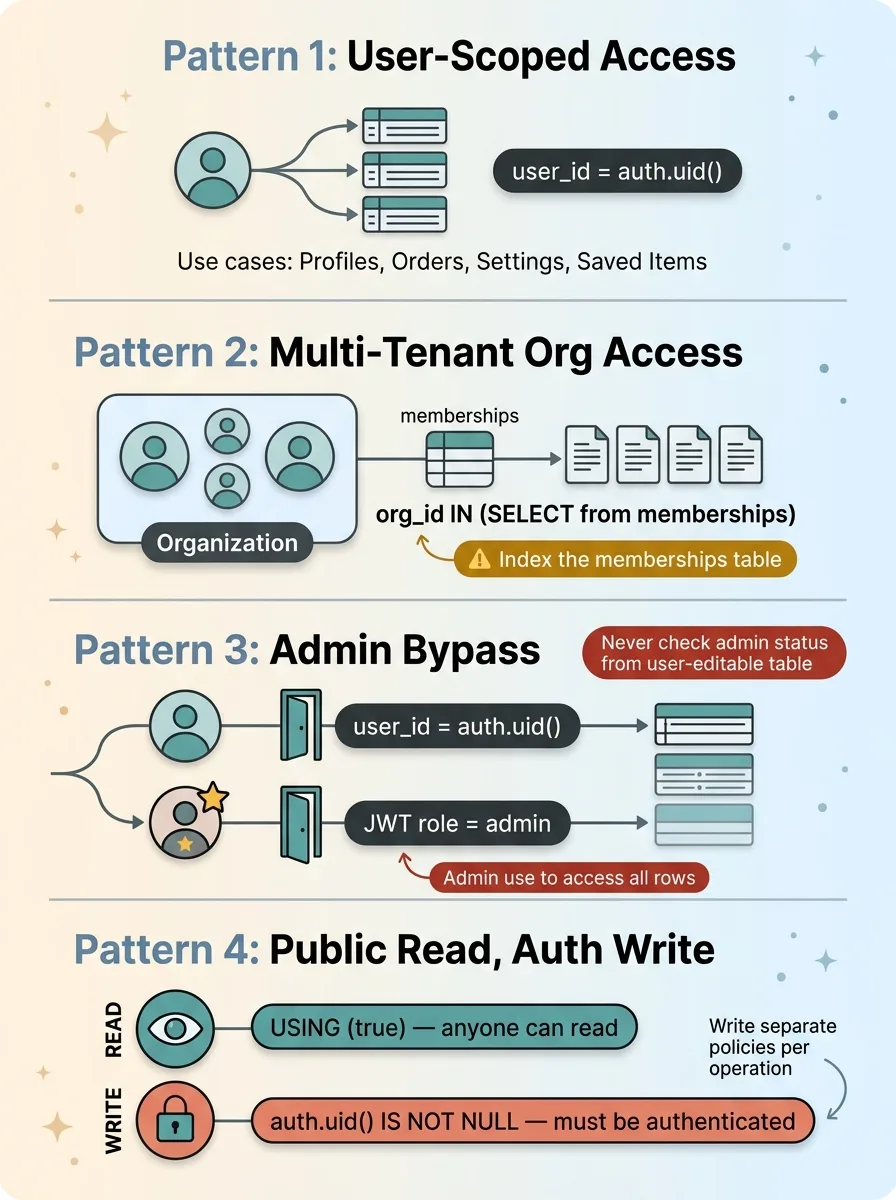 Four RLS Patterns That Cover 90% of Use Cases
User-Scoped Access
The simplest and most common pattern. Each row belongs to one user, and only that user should access it.
ALTER TABLE user_profiles ENABLE ROW LEVEL SECURITY;

CREATE POLICY "Users can view own profile"
  ON user_profiles FOR SELECT
  USING (user_id = auth.uid());

CREATE POLICY "Users can update own profile"
  ON user_profiles FOR UPDATE
  USING (user_id = auth.uid());
Use this for: personal data, user-created content, settings, saved items, order history.
Critical gotcha: Make sure user_id is NOT NULL and has a foreign key constraint to auth.users(id). If user_id is nullable, rows with NULL values behave unpredictably — I'll cover this in the mistakes section.
Multi-Tenant Organization Access
When users belong to organizations and should see all data within their org, you need a join pattern.
CREATE POLICY "Users can view org documents"
  ON documents FOR SELECT
  USING (
    organization_id IN (
      SELECT org_id FROM memberships
      WHERE user_id = auth.uid()
    )
  );
This subquery runs on every row access, so index the memberships table on both user_id and org_id. I learned this the hard way — more on that in the performance section.
I used this exact pattern when building the document signing SaaS, where multi-tenant RLS was critical from day one. Every document, every signature request, every audit log entry had to be scoped to the correct organization. One leaked document and the whole product loses trust.
Admin Bypass
Admins need to see everything. The cleanest approach uses custom claims in the JWT:
CREATE POLICY "Admins can view all records"
  ON orders FOR SELECT
  USING (
    auth.jwt() ->> 'role' = 'admin'
    OR user_id = auth.uid()
  );
Alternatively, for server-side admin operations (cron jobs, background processing, internal tooling), use the service_role key, which bypasses RLS entirely.
Warning: Never store admin status in a user-editable table and reference it in a policy. If your policy checks SELECT is_admin FROM users WHERE id = auth.uid(), a user who can update their own profile can potentially escalate privileges. Use JWT claims set during authentication, or use a separate admin table they can't write to.
Public Read, Authenticated Write
Perfect for product catalogs, blog posts, FAQs — anything the public should see but only authenticated users should modify.
CREATE POLICY "Anyone can read products"
  ON products FOR SELECT
  USING (true);

CREATE POLICY "Authenticated users can insert products"
  ON products FOR INSERT
  WITH CHECK (auth.uid() IS NOT NULL);

CREATE POLICY "Authenticated users can update own products"
  ON products FOR UPDATE
  USING (created_by = auth.uid());
Write separate policies for SELECT, INSERT, UPDATE, and DELETE. Never use FOR ALL unless you genuinely want identical logic for every operation. I've seen FOR ALL USING (true) more times than I'd like to admit — it grants complete access to everyone for everything.
The Five Mistakes I Keep Finding (And How to Fix Them)
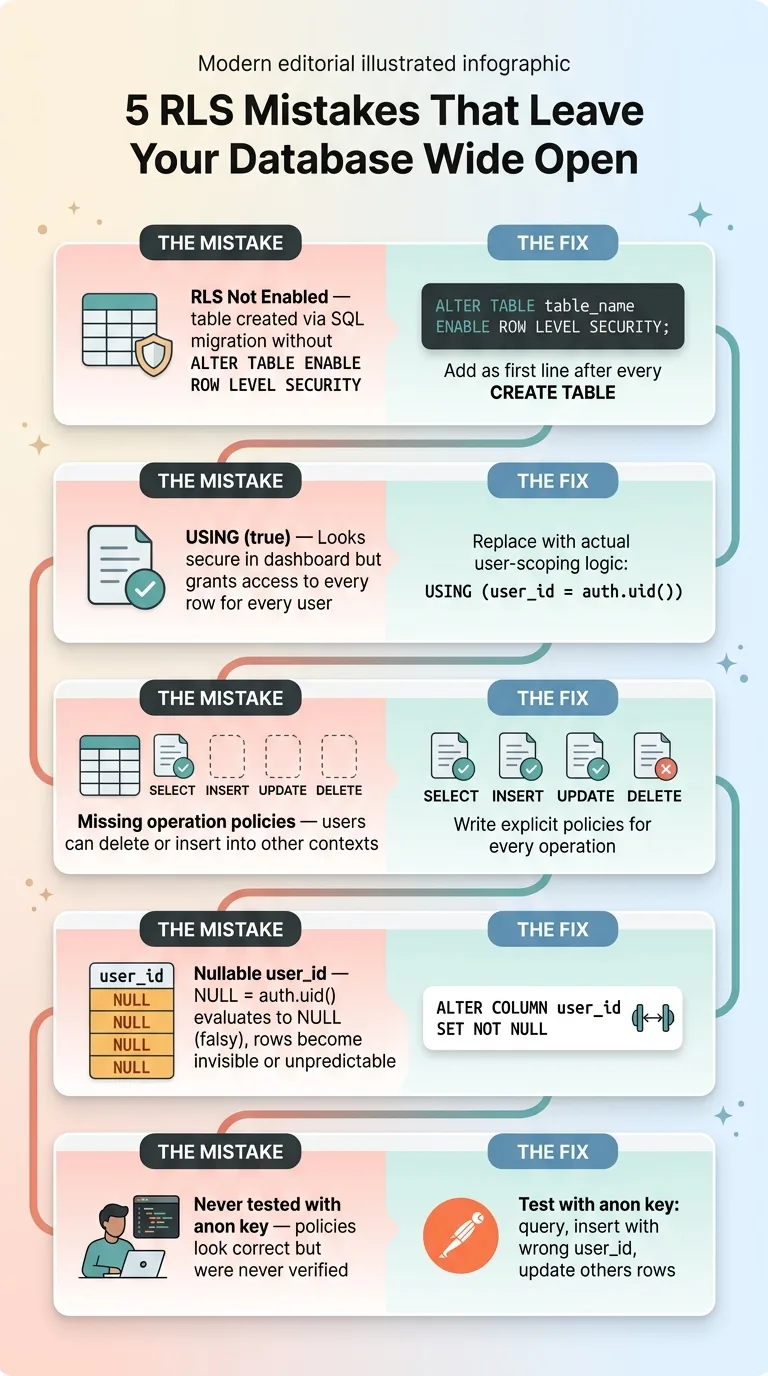 Five Common RLS Mistakes and Their Fixes
Forgetting to Enable RLS Entirely
Supabase doesn't enable RLS by default when you create a table via SQL migration. The dashboard toggles it on, but if you're writing migrations (which you should be), there's no automatic RLS. Eleven tables across my projects had this gap.
Fix it and make it permanent:
ALTER TABLE table_name ENABLE ROW LEVEL SECURITY;
Add this to every migration template. Make it the first line after CREATE TABLE. No exceptions.
The 'USING (true)' Trap
Eight tables in my audit had policies with USING (true). In every case, the developer (sometimes me) had written it as a placeholder during development and never replaced it. It looks like you have security. The Supabase dashboard shows a green checkmark — "RLS enabled, 1 policy." But the policy grants access to every row for every user, including anonymous.
If you see USING (true) on any table that isn't intentionally public, it's a security incident waiting to happen.
Missing Policies for Specific Operations
You write a SELECT policy scoping users to their own data. Great. But you forget INSERT, UPDATE, or DELETE policies. Now users can read only their own rows but insert data into anyone else's context. Or they can delete rows that don't belong to them.
Every table needs policies for every operation it supports. No exceptions.
Nullable or Missing User ID Columns
Your policy says WHERE user_id = auth.uid(). But user_id allows NULL. What happens to rows where user_id IS NULL?
In Postgres, NULL = anything evaluates to NULL, which is falsy. Those rows become invisible to everyone — including admins using user-scoped policies. In some edge cases, depending on your policy logic, NULL user IDs can create unexpected access for anonymous users. Either way, it's broken.
Fix: ALTER TABLE table_name ALTER COLUMN user_id SET NOT NULL;
Not Testing Policies With the Anon Key
Most developers write policies, eyeball them, and move on. They never test by actually making a request with the anon key to verify the policy works. I'm guilty of this too — it's how I ended up with 30% of tables having issues.
Test from Postman or curl using your project's anon key. Query a table. Verify you only see rows that belong to the authenticated user. Try inserting a row with a different user_id. Try updating someone else's row. If any of it works, your policy is broken.
This is especially relevant if you're using AI to generate your schema. I wrote about the security debt that vibe coding creates — AI-generated schemas almost never include RLS. The AI happily generates your tables, your migrations, your seed data, and skips the security layer entirely. Every single time.
How I Run an RLS Audit on a New Project
The SQL Query That Finds Every Gap
Two queries give you the full picture. First, check which tables have RLS enabled:
SELECT schemaname, tablename, rowsecurity
FROM pg_tables
WHERE schemaname = 'public'
ORDER BY tablename;
Any row where rowsecurity is false is completely open. That's your highest priority fix.
Second, check what policies exist and what they do:
SELECT tablename, policyname, cmd, qual
FROM pg_policies
WHERE schemaname = 'public'
ORDER BY tablename, cmd;
Here's what to look for in the output:
- Tables with no policies at all — RLS might be enabled but with no policies, which means all access is denied (the opposite problem, but still broken)
- Policies where
qualistrue— that's yourUSING (true)trap - Tables with SELECT policies but missing INSERT/UPDATE/DELETE — incomplete coverage
- Policies that don't reference
auth.uid()orauth.jwt()— they're probably not doing real user scoping
Building a Pre-Deploy Checklist
Before any Supabase project goes live, I run through this:
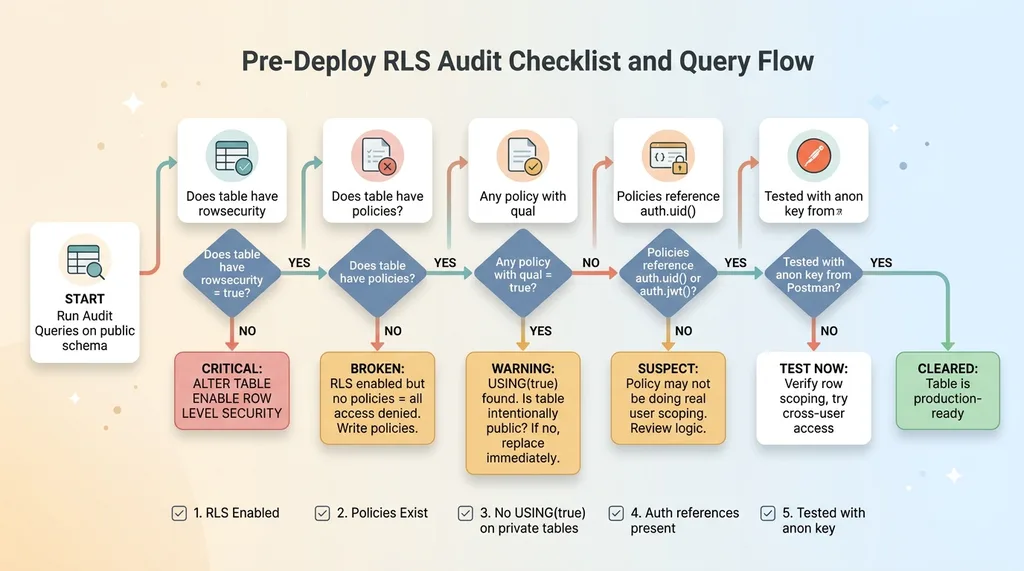 Pre-Deploy RLS Audit Checklist and Query Flow
- Every
publictable has RLS enabled - Every table has at least SELECT and INSERT policies
- No policy uses
USING (true)unless the table is intentionally public (and documented as such) - Every policy references
auth.uid()orauth.jwt() - Tested with anon key from Postman — verified row scoping works
Copy those two SQL queries. Run them against your project right now. The whole audit takes 15 minutes. What you find might keep you up at night, but better to find it yourself than have someone else find it for you.
Performance Considerations That Actually Matter
RLS policies add overhead because they're evaluated on every row. For simple user_id = auth.uid() checks, the impact is negligible — if user_id is indexed.
For multi-tenant subquery patterns, you need indexes on the join tables. On one project, a multi-tenant policy was adding ~80ms to queries on a table with 50K rows because the memberships table wasn't indexed on user_id. Adding the index dropped it to ~3ms. That's a 96% reduction from one CREATE INDEX statement.
CREATE INDEX idx_memberships_user_id ON memberships(user_id);
CREATE INDEX idx_memberships_org_id ON memberships(org_id);
If you're using Supabase Edge Functions or any server-side code, you can use the service_role key, which bypasses RLS entirely. This is useful for admin operations, cron jobs, and background processing. But you have to be deliberate about it. The service_role key should never appear in client-side code. Never. Not in an environment variable that gets bundled. Not in a "hidden" config file. Nowhere the browser can reach it.
Security at Scale Requires Systems, Not Spot-Checks
RLS on individual tables is necessary but not sufficient. When you're managing 12 projects and 50+ tables, you need a systematic approach: migration templates that include RLS by default, audit queries that run before every deploy, and a clear set of Supabase RLS patterns your team — or your AI tools — can follow consistently.
The reason I found 30% of tables with issues isn't because I'm careless. It's because databases grow organically and security is the easiest thing to skip when you're shipping fast. A new feature needs a new table. You write the migration, add the columns, seed the data, test the UI, ship it. RLS is the step that has no visible effect when you skip it — until someone exploits it.
This is one of the first things I audit when I come into a new engagement. Not the AI strategy. Not the automation roadmap. The database security layer. Because none of the sophisticated stuff matters if your data is leaking out the back door.
Thinking About Your Own Supabase Security?
If this resonated — especially if you ran those audit queries and didn't love what you saw — I'd be happy to talk through it. I do free 30-minute discovery calls where we look at your current setup and identify the highest-risk gaps, whether that's RLS, broader architecture, or where AI could actually move the needle in your operations.
Get AI insights for business leaders
Practical AI strategy from someone who built the systems — not just studied them. No spam, no fluff.
Hodgen.AI
Ready to automate your growth?
Book a free 30-minute strategy call with Hodgen.AI.
Book a Strategy Call