Multi-Agent Code Audit: 78 Bugs in 16 Minutes
I ran a multi-agent code audit across my own app and found 78 real bugs in 16 minutes. Here's how adversarial AI QA actually works in production.
By Mike Hodgen
The Problem With Auditing Software You Already Shipped
Here's a thing nobody tells you about building software: six months after you ship it, you don't remember where you cut corners.
I built an internal AI operations platform for a regulated financial-services client. It matured. It worked. People used it every day and nothing was on fire. By every visible measure, it was fine.
But fine is a surface reading. Under the hood, that platform had quietly accumulated debt I couldn't see. Dead links pointing at routes that no longer existed. API endpoints that returned 500 errors when someone fed them malformed input. A password hash table that was readable by anyone with the public anon key. A database migration that had been written but never applied, which silently broke an entire API surface.
None of that showed up in normal use. That's the whole problem. The bugs that survive to production are the ones you don't trip over in a demo.
The traditional answer is a manual audit. Hire someone to read the code top to bottom. The problem is that manual audits are slow, expensive, and they lean hard on the auditor's memory of where the bodies are buried. If the auditor is the person who built the thing, you're asking them to remember the shortcuts they took under deadline pressure. People are bad at that. I'm bad at that.
So the real question every CEO is sitting on, whether they say it out loud or not, is this: how do you actually find the bugs in software you already shipped and forgot the details of?
I stopped trusting my own memory. Instead, I pointed 98 agents at it and let them try to break it. That's a multi-agent code audit, and what it surfaced changed how I think about every system I run.
What a Multi-Agent Code Audit Actually Is
A multi-agent code audit is when you orchestrate dozens of specialized AI agents, each assigned to break a specific part of your system, instead of having one AI read your code start to finish. The agents work in parallel, attack different subsystems, and report what actually broke.
That's the short version. Here's how it played out in practice.
Eight subsystem teams instead of one reviewer
For this platform I ran roughly 98 agents, organized into eight teams. Each team owned one part of the system and had a single mandate: break it.
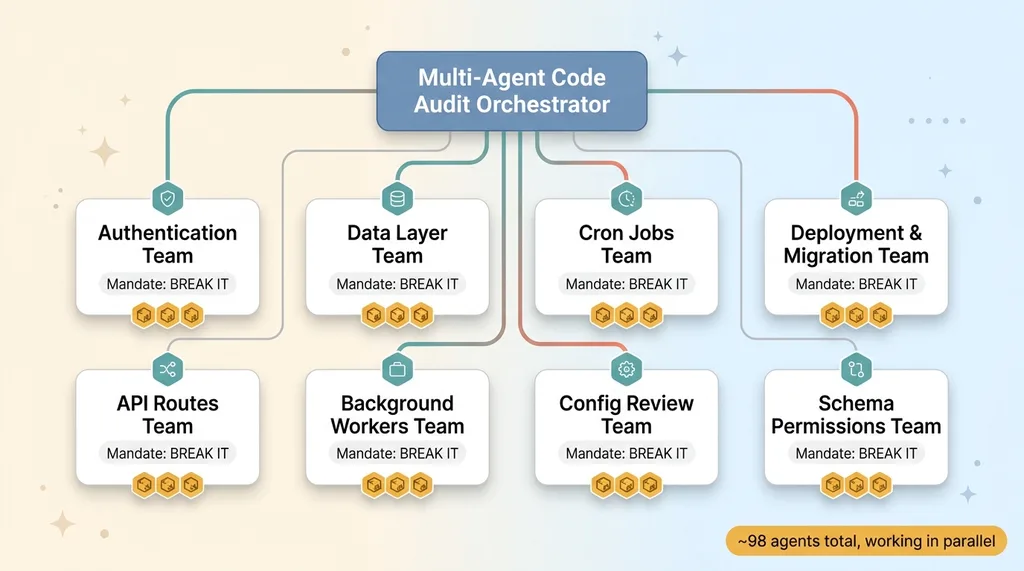 Multi-agent audit architecture: 98 agents in 8 subsystem teams
One team went after authentication. Another went after the data layer. Another took the cron jobs. Another reviewed the deployment configuration and migration state. Others handled the API routes, the background workers, and so on.
The advantage is focus. A single reviewer reading 22,000 lines top to bottom gets fatigued and starts pattern-matching. Eight teams with narrow mandates don't get tired and don't lose the thread. Each one goes deep on its piece.
This same approach scales well past one app. I've used it when I ran a 19-lens security audit across 58 codebases at once. The structure holds whether you're auditing one platform or a whole portfolio.
Why adversarial beats checklist
Most QA is a checklist. Did you sanitize inputs? Did you set up rate limiting? Did you handle the null case? It's a list of questions, and the answers tend to be optimistic because the person answering is the person who wrote the code.
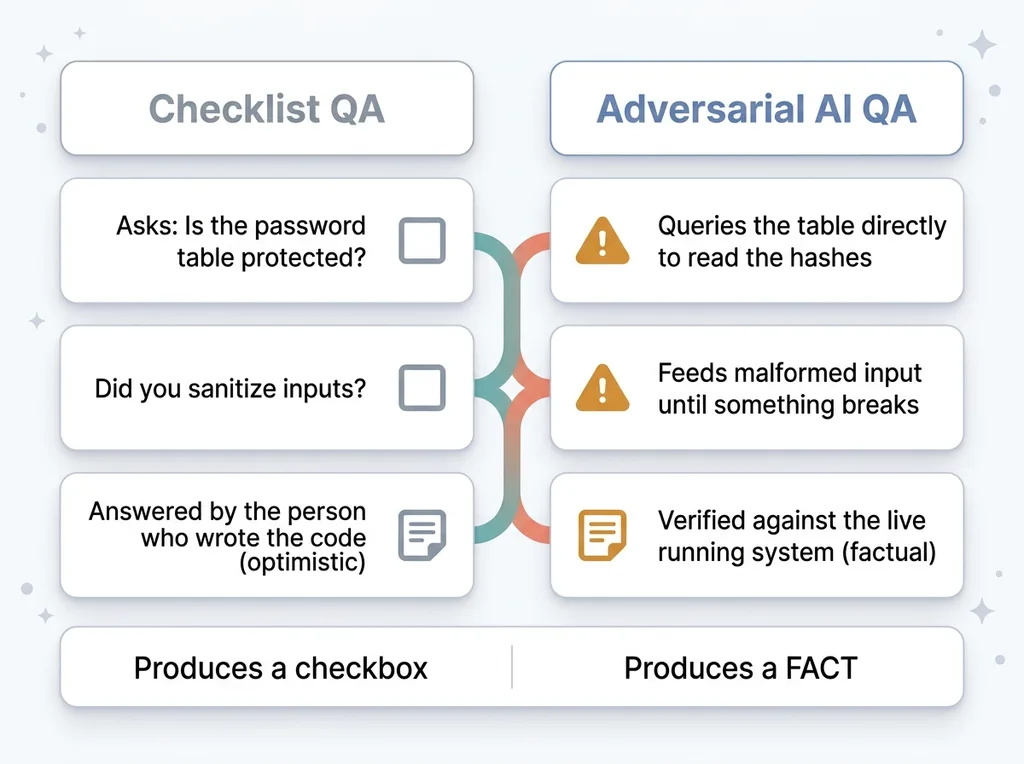 Checklist QA vs Adversarial AI QA
Adversarial AI QA flips that. Instead of asking "did you do X," it tries to actually break the thing and reports what happened.
A checklist asks whether the password table is protected. An adversarial agent queries the table directly to see if it can read the hashes. One produces a checkbox. The other produces a fact. That difference is the entire point.
How the Sweep Inspected Live Systems, Not Just Code
Here's what separates this from ordinary code review: most reviews read files. This sweep touched the running system.
That matters more than it sounds. Bugs in shipped software hide in the gap between what the code says and what the live state actually is. You can read a migration file all day and it looks correct. Whether it was applied to the production database is a different question, and the file won't tell you.
Live database inspection
Several agents queried the live database directly to check what was actually exposed, not what the schema intended to expose.
That's how the password hashes surfaced. The intent was for that table to be locked down. The reality, on the running system, was that anyone holding the public anon key could read the hashes. No file review catches that, because the file looks fine. Only inspecting the live permissions catches it.
Cron probing and deploy review
Another team probed the cron jobs to find which ones were silently failing. Not erroring loudly, just quietly doing nothing. A scheduled job that fails silently is invisible until the data it was supposed to produce stops showing up weeks later.
A separate team reviewed the actual deployment config and migration state. That's how the never-applied migration got caught. The migration existed in the repo. It had never run against production. The API that depended on it had been broken for who knows how long, and nobody had filed a ticket because the failure mode was quiet.
This is the same class of problem as the silent OAuth failure I'd seen before, where a data pipeline was completely dead and the dashboard just showed zeros. That kind of failure never shows up in the repo. It only shows up when you inspect the running system.
Why the Agents Rejected 12 of Their Own 90 Findings
The sweep produced 90 raw findings. The agents then rejected 12 of them, leaving 78 confirmed.
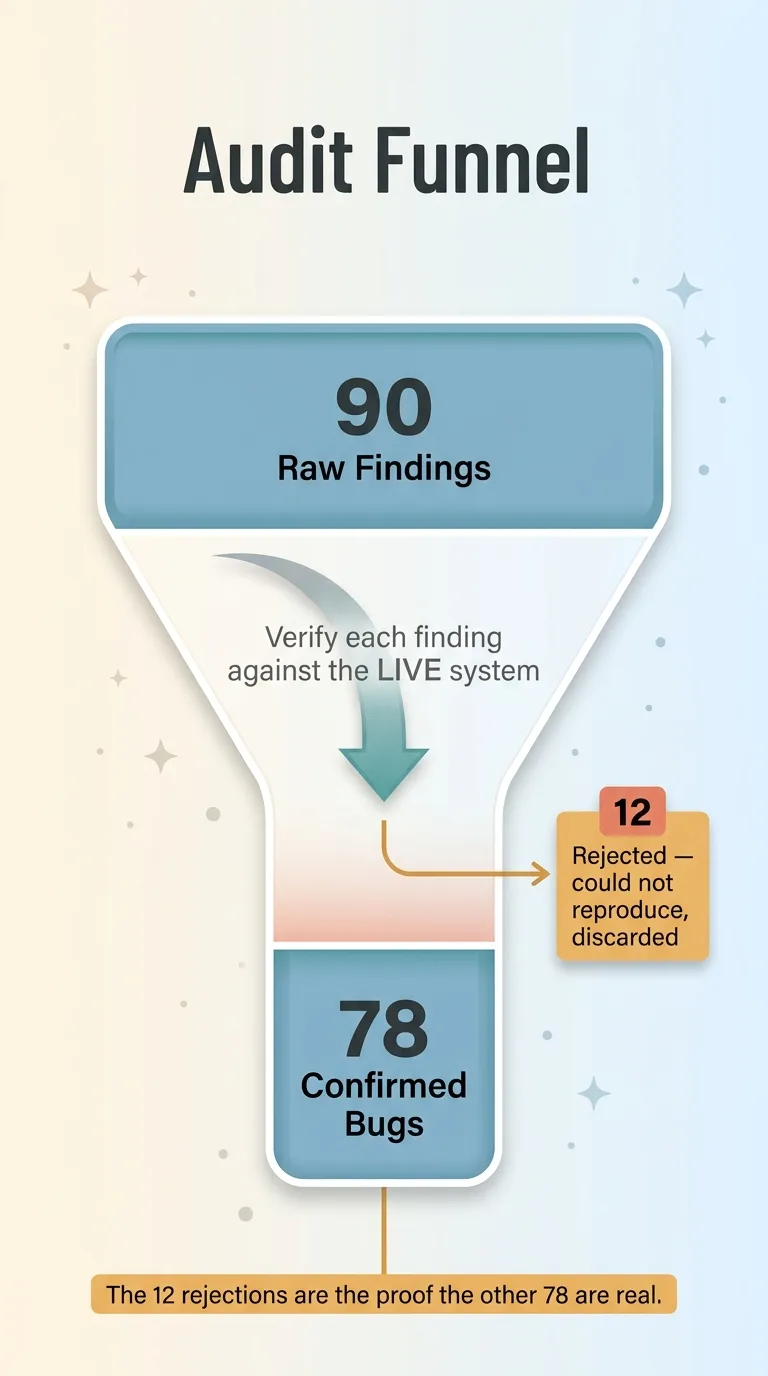 The audit funnel: 90 findings to 78 confirmed via live verification
That rejection is the most important number in this whole article, and I want to explain why.
An AI audit that reports everything as a bug is worse than useless. It floods you with false positives until you stop reading the report. I've seen tools that generate 400 "issues," 380 of which are noise, and the result is that nobody trusts the 20 that are real. You've spent money to produce something everyone ignores.
So the agents weren't just told to find problems. They were told to verify each finding against the live system before confirming it, and to discard anything they couldn't reproduce. If an agent flagged a route as vulnerable but couldn't actually trigger the failure, that finding got thrown out.
Twelve findings didn't survive that test. They got cut.
The reason this matters is that unverified AI output is the real risk, not the bug itself. I've written before about AI that lies about doing the right thing, confidently reporting success it never achieved. An audit agent that confirms bugs it can't reproduce is the same failure in a different coat.
Honestly, the 12 rejections are the proof that the other 78 are real. A tool that confirms everything is a tool that confirms nothing. The willingness to say "I flagged this and I was wrong" is what makes the rest of the report something you can act on.
The 78 Bugs, Sorted by What They Could Actually Cost You
Seventy-eight confirmed bugs sounds like a lot until you sort them by impact. Most were minor. Five were the kind that could genuinely hurt you.
The 5 critical ones
The critical five:
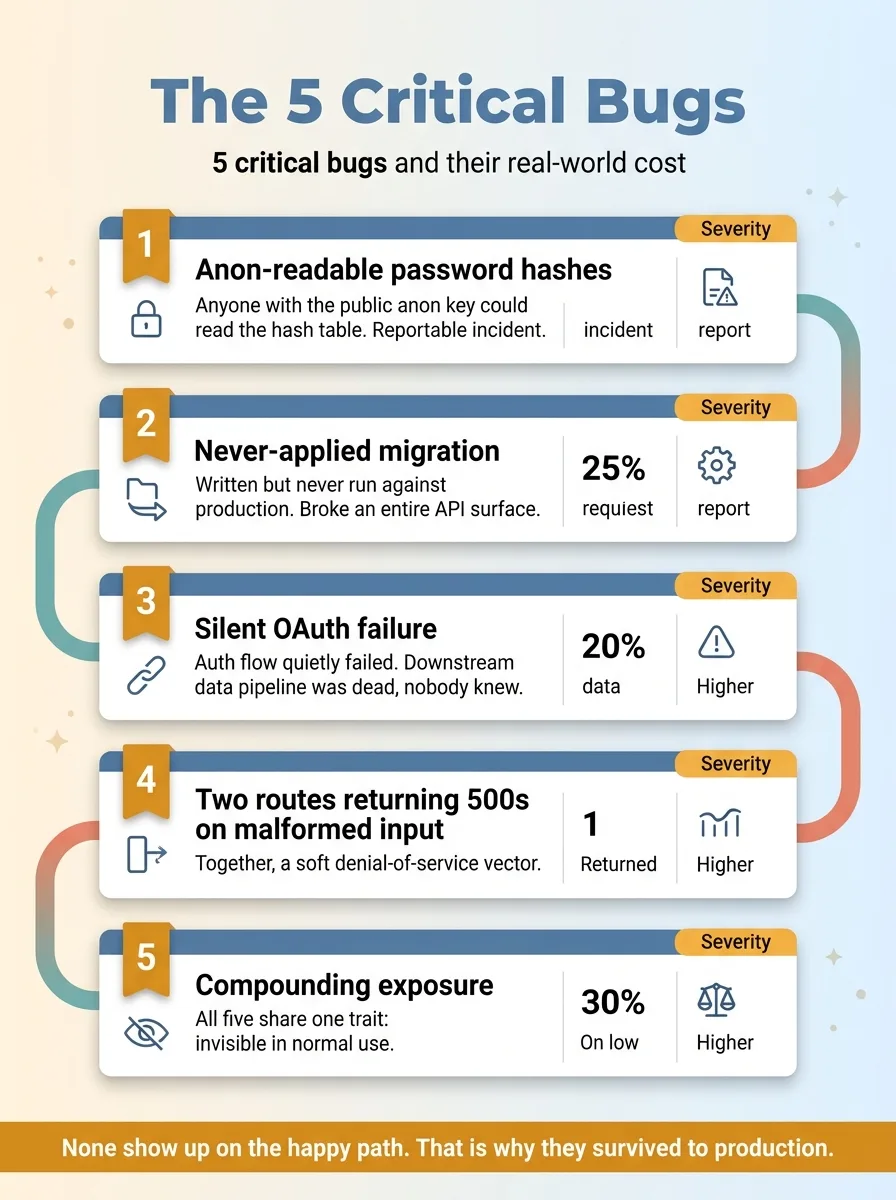 The 5 critical bugs and their real-world cost
- Anon-readable password hashes. Anyone with the public anon key could read the hash table. For a regulated financial-services platform, that's not a bug, that's a reportable incident waiting to happen.
- The never-applied migration. A migration written but never run against production, which left an entire API surface broken.
- The silent OAuth failure. An auth flow that quietly failed, which meant a downstream data pipeline was dead and nobody knew.
- Two routes returning 500s on malformed input. On their own, an annoyance. Together, a soft denial-of-service vector. Feed the endpoint bad input on a loop and you can degrade the service.
The thing all five share: they don't show up in normal use. You'd never find them clicking around the app like a regular user. That's exactly why they survived to production. The happy path worked, so nobody looked harder.
The long tail of small breakage
The remaining 73 were the long tail. Dead links pointing at retired routes. Missing input validation in places that hadn't been exploited yet. Minor data integrity issues. Stale config references.
None of those would make headlines. But every one is a small tax on the system, and they compound. This is what the security and quality debt hiding inside fast builds actually looks like when you put it under a light. You ship fast, the platform matures, and the debt accumulates in the gaps you didn't have time to revisit.
The point isn't that the team was careless. The point is that no team remembers everything, and the bugs that matter most are precisely the ones invisible in daily use.
Fixed in the Same Session: 16 Minutes to Find, One Sitting to Patch
The sweep ran in about 16 minutes. That's the discovery phase: 98 agents, eight teams, 90 findings, 78 confirmed, all of it in the time it takes to drink a coffee.
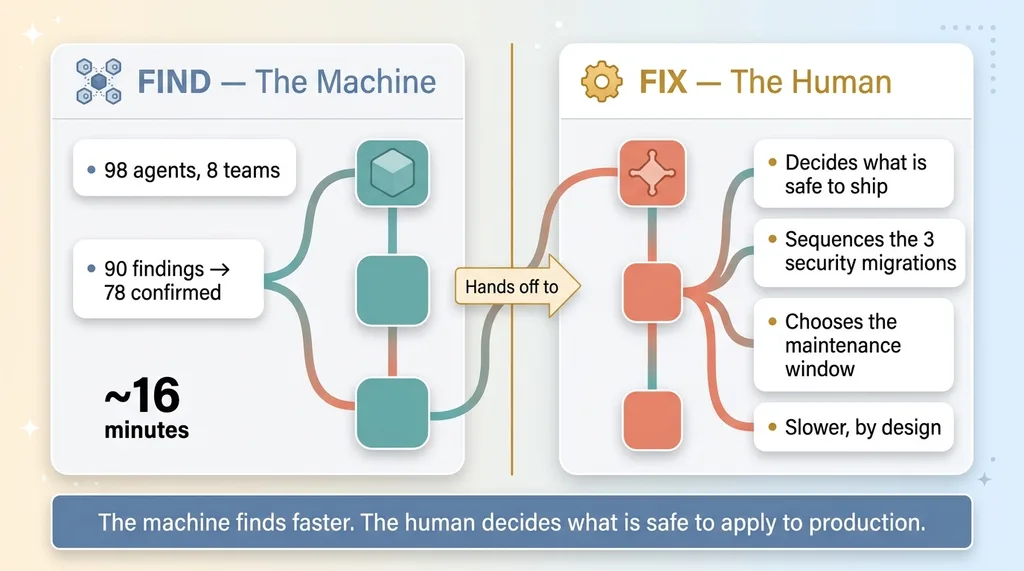 Division of labor: 16 minutes to find vs human judgment to fix
Then I fixed it. In the same session, I patched the code-level issues and applied three security migrations to close the critical gaps.
I want to be honest about the part that's hard. The 16 minutes is the find. The fix is judgment plus execution, and it's slower for a reason. Applying migrations to a live regulated-client system is not something you let an agent do unsupervised. A human has to decide what's safe to ship, in what order, and whether anything needs to happen during a maintenance window. The agents told me what was broken. I decided how to close it without breaking something else.
That division of labor is the whole model. The machine is faster than any human at finding problems across a sprawling system. The human is better at deciding which fixes are safe to apply to production right now.
This is what "use AI to QA your own work" actually looks like. Not a slide in a deck. An actual sweep that surfaced real, exploitable problems in software that looked fine, and got the critical ones closed the same day.
What This Means for Software You're Running Right Now
Here's the takeaway if you're a CEO with software in production: every system you've shipped has accumulated debt you cannot see by remembering. Your team's memory of where they cut corners faded the moment the next deadline hit.
A multi-agent code audit finds that debt in minutes instead of weeks of manual review. And it doesn't care who built the software. Agency, vendor, a previous team that's long gone, your own engineers under deadline pressure. The agents don't need the institutional knowledge. They just try to break the running system and report what gave.
I run this sweep on my own systems before I trust them in production. I run it on client systems before I take them over, because I'm not willing to inherit problems I can't see. Both times, it finds things. It always finds things.
If you've got software in production and no honest picture of what's actually broken inside it, that's the gap to close first. You can't fix what you can't see, and you can't see it by remembering. Have me run the same sweep on your systems and you'll have a real list within the day instead of a vague sense that something's probably wrong.
No hype. Just a clear picture of what's broken before it costs you.
Thinking about AI for your business?
If this resonated, let's have a conversation. I do free 30-minute discovery calls where we look at your operations and find where AI could actually move the needle.
Get AI insights for business leaders
Practical AI strategy from someone who built the systems — not just studied them. No spam, no fluff.
Hodgen.AI
Ready to automate your growth?
Book a free 30-minute strategy call with Hodgen.AI.
Book a Strategy Call