The Speech-to-Text Was Never the Hard Part
Everybody who asks me about building an AI phone receptionist starts in the wrong place. They want to know about transcription accuracy. Will it understand accents? What about background noise? Can it handle someone mumbling?
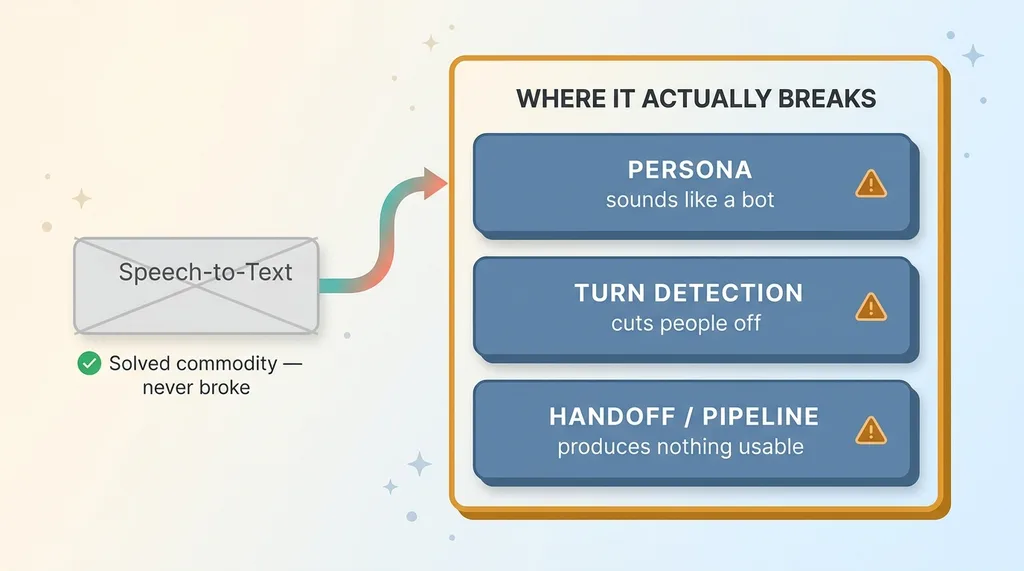 The three real problems with AI voice agents (vs. the false problem of transcription)
I get why. It feels like the scary part. It isn't.
Speech-to-text is a solved, cheap commodity now. The models that turn voice into text are good enough that I stopped thinking about them after the first day of building. Not the first week. The first day.
I've now built four different voice systems: a salon front desk receptionist, an intake line for a personal-injury law firm, a hands-free intake tool for a field installer, and a call-debrief tool that files notes into a CRM. Across all four, the speech recognition never broke. Not once was the transcription the thing that made a call go sideways.
What broke was everything around it.
The persona broke (the bot sounded like a bot). The turn-taking broke (it cut people off). And the handoff broke (a beautiful conversation that produced nothing usable on the other end).
Those are the three real problems with any ai voice agent that answers your phone. The model hearing the words correctly is table stakes. The work is in the persona, the turn detection, and the pipeline that catches every call as a structured, scored lead.
That's what the rest of this article is about. Not the magic of transcription. The unglamorous engineering that decides whether your callers think they're talking to a competent business or a robot reading a script.
The Persona Problem: Killing 'Wonderful!'
Why default voice personas fail
The single fastest way a caller knows they're talking to a bot is hollow affirmation.
Default voice agents are relentlessly upbeat. Say anything and you get "Wonderful!" Ask a question and you get "Great question!" Give your name and it's "Perfect!" Every utterance triggers a little burst of fake enthusiasm.
Real people don't talk like that. And the mismatch is jarring.
On the salon front desk system, this nearly sank the whole thing in testing. We had a caller phone in to reschedule because of a death in the family. The default agent's response started with "Wonderful!"
Wonderful. To a death in the family.
Nobody on a happy-path call notices the over-affirmation because it sort of fits. But the moment a caller is stressed, sad, or annoyed, the cheerful bot persona becomes offensive. And those are exactly the calls where you can't afford to sound like a machine.
The system prompt rules that actually fixed it
I had to write explicit banned-phrase rules into the persona prompt and build a check that flags filler phrases in the agent's output before they ever reach the caller.
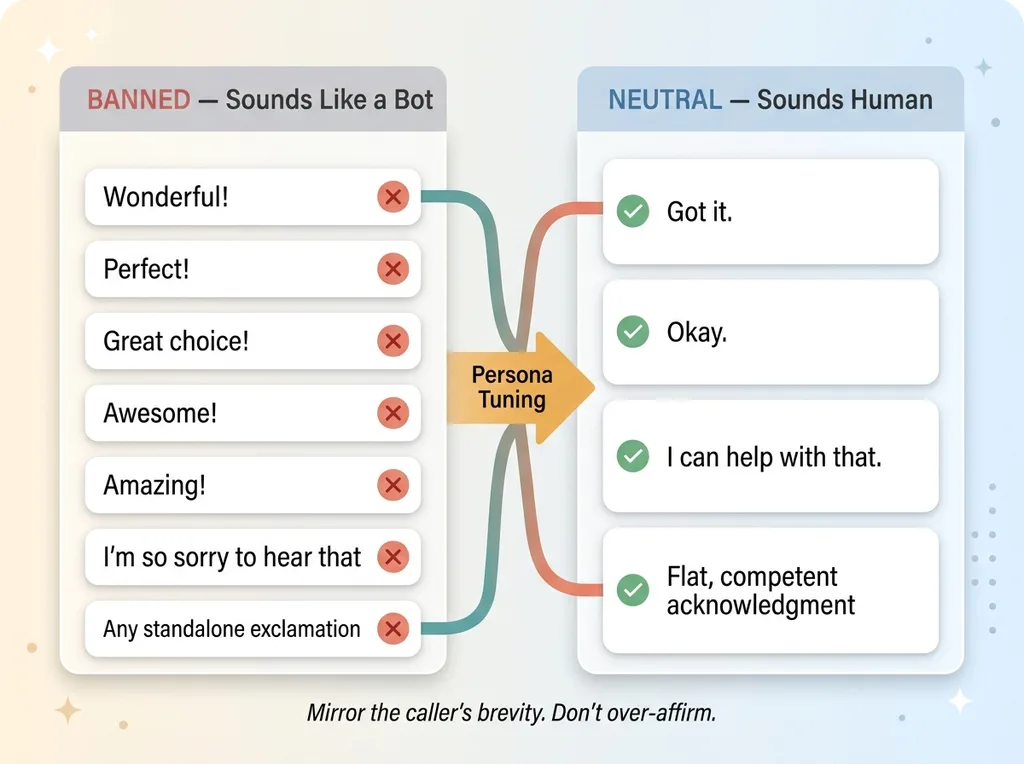 Banned cheerful filler phrases replaced with neutral, competent acknowledgments
The fix was a persona that mirrors the caller's brevity, doesn't over-apologize, and uses neutral acknowledgment. "Got it." "Okay." "I can help with that." Flat, competent, human.
Here's the short list I now ban in every voice agent I build:
- "Wonderful!"
- "Perfect!"
- "Great choice!"
- "Awesome!"
- "Amazing!"
- "I'm so sorry to hear that" (when nothing warrants it)
- Any standalone exclamation as a reaction
I'll be honest: this is iterative tuning, not a one-shot prompt. You write the rules, you listen to real calls, you catch the new filler phrase the model invented to replace the one you banned, and you ban that too. It took several rounds on the salon system before it stopped sounding like a cheerleader.
But the result was a receptionist that handled a grieving caller with the same calm tone it used to book a haircut. That's the bar.
Turn Detection: Don't Cut Off a Distressed Caller
The endpointing tradeoff
The hardest engineering problem in a voice agent isn't understanding words. It's knowing when the caller is done talking.
This is called endpointing, and the default settings are tuned for fast, transactional speech. Think ordering a pizza. Someone says "large pepperoni," pauses for 800 milliseconds, and the agent jumps in. Snappy. Efficient. Feels responsive.
Now put that same setting on a personal-injury intake line.
A distressed caller describing a car accident doesn't talk like a pizza order. They pause. They break down. They restart mid-sentence. "I was on the freeway and... sorry... the truck just... it came out of nowhere and I..."
If your agent jumps in at the first 800ms of silence, it talks over someone who is upset. On an intake line where empathy is the entire product, that's catastrophic. You've just confirmed to a vulnerable person that they're talking to a machine that doesn't care.
Tuning for emotional, not transactional, calls
The tradeoff is real and it's annoying. Longer silence thresholds make the agent feel patient and human on emotional calls. But the same long thresholds make a simple scheduling call feel sluggish, like the bot is half-asleep.
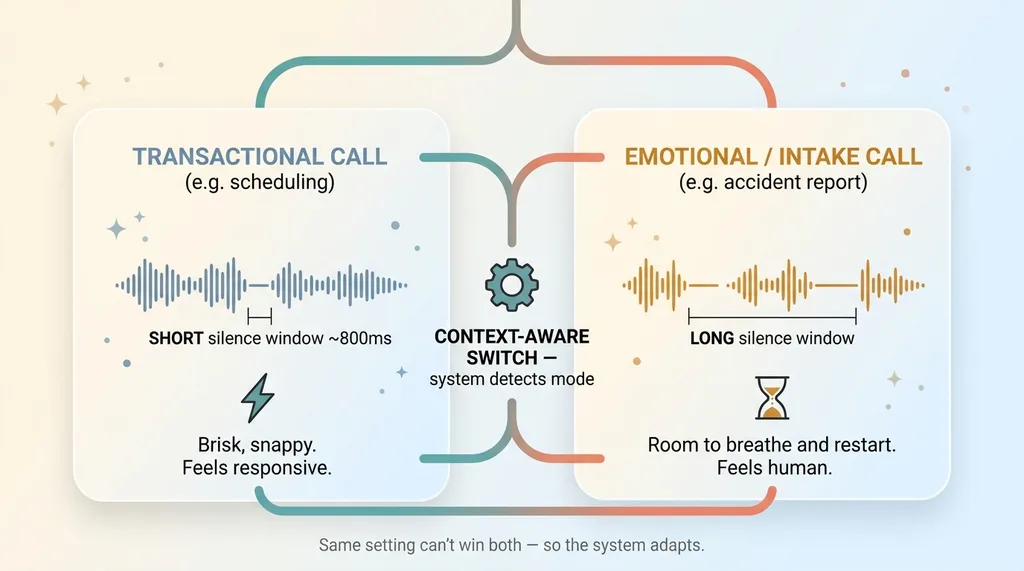 Context-aware endpointing: silence thresholds for transactional vs. emotional calls
You can't pick one setting and win both.
So I built it context-aware. The system detects when it's in an emotional or long-form intake mode and extends the silence window, giving the caller room to breathe and restart. On a quick scheduling call, it uses shorter windows so the conversation stays brisk.
Honestly? This is still imperfect. Detecting distress in real time is fuzzy, and I get it wrong sometimes. Which is exactly why I don't let the intake bot run fully unsupervised on the highest-stakes calls. It captures the intake, but a human reviews emotionally heavy calls before anything moves forward. Empathy you can't fully automate, you supervise.
Hands-Free Intake When the Caller Has No Free Hands
The field installer system flips the whole problem on its head.
Here the bot isn't answering inbound calls. It's a voice interface a worker uses to log a measurement or job detail without typing. Picture a tradesperson up a ladder with a tape measure in one hand and a phone on speaker. He's not going to stop, climb down, and tap on a screen.
He talks. The system logs it.
The design constraints are completely different from a receptionist. The environment is noisy, so noise handling and endpointing matter far more than they did even on the intake line. The worker wants speed, not warmth. Nobody up a ladder wants the bot to ask how his day is going.
And here's the part that took the actual work: confirmation.
When a worker says "84 inches wide, 60 tall, white frame," a misheard number doesn't just feel awkward. It becomes a wrong order, a wasted manufacturing run, and a furious customer. The transcription was accurate, but accurate isn't the same as verified.
So the agent reads structured data back every time. "You said 84 inches wide, 60 tall, white frame. Correct?" The worker confirms or corrects, and only then does it commit the record.
Voice intake for workers needs explicit confirmation loops, full stop. It's the opposite of the receptionist persona problem. Nobody cares if it sounds friendly. They care whether the numbers are right.
Same theme as everywhere else in this article: the speech-to-text worked fine. The design of the confirmation flow was the real engineering. Getting the words is easy. Making sure the right structured data lands in the system is the job.
Every Call Has to Land as a Scored Lead
The same scorecard as a web form
This is the most overlooked part, and for a CEO it's the part that actually matters.
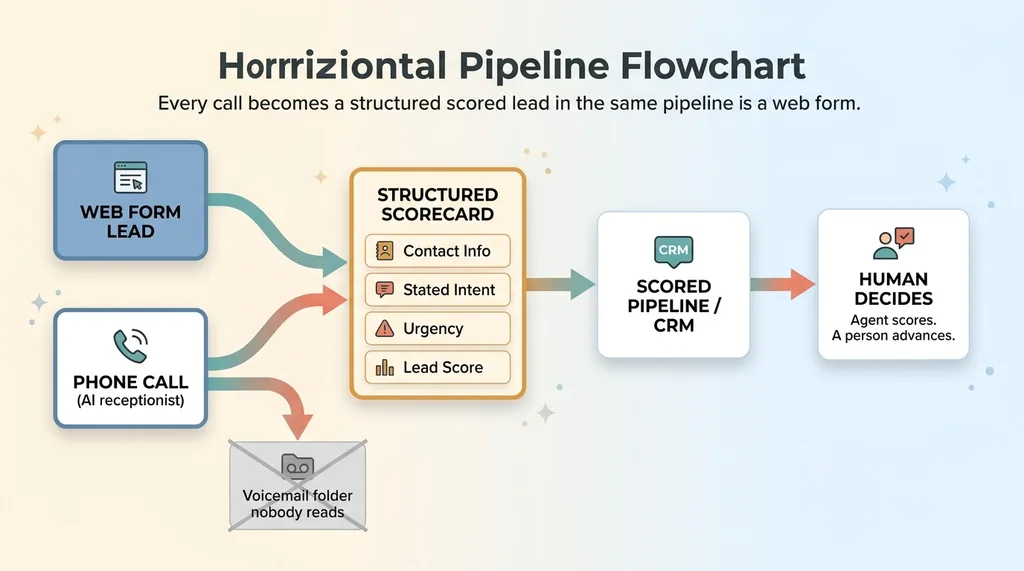 Every call becomes a structured scored lead in the same pipeline as a web form
A voice agent that answers the phone beautifully but dumps an unstructured transcript into a folder is useless. You can't sort it, score it, or act on it. You've just moved your missed-call problem into a folder full of transcripts nobody reads.
Every call must produce the same structured output as a web form lead. Contact info. Stated intent. Urgency. A lead score. The exact same scorecard you'd apply to someone who filled out a form on your website.
If a stranger fills out your contact form, it flows into your pipeline scored and routed. If that same stranger calls instead, why should they vanish into voicemail purgatory? Same person, same intent, completely different treatment. That's a measurement hole.
The call-debrief that files itself
The CRM debrief system shows the other side of this. After a real human takes a call, they talk into the system: what was discussed, what the prospect needs, where things stand. The agent files the notes, updates the deal stage, and scores the opportunity.
No typing up notes after every call. No deals sitting at the wrong stage because someone forgot to update the CRM. The debrief files itself.
That voice layer plugs straight into the CRM I built to score leads, so a spoken debrief and an inbound call land in the same scored pipeline. Voice in, structured lead out.
For you as the operator, the point is blunt: if your answering service or your voicemail isn't producing scored leads with the same rigor as your website form, you have a hole in your pipeline and you can't even see it.
And to be clear, scored doesn't mean auto-advanced. A high-value lead gets flagged, but every AI system I ship stops for a human before anything important moves on its own. The agent scores. A person decides.
This is also where voice and text automation diverge. My AI customer support system handles returns and exchanges over text, where you have time and a paper trail. Voice is live, real-time, and unforgiving. Different tool, same rule: structured output or it doesn't count.
Where I Don't Let the Voice Agent Run Free
Here's the part the magic-phone-bot vendors skip.
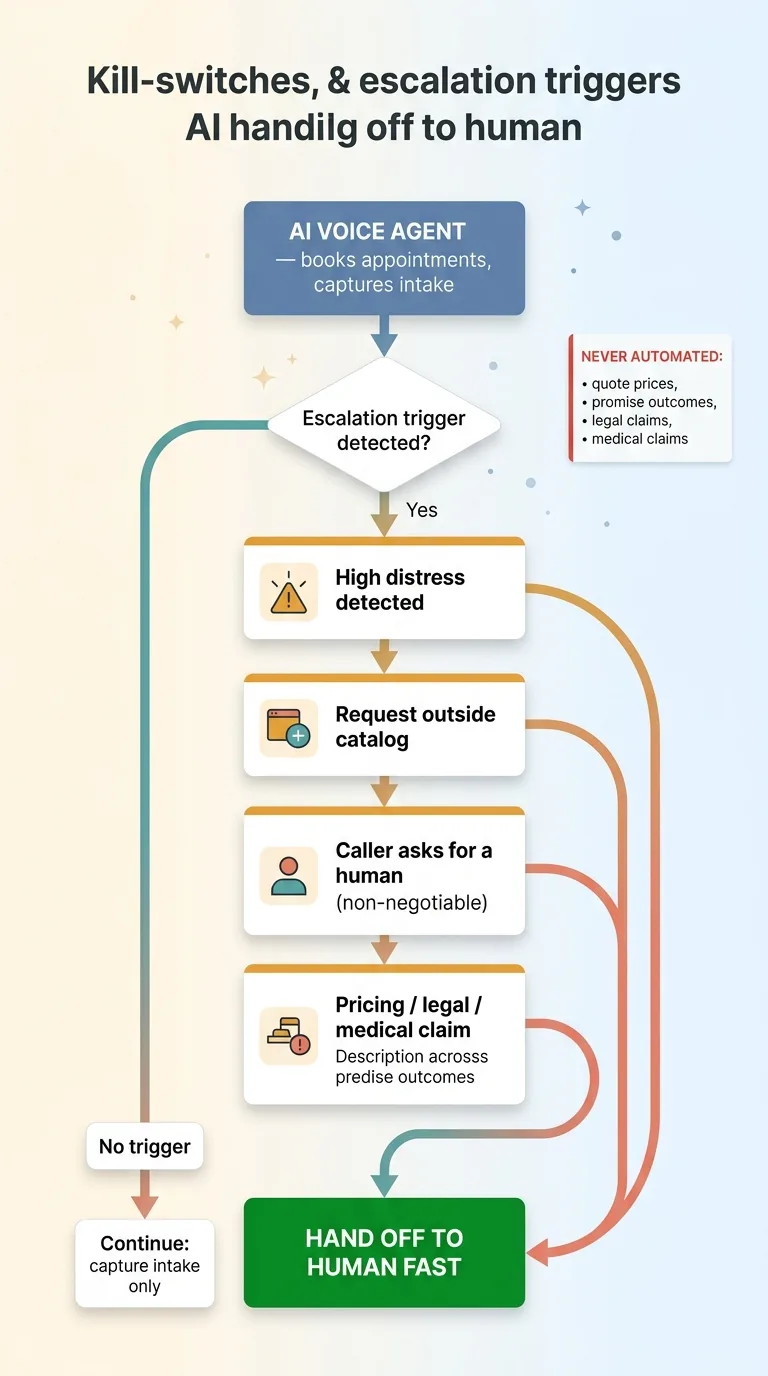 Kill-switches and escalation triggers, where the voice agent must hand off to a human
The voice agent books appointments and captures intake. That's it. On the legal intake line, it does not quote prices. It does not promise outcomes. It does not make legal claims, and on a medical-adjacent call it makes no medical claims. Those are exactly the things that get a business sued, and exactly the things a confident language model will happily invent if you let it.
So I don't let it.
Every voice system I build has kill-switches and defined escalation triggers. The bot hands off to a human when it detects high distress, when a caller asks something outside its catalog, or when someone simply says they want to talk to a person. That last one is non-negotiable. If a caller asks for a human, they get a human. No looping, no "I can help you with that," no fighting them.
The honest limitation: voice latency is still the thing holding natural conversation back. Even a fast system has a beat of delay that a real receptionist doesn't. On a transactional call you don't notice. On a delicate one, you sometimes do.
And some calls should never be fully automated. A grieving caller, a genuine emergency, a high-stakes negotiation. The agent's job there is to capture what it can and route to a person fast, not to handle it solo.
Drawing these limits isn't me being cautious for the sake of it. It's the difference between a voice system you can actually put on your main line and a liability waiting to embarrass you on a recorded call.
What This Looks Like for Your Phone
Walk through your own numbers for a second.
How many calls go to voicemail during business hours because your receptionist is doing three other things? How many come in after you close and never get returned? How many of those were people ready to buy who simply called your competitor next?
That's the real cost. Not transcription accuracy. Lost leads.
The question was never whether AI can answer the phone. It can, and it can do it well. The real questions are whether it's tuned for your actual callers (a salon, a law firm, and a field crew need three completely different agents) and whether every call becomes a measurable, scored lead instead of a transcript nobody reads.
That's the work. The persona that doesn't say "Wonderful!" to a grieving caller. The turn detection that doesn't cut off someone in distress. The confirmation loops, the kill-switches, and the pipeline integration that turns a phone call into a scored opportunity in your CRM.
I build these end to end. Not a plugged-in off-the-shelf voice API with your logo on it, but a system tuned to your callers and wired into how you actually run.
Get the next build note.
I write up each system I build, including what broke. Subscribe to my newsletter and I'll send you the next one.