I Built an AI Customer Support System for Returns and Exchanges
How I built AI customer service automation for my ecommerce brand — handling returns, exchanges, and store credit with human approval still in the loop.
By Mike Hodgen
Returns and exchanges are the unglamorous backbone of ecommerce customer service. And for the first two years of running my DTC fashion brand in San Diego, they were eating me alive. I built an AI customer service automation ecommerce system to fix it — not a chatbot, not a SaaS tool, but a custom support desk that handles the repetitive 80% while keeping me in the loop for the decisions that actually matter.
Here's how it works, what it cost, and the results after 90 days.
The Problem: 14 Hours a Week Answering the Same 6 Questions
Before this system existed, my team and I were spending roughly 14 hours per week on customer support. That's almost two full working days. We were fielding about 120 emails a week, and roughly 65% of them fell into one of six categories: Where's my order? Can I return this? Can I exchange for a different size? I want a refund. This arrived damaged. You sent the wrong item.
The replies themselves weren't hard. Most took 2-3 minutes. The real cost was everything around them.
Context switching killed productivity. You're in the middle of reviewing production samples or updating product listings, and a return request comes in that needs a response before the customer escalates. So you stop what you're doing, pull up the order, check the return window, verify inventory for an exchange, draft a reply, attach a return label. Three minutes of typing. Fifteen minutes of disruption.
Then there's the error rate. When you're handling 15-20 return requests a day by hand, mistakes happen. Wrong return label attached. Confirming an exchange for a size that's actually out of stock. Forgetting to check whether the item was purchased within the return window. Each mistake creates a follow-up thread that costs more time than the original request.
This is especially painful with handmade products. I'm not selling commodity goods where you pull another unit off a warehouse shelf. Each piece has production lead time. An exchange promise I can't fulfill is a broken promise to a customer who already had a problem.
I needed a system that could handle the repetitive stuff with zero errors and flag the complex stuff for human judgment. So I built one. Customer support is one of 14 skills within the larger AI platform I built to run my ecommerce brand — and it turned out to be one of the highest-ROI components.
Architecture: Gmail, Threaded Email, and AI Drafting With Human Approval
Gmail Integration and Thread Management
The system plugs directly into Gmail via API. When an email hits the support inbox, the AI reads it, classifies it by intent, and threads it against existing conversations.
Classification categories: return request, exchange request, order status inquiry, general product question, complaint, and "other." The classifier runs on a lightweight model trained against our historical support emails — about 2,400 labeled examples. Current accuracy sits at 94.2% on the primary categories. When confidence drops below the threshold, the email gets tagged as "needs human review" and skipped by the automation. No guessing.
Threading matters more than people realize. A customer might send three emails over two days about the same return. Without proper threading, the AI treats each one as a new request. The system uses order number extraction, email address matching, and subject line parsing to keep conversations grouped. This preserves context — so when the AI drafts a response to email three, it knows what was already said in emails one and two.
The Draft-Review-Send Workflow
Here's the design decision that makes or breaks an AI support desk: the AI drafts responses but does not auto-send.
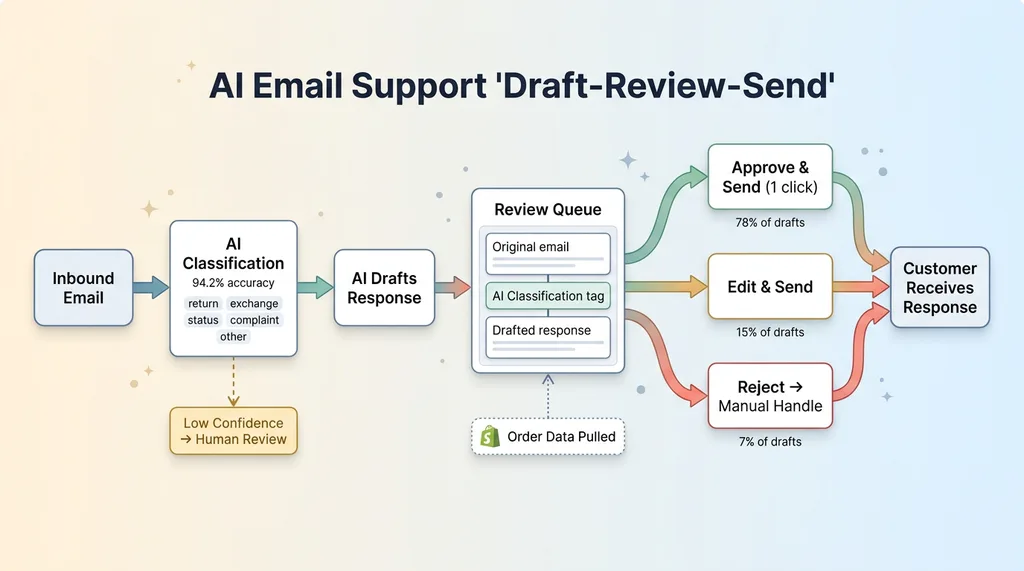 Draft-Review-Send Workflow
Every draft goes into a review queue. I see the original email, the AI's classification, the drafted response, and any relevant order data pulled from Shopify. Three options: approve and send (one click), edit then send, or reject and handle manually.
This isn't a compromise born from technical limitation. It's deliberate. Customer support is brand voice. My brand makes handmade fashion in San Diego — the tone needs to feel personal, not corporate, and definitely not robotic. A bad auto-reply damages trust more than a slow reply. A customer who gets a clearly canned response about their one-of-a-kind handmade piece feels dismissed.
The review step adds maybe 8-10 seconds per email. In exchange, I maintain 100% quality control on outgoing communication. This philosophy — AI that rejects its own bad work before it reaches the customer — runs through everything I build. The system's job is to do 90% of the work. My job is the final 10% that protects the brand.
In practice, about 78% of drafts get approved without editing. Another 15% need minor tweaks (usually tone adjustments or adding a personal detail). Only 7% get rejected for manual handling.
The Self-Service Returns Portal
How the Flow Works for the Customer
The biggest reduction in support volume didn't come from faster replies. It came from eliminating the need to email at all.
The returns portal is a standalone page on the site. Customer enters their order number and email address. The system pulls up the order, shows line items, and flags which ones are eligible for return based on policy rules. Customer selects the item(s), picks a return reason from a structured dropdown (wrong size, didn't match expectations, changed my mind, defective, other), and submits.
If everything checks out, they get an instant return shipping label and a confirmation email. Total time for the customer: under two minutes. No waiting for a reply. No back-and-forth.
What Happens Behind the Scenes
The eligibility logic is entirely rule-based. No LLM judgment calls here. Return window is 30 days from delivery date. Item must be unworn with tags attached. Certain handmade categories have specific handling rules — custom-dyed pieces, for example, are final sale unless defective. The system applies these rules deterministically. Yes or no. Eligible or not.
Where the LLM comes in is the communication layer. Once eligibility is determined, the AI crafts the confirmation email. If the return reason is "wrong size," the email includes sizing guidance and suggests an exchange instead. If the reason is "didn't match expectations," the email acknowledges the disappointment and offers to help find something better. Same outcome (return processed), different emotional tone based on context.
The portal also handles the logistics paperwork: generating the return label, creating the return record in Shopify, and queuing the item for inspection upon arrival.
The result: the portal eliminated roughly 60% of inbound return-related emails. Those customers never needed to contact us at all. They got a faster resolution, and we got hours back.
Exchange Inventory Checking: The Part That Actually Matters
This is where most AI support articles get vague, and where my system earns its keep.
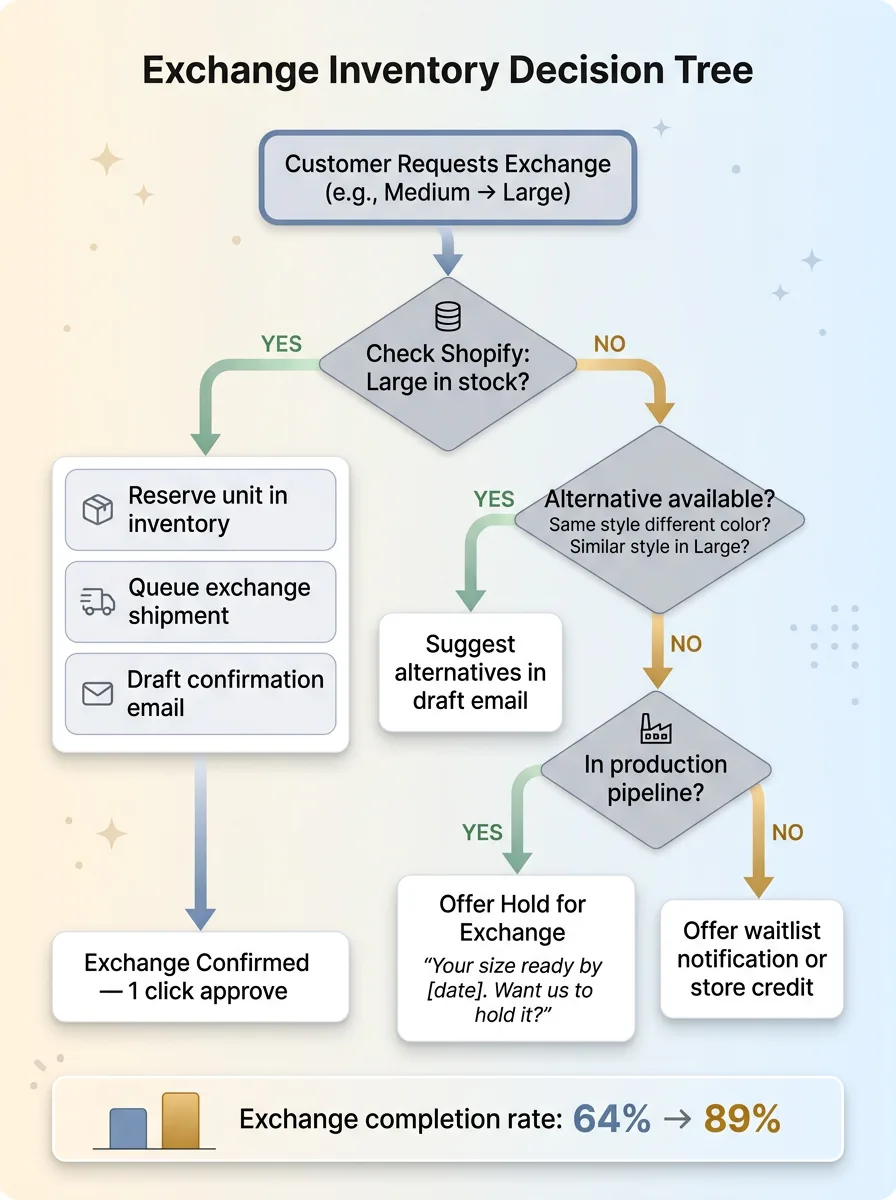 Exchange Inventory Decision Tree
When a customer wants an exchange — say, they ordered a Medium and need a Large — the system doesn't just say "sure, we'll send a Large." It checks real-time inventory against Shopify. If the Large is in stock, it queues the exchange, reserves the unit, and drafts a confirmation email. Simple.
If it's not in stock, things get interesting.
The system checks for alternatives: same style in a different color that is available in Large. Similar styles in Large. If nothing's available, it can offer to notify the customer when the item is back. But here's the piece that really matters for a handmade brand — the system also factors in the production pipeline. If I have a batch of that style in production that'll be finished in 6 days, it offers a "hold for exchange" option: "We'll have your size ready by [date]. Want us to hold it for you?"
This is the same recommendation logic that powers the AI shopping assistant I built for the storefront — just applied in a post-purchase context instead of pre-purchase. Same inventory data, same product knowledge, different customer intent.
Why does this matter so much? Because I might have 3 units of a particular piece in stock and 5 exchange requests pending. Without real-time inventory awareness, I'd be confirming exchanges I can't fulfill. With handmade products, that's not a "we'll get more from the warehouse" problem. That's a "this won't exist for another 3 weeks" problem.
Before the system: exchange completion rate was about 64%. After: 89%. The difference is almost entirely from accurate inventory checking and proactive alternative suggestions.
Why I Automate Store Credit But Never Refunds
The Store Credit Automation
When a return is processed and the customer is eligible for store credit, the system handles it end-to-end. Credit gets issued in Shopify, confirmation email goes out (via the draft queue, approved with one click), and the case is closed. The customer typically has their credit within an hour of their return being received.
Store credit is low risk. The money stays in the ecosystem. If the AI issues a $50 credit incorrectly — wrong amount, shouldn't have been eligible, whatever — I can adjust it. The customer still needs to come back and spend it. The error is recoverable.
I've automated roughly 85% of store credit issuance. The remaining 15% involves edge cases that get flagged for review: credits over a certain dollar threshold, returns outside the standard window that might warrant a courtesy credit, and customers who've had multiple returns in a short period.
The Line I Won't Let AI Cross
Refunds go back to a payment method. That's real money leaving the business. And I made a deliberate decision from day one: refunds always require human approval.
Not because the AI can't process them technically. It can. The Shopify API call is trivial. But the cost of a wrong refund is asymmetric compared to a wrong store credit.
A $50 store credit issued incorrectly is recoverable. A $50 refund issued incorrectly is gone. You're not calling the customer to ask for it back. And the failure modes are ugly: duplicate refunds on the same return, refunds on fraudulent claims, refunds when store credit was the appropriate resolution per policy.
Then there's the fraud angle. Return fraud is real in ecommerce and growing. The system flags suspicious patterns: customers who return more than 30% of their orders, mismatched shipping addresses between orders and return requests, claims of "never received" on orders with confirmed delivery signatures. These don't automatically mean fraud — but they mean a human should look before money leaves the account.
The broader principle here applies to every AI system I build: automate where the cost of error is low. Keep humans where the cost of error is high.
This isn't about trust in the technology. It's about risk management. The AI handles 80%+ of the support workflow. But the 20% it escalates to me is the 20% where a mistake costs real money or real customer relationships. That's a trade I'll make every time.
Results After 90 Days in Production
Hard numbers from the first 90 days:
- Average response time: dropped from 4.2 hours to 38 minutes (including review queue time)
- AI draft approval rate (no edits): 78%
- Returns processed via self-service portal: 61% of all returns, up from 0%
- Weekly hours on customer support: down from 14 to 4.5 (68% reduction)
- Exchange completion rate: 64% → 89%
- Cost comparison: a part-time support hire in San Diego would run $2,200-2,800/month. The system costs a fraction of that in API calls and compute
Customer satisfaction is harder to quantify, but the proxy metric I track is repeat purchase rate among customers who went through the return or exchange flow. Before the system: 22%. After: 34%. Faster resolution and accurate exchanges bring people back.
What didn't work perfectly? Early on, the classifier struggled with emails that combined multiple intents — "I want to return this AND where's my other order?" It would classify based on whichever intent appeared first and miss the second. I added a multi-intent detection layer in week three that fixed most of it.
International returns are still mostly manual. Different customs documentation, variable shipping costs, and country-specific consumer protection rules make full automation risky. That's a future project.
Damaged-in-transit claims that require photo review are also human-only. The AI flags them, pulls up the order details, but a person needs to evaluate the photos. I've experimented with vision models for this, but the accuracy isn't reliable enough yet to trust. Honest answer: it's maybe 70% accurate on damage assessment. Not good enough.
The system got measurably better over the 90 days. Classification accuracy went from 89% in week one to 94.2% by week twelve, mostly from handling edge cases I hadn't anticipated and feeding corrections back into the training data.
What This Means for Your Ecommerce Operation
This isn't a SaaS product. It's a custom system built around my specific business rules, product catalog, and brand voice. I'm not selling it.
But the architecture is transferable. Any ecommerce brand doing $1M+ in revenue is spending significant time on repetitive support tasks. The math is the same everywhere: a handful of question types account for the vast majority of volume.
The framework I'd suggest before building anything:
- High repetition + low risk = automate fully (order status inquiries, store credit, return label generation)
- High repetition + high risk = AI draft with human approval (exchange confirmations, complaint responses)
- Low repetition + high risk = fully manual (refunds, fraud review, escalated complaints)
Map your support tickets against that grid. The answer to "should we use AI for customer support?" is always "for some of it." The question is which parts.
This is one of the systems I build when I work with ecommerce businesses on their broader AI strategy. If you're spending more than 10 hours a week on support tasks that feel repetitive, there's almost certainly a version of this that works for your operation.
Thinking About AI Customer Service Automation for Your Business?
If this resonated — if you read this thinking "we're spending way too much time on this stuff" — I'd like to hear about it. I do free 30-minute discovery calls where we look at your operations, your support volume, and where AI could actually move the needle. No slides. No pitch deck. Just an honest conversation about what's worth automating and what isn't.
Get AI insights for business leaders
Practical AI strategy from someone who built the systems — not just studied them. No spam, no fluff.
Hodgen.AI
Ready to automate your growth?
Book a free 30-minute strategy call with Hodgen.AI.
Book a Strategy Call