The day AI invented a label that didn't exist
A while back I was helping a brand that sells named wine blends. Real bottles, real photography, a label that customers recognize on a shelf. They wanted AI-generated marketing scenes: the bottle on a sunset table, in a vineyard, next to a cheese board. Standard lifestyle stuff.
So we ran the bottle through an image model. The scenes came back gorgeous. Warm light, soft bokeh, the kind of background that takes a photographer half a day to set up.
And the label was garbage.
The model had invented text. Not their blend name, not anything readable. A smudge of pseudo-letters that looked like a foreign language printed by a broken inkjet. The proportions had drifted too. The bottle was slightly too tall, the cap too small, the silhouette subtly wrong. It looked like a counterfeit of their own product.
This is the heart of AI product image label fidelity, and it's the thing most people discover the hard way. For a generic product, a fuzzy label might not matter. Nobody buys a no-name candle because of the typography. But for a brand whose entire value is the named blend printed on that bottle, a fabricated label isn't a minor flaw. It's a lie that ships.
Think about what happens when that asset goes live. A customer who knows the product sees a bottle that's almost right but clearly fake. A new customer sees branding that looks cheap. Either way you've spent money to undermine the exact thing your brand is built on.
One bad asset can do real damage. And the scary part is how easy it is to generate dozens of them before anyone notices the label is wrong.
Why generative image models can't draw your packaging
Let me explain the mechanism honestly, because this isn't a problem you prompt your way out of.
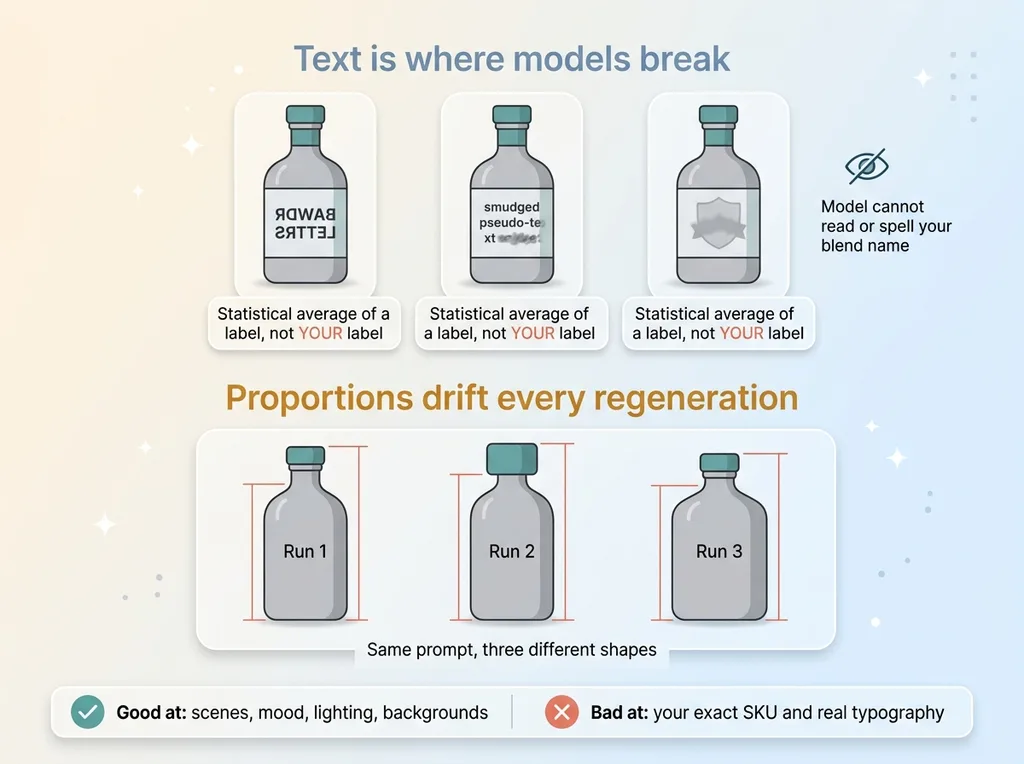 Why image models break on labels, text and proportion failure
Text is where image models break
Diffusion models don't store your label. They render the statistical idea of a label, the average of millions of bottles they've seen. When you ask for "a wine bottle on a table," the model fills the label area with what a label tends to look like: some letters, some lines, a vague crest shape.
It has no concept of your blend name. It can't read it, it can't reproduce it, and it can't spell it. Small text is the single weakest area of every image model I've tested. The more specific and named your product, the worse the mismatch gets.
These are the AI generated product photography problems that don't show up in a demo but absolutely show up when you scale to real SKUs.
Proportions drift every regeneration
Even setting text aside, the model reinvents the object every single time. Run the same prompt twice and you get two slightly different bottles. The cap-to-body ratio shifts. The shoulder curve changes. The silhouette wanders.
For a product line where every bottle should look identical, that drift is poison. You can't have a catalog where your hero bottle has three different shapes across three marketing images.
Here's what's fair to the technology: image models are genuinely good at general scenes. Lifestyle backgrounds, mood, lighting, abstract product categories, "a cozy kitchen" or "a sunlit beach." That stuff works.
What fails is your exact SKU with real typography. The honest line is this: image generation is great at everything around your product and terrible at your product itself. Once you accept that, the fix becomes obvious.
The rule that makes AI imagery safe for a real product
Here's the principle, stated plainly: composite, don't generate.
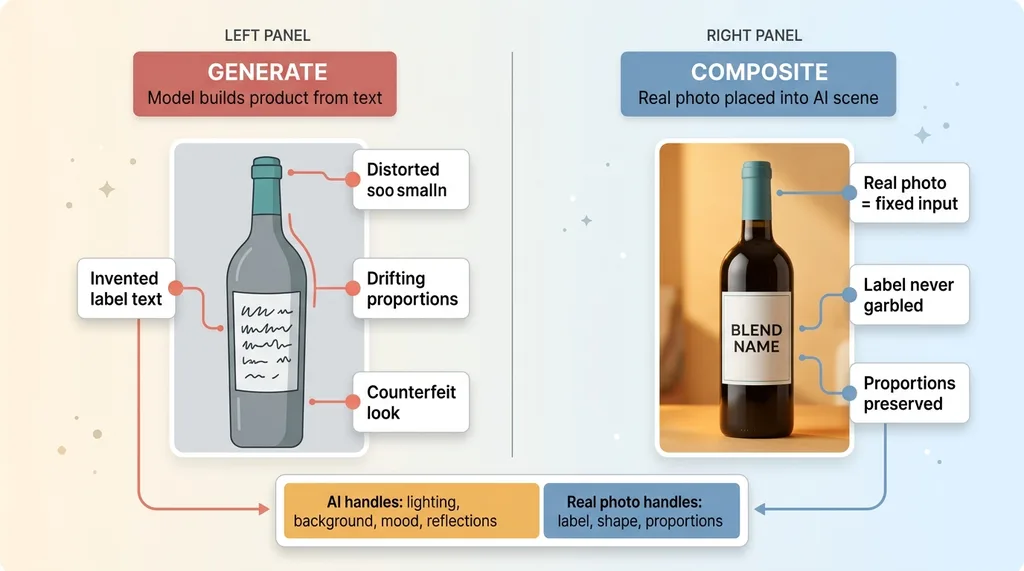 Generate vs Composite, side-by-side comparison
Never let the model recreate a labeled product from scratch. Instead, take the real product photograph and place it into AI-generated scenes. This is the single rule that separates usable AI imagery from embarrassing AI imagery, and it's why I tell every client to composite the real thing instead of generating it.
Let me define the two clearly, because the distinction is the whole game.
Generate means the model builds the product out of nothing, from a text description. The label, the shape, the proportions all come from the model's imagination. This is where labels get garbled and silhouettes drift.
Composite means you start with a genuine photograph of the real product and let the model build only the scene around it. The lighting, the background, the mood, the reflections all come from AI. The product itself stays exactly as photographed.
The division of labor is the point. The model does what it's good at: atmosphere, light, environment. The genuine photograph does what the model can't: the label, the proportions, the truth of the product.
When you composite a product photo into an AI scene instead of regenerating it, the label is no longer something the model has to invent. It's a fixed input. You can't garble what you never asked the model to draw.
This isn't a clever trick. It's a constraint. And constraints are what make AI safe to deploy on a real brand.
Building a source-of-truth photo catalog
Compositing only works if you have real product photos to composite. That sounds obvious, but the catalog is where fidelity actually lives or dies.
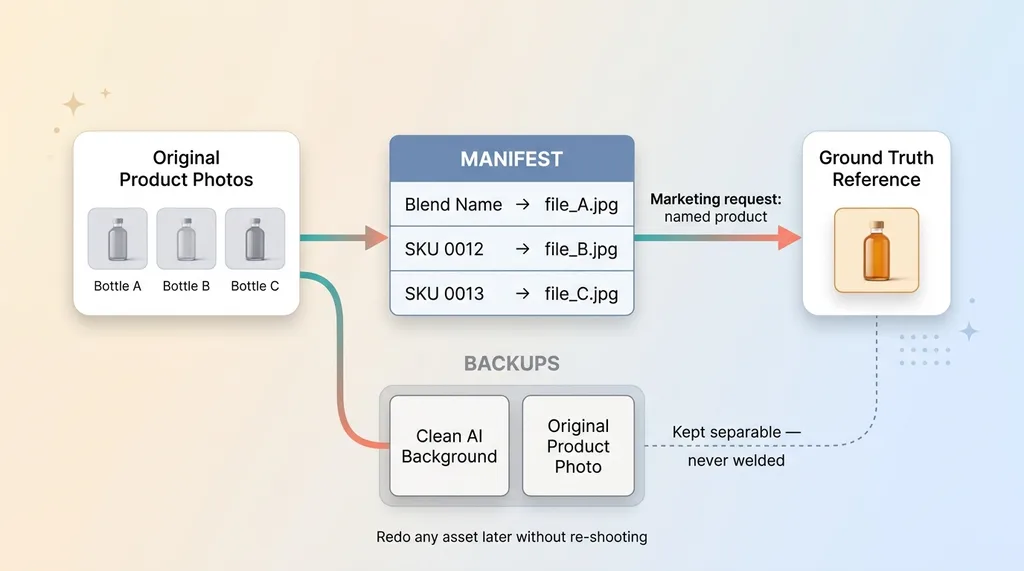 Source-of-truth catalog and manifest with backups
Originals plus a labeled manifest
In my own systems I keep a catalog of original product photographs, and alongside it a manifest that maps each named product to its reference image. Blend name to file. SKU to photo. No ambiguity.
This manifest is the anchor. When a marketing request comes in for a specific product, the pipeline doesn't guess which bottle to use. It looks up the named product, pulls the exact reference photo, and that becomes the ground truth for every composite.
This is the same discipline I describe when I talk about how to lock the AI to a real catalog. The AI is never allowed to free-associate about what your product looks like. It's pinned to a known, verified image.
Backing up every pre-composite scene
The second piece is backups. Before any scene gets composited, I back up the clean generated background and the original product photo separately. They never get welded together permanently.
Here's why that matters. Six months from now you might want a new background, a seasonal treatment, a different mood for the same bottle. If the genuine bottle and the generated scene are kept separable forever, you can redo any asset without re-shooting anything.
Nothing is locked into a one-shot generation. You're not stuck praying the next render keeps the label intact, because the label always lives in the original photo, untouched. The catalog plus backups turns image production from a gamble into a repeatable process.
This is the unglamorous infrastructure work that makes the pretty results possible. Most people skip it and then wonder why their imagery is inconsistent.
The keep-rule that enforces label and proportion fidelity
Now the compositing mechanics. This is where you enforce fidelity instead of hoping for it.
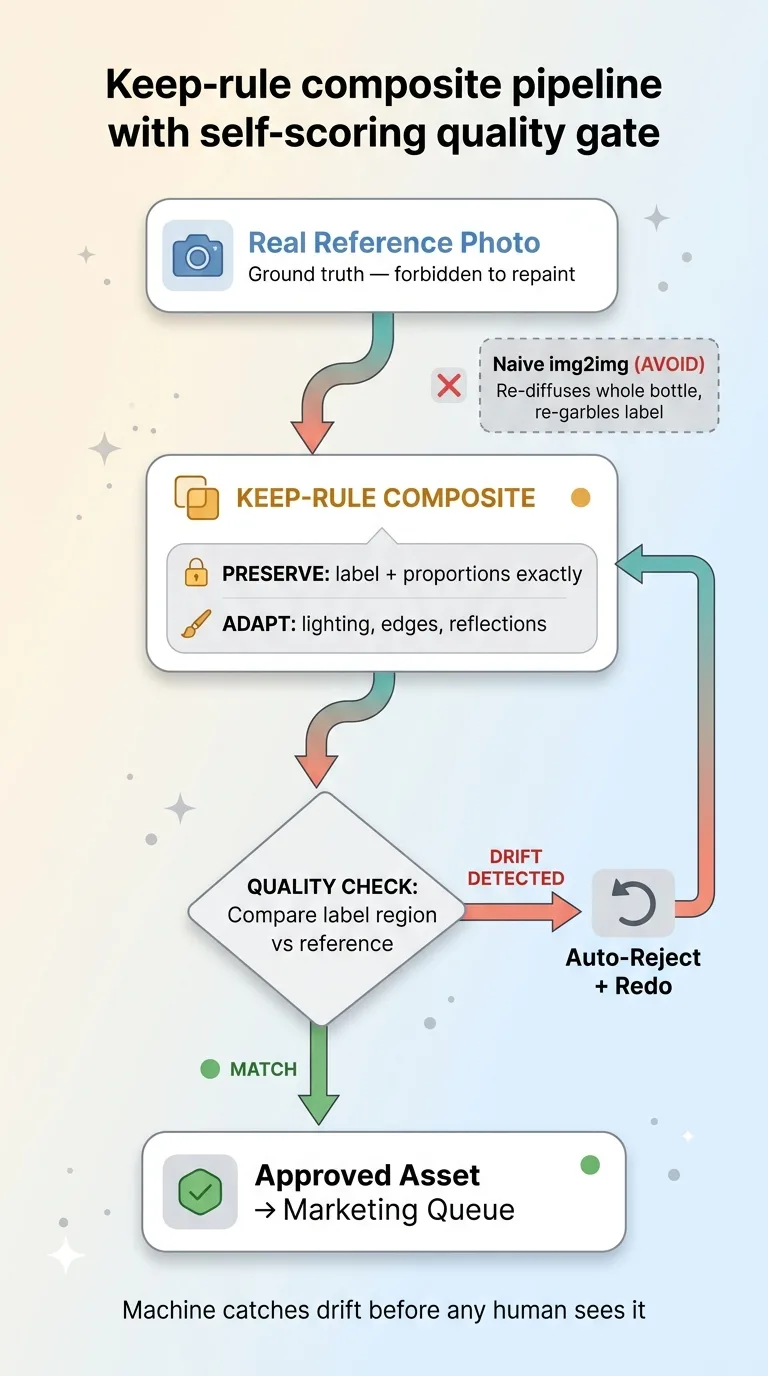 Keep-rule composite pipeline with self-scoring quality gate
A higher-fidelity model places the real bottle into the new scene under what I call a keep-rule: preserve the label and proportions from the reference exactly, and only adapt lighting and edges to match the scene. The reference photo is ground truth the model is forbidden to repaint.
Contrast this with naive img2img. If you feed your bottle into a standard image-to-image flow with any real strength, the model re-diffuses the entire bottle. It re-renders the label, re-garbles the text, and shifts the proportions all over again. You've reintroduced the exact problem you were trying to avoid.
The keep-rule is the difference. The model is allowed to blend the edges so the bottle sits naturally in the scene, to add a reflection on the table, to match the warm light hitting one side. It is not allowed to touch the label region or change the silhouette.
Then comes the quality check, and this is non-negotiable. After every composite, the pipeline compares the label region against the reference. If the label drifted, the asset gets rejected automatically. It never reaches a human, never reaches a marketing queue, never reaches a customer.
I build this self-scoring step into the broader AI product photography pipeline that scores its own work. The system grades its own output and throws away anything that fails the fidelity bar. You don't want a person eyeballing 500 composites for label drift. You want the machine to catch it and redo it before anyone looks.
This is what lets you preserve the label with image AI at scale instead of one careful hand-check at a time. The keep-rule sets the constraint, the quality check enforces it, and together they make volume safe.
What to do when no real photo exists
Here's the honest edge case, the part where I tell you what doesn't work yet.
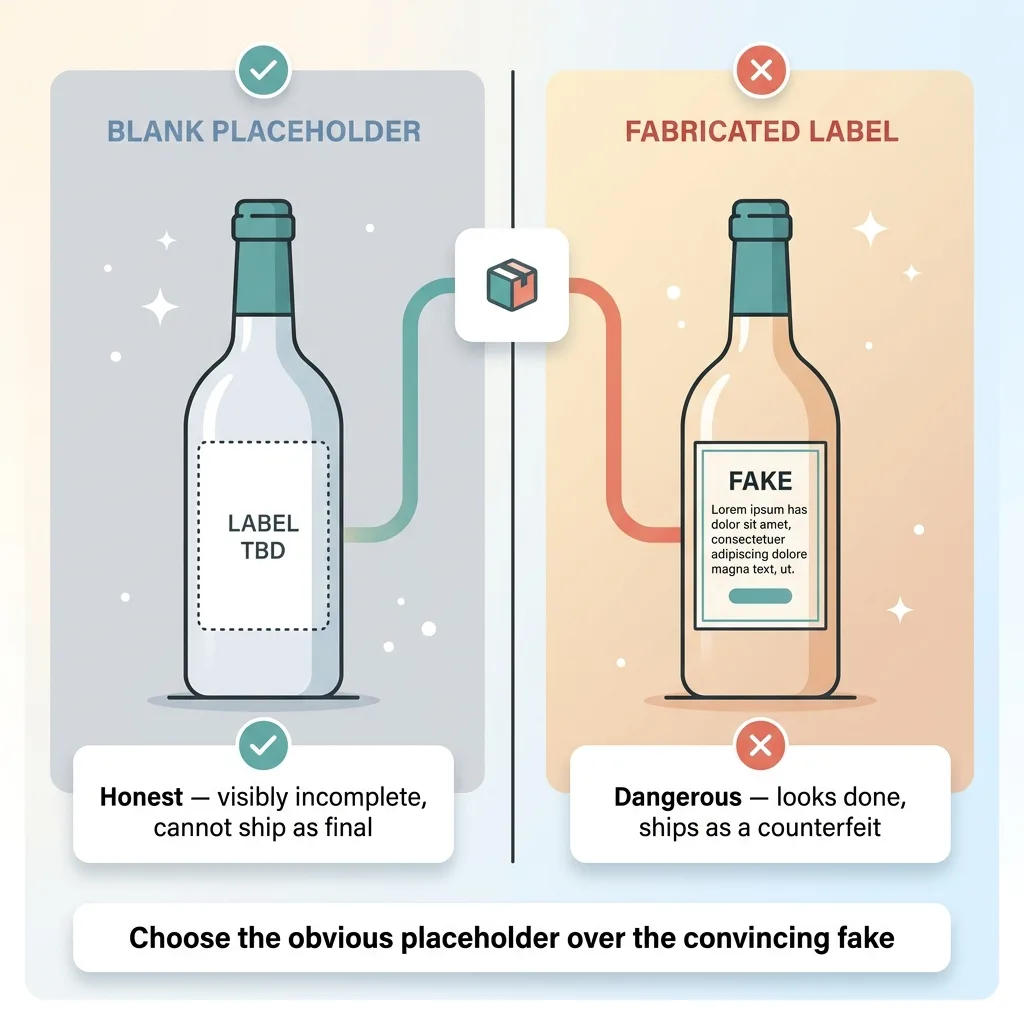 No-photo edge case, blank placeholder vs fabricated label
Sometimes you need an image of a product that hasn't been photographed. A new blend that's still in development. A SKU that's launching next month with no studio shoot scheduled. You want the marketing asset ready, but there's no reference photo to composite.
The temptation is to let AI fabricate the label "just for now." Don't. The discipline has to hold here more than anywhere.
Instead, render a deliberately label-free placeholder. A clean, unbranded bottle silhouette. The right shape, the right category, obviously blank where the label belongs.
The reason is simple. A blank bottle is an honest placeholder. Any marketer who sees it knows instantly it needs the real label dropped in before launch. It can't accidentally ship as final because it's visibly incomplete.
A fake label is the opposite. It looks finished. It looks plausible. And that's exactly why it's dangerous, because a plausible fake is the thing that slips into a campaign and ships as a counterfeit of your own product.
So the rule is: AI can't responsibly invent your packaging, and I don't pretend it can. A blank placeholder tells the truth about what it is. A fabricated label tells a lie that looks like the truth. I'll always choose the obvious placeholder over the convincing fake.
Composite discipline is what keeps AI safe for real brands
The fear here is completely rational. You've heard AI imagery is fast and cheap, but you've also seen it mangle text and warp products, and the last thing you want is to ship something that looks counterfeit. For a brand built on a recognizable label, that risk feels like a dealbreaker.
It isn't. The answer was never to avoid AI imagery. It's to build the discipline that keeps the real product real.
Composite, don't generate. Keep a source-of-truth catalog with a manifest pinning every named product to its real photo. Apply keep-rules so the model adapts the scene but never repaints the label. Reject any composite where the label drifts. And when there's no real photo, use a label-free placeholder instead of a fabrication.
None of these are exotic. They're guardrails. And guardrails are exactly what most AI image tools leave out, which is why those tools embarrass brands.
This is the kind of constraint I build into every client system, so the AI extends your brand instead of undermining it. The same logic shows up across my work, and I've written more about it in three ways I stop AI from embarrassing a client. The pretty output is easy. The discipline that makes the pretty output safe to ship is the actual job.
If your brand lives or dies on a label, a logo, or a product people recognize on sight, that discipline isn't optional. It's the whole point.
Get the next build note.
I write up each system I build, including what broke. Subscribe to my newsletter and I'll send you the next one.