AI Product Photography: The Pipeline That Scores Its Own Work
How I built an AI product photography ecommerce pipeline that generates, scores, and deploys images to Shopify — no photographer needed.
By Mike Hodgen
I run a DTC fashion brand in San Diego. We make handmade products — real fabric, real craftsmanship. And at 564+ products in the catalog, AI product photography for ecommerce isn't some future experiment for us. It's a production system that runs every week.
But what makes our pipeline different from "I typed a prompt into Midjourney" isn't the generation step. It's the part where a separate AI scores every image, rejects the bad ones, and triggers regeneration automatically. The system grades its own work before a human ever sees it.
That loop — generate, evaluate, reject, regenerate — changed how I think about building AI systems entirely.
What Product Photography Actually Costs a DTC Brand
The Math on Traditional Shoots
Let me walk through the numbers I used to live with. A decent product photographer in San Diego runs $300-800 per session. A model costs $150-500 per session depending on experience. Studio rental adds another $200-400 for a half day. Post-production editing — background removal, color correction, resizing — tacks on $5-15 per image if you outsource it, or hours of your own time if you don't.
For a single product with 4-5 images, you're looking at $50-150 all-in when you batch efficiently. That sounds manageable until you multiply it across 564 products. At even $75 per product, that's $42,300. And that's before you account for the seasonal refreshes, the new product drops, the A/B test variants you wish you had but never shoot because who has the budget.
The Hidden Cost: Time to Market
The dollar cost isn't even the real problem. The real killer is time to market.
When I'm adding new products weekly — which is what a healthy DTC brand does — a traditional photography workflow creates a 1-2 week backlog minimum. You batch products, schedule the shoot, wait for editing, upload to Shopify. Every day a product sits without photos is a day it can't generate revenue.
For a catalog our size, that backlog was a constant revenue leak. Products sitting in a "needs photos" queue while competitors listed similar items and captured the search traffic. This isn't about replacing great photography everywhere. It's about having a system that keeps pace with a fast-moving catalog.
How the AI Photo Pipeline Works End to End
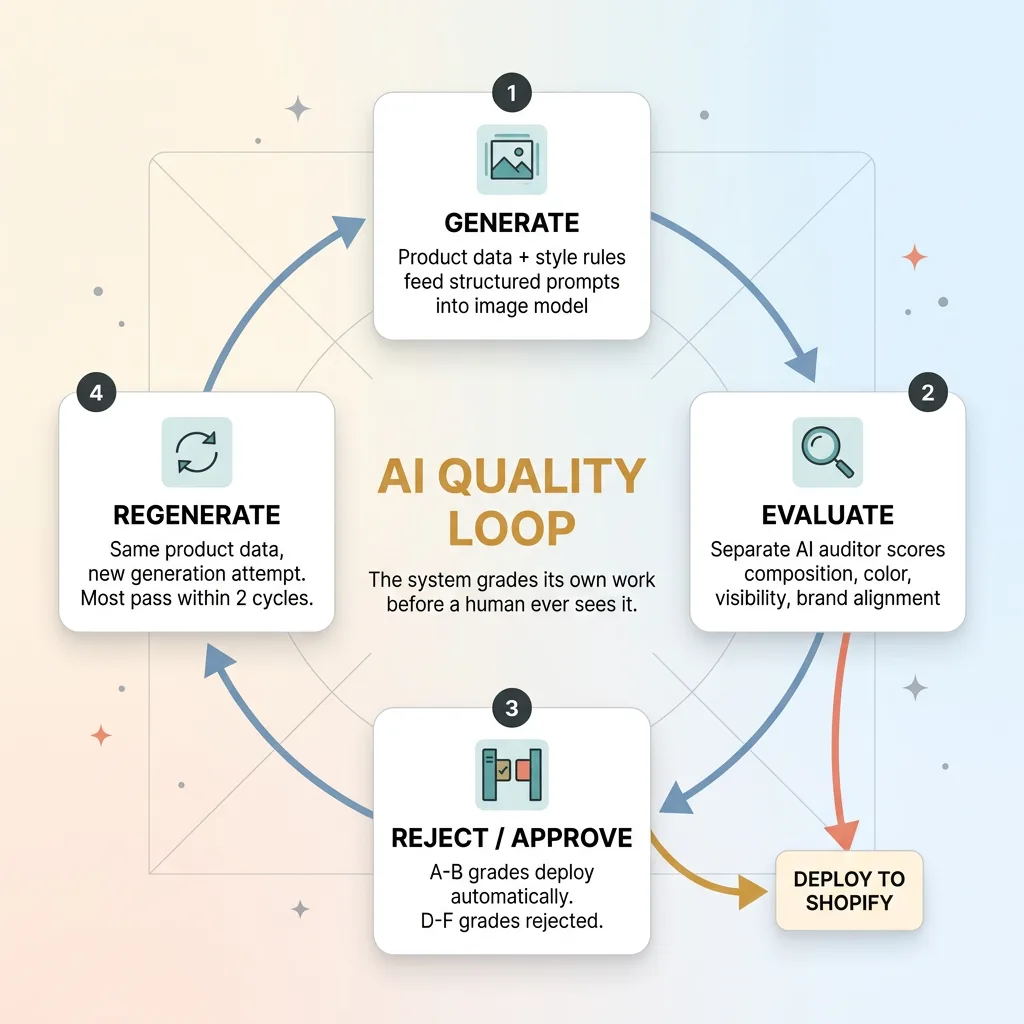 Generate-Evaluate-Reject-Regenerate Loop
Input: Product Data and Style Rules
The pipeline starts with structured product data, not creative inspiration. Every product in our system has attributes: type (t-shirt, dress, accessory), primary colors, fabric, target customer profile, and product line classification. That data feeds directly into the prompt construction layer.
The prompt construction isn't freeform. It's a template system with product-aware rules. A linen summer dress gets different lighting direction, different background treatment, and different model positioning than a structured blazer. These rules are encoded once and applied automatically across every generation. No one sits there crafting individual prompts for 564 products.
Generation: Model Personas and Scene Composition
Here's where it gets interesting. The pipeline maintains virtual model personas — consistent character descriptions that align with our brand identity and target customer demographics. This means the "model" in a product photo maintains visual consistency across a product line, which matters enormously for how a collection looks on a Shopify store page.
We use NB2 for image generation. Scene composition is controlled through prompt engineering that specifies camera angle, lighting direction, background environment, and styling context. A casual product gets a lifestyle setting. A formal piece gets a studio backdrop. These decisions are automatic, driven by product category rules.
The key here: this isn't "type a prompt and hope for the best." Every generation runs through a structured pipeline with constraints at every step. The creativity is in the system design, not in individual prompt writing.
Output: Shopify-Ready Images
Generated images go through automatic formatting: proper dimensions for Shopify galleries, web-optimized compression (we've achieved 92% image weight reduction without visible quality loss), and metadata tagging. The pipeline pushes finished images directly to Shopify product listings via API.
This is one skill within the 14-skill AI ecommerce platform I've built, and it plugs into the AI pipeline that creates products in 20 minutes — from concept to live on the store. Photography used to be the bottleneck in that 20-minute window. Now it's just another automated step.
Face-Safe Compositions: Solving the Hardest Problem in AI Fashion Photography
Why AI Faces Still Fail
I'll be straight with you: AI-generated faces still land in uncanny valley territory more often than anyone selling AI image tools wants to admit. Skin texture goes slightly waxy. Eye contact feels dead. Teeth do something nobody asked for. And for a fashion brand, a face that feels even 5% off kills the entire image. The customer doesn't think "nice dress" — they think "something's wrong."
Compounding this, production image pipelines run into safety filter challenges that are especially aggressive around human faces and bodies. Filters designed to prevent deepfakes and explicit content frequently block completely legitimate fashion photography prompts. You'll generate 10 images and have 3 blocked for reasons that have nothing to do with your actual intent. In a production system processing hundreds of images weekly, that friction adds up fast.
The Composition Strategy That Sidesteps the Problem
Our pipeline handles this with deliberate composition constraints. Instead of fighting the face problem, we design around it.
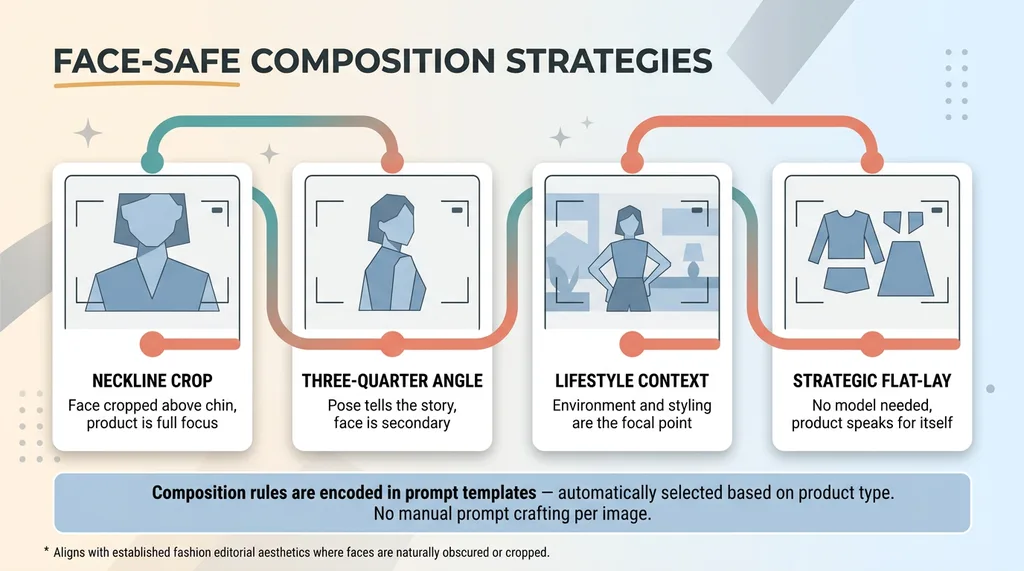 Face-Safe Composition Strategies
The prompt engineering layer enforces composition rules that showcase the product without relying on full facial detail. Cropped compositions at the neckline or chin. Three-quarter angles where the model's pose tells the story more than the face. Lifestyle shots where the environment and styling are the focal point. Strategic flat-lay alternatives for products where wearing shots aren't essential.
This isn't a hack or a workaround. It's a creative direction that happens to align with what AI does well right now. Look at how many major fashion brands already shoot editorials with faces partially obscured, turned away, or cropped. It's an established aesthetic, and it works commercially.
The constraint is encoded in the prompt templates. When the system generates an image for a specific product type, it automatically selects from composition strategies that minimize facial dependency. The photographer's equivalent of "shoot from the waist up, model looking away" — except it's programmatic and consistent across every generation.
The Grading System: How AI Scores Its Own Product Photos
The A-F Scoring Framework
This is the part of the pipeline I'm most proud of, and the one that gets the most questions when I show it to other business owners.
After the generation step, every image goes through a separate AI auditor. Different model. Different prompt. Different job. The auditor evaluates each image across multiple criteria:
- Composition quality — Is the framing balanced? Is the product centered or positioned according to the style rules?
- Product visibility — Can you clearly see the product? Is it obscured by shadows, cropping errors, or background elements?
- Color accuracy — Do the product colors match the specified attributes? A navy dress shouldn't render as black.
- Background consistency — Does the background match the intended scene type? No random artifacts or incongruent elements?
- Brand alignment — Does the overall feel match our brand aesthetic? A bohemian line shouldn't look like corporate catalog photography.
Each criterion gets a numeric score. The average maps to a letter grade based on defined thresholds: A (90-100), B (80-89), C (70-79), D (60-69), F (below 60).
A and B grades deploy automatically. No human intervention needed.
C grades get flagged for human review. Someone looks at it and makes a call.
D and F grades are rejected and regenerated automatically. The pipeline kicks off a new generation with the same product data, and the cycle repeats.
What Gets Rejected and Why
In practice, about 65-70% of images pass on first generation with an A or B grade. Another 15-20% come back as C grades that mostly get approved after review. The remaining 10-15% get rejected and regenerated.
The most common rejection reasons: color drift (the product renders in the wrong shade), composition violations (face too prominent despite the constraints), and background artifacts (random objects or inconsistent lighting that breaks the scene).
Most products get a complete, approved image set within 2 generation cycles. Rarely does anything need a third pass.
The critical design principle here: the auditor is a different system than the generator. You're not asking the artist to grade their own painting. This is the same pattern I wrote about in AI that rejects its own bad work — it applies to content, pricing, customer service responses, and anything else where AI output needs quality control before it reaches a customer.
What AI Product Photos Can and Can't Replace Today
Where AI Images Outperform Traditional Shoots
AI product images legitimately outperform traditional photography in specific scenarios:
- Speed. Minutes versus days. A new product can have a full image set before the listing copy is finished.
- Consistency across large catalogs. Every product gets the same lighting treatment, the same composition quality, the same background style. Try getting that from a photographer across 12 separate shoot days.
- A/B testing. Want to test the same product against a white background versus a lifestyle setting? Generate both in minutes. No rescheduling a shoot.
- Seasonal and themed variations. Holiday backgrounds, summer settings, Valentine's Day styling — without rebooking a studio or restyling a model.
- Initial listings. New products go live immediately with professional-quality images while you decide which ones warrant a traditional shoot.
Where You Still Need a Camera
I'm going to be honest here because this is where most AI vendors lose credibility.
AI product photos are not ready to replace traditional photography for hero images on high-ticket items where customers scrutinize every detail. A $200 handmade dress needs real photos that show exact fabric drape and texture. Period.
Editorial and lookbook content where brand storytelling requires authentic human emotion and interaction — AI can't match a skilled photographer and model working together to capture a brand moment.
Extreme close-up detail shots where fabric texture, stitching quality, and material feel need to be conveyed — AI generation doesn't have access to your actual product's physical characteristics.
And anywhere customers expect to see exactly what they're getting — especially when trust is on the line — real photography carries weight that AI can't yet replicate.
For my DTC brand, AI handles roughly 70-80% of our product image needs. Traditional photography is reserved for hero content, marketing campaigns, and our flagship product lines. That split saves thousands monthly while keeping quality where it matters most.
Building Your Own AI Photo Pipeline: What It Takes
The Technical Stack
The core components: an image generation model (model selection matters enormously — not all models handle product photography well, and what works for landscapes fails at apparel), a prompt engineering layer with product-aware templates, a scoring and auditing system running on a separate model, an image optimization pipeline for web deployment, and a Shopify API integration for automated publishing.
This sits within 22,000+ lines of custom Python that power our broader ecommerce AI toolkit. The photo pipeline is one skill within the 14-skill platform.
The Non-Obvious Challenges
The hard parts aren't technical — they're systematic. Maintaining brand consistency across hundreds of generations requires explicit rules, not vibes. Products that look similar (three white t-shirts in different cuts) need prompt differentiation that's subtle but real. Building a prompt library that actually works across product categories takes weeks of iteration, not an afternoon.
And tuning scoring thresholds is its own project. Set them too high and nothing passes. Set them too low and you're publishing mediocre images. It took us multiple calibration rounds to find the sweet spot where automatic deployment was trustworthy.
The message for anyone considering this: it's buildable, but it's a system, not a prompt.
Why the Photo Pipeline Changed How I Think About AI Systems
The photography pipeline was where I first proved that AI could be its own quality gate. That single insight — that the best AI systems aren't single-shot generators but loops of generate, evaluate, reject, and regenerate — changed my approach to every system I've built since.
Content gets scored before publishing. Dynamic pricing recommendations get validated before deployment. Customer service drafts get reviewed by a separate model before sending. The pattern is everywhere once you see it.
For business leaders reading this, the takeaway isn't "go automate your product photos." It's that AI works best when you design systems with built-in judgment, not just output. The output is the easy part. The judgment is what makes it production-ready.
This is the kind of system I build for companies as Chief AI Officer — not advising from a slide deck, but shipping production pipelines that run while you sleep.
Thinking About AI for Your Business?
If any of this resonated — whether it's the photography pipeline specifically or the broader idea of AI systems that judge their own work — I'd be happy to talk through how it applies to your operations. I do free 30-minute discovery calls where we look at what you're actually dealing with and identify where AI could move the needle.
No pitch deck. Just a conversation between two people who care about building things that work.
Get AI insights for business leaders
Practical AI strategy from someone who built the systems — not just studied them. No spam, no fluff.
Hodgen.AI
Ready to automate your growth?
Book a free 30-minute strategy call with Hodgen.AI.
Book a Strategy Call