The Slow Part of E-Signing Isn't Signing
Signing a document takes 30 seconds. Click the box, draw your name, done.
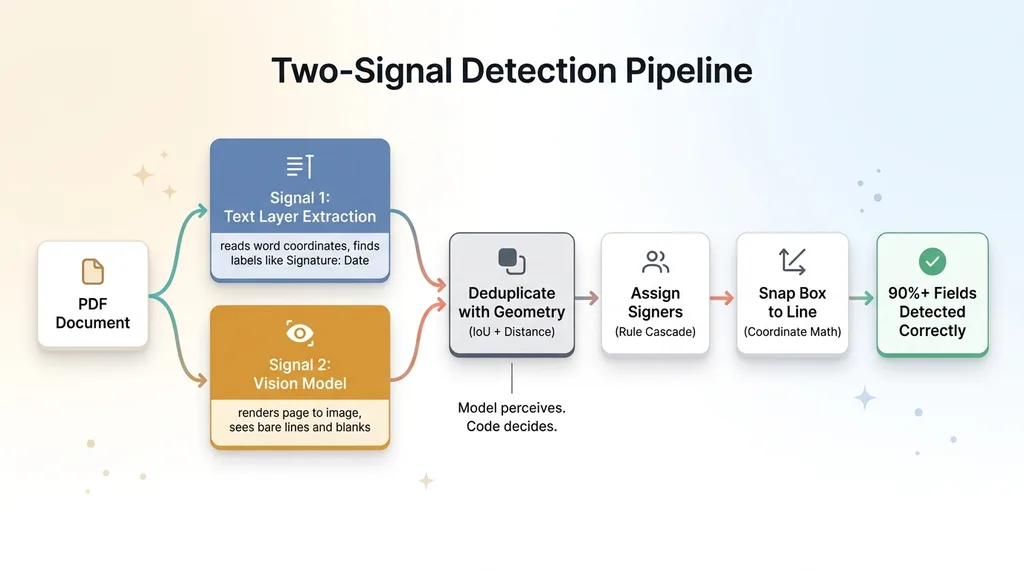 Two-Signal Detection Pipeline
Preparing that document for signature is the slow part. You have to drag a signature box onto the right line, a date box next to it, a print-name box below, and then do it all again for the second signer on a different page. On a 12-page contract with two signers, that fiddly box-dragging eats 5 to 10 minutes. Every single time.
I hit this problem building the e-signature tool I built to avoid paying for DocuSign. The signing flow was easy. The prep flow was miserable. And paying a subscription to avoid the prep felt like paying rent on a problem I could solve.
So I set a clear goal: read the PDF, find every field a human is expected to fill, assign each one to the right signer, snap the box to the actual line, and get it right more than 90% of the time. The remaining 10% is a quick drag-fix that takes seconds.
The hard part is the assumption baked into all of this. Most people, including smart operators who've automated plenty already, assume AI can't handle fiddly layout work like this. Boxes on lines. Coordinate math. Telling Signer A's signature apart from Signer B's. It feels too precise for a model that hallucinates.
It isn't. The trick is to auto detect signature fields in PDF using two signals instead of one, and to let deterministic code, not the model, make the final call.
Here's exactly how I built it.
Why Text Extraction Alone Isn't Enough
Reading the PDF text layer
Step one is the obvious one: read the words already in the document.
Every PDF has a text layer, and modern PDF libraries expose not just the text but the position of each word. Every run of text comes with x/y coordinates and a bounding box. That means I can find labels like "Signature:", "Date", and "Print Name" and know exactly where they sit on the page.
This is pdfjs text extraction, and for clean, well-structured contracts it does a lot of the work for free. A label says "Signature:" and I know a signature field belongs nearby. No model required.
But text extraction alone has holes. Big ones.
It misses fields drawn as a bare line with no label. It struggles with fields buried in tables where the label is three cells away. It gets confused by ambiguous layouts where one label could govern two fields. Plenty of real legal templates have a row of underscores and zero nearby text telling you what they're for.
So text gets you maybe 60 to 70% of the fields with high confidence. The rest are invisible to it.
Keeping the PDF library off the server bundle
A real gotcha worth flagging, because it cost me an afternoon.
The PDF parsing library is heavy, and it breaks when it tries to load server-side. It expects a browser-style environment, and bundling it into the server build throws errors that look like they have nothing to do with PDFs.
The fix was simple once I stopped fighting it: keep the library off the server bundle entirely and run extraction where it belongs. Don't force a browser-shaped tool into a server-shaped hole.
That's the boring kind of decision that separates a working system from a demo. But text extraction is only half the picture. To catch what it misses, you need a second pair of eyes.
Running a Vision Model to Locate the Fields
What the vision model is good at
Step two: I render each page to an image and hand it to a vision model.
The prompt is tight. Find every place a human is expected to write. For each one, return the field type (signature, date, initials, print name) and a bounding box. That's it. I'm not asking the model to make decisions, just to look at a page like a person would and point at the blanks.
This is where pdf field detection vision ai earns its keep. The vision model catches what text extraction can't see. A bare underline with no label. A row of checkboxes. A field stuffed into an odd table layout where the text-position math falls apart. The model doesn't care that there's no nearby label, because it can see the line.
What it gets wrong
I'll be honest about the limits, because they matter for the design.
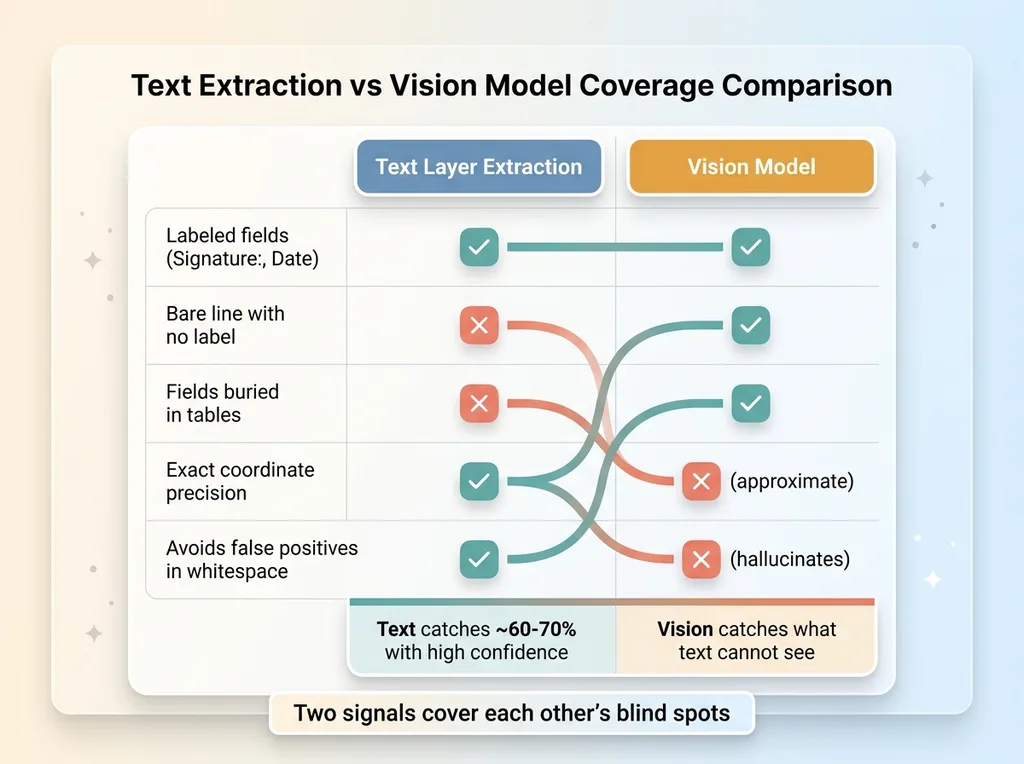 Text Extraction vs Vision Model Coverage Comparison
The vision model returns approximate boxes, not exact ones. Sometimes it double-counts a field. Sometimes it hallucinates a field in empty whitespace because the page just felt like it should have one there. If I trusted its output as the final answer, I'd ship a mess.
That's fine, because it isn't the final answer. It's one of two signals. I let the model judge, and the code does the math. The same principle I lean on everywhere: let the model judge and the code do the math.
One more thing trips people up. The vision model returns boxes in image-space pixels, but the PDF lives in points. Two different coordinate spaces. Before vision output can be compared to text output, everything has to be normalized into one shared coordinate system. Skip that and your two signals are speaking different languages.
Deduping Two Sources of Truth With IoU and Proximity
Now I have two lists of candidate fields. Text-layer hits and vision hits. And they overlap, constantly, because both sources keep pointing at the same signature line.
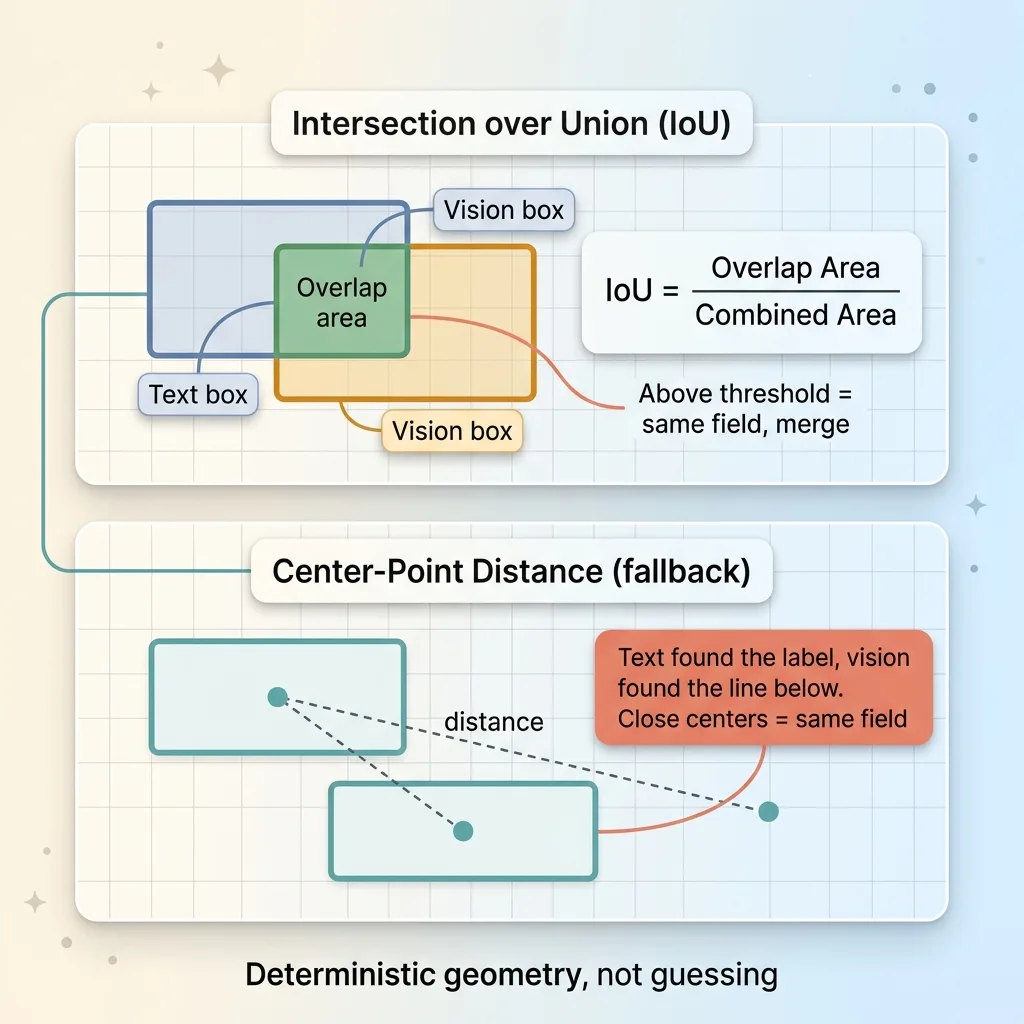 IoU and Center-Point Distance Deduplication
If I just merged them, every field would appear twice. So I dedupe with geometry, not guessing.
The main tool is Intersection-over-Union, or IoU. It's simpler than it sounds. Take two boxes. Measure the area where they overlap. Divide that by the total area both boxes cover combined. If that ratio is above a threshold, they're the same field, and I merge them into one.
IoU handles the common case where text and vision both found the same blank and their boxes sit roughly on top of each other.
But sometimes the boxes don't overlap at all and are still clearly the same target. Text found the label, vision found the line below it, and there's a gap between them. For those near-misses, IoU fails, so I fall back to center-point distance. If the centers of two boxes are close enough, same field.
The confidence logic falls out of this naturally.
When text and vision both fire on the same spot, confidence is high. That field is almost certainly real. When only one source fires, I keep the field but flag it as lower confidence so it can be reviewed or styled differently in the UI.
None of this is AI guessing. It's deterministic geometry. Overlap ratios and distances, computed the same way every time. This is the step where the model's fuzzy, sometimes-double-counted output becomes a clean, deduped list of real fields. The model perceives. The math decides.
Assigning Each Field to the Right Signer
This is the hardest part, and the part that breaks most naive implementations.
A two-signer contract has a signature line for each signer. Put Signer B's box on Signer A's line and you haven't saved time, you've ruined the document. Worse, you might not notice until it's signed wrong.
The assignment cascade
I solve this with a cascade of rules, tried in strict order. Each rule only fires if every rule above it failed.
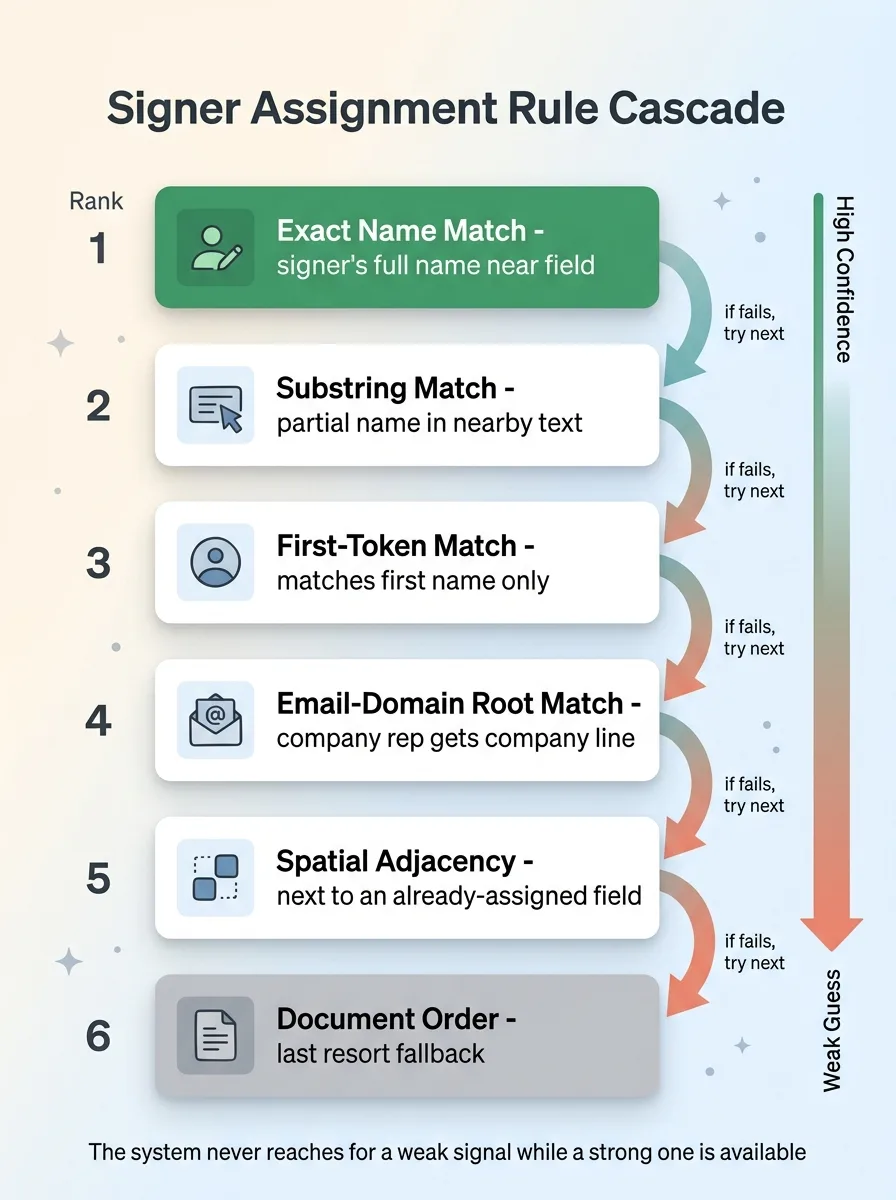 Signer Assignment Rule Cascade
- Exact name match. If the signer's full name appears near the field, assign it. Highest confidence.
- Substring match. The signer's name appears partially in nearby text.
- First-token match. Match on first name only, for templates that only print "John" near the line.
- Email-domain root match. If the field is near a company name and that company appears in a signer's email domain, map it to that signer. The company rep gets the company line.
- Spatial adjacency. If the field sits right next to an already-assigned field, it probably belongs to the same signer.
- Document order. First unassigned signature line goes to the first signer. The final fallback, used only when everything else strikes out.
Why order is the last resort, not the first
Notice that document order, the thing most people would reach for first, is dead last in my cascade.
That's deliberate. Order is a guess. It works until a template lists signers in an order that doesn't match the lines, and then it silently mislabels everyone. By the time order fires, I've already exhausted every signal that's actually grounded in the document's text.
This is what I mean when I talk about constraining AI with deterministic rules. The whole point is that a confident-but-wrong guess never gets to silently mislabel a signer. The rules are ranked by how trustworthy the evidence is, and the system never reaches for a weak signal while a strong one is available.
On standard legal templates, this cascade gets signer assignment right the vast majority of the time. The edge cases that slip through are obvious in review, not buried.
Snapping the Box to the Line (the Coordinate Math Nobody Mentions)
Here's the detail that decides whether the whole thing feels finished or feels broken.
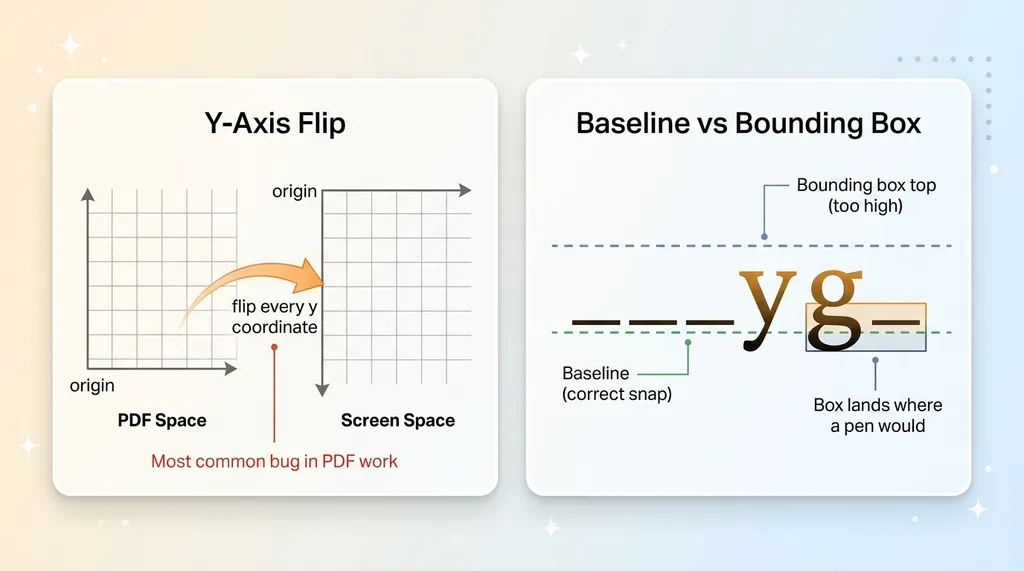 PDF Coordinate Space vs Screen Space and Baseline Snapping
Even with the right field type and the right signer, a signature box floating a few pixels above or below the actual line looks wrong. People don't trust it. It reads as sloppy even when the logic underneath is perfect.
So I snap the box to the line.
Inside the label, there's almost always a run of underscores. The visible "_______" that forms the line you sign on. I find that run, measure its bounding box, and snap the signature box to sit on that baseline at the correct width. The box now lands exactly where a pen would.
Two pieces of math make this harder than it sounds.
First, the baseline-versus-bounding-box distinction. A text glyph's baseline sits below its bounding box, because letters like "y" and "g" hang lower. If I align the signature box to the top of the underscore's bounding box, it floats too high. I have to align to the baseline, not the box.
Second, the y-axis flip. PDF coordinate space puts the origin at the bottom-left, with y increasing upward. Screen space puts the origin at the top-left, with y increasing downward. Every coordinate has to be flipped between the two, and getting this wrong is the single most common bug in PDF work. Your box ends up mirrored to the wrong half of the page and you stare at it for an hour.
Once the baseline math and the axis flip are handled, the result is correct placement on more than 90% of templates. The remaining few need a quick drag-adjust that takes seconds, which is exactly the outcome I aimed for.
Why This Matters More Than the Feature Itself
Step back from the PDFs for a second.
The point of all this was never that I dodged a DocuSign subscription, though I did. The point is that this is precisely the kind of work people assume AI can't do. Fiddly. Layout-heavy. Coordinate geometry. Get-it-wrong-and-the-document-is-ruined precise.
It's very doable. The trick was never asking one model to do everything.
I used two signals, text extraction and vision, where each covers the other's blind spots. I merged them with deterministic geometry, not vibes. I assigned signers with a ranked rule cascade that refuses to guess when it can reason. And I closed it out with real coordinate math so the result looks finished, not approximate.
That pattern, vision for perception and code for the math, is how you ship document automation a business can actually trust. The model does what models are good at, seeing. The code does what code is good at, being exactly right every time. The same discipline applies elsewhere in the signing system, like why a signed document can't just be deleted once an audit trail exists.
If you've got a manual document process eating hours every week (contracts, intake forms, onboarding packets, anything where a human drags boxes or retypes the same fields), this kind of detection is buildable today. Not theoretical, not a research project. The same approach I just walked through.
Get the next build note.
I write up each system I build, including what broke. Subscribe to my newsletter and I'll send you the next one.