California's Private Attorneys General Act is one of the most punishing labor laws in the country, and most businesses don't know they're in violation until a letter shows up from a plaintiff's attorney. When a labor compliance SaaS client came to me needing to make PAGA rules machine-readable and checkable against real payroll data, I knew this was exactly the kind of problem where AI labor compliance could move from theoretical to operational. What I didn't fully appreciate yet was how many edge cases would try to kill us along the way.
California PAGA: The $10,000-Per-Employee Problem Nobody Can Solve Manually
PAGA lets any single employee sue on behalf of all employees for California Labor Code violations. Not just their own grievances — everyone's. Penalties stack at $100 per pay period per employee for initial violations, $200 for subsequent ones. Do the math on that.
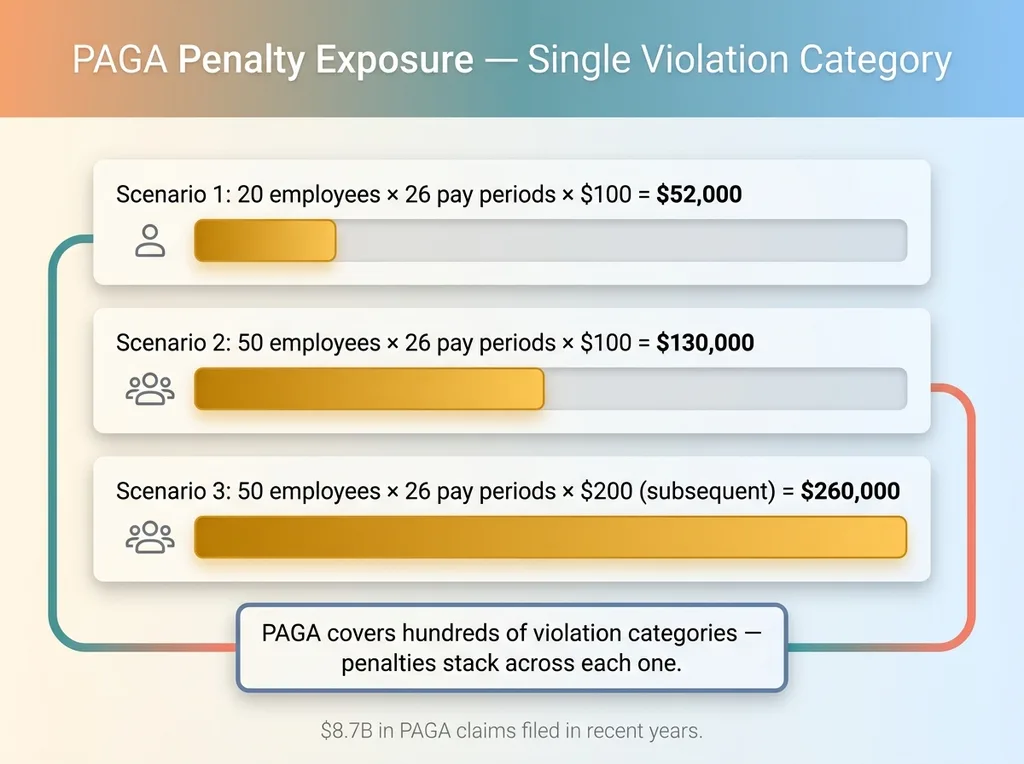 PAGA Penalty Exposure Calculator
What PAGA Actually Requires (And Why It's a Nightmare)
A 50-person company with a meal break violation running across 12 months of biweekly pay periods? That's 50 employees × 26 pay periods × $100, minimum. Over $120,000 in penalties for a single violation category. And PAGA covers hundreds of specific requirements: wage statement accuracy, meal break timing, rest period duration, overtime calculations, final pay timing after termination, itemized deduction disclosures. Each one is its own potential lawsuit.
The penalties aren't theoretical. California saw over $8.7 billion in PAGA claims filed in recent years. Plaintiff's attorneys have built entire practices around finding technical violations in payroll records.
Why Small Businesses Get Hit Hardest
Big companies have compliance departments, labor attorneys on retainer, and HRIS systems with built-in compliance modules. A 20-person restaurant, a 35-person construction firm, a 50-person manufacturing shop? They're running payroll through QuickBooks, relying on their accountant to get it right, and hoping nobody notices the overtime calculation that doesn't account for California's 7th-consecutive-day rule.
Most don't know they're in violation. The violations are often configuration errors — a missed meal premium, a wage statement that's technically incomplete, a rest period policy that exists in the handbook but isn't tracked in practice. These aren't bad-faith employers. They're businesses that can't afford the $15,000-$25,000 manual audit that would catch the problems before a plaintiff's attorney does.
That's the problem my client wanted to solve. Build a system that checks payroll data against every applicable PAGA provision, continuously, for every employer on the platform.
Why Labor Law Is a Perfect (and Terrifying) AI Problem
Most legal domains are too ambiguous for automated compliance checking. Contract interpretation, negligence standards, fiduciary duties — these require judgment that AI isn't ready to make reliably. PAGA compliance is different.
Rules That Are Specific Enough to Encode
California labor law is unusually precise. A meal period must be "not less than 30 minutes" for shifts exceeding 5 hours, "commencing no later than the end of the fifth hour of work." That's not open to interpretation. It's a timestamp comparison.
Overtime is calculated at 1.5× for hours over 8 in a day and over 40 in a week, 2× for hours over 12 in a day. Wage statements must include nine specific data fields. Final pay after involuntary termination is due on the same day. These are rules with numbers, deadlines, and explicit criteria. They're codifiable.
The Gotchas That Make It Terrifying
Here's where it gets dangerous. California has different rules for split shifts, alternative workweek schedules, piece-rate workers, commissioned employees, and specific industry orders. A construction worker's meal break rules differ from a healthcare worker's. An employee on an alternative workweek schedule has different daily overtime thresholds.
My approach: deterministic rule engines for the clear-cut requirements, AI for pattern recognition on edge cases and for interpreting unstructured data like the wildly inconsistent payroll export formats that come out of QuickBooks.
I'll be honest — some compliance questions still need a human attorney. When the system encounters an ambiguous situation it can't resolve with high confidence, it flags it for review rather than guessing. In PAGA compliance automation, a false negative — telling an employer they're compliant when they're not — is far worse than a false positive. The system errs toward caution.
The Architecture: Multi-Tenant Compliance Checking Against Live Payroll
The system needed to handle multiple employers, each with different employee counts, pay structures, and QuickBooks configurations. Here's how I built it.
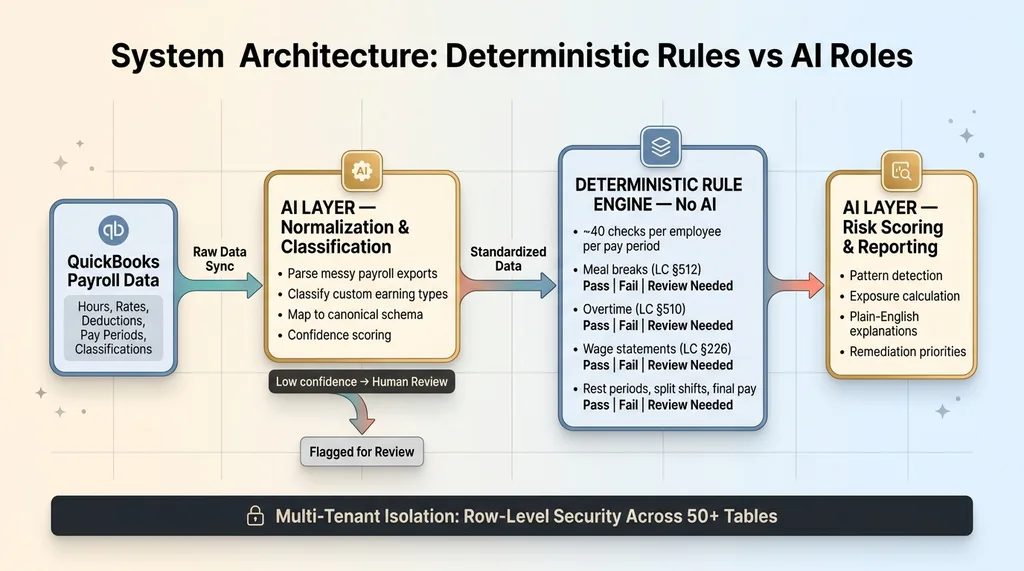 System Architecture: Deterministic Rules vs AI Roles
QuickBooks Integration and Payroll Data Normalization
QuickBooks integration pulls payroll data: hours worked, pay rates, deductions, pay periods, employee classifications. Straightforward in theory. Messy in practice.
Different employers configure QuickBooks differently. Some use standard payroll items. Others have custom earning types with names like "OT-Special" or "Lunch Penalty" that mean different things to different companies. Manual entries don't follow patterns. Some employers track meal breaks in QuickBooks; others use a separate time clock system and the break data has to be inferred from punch gaps.
This is where AI earns its keep. The normalization layer uses AI to classify each payroll line item into standardized categories the compliance engine can check. It looks at the naming, the calculation pattern, the relationship to other line items, and maps everything to a canonical schema. Without this step, the compliance engine would be useless — it needs clean, standardized data to run its checks.
Multi-Tenant Isolation for Employer Data
Every employer's data must be completely isolated. This isn't just good practice — it's a legal necessity when handling payroll records. I used a row-level security approach across 50+ tables to ensure that even at the database level, one employer's data is inaccessible to another. If a breach occurs, the architecture must prove containment.
The Compliance Rule Engine
The engine itself is mostly deterministic. PAGA rules are specific enough that you don't want AI making judgment calls on whether a meal break was compliant. That's a yes/no question with a defined threshold.
The engine runs approximately 40 specific checks per pay period per employee: meal break timing and premium payment, rest period compliance, daily and weekly overtime calculation accuracy, 7th-consecutive-day overtime, wage statement field completeness, minimum wage compliance by jurisdiction (California has state, county, and city minimum wages that differ), pay timing after termination, split shift premiums, and more.
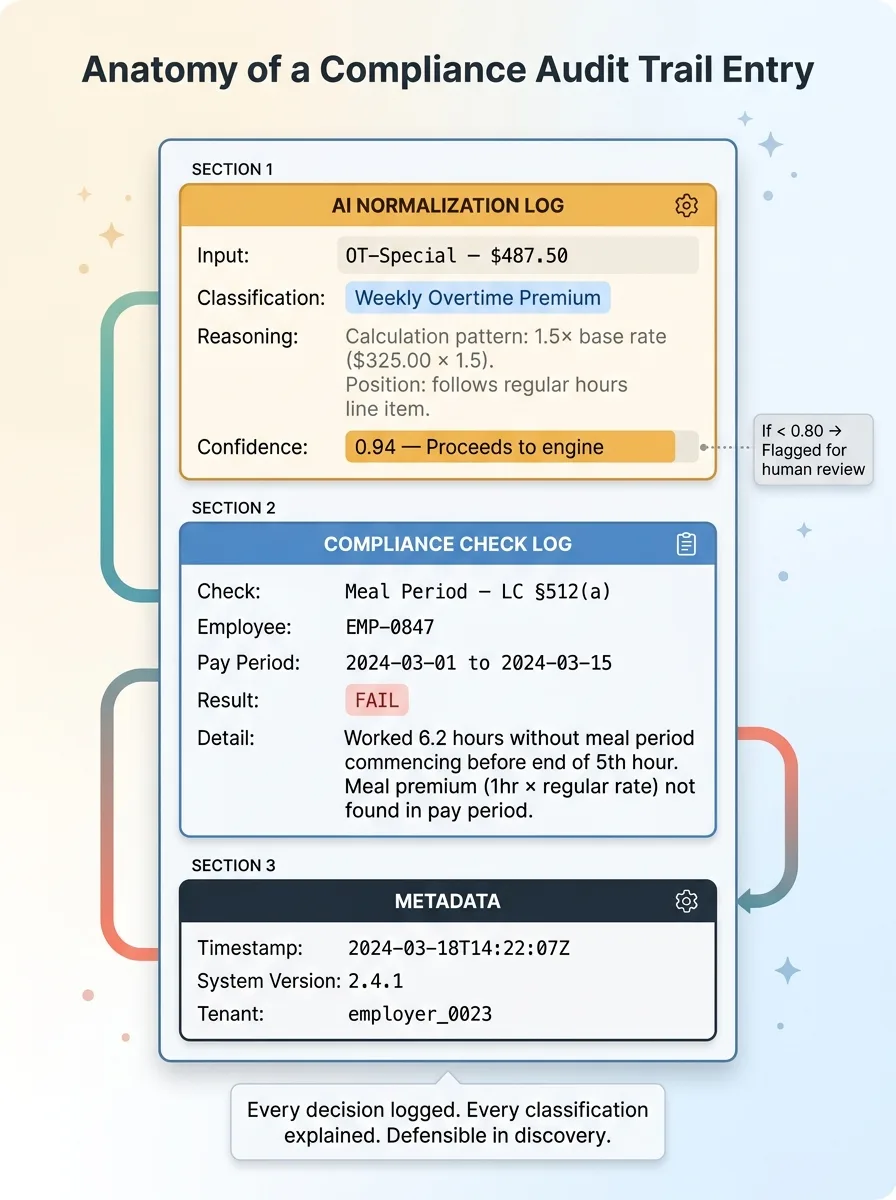
Each check produces a pass, fail, or review-needed result with the specific California Labor Code section cited. "Fail: Labor Code § 512(a) — Employee worked 6.2 hours without a meal period commencing before end of 5th hour. Meal period premium of 1 hour at regular rate not found in pay period." That level of specificity matters because it tells employers exactly what to fix and gives them documentation if they need to demonstrate remediation.
The pattern of building SaaS products with AI applied here — but with significantly higher stakes than document signing. The architecture decisions had to account for the fact that this system's output could end up as evidence in litigation.
What the AI Actually Does (And What It Doesn't)
This is the section that matters most, because the gap between "AI-powered compliance" marketing and the actual responsible use of AI in labor law AI applications is enormous.
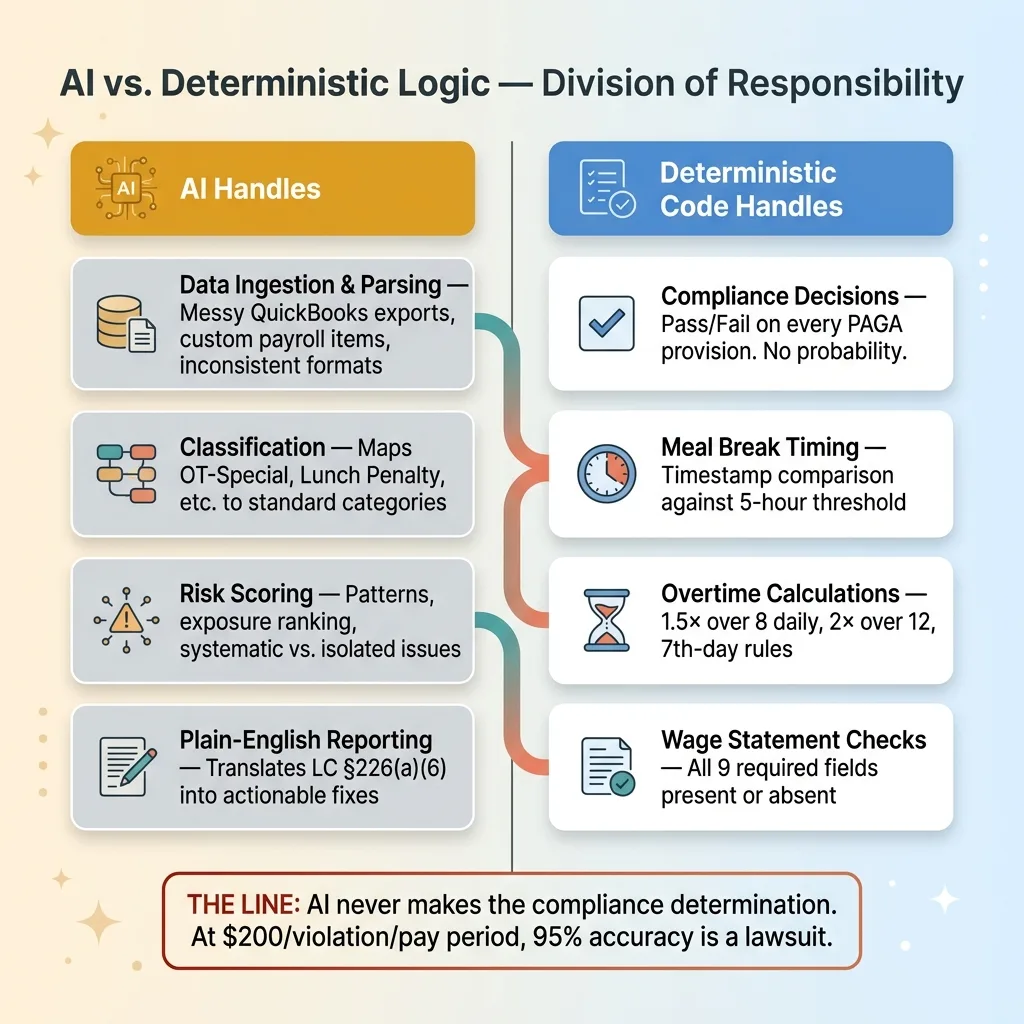 AI vs Deterministic: Where Each Handles Compliance
AI for Data Ingestion and Normalization
AI handles parsing and normalizing messy payroll data from various QuickBooks configurations. It identifies earning types, maps custom payroll items to standardized categories, and resolves ambiguities in time records. This is classification work that AI does well — it's seen thousands of variations and can recognize that "OT Premium - Weekend" maps to the same compliance check as "Weekly Overtime."
AI for Risk Scoring and Prioritization
Once violations are identified, AI scores them by exposure. Not all violations carry equal risk. A systematic meal break violation affecting 30 employees over 18 months has vastly more penalty exposure than a one-time wage statement error for a single employee. The AI identifies patterns that suggest systematic issues versus isolated mistakes, and prioritizes the employer's remediation list accordingly.
AI also generates plain-English explanations of violations. A business owner shouldn't need to parse "LC § 226(a)(6) non-compliance" — they need to read "Your wage statements are missing the inclusive dates of the pay period, which is required by law. Here's how to fix it in QuickBooks."
Where I Drew the Line on AI Decision-Making
AI does not make the actual compliance determination. That's deterministic code. It does not provide legal advice or recommendations. It does not predict litigation outcomes.
This was a deliberate architectural choice. When penalties are $200 per pay period per employee, you cannot afford a 95% accuracy rate on compliance checks. The 5% misses are lawsuits. A probabilistic model that's "pretty sure" a meal break was compliant isn't good enough. The compliance logic needs to be auditable, testable, and deterministic.
I built the system to reject its own bad work — the AI normalization layer validates its interpretations against known test cases before running on live data. If the AI classifies a payroll line item with low confidence, it flags it for human review instead of guessing. California compliance AI is only useful if the people relying on it can trust it completely within its defined scope.
Results: From 40-Hour Audits to Continuous Monitoring
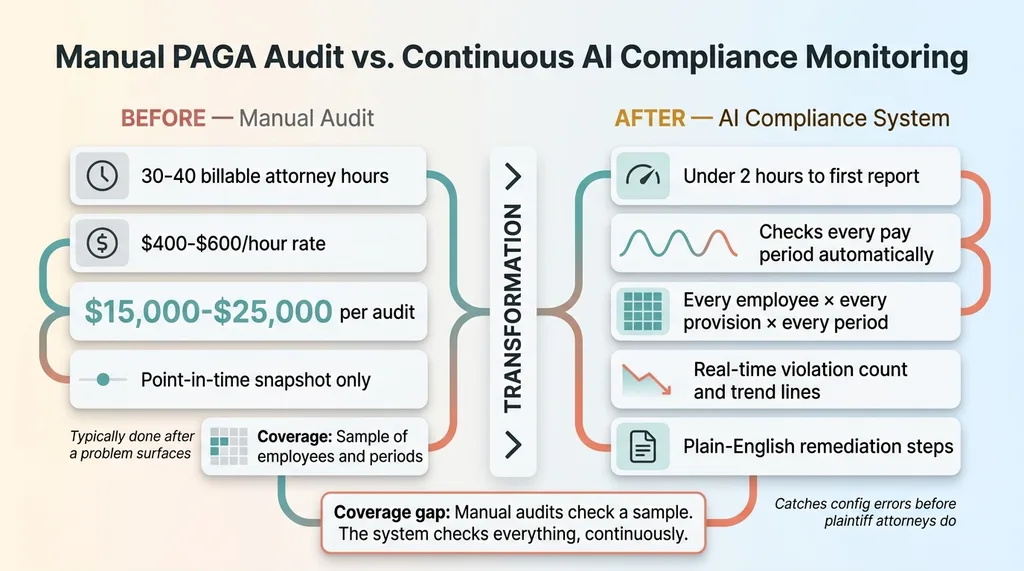 Manual Audit vs Continuous AI Monitoring
Speed and Coverage Numbers
A manual PAGA compliance audit for a 50-person company takes a labor attorney 30-40 billable hours. At $400-600/hour, that's $15,000-$25,000 for a single point-in-time snapshot. And it's typically only done when there's already a problem.
This system runs the equivalent check continuously as new payroll data syncs from QuickBooks. Time to first compliance report after connecting an employer's QuickBooks: under 2 hours, mostly waiting for the initial data sync. Every subsequent pay period is checked automatically.
The system reviews every pay period for every employee against every applicable PAGA provision — comprehensive coverage that no manual audit can economically deliver.
What Employers Actually See
The employer dashboard displays current violation count by category, estimated penalty exposure in dollars, trend lines showing whether violations are increasing or decreasing over time, and specific remediation steps in plain English.
One key insight from production data: most violations aren't malicious. They're configuration errors. A meal break premium that was never set up in QuickBooks. An overtime calculation that doesn't account for California's 7th-consecutive-day rule. A wage statement template missing one of nine required fields. The system catches these before a plaintiff's attorney does, which is the entire point.
Limitations I'm upfront about: the system is only as good as the data QuickBooks provides. Time clock manipulation, off-the-books hours, or cash payments won't show up. The system checks what's documented. If the documentation itself is incomplete or fraudulent, no software catches that.
Building Compliance SaaS: The Decisions That Matter Most
Why Multi-Tenant Matters More Than You Think
Multi-tenant architecture isn't just a technical decision for compliance software — it's a legal requirement. When you're handling payroll data for multiple employers, a data breach affecting one tenant must be provably contained. The architecture needs to demonstrate that other employers' records were not exposed. This shapes every design decision from database schema to API authorization to backup procedures.
Audit Trails as a First-Class Feature
Every compliance check, every AI normalization decision, every data classification is logged with timestamps and reasoning. This isn't an afterthought bolted on for SOC 2 compliance. It's a core product feature because the system's output may need to be defensible in actual litigation.
 Audit Trail Decision Log
When the AI normalizes a payroll line item, the log records: "Classified 'OT-Special' as weekly overtime premium based on calculation pattern (1.5× base rate) and position relative to regular hours line item. Confidence: 0.94." If that classification is ever questioned, there's a clear explanation of how and why the system interpreted the data the way it did.
The difference between building SaaS for convenience and building SaaS where errors have five- and six-figure consequences changes every engineering decision you make. Audit trails, data isolation, validation loops — these aren't nice-to-haves. They're the product.
Regulated Industries Need AI Built by Builders, Not Advisors
Regulated industries — labor law, healthcare, finance — are where AI delivers the most value and where the implementation risk is highest. The manual processes are expensive, the error costs are enormous, and the rules are specific enough to encode. That's a perfect fit for PAGA regulations AI and similar compliance automation.
But these aren't problems you solve with a ChatGPT wrapper or a strategy deck. The PAGA system works because every architectural decision was made with the penalty structure in mind. Deterministic compliance logic instead of probabilistic AI guessing. Audit trails that can survive discovery. Multi-tenant isolation that can withstand a breach investigation. Quality control loops that reject uncertain outputs. Those aren't features — they're survival requirements.
For CEOs in regulated industries still running manual compliance processes: the math is straightforward. The cost of building AI compliance systems is a fraction of one PAGA lawsuit. But only if the system is built correctly from day one. A bad implementation doesn't just fail to help — it creates a false sense of security that makes the eventual lawsuit worse.
Get the next build note.
I write up each system I build, including what broke. Subscribe to my newsletter and I'll send you the next one.