Manufacturing Materials Demand Tracking, No ERP Needed
How I replaced manual packing lists and a memory-based parts list with live manufacturing materials demand tracking across every active job.
By Mike Hodgen
The Numbers That Only Lived in One Person's Head
I sat down with the owner of a custom shade manufacturer who had a problem he didn't even think of as a problem. It was just Tuesday.
Every order came in as a spreadsheet. Custom dimensions, custom fabric, custom hardware. When a job hit the floor, he rebuilt the packing list by hand, retyping numbers out of the order sheet into the format his crew could actually cut from.
Here's the part that made it brutal: the column order varied per product. A roller shade sheet didn't line up with a roman shade sheet. So there was no copy-paste. He read the order, did the mental math, and wrote the packing list out fresh. Every single time.
Now ask him a simple question. "How much fabric do you need this week across everything that's open?"
He couldn't answer it without opening every active file and adding it up in his head. No running parts list existed across jobs. The demand for fabric, rail, tube, fascia, all of it, was scattered across a dozen spreadsheets and one person's memory.
The custom paint colors were the scariest part. Those lived entirely in his head. A specific color for one client's fascia, another shade for somebody else's hem bar. Nothing written down in a place you could scan.
The stakes here aren't abstract. Miss a paint color and a job stalls. Underestimate fabric and you're paying for an emergency reorder at a premium, plus the delay. One wrong number on a hand-rebuilt packing list and the crew cuts the wrong size. Now you're remaking it.
This is how a huge number of real manufacturers actually run. Not broken, exactly. Functional. But fragile, and bottlenecked on one person.
And when I brought up the idea of better systems, his face did the thing every owner's face does. He had zero appetite for a six-month ERP rollout. Fair.
Why a Full ERP Is the Wrong First Move
Let me address that doubt directly, because it's the right instinct.
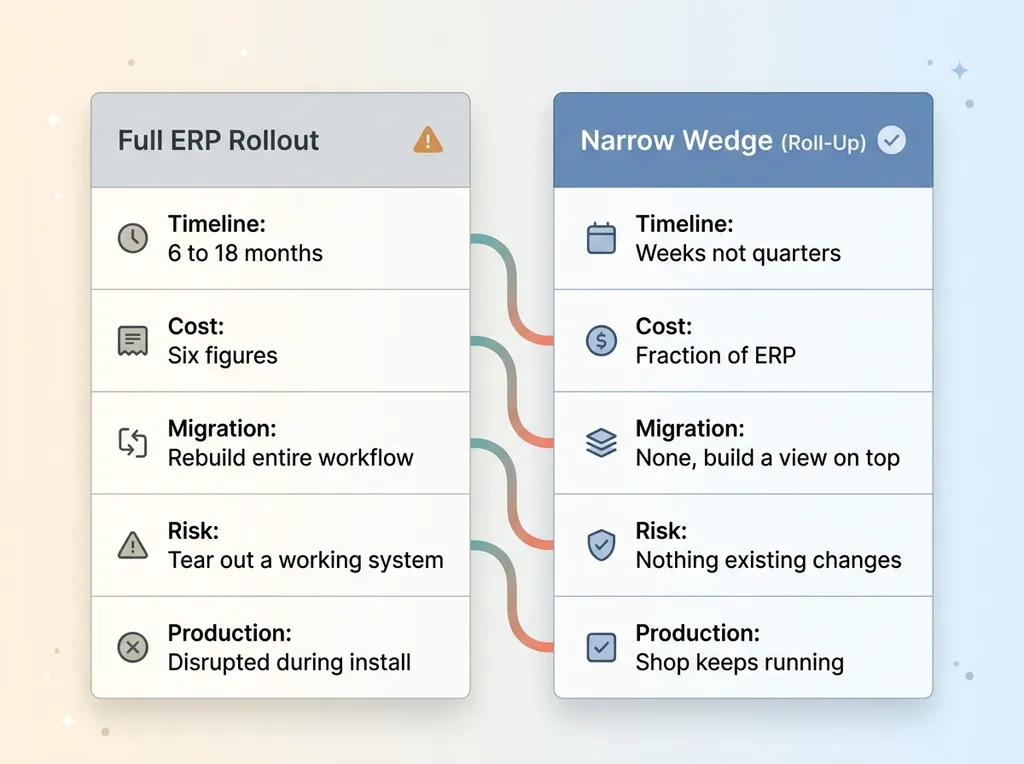 ERP vs Narrow Wedge Approach Comparison
An ERP project promises to fix everything. Inventory, accounting, production, purchasing, all in one platform. The reality is 6 to 18 months of implementation, six figures of cost, and a long stretch where you're rebuilding your entire workflow to fit the software's assumptions.
For a shop that's running fine on spreadsheets and producing real product every day, that's a bad trade. You'd be tearing out a system that works to install one that might, eventually, after a painful migration.
And here's what most ERP pitches miss: the spreadsheets aren't the problem.
The owner's spreadsheets were accurate. They held real orders with real numbers. The problem was that the spreadsheets didn't talk to each other, and the knowledge that connected them lived in his head. There was no live view across all the open jobs. The math that turned an order into a parts list was never written down.
You don't need to replace the system of record to fix that. You need to roll up what's already there into something you can actually see.
That's the narrow wedge. Solve the one painful thing. No live demand view, so build one. Manual packing lists, so generate them. Paint tracked in memory, so surface it. Without ripping out a single thing that already works.
That's a project measured in weeks, not quarters. I've written before about getting something live in days, not a six-month ERP project, and this is exactly that pattern. The shop keeps running the whole time. Nobody migrates anything. You add a view on top of the orders you already have.
The goal isn't a new platform. It's manufacturing materials demand tracking that reflects the work you're already doing.
Encoding the Industry Math Nobody Wrote Down
The hidden formulas in a custom product
Here's the technical heart of it. A custom shade isn't a SKU. It's a set of formulas.
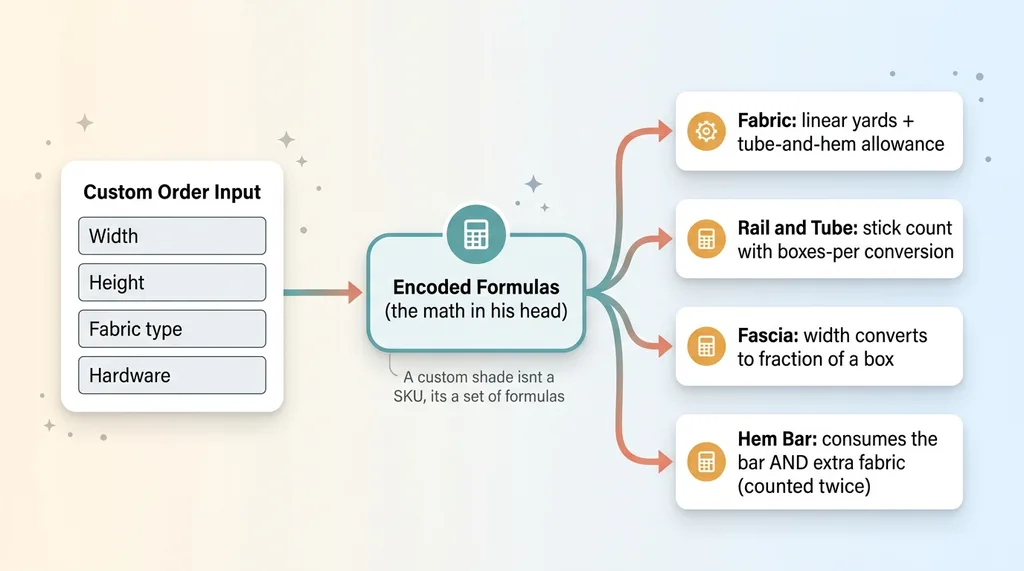 Custom Product Formula Breakdown (Order to Parts List)
Fabric isn't "one unit." It's calculated in linear yards, with a tube-and-hem allowance baked into the dimensions. The bottom rail and fascia aren't single parts either. They're stick counts with a boxes-per conversion, so a given width pulls a specific fraction of a box of material. Hem bars are fabric-wrapped, which means they consume both the bar and additional fabric.
None of this was documented anywhere. It lived entirely in how the owner filled out his spreadsheets. When he typed a number into the fabric column, he was running a calculation in his head that he'd done ten thousand times.
My job was to pull those formulas out of his head and encode them into demand aggregators. The system needed to compute the exact same numbers he did by hand, from the same order inputs. This is the encoding the industry math into a calculator problem, applied at the component level.
Why this can't be a generic template
This is also why generic production planning software falls down here.
Off-the-shelf tools don't know your product's geometry. They don't know that your fabric calc includes a tube-and-hem allowance, or that your fascia converts to boxes at a specific ratio, or that your hem bars eat into fabric twice. They give you fields to fill in. They don't do the math that's specific to how your product is actually built.
So you end up back where you started: a human reading an order and computing the parts in their head, just inside prettier software.
The real work was sitting with the owner, watching how he filled out a sheet, and asking "okay, why that number?" until every formula was explicit. That's the bill of materials rollup at the component level. Get the formulas right and everything downstream becomes possible. Get them wrong and the whole thing is worse than the spreadsheet, because now it's wrong and people trust it.
Rolling Up 819 Line Items Into One Live Demand View
Once the math was encoded, the payoff arrived fast.
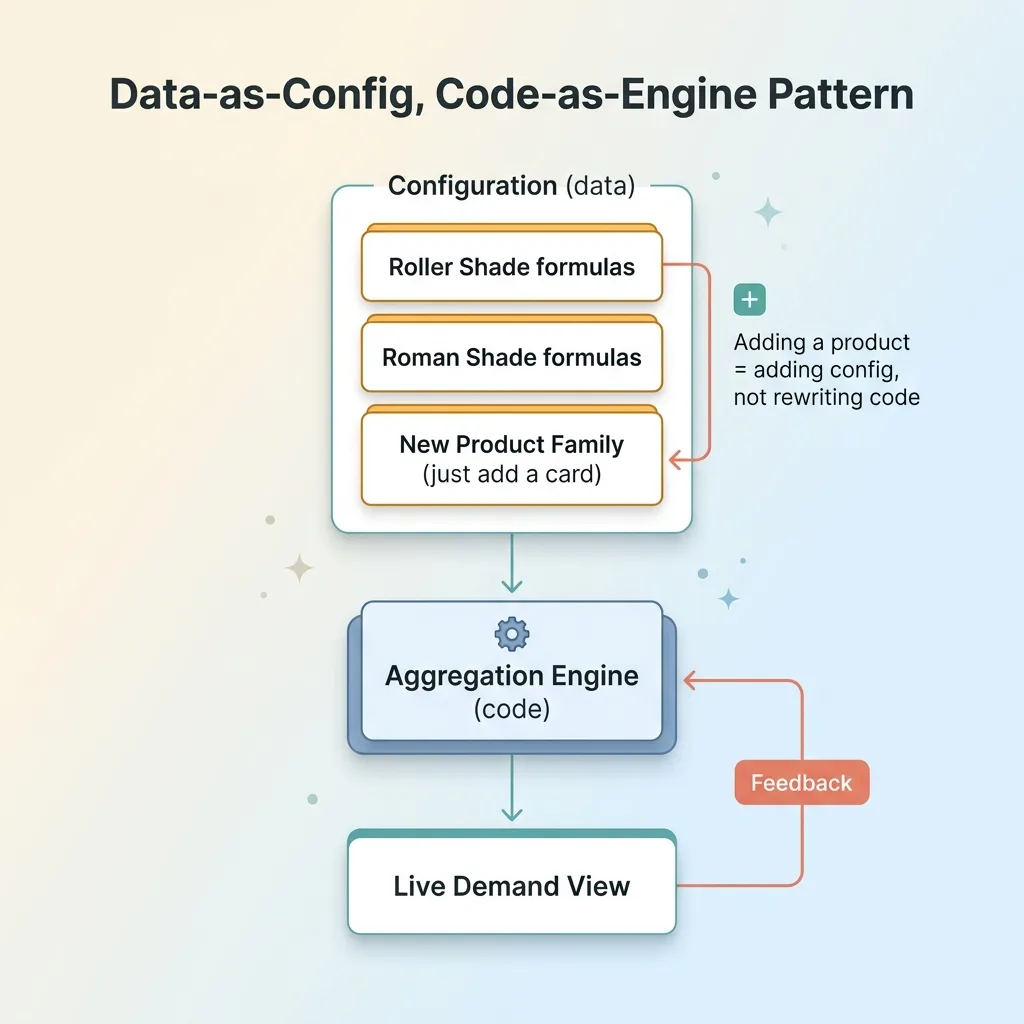 Data-as-Config, Code-as-Engine Pattern
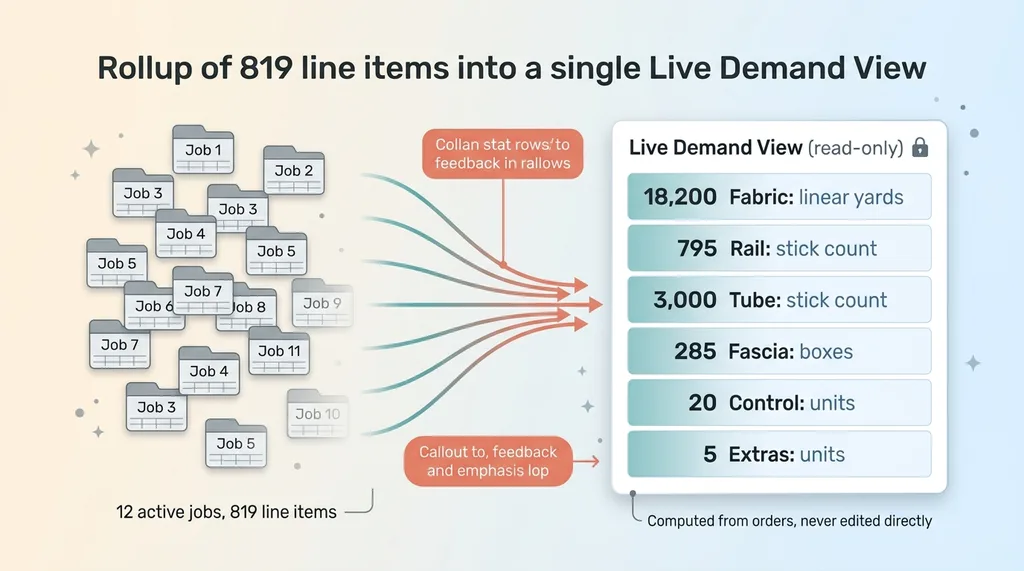 819 Line Items Rolling Up Into One Live Demand View
I built a read-only production tracker that aggregates every line item across all active jobs into category totals. Fabric, rail, tube, fascia, control, extras. Across the open book, that was 819 line items rolling up into clean category numbers.
Now the owner answers the question that used to require opening a dozen files. "How much of each thing do we need across everything that's open?" One screen. Total fabric in linear yards. Total rail stick count. Total boxes of fascia. Done.
I made it read-only on purpose, and that decision matters more than it sounds.
The tracker doesn't become a second place where data lives. If you let people edit the rollup directly, it drifts from the orders, and now you have two versions of the truth fighting each other. Instead, the tracker reflects the orders. The orders stay the source of truth. The view just computes and aggregates. It can't lie to you, because it has nothing of its own to be wrong about.
This is manufacturing materials demand tracking in practice. Not a forecast, not a guess. A live total of what the open jobs actually require, computed from the real numbers using the real formulas.
The other thing that mattered: new product types. A shop like this adds product families over time. If every new family required re-engineering the system, the whole thing would rot within a year.
So I built it on a data-as-config, code-as-engine pattern. The product definitions and their formulas live as configuration. The aggregation logic is the engine that reads them. Adding a new product family means adding config, not rewriting the codebase. The shop can grow without a developer in the loop every time.
The Packing List That Generates Itself
Now the automated packing list, which was the thing that personally cost the owner the most time.
The hardest constraint here wasn't generating a PDF. It was generating one that reproduced the legacy template's numbers exactly. The floor crew had been reading the owner's hand-built packing lists for years. They knew the format. They trusted it.
If my generated version looked different or computed even one number a hair off, the crew wouldn't trust it, and the whole system would sit unused. So matching the legacy output exactly was the trust bridge. Get that right and the owner uses it day one. Get it wrong and you've built a thing nobody touches.
So that's what I did. Per order, one click, a packing list PDF that matches what he used to build by hand, down to the numbers and layout the crew already recognized.
The time savings are real. He was rebuilding these by hand from spreadsheets with varying column orders, which meant no shortcuts, just careful retyping for every order. That's gone.
But the bigger win is eliminating transcription errors. Every hand-rebuilt packing list was a chance to fat-finger a dimension or transpose a number. A wrong number means a wrong cut. A wrong cut means a remake, wasted fabric, and a delayed job.
The system computes from the order directly, so there's no retyping step where a mistake can creep in. The most expensive time in the shop, the owner's, stopped going to a tedious, error-prone task that a machine does better.
Getting the Paint Out of His Memory
The custom paint was the part that kept me up, honestly, because it was the clearest case of critical knowledge living nowhere but a person's head.
So I built a custom-paint tracker. Every distinct custom color across every open job, surfaced in one place. Nothing depends on the owner remembering that this client's fascia is a specific blue and that one's hem bar is a particular gray.
If he gets sick, if he's on a call, if he just forgets, the information is still there. That's the whole point of getting tacit knowledge out of someone's head and into a system. It stops being a single point of failure.
The piece that ties it all together is workflow status. When a job gets marked complete, it drops out of every tracker automatically. The demand view, the packing lists, the paint list. They only ever show what's actually open.
That's what keeps the live view honest without anyone doing manual cleanup. You don't have to remember to remove finished jobs from the fabric total or scrub a completed color off the paint list. Marking the job done handles it everywhere at once.
So the paint tracker isn't a static list somebody has to maintain. It's a live reflection of the open work, the same as the demand view. The knowledge moved out of his memory and into something that updates itself.
What It Actually Takes to Replace Spreadsheets Without an ERP
Step back and the pattern is clear, and it works in far more shops than this one.
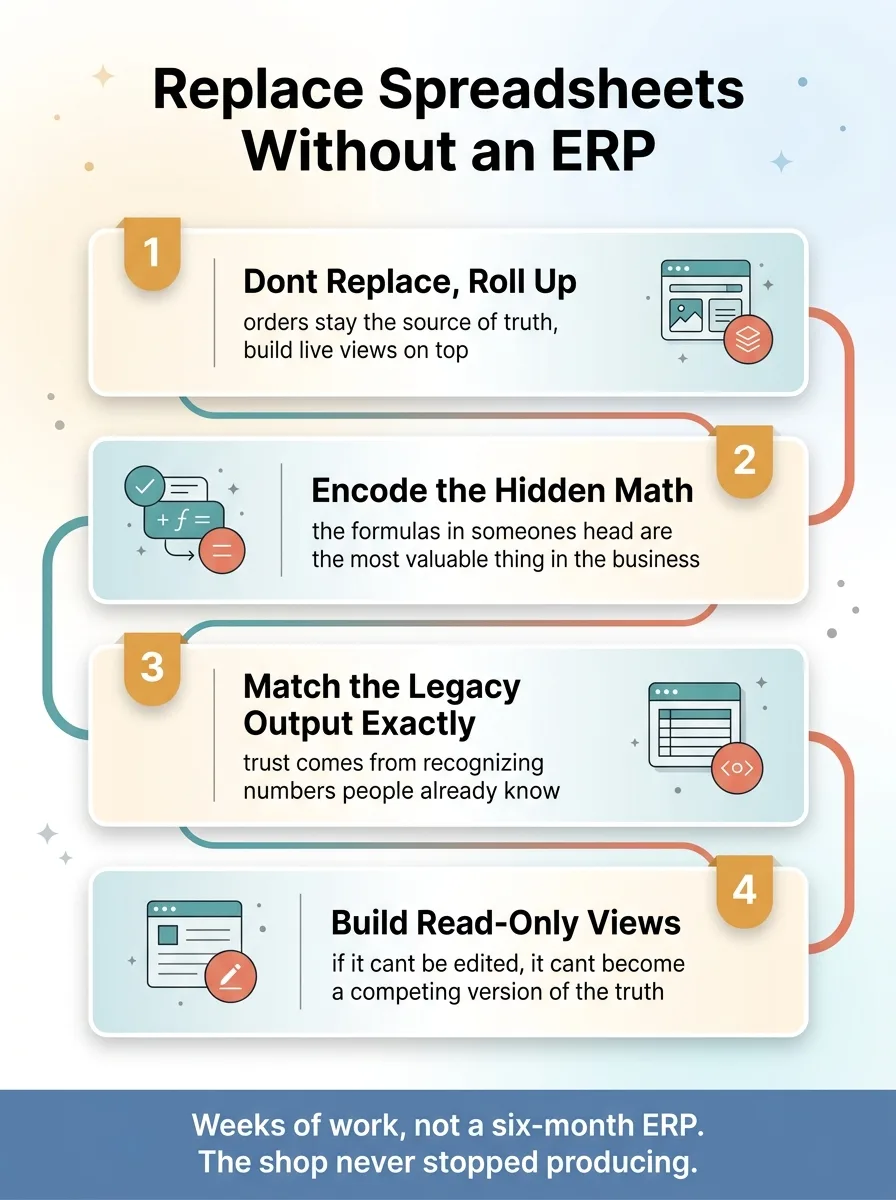 The Four Principles of Replacing Spreadsheets Without an ERP
Don't replace the system of record. Roll it up. The orders stay the source of truth, and you build live views on top that compute and aggregate.
Encode the math that lives in someone's head. The formulas that turn an order into a parts list are usually the most valuable thing in the business, and they're almost never written down. Getting them explicit is most of the work.
Match the legacy output exactly. People won't use a system they don't trust, and trust comes from recognizing the numbers they already know.
Build read-only views that can't drift. If a view can't be edited, it can't become a competing version of the truth.
This was weeks of work, not a six-month ERP project. The shop kept producing the entire time. Nobody migrated a system or changed how they take orders.
Let me be honest about what this isn't. It didn't replace the owner's judgment. He still decides what to build and when. The orders are still the source of truth, and the system just reflects and computes from them. This isn't artificial intelligence running the shop. It's encoding what a skilled person already knows so it stops living in one fragile place.
If your critical numbers live in spreadsheets and people's memory, the move isn't a giant platform that takes a year and reshapes how you work. It's taking what you already know and making it live, visible, and trustworthy.
That's a much smaller, much faster bet. And it's usually the one that actually pays off.
Thinking about AI for your business?
If this resonated, let's have a conversation. I do free 30-minute discovery calls where we look at your operations and find where AI could actually move the needle, not in theory, in your real workflow.
Get AI insights for business leaders
Practical AI strategy from someone who built the systems — not just studied them. No spam, no fluff.
Hodgen.AI
Ready to automate your growth?
Book a free 30-minute strategy call with Hodgen.AI.
Book a Strategy Call