The Gap Between a Demo Clip and a Live Feature
Your social feed is full of AI video right now. Slick clips, impossible camera moves, products that morph and float. Every CEO I talk to has seen them, and most have the same quiet question: is this real enough to actually ship inside my product?
I had the same question. So I answered it the only way I trust, which is by building it.
I wired a frontier text-to-video model into the production OS I run for my DTC fashion brand in San Diego. The model itself is public tech. Anyone can sign up for an API key and generate a clip by hand in an afternoon. That part is genuinely easy now.
The hard part was never the clip. A one-off demo you generate by hand, babysitting each render, is nothing like AI video generation in production where real users hit the button hundreds of times and every one of those presses costs money.
The distance between those two things is all engineering, and none of it shows up in the demo.
Per-call duration caps that truncate your render. Audio that quietly doubles your bill. SDK types that lie about what the API accepts. And the quiet killer: a naive build that re-generates and re-bills every single time a user reopens the same result.
This article is about those unglamorous decisions. The ones that separate a viral clip from a feature you can actually put in front of customers without your finance person shutting it down in week one.
The Hard Edges Nobody Shows You in the Demo
Before I get to solutions, you need to see the shape of the work. These four problems are not edge cases you might hit. They are the default behavior you inherit the moment you move from a hand-run demo to a live feature.
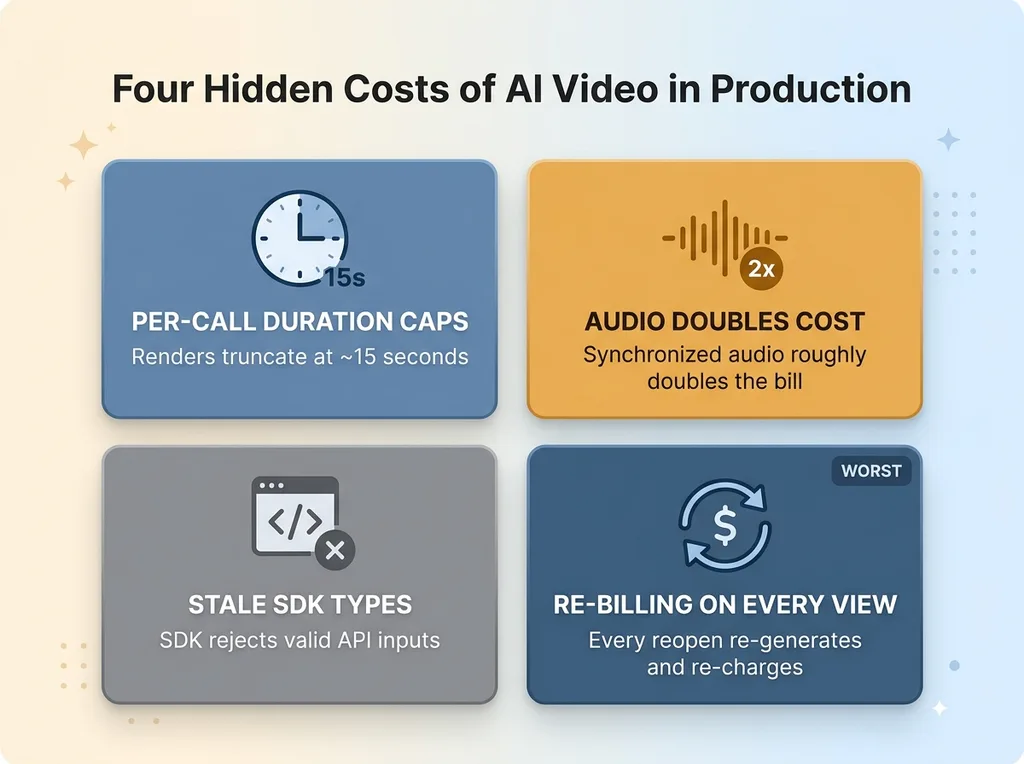 The four production problems nobody shows in the demo
Per-call duration caps
Most text to video API endpoints cap a single render at around 15 seconds. That is the hard ceiling per call. Ask for a 30-second brief and the request either fails outright or silently truncates to the cap. Either way, your "longer clip" feature is broken before a user ever sees it.
If your product needs anything past the cap, you cannot just ask the model nicely. You have to build around it.
Audio doubles the cost
Enabling synchronized audio roughly doubles the per-render bill. That is not a rounding error. On a feature that runs hundreds of times a week, doubling the unit cost changes whether the whole thing pencils out.
Generative video cost is the line item that quietly kills these features. Nobody models it up front, then the first month's invoice lands and the project gets paused.
Stale SDK types reject valid inputs
The vendor's SDK type definitions lagged behind the live API. The endpoint happily accepted resolutions that the SDK's own types flagged as invalid. So valid requests got rejected by the client library before they ever reached the server.
You will not find this in any tutorial, because tutorials use whatever resolution the docs were written against.
Re-billing on every view
This is the worst one, and the most common in naive builds. Generate a clip, show it to the user, then they close the tab and reopen the result. Without a deliberate decision, your code re-generates the whole thing and bills you again. Every view becomes a fresh charge.
These four are not exotic. They are what you get for free, in the bad sense, the day you go from demo to feature.
Chunking and Stitching: How to Beat the 15-Second Cap
The fix for the duration cap is not a model trick. It is plumbing.
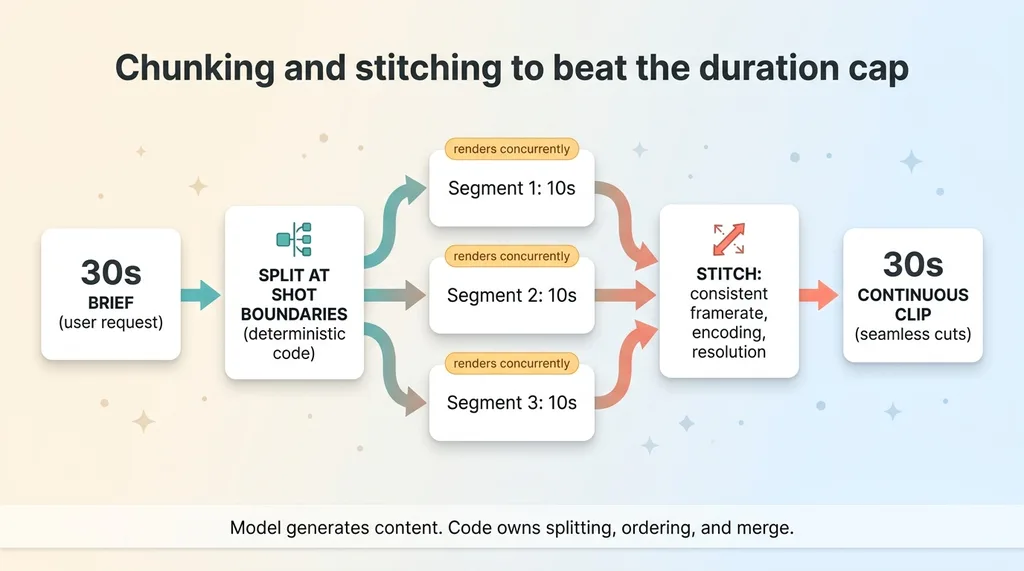 Chunking and stitching pipeline to beat the duration cap
A brief longer than the per-call limit gets split into segments, each one comfortably under the cap. Each segment renders separately. Then I merge them into one continuous clip. The user asks for 30 seconds, gets 30 seconds, and never knows it arrived as three pieces.
The detail that matters is where you cut. I split at shot boundaries, not at arbitrary timestamps. A segment ends where a scene was always going to change. That way the joins read as intentional cuts, the kind any edited video has, instead of awkward seams in the middle of a motion.
The segments render concurrently. Three 10-second pieces rendered in parallel finish in roughly the wall-clock time of one, instead of stacking up sequentially while the user stares at a spinner.
Then the stitch. Consistent framerate, consistent encoding, consistent resolution across every segment so the merge is clean and the seams don't show. Mismatch any of those and you get a visible stutter at every join.
Here is the principle underneath it. The model generates the content. Deterministic code owns the splitting, the ordering, and the merge. I do not ask the model to "make a 30-second video." I ask it for specific shots, then my code assembles them in a fixed, predictable way. This is the same pattern I write about in letting the model judge while the code computes, and it applies everywhere in this stack.
Once you control the assembly, multi-shot cuts stop being a workaround for the cap. They become a feature. A clip with deliberate scene changes looks more like real content than a single uninterrupted shot ever would. The constraint turned into the better product.
Caching So Reopening a Result Is Free
This is the single biggest cost decision in the whole build, and it is almost embarrassingly simple.
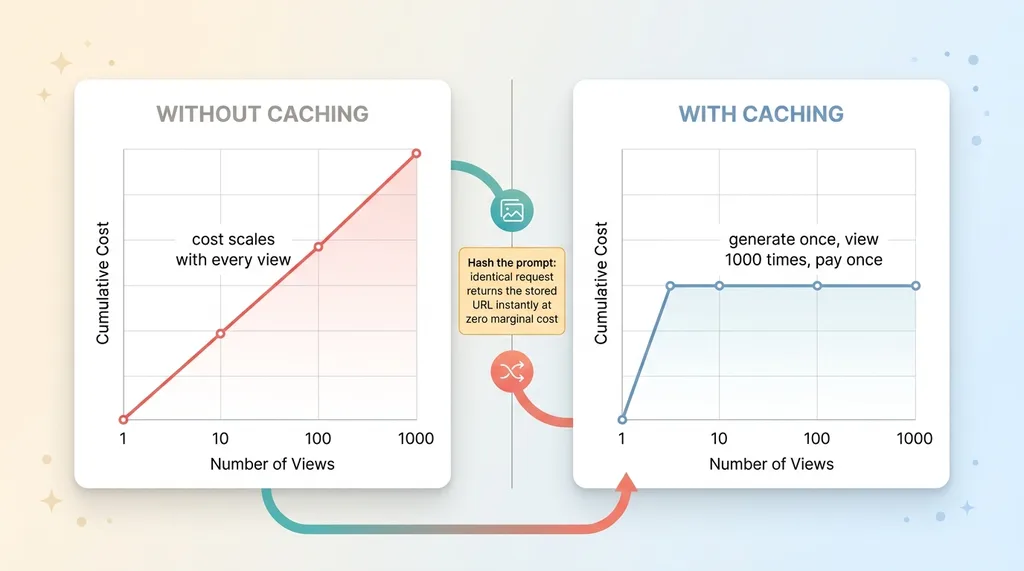 Caching: cost without caching vs with caching
Without caching, every view re-spends credits. A user generates a clip, watches it, comes back an hour later to show a colleague, and you pay to render it again. Same prompt, same output, brand new charge. A feature that re-bills on every view is not a feature. It is a leak.
The fix: cache the result URL alongside the prompt that produced it. When someone reopens a result, I serve the stored URL instead of re-rendering anything. The video already exists. There is nothing to regenerate.
I hash the prompt to make this clean. An identical request hits the cache and returns instantly at zero marginal cost. A changed request, even by one word, produces a different hash and renders fresh. The cache is exact, never stale, and never serves the wrong clip.
The impact in plain terms: caching bounds your cost to the first generation. Generate once, view a thousand times, pay once. Without it, your cost scales with views, which is exactly the number you most want to grow and least want to pay for.
This is the same discipline I apply across every AI system I build, and it is why my costs stay measured in pennies rather than dollars. I went deep on the broader pattern in caching to keep AI costs in pennies, and it is the difference between a feature you can put in front of users and one your finance person shuts down in week one.
Caching is not glamorous. It is also the line between shippable and not.
Working Around Stale SDK Types Without Waiting on the Vendor
Here is the kind of problem that exists in production and nowhere else.
The vendor's SDK had type definitions that were behind the live API. I would pass a resolution the endpoint accepted without complaint, and the SDK's own types would reject it before the request even left my code. The library was wrong, and the library was the thing standing between me and a working render.
I had two options. Wait for the vendor to ship a release that fixed their types, on their timeline, or work around it on mine.
I cast around the stale types to pass the values the endpoint actually accepted. Then I documented the cast clearly, right at the line, so it is obvious why it exists and when it can be removed. The comment says: the SDK types are behind the API, this resolution is valid, delete this cast when the types catch up.
That documentation matters as much as the fix. A naked cast with no explanation is a landmine for whoever reads the code next, including future me. A documented one is a deliberate decision with an expiry date.
This is the honest texture of shipping against a moving API. The SDK lies sometimes. The docs are sometimes stale. You either accept that and build the workaround, or you wait and ship nothing. I build the workaround. You will not find this step in any tutorial, because tutorials assume the tools are correct, and in production they often aren't.
The Audio Decision: Paying 2x On Purpose
I told you audio roughly doubles the per-render cost. I kept it on anyway. That was a deliberate call, not an oversight.
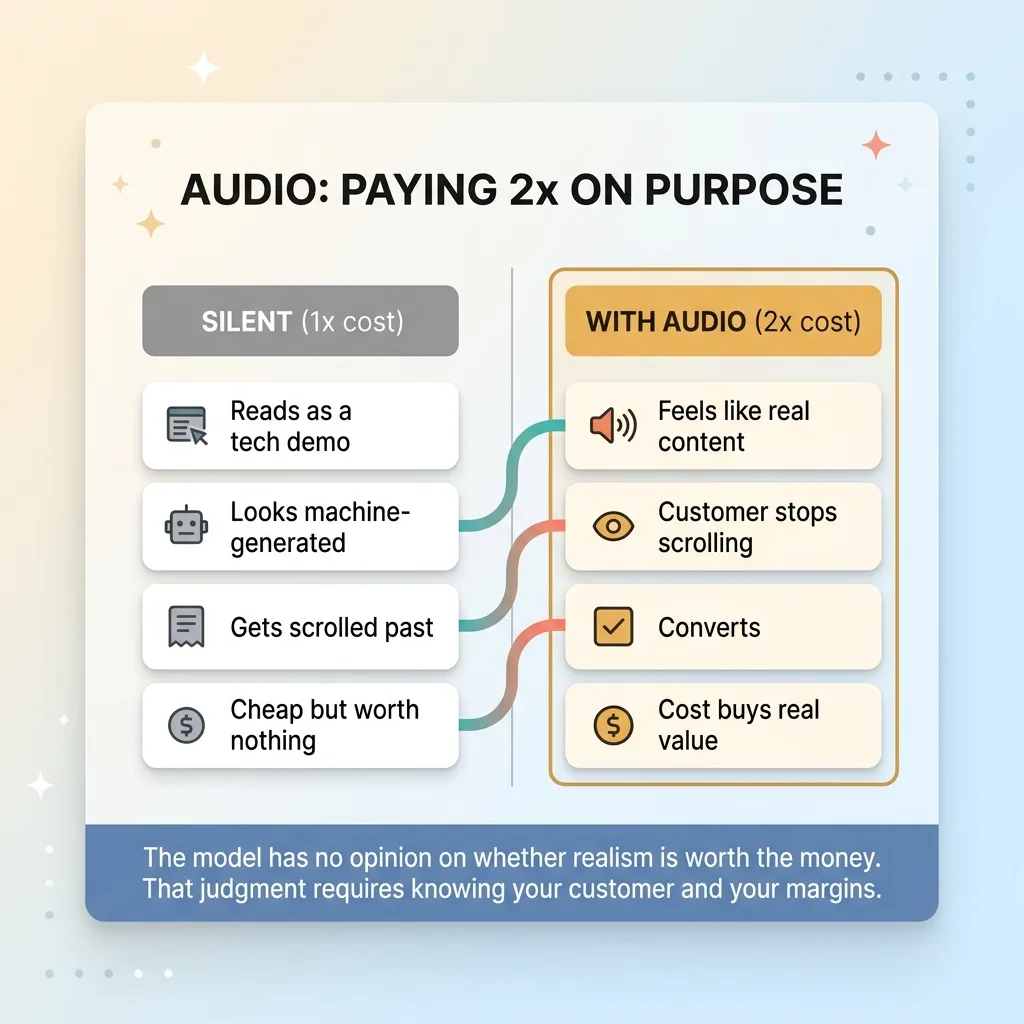 The audio cost-vs-value decision tradeoff
Here is the reasoning. Silent B-roll reads as a tech demo. It looks like what it is: a machine generated some pixels. The moment you add synchronized audio, the same clip starts to feel like content a real person made and a real customer would actually stop scrolling to watch.
For a feature where the video is customer-facing, that realism is the entire point. A clip nobody watches is worth nothing, no matter how cheap it was to make. The 2x cost buys the difference between an asset that converts and one that gets scrolled past. That trade is easy.
This is exactly the kind of judgment AI cannot make for you. The model will render audio or not render audio depending on a flag. It has no opinion on whether the realism is worth the money. That decision requires knowing your customer, your margins, and what the clip is actually for.
I make these calls because I run the brand whose money is on the line. When I turn audio on and accept double the cost, it is because I have decided that cost buys real value, not because a spec told me to. The same way I decided chunking was worth the engineering and caching was non-negotiable.
That is the work that does not look like AI work. Deciding which costs buy something real and which are vanity. A vendor selling you a video API will never make that call for you, and a demo will never reveal it. You only learn it by running the thing with your own budget on the line, which is also how I built the pipeline to turn real product photos into AI reels for the brand.
What This Means If You Want AI Video in Your Own Product
The clips on your feed are real. The model works. That was never the question.
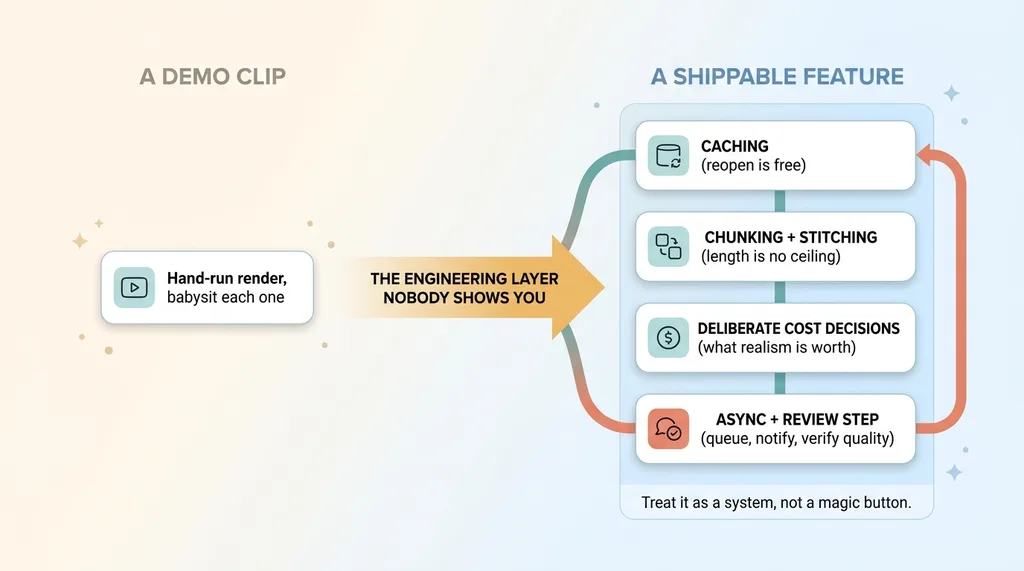 Demo clip versus shippable production feature
The question is whether you can put it in front of your customers without it falling apart or quietly draining your budget. And the honest answer is yes, but only with the layer underneath that nobody shows you.
The engineering between a clip and a feature is where most projects die. Duration caps that truncate your output. Audio cost that doubles your bill. Re-billing that scales with views instead of generations. SDK drift that rejects valid requests. None of those are visible in a demo, and all four are waiting for you on day one.
The companies actually shipping AI video are the ones that treated it as a system. Caching so reopening a result is free. Chunking and stitching so length stops being a ceiling. Deliberate cost decisions about what realism is worth paying for. Not a magic button. A pipeline with judgment built into it.
Let me be straight about what is still rough. Render times mean you design for async, not instant. You queue the job and notify the user, you do not make them wait on a spinner. And quality varies enough that you build a review step in rather than auto-publishing every clip. This tech is real, not perfect.
Get the next build note.
I write up each system I build, including what broke. Subscribe to my newsletter and I'll send you the next one.