The Supabase Anon Key Security Trap That Leaked Hashes
How a public Supabase anon key exposed password hashes and reset functions, and the Postgres revoke-from-public gotcha that hid the real fix.
By Mike Hodgen
What I Found in an Internal App for a Regulated Financial Firm
I was reviewing an internal platform I had built for a regulated financial firm, the kind that manages serious money for serious people. The review was routine. The finding was not.
The advisor login table was readable through the public REST API. Not through some admin backdoor, not with a leaked credential. It was readable using the same supabase anon key that the public-facing site ships to every browser that loads the homepage.
That meant anyone who knew how to query the endpoint could pull the advisor login records. Including bcrypt password hashes.
It got worse. The password-reset stored procedures were callable directly through the RPC endpoint. So not only could someone read the hashes, they could reset an advisor's password without ever touching the front end.
Let me be plain about the stakes. This is a regulated firm. The data sitting in that table is exactly the kind a buyer, an auditor, or a regulator loses sleep over. If that had been found by the wrong person instead of by me, it would not have been a bug report. It would have been a breach disclosure.
I found it. I fixed it. The app is locked down now.
But the fix had a trap in it. The first thing I tried looked like it worked and did absolutely nothing. That trap is worth the entire rest of this article, because if you are running an AI-built app holding sensitive data, you have probably stepped in it too, and you do not know it yet.
Here is exactly what happened and how I closed it.
Why the Anon Key Is Public by Design (and Why That's Fine, Until It Isn't)
Before the fix, you need the mental model. This is the part most non-technical CEOs get wrong, and honestly most developers get wrong too.
The anon key is not a secret
The anon key is meant to be public. It ships in the browser. Open the developer tools on any site built on this stack and you can find it in about ten seconds. That is by design.
It is not a password. It is not a credential you protect. Treating the anon key like a secret is like putting a lock on a door that has no walls around it.
Security does not come from hiding the key. It comes from row-level security and table grants deciding what that key is actually allowed to touch.
Row-level security is the actual gate
The anon key represents a role called anon. What that role can read and write is controlled by two things: row-level security policies and table-level grants. That is the real gate.
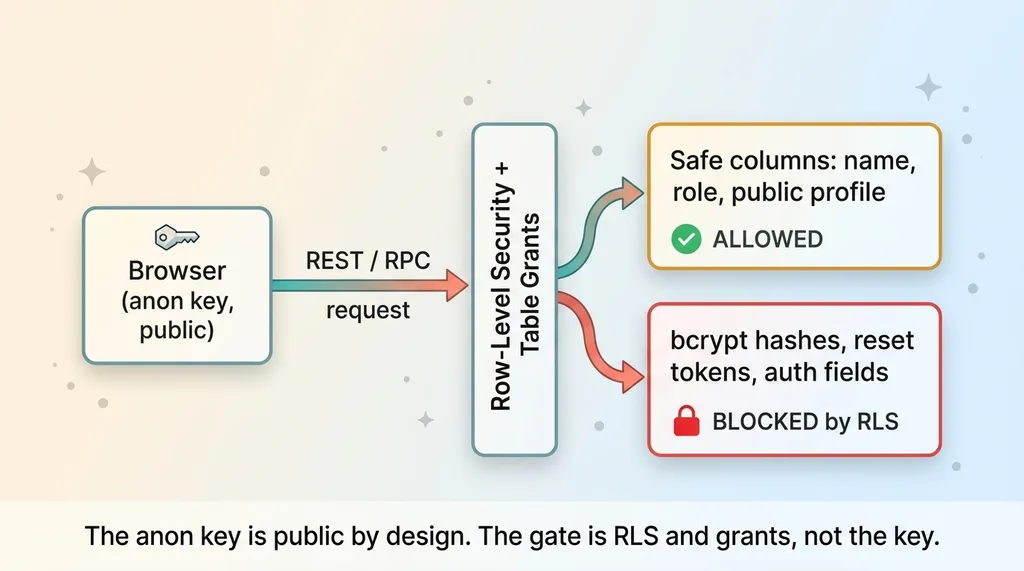 Anon key request path: what the public key can and cannot reach
The failure mode is simple and incredibly common. A developer assumes the key being "theirs" means the tables behind it are private. They are not. By default, the REST API will happily serve any table the anon role is allowed to read.
I have seen this exact pattern before, including a health app where sensitive records were leaking sensitive data through the public key. Same root cause. Different industry.
Here is the distinction that matters. "Anon key in the browser" is normal. That is how the stack is supposed to work. "Anon key can read password hashes" is the bug. The key was never the problem. What it was permitted to reach was.
Step One: Lock the Table to Safe Columns Only
The advisor table was doing too much. It held login fields, bcrypt hashes, reset tokens, and ordinary profile data all in one place.
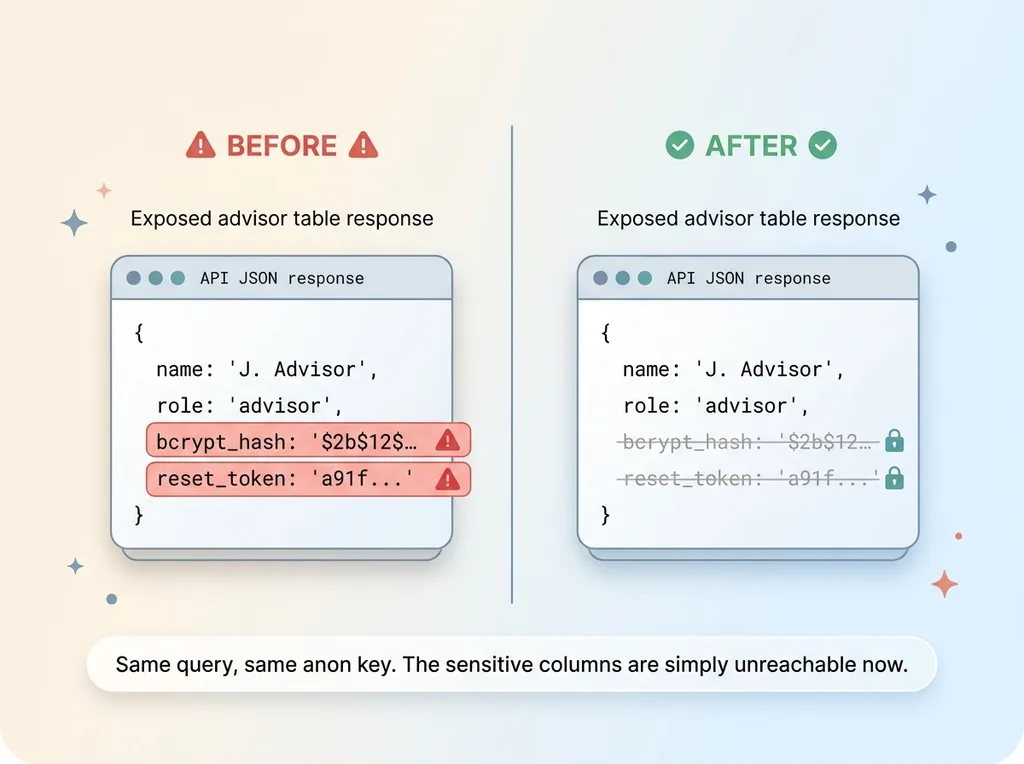 Before/after of the exposed advisor table response
The site itself only ever needed the safe stuff. Name, role, a few public-facing fields used to render advisor profiles. It never needed the hash. It never needed the reset token. The browser had no business seeing those columns, and yet the API was serving the whole row.
The fix was a principle, not a one-liner. A table the browser can reach should contain nothing the browser should not see. If it must contain sensitive fields, then the anon role gets read access to safe columns only, and everything else stays behind row-level security and functions the public role cannot call.
So that is what I did. I stopped exposing the entire table. I restricted the anon role to read only the safe profile columns. I moved every authentication concern behind functions that the public role has no path to.
Before: query the table, get back names, roles, and bcrypt hashes.
After: query the table, get back names and roles. The hash column is no longer reachable. The reset token is gone from the response entirely.
One thing worth saying clearly, because people hear "hashed" and relax. A bcrypt hash is still dangerous to leak. Hashing is not encryption. If an attacker has your hashes, they can run offline cracking against them at their own pace, on their own hardware, with no rate limiting and no one watching. Weak passwords fall fast. "Hashed" is not "safe to publish."
That was step one. Step two is where I nearly fooled myself.
Step Two: Revoke the Password-Reset Functions (and the No-Op That Fooled Me)
The password-reset stored procedures were the bigger problem. They were callable by anyone through the RPC endpoint. Reset an advisor's password without authenticating as anyone.
My first instinct was the obvious one.
The first revoke did nothing
I revoked EXECUTE on the reset functions from anon. Then from authenticated for good measure. Two roles, two revokes, done.
I re-tested. I called the function through the RPC endpoint using the public anon key, exactly the way an attacker would.
It still worked. The function executed. The reset still ran.
I revoked access from the role that was calling it, and the call went through anyway. That is the kind of result that makes you stop and stare at the screen.
Postgres grants EXECUTE to PUBLIC by default
Here is the trap, and it is the postgres revoke from public gotcha in its purest form.
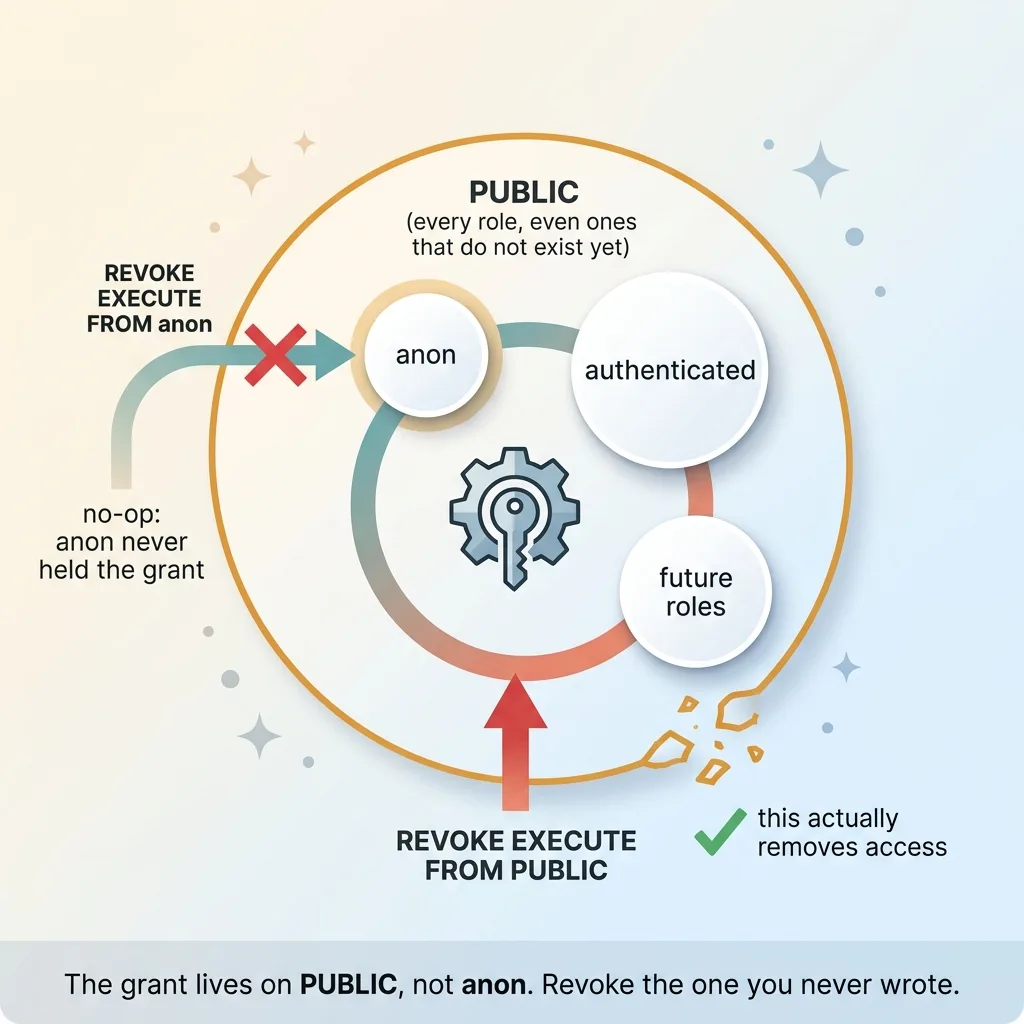 The PUBLIC grant trap, why revoking from anon does nothing
When you create a function in Postgres, EXECUTE on that function is granted to a special pseudo-role called PUBLIC by default. Automatically. You do not write it. It is never in your code. It is just how Postgres behaves the moment the function is created.
PUBLIC is not a user. It is "every role, all of them, including ones you have never thought about." It includes anon. It includes authenticated. It includes roles that do not exist yet.
So when I revoked EXECUTE from anon, the privilege did not come from anon. It came from PUBLIC. And anon is a member of PUBLIC. Revoking the grant anon never actually held does nothing. The function stayed callable through the broader PUBLIC grant the whole time.
This is the rpc function security default grant problem, and it is brutal precisely because it is invisible. "I removed anon access" and "I removed public access" feel like the same sentence. They are not. One leaves the door wide open while you walk away convinced you locked it.
I had run the command. It returned success. And the function was still wide open to the entire internet.
The Real Fix: Revoke From PUBLIC, Grant to service_role, Pin the search_path
Once I understood where the privilege actually lived, the correct fix was straightforward. The order matters, so here is the exact sequence.
REVOKE EXECUTE ... FROM PUBLIC
First, revoke EXECUTE on the privileged functions from PUBLIC, not from anon. This removes the default grant that was the actual source of the access. The moment this ran, the anon key could no longer call the reset functions, because the grant it had been riding on was gone.
Re-grant to service_role only
The server still needs to run these functions. The legitimate reset flow happens server-side. So I granted EXECUTE back to service_role only.
service_role is the trusted role that lives on your backend and never ships to a browser. It is the opposite of the anon key. If service_role ever leaks into front-end code, that is a separate emergency, but in a correctly built app it stays server-side, full stop.
So now the function can be executed by your server and by nothing else. Exactly what you want.
Pin search_path to prevent hijacking
These reset functions ran as SECURITY DEFINER, meaning they execute with the privileges of the function's owner rather than the caller. That is necessary here, but it raises the stakes on a separate attack.
If you do not pin the search_path, a malicious caller can create a function or table in a schema that gets searched first and shadow the real one, hijacking what your privileged function actually does. So I pinned the search_path to a fixed, trusted schema. The function now resolves names exactly where I expect, every time, regardless of who calls it.
Verify the ACLs, don't assume
This is the step almost everyone skips, and it is the one that would have saved me an hour earlier.
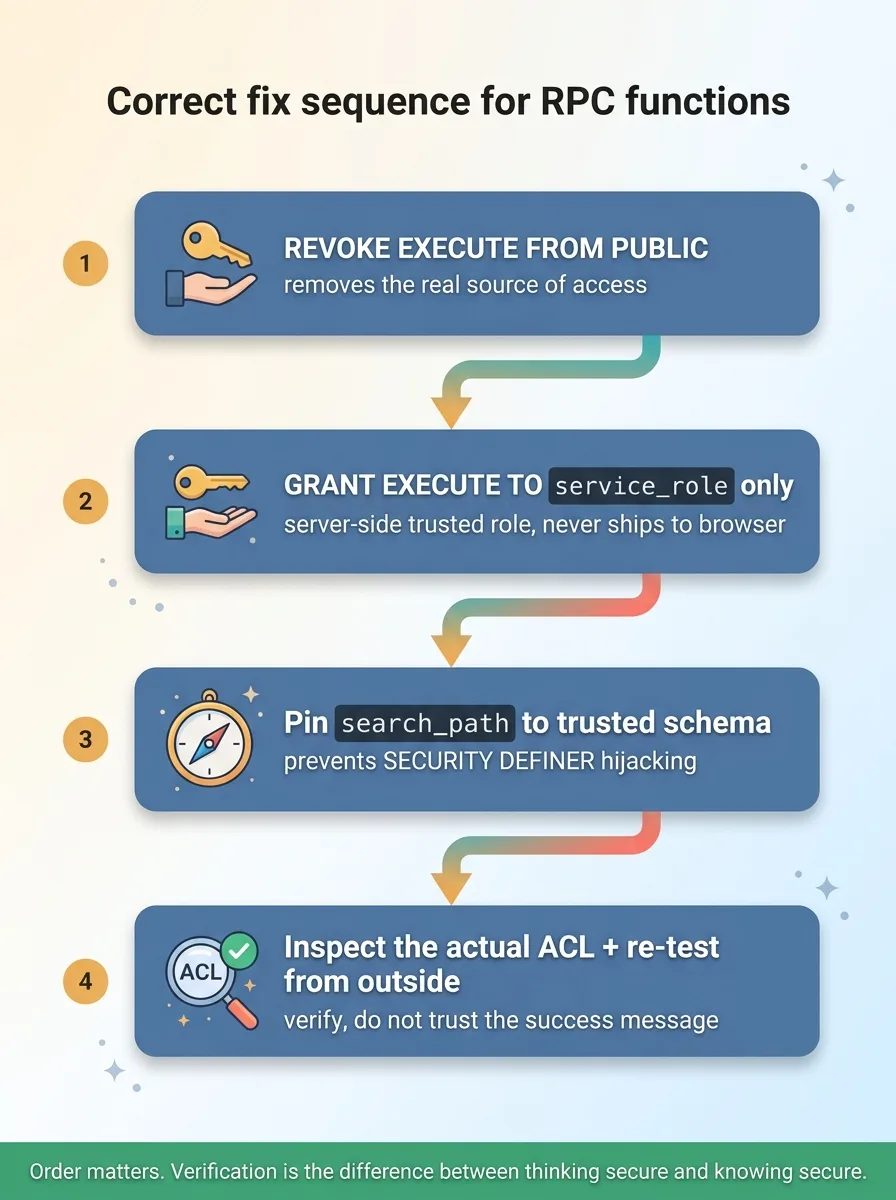 The correct four-step fix sequence for RPC functions
After the change, I inspected the actual function ACLs to confirm PUBLIC was gone and only service_role remained. I did not trust that the command "worked" because it returned success. My first revoke also returned success, and it did nothing.
Verification is the difference between thinking you are secure and knowing it. Inspect the grant. Confirm what is really there. Then re-test from the outside.
Why This Pattern Hides So Well in AI-Built Apps
Here is the part that should concern you if you are running on a codebase that got built fast.
This class of bug is completely invisible from the front end. The app works. Logins work, resets work, every feature behaves exactly as designed. Nothing looks broken because nothing is broken from the user's seat.
The exposure only shows up if you query the REST and RPC endpoints directly the way an attacker would. You will never trip over it by clicking around the UI. You have to go looking for it on purpose.
AI-generated code makes this worse, not because the AI is careless, but because it inherits framework defaults. The PUBLIC grant on functions is a Postgres default that lives nowhere in your application code. There is no line to review, no obviously risky function call to flag. It is an absence, and absences do not show up in code review.
I have written before about how nine of my own databases were readable by anyone with the URL when I went looking. These were my own projects. I know this stack cold, and the defaults still bit me.
I will be honest about the tradeoff. Speed introduces this kind of debt. Building fast with AI is a real advantage, and I would not give it up. But the same defaults that let you move quickly are the ones that quietly leave doors open. That is why I sweep for this deliberately instead of assuming the defaults are safe. They are not.
How I Now Verify a Regulated App Is Actually Locked Down
Any app holding regulated data gets a standing checklist from me. This is the exact sequence I run.
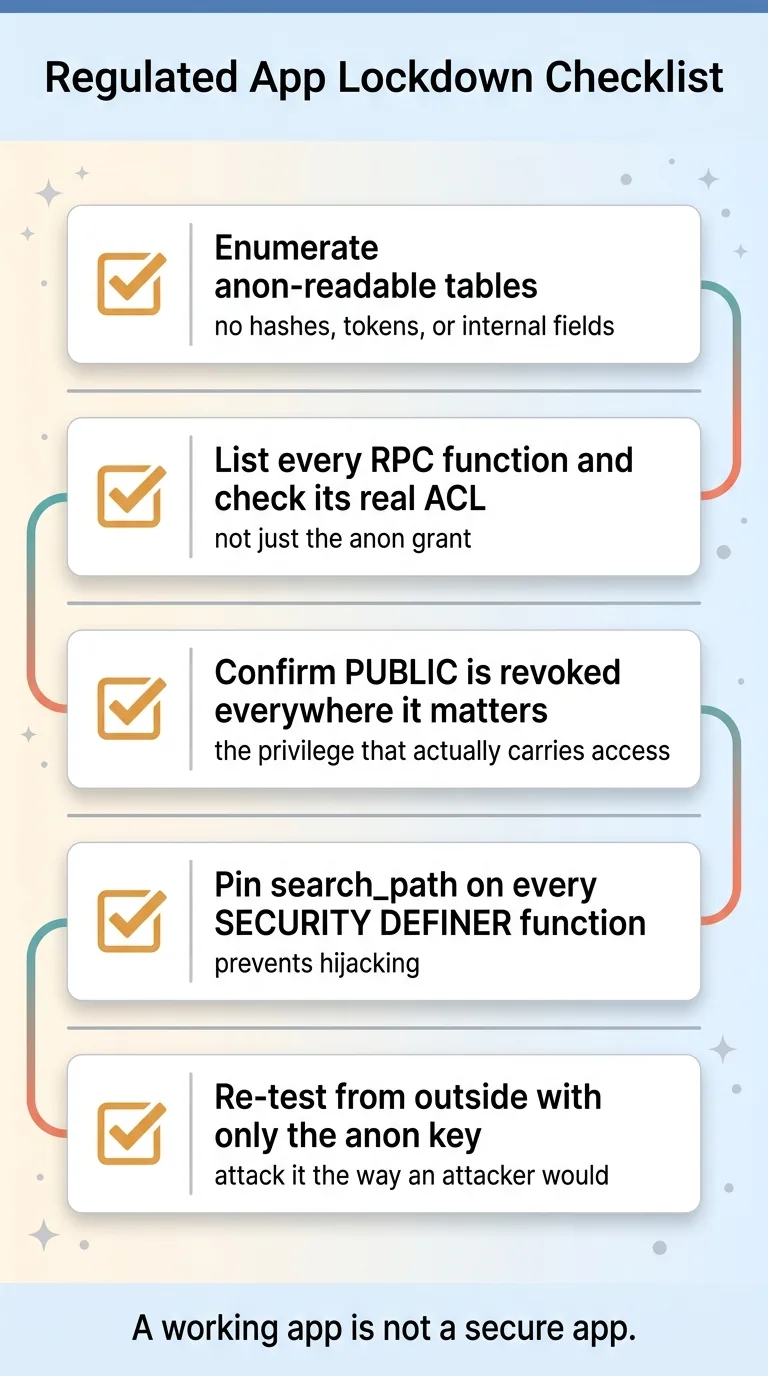 Standing security audit checklist for regulated apps
- Enumerate every table reachable by the
anonrole and confirm it exposes nothing sensitive. No hashes, no tokens, no internal fields. - List every RPC function and check its real ACL, not just the
anongrant. The grant that matters is usually the one you did not write. - Confirm
PUBLIChas been revoked everywhere it matters, because that is the privilege that actually carries the access. - Pin
search_pathon every SECURITY DEFINER function so it cannot be hijacked. - Re-test from the outside using only the public anon key, the same way an attacker would, and verify the locks hold.
I run this as a structured pass, the same way I ran a security audit across dozens of codebases to find exactly these patterns at scale.
The point for a CEO is simple. A working app is not a secure app. Those are two different statements, and the gap between them is a deliberate audit by someone who knows where Postgres and Supabase hide their defaults.
If you have heard that the same handful of security holes show up in every AI-built app, this is one of the worst of them, and one of the quietest.
If an AI-built app is holding your regulated data right now, this is exactly the kind of review worth running before a customer or a regulator finds it for you.
Thinking about AI for your business?
If this resonated, let's have a conversation. I do free 30-minute discovery calls where we look at your operations and identify where AI could actually move the needle.
Get AI insights for business leaders
Practical AI strategy from someone who built the systems — not just studied them. No spam, no fluff.
Hodgen.AI
Ready to automate your growth?
Book a free 30-minute strategy call with Hodgen.AI.
Book a Strategy Call