Database Exposed Publicly: I Found 9 Open by URL
How a misnamed RLS policy left nine live databases exposed publicly to the anon key. Here's how I swept 29 projects, found the leak, and verified the lock held.
By Mike Hodgen
The Policy Was Named 'Locked.' It Was Wide Open.
I found a row-level security policy named something like "authenticated read only." Reassuring name. The kind of label you'd see in a dashboard and move on, satisfied the table was protected.
It was bound to the public role. The condition was true. For everyone.
That means anyone with the anonymous key (the one that ships in every browser, sitting right there in the page source) could read the entire table. No exploit. No stolen credentials. No clever attack. Just the public key that the app hands out by design, plus a URL.
I ran a sweep across every database I'm responsible for. Twenty-nine of them. Nine were readable by anyone with the URL and the anon key.
Let me be precise about what "database exposed publicly" meant in practice here. Not theoretical. Not "could be exploited under the right conditions." I'm talking about a stranger pasting a key into a browser console and pulling down full tables.
Job-applicant PII. Client emails and payment context. Fitness body-analysis data. Window-treatment client records. All of it world readable.
The worst part is the false comfort. The dashboard said RLS was ON. There was a policy with a sensible name. Every developer who looked at it assumed the table was locked.
It wasn't. And I only found out because I stopped trusting the names and started reading the actual bindings.
This is the kind of thing that doesn't show up in a status meeting. Nobody reports "our database is wide open" because nobody knows. The system reports green. The reality is red.
Here's how it happens, how I found it across nine builds, and how you can check your own database before the close of business today.
Why a Named RLS Policy Can Still Leave Everything Open
Row-level security is the right tool. I'm not here to tell you to abandon it. I use it across hundreds of tables. The problem isn't RLS. The problem is what people think a policy guarantees versus what it actually enforces.
The anon key is public by design
The anonymous key is meant to be public. It's embedded in your client-side JavaScript so the browser can talk to your backend. Anyone can open dev tools, look at the network tab, and read it in about ten seconds.
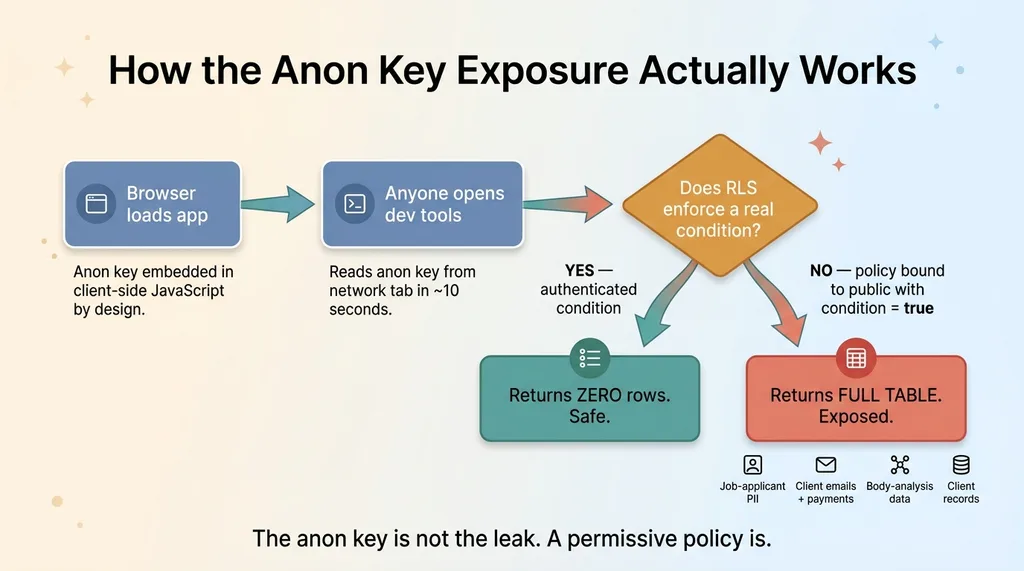 How the Anon Key Exposure Actually Works (Attack Path)
That's not a leak. That's how the architecture works. The anon key alone is supposed to be useless because RLS is supposed to stop it from reading anything it shouldn't.
So when people talk about an "anon key data leak," the key isn't the leak. The key doing its job against a misconfigured policy is the leak.
The naming-vs-binding gap
A policy has three parts: a name, a role it binds to, and a condition (the qual). Only the developer cares about the name. The database doesn't. The name has zero enforcement power.
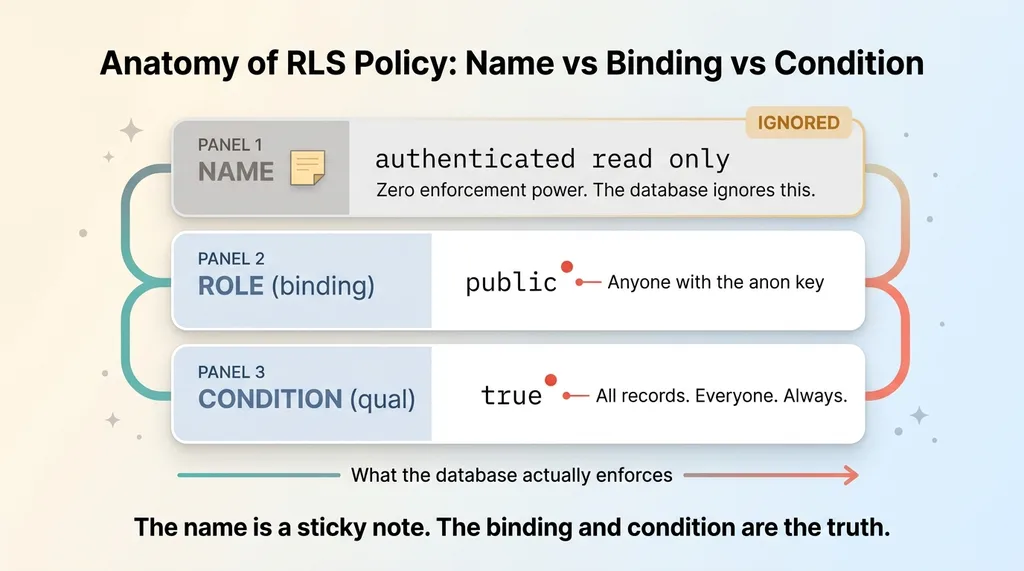 Anatomy of an RLS Policy: Name vs Binding vs Condition
You can name a policy "anon read own records" and bind it to the public role with a condition of true. The name says "own records." The condition says "all records, everyone, always."
The database obeys the condition. It ignores the name entirely.
This is the RLS policy misconfiguration that bit me nine times. A permissive condition plus a public key equals a world-readable database. And because the dashboard shows RLS enabled and a reasonably named policy, everyone assumes it's locked.
If you want to see how these policies should actually be structured, with conditions that tie reads to the authenticated user, I wrote the row-level security playbook covering exactly that across 50+ tables. The short version: the binding and the condition are the truth. The name is a sticky note.
The Read-Only Sweep: Auditing 29 Databases Without Touching Them
I did not start by changing things. When you find one open table, the instinct is to start slamming doors shut. That's how you take down production at 2 AM.
I started by reading.
Classify before you change anything
I swept all 29 sensitive databases read-only. For every RLS policy, I inspected two things and ignored the third: which role it binds to, and what its condition evaluates to. The name, I skipped entirely.
The query that mattered was simple in concept: list every policy where the role is anon or public and the qual is permissive. That single filter surfaced the problems. Everything bound to authenticated with a real condition fell away. Everything bound to anon with true lit up.
This companion sweep, where I documented the full scope of world-readable databases, came out of the same morning of work.
Locked, clean, held
I sorted every project into three buckets.
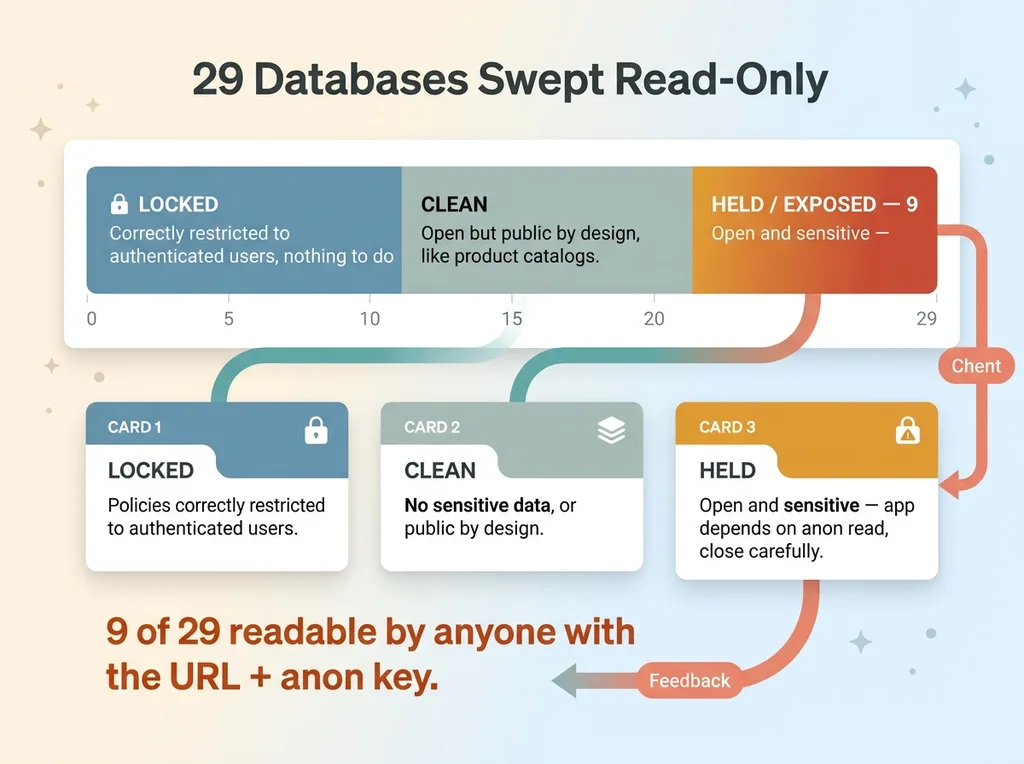 The 29-Database Sweep Results: Locked, Clean, Held
LOCKED meant the policies were already correctly restricted to authenticated users. Nothing to do. Move on.
CLEAN meant the open tables held no sensitive data or were public by design. A product catalog is supposed to be readable by everyone. Marketing pages too. Open isn't always wrong.
HELD meant the table was open and sensitive, but I couldn't safely close it yet because the app actually depended on the anon read. Close it blind and I break production.
This read-only-first discipline is the whole game. You diagnose before you operate. It's the same approach I took when I ran a security audit across 58 codebases, reading first, classifying second, fixing last. Surgeons don't cut before they image.
What Was Exposed: Categories, Not Names
I'm going to describe these strictly by category. No names, no domains, no identifying details.
A window-treatment operations tool with client records, readable by anyone. A financial advisory app with client emails and payment context sitting open. A job-search tool exposing applicant PII (names, contact info, the kind of data that triggers regulatory headaches). A fitness app with body-analysis data, which is about as personal as it gets. And one of my own e-commerce brains, because nobody is exempt, including me.
Five wildly different builds. Different developers, different stacks, different years. The same exact misnaming pattern in all of them.
That's the part worth sitting with. This is not a junior-developer problem. This is a pattern problem. The same wrong thing showed up across unrelated projects because the underlying tooling makes the wrong thing easy and the right thing slightly harder.
When the default path is "create a permissive policy to get it working," and the secure path requires extra thought about user binding and conditions, you get exactly this. Speed favors the open door.
It's especially common in fast AI-assisted builds, where the code gets generated and shipped before anyone audits the security model. I broke down why in five security holes in every AI-built app, and the open anon policy is right at the top.
Here's the takeaway I want you to actually keep. If this happened across nine of my databases while I was paying attention, assume it's happening in yours. Not as a scare tactic. As a base rate.
Closing Them in Production: Drop the Anon Policy, Verify Zero Rows
For each of the nine, the fix itself was small.
The migration: down to authenticated-only
I ran a production migration that dropped the anon all-access policy and left access restricted to authenticated users only. Where the table needed any public access at all, I replaced the blanket true condition with a real one that ties reads to the requesting user.
The migration took minutes per database. If the migration were the whole job, this would be a boring post.
The migration is not the win.
The verification that actually matters
After each change, I queried the table as the anonymous role. I sat in the attacker's seat, used the public key, and tried to read the data.
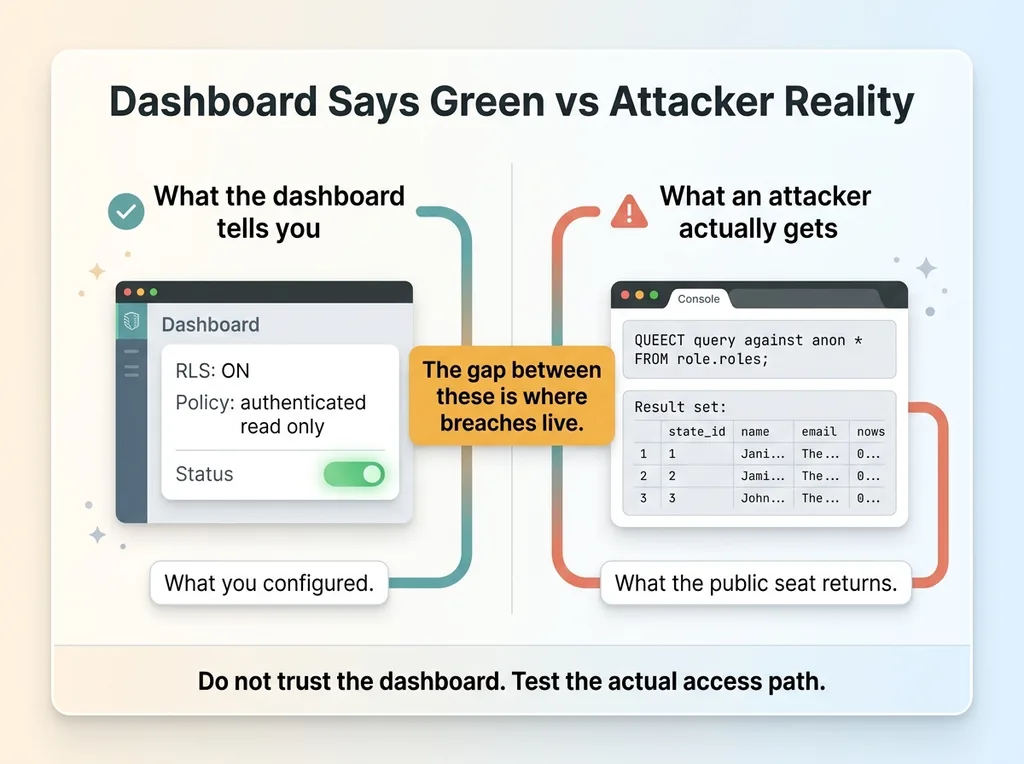 Dashboard Says Green vs Attacker Reality
I confirmed it returned zero rows. Every time. That's the proof.
This is the step almost everyone skips. They run the migration, see green in the dashboard, and call it done. They trust the tool to tell them the truth about itself.
Don't trust the dashboard. Test the actual access path. The dashboard tells you what you configured. Querying as anon tells you what an attacker actually gets. Those are not the same thing, and the gap between them is where breaches live.
For the HELD databases, I did not just close the hole and break the app. One of them genuinely relied on anon reads for core functionality. So I added proper authentication first, confirmed the app still worked through the authenticated path, and only then dropped the anon policy. Order matters. Closing a hole the app depends on isn't a fix, it's an outage with extra steps.
The principle underneath all of it: a security fix you haven't verified from the attacker's seat is a hope, not a fix. I don't ship hopes to production.
How to Check Your Own Database Today
Here's a checklist you can hand to your developer this afternoon. It doesn't require a consultant. It requires about an hour and a willingness to distrust your own dashboard.
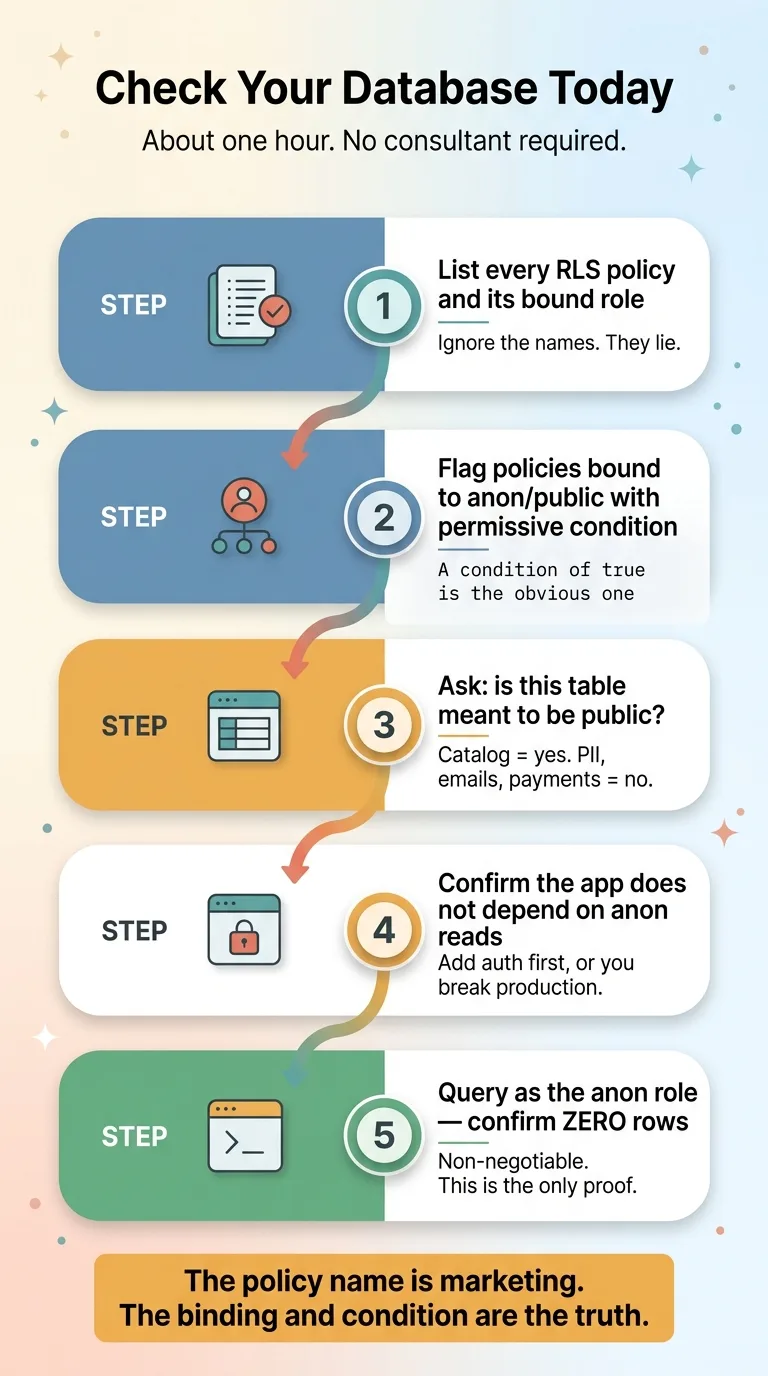 The 5-Step Database Audit Checklist
-
List every RLS policy and its bound role. Pull them all. Critically: ignore the names. The names will lie to you. You want the role and the condition only.
-
Flag any policy bound to anon or public with a permissive condition. A condition of
trueis the obvious one. Anything that doesn't constrain the read to a specific authenticated user belongs on the flag list. This is where Supabase anon access turns into a world-readable database. -
For each flagged table, ask one question: is this meant to be public? A product catalog, yes. Marketing content, yes. Client emails, payments, PII, body data, absolutely not. Sort honestly.
-
Before you change anything sensitive, confirm the app doesn't depend on anon reads. Search the codebase for where that table gets read. If the app pulls it without an authenticated session, you need to add auth before you close the hole, or you'll break production the moment you ship.
-
After the change, query as the anon role and confirm zero rows. This is non-negotiable. Use the public key, hit the table, prove you get nothing back. If you skip this, you've changed a setting and assumed an outcome.
The meta-lesson fits in one sentence. The policy name is marketing. The binding and the condition are the truth. The only proof is querying from the public seat.
If your developer pushes back and says "RLS is on, we're fine," that response is exactly the false comfort that left nine of my databases open. RLS being on is necessary. It is nowhere near sufficient.
Who's Watching Your Public Key
Here's the uncomfortable truth. Most companies have never had anyone read their database policies from the attacker's perspective. They have RLS enabled, a policy with a reasonable-sounding name, and a comfortable assumption that those two facts add up to safety.
They don't. I just proved it across nine of my own systems.
This is exactly the kind of thing a Chief AI Officer catches, because I build these systems and I audit them the same week. I'm not handing a slide deck to your team and walking away. I'm in the database, reading the bindings, querying from the public seat, and verifying zero rows before I call anything fixed.
I ran this sweep across every database I'm responsible for because nobody else was going to. That's the job. Build fast, then go back and prove the fast thing didn't leave a door open.
If you've shipped apps quickly, especially AI-assisted builds, the same misnaming pattern is statistically likely sitting in your production environment right now. Not maybe. Likely. The base rate I'm working from is nine out of twenty-nine.
The natural next step is simple: have someone sweep your databases the way I swept mine. Read-only first, classify, close what's open, verify from the attacker's seat.
A named policy is not a locked policy. The only way to know which one you have is to test it.
Want to explore what AI could do for your business?
Book a free 30-minute strategy call. No pitch deck, no sales team, just a real conversation about your operations and where AI fits.
Get AI insights for business leaders
Practical AI strategy from someone who built the systems — not just studied them. No spam, no fluff.
Hodgen.AI
Ready to automate your growth?
Book a free 30-minute strategy call with Hodgen.AI.
Book a Strategy Call