The Problem: Every Session Looked the Same
I run AI agents across more than 40 repos. Coding agents, content agents, research agents, the whole spread. Every one of them pipes its telemetry into a single dashboard so I can watch the fleet from one place. The idea was solid. The execution had a hole in it, and the hole was automatic project tagging telemetry.
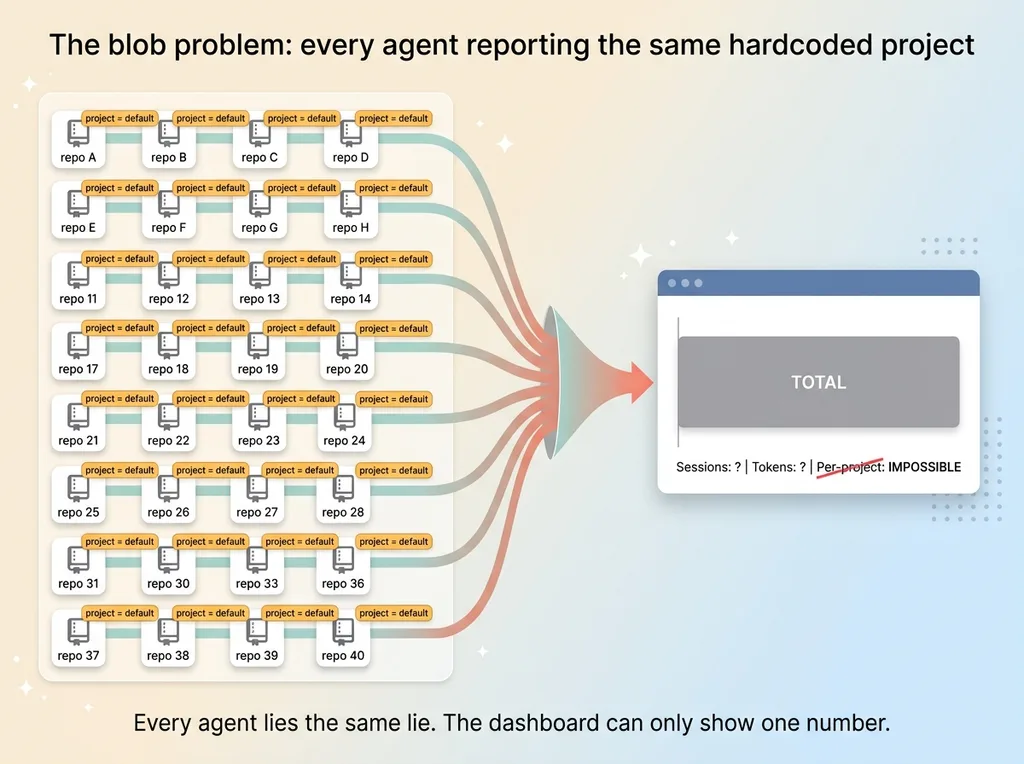 The blob problem: every agent reporting the same hardcoded project
Here's what actually happened. Every agent session reported the same hardcoded project attribute. Some default I'd baked into the config months earlier and forgotten about. So when I opened the live dashboard I built to watch every AI agent working for me, every session collapsed into one undifferentiated blob.
I could see total activity. I could see total token spend. I could see that something was running. What I couldn't see was the one thing that mattered: which project was eating my time and my tokens.
The dashboard runs on OpenTelemetry. The pipeline worked. Data flowed in, charts rendered, nothing crashed. By any narrow definition the tool functioned. But it was half-usable, because per-project metrics were impossible. The project signal was a static default. Every agent in every repo was lying to the dashboard, telling it the same thing.
That's the worst kind of broken. Not broken enough to notice immediately, just broken enough to make the data useless the moment you ask a real question. I'd built a beautiful instrument that could only tell me one number: total. And total is the least actionable number there is.
If repo A was burning 80% of my agent budget and repo B was idle, I had no way to know. They were the same blob. I'd done the hard, interesting part (the pipeline, the dashboard, the OTel plumbing) and skipped the boring part that made it answer the question I actually cared about.
Why I Didn't Just Tag 40 Repos by Hand
The obvious fix is to drop a small project config file into each repo with the correct name. Open repo, add file, set name, commit, move on. Forty times. I rejected this immediately, and not because I'm lazy.
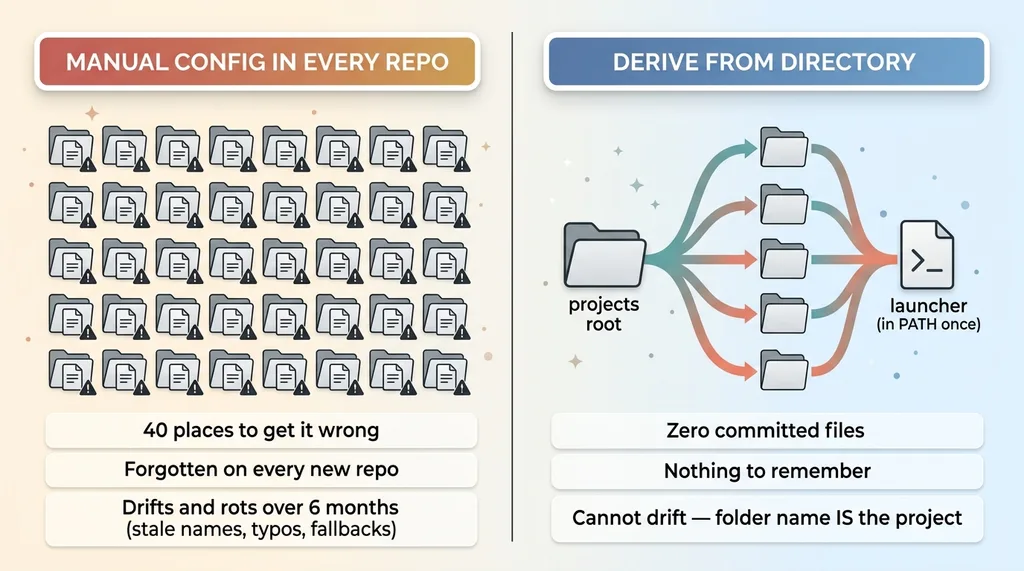 Manual config-per-repo trap versus deriving from directory structure
The config-in-every-repo trap
Forty repos means 40 places to get it wrong. Every new repo means remembering to add the file, and I will forget, because the whole point of new work is that you're focused on the new work, not the telemetry plumbing.
Worse, it means committing a config file into version control across every repo. That's 40 chances to leak something environment-specific. A path that only exists on my machine. A value that belongs in one repo and gets copy-pasted into another. The config file is exactly the kind of thing that quietly accumulates secrets and machine-specific cruft because nobody's watching it.
The drift problem
Manual config rots. That's not a maybe, it's a guarantee on a long enough timeline.
Six months out, half the repos have stale names because I renamed a project and only updated the dashboard, not the 40 config files. Three repos have typos I'll never catch because nothing breaks visibly. Two new repos have nothing at all and fall back to the default, recreating the exact blob problem I was trying to solve.
Per project metrics are only as good as the tagging discipline behind them. And "discipline" is a polite word for "manual work I have to remember to do correctly, forever, with no feedback when I get it wrong." That's not discipline. That's a debt that compounds.
The boring last-mile config is exactly where most tools quietly break. Not in the demo. In month four, when the config and reality have drifted apart and nobody noticed. I wasn't going to ship myself a tool with a six-month expiration date.
The Fix: Derive the Project From the Working Directory
The insight that fixed this was almost embarrassingly simple. I already encode the project name somewhere reliable. The directory structure.
Every repo I work in lives under a single projects root. One parent folder, dozens of project folders underneath it. The folder name is the project name. I already maintain that structure perfectly, because I have to navigate it every day. It can't drift, because if the folder name is wrong, nothing works and I fix it instantly.
So instead of asking each repo to declare what it is, I make the launcher figure it out from where it's running.
Reading the path under the projects root
The logic is conceptual and trivial. Take the current working directory. Strip off the projects root prefix. Take the first path segment that remains. That's your project name.
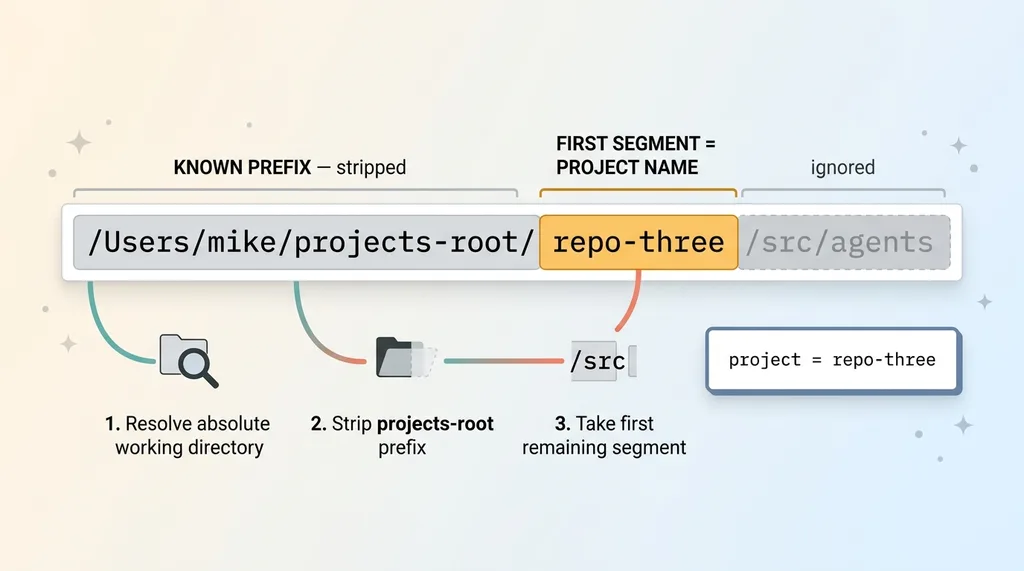 Deriving project name from the working directory path
If my projects root is some parent folder and I'm running inside the third repo down, the launcher sees the full path, removes the known prefix, and grabs the first remaining segment. That segment is the repo's folder name, which is the project. No declaration required. The structure I already maintain carries the signal.
Injecting it as a resource attribute at launch
Once I've derived the name, I export it as an OTel resource attribute before the agent process starts. This is where shell wrapper environment variables do the work.
OpenTelemetry reads resource attributes from the environment at startup. So I wrap the agent launcher in a shell script that does the directory derivation and exports the result as the attribute the telemetry layer reads (a custom project attribute, though service.namespace works too depending on how you model it).
By the time the agent boots, the environment already says "you are running in project X." The agent doesn't know or care that a wrapper computed that. It just reads its environment like it always does.
Zero per-repo config. Zero committed files. Zero things to remember. I drop the wrapper in my PATH once, and from then on every agent in every repo self-reports the correct project, because the project is a fact about where it runs, not a fact I have to declare. That's the entire shift. Convention over configuration, using the convention I already keep.
How the Shell Wrapper Actually Works
The wrapper is a few lines of shell. It makes four moves, in order, and then gets out of the way.
Resolve directory, derive name, export, exec
First, it resolves the absolute working directory. Not the relative path, not a symlinked shortcut, the real absolute path, so the derivation is consistent no matter how I got there.
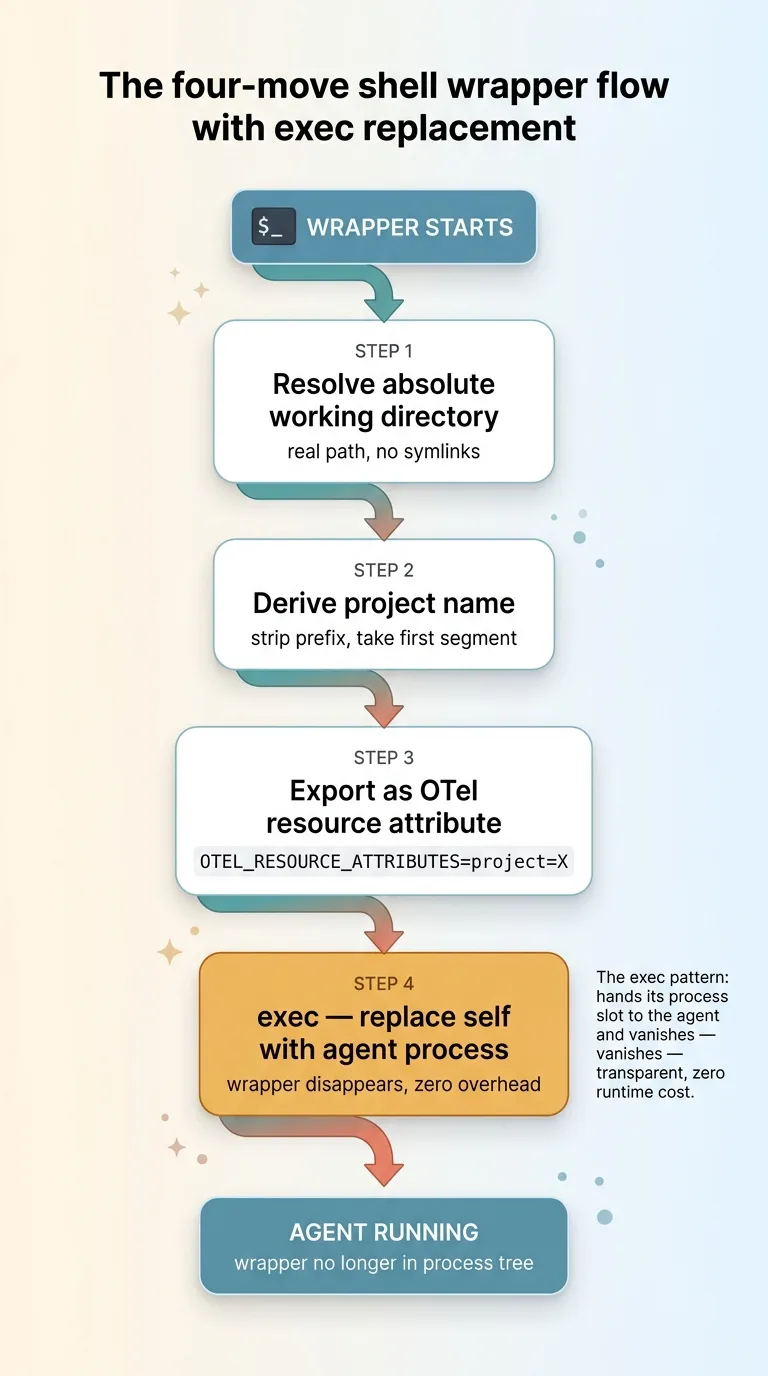 The four-move shell wrapper flow with exec replacement
Second, it computes the project name relative to the projects root. Strip the prefix, take the first segment. One line of string handling.
Third, it exports that name into the environment as the resource attribute the telemetry layer reads. This is the only side effect the wrapper has on the world.
Fourth, and this is the part that matters, it calls exec to replace itself with the real agent process. Not "run the agent and wait." Replace. The wrapper hands its process slot directly to the agent and disappears.
That exec pattern is deliberate. It means the wrapper adds zero runtime overhead and never sits in the process tree. If you look at what's running, you see the agent, not a shell script babysitting it. The wrapper does its three lines of setup and then ceases to exist as a separate process. Transparent.
Handling the edge cases
Honest tools handle the ugly cases, so I covered them.
Run the agent outside the projects root entirely? The derivation has nothing to strip, so it falls back to a sane default like unscoped. Critically, unscoped is better than the old hardcoded value, because it tells the truth: this session genuinely isn't under a known project, rather than lying that it belongs to whatever the old default was.
Nested repos, where a repo sits inside another? I take the first segment under the projects root, so nesting resolves to the top-level project consistently. Directories with spaces? Quoted properly so they don't shatter into multiple arguments, which is the classic shell bug that bites everyone exactly once.
None of these are exotic. They're just the cases that separate "works on my machine in the happy path" from "works." A few extra lines, written once, dropped in my PATH once. Not 40 times.
What Changed in the Dashboard
Before: one blob. Total activity, total spend, total time, and no way to slice any of it. I had instrumentation that could measure everything and attribute nothing.
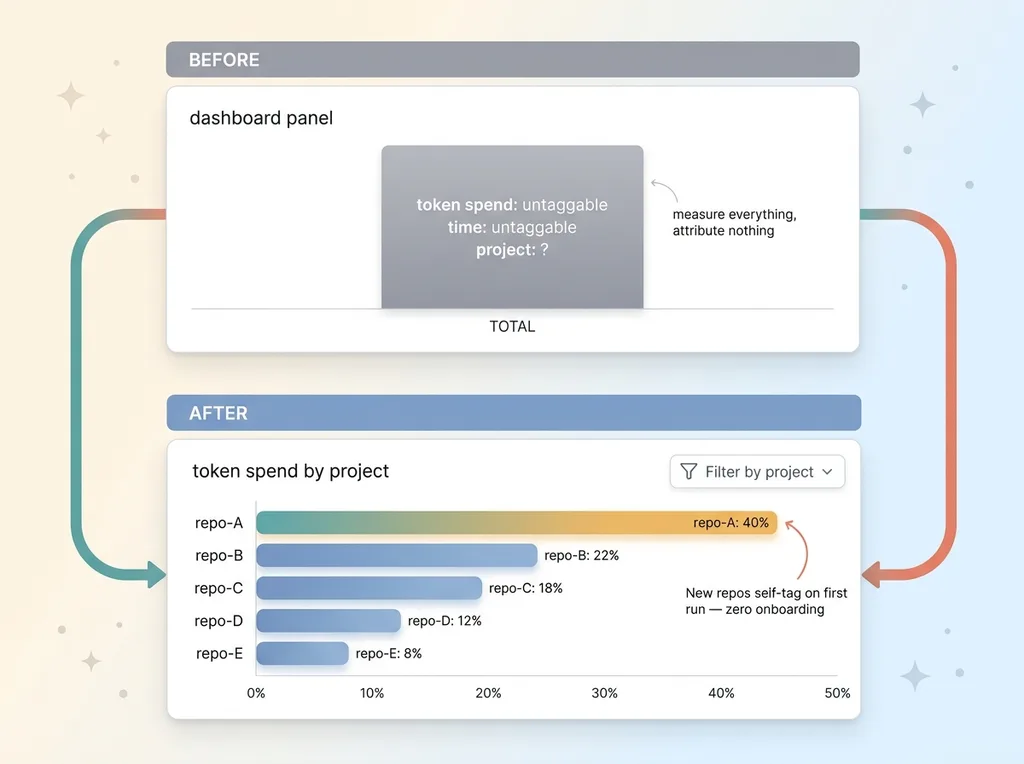 Before and after: blob dashboard versus per-project attributable dashboard
After: every repo lands in its own room.
I can now filter sessions, token spend, and elapsed time by project, automatically, with zero manual upkeep. When I open the dashboard and want to know which project ate my agent budget last week, I pick it from a list and the answer is right there. The project that was quietly consuming 40% of my tokens stopped hiding in the aggregate.
The best part is the part I never have to think about. New repos self-tag the first time I run an agent inside them. I create a project folder, run an agent, and it shows up in the dashboard correctly named, instantly. No onboarding step. No config. The structure carried the signal.
This is the difference between telemetry and useful telemetry. Telemetry you can't slice is barely better than no telemetry, because you can't act on a blob. It's the same reason my automations email me even when nothing is wrong. Data that can't drive a decision is just noise with a dashboard in front of it.
Now I'm watching dozens of repos and hundreds of sessions, and every single one is attributable. Not most. Not the ones I remembered to configure. All of them, by construction.
Why This Is the Difference Between a Demo and a Finished System
Anyone can build a telemetry pipeline that works in a demo. One repo, one project, hardcode the name, ship it, take the applause. It looks finished. It demos beautifully.
The last-mile problem is where that demo falls apart. Making the same system self-configure across an entire portfolio, with zero manual setup and zero config committed to repos, is a completely different piece of work. It's not glamorous. There's no chart to show off. It's a few lines of shell and a decision about where the signal should live.
That's exactly where most builders stop. They solve the interesting 80% and ship something half-usable, then wonder why nobody trusts the data six months later.
I solve the boring last mile because that's the whole difference between a tool you actually use and a tool you abandon. The pipeline was never the hard part. The hard part was making it true across 40 repos without me maintaining anything by hand.
Convention over configuration is the instinct underneath all of it. Don't make people declare what the system can derive. Let the structure they already maintain carry the signal. That's the same instinct I bring to client work, and this project-tagging signal is one input into the broader system I describe in the live dashboard I built to watch every AI agent working for me. The dashboard is the stage. This wrapper is what makes the stage tell the truth.
The Last Mile Is Where I Spend My Time
The pattern repeats everywhere I look. The demo gets the applause. The last mile gets the abandonment.
When I build AI systems for a company, I'm not handing over something that works in a clean demo and falls apart the moment it meets your real directory of 40 projects, your real edge cases, your real team that will absolutely not maintain a config file by hand. I've watched that movie. The tool gets praised in the kickoff and quietly dies in month three.
I build the boring part that makes the thing survive contact with reality. The fallback for the case nobody planned for. The self-configuration so your team doesn't have to remember a step. The exec pattern so it's invisible instead of in the way.
If you've got a tool that's 80% there, technically functional but nobody actually uses it because the last 20% was never finished, that's the work I do. The unglamorous, decisive 20% that turns a working demo into a system people rely on without thinking about it.
Get the next build note.
I write up each system I build, including what broke. Subscribe to my newsletter and I'll send you the next one.