Fix Ecommerce Broken Product Links Before They Cost You
Sold-out products quietly break your shop links and leak revenue. Here's the targeted automation I built to fix ecommerce broken product links safely.
By Mike Hodgen
The Revenue Leak Nobody Sees
A while back I looked at a winery running on a hosted wine ecommerce platform. Nice site, clean design, the kind of thing that photographs well. Their homepage and landing pages had "Shop" buttons that deep-linked straight to specific products. Click the bottle you like, land on the product page, buy it. Simple.
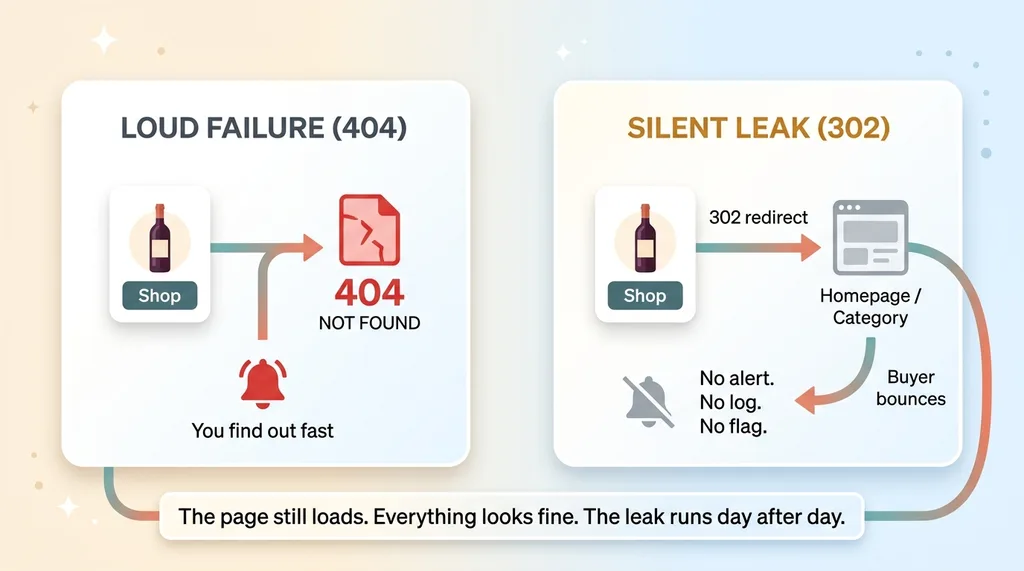 The silent 302 redirect leak vs a loud 404
Except it wasn't working, and nobody knew.
Here's what was happening. Every time a vintage sold through, the platform retired that product's URL. It didn't throw an error. It didn't break the button. It quietly 302-redirected anyone who clicked through to a dead-end page. The button still looked perfect. The page still loaded. There was no broken-link warning, no red flag in any dashboard.
So a customer would see a bottle, click "Shop," and land on nothing useful. Then they'd bounce. No alert fired. No log line screamed. The leak just ran, quietly, day after day, customer after customer.
This is the worst kind of problem because it's invisible. When something 404s loudly, you find out fast. When it 302s to a homepage, everything looks fine from the outside. You only catch it if you actually click your own links like a customer would, which almost nobody does once a site is "done."
To fix ecommerce broken product links like these, you first have to accept they exist, and most owners have no idea theirs do.
So let me ask you the same question I asked them. How many of your own shop links are pointing at products you stopped selling six months ago? If you sell anything seasonal, limited, or vintage-based, the honest answer is probably "more than zero, and I have no way to know."
Why Sold-Out Products Break Your Links
The vintage-sellthrough pattern
This problem has a specific shape, and once you see it, you'll spot it everywhere.
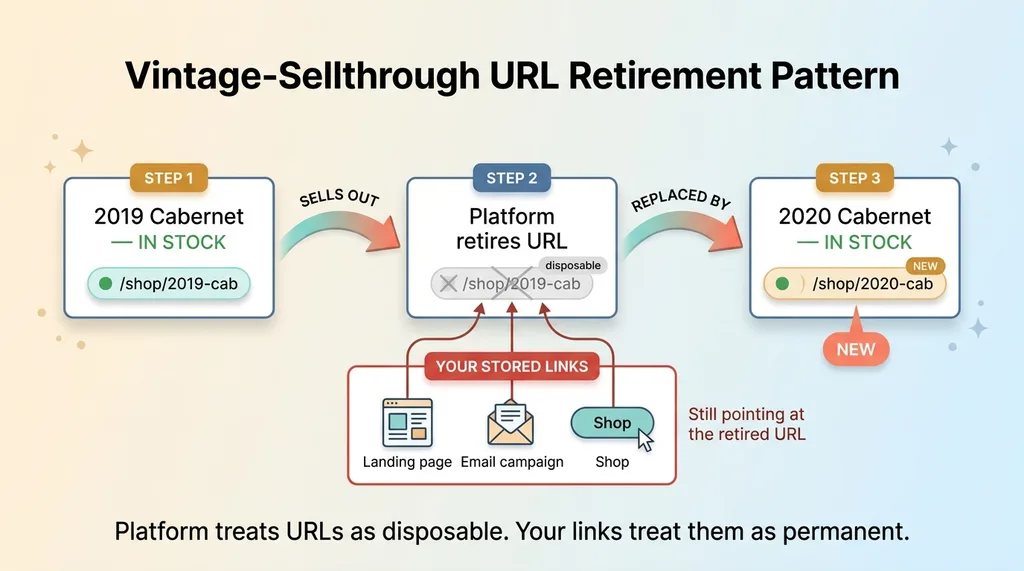 The vintage-sellthrough URL retirement pattern
Hosted ecommerce platforms tend to retire a product URL when the SKU sells out. That makes sense for the platform. Why keep a page live for something you can't buy? Wine vintages are the textbook case: the 2019 Cab sells through, the platform retires its product page, and the 2020 takes its place with a brand-new URL.
Same thing happens with limited drops, seasonal runs, and anything inventory-bound. The product page is treated as temporary, because the product is temporary.
The trouble is that your stored links assume those URLs are permanent. Your landing page, your email campaign, your "Shop the Collection" button all point at a specific product URL that the platform considers disposable.
302 redirects hide the damage
Here's the mechanic that makes it dangerous. When the URL retires, the old link doesn't 404 loudly. It 302-redirects to a category page or the homepage.
A 302 is a "temporary redirect." To a browser, it's totally normal. The page loads, status looks healthy, nothing in your analytics screams "error." But the buyer who clicked a specific bottle now lands on a generic page that isn't what they wanted. They came to buy one thing and got dumped into a lobby.
This is the broader pattern of link rot in ecommerce, where links slowly die as the catalog underneath them changes. The difference here is the silence. There's no rot you can see. There's just a redirect doing exactly what it was designed to do.
That's the part to internalize. This isn't a bug. The platform is behaving correctly. The problem is the gap between how the platform treats product URLs (disposable) and how your stored links treat them (permanent). Until you close that gap, the leak keeps running.
Why Fixing the Source File Didn't Work
When I dug in, I hit a trap that catches a lot of smart people, including me for about an hour.
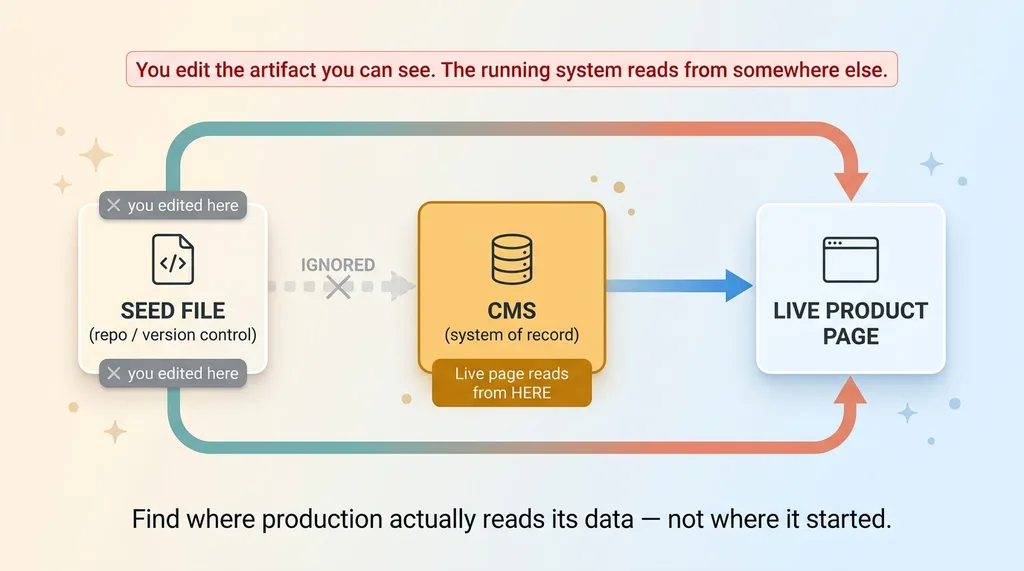 Editing the wrong data source (seed file vs CMS system of record)
I found the seed file. The original config in the repo that listed all the shop URLs. Great, I thought. I'll patch the URLs here, redeploy, done. I updated the file, pushed it, checked the live site.
Nothing changed. The dead links were still dead.
Here's why. The live page didn't read shop URLs from the seed file. It read them from the CMS. The seed file had been the starting point, but the CMS had become the system of record. Editing the file in version control changed the thing I could see, while the live system kept happily serving the old data from a completely different store.
This is one of the most common mistakes in this kind of work. You fix the artifact in the repo because that's what's in front of you, and the running system ignores you entirely because it's reading from somewhere else.
It's the same failure mode behind landing pages that go stale when inventory changes. The page pulls from a data source that has quietly drifted out of sync with reality, and editing the wrong source feels productive while accomplishing absolutely nothing.
The lesson is boring and important. Before you touch anything, figure out where the live page actually reads its data from. Not where you think it should. Not where it started. Where it reads from right now, in production.
In this case the answer was the CMS, not the file in version control. Once I knew that, the actual fix became obvious. Everything before that was guessing.
The Safe Re-Runnable Patch I Built
Patch one field, touch nothing else
Once I knew the CMS was the system of record, the fix was targeted. I built a script that pulls the correct, current shop URLs from a reliable data source and patches only the shop-URL field on each product in the CMS.
That word "only" is doing heavy lifting. The script touches one field per product and leaves everything else untouched. It does not go near descriptions, prices, images, tags, or any other data. There's zero risk of clobbering a hand-written product description or overwriting a carefully set price.
When you're writing directly into a CMS that powers a live store, the smallest possible blast radius is the whole game. One field in, one field out. Everything else stays exactly as the owner left it.
Idempotent by design
The second principle matters even more, because of the nature of the problem. Vintages keep selling out. New ones replace them. This isn't a one-time fix, it's a recurring one.
So the script is idempotent. Running it twice produces the exact same result as running it once. No duplicate writes, no side effects, no drift. If a URL is already correct, the script confirms it and moves on. If it's wrong, it corrects it.
That's the whole point of a safe re-runnable data patch script. You should be able to run it tomorrow, next month, after the next sellthrough, without holding your breath. It either fixes what's broken or does nothing at all. Both outcomes are safe.
While I was in there, I made one more change. I switched the CTA from "Shop" to "Add to Cart." Instead of sending the buyer to a fragile product page that might retire next week, the link drops them straight into the purchase flow. Fewer hops, fewer pages that can rot, faster path to checkout.
None of this is a platform migration or a rebuild. It's a small, sharp piece of targeted automation that solves the actual problem and can keep solving it. That's usually the right size for a leak like this. You don't need a new engine. You need to stop the bleeding precisely.
The Redeploy Gotcha: Patching Data Isn't Publishing
Here's the detail that separates people who've actually shipped this from people who read about it.
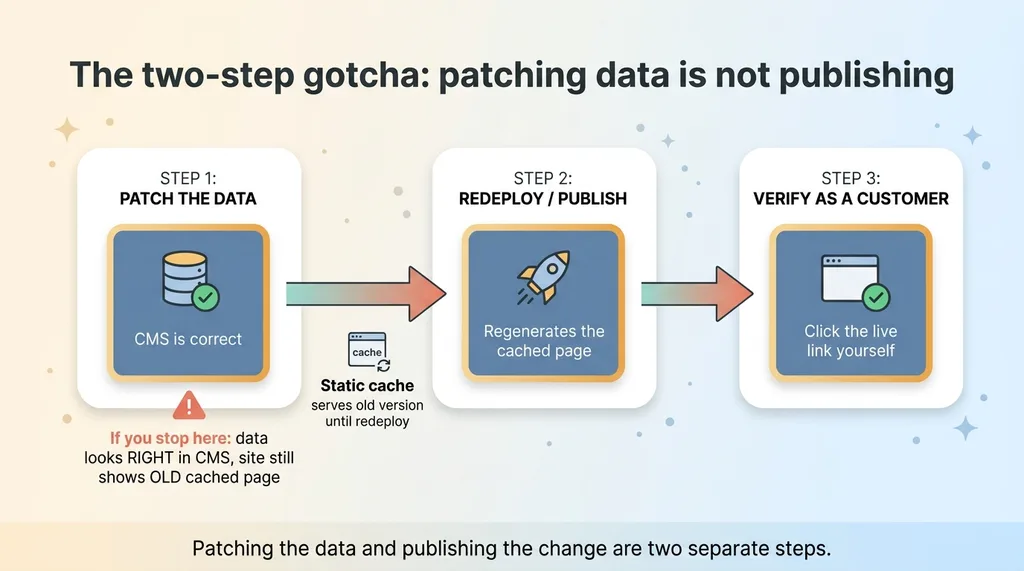 The two-step gotcha: patching data is not publishing
After the script ran and the CMS data was correct, I checked the live site. The old broken links were still showing.
I'd patched the data perfectly. The CMS was right. And the site was still wrong.
The reason was caching. The page was statically cached, which is great for speed and terrible for "I just changed the data and want to see it." The live page kept serving the old cached version until a redeploy regenerated it. The fix existed in the data store and hadn't reached the rendered page yet.
So write this down: patching the data source and publishing the change are two separate steps. They feel like one. They are not.
If you patch the CMS and walk away, you'll swear the fix didn't work. You'll go back and second-guess your script, dig through logs, question whether you found the right data source. Meanwhile the only thing standing between you and a working site is a redeploy you didn't run.
This is exactly the territory where why silent failures are the dangerous ones becomes real. The gap between "data is fixed" and "site shows the fix" is completely invisible unless you know to check both. Nothing errors. The data looks right when you query it. The site looks wrong when you visit it. Neither one tells you the other exists.
The discipline is simple once you've been burned. Fix the data. Publish it. Then verify on the live, rendered page, as a customer, not in the CMS admin where everything already looks correct.
The Patch vs. the Permanent Fix
I want to be straight about what this fix is and isn't.
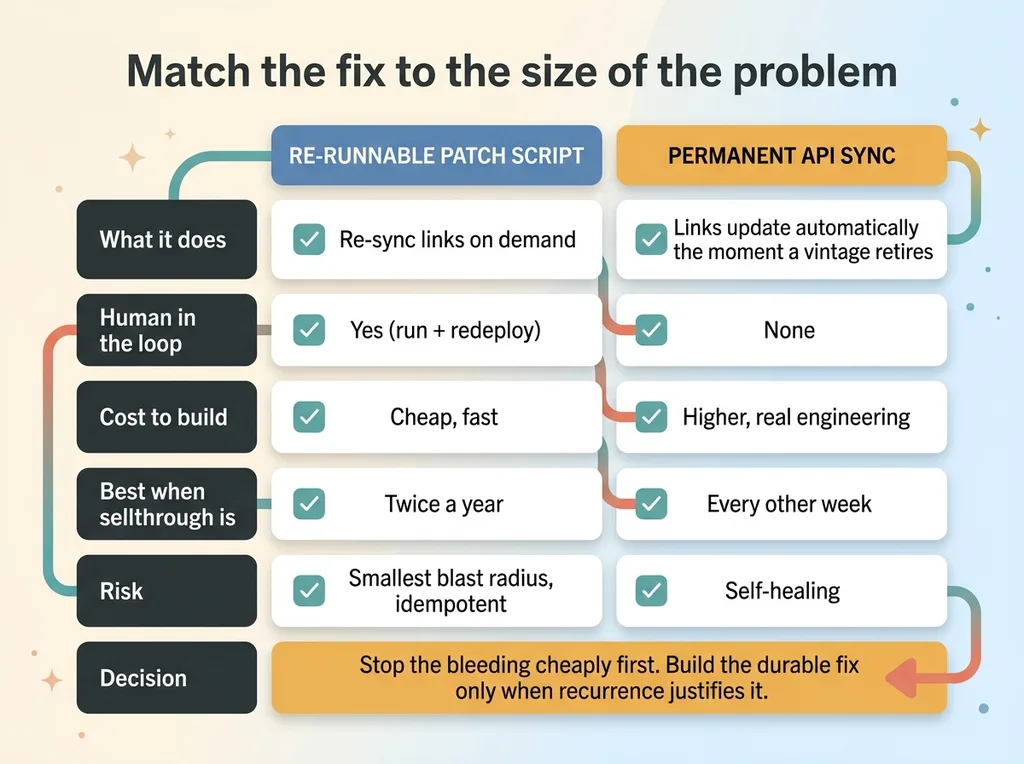 Triage decision: cheap patch vs permanent API sync
The script keeps the links alive. Run it after a sellthrough, redeploy, and the shop links point where they should. It works, it's safe, it's cheap to run. But it is a maintenance patch, not a root-cause fix.
The actual root cause is that the CMS and the platform's live inventory aren't talking to each other. When a vintage sells through, nothing automatically updates the stored link. My script just lets a human (or a scheduled job) re-sync on demand.
The permanent fix is a real API sync between the platform's live inventory and the CMS, so links update themselves the moment a vintage retires. No re-run, no redeploy babysitting, no human in the loop. I scoped that out separately as its own piece of work.
Here's why I didn't just build that immediately. The right way to handle a leak like this is triage. Stop the bleeding cheaply first, then decide whether the durable engineering is worth it based on how often the problem actually recurs.
If vintages sell through twice a year, the patch is plenty. Running a script and a redeploy a couple times a year is not a problem worth a full API integration. If they sell through every other week, the automatic sync pays for itself fast.
You don't know the failure rate until you've watched it for a while. Building the permanent fix before you understand the recurrence is just over-engineering with extra steps. I'd rather be honest about that tradeoff than build something expensive to look thorough. Good judgment here is matching the size of the fix to the size of the problem, not maxing out the invoice.
How to Find Out If This Is Happening to You
You can check this yourself, today, without hiring anyone.
Crawl your shop and CTA links and flag any that return a 302 or 404. Pay special attention to seasonal or limited-inventory products, because those are the ones whose URLs retire when they sell through. A simple crawler will surface dead links in minutes, and the 302s are the sneaky ones, so don't just look for 404s.
Then do the harder check. Figure out where your live pages actually read their data from, and compare it to wherever you've been making edits. If those are two different places, you have the exact drift I described earlier, and some of your edits have been going nowhere.
Most owners have no monitoring for any of this. There's no alert when a product URL retires. No dashboard line when a shop button starts redirecting to nothing. So the leak runs for months, quietly bleeding customers who clicked to buy and landed on a wall.
This is the kind of quiet, compounding problem I find constantly when I audit a business's systems. Not dramatic outages. Slow, silent losses that nobody is watching for because nothing ever errors.
If you sell limited or seasonal inventory and your shop links point at specific products, I'll be blunt: some of them are probably dead right now. You just haven't clicked them like a customer would.
If that's nagging at you, let me find the quiet leaks in your own systems. It's usually the stuff nobody's watching that costs the most.
Want to explore what AI could do for your business?
Book a free 30-minute strategy call. No pitch deck, no sales team, just a real conversation about your operations and where AI actually fits.
Get AI insights for business leaders
Practical AI strategy from someone who built the systems — not just studied them. No spam, no fluff.
Hodgen.AI
Ready to automate your growth?
Book a free 30-minute strategy call with Hodgen.AI.
Book a Strategy Call